Choose DeepSeek V4 Pro on Novita AI when you need the stronger quality-first option for complex coding, long-context reasoning, or high-failure-cost agent workflows; choose DeepSeek V4 Flash when you want the same chat/completions API pattern, the same 1,048,576-token context window, and much lower token pricing for baseline traffic. As checked on June 24, 2026, Pro lists $1.60 per million input tokens and $3.20 per million output tokens, while Flash lists $0.14 per million input tokens and $0.28 per million output tokens.
DeepSeek V4 Pro vs DeepSeek V4 Flash: Quick Comparison
Model fit
| Field | DeepSeek V4 Pro | DeepSeek V4 Flash |
| Best for | Complex agentic workflows, professional-grade software development, difficult reasoning | High-concurrency apps, lightweight workloads, cost-sensitive production traffic |
| Decision rule | Use when failure cost is high | Use when request volume or latency matters more |
API and limits
| Field | DeepSeek V4 Pro | DeepSeek V4 Flash |
| Model ID | deepseek/deepseek-v4-pro | deepseek/deepseek-v4-flash |
| Availability | Available, serverless LLM | Available, serverless LLM |
| Context window | 1,048,576 tokens | 1,048,576 tokens |
| Max output tokens | 393,216 tokens | 393,216 tokens |
| Input / output modality | Text input, text output | Text input, text output |
| API request path | OpenAI-compatible chat completions | OpenAI-compatible chat completions |
Pricing snapshot
| Field | DeepSeek V4 Pro | DeepSeek V4 Flash |
| Input pricing | $1.60 per 1M tokens | $0.14 per 1M tokens |
| Output pricing | $3.20 per 1M tokens | $0.28 per 1M tokens |
| Cache read pricing | $0.135 per 1M tokens | $0.028 per 1M tokens |
Feature notes
| Field | DeepSeek V4 Pro | DeepSeek V4 Flash |
| Listed features | Serverless, function calling, structured outputs, reasoning | Serverless, function calling, structured outputs, reasoning |
| Practical note | Route the hardest prompts to Pro | Use Flash for scalable baseline traffic |
What Changes Between Pro and Flash?
The most important change is not context length or basic chat completions access. On Novita AI, both models list a 1,048,576-token context window, 393,216 max output tokens, text input, text output, serverless delivery, function calling, structured outputs, and reasoning support.
The practical difference is positioning and price. The DeepSeek V4 Pro model page describes Pro as the flagship option for complex agentic workflows, professional software development, reasoning-heavy evaluations, and demanding coding tasks. The DeepSeek V4 Flash model page positions Flash as a lightweight option for fast, economical API service, high concurrency, low latency, and large-scale lightweight workloads.
That gives developers a clear routing pattern:
- Use Pro for tasks where one poor answer can cost more than the extra token price: autonomous code changes, long debugging sessions, repository-scale analysis, planning, and difficult reasoning.
- Use Flash for requests where cost and responsiveness shape the product experience: chat assistance, first-pass classification, summarization, extraction, routing, and repeated production calls.
- Use both when your application can separate “hard prompts” from “standard prompts.” Flash can handle most baseline traffic, while Pro can be reserved for escalations or premium workflows.
If you already read the DeepSeek V4 Flash launch guide, treat this page as the decision layer: it is about when to select each API, not how to repeat the launch setup. If you need the newer Pro release snapshot before you compare routing policy, read the DeepSeek V4 Pro 0813 on Novita AI guide for the current GA model ID, DSpark note, and updated pricing.
Pricing Comparison on Novita AI
Current Novita AI model-page pricing shows a wide cost gap between the two models:
DeepSeek V4 Pro pricing
| Field | Value |
| Input price | $1.60 per 1M tokens |
| Output price | $3.20 per 1M tokens |
| Cache read input price | $0.135 per 1M tokens |
| Use when | Complex reasoning, agentic coding, or high-failure-cost tasks |
DeepSeek V4 Flash pricing
| Field | Value |
| Input price | $0.14 per 1M tokens |
| Output price | $0.28 per 1M tokens |
| Cache read input price | $0.028 per 1M tokens |
| Use when | High-volume, latency-sensitive, or cost-sensitive production traffic |
For input and output tokens, Pro is about 11.4x the listed Flash price. That does not mean Flash is always the better business choice; it means Pro should be used where its expected quality advantage justifies the higher unit cost.
A simple production policy works well:
- Default to Flash for high-volume prompts that have clear instructions, short evaluation criteria, and low failure cost.
- Escalate to Pro when the user asks for difficult coding, multi-step reasoning, long-context synthesis, or a high-stakes answer.
- Run a shadow test on a representative prompt set before changing production routing. Compare output quality, retries, user acceptance, total tokens, latency, and failure cases, not only per-token price.
Pricing can change, so check the current model pages before publishing a pricing-sensitive workflow or quote. If your search intent is “DeepSeek V4 Pro vs Flash pricing,” this price gap is the main reason most teams start with Flash for general traffic and keep Pro as an escalation tier.
Benchmark and Performance Signals
Benchmark data from Artificial Analysis indicates a clear tradeoff between quality-oriented and throughput-oriented usage. DeepSeek V4 Pro reports the higher intelligence score, while DeepSeek V4 Flash reports stronger speed and cost metrics. These results should be treated as decision inputs rather than universal rankings.
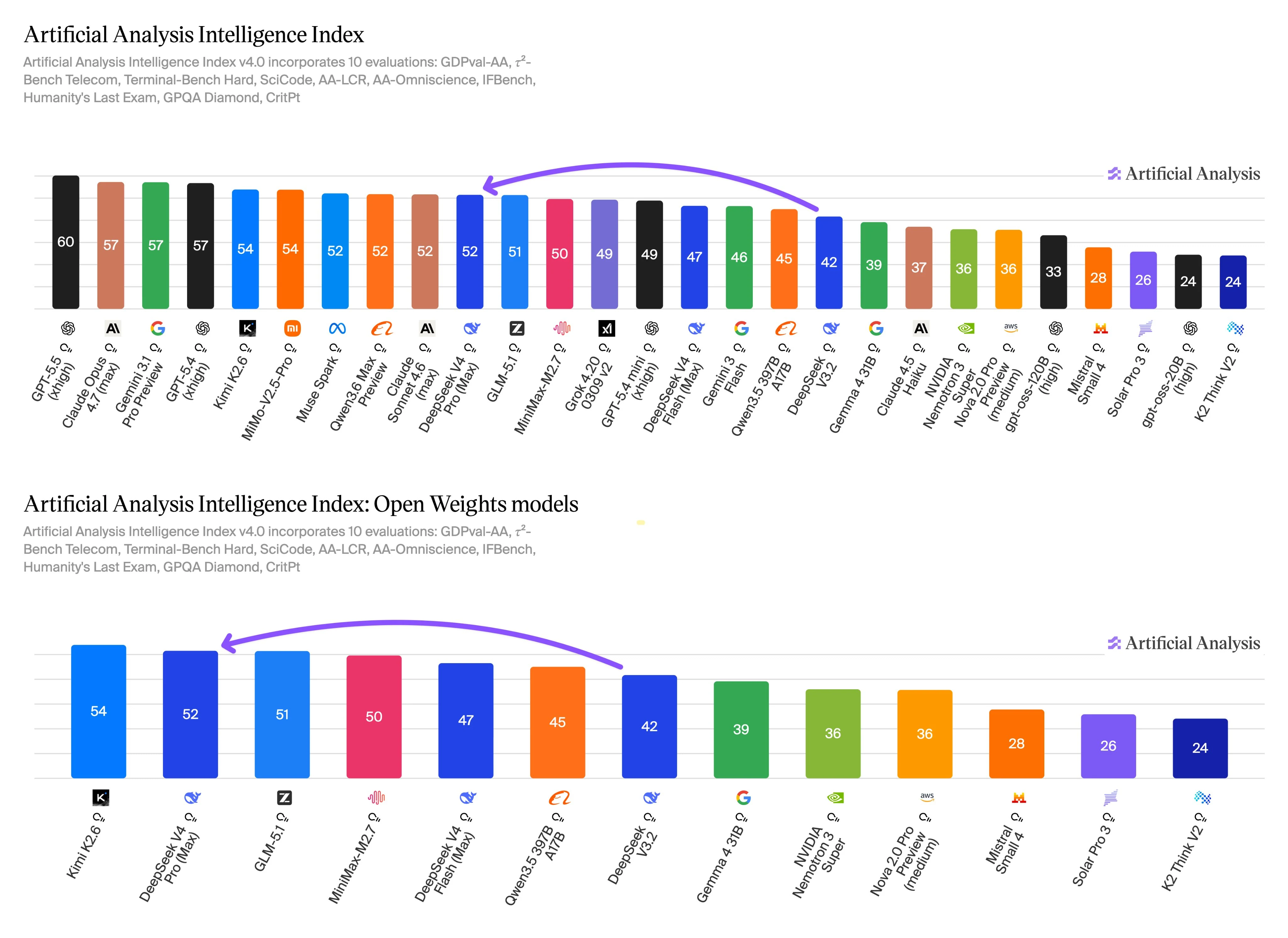
The Intelligence Index v4.0 covers evaluations for agentic work, terminal and coding tasks, long-context reasoning, knowledge, instruction following, scientific reasoning, and related quality tests. This evaluation scope is relevant here because those categories overlap with the main reason to choose Pro: harder multi-step work where a higher-quality answer can justify a higher unit cost.
Flash still performs competitively on the same benchmark scale, and its speed and price profile make it a practical option for production paths that run many similar prompts. Use Flash for first-pass summarization, classification, extraction, support assistance, or routing. Escalate to Pro when the prompt is ambiguous, requires deeper reasoning, touches a large codebase, or has a high failure cost.
Before replacing one model with the other, run your own prompt set across both APIs. Track accepted answers, retry rate, latency, total token cost, structured-output reliability, and tool-call behavior. The benchmark suggests where to start, but production routing should follow your actual workload.
Which DeepSeek V4 API Should You Use on Novita AI?
Both models use Novita AI’s OpenAI-compatible LLM API. The model ID is the field you change when switching between Pro and Flash, so the API decision is mostly a routing decision: send quality-sensitive prompts to deepseek/deepseek-v4-pro and high-volume baseline prompts to deepseek/deepseek-v4-flash.
If you searched for the exact model ID, API documentation path, or which endpoint changes between the two models, the short answer is that the endpoint does not change. You keep the same Novita base URL and POST /openai/v1/chat/completions path, then switch only the model value and your routing policy.
If you need the implementation details before running an evaluation, open the DeepSeek V4 Pro long-context guide for Pro request planning and the DeepSeek V4 Flash setup guide for the lower-cost default path.
Step 1: Confirm model IDs and availability
Use the current model pages before deployment:
- DeepSeek V4 Pro API pricing and playground:
deepseek/deepseek-v4-pro - DeepSeek V4 Flash API pricing and playground:
deepseek/deepseek-v4-flash
The Novita AI list models endpoint can also be used to check available model objects and fields such as model ID, pricing fields, title, description, and context size.
Step 2: Use the OpenAI-compatible base URL
Novita AI’s API reference lists OpenAI-compatible endpoints under:
https://api.novita.ai/openaiFor chat completions, the endpoint is:
https://api.novita.ai/openai/v1/chat/completionsRequests require a bearer token in the Authorization header.
Step 3: Run the same prompt against both models
Start with a small evaluation set that represents real traffic: easy prompts, long-context prompts, coding prompts, tool-style prompts, extraction prompts, and failure-prone prompts.
curl --request POST \
  --url https://api.novita.ai/openai/v1/chat/completions \
  --header "Authorization: Bearer $NOVITA_API_KEY" \
  --header "Content-Type: application/json" \
  --data '{
    "model": "deepseek/deepseek-v4-flash",
    "messages": [
      {
        "role": "user",
        "content": "Summarize the tradeoffs between batching and streaming for an LLM chat API."
      }
    ],
    "max_tokens": 500,
    "temperature": 0.2
  }'
Then switch only the model ID:
curl --request POST \
  --url https://api.novita.ai/openai/v1/chat/completions \
  --header "Authorization: Bearer $NOVITA_API_KEY" \
  --header "Content-Type: application/json" \
  --data '{
    "model": "deepseek/deepseek-v4-pro",
    "messages": [
      {
        "role": "user",
        "content": "Summarize the tradeoffs between batching and streaming for an LLM chat API."
      }
    ],
    "max_tokens": 500,
    "temperature": 0.2
  }'
Step 4: Compare production signals
For each prompt class, record:
- completion quality and correctness
- output format reliability
- tool or function-call behavior if your app depends on it
- total input and output tokens
- latency under expected concurrency
- retry rate and fallback rate
- user-visible acceptance or edit rate
This is especially important if you plan to route standard requests to Flash and escalations to Pro.
Best Use Cases: When to Choose Each Model
Choose DeepSeek V4 Pro for complex work
Use Pro when the task needs deeper reasoning or stronger agentic behavior:
- codebase analysis, code review, and refactoring plans
- autonomous coding agents that need to reason across multiple files
- long-context debugging or incident analysis
- multi-step planning with high failure cost
- mathematical, STEM, or competitive-programming style reasoning
- premium user workflows where answer quality matters more than unit cost
The DeepSeek V4 Pro long-context guide is the better internal follow-up when the reader wants more detail on using Pro for long-context workloads.
Choose DeepSeek V4 Flash for scalable product traffic
Use Flash when the workload benefits from lower unit price and lighter-weight serving:
- high-volume chat and assistant features
- classification, routing, extraction, and summarization
- first-pass code explanation or documentation tasks
- support workflows with many similar prompts
- background processing where a fallback to Pro is available
- applications where latency and cost are core user-experience constraints
The DeepSeek V4 Flash on Novita AI guide is the natural setup companion for developers who choose Flash as the default model.
Avoid switching blindly
Do not switch purely because two models share context length and endpoint access. Before migration, verify that the new model preserves:
- prompt behavior on your production examples
- JSON or structured output shape
- tool-call arguments and failure behavior
- latency under expected concurrency
- total cost after retries and longer outputs
- guardrails, refusal behavior, and edge-case handling
For many systems, the best answer is not Pro or Flash. It is a routing policy that uses both.
Migration Notes for Developers
If you are migrating between the two models, the model ID is the first field to update:
| Direction | Change |
| Flash to Pro | Replace deepseek/deepseek-v4-flash with deepseek/deepseek-v4-pro for harder prompts. |
| Pro to Flash | Replace deepseek/deepseek-v4-pro with deepseek/deepseek-v4-flash for cost-sensitive baseline prompts. |
| Mixed routing | Keep both IDs and route by task difficulty, account tier, or evaluation score. |
Migration checklist:
- Confirm current model availability on the Novita AI model pages.
- Confirm current pricing before changing cost assumptions.
- Keep the same base URL and chat completions endpoint for the examples in this guide.
- Run a representative prompt regression set.
- Compare output quality by task type, not only aggregate win rate.
- Track token usage, latency, retries, and fallback rate.
- Keep a rollback plan that can switch traffic back to the previous model ID.
Final Recommendation
For most teams, DeepSeek V4 Flash should be the first model to test for high-volume production traffic because it lists much lower input, output, and cache-read pricing while keeping the same visible context and max-output limits as Pro on Novita AI.
DeepSeek V4 Pro should be reserved for tasks where quality, reasoning depth, or agentic coding reliability has more business value than the higher token price. If your product includes both routine and difficult prompts, route routine requests to Flash and escalate harder requests to Pro after your evaluation confirms the split.
Recommended articles
FAQ
What is the main difference between DeepSeek V4 Pro and DeepSeek V4 Flash?
On Novita AI, the visible context limit, max output limit, modalities, and chat completions request path used in this guide are the same. The main difference is positioning and price: Pro is the quality-first option for complex reasoning and agentic coding, while Flash is the lower-cost option for high-volume and latency-sensitive use.
Are both models available on Novita AI?
Yes. Novita AI has model pages for both deepseek/deepseek-v4-pro and deepseek/deepseek-v4-flash, and both are listed as serverless LLM models.
Is DeepSeek V4 Flash cheaper than DeepSeek V4 Pro?
As of June 9, 2026, the current Novita AI model pages list Flash at $0.14 per 1M input tokens and $0.28 per 1M output tokens, while Pro is listed at $1.60 per 1M input tokens and $3.20 per 1M output tokens.
Should I upgrade from Flash to Pro?
Upgrade specific workloads to Pro when Flash does not meet your quality target on complex coding, long-context reasoning, or high-failure-cost tasks. Do not upgrade all traffic until you compare real prompts, total cost, latency, and failure cases.
Can both models use the same chat completions endpoint?
Yes. Novita AI’s model pages list chat/completions for both models, and the API reference documents the OpenAI-compatible chat completions endpoint at /openai/v1/chat/completions.
Do benchmarks prove Pro is always better than Flash?
No. The reported benchmark data gives Pro a higher Intelligence Index score, while Flash shows higher output speed, lower first-token latency, and lower listed token prices. Use Pro for harder reasoning or coding tasks, and test Flash for high-volume product traffic.