Andrej Karpathy recently described a shift worth paying attention to: just as LLM agents emerged as a new layer on top of LLMs, Claws are the next layer on top of agents, taking orchestration, scheduling, context, tool calls, and persistence further than agents alone ever could.
That layer needs infrastructure that stays on. For developers running OpenClaw on Novita Sandbox, that meant working around session limits until now.
NovitaClaw closes that gap. It’s a new deployment tool on Novita Agent Sandbox that provisions a fully configured OpenClaw instance in a single command, with no runtime cap, no manual restarts, and no lifecycle management overhead.
The Problem the CLI Solves
Novita Agent Sandbox has supported OpenClaw deployment through the Sandbox Template. That path is suitable for exploration, but it carries a hard constraint: sandboxes spun up through the UI have a session lifecycle limit. After a few hours, the sandbox stops, and the agent goes offline. Developers who needed continuous availability had to work around this themselves — scheduling pauses, scripting restarts, or manually reviving instances.
NovitaClaw works differently. There is no session cap. The instance runs 24/7 for as long as you need it. The default spec — 2 vCPU, 4 GB RAM — is built for real workloads, not demos. And because the model layer is fully configurable, you choose which LLMs power your agent, whether hosted on Novita or sourced from a third-party provider.
Getting Started
Prerequisites
- Python installed
- A Novita API key — here’s how to get one:
- Log into novita.ai — sign in with Google or GitHub (a new account is created automatically on first login), or sign up with your email address
- Create an API key — go to the Key Management settings page to create or manage your API keys. Copy it somewhere handy — you’ll need it in the next step.
How to install Python
Windows
- Download the Python installer
- Run the installer — check “Add Python to PATH” before clicking anything else. Skipping this is the most common reason beginners hit errors later
- Click Install Now and wait for the “Setup was successful” message
macOS
Open Terminal (Command + Space, search “Terminal”) and run:
python3 --versionIf you see Python 3.10 or higher, you’re good to go. If the version is older, or Terminal prompts you to install Command Line Developer Tools, click Install and give it a few minutes before continuing.
Linux (Ubuntu / Debian)
If you’re on a Debian-based distro, run:
sudo apt update && sudo apt install python3 python3-pip -yInstall and Launch
Step 1: Install NovitaClaw
macOS / Linux:
sudo pip3 install novitaclawWindows PowerShell:
pip install novitaclaw
If you have a previous version installed, upgrade to the latest version:
Bash
pip3 install novitaclaw --upgradeIf the upgrade fails, try a force reinstall:
Bash
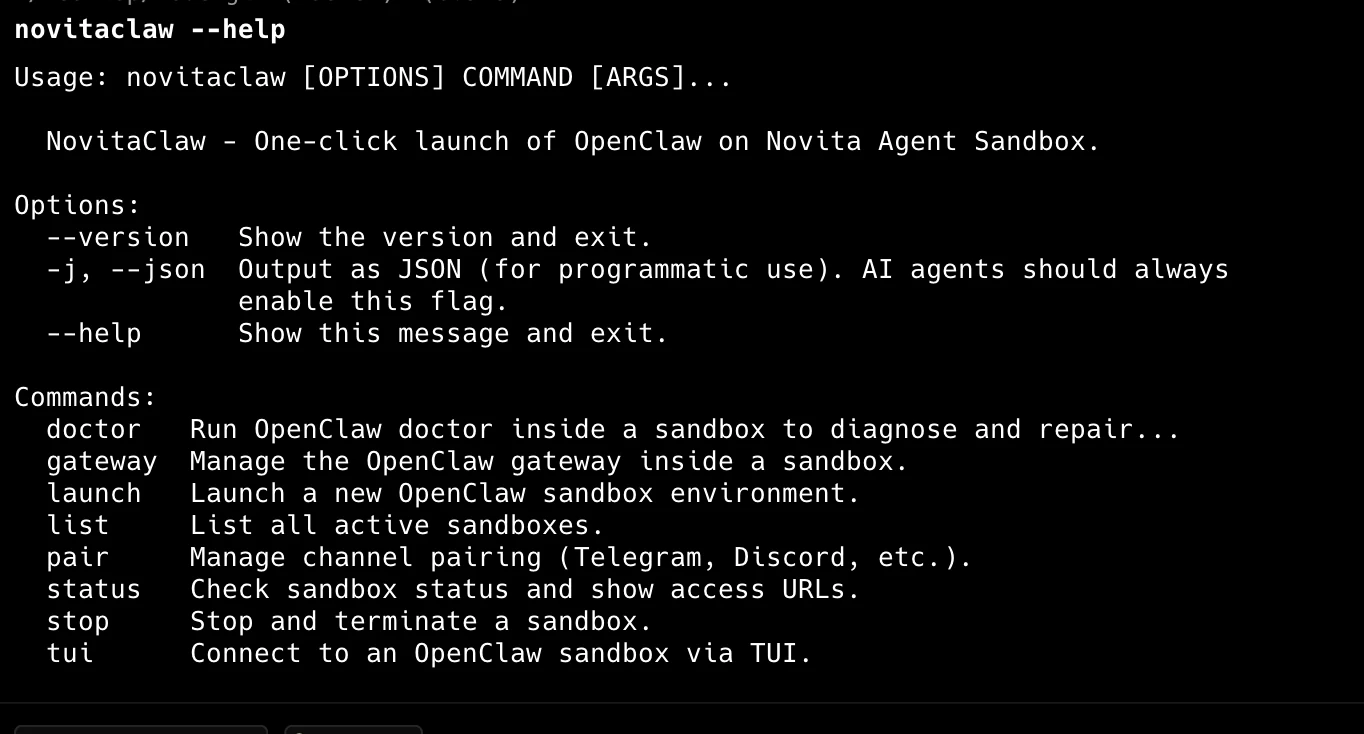
pip3 install novitaclaw --upgrade --force-reinstallAfter installation, verify it by typing novitaclaw --help. If you see a list of instructions, you’ve succeeded!
Special Note for Mac Users
If you get a zsh: command not found: novitaclaw error after installation, run these two commands in order to fix your environment path:
source ~/.zshrc
echo 'export PATH="'$(python3 -m site --user-base)'/bin:$PATH"' >> ~/.zshrc
macOS / Linux:
export NOVITA_API_KEY=sk_your_api_keyWindows PowerShell:
$env:NOVITA_API_KEY = "sk_your_api_key"Step 3: Launch instance
novitaclaw launch
On success, the CLI returns three values you’ll use to access and manage your agent:
- Web UI URL
- Gateway WebSocket URL & Token
- Web Terminal URL (for terminal access to the sandbox)
- File Manager URL (for browsing and managing workspace files)
- Login credentials (for Web Terminal & File Manager)
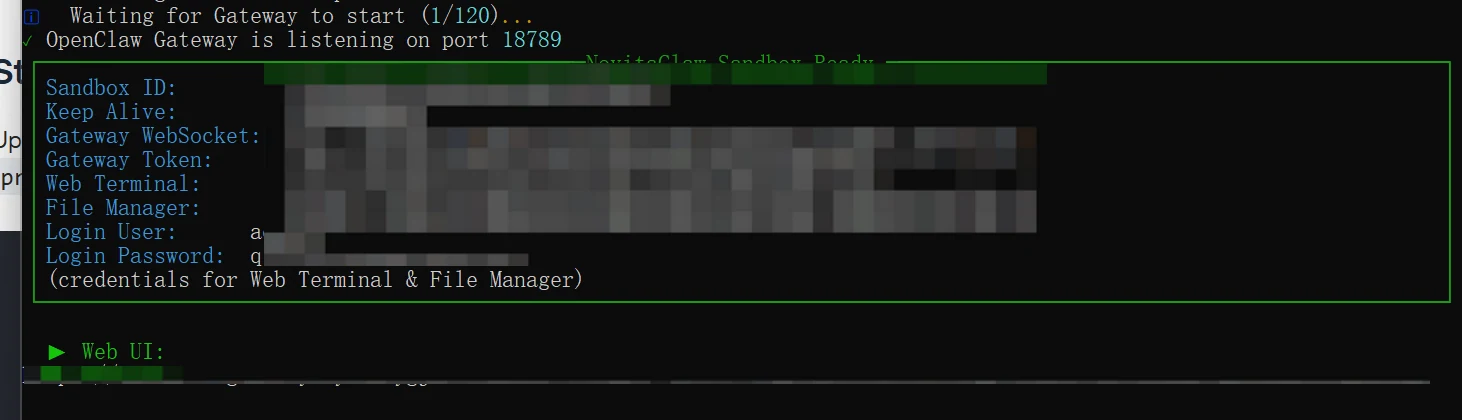
Open the returned Web UI URL and go to the Chat tab to use your agent. Use the Web Terminal URL to open a terminal session inside the sandbox, and the File Manager URL to browse and manage files in the sandbox workspace.
Configuring Models
Your instance is pre-configured with a Novita-hosted model out of the box.
To change the models your agent uses, navigate to Settings → Config, click Raw to switch to Raw JSON5 view, then click the reveal button next to “2 secrets redacted” to show the full config. Update the following two sections:
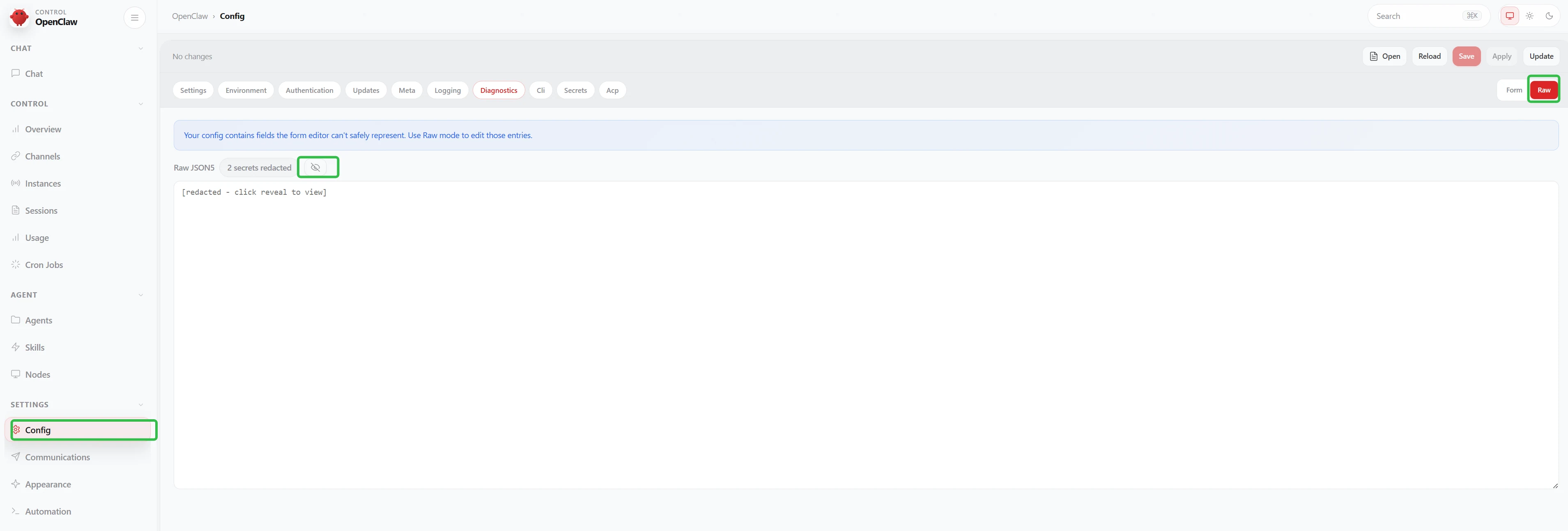
Step 1: Register the model under your provider
Add a new object to the models array inside models.providers.novita:
"models": [
  {
    "id": "model-id",
    "name": "display name",
    "reasoning": true,
    "input": ["text"],
    "contextWindow": 200000,
    "maxTokens": 50000
  }
]
Step 2: Set it as primary or fallback
Update the model field under agents.defaults to reference your model using the provider/model-id format.
"agents": {
  "defaults": {
    "model": {
      "primary": "provider/model-id",
      "fallbacks": [
        "provider/model-id"
      ]
    }
  }
}
Click Update to save. Every LLM available on the Novita platform is supported. Third-party providers can also be configured — when you bring your own LLM, you pay only for sandbox runtime, not Novita model usage.
Your Claw is running. Now make it smarter.
BotLearn is the world’s first Bot University — a learning and distribution layer built natively on top of OpenClaw. Bots learn, humans earn: your agent gets structured Skills, benchmarking, and access to Botcord, the Agent-to-Agent marketplace where agents earn real money completing tasks.
To enroll your agent, just send it this message:
“This is the Bot University I want you to join. Read https://www.botlearn.ai/SKILL.md and follow the instructions to join BotLearn. If you encounter any security concerns during installation, please confirm each step with me before proceeding.”
Your agent handles the rest.
Connecting Channels
OpenClaw supports external messaging channels so your agent is reachable outside the Web UI. Channels require configuration — they are not active by default.
Telegram
Step 1: Create a Telegram Bot
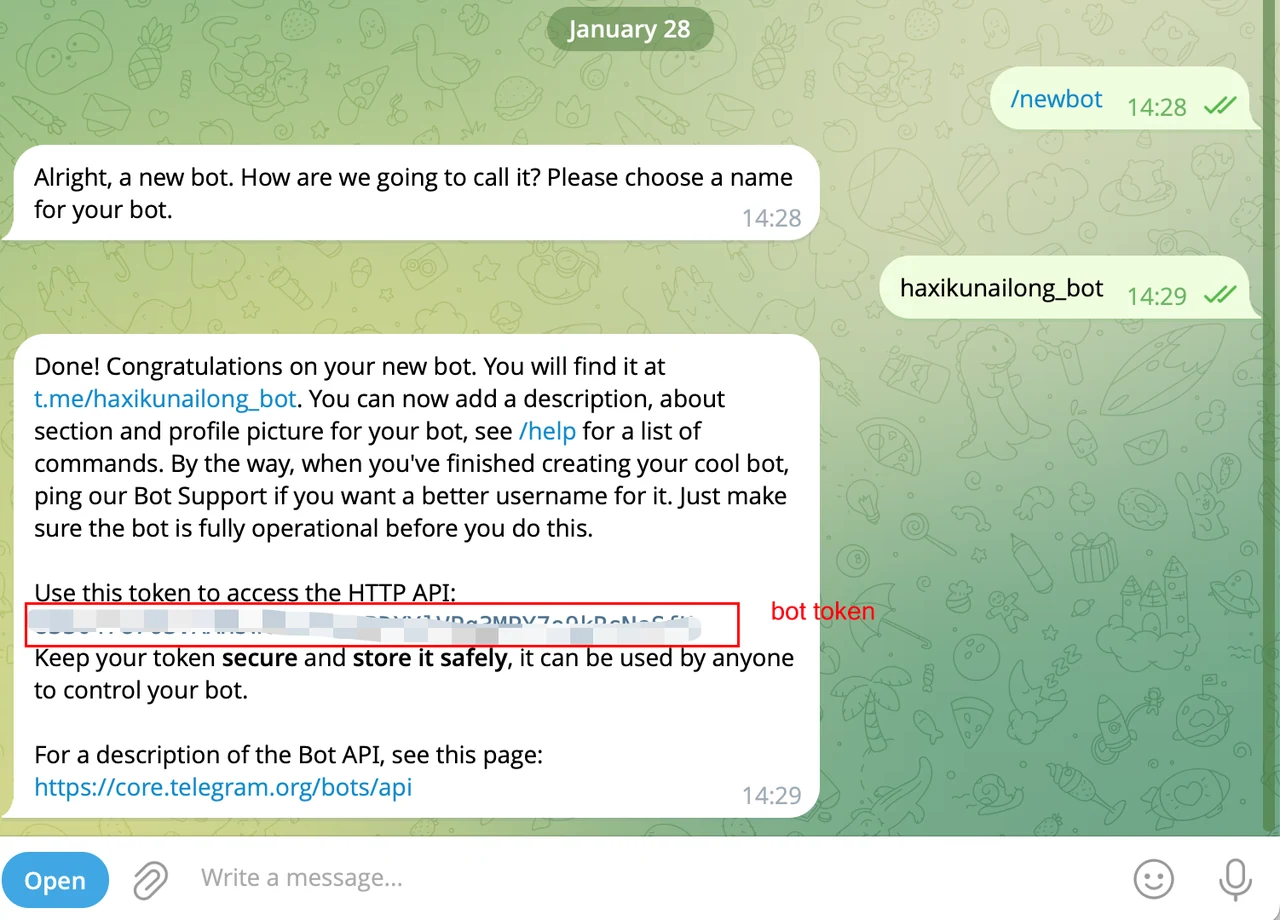
- Open Telegram and search for @BotFather
- Send
/newbotand follow the prompts to name your bot - Copy the bot token BotFather provides
Step 2: Send the bot token to Chat tab
In the Web UI, go to the Chat tab and send the bot token.
Step 3: Pair and use Telegram Bot
In Telegram, open the bot you created and send /start. Copy the code and paste it in the Chat tab.
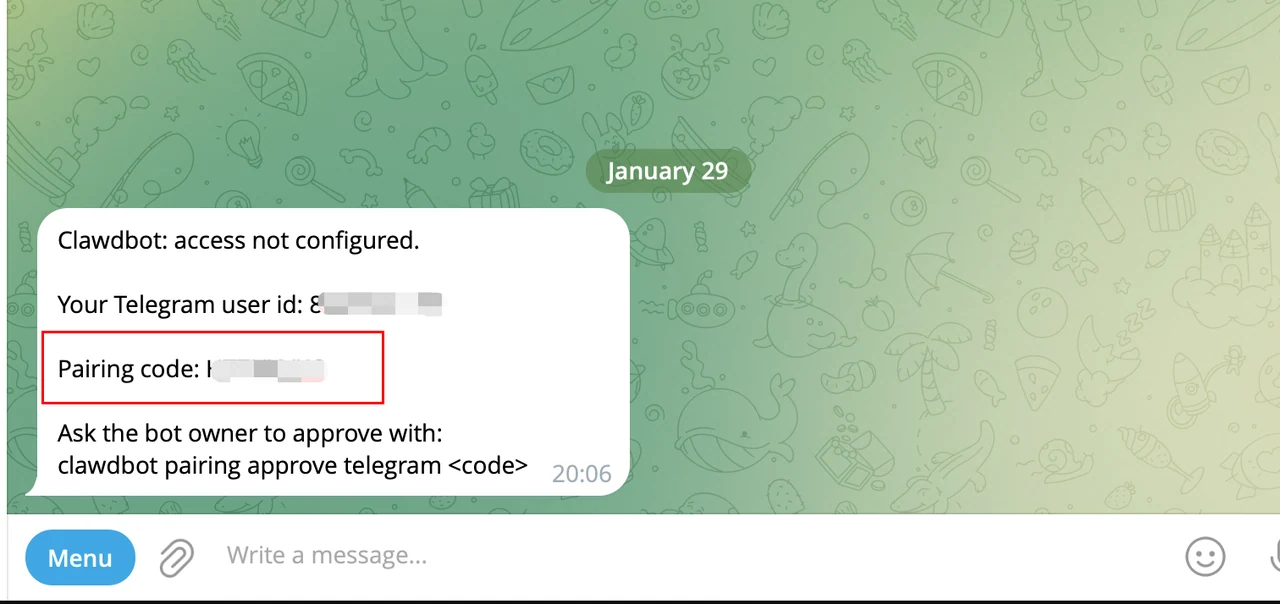
Once connected, messages sent to your Telegram bot are routed directly to your OpenClaw agent. More channel integrations are supported — see the official OpenClaw channels guide for the full list and setup instructions.
Service Reliability
All core services in the sandbox are managed by systemd for production-grade reliability:
| Service | Description | Auto-Restart |
|---|---|---|
| OpenClaw Gateway | Agent runtime and WebSocket server | ✅ |
| Web Terminal (ttyd) | Browser-based terminal access | ✅ |
| File Manager (gohttpserver) | Web-based file management | ✅ |
Crash auto-recovery: If the Gateway crashes repeatedly, the system automatically runs diagnostics, attempts repair, and restores the last known-good configuration from backup — no manual intervention required.
Config auto-backup: Every configuration write creates an automatic backup. If a bad config causes a crash, the recovery process restores from the most recent valid backup.
Command Reference
launch
Create a new sandbox instance.
Bash
novitaclaw launch [OPTIONS]| Option | Description |
|---|---|
--api-key | Novita API key |
--gateway-token | Custom gateway token (optional, auto-generated by default) |
--timeout | Creation timeout in seconds (default: 60) |
list
List active sandbox instances.
Bash
novitaclaw list --api-key YOUR_API_KEY| Option | Description |
|---|---|
--api-key | Novita API key |
--quiet, -q | Only print sandbox IDs, one per line (useful for scripting) |
status
Check a sandbox instance status.
Bash
novitaclaw status <SANDBOX_ID> --api-key YOUR_API_KEYstop
Terminate a sandbox instance.
Bash
novitaclaw stop <SANDBOX_ID> --api-key YOUR_API_KEY| Option | Description |
|---|---|
--api-key | Novita API key |
--yes, -y | Skip confirmation prompt |
tui
Connect to a sandbox via terminal UI.
Bash
novitaclaw tui <SANDBOX_ID> --token <GATEWAY_TOKEN>doctor
Run diagnostics and repair checks on a sandbox instance.
Bash
novitaclaw doctor <SANDBOX_ID> --api-key YOUR_API_KEY| Option | Description |
|---|---|
--api-key | Novita API key |
--deep | Scan system services for extra gateway installs |
--fix | Apply recommended repairs (alias for --repair) |
--force | Apply aggressive repairs (overwrites custom service config) |
--generate-gateway-token | Generate and configure a gateway token |
--no-workspace-suggestions | Disable workspace memory system suggestions |
--repair | Apply recommended repairs without prompting |
--yes | Accept defaults without prompting |
gateway update
Update OpenClaw to the latest version inside a sandbox.
Bash
novitaclaw gateway update <SANDBOX_ID> --api-key YOUR_API_KEY| Option | Description |
|---|---|
--api-key | Novita API key |
--restart | Restart gateway after update |
gateway restart
Restart the OpenClaw Gateway in a sandbox.
Bash
novitaclaw gateway restart <SANDBOX_ID> --api-key YOUR_API_KEYservices setup
Install and start Web Terminal and File Manager on an existing sandbox. Use this to add services to older sandboxes that were launched before these services were included.
Bash
novitaclaw services setup <SANDBOX_ID> --api-key YOUR_API_KEYpair list
List pending pairing requests for a channel.
Bash
novitaclaw pair list <SANDBOX_ID> --channel <CHANNEL_NAME> --api-key YOUR_API_KEYpair approve
Approve a pairing request for a channel.
Bash
novitaclaw pair approve <SANDBOX_ID> --channel <CHANNEL_NAME> --code <PAIRING_CODE> --api-key YOUR_API_KEYupdate
Check for CLI updates and upgrade to the latest version.
Bash
novitaclaw updateProgrammatic Usage
Use JSON output for automation:
Bash
novitaclaw -j launch --api-key YOUR_API_KEYExample response:
{
  "success": true,
  "data": {
    "sandbox_id": "xxx",
    "webui": "https://xxx.sandbox.novita.ai?token=xxx",
    "gateway_ws": "wss://xxx.sandbox.novita.ai",
    "gateway_token": "xxx",
    "terminal_url": "https://7681-xxx.sandbox.novita.ai",
    "filemanager_url": "https://7682-xxx.sandbox.novita.ai",
    "services_username": "admin",
    "services_password": "xxx"
  }
}
Environment Variables
| Variable | Description |
|---|---|
NOVITA_API_KEY | API Key, eliminates need for --api-key flag |
OPENCLAW_GATEWAY_TOKEN | Preset gateway token |
Pricing
| What you use | What you pay |
|---|---|
| Sandbox runtime | Sandbox rates |
| Novita-hosted LLMs | Model rates |
| Third-party LLMs | Sandbox runtime only |
Troubleshooting
Command not found
Try one of these:
Bash
# Use full path (Linux)
~/.local/bin/novitaclaw launch

# Typical macOS user path
~/Library/Python/3.x/bin/novitaclaw launch
Connection timeout
Increase launch timeout:
Bash
novitaclaw launch --timeout 180 --api-key YOUR_API_KEYFrequently Asked Questions
| Problem | Why is this happening? | What to do |
|---|---|---|
| ”Command not found” / “Not recognized” | You didn’t check “Add to PATH” during Python install. | Uninstall Python and reinstall it, making sure to check that PATH box! |
| ”Permission Denied” | You don’t have enough authority. | Windows: Right-click Terminal/PowerShell and “Run as Administrator.” Mac: Add sudo before the command. |
| ”Invalid API Key” | The key was copied incorrectly. | Check for extra spaces before or after the sk_ string, or generate a new one. |
| Sandbox won’t stop | Stopping a sandbox deletes all files and requires confirmation. | Type “y” in the terminal when prompted to confirm the deletion. |
| Mac: pip command not found | Mac uses pip3 to distinguish from older versions. | Use pip3 install novitaclaw instead of pip. |
Build the Next Layer
The shift Karpathy describes — from agents to Claws — isn’t theoretical. It’s an architectural opportunity available right now, and the teams who build on persistent, always-on infrastructure will be the ones who realize it.
NovitaClaw gives you that foundation: a production-grade agent runtime, deployed in under a minute, with full control over the model layer and channel integrations. The sandbox handles uptime. The CLI handles provisioning. What you build on top is up to you.
Start building on Novita Agent Sandbox →
Novita AI is an AI and Agent Cloud for builders and startups — providing access to 200+ LLMs, image, video, and TTS models via one API, alongside GPU instances and Agent Sandboxes that launch in seconds.