For developers, choosing the right cloud AI platform often comes down to three things: cost, ease of use, and scalability. Both Novita AI and RunPod offer powerful GPU-backed infrastructure and tools to deploy, train, or run AI models — but they serve slightly different developer needs.
- Novita AI excels in fast, affordable inference via plug-and-play APIs and serverless GPU access —ideal for Indie developers, startups, product teams needing fast AI integration without worrying about hardware or configuration.
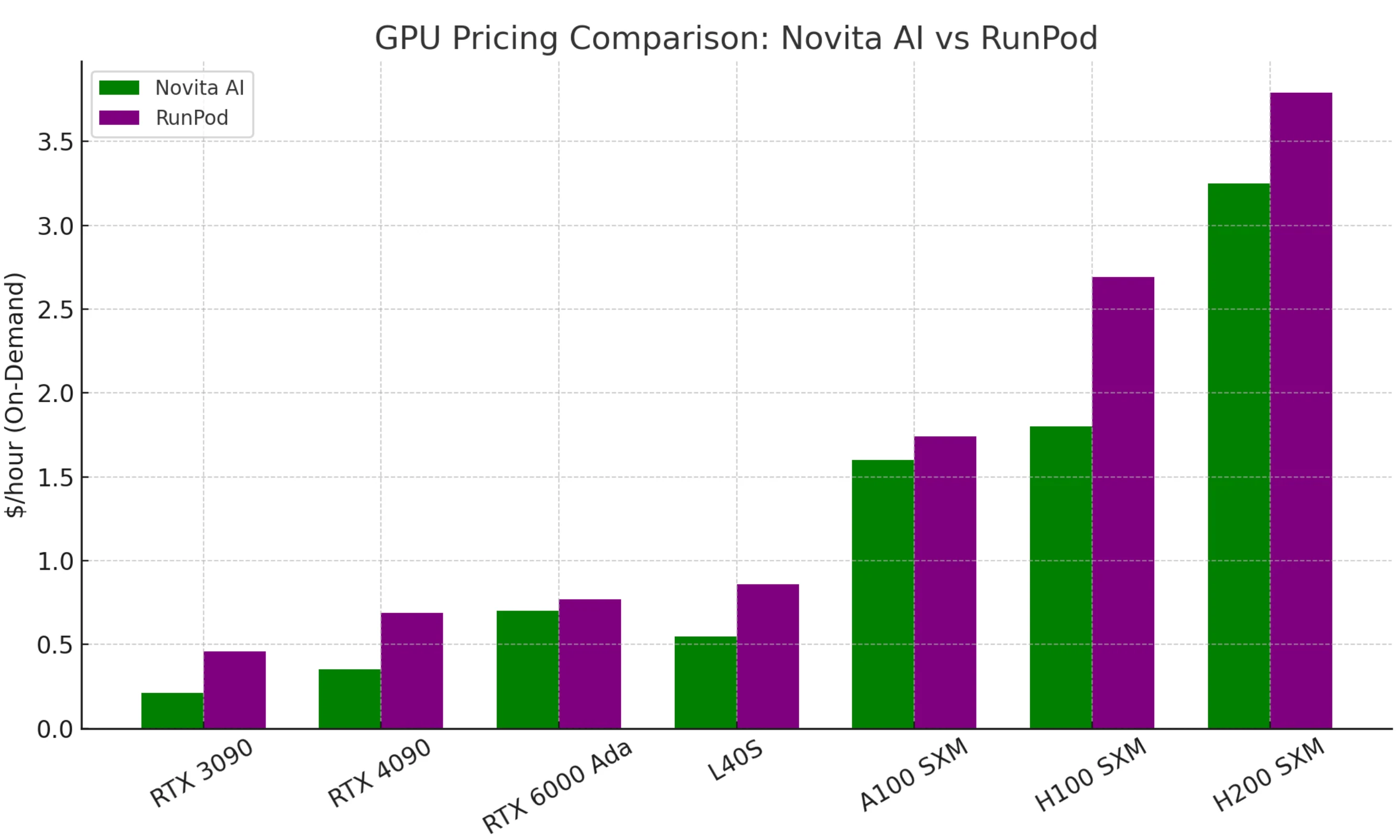
Novita’s main selling point is low cost. Equivalent GPUs often cost half as much compared to RunPod or competitors.
- RunPod shines with its mature dev environment, configurable pods, and robust support for both inference and training workloads — ideal for ML engineers or development teams building and fine-tuning models, needing control, scalability, and infrastructure flexibility.
In this post, we break down the strengths and trade-offs of each platform to help you decide which one fits your project.
Novita AI Introduction
Novita AI is a cloud platform that makes deploying AI models easy and affordable.
It provides over 200 ready-to-use APIs for language, vision, audio, and more, as well as GPU cloud infrastructure for custom models.
Developers can quickly integrate AI with simple REST APIs or launch GPU instances without dealing with hardware. With its focus on low-cost, reliable inference, Novita AI helps indie developers and businesses ship AI-powered features effortlessly.
Runpod Introduction
RunPod is an all-in-one cloud platform for AI that gives developers on-demand access to powerful GPUs for training, fine-tuning, and deploying models. With GPU pods available in 30+ global regions (both on-demand and spot), users can quickly launch anything from a Jupyter notebook to a multi-node GPU cluster in minutes. Designed for ML engineers and dev teams, RunPod makes scaling AI easy and affordable—no DevOps required.
Compare the Scalability of RunPod and Novita AI
Novita AI offers dozens of APIs, including LLM, image, and video APIs, with new ones continuously being added. You can try them for free directly in the Playground. RunPod, while it doesn’t provide LLM APIs out of the box, allows you to deploy a large language model (LLM) using its preconfigured vLLM workers.
| GPU Module | RunPod | Novita AI |
|---|---|---|
| Serverless | ✅ Short-term inference | ✅ Short-term inference |
| Instance | ✅ GPU instances | ✅ GPU instances |
| Storage | ✅ Persistent storage and Network storage | ✅ Persistent storage and Network storage |
| Bare Metal | ❌ Not available | ✅ Dedicated physical servers |
| Finetune | ✅ Built-in fine-tuning service | ❌ Not directly available |
| Clusters | ✅ Multi-GPU distributed | ✅ Multi-GPU distributed |
| Region | ✅ Most of Region Clusters Supoorts | ⚠️ only two Region Clusters Supoorts |
Serverless Difference
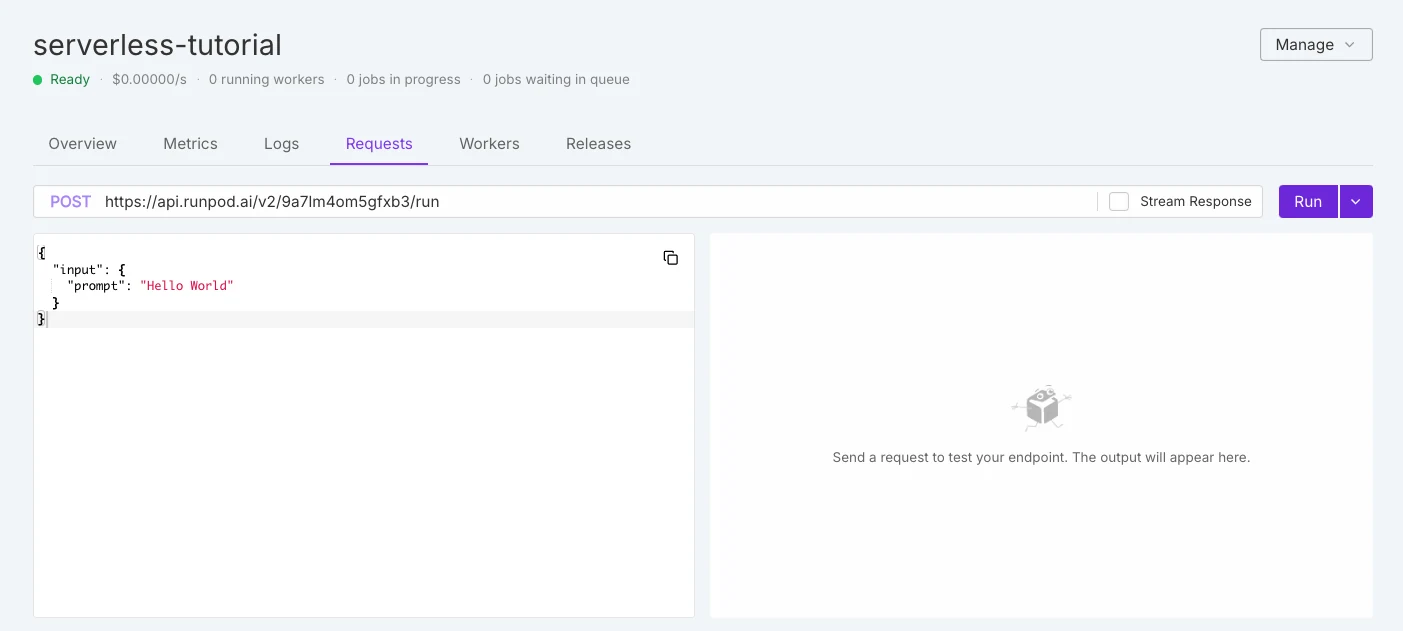
Runpod Serverless
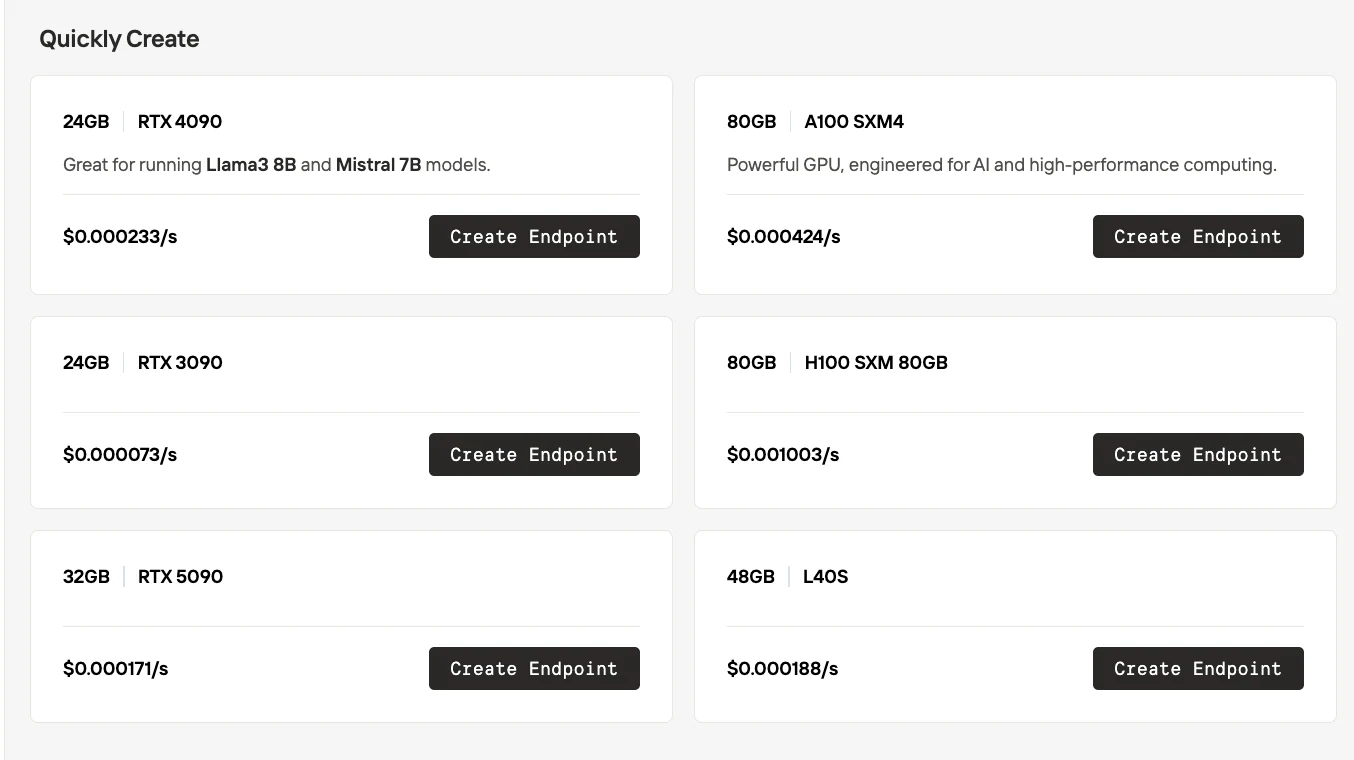
Novita AI serverless
| Aspect | RunPod Serverless | Novita AI Serverless |
|---|---|---|
| GPU Selection | Black-box model — GPUs are automatically assigned by the platform. Users cannot choose the exact GPU type. | White-box model — Users explicitly select the GPU type (e.g., RTX 3090, 4090, 5090, A100, H100, L40S) before creating an endpoint. |
| Pricing | Billed according to the GPU type automatically assigned at runtime. | Pricing is transparent and shown per GPU type (e.g., $0.000073/s for RTX 3090, $0.000233/s for RTX 4090, etc.). |
| Control | Easier for quick deployment, but less flexibility for cost-performance optimization. | More flexible: teams can balance cost, performance, and VRAM needs by choosing the GPU. |
Region Difference
- RunPod: Most regions support both Region and Cluster nodes.
- Novita AI: Only two regions currently support both types. However, Novita AI will launch its enhanced-caching Region GPU feature this quarter, a capability that was previously available only to enterprise clients.
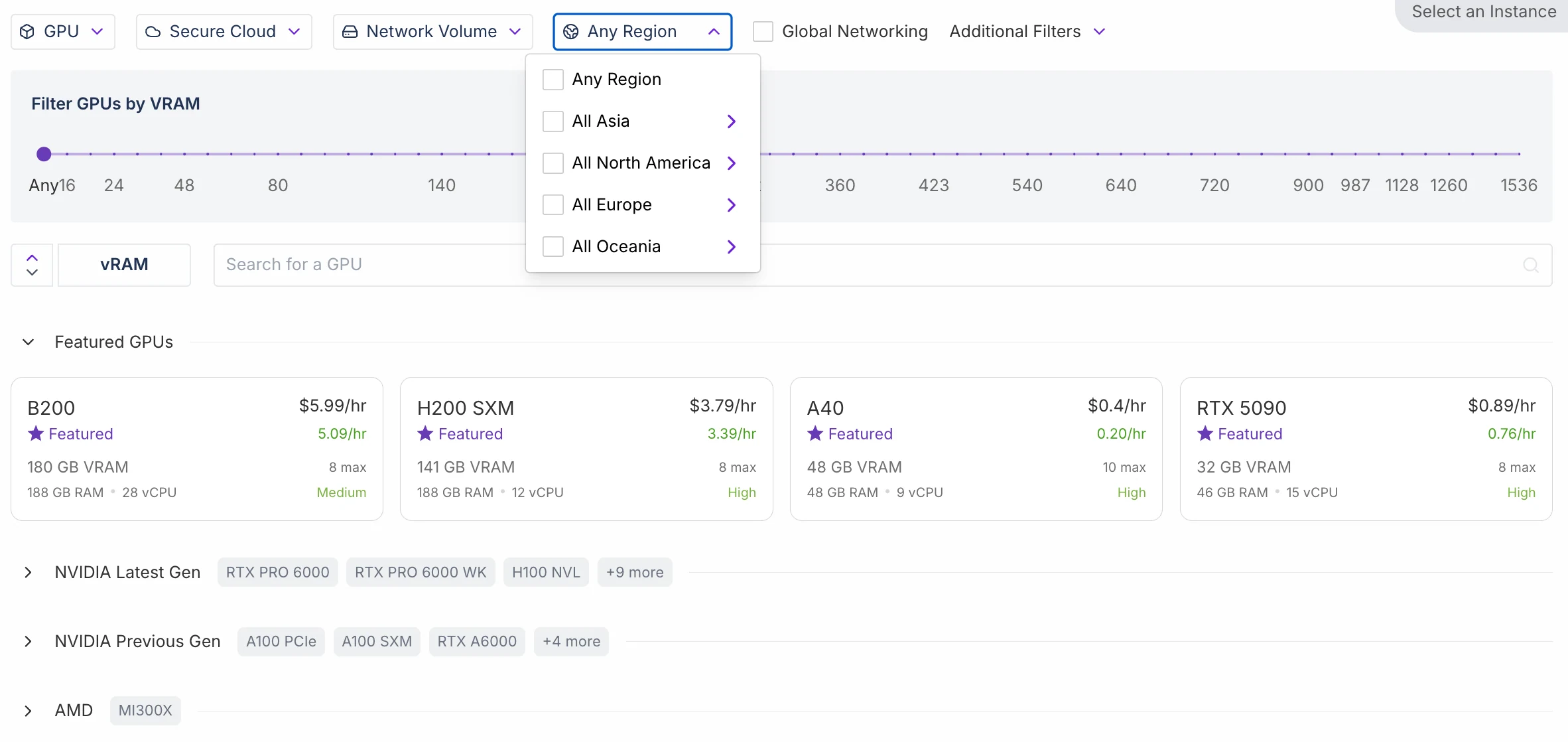
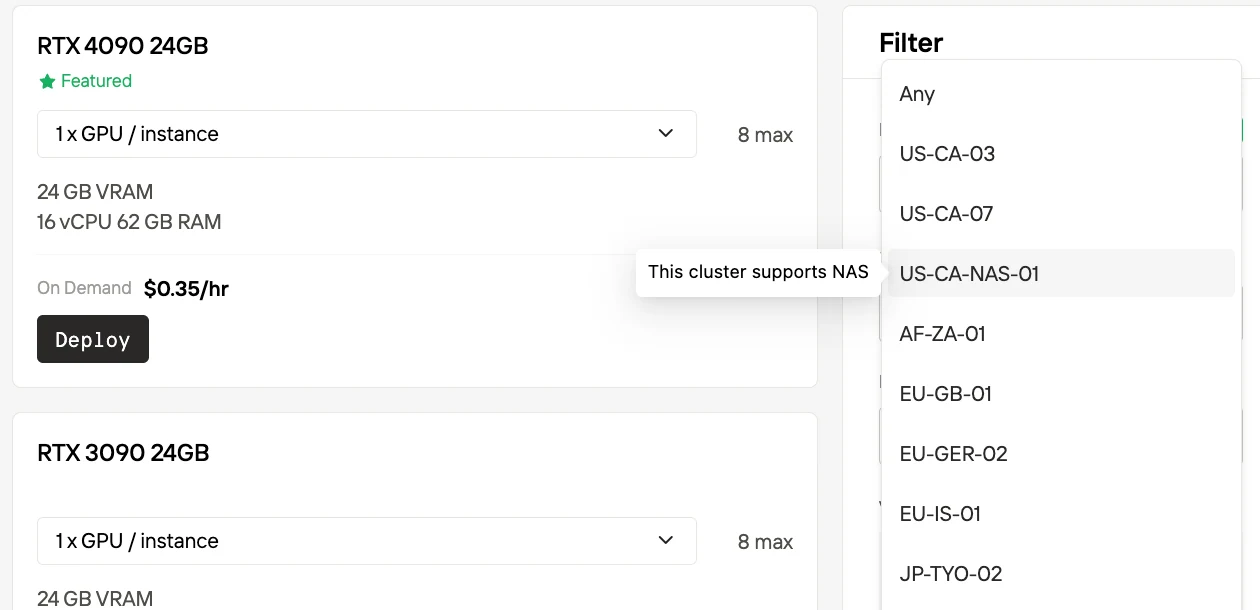
Region Nodes
Definition: Centralized, high-quality nodes designed for long-term, stable workloads.
Key Features:
- Reliable, high-performance compute with sustainable capacity.
- Includes NAS (network-attached storage) for shared data access — suitable for workloads requiring repeated access to datasets.
- Dedicated lines and auxiliary services for enterprise-grade reliability.
- Best suited for long-term tasks such as model training and continuous inference services.
- Note: NAS here is cache/shared storage, not permanent storage — users still need to back up data externally.
Analogy: Like a dedicated office space — fully equipped and stable, ideal for long-term projects.
Cluster Nodes
Definition: Distributed, elastic compute nodes designed for short-term or on-demand usage.
Key Features:
- No NAS, no long-term caching or storage.
- No dedicated lines; nodes are more distributed and flexible.
- Optimized for short-term, large-scale elastic computing (e.g., one-off experiments, temporary parallel tasks).
- More cost-efficient but less suited for permanent workloads.
Analogy: Like a shared co-working space — easy to use, flexible, and affordable, but not intended for permanent residence.
Compare the Usability of RunPod and Novita AI(GPU Instance as Example)
Novita AI
Step 1. Choose Template / Create Template and Choose GPU
- Select a pre-built template (with GPU drivers, CUDA/cuDNN, frameworks, and runtime already configured) or create your own custom template and Choose GPU types and the Quantities!
Step 2. Confirm Disk and Configuration
- Review and adjust the technical setup: GPU type (e.g., RTX 4090, VRAM, CPU, RAM), container image, start command, environment variables, exposed ports, and disk size.
Step 3. Confirm Payment
- Choose billing mode (On-Demand vs. Spot, or 1-12 months subscription) and review the pricing summary (GPU cost per hour, disk cost per day, monthly totals).
RunPod
Step 1. Select GPU
- Browse available GPU types (e.g., B200, H200, A40, RTX 5090). You can filter by VRAM, region, or other attributes.
Step 2. Configure Instance
- What it is: Adjust environment and runtime options, Disk volume size, and additional options like Encrypt Volume, SSH Terminal Access, and whether to auto-start a Jupyter Notebook.
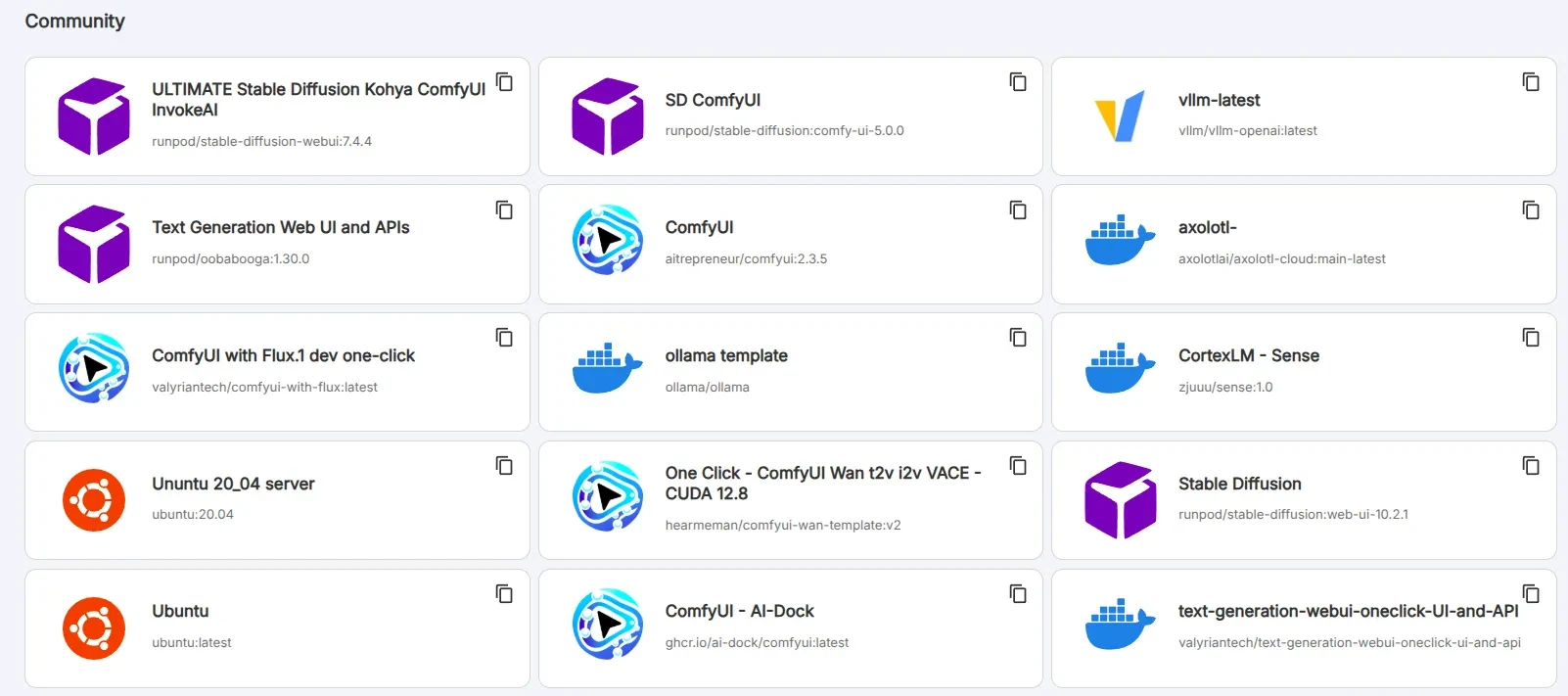
Runpod has 50+ pre-configured templates so you don’t need to customize complex parameters
Step 3. Choose Pricing Plan
-
Select how you want to pay for the instance.
-
Available options:
- On-Demand
- 3-Month Savings Plan
- 6-Month Savings Plan
- 1-Year Savings Plan
- Spot
Compare the Pricing Plans of RunPod and Novita AI
| Pricing Aspect | RunPod | Novita AI |
|---|---|---|
| Free Tier / Credits | No permanent free GPU tier. New users can get trial credits, and qualifying startups can receive up to 1,000 free H100 hours through the Startup Program | No permanent free tier. Novita does have a startup program as well (they advertise up to $10k in free credits for startups that qualify) |
| GPU Instance Price | GPU instances have hourly rates (billed per minute). | GPU instances have hourly rates (billed per minute). |
| Spot Price | Lower than On-Demand Gpu Price | 50% of On-Demand Gpu Price |
| Serverless Price | /Worker/sec |
| Storage Type | Novita AI (Per GB/Day) | RunPod (Per GB/Month) |
|---|---|---|
| Container Disk | $0.005/GB/day, includes 60 GB free quota | $0.10/GB/month |
| Persistent (Volume) Disk | $0.005/GB/day | $0.10/GB/month for running pods (same as container disk) $0.20/GB/month for exited pods |
| Network Volume (Cloud Storage) | $0.002/GB/day | $0.07/GB/month (<1 TB) $0.05/GB/month (≥1 TB) |
On RunPod, storage is billed per second, not as a fixed monthly fee. The “$0.10/GB per month” rate is just a reference: if you keep 1 GB for a full 30 days, it costs about $0.10. If you only keep it for a few days or hours, the cost is prorated by the second, so you pay much less.
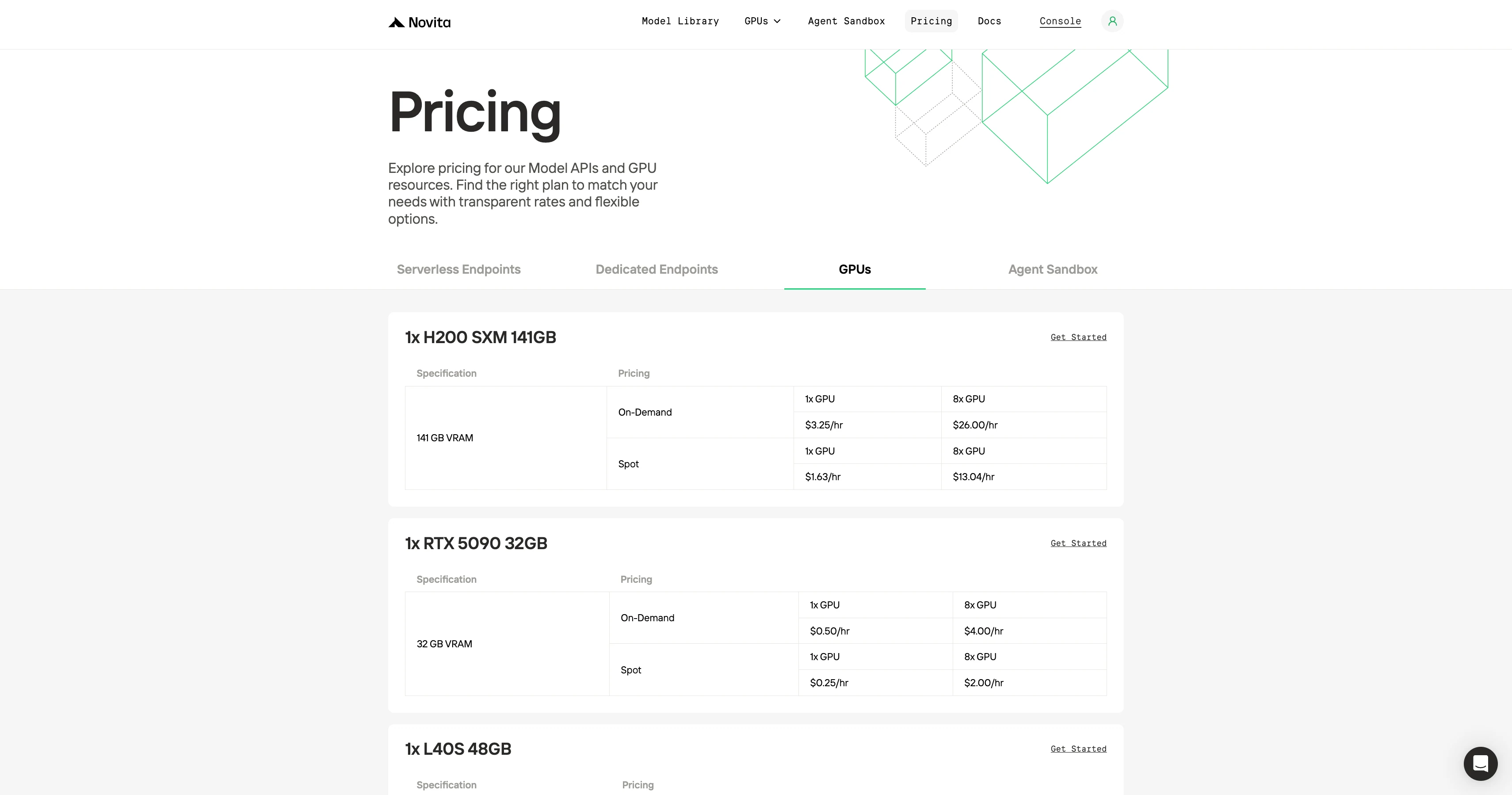
GPU On-Demand Price Comparison
Novita’s main selling point is low cost. Equivalent GPUs often cost half as much compared to RunPod or competitors.
You can check if this is the lowest price?
Is RunPod or Novita AI Better for Small Teams?
| Aspect | RunPod | Novita AI | Which is Better for Small Teams? |
|---|---|---|---|
| GPU Instances (Usability) | Step 1: Select GPU Step 2: Configure instance. 50+ pre-configured templates Step 3: Select pricing | Step 1: Choose or create template + GPU. Step 2: Configure disk, runtime, environment variables. Step 3: Confirm payment | Both are straightforward. RunPod has more templates; Novita emphasizes customization and lower cost. |
| Serverless | Black-box GPU assignment, quick deployment, but pricing is less transparent. | White-box GPU selection, transparent per-GPU pricing, allows cost control. | Novita AI — clearer pricing, better cost-performance balance. |
| Region | Mature coverage across many regions, stable for long-term workloads, but GPU choice is limited and pricing opaque. | Region nodes with transparent GPU pricing, caching features coming soon, but fewer regions currently supported. | If you need stability & global coverage → RunPod. |
| Scalability | Supports multi-GPU clusters, fine-tuning service, persistent storage. Suitable for distributed training. | Supports multi-GPU clusters, persistent storage. | RunPod better for large-scale training and fine-tuing |
| Pricing | GPU instances billed per minute. Spot cheaper than On-Demand. | Typically 50% cheaper than RunPod. | Novita is generally much cheaper—advantageous for small teams with limited budget. |
| APIs | ❌No pre-built LLM APIs, but supports deploying vLLM workers. | ✅200+ ready-to-use APIs (LLM, image, video, embeddings, etc.), directly callable via REST. | Novita AI is better for teams wanting quick AI features without training. |
For small teams/startups, Novita AI is typically the better option due to lower pricing, GPU flexibility, and extensive pre-built APIs.
RunPod is stronger for teams focused on large-scale training, fine-tuning, and GitHub-integrated workflows.
How to Access Runpod?
Getting started with RunPod is straightforward. Here’s a step-by-step guide for developers:
- Sign Up: Go to runpod.io and create an account (you can sign up with an email or use single-sign-on with services like Google/GitHub). After verifying your account, you’ll access the RunPod dashboard.
- Launch a GPU Pod: In the RunPod console, navigate to the “Cloud GPUs” or “Pods” section to deploy your first GPU instance. You’ll typically:
- Choose a region (for example, US West, EU, etc.) and a GPU type (e.g. RTX 4090, A100) from the list of available instances. The pricing for each is shown as you select.
- Select an environment template. RunPod provides pre-built templates (like Ubuntu with CUDA, Jupyter Notebook, Stable Diffusion, etc.), or you can bring your own Docker image. For a quick start, pick something like a Jupyter Notebook template so you have an IDE ready to go.
- Click Deploy. Within seconds to a minute, RunPod will spin up your container on the chosen GPU. You’ll see the pod status become “Running” in the dashboard.
- Connect and Use: Once the pod is running, you can connect to it. If it’s a Jupyter template, a URL will be provided to open the Jupyter interface in your browser (with GPU backing it). For other environments, you can open a web shell or use SSH (RunPod gives connection details in the UI). Now you can run your code or train your model on this remote GPU.
- Serverless Endpoints (optional): If your goal is to deploy an inference endpoint (serverless), RunPod has a section for Serverless. You would create a new Endpoint, specify a model or use a pre-built model serving template, and deploy. RunPod will give you an API endpoint URL. This endpoint will auto-scale as requests come in. This is great for serving an API to your app without keeping a pod running 24/7.
- Manage and Monitor: In the dashboard, you can see your running pods, their utilization, and your credit/billing info. You can stop or terminate pods when not in use to save money (since billing is by the second). You can also set up auto-shutdown policies (e.g. terminate a pod after an hour of idle time). Everything can be managed via the web UI initially. For advanced use, explore the RunPod CLI and API for scripting deployments as your team grows.
How to Access Novita AI?
GPU Guide
Step1:Register an account
Create your Novita AI account through our website. After registration, navigate to the “Explore” section in the left sidebar to view our GPU offerings and begin your AI development journey.
Step2:Exploring Templates and GPU Servers
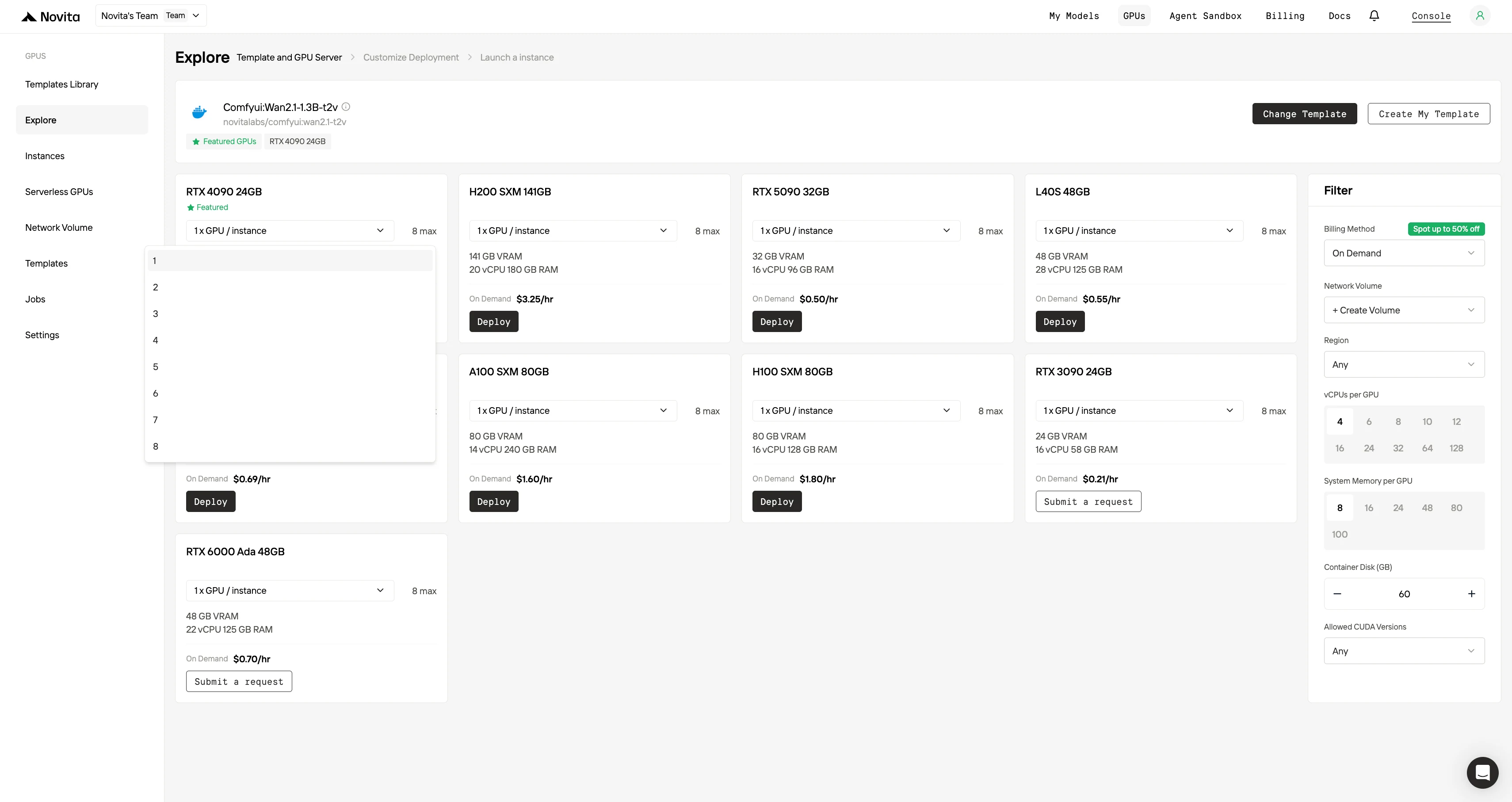
Choose from templates like PyTorch, TensorFlow, or CUDA that match your project needs.
Then select your preferred GPU configuration and GPU Quantities—options include the powerful L40S, RTX 4090 or A100 SXM4, each with different VRAM, RAM, and storage specifications.
Step3:Tailor Your Deployment
Customize your environment by selecting your preferred operating system and configuration options to ensure optimal performance for your specific AI workloads and development needs.
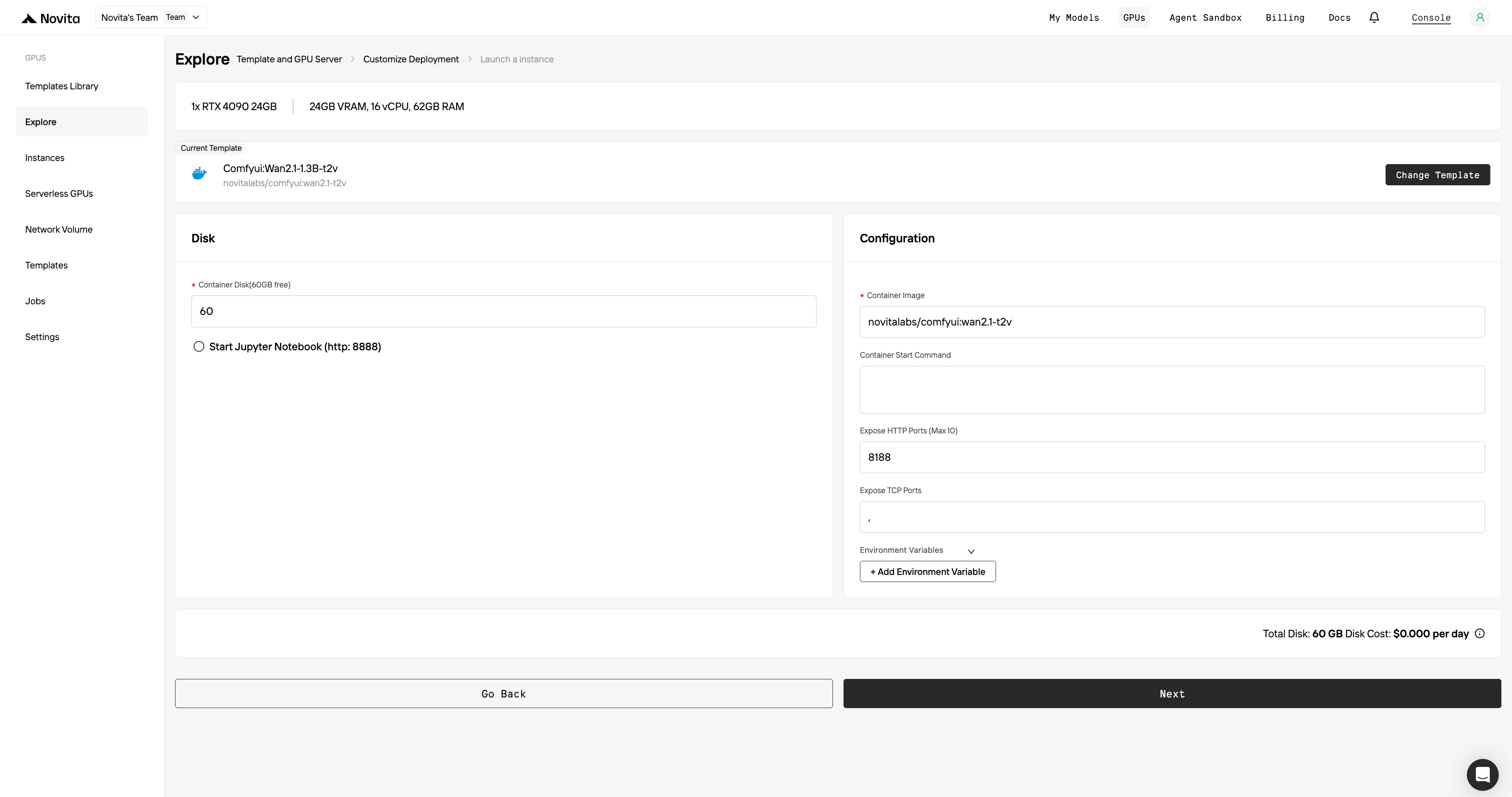
Step4:Launch an instance
Select “Launch Instance” to start your deployment. Your high-performance GPU environment will be ready within minutes, allowing you to immediately begin your machine learning, rendering, or computational projects.
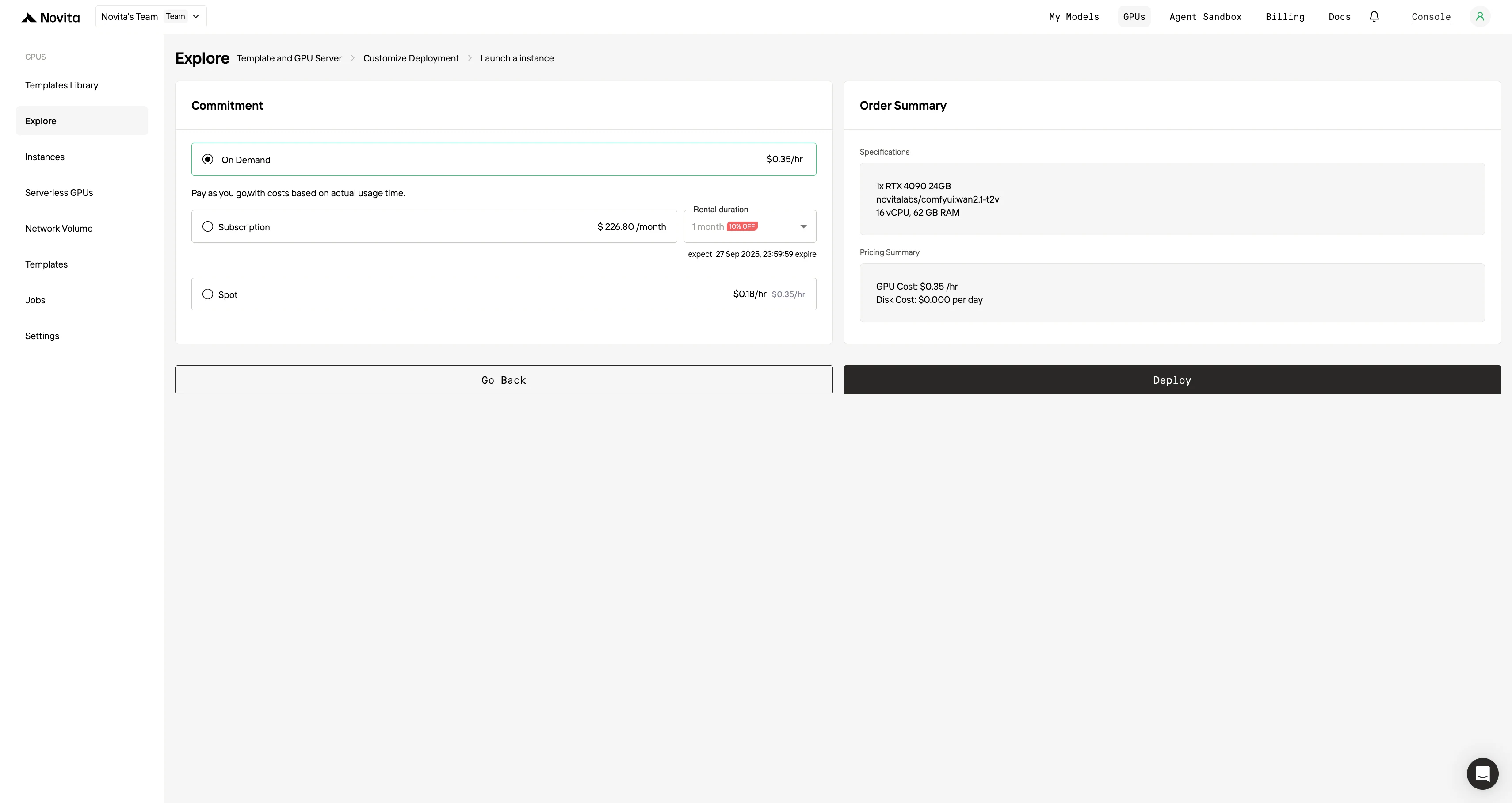
API Guide(As Kimi K2 for Example)
Step 1: Log In and Access the Model Library
Log in to your account and click on the Model Library button.

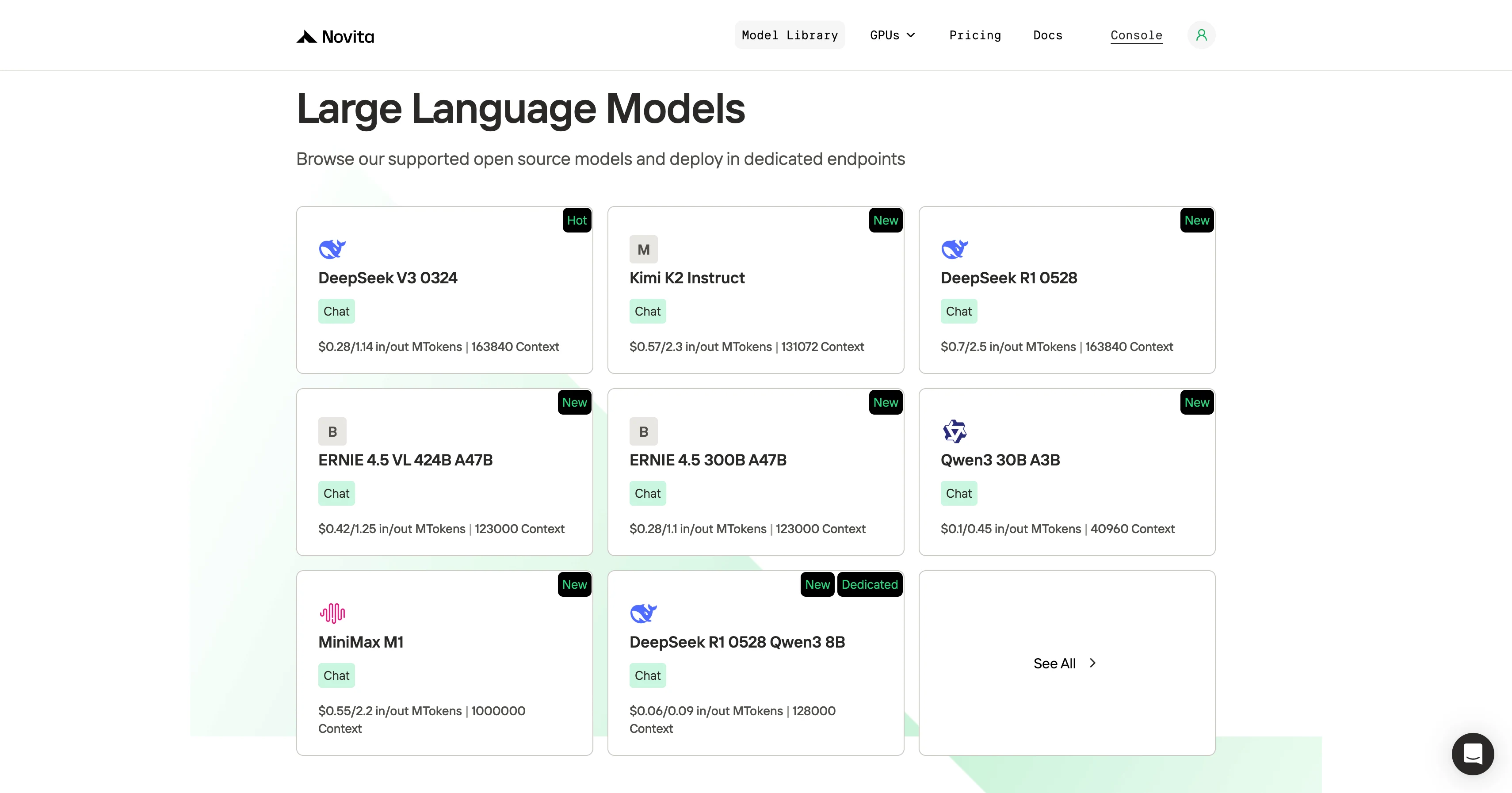
Step 2: Choose Your Model
Browse through the available options and select the model that suits your needs.
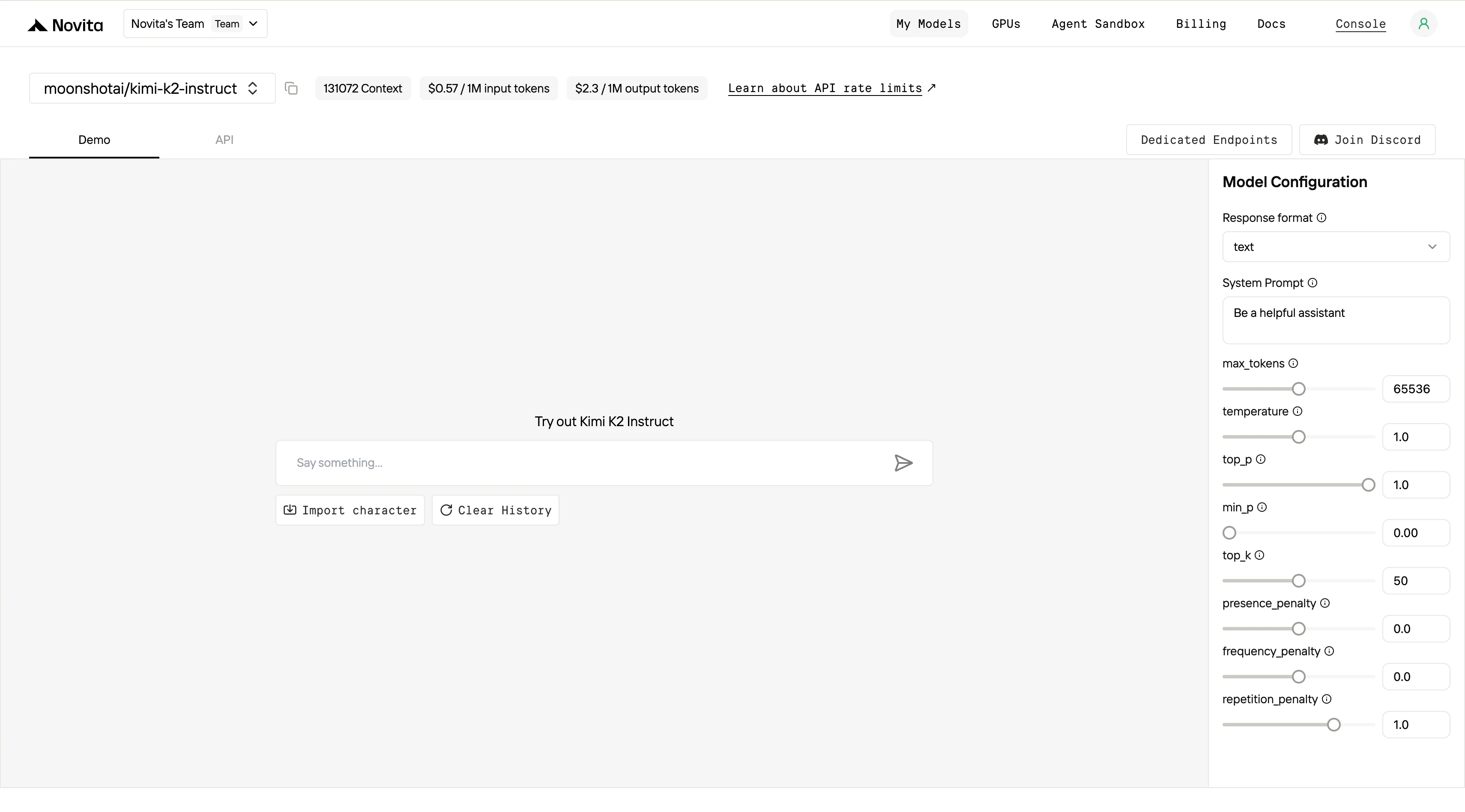
Step 3: Start Your Free Trial
Begin your free trial to explore the capabilities of the selected model.
Step 4: Get Your API Key
To authenticate with the API, we will provide you with a new API key. Entering the “Settings“ page, you can copy the API key as indicated in the image.

Step 5: Install the API
Install API using the package manager specific to your programming language.
After installation, import the necessary libraries into your development environment. Initialize the API with your API key to start interacting with Novita AI LLM. This is an example of using chat completions API for python users.
from openai import OpenAI

client = OpenAI(
    base_url="https://api.novita.ai/v3/openai",
    api_key="<YOUR Novita AI API Key>",
)

model = "moonshotai/kimi-k2-instruct"
stream = True # or False
max_tokens = 65536
system_content = ""Be a helpful assistant""
temperature = 1
top_p = 1
min_p = 0
top_k = 50
presence_penalty = 0
frequency_penalty = 0
repetition_penalty = 1
response_format = { "type": "text" }

chat_completion_res = client.chat.completions.create(
    model=model,
    messages=[
        {
            "role": "system",
            "content": system_content,
        },
        {
            "role": "user",
            "content": "Hi there!",
        }
    ],
    stream=stream,
    max_tokens=max_tokens,
    temperature=temperature,
    top_p=top_p,
    presence_penalty=presence_penalty,
    frequency_penalty=frequency_penalty,
    response_format=response_format,
    extra_body={
      "top_k": top_k,
      "repetition_penalty": repetition_penalty,
      "min_p": min_p
    }
  )

if stream:
    for chunk in chat_completion_res:
        print(chunk.choices[0].delta.content or "", end="")
else:
    print(chat_completion_res.choices[0].message.content)
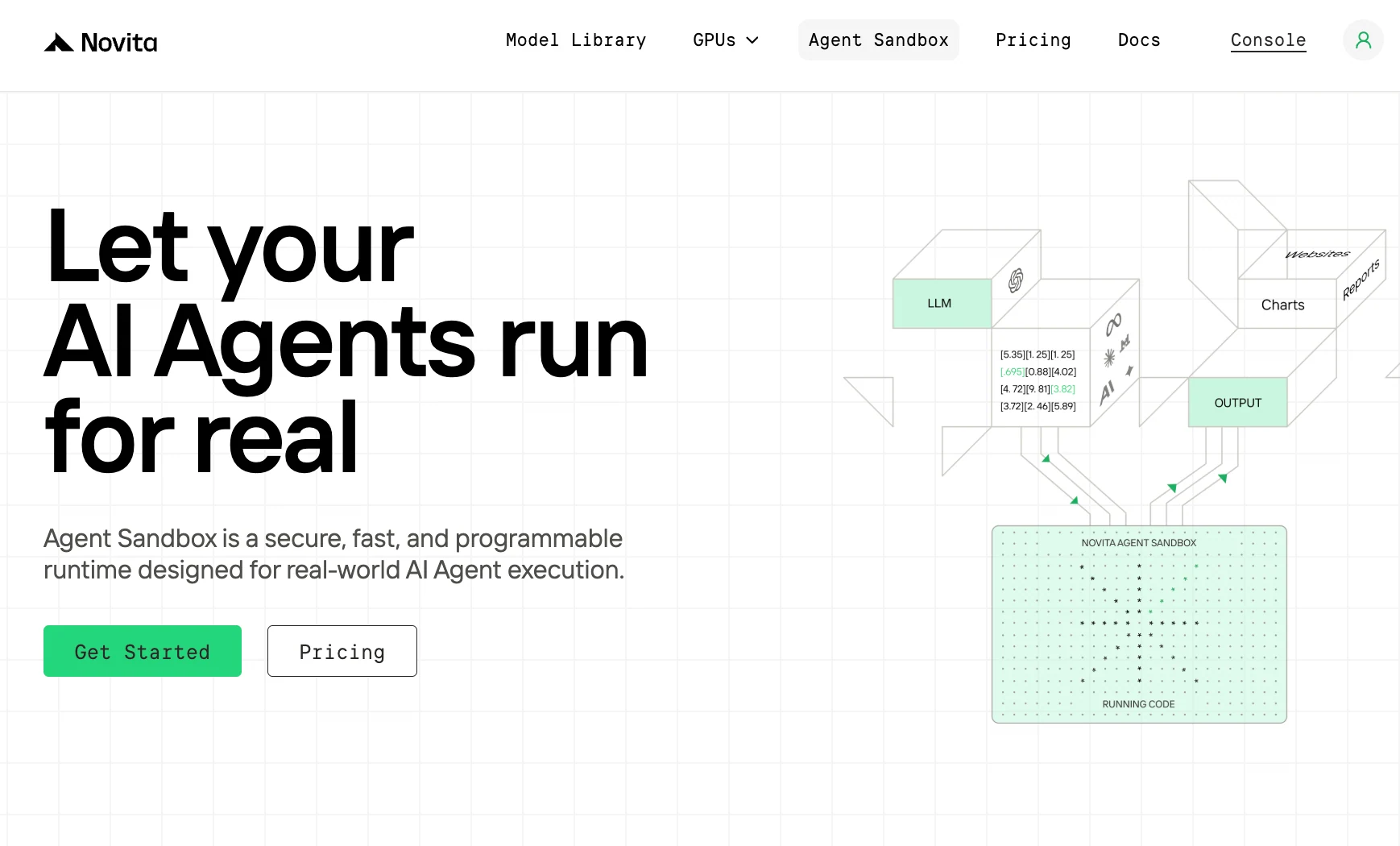
Using the Agent Sandbox (optional): Novita also has an Agent Sandbox feature accessible from the dashboard. This allows you to run AI agents or code in a fully managed sandbox environment with internet isolation. If your use case involves things like evaluating code generated by an AI agent, this can be handy. You can explore this once you’re comfortable with basics.
When to Choose Novita AI
- On a tight budget — Novita is generally around 50% cheaper than RunPod for GPU usage, with very affordable storage and generous free credits for startups.
- Need rapid, hassle-free functionality — With 200+ pre-built APIs (LLM, image, audio, video), it’s ideal if you want AI-driven features without managing infrastructure.
- Prefer simplicity and speed — Great for integrating AI quickly, especially if training/fine-tuning isn’t a priority.
Best For: Indie developers, startups, product teams needing fast AI integration without worrying about hardware or configuration.
When to Choose RunPod
- Planning complex training workflows — Offers strong support for multi-GPU clusters, persistent storage, and built-in fine-tuning services.
- Need scalability or robust compute — Great for training large models, multi-node setups, or long-term experiments.
- Prefer standardization across regions — Its footprint across 30+ global regions and extensive template library simplify deployments.
- Work closely with code/GitHub repos — Built-in support for Serverless Repos makes it straightforward to deploy directly from open-source projects.
Frequently Asked Questions
Can I deploy multi-GPU clusters?
Only RunPod supports this natively via its Instant Clusters feature. Novita AI currently supports scaling via serverless and vertical scaling, but not user-managed clusters.
Which is cheaper for running a 4090 or A100 GPU?
Novita AI is usually cheaper — offering RTX 4090 at ~$0.35/hour and A100 around ~$1.2/hour (with spot prices even lower). RunPod offers more regions and flexibility, but costs slightly more per hour.
Does RunPod offer an LLM API like OpenAI?
L40S. Its 300–350W TDP and strong performance-per-watt make it a better option for power-sensitive deployments. H100 (up to 700W SXM5) requires significant infrastructure.Yes. RunPod provides Serverless Endpoints using vLLM, allowing you to deploy Hugging Face models and expose them via OpenAI-style APIs. You can call these endpoints via REST or integrate them with LangChain.
Novita AI is an AI cloud platform that offers developers an easy way to deploy AI models using our simple API, while also providing the affordable and reliable GPU cloud for building and scaling.
Recommended Reading



