Deploying cutting-edge OCR models like PaddleOCR-VL-1.5 can be overwhelming — developers face unclear hardware requirements, complex environment setup, and uncertainty about GPU costs. PaddleOCR-VL-1.5, Baidu’s state-of-the-art vision-language model achieving 94.5% accuracy on OmniDocBench v1.5, demands precise deployment configurations for optimal performance.
This guide walks you through deploying PaddleOCR-VL-1.5 on Novita AI’s GPU instances, from selecting the right GPU to running inference in production. We cover Docker image setup, environment configuration, GPU selection, and real-world cost analysis.
What is PaddleOCR-VL-1.5?
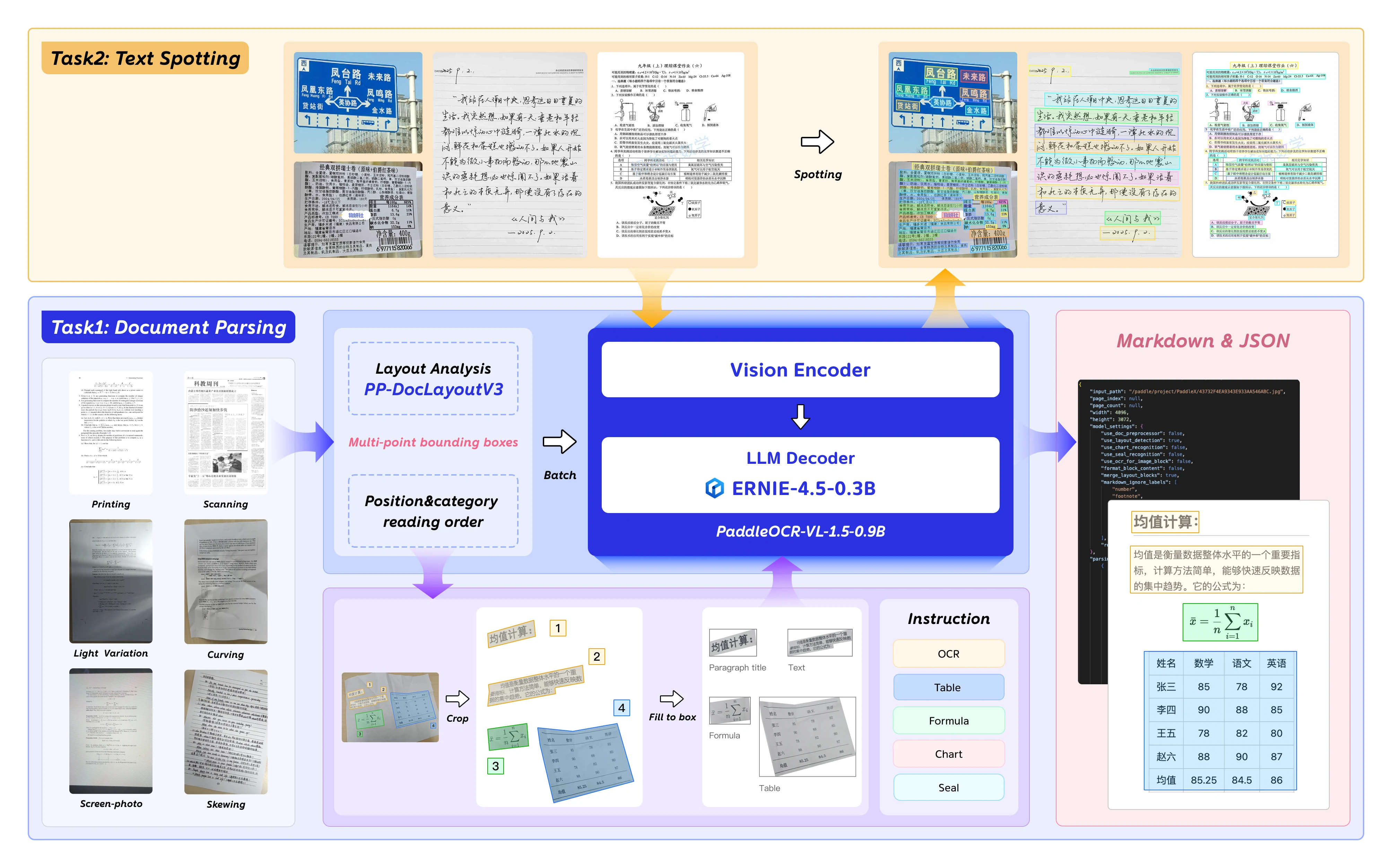
PaddleOCR-VL-1.5 is Baidu’s next-generation vision-language model optimized for document parsing, OCR, and layout understanding. With 0.9B parameters, it delivers enterprise-grade accuracy while remaining deployable on consumer GPUs.
| Specification | Value |
|---|---|
| Model Type | Vision-Language (VLM) |
| Parameters | 0.9B |
| Context Window | 131,072 tokens |
| Precision | bfloat16 |
| OmniDocBench v1.5 | 94.5% accuracy |
| Base Model | ERNIE-4.5-0.3B-Paddle |
Key Capabilities
PaddleOCR-VL-1.5 introduces notable features for document AI:
- Irregular Shape Detection: Polygonal localization for skewed and warped documents — handles scanning artifacts, screen photography, and illumination variations tested on the Real5-OmniDocBench benchmark.
- Enhanced Element Recognition: Significant improvements in table, formula, and text recognition compared to predecessor models.
- Seal and Text Spotting: Native support for seal recognition and text spotting tasks — critical for legal and government document processing.
- Multilingual Support: Trained on English, Chinese, and multilingual datasets.
From Hugging Face
Why Deploy on Novita AI GPU Instances?
Novita AI GPU instances provide an optimal environment for deploying PaddleOCR-VL-1.5 with several critical advantages:
- Pre-configured CUDA Environment: Novita templates support CUDA 11.x and 12.x required by PaddlePaddle 3.1.0/3.1.1.
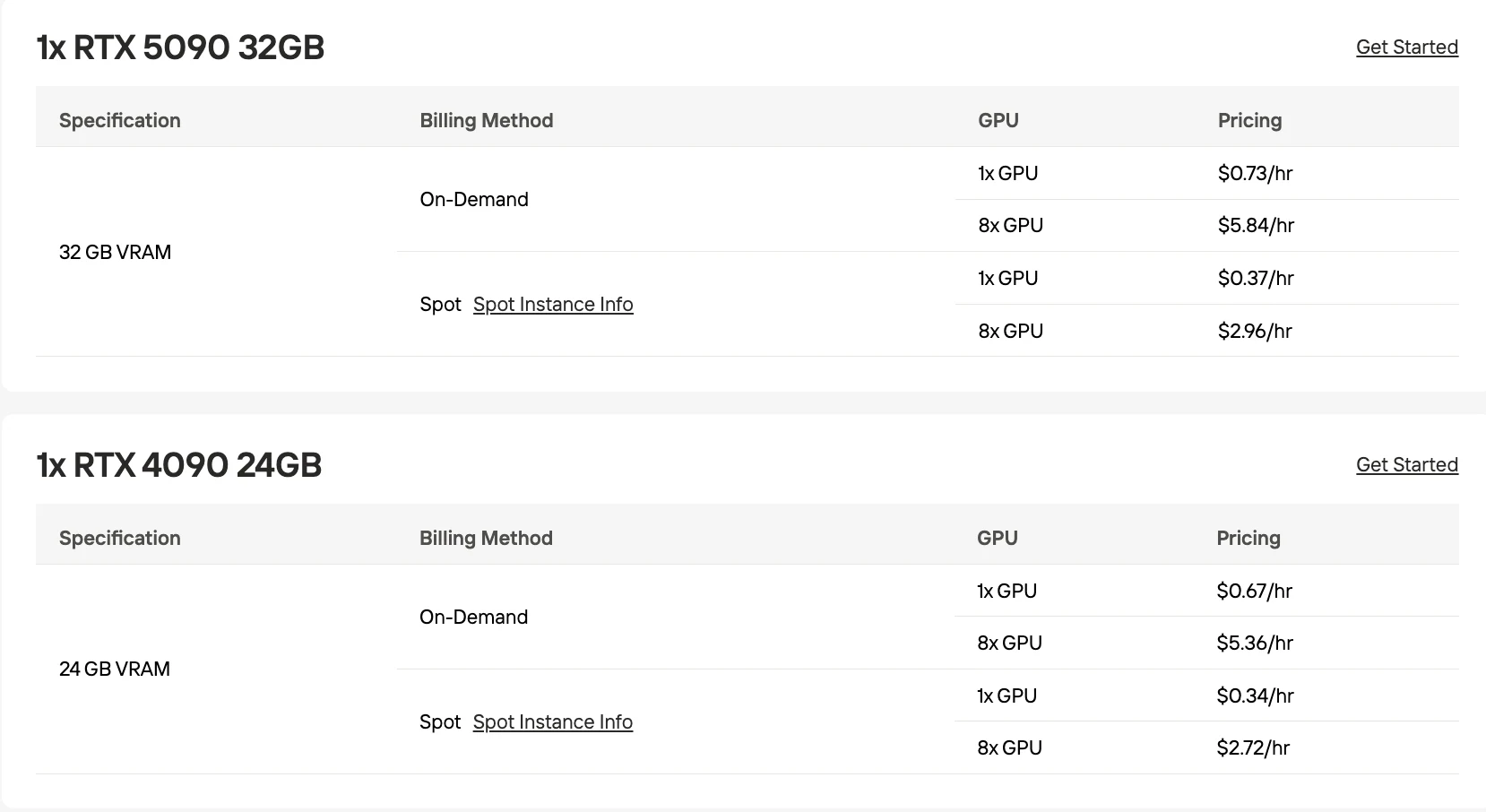
- Cost-Effective GPU Options: RTX 5090 32GB at $0.73/hr on-demand.
- Flexible Scaling: Pay-as-you-go pricing with on-demand and spot instances — scale from single GPU to 8×GPU clusters.
- Docker-Native Deployment: Custom image support with public/private registries eliminates environment setup complexity.
- Network Volume Storage: $0.002/GB/day network volumes for persistent model storage across instances.
Deploy PaddleOCR-VL-1.5 on Novita GPU Template
Step 1: Console Entry
Launch the GPU interface and select Get Started to access deployment management.
Step 2: Package Selection
Locate PaddleOCR-VL-1.5 in the template repository and begin installation sequence.
Step 3: Infrastructure Setup
Configure computing parameters including memory allocation, storage requirements, and network settings. Select Deploy to implement.
Step 4: Review and Create
Double-check your configuration details and cost summary. When satisfied, click Deploy to start the creation process.
Novita AI’s Spot mode is a cost-optimized GPU rental system that leverages the platform’s idle or unused GPU capacity. Unlike on-demand instances, which reserve dedicated hardware for stable, continuous usage, Spot instances are interruptible—your job may be paused or terminated if the GPU is reclaimed by the system. Because Spot mode reallocates otherwise idle GPU resources, it is typically 40–60% cheaper than on-demand pricing.
Step 5: Wait for Creation
After initiating deployment, the system will automatically redirect you to the instance management page. Your instance will be created in the background.
Step 6: Monitor Download Progress
Track the image download progress in real-time. Your instance status will change from Pulling to Running once deployment is complete. You can view detailed progress by clicking the arrow icon next to your instance name.
Step 7: Verify Instance Status
Click the Logs button to view instance logs and confirm that the PaddleOCR service has started properly.
Step 8: Environmental Access
Launch development space through Connect interface, then initialize Start Web Terminal.
This is a Python test case.
import base64
import requests
import pathlib

API_URL = "http://localhost:8080/layout-parsing"  # Service URL

image_path = "./demo.jpg"

# Encode local image to Base64
with open(image_path, "rb") as file:
    image_bytes = file.read()
    image_data = base64.b64encode(image_bytes).decode("ascii")

payload = {
    "file": image_data,  # Base64 encoded file content or file URL
    "fileType": 1,  # File type, 1 means image file
}

# Call the API
response = requests.post(API_URL, json=payload)

# Process the API response data
assert response.status_code == 200
result = response.json()["result"]
for i, res in enumerate(result["layoutParsingResults"]):
    print(res["prunedResult"])
    md_dir = pathlib.Path(f"markdown_{i}")
    md_dir.mkdir(exist_ok=True)
    (md_dir / "doc.md").write_text(res["markdown"]["text"])
    for img_path, img in res["markdown"]["images"].items():
        img_path = md_dir / img_path
        img_path.parent.mkdir(parents=True, exist_ok=True)
        img_path.write_bytes(base64.b64decode(img))
    print(f"Markdown document saved at {md_dir / 'doc.md'}")
    for img_name, img in res["outputImages"].items():
        img_path = f"{img_name}_{i}.jpg"
        pathlib.Path(img_path).parent.mkdir(exist_ok=True)
        with open(img_path, "wb") as f:
            f.write(base64.b64decode(img))
        print(f"Output image saved at {img_path}")
Download the sample image and run the test script:
# Download sample image for testing
curl https://raw.githubusercontent.com/PaddlePaddle/PaddleOCR/main/tests/test_files/book.jpg -o demo.jpg

# Copy port mapping address and replace API_URL in test.py, then run:
python test.py

# Expected output:
# Markdown document saved at markdown_0/doc.md
# Output image saved at layout_det_res_0.jpg
Optimize for Deploying PaddleOCR-VL-1.5 on Novita GPU Template
Batch Processing Configuration
The AMD deployment guide recommends batch_size: 64 for throughput optimization. Adjust based on your GPU:
| GPU | Recommended Batch Size | Throughput (docs/min) |
|---|---|---|
| RTX 5090 32GB | 32-48 | ~120-150 |
| RTX 4090 24GB | 24-32 | ~90-120 |
| H100 80GB | 64-96 | ~250-350 |
Layout Detection Settings
Enable use_layout_detection: True for complex documents with tables, formulas, and charts. Disable for plain text documents to reduce latency by 30-40%.
Troubleshooting Common Issues
Issue 1: Model Download Timeout
Symptom: Container fails to start with “Connection timeout to huggingface.co”
Solution: Pre-download the model to a Novita network volume and mount it:
# On a temporary instance:
pip install huggingface-hub
huggingface-cli download PaddlePaddle/PaddleOCR-VL-1.5 --local-dir /mnt/models

# In Dockerfile:
ENV HF_HOME=/mnt/models
VOLUME /mnt/models
Issue 2: Out-of-Memory Errors
Symptom: CUDA out of memory during inference
Solution: Reduce batch_size in your configuration:
batch_size: 16  # Down from 64
gpu_memory_utilization: 0.85  # Leave 15% headroom
Issue 3: Slow Inference on Complex Documents
Symptom: Processing time >5 seconds per document
Solution: Disable unnecessary features per the AMD optimization guide:
- Set
use_layout_detection: Falsefor plain text documents (30-40% faster) - Set
merge_layout_blocks: Falseif you need raw element positions - Upgrade to H100 SXM 80GB for 2-3× higher throughput on complex layouts
Deploying PaddleOCR-VL-1.5 on Novita AI GPU instances delivers production-grade document parsing. The combination of 0.9B parameter efficiency, and Novita’s flexible GPU pricing enables startups and enterprises to process millions of documents monthly without breaking budgets.
Conclusion
Deploying PaddleOCR-VL-1.5 on Novita AI GPU templates gives you enterprise-grade document parsing in minutes — no complex environment setup, no idle GPU costs. With 0.9B parameters, 94.5% accuracy on OmniDocBench v1.5, and flexible GPU options starting at $0.73/hr, it’s an efficient solution for teams processing high volumes of documents at scale.
Key Takeaway: Select your GPU tier based on throughput needs, enable batch processing for production workloads, and use Spot instances to cut costs by 40–60%. Get started on Novita AI and deploy PaddleOCR-VL-1.5 today.
What GPU do I need to run PaddleOCR-VL-1.5?
PaddleOCR-VL-1.5 runs on any GPU with 8GB+ VRAM; RTX 5090 32GB at $0.73/hr is recommended for production.
Can PaddleOCR-VL-1.5 handle scanned documents with distortions?
Yes, PaddleOCR-VL-1.5’s irregular shape detection handles skew, warping, and scanning artifacts validated on the Real5-OmniDocBench benchmark.
Is PaddleOCR-VL-1.5 suitable for production use?
Yes. With 0.9B parameters and 94.5% accuracy, it offers a strong balance between performance and efficiency, making it suitable for enterprise document processing pipelines.
Novita AI is an AI & agent cloud platform helping developers and startups build, deploy, and scale models and agentic applications with high performance, reliability, and cost efficiency.
Recommended Reading
DeepSeek vs Qwen: Identify Which Ecosystem Fits Production Needs
DeepSeek vs Qwen: Identify Which Ecosystem Fits Production Needs



