If you’re building an AI agent in 2026, the inference provider you choose matters more than it did a year ago — and for reasons most comparison articles don’t talk about. Context windows, pricing, and latency are table stakes. The real differentiators only show up when your agent starts making dozens of tool calls per session, spawning parallel sub-tasks, and hitting your infrastructure with traffic spikes you can’t predict.
This guide breaks down the five criteria that actually determine whether an inference provider can handle agentic workloads — not just chat completions.
Why Agent Workloads Are Different
A chat completion is a single round-trip: one prompt in, one response out. An AI agent is something else entirely.
A typical agent workflow involves:
- Multi-step reasoning loops — the model thinks, acts, observes, and thinks again, chaining multiple LLM calls per user request
- Tool calls at every step — search, code execution, API calls, file reads, each requiring a structured response the model must get right
- Growing context windows — every tool result gets appended to the context, so a session that starts at 2K tokens might reach 80K tokens by step 15
- Burst-heavy traffic patterns — agents are often triggered by events (webhooks, user actions, scheduled tasks), not smoothly distributed like chat
The Five Criteria That Matter
1. Tool Calling Stability
🔧TL;DR — If your provider can’t reliably return well-formed tool calls, your agent will fail mid-workflow. This is non-negotiable.
What it is: The provider’s ability to reliably return well-formed tool call responses — every time, in every turn of a multi-step agent loop.
Why it matters for agents: A chat completion can afford an occasional malformed response. An agent cannot. If the model returns a badly structured tool call on step 6 of a 10-step workflow, the entire task fails.
What to look for:
- OpenAI-compatible function calling API — not a proprietary format that requires custom parsing
- Structured outputs support — enforces valid JSON schema at the model level, not just via prompting
- Model-level verification — not all models handle multi-turn tool use equally
On Novita AI: Novita supports function calling and structured outputs natively.
2. Context Length
📏TL;DR — Context length is your agent’s working memory. Insufficient context doesn’t crash your agent — it causes silent quality degradation.
What it is: The maximum number of tokens a model can process in a single request — including all prior conversation turns, tool results, and system prompts.
Why it matters for agents: Every tool result your agent retrieves gets added to the context. A web search might return 3K tokens. A code execution output might return 8K. By step 10 of a research agent, you’re easily at 50–100K tokens. Insufficient context length causes subtle degradation — the agent “forgets” constraints defined in the system prompt, contradicts earlier reasoning, or repeats steps it already completed.
What to look for:
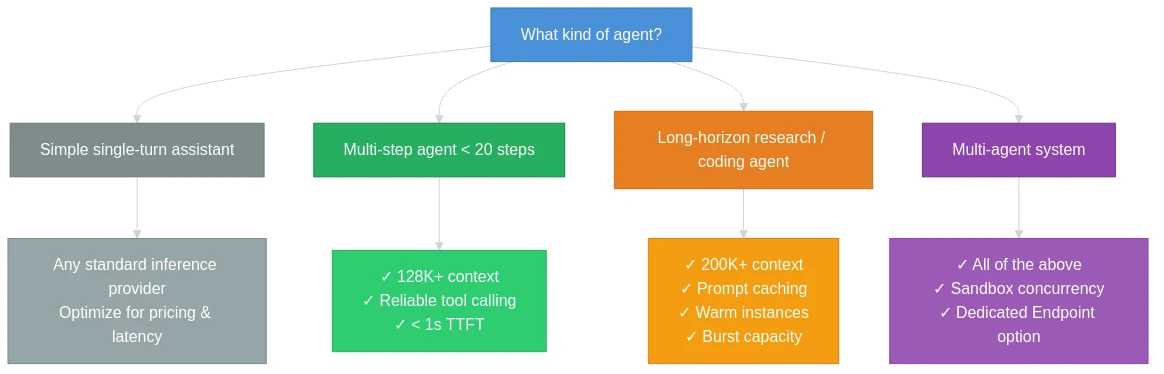
- Minimum 128K tokens for production agents
- 200K+ tokens for research agents, long-horizon planning tasks, or code-heavy workflows
- Prompt caching — re-sending a large context on every turn gets expensive fast; caching the stable prefix cuts both cost and latency
On Novita AI: Context lengths range up to 1M tokens (MiniMax M1), with most flagship models at 128K–204K tokens. GLM-4.7 and MiniMax M2.x series support 204,800 tokens; Llama 3.3 70B supports 131,072 tokens; DeepSeek V3.2 and V3-0324 support 163,840 tokens. Prompt caching is available natively.
Know More About Prompt Cashing
3. Burst Traffic Handling
⚡TL;DR — Rate limits that work fine in testing will surface in production as 429 errors that break agent workflows mid-execution.
What it is: The provider’s ability to absorb sudden spikes in request volume without significant latency degradation or hard failures.
Why it matters for agents: Agent traffic is inherently bursty. A user-triggered event might fan out into 10 parallel sub-agent calls at once. A scheduled job might kick off 50 agents simultaneously at midnight.
What to look for:
- High RPM ceilings — specifically at the tier accessible to your team today
- Per-model rate limits — not a shared pool across all models
- Dedicated endpoints as an option when you need guaranteed capacity
On Novita AI: At T3 and above, most models support 1,000 RPM; at T5, that scales to 3,000–6,000 RPM per model. TPM is capped at 50M tokens/minute at all tiers. Dedicated Endpoints are available for reserved capacity and guaranteed SLAs.
4. Cold Start Latency
🚀TL;DR — In a multi-step agent loop, latency compounds. 3s cold start × 8 tool calls = 24s of unnecessary overhead per session.
What it is: The delay incurred when a model instance isn’t already “warm” and needs to be initialized before serving the request.
Why it matters for agents: Cold starts tend to cluster — if your agent hasn’t received traffic for a few minutes, the next batch of requests all hit cold instances simultaneously. For serverless inference providers, cold start is often the hidden performance variable that benchmarks don’t capture.
What to look for:
- Consistently warm instances for popular models
- Predictable TTFT (time to first token) across request patterns
- Agent Sandbox infrastructure with sub-200ms startup for code-executing agents
On Novita AI: As a high-volume platform running 200+ models, Novita keeps popular model instances warm. E2E latency and TTFT metrics (including P95 and P99 percentiles) are exposed via the observability dashboard. Agent Sandbox startup time is under 200ms.
5. Concurrency
🔀TL;DR — Concurrency isn’t just about scale — it’s about architecture. Agents that run subtasks in parallel are categorically faster than sequential agents.
What it is: How many simultaneous requests the provider can handle — both at the API level (RPM/TPM) and at the infrastructure level (parallel agent execution).
Why it matters for agents: Multi-agent systems require concurrency at multiple levels: parallel LLM calls, parallel tool executions, and parallel sandbox instances.
What to look for:
- High per-model RPM to support parallel agent calls
- Sandbox concurrency — can you spin up 50 isolated execution environments at once?
- Per-second billing for sandboxes, not per-minute
On Novita AI: Agent Sandboxes support large-scale concurrent creation with per-second billing for CPU and RAM. T3+ accounts reach 1,000 RPM per model, and the observability layer tracks RPM in real time.
Decision Framework
| Criterion | Minimum | Production-Ready |
|---|---|---|
| Tool calling | OpenAI-compatible function calling | Structured outputs + validated multi-turn support |
| Context length | 32K | 128K+ (200K+ for research agents) |
| Burst capacity | 100 RPM | 1,000+ RPM per model |
| Cold start | <3s average TTFT | <1s P95 TTFT, warm instance guarantees |
| Concurrency | Sequential | Parallel LLM calls + sandbox execution |
Conclusion
Choosing an inference provider for AI agents isn’t the same as choosing one for a chatbot. The five criteria — tool calling stability, context length, burst traffic, cold start, and concurrency — separate providers designed for chat from those built to run production agents.
Novita AI is positioned as an AI & agent cloud platform: 200+ models via a single OpenAI-compatible API, Agent Sandboxes with <200ms startup and per-second billing, Prompt Cache for long-context cost efficiency, and a tiered rate limit structure that scales from prototyping (30 RPM) to production (6,000 RPM per model).
Novita AI is an AI & agent cloud platform helping developers and startups build, deploy, and scale models and agentic applications with high performance, reliability, and cost efficiency.
Frequently Asked Questions
Does it matter which model I use for tool calling in an agent?
Yes — significantly. Not all models handle multi-turn function calling with the same reliability. Test your specific agent workflow, and look for providers that explicitly categorize models by tool-calling capability.
How do I estimate the context length I actually need?
Start by logging the actual token count at each step of a representative session. A reasonable rule: more than 5 tool calls per session → 64K+ tokens; more than 10 tool calls → 128K+.
Is a dedicated endpoint worth the cost?
For most early-stage teams, a shared serverless endpoint is fine. A dedicated endpoint makes sense when: (a) traffic is predictable enough to justify reserved capacity, (b) you’ve hit rate limits on the shared tier, or (c) your SLA requires no request queuing.
Recommended Articles