
Qwen 3.5 Medium Series (27B, 35B-A3B, 122B-A10B) offers enterprise-grade language models with varying VRAM needs:
- 27B: 17-54 GB (Q4_K_M to BF16)
- 35B-A3B: 22-69 GB (Q4_K_M to BF16)
- 122B-A10B: 77-244 GB (Q4_K_M to BF16)
Deploy on Novita AI with flexible GPU options (H100, RTX 5090, RTX 4090) or serverless API for zero infrastructure management.
What is Qwen 3.5 Medium Series
Qwen 3.5 Medium Series comprises three high-performance language models designed for production-grade applications:
- Qwen3.5-27B: 27B parameters, balanced performance for general tasks
- Qwen3.5-35B-A3B: 35B total parameters with 3B active per token (MoE architecture)
- Qwen3.5-122B-A10B: 122B total parameters with 10B active per token (MoE architecture)
These models excel in reasoning, coding, multilingual understanding, and long-context processing.
Understanding VRAM requirements is critical for cost-effective deployment—whether you’re running on dedicated GPUs or leveraging serverless infrastructure.
VRAM Requirements by Model and Precision
VRAM needs vary significantly based on quantization precision. Below are memory requirements based on Hugging Face hardware compatibility data.
⚠️ Note: These figures represent model weight sizes. Actual VRAM usage during inference will be 10-30% higher depending on batch size, context length, and KV cache overhead. We recommend choosing GPUs with at least 10-20% headroom.
Qwen3.5-27B-GGUF
| Quantization | VRAM (GB) | Recommended Hardware |
| BF16 | 54 | GPU: A100 × 1 (80GB) / H100 × 1 (80GB) |
| Q8_0 | 29 | CPU: Intel Sapphire Rapids 16× vCPUs · 32 GB RAM GPU: A100 40GB / RTX 4090 24GB (faster inference) |
| Q4_K_M | 17 | CPU: Intel Sapphire Rapids 16× vCPUs · 32 GB RAM GPU: RTX 4090 24GB / L40S 48GB (faster inference) |
💡 CPU vs GPU: At Q8_0 and Q4_K_M precision, the model fits within modern CPU RAM limits (32-64 GB). However, GPU inference is 10-50× faster depending on batch size. For production workloads requiring low latency or high throughput, GPU deployment is strongly recommended.
Qwen3.5-35B-A3B-GGUF
| Quantization | VRAM (GB) | Recommended Hardware |
| BF16 | 69 | GPU: A100 × 1 (80GB) / H100 × 1 (80GB) |
| Q8_0 | 37 | GPU: L40S × 1 (48GB) / A100 40GB |
| Q4_K_M | 22 | CPU: Intel Sapphire Rapids 16× vCPUs · 32 GB RAM GPU: RTX 4090 24GB / L40S 48GB (faster inference) |
Qwen3.5-122B-A10B-GGUF
| Quantization | VRAM (GB) | Recommended Hardware |
| BF16 | 244 | GPU: A100 × 4 (320GB) / H100 × 4 (320GB) |
| Q8_0 | 130 | GPU: A100 × 2 (160GB) / H100 × 2 (160GB) |
| Q4_K_M | 77 | GPU: A100 × 1 (80GB) / H100 × 1 (80GB) |
💡 Note: The 122B model requires high-end GPUs even with aggressive quantization due to its size. Multi-GPU setups are essential for BF16 and Q8_0 precision.
Deploying on Novita AI
Novita AI provides flexible deployment options for Qwen 3.5 Medium Series, balancing performance, cost, and ease of use.
GPU Deployment (Recommended for VRAM-Focused Users)
Novita AI offers high-performance GPUs optimized for deploying Qwen 3.5 models with flexible billing options:
Recommended GPU Configurations
| Model | Quantization | VRAM Needed | Recommended GPU | Use Case |
| 27B | BF16 | 54 GB | H100 80GB / RTX 5090 32GB × 2 | Production, max quality |
| 27B | Q8_0 | 29 GB | RTX 5090 32GB / RTX 4090 24GB × 2 | Balanced performance |
| 27B | Q4_K_M | 17 GB | RTX 4090 24GB | Cost-effective inference |
| 35B-A3B | BF16 | 69 GB | H100 80GB | Production, max quality |
| 35B-A3B | Q8_0 | 37 GB | RTX 5090 32GB × 2 / H100 80GB | Balanced performance |
| 35B-A3B | Q4_K_M | 22 GB | RTX 4090 24GB | Cost-effective inference |
| 122B-A10B | BF16 | 244 GB | H100 80GB × 4 | Enterprise, max quality |
| 122B-A10B | Q8_0 | 130 GB | H100 80GB × 2 | Balanced performance |
| 122B-A10B | Q4_K_M | 77 GB | H100 80GB | Cost-effective inference |
Why Novita AI GPU Deployment?
Novita AI provides GPU options across multiple performance tiers to match your workload and budget:
- Enterprise-grade GPUs: High-VRAM configurations for BF16 and Q8_0 precision
- High-performance consumer GPUs: Balanced price/performance for medium-sized models
- Cost-effective options: Affordable configurations for quantized models (Q4_K_M)
- Multi-GPU setups: Seamlessly scale from 1× to 8× GPU configurations
- Flexible billing: On-demand, spot instances, and serverless GPUs (pay-per-second)
- Instant deployment: Pre-configured templates for rapid setup
Serverless API (Zero Infrastructure Alternative)
For users who prefer zero infrastructure management, Novita AI offers Serverless API endpoints with OpenAI-compatible interfaces.
Supported Models
| Model | Model ID |
| Qwen3.5-27B | qwen/qwen3.5-27b |
| Qwen3.5-35B-A3B | qwen/qwen3.5-35b-a3b |
| Qwen3.5-122B-A10B | qwen/qwen3.5-122b-a10b |
- Base URL: https://api.novita.ai/openai
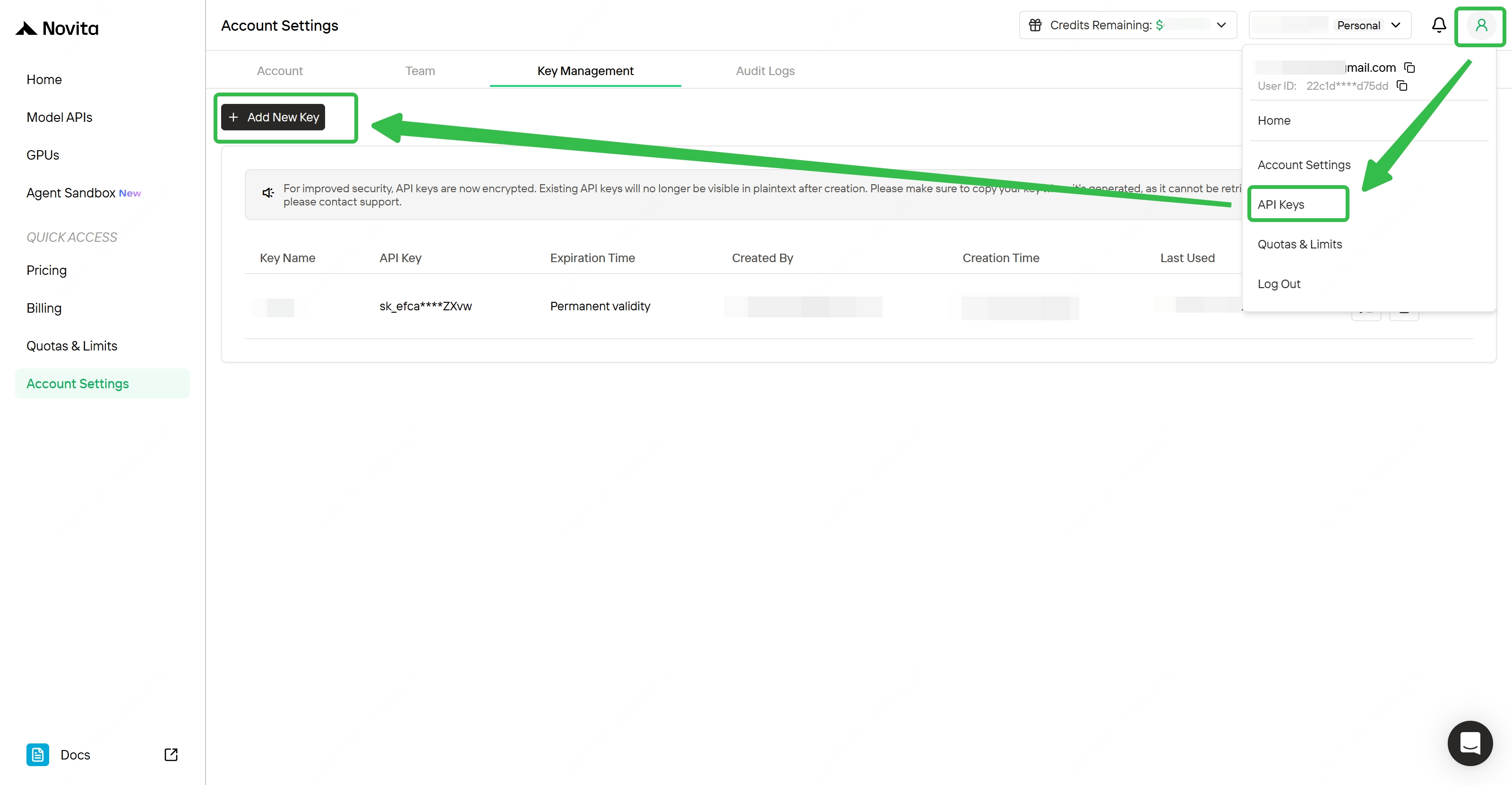
How to Get API Key
- Sign up at Novita AI
- Navigate to API Keys section in your dashboard
- Click Create New Key and copy your API key
- Add credits to your account to start using the API
Quick Example:
from openai import OpenAI

client = OpenAI(
    api_key="<Your API Key>",
    base_url="https://api.novita.ai/openai"
)

response = client.chat.completions.create(
    model="qwen/qwen3.5-35b-a3b",
    messages=[
        {"role": "system", "content": "You are a helpful assistant."},
        {"role": "user", "content": "Hello, how are you?"}
    ],
    max_tokens=65536,
    temperature=0.7
)

print(response.choices[0].message.content)
Choosing the Right Precision
BF16 (Full Precision)
- Use case: Production environments requiring maximum quality
- Trade-off: Highest VRAM requirements
- Best for: Enterprise applications, research benchmarks
Q8_0 (8-bit Quantization)
- Use case: Balanced performance and efficiency
- Trade-off: ~1-2% quality loss, 50% VRAM reduction
- Best for: High-throughput inference, cost-sensitive production
Q4_K_M (4-bit Quantization)
- Use case: Cost-effective deployment on consumer GPUs
- Trade-off: ~3-5% quality loss, 70-75% VRAM reduction
- Best for: Development, testing, budget-constrained deployments
Conclusion
Qwen 3.5 Medium Series offers powerful language models for diverse enterprise needs, with VRAM requirements ranging from 17 GB (27B Q4_K_M) to 244 GB (122B BF16).
Key takeaways:
- Choose quantization based on quality vs. cost trade-offs
- GPU inference is 10-50× faster than CPU for production workloads
- Novita AI provides flexible deployment: GPU rental (on-demand/spot) or serverless API
Next steps:
- Determine your model size and precision needs
- Explore Novita AI’s GPU pricing or API endpoints
- Deploy in minutes with pre-configured templates
Novita AI is an AI cloud platform that offers developers an easy way to deploy AI models using our simple API, while also providing affordable and reliable GPU cloud for building and scaling.
Frequently Asked Questions
What is VRAM?
VRAM (Video Random Access Memory) is dedicated memory on your GPU used to store model weights, activations, and intermediate calculations during inference. For LLMs like Qwen 3.5, VRAM requirements scale with model size and precision—larger models and higher precision (e.g., BF16) need more VRAM than quantized versions (e.g., Q4_K_M). Insufficient VRAM will cause out-of-memory errors or force you to use CPU inference, which is significantly slower.
Can I run Qwen 3.5 Medium models on CPU?
Yes, smaller quantized models (Q8_0 and Q4_K_M) can run on CPUs with 32-64 GB of RAM. However, CPU inference is 10-50× slower than GPU, making it impractical for production workloads or real-time applications. For best performance, GPU deployment is strongly recommended even for quantized models.
What’s the difference between BF16, Q8_0, and Q4_K_M?
BF16 (16-bit) is full precision with maximum quality but highest VRAM usage. Q8_0 (8-bit) reduces VRAM by ~50% with minimal quality loss (~1-2%). Q4_K_M (4-bit) cuts VRAM by 70-75% but may introduce 3-5% quality degradation—ideal for cost-sensitive deployments where slight accuracy trade-offs are acceptable.



