Artificial Intelligence (AI) and deep learning have revolutionized the tech industry, driving innovation in fields ranging from autonomous vehicles to personalized healthcare. At the heart of these advances lie powerful frameworks that simplify model creation, training, and deployment. When comparing PyTorch vs TensorFlow, these two have emerged as the most influential frameworks, each with its unique strengths and dedicated communities. But as AI continues its rapid evolution, one critical question arises: Which framework will dominate AI development in the foreseeable future?
A Brief Overview of PyTorch and TensorFlow
What is PyTorch?
PyTorch is an open-source machine learning library developed by Facebook’s AI Research lab (FAIR) and first released in 2016. Built on the Torch library, PyTorch was designed with a focus on flexibility and ease of use, particularly for research applications.
PyTorch has gained tremendous popularity, especially in academic and research settings, due to its pythonic nature and dynamic computational graph approach. This framework allows for intuitive debugging and a more natural coding experience that closely resembles standard Python programming.
Key features of PyTorch include:
- Dynamic computational graph (define-by-run)
- Seamless integration with Python data science stack
- Strong GPU acceleration support
- Comprehensive libraries for computer vision, NLP, and more
- TorchScript for production deployment
What is TensorFlow?
TensorFlow is an open-source machine learning framework developed by the Google Brain team and released publicly in 2015. Initially designed with production deployment in mind, TensorFlow has evolved significantly over the years, particularly with the release of TensorFlow 2.0, which brought major improvements to usability.
TensorFlow was originally built around a static computational graph approach, though it has since incorporated eager execution in more recent versions. The framework emphasizes scalability, production readiness, and deployment across various platforms.
Key features of TensorFlow include:
- Comprehensive ecosystem for model development and deployment
- TensorFlow Extended (TFX) for production ML pipelines
- TensorBoard for visualization and debugging
- TensorFlow Lite for mobile and edge deployment
- TensorFlow Serving for model serving
- Integration with Google Cloud AI Platform
Core Technical Differences: PyTorch vs TensorFlow
Architecture and Design Philosophy
- PyTorch: Employs a dynamic computational graph that’s built and modified on-the-fly, offering greater flexibility during development and debugging. This approach allows for more natural Python integration and easier step-by-step model development.
- TensorFlow: Originally used a static graph approach but now supports both static and dynamic execution. Static graphs can offer better performance optimization opportunities but may be less intuitive for development.
Performance Benchmarks
- Speed and Efficiency: In typical deep learning tasks, PyTorch and TensorFlow offer comparable GPU performance. PyTorch often edges ahead in speed and VRAM efficiency for smaller-scale tasks and prototyping, while TensorFlow can be more memory-efficient and optimized for large-scale deployments due to its graph-based optimizations.
- Scalability: Both frameworks support distributed training and deployment. TensorFlow is renowned for its scalability in enterprise settings, especially with native TPU support and robust deployment tools. PyTorch, with features like TorchScript and improved distributed support, is closing the gap and is now widely used in production as well.
Ease of Use and Learning Curve
- PyTorch is widely regarded as more accessible, especially for those with a Python background. Its clear syntax and dynamic nature make it easy to learn, debug, and adapt, which is why it dominates academic research and rapid prototyping.
- TensorFlow has improved usability through Keras integration, but still presents a steeper learning curve for custom or low-level operations. Its extensive documentation and large community help mitigate this challenge.
Decision Framework: PyTorch vs TensorFlow
When to Choose PyTorch
- Research and Experimentation: PyTorch’s flexibility and ease of debugging make it the leading choice for academic research and projects where models evolve rapidly.
- Rapid Prototyping: Its Pythonic syntax and dynamic execution allow for quick iteration and testing of new ideas.
- Beginner-Friendly: Those new to deep learning or with strong Python skills will find PyTorch more approachable
When to Choose TensorFlow
- Production and Scalability: TensorFlow’s structured approach, deployment tools (TensorFlow Serving, Lite, and JS), and support for distributed training make it ideal for enterprise and large-scale applications.
- Cross-Platform Deployment: If you need to deploy models across servers, mobile, web, or edge devices, TensorFlow’s ecosystem is unmatched.
- Advanced Optimization: For projects requiring fine-tuned performance and resource management, TensorFlow’s static graph and optimization capabilities are advantageous.
Cloud GPU Solutions: Choosing Novita AI as Your Provider
Regardless of which framework you choose, developing and training complex AI models requires significant computational resources. Cloud GPU solutions have become essential for most AI developers, offering scalable access to high-performance hardware without the upfront investment.
Novita AI has emerged as a compelling option in the cloud GPU space, offering specific advantages for both PyTorch and TensorFlow developers. If you are interested in Novita AI, please follow these steps:
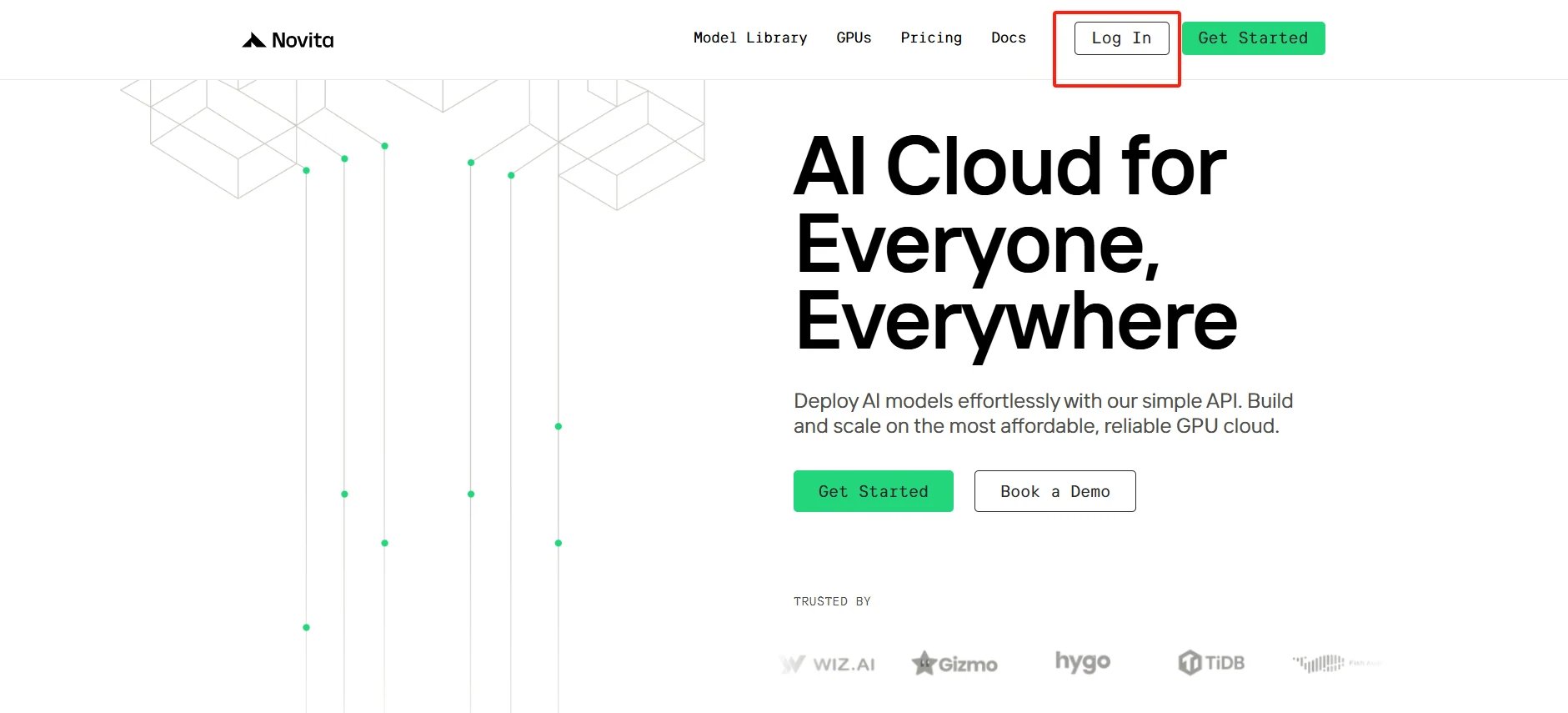
Step1:Create an account
Start in just minutes: Sign up on Novita AI’s platform and head to our GPU marketplace. Explore our selection of high-performance instances with detailed specs and benchmark results. Choose the configuration that best fits your model needs, and launch with a simple click. Our efficient deployment process lets you focus on what truly matters - developing your AI.
[Try using Novita AI now](https://novita.ai/?utm_source=blogs_GPU&utm_medium=article&utm_campaign=PyTorch vs TensorFlow: Which Framework Will Dominate AI Development?)
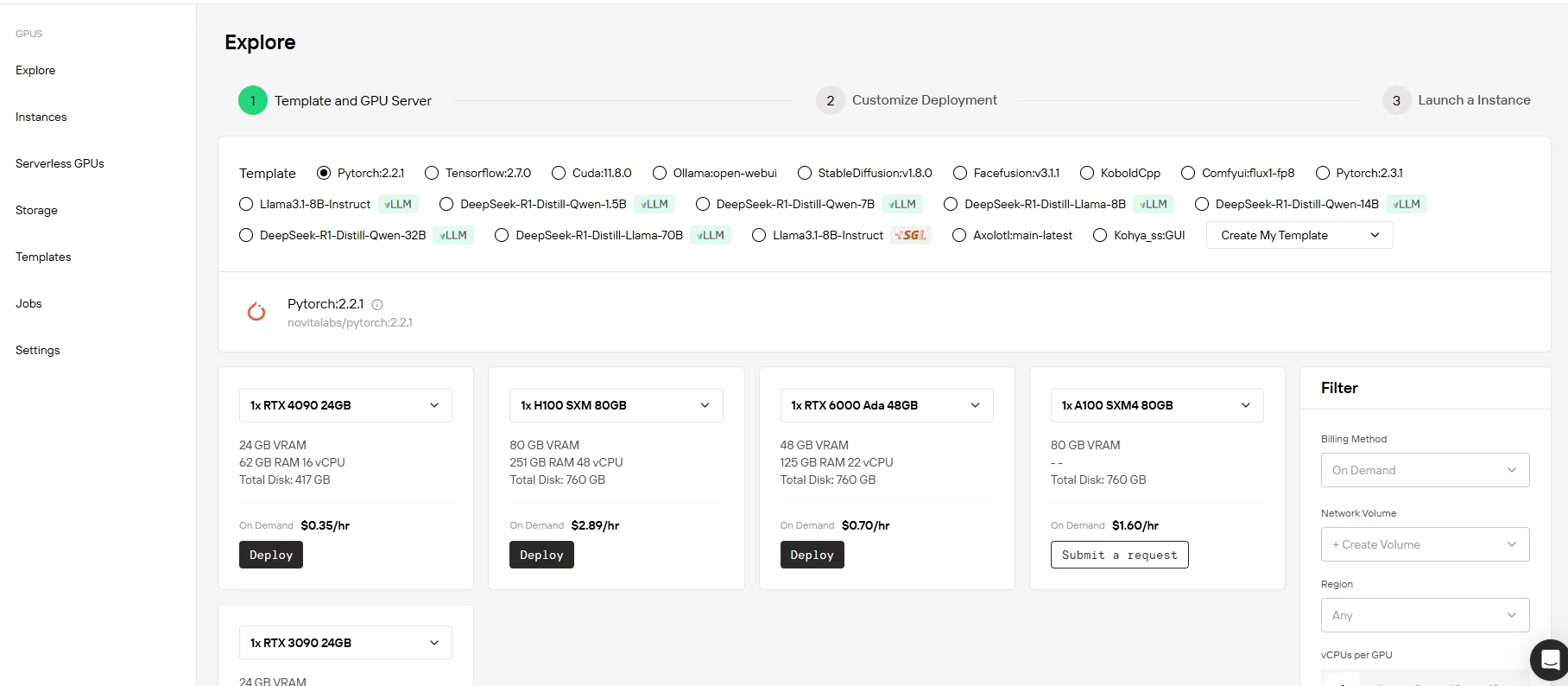
Step2:Select Your GPU
Access cutting-edge GPU infrastructure powered by the latest NVIDIA technology. Our high-performance GPUs deliver exceptional processing capability for your large language models. With generous VRAM capacity and optimized RAM configurations, your AI training reaches maximum efficiency. Select from our ready-to-use templates or create your custom environment - our flexible platform seamlessly adapts to how you work.
[Try Novita AI’s High-Performance GPUs](https://novita.ai/gpus-console/?utm_source=blogs_GPU&utm_medium=article&utm_campaign=PyTorch vs TensorFlow: Which Framework Will Dominate AI Development?)
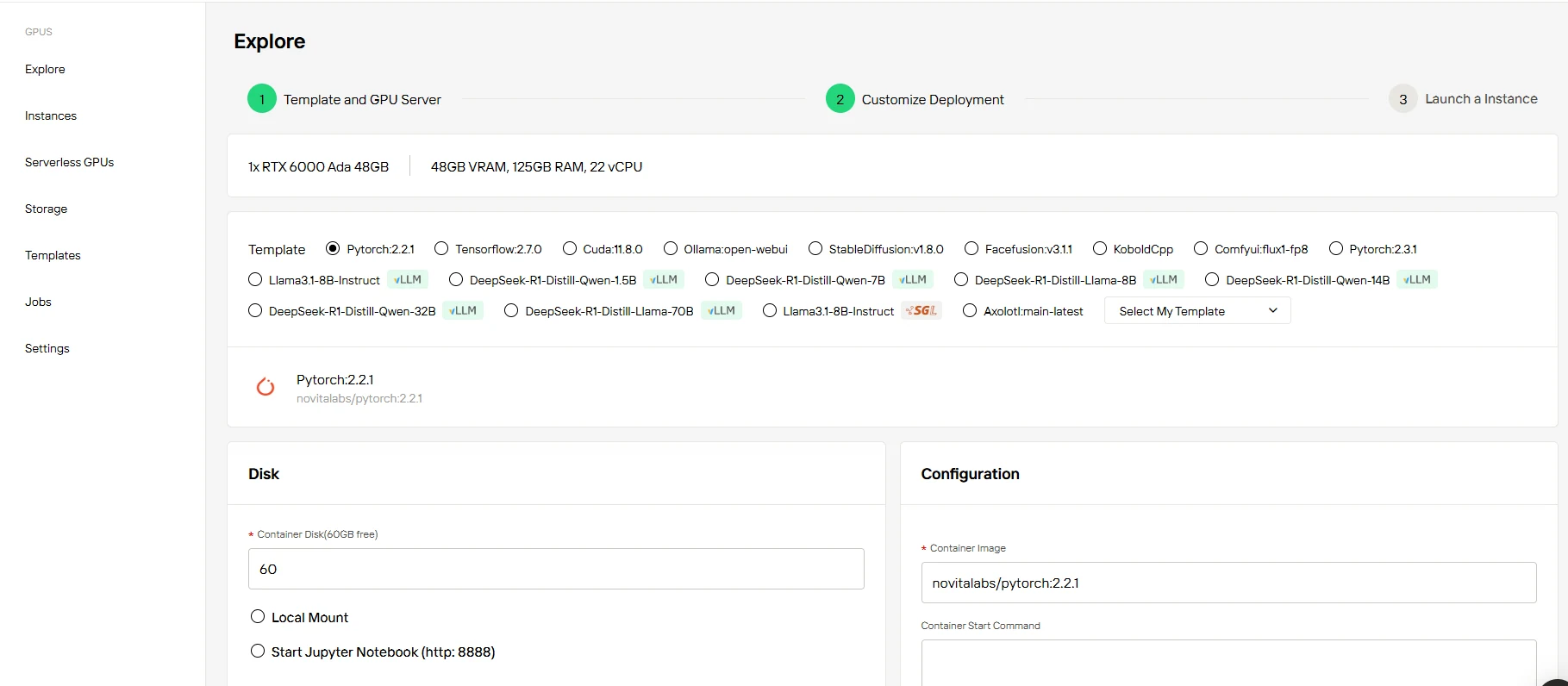
Step3:Customize Your Setup
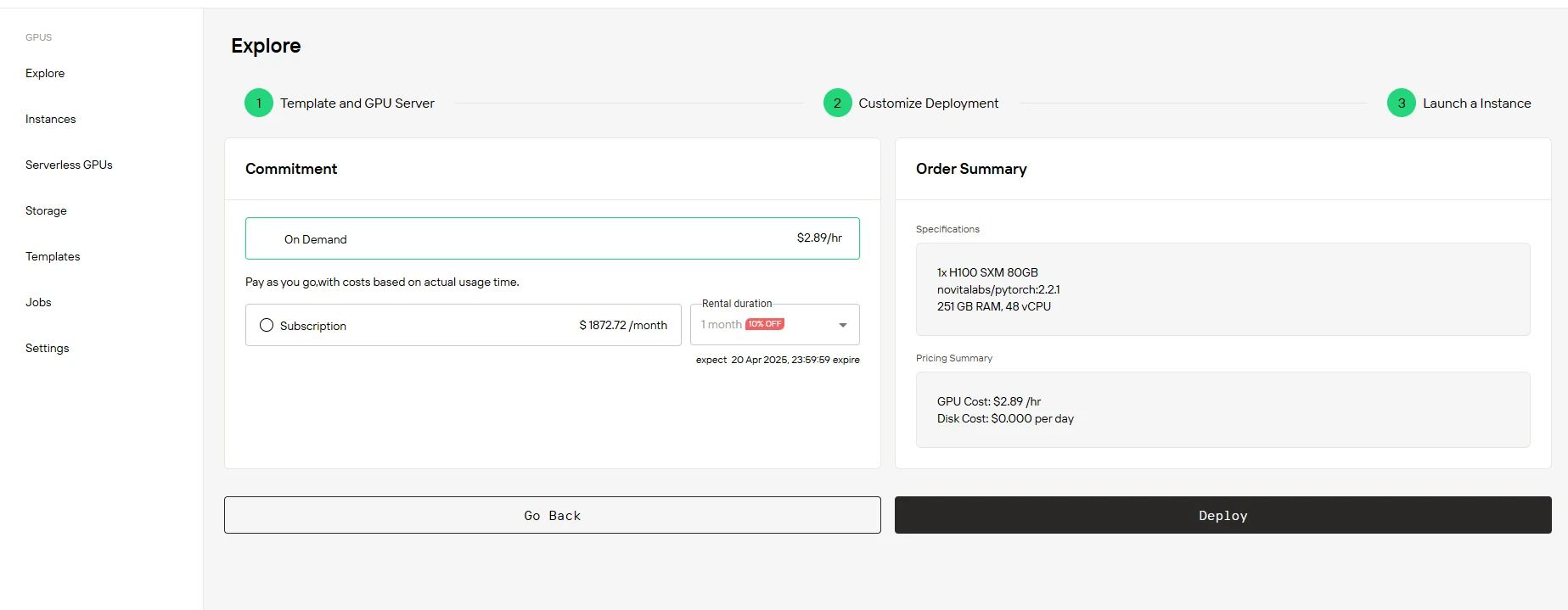
Get started with 60GB of complimentary Container Disk storage and easily scale as your projects expand. Whether you’re prototyping or running production workloads, our adaptable storage solutions grow with you. Enjoy the freedom to choose between pay-as-you-go pricing or budget-friendly subscription plans, all with instant setup and zero hidden costs.
Details on specific subscription tiers and pricing are provided below the table:
| Option | RTX 3090 24 GB | RXT 4090 24 GB | RXT 6000 Ada 48GB | H100 SXM 80 GB |
| 1-5 months | $136.00/month (10% OFF) | $226.80/month (10% OFF) | $453.60/month(10% OFF) | $1872.72/month (10% OFF) |
| 6-11 months | $129.00/month( (15% OFF) | $206.64/month (18% OFF) | $428.40/month(15% OFF) | $1664.64/month (20% OFF) |
| 12 months | $113.40/month(25% OFF) | $189.00/month (25% OFF) | $403.20/month(20% OFF) | $1498.18/month (28% OFF) |
Step4:Launch Your Instance
Select the plan that suits your needs: opt for flexible On Demand pricing or go for our cost-effective Subscription plans. After reviewing your custom configuration and pricing details, launch your instance with a single click. Your GPU environment is ready instantly—no elaborate setup or unnecessary delays. Start innovating immediately.
Conclusions
Both PyTorch and TensorFlow have distinct strengths, making them ideal for different scenarios. PyTorch excels in research environments and rapid prototyping, while TensorFlow remains the preferred choice for robust, scalable production deployments.
As AI and deep learning fields continue to evolve, both frameworks are actively improving and adopting each other’s strengths. Rather than a single dominant framework emerging, it is more likely that PyTorch and TensorFlow will continue coexisting, each excelling in their respective niches.
Ultimately, your framework choice should align with your specific project objectives, your team’s expertise, and your organizational infrastructure. Regardless of your decision, leveraging optimized cloud GPU infrastructure such as Novita AI can greatly enhance your productivity, allowing you to innovate faster and more efficiently in the exciting landscape of AI development.
Frequently Asked Questions
Can I switch between PyTorch and TensorFlow mid-project?
While possible, it’s generally not recommended due to significant code refactoring requirements. Choose your framework before starting development.
Which framework has better community support?
Both have strong communities. PyTorch is popular in research, while TensorFlow has broader enterprise adoption.
Can PyTorch or TensorFlow be used with cloud GPU solutions?
Yes, both frameworks are fully compatible with cloud GPU solutions. Cloud providers like Novita AI offer ready-to-use GPU environments optimized for PyTorch and TensorFlow, ensuring seamless deployment and performance optimization.
[Novita A](https://novita.ai/?utm_source=blogs_GPU&utm_medium=article&utm_campaign=PyTorch vs TensorFlow: Which Framework Will Dominate AI Development?)[I](https://novita.ai/?utm_source=blogs_GPU&utm_medium=article&utm_campaign=The Uncertain Future of GPU Pricing: Why Cloud GPUs Offer Stability in 2025) is an AI cloud platform that offers developers an easy way to deploy AI models using our simple API, while also providing the affordable and reliable GPU cloud for building and scaling.
Recommended Reading
CUDA Cores vs Tensor Cores: A Deep Dive into GPU Performance



