
GLM-Imageは、自己回帰アーキテクチャと拡散アーキテクチャを組み合わせたAI画像生成の大きな進歩であり、ビジュアルの忠実度の限界を押し広げます。AIを活用したビジュアルアプリケーションを開発する開発者や企業にとって、このモデルを効率的にデプロイすることは極めて重要です。しかし、従来のセットアッププロセスには、複雑な依存関係、環境設定、インフラ管理が伴います。
Novita AIは、事前設定済みGPUテンプレート を提供することでこれらの障壁を取り除き、GLM-Imageを数時間ではなく数分でデプロイできるようにします。このガイドでは、テンプレートの選択から最初の推論の実行、さらに本番ワークロード向けの最適化戦略まで、完全なデプロイプロセスを説明します。
コンテンツ生成ツールのプロトタイプ作成、Eコマースのビジュアライゼーションプラットフォームの構築、アプリケーションへの高度な画像合成の統合など、このチュートリアルはエンタープライズグレードのGPUインフラ上でGLM-Imageを実行するために必要なすべてを提供します。
GLM-Imageとは?
GLM-Imageは、自己回帰デコーダと拡散デコーダのアーキテクチャを組み合わせた高度な画像生成モデルであり、卓越したビジュアル品質ときめ細かなディテールレンダリングを実現します。ZAIチームによって開発されたこのハイブリッドアプローチは、従来の潜在拡散モデル(LDM)に代わる強力な選択肢として位置づけられ、特に知識集約的な画像生成シナリオで優れた性能を発揮します。
このモデルのユニークなアーキテクチャにより、業界標準の手法と競合するパフォーマンスを維持しながら、高精細な画像を生成できます。AI搭載のデザインツール、コンテンツ作成プラットフォーム、ビジュアル合成アプリケーションの構築において、GLM-Imageはテキストから画像へ、画像から画像への生成機能を通じて、柔軟性と精度の両方を提供します。
主な機能:
- ハイブリッド自己回帰+拡散アーキテクチャによる優れたビジュアル忠実度
- 詳細なプロンプト理解によるテキストから画像への生成
- 画像から画像への変換とスタイル転送
- マルチ画像条件付き生成
- 高解像度出力対応(カスタマイズ可能な寸法)
完全な技術仕様とモデルのドキュメントについては、公式GLM-Imageリポジトリ をご覧ください。
Novita AIでGLM-Imageをデプロイする理由
Novita AIのGPUインフラは、事前設定済みテンプレート、即時デプロイ、スケーラブルなコンピューティングリソースにより、GLM-Imageを実行するための理想的な環境を提供します。ローカル環境をセットアップしたり、クラウドインスタンスを手動で管理したりするのとは異なり、Novita AIはテンプレートの選択から推論の実行までのデプロイプロセス全体を効率化します。
ステップバイステップのデプロイガイド
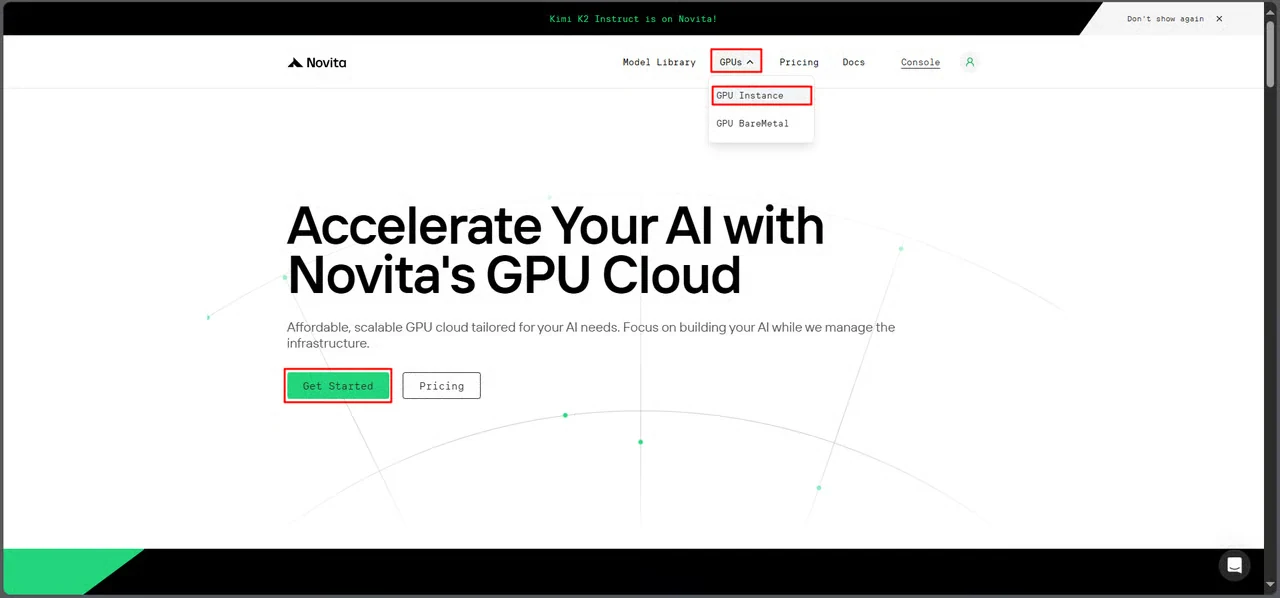
ステップ1:GPUコンソールにアクセス
Novita AIのGPUインターフェースに移動し、Get Started をクリックしてデプロイ管理ダッシュボードに入ります。
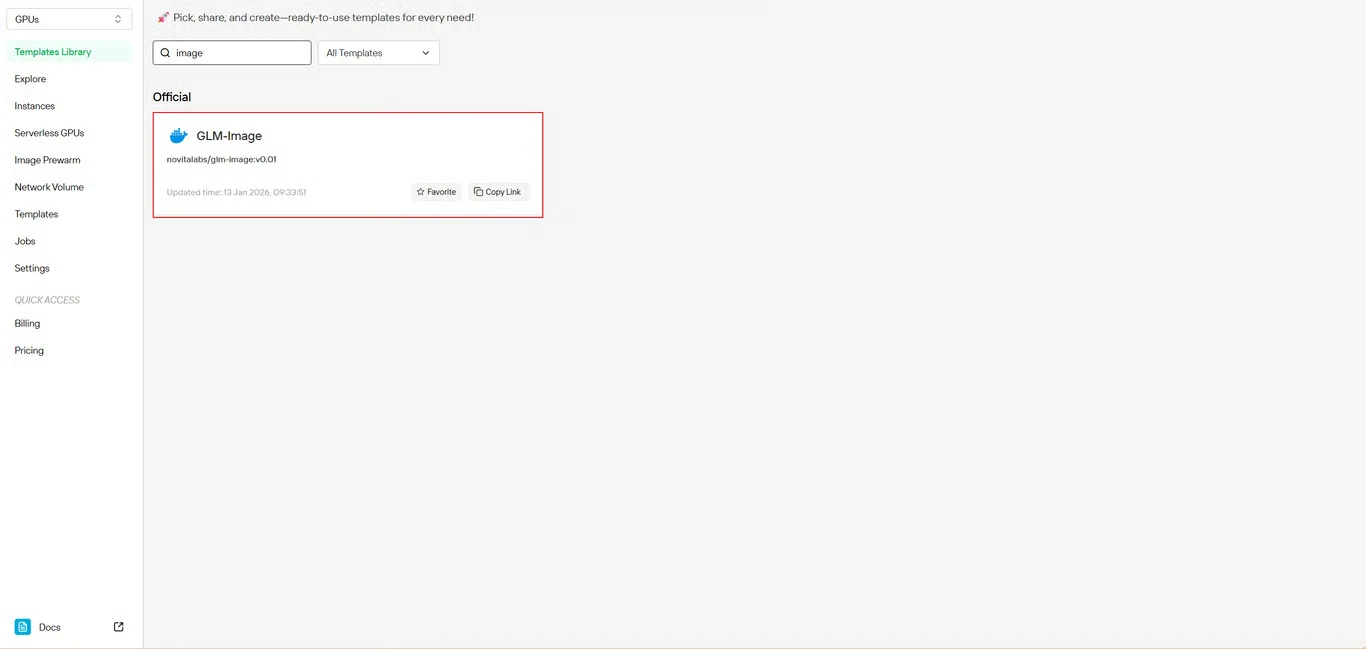
ステップ2:GLM-Imageテンプレートを選択
テンプレートリポジトリで GLM-Image を見つけます。Novita AIのビルド済みテンプレートには必要な依存関係がすべて含まれており、複雑な環境セットアップが不要です。
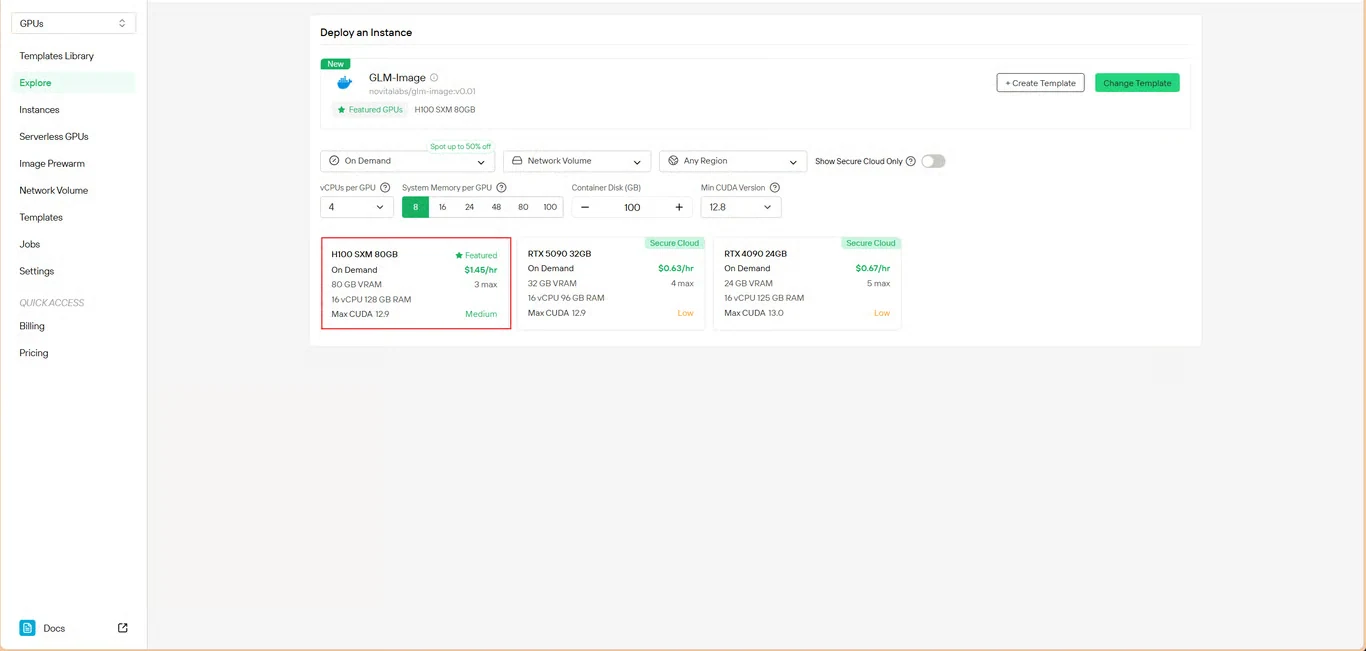
ステップ3:インフラを設定
コンピューティングパラメータを設定します。
- メモリ割り当て:モデルの重みに十分なVRAMを確保します。
- ストレージ要件:モデルファイルと生成画像のための領域を割り当てます。
- ネットワーク設定:アクセス要件に応じて設定します。
Deploy をクリックして設定を進めます。
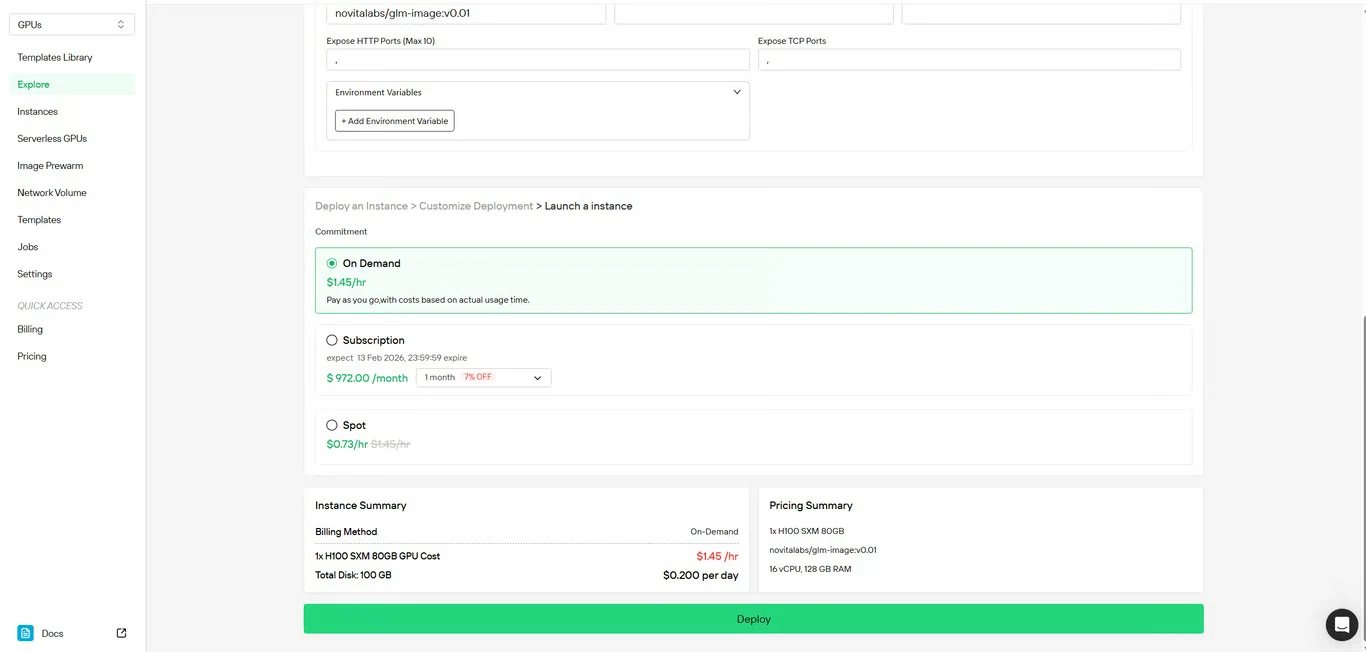
ステップ4:設定を確認
セットアップの詳細とコストの概要を再確認します。問題がなければ Deploy をクリックしてインスタンスの作成を開始します。
ステップ5:デプロイの進行状況を監視
システムは自動的にインスタンス管理ページにリダイレクトします。GLM-Imageインスタンスはバックグラウンドで作成されます。手動での操作は不要です。
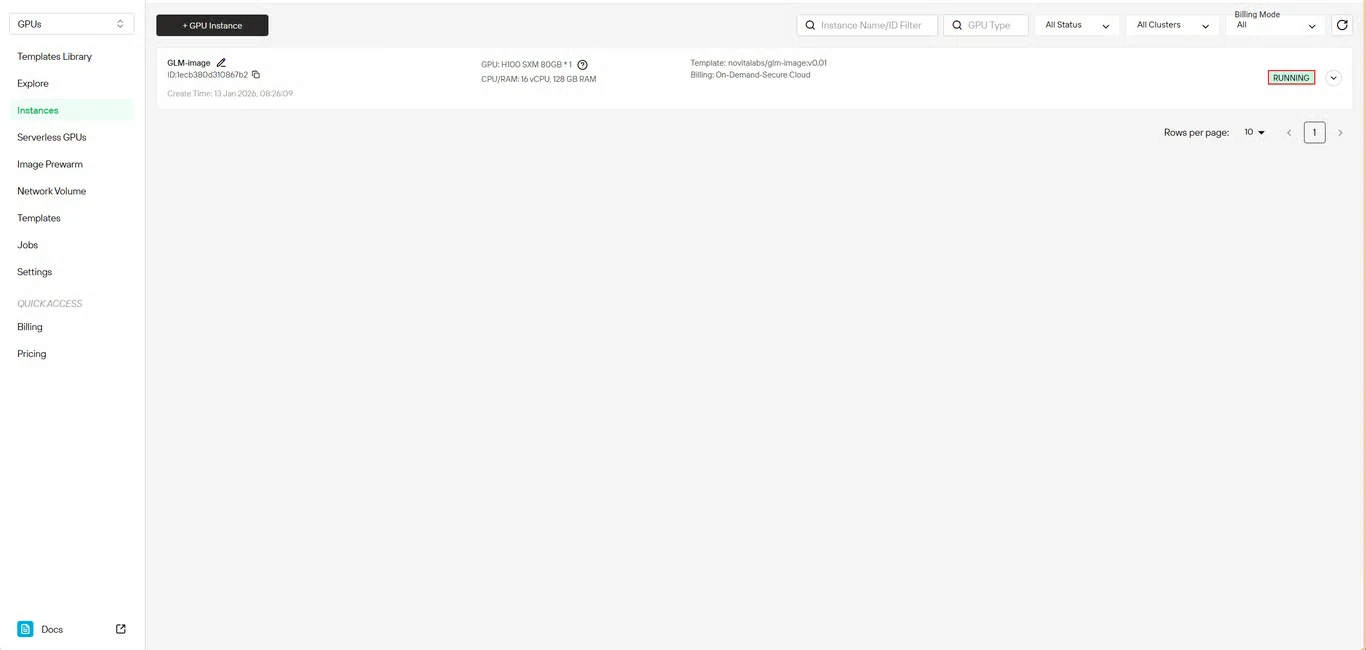
ステップ6:ダウンロードの進行状況を追跡
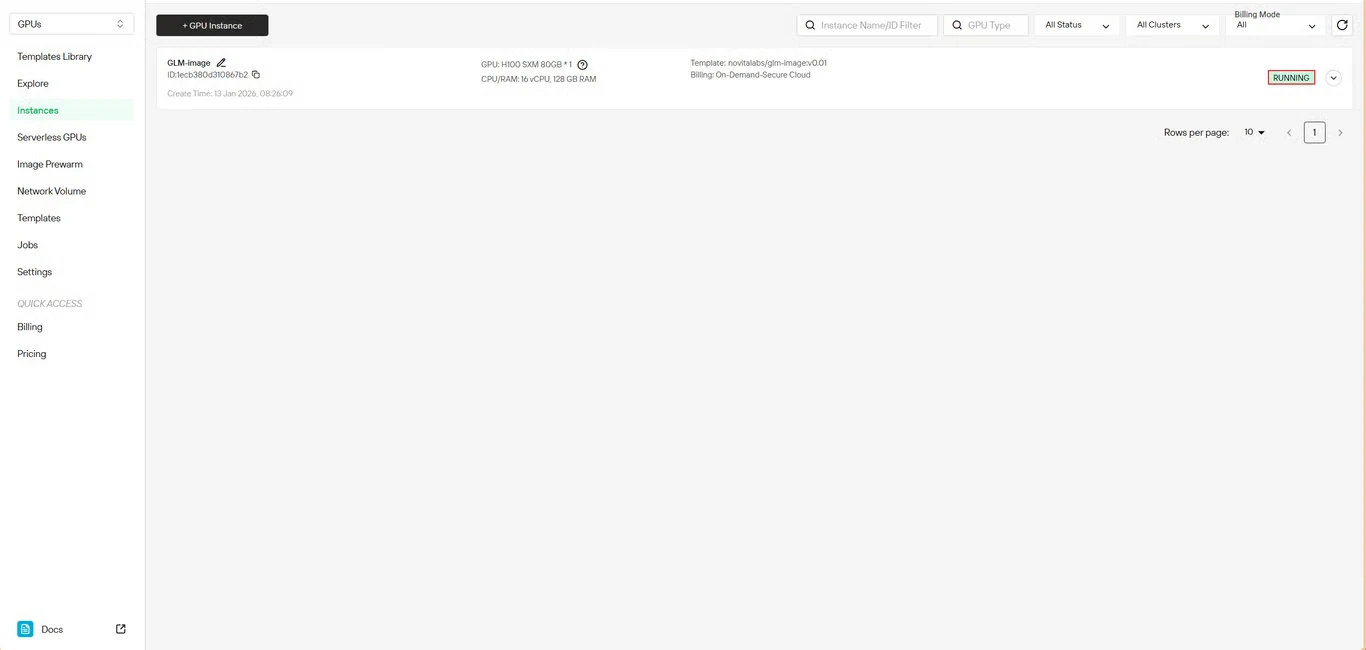
モデルのダウンロード状況をリアルタイムで監視します。デプロイが完了すると、インスタンスのステータスが Pulling から Running に変わります。インスタンス名の横にある矢印アイコンをクリックすると、詳細な進行状況が表示されます。
ステップ7:サービスのステータスを確認
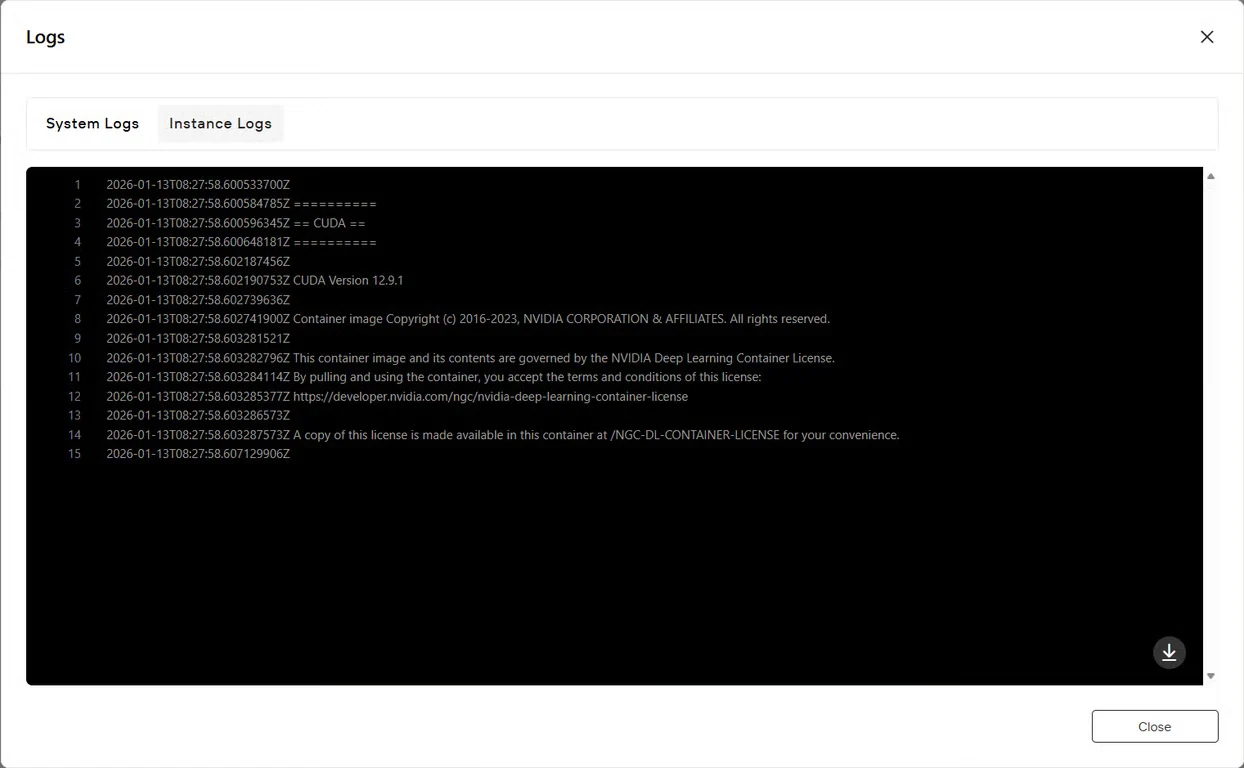
Logs ボタンをクリックしてインスタンスログを表示し、GLM-Imageサービスが正常に起動したことを確認します。モデルが推論の準備ができたことを示す初期化確認メッセージを探します。
はじめ方
例:text2image.py
import torch
from diffusers.pipelines.glm_image import GlmImagePipeline
pipe = GlmImagePipeline.from_pretrained("zai-org/GLM-Image", torch_dtype=torch.bfloat16, device_map="cuda")
prompt = "A beautifully designed modern food magazine style dessert recipe illustration, themed around a raspberry mousse cake. The overall layout is clean and bright, divided into four main areas: the top left features a bold black title 'Raspberry Mousse Cake Recipe Guide', with a soft-lit close-up photo of the finished cake on the right, showcasing a light pink cake adorned with fresh raspberries and mint leaves; the bottom left contains an ingredient list section, titled 'Ingredients' in a simple font, listing 'Flour 150g', 'Eggs 3', 'Sugar 120g', 'Raspberry puree 200g', 'Gelatin sheets 10g', 'Whipping cream 300ml', and 'Fresh raspberries', each accompanied by minimalist line icons (like a flour bag, eggs, sugar jar, etc.); the bottom right displays four equally sized step boxes, each containing high-definition macro photos and corresponding instructions, arranged from top to bottom as follows: Step 1 shows a whisk whipping white foam (with the instruction 'Whip egg whites to stiff peaks'), Step 2 shows a red-and-white mixture being folded with a spatula (with the instruction 'Gently fold in the puree and batter'), Step 3 shows pink liquid being poured into a round mold (with the instruction 'Pour into mold and chill for 4 hours'), Step 4 shows the finished cake decorated with raspberries and mint leaves (with the instruction 'Decorate with raspberries and mint'); a light brown information bar runs along the bottom edge, with icons on the left representing 'Preparation time: 30 minutes', 'Cooking time: 20 minutes', and 'Servings: 8'. The overall color scheme is dominated by creamy white and light pink, with a subtle paper texture in the background, featuring compact and orderly text and image layout with clear information hierarchy."
image = pipe(
prompt=prompt,
height=32 * 32,
width=36 * 32,
num_inference_steps=30,
guidance_scale=1.5,
generator=torch.Generator(device="cuda").manual_seed(42),
).images[0]
image.save("output_t2i.png")
text2image.py内のプロンプトを変更して実行するか、既存のサンプルをそのまま実行できます。
python3 text2image
$ python3 text2image.py
Couldn't connect to the Hub: Cannot reach https://huggingface.co/api/models/zai-org/GLM-Image: offline mode is enabled. To disable it, please unset the `HF_HUB_OFFLINE` environment variable..
Will try to load from local cache.
Loading checkpoint shards: 100%|████████████████████████████████████████████████████████████████████████████████████████████████████████████████████████████████████████████████████| 3/3 [00:02<00:00,  1.47it/s]
Loading weights: 100%|█████████████████████████████████████████████████████████████████████████████████████████████████████████████████████| 111/111 [00:00<00:00, 1391.52it/s, Materializing param=shared.weight]
Loading pipeline components...:  71%|██████████████████████████████████████████████████████████████████████████████████████████████████████▏                                        | 5/7 [00:02<00:00,  2.91it/s]Using a slow image processor as `use_fast` is unset and a slow processor was saved with this model. `use_fast=True` will be the default behavior in v4.52, even if the model was saved with a slow processor. This will result in minor differences in outputs. You'll still be able to use a slow processor with `use_fast=False`.
Loading weights: 100%|██████████████████████████████████████████████████████████████████████████████████████████| 1011/1011 [00:02<00:00, 359.59it/s, Materializing param=model.vqmodel.quantize.embedding.weight]
Loading pipeline components...: 100%|███████████████████████████████████████████████████████████████████████████████████████████████████████████████████████████████████████████████| 7/7 [00:07<00:00,  1.02s/it]
100%|█████████████████████████████████████████████████████████████████████████████████████████████████████████████████████████████████████████████████████████████████████████████| 30/30 [00:11<00:00,  2.69it/s]
output_t2i.png
例:image2image.py
import torch
from diffusers.pipelines.glm_image import GlmImagePipeline
from PIL import Image

pipe = GlmImagePipeline.from_pretrained("zai-org/GLM-Image", torch_dtype=torch.bfloat16, device_map="cuda")
image_path = "cond.jpg"
prompt = "Replace the background of the snow forest with an underground station featuring an automatic escalator."
image = Image.open(image_path).convert("RGB")
image = pipe(
    prompt=prompt,
    image=[image],  # can input multiple images for multi-image-to-image generation such as [image, image1]
    height=33 * 32,
    width=32 * 32,
    num_inference_steps=30,
    guidance_scale=1.5,
    generator=torch.Generator(device="cuda").manual_seed(42),
).images[0]

image.save("output_i2i.png")
text2image.py内のプロンプトや画像を変更して実行するか、既存のサンプルをそのまま実行できます。
$ python3 image2image.py

Couldn't connect to the Hub: Cannot reach https://huggingface.co/api/models/zai-org/GLM-Image: offline mode is enabled. To disable it, please unset the `HF_HUB_OFFLINE` environment variable..
Will try to load from local cache.
Loading pipeline components...:   0%|                                                                                                                                                       | 0/7 [00:00<?, ?it/s]Using a slow image processor as `use_fast` is unset and a slow processor was saved with this model. `use_fast=True` will be the default behavior in v4.52, even if the model was saved with a slow processor. This will result in minor differences in outputs. You'll still be able to use a slow processor with `use_fast=False`.
Loading weights: 100%|██████████████████████████████████████████████████████████████████████████████████████████| 1011/1011 [00:02<00:00, 360.88it/s, Materializing param=model.vqmodel.quantize.embedding.weight]
Loading checkpoint shards: 100%|████████████████████████████████████████████████████████████████████████████████████████████████████████████████████████████████████████████████████| 3/3 [00:02<00:00,  1.46it/s]
Loading weights: 100%|█████████████████████████████████████████████████████████████████████████████████████████████████████████████████████| 111/111 [00:00<00:00, 1426.62it/s, Materializing param=shared.weight]
Loading pipeline components...: 100%|███████████████████████████████████████████████████████████████████████████████████████████████████████████████████████████████████████████████| 7/7 [00:07<00:00,  1.03s/it]
100%|███████████████████████████████████████████████████████████████████████████████████| 30/30 [00:10<00:00,  2.97it/s]
GLM-Imageのユースケース
GLM-Imageのハイブリッドアーキテクチャは、以下のような用途に特に効果的です。
- Eコマース:商品のビジュアライゼーションとバリエーション生成
- マーケティング:キャンペーンクリエイティブとソーシャルメディアコンテンツ
- 出版:エディトリアルイラストとインフォグラフィック
- デザイン:コンセプトアートとビジュアルプロトタイピング
- 教育:説明図とビジュアル学習教材
知識集約型生成におけるこのモデルの強みは、特定の要件を持つ複雑なシーンを正確にレンダリングできることであり、創造性と精度の両方を必要とするプロジェクトに最適です。
Novita AIでGLM-Imageを始めよう
今すぐNovita AIのGPUインフラにGLM-Imageをデプロイし、手動設定の複雑さを伴わずにエンタープライズグレードの画像生成機能を活用しましょう。GLM-Imageテンプレートページ にアクセスしてデプロイを開始してください。
Novita AI は、開発者がAIアプリケーションを構築・スケーリングするための使いやすいAPIと手頃で信頼性の高いGPUインフラを提供する、主要なAIクラウドプラットフォームです。