Key Highlights
Memory Hierarchy:H100’s HBM3 memory provides 3.35 TB/s bandwidth, a 67% increase over A100’s 2.0 TB/s, with improved latency and cache size.
Compute Units: H100 features 14,592 CUDA cores, delivering 34 TFLOPS FP64 performance, and supports FP8 precision for higher AI throughput.
AI-Specific Features: H100’s 4th-gen Tensor Cores and Transformer Engine enable faster training and inference, outperforming A100 in key benchmarks.
Performance Benchmarks: H100 trains models like ResNet-50 2.5x faster and achieves 30x faster inference for Llama2 70B compared to A100.
Workload Analysis: A100 is cost-effective for smaller models and legacy systems, while H100 is better suited for large language models and advanced applications.
Investment Considerations: While H100 has a higher upfront cost, its efficiency and performance can lead to lower total costs over time despite increased infrastructure needs.
The AI hardware landscape in 2025 demands GPUs capable of balancing raw computational power, energy efficiency, and scalability. NVIDIA’s A100 (Ampere architecture) and H100 (Hopper architecture) represent two generations of AI acceleration, each excelling in distinct scenarios. While the A100 remains a workhorse for established AI workflows, the H100’s specialized design for transformer models and large language models (LLMs) makes it indispensable for cutting-edge applications.
This analysis dives into architectural differences, performance benchmarks, and cost considerations to help businesses and researchers choose the optimal GPU for their AI infrastructure.
Architectural Foundations: A100’s Ampere vs H100’s Hopper
Memory Hierarchy: A100’s HBM2e vs H100’s HBM3
The A100’s 80 GB HBM2e memory delivers 2.0 TB/s bandwidth, sufficient for most 2023-era AI models. However, the H100’s HBM3 memory (80 GB) nearly doubles bandwidth to 3.35 TB/s, critical for modern LLMs like GPT-4 and LLaMA-3.
Key Improvements in H100:
- Reduced Latency: 30% lower L1 cache latency compared to A100.
- L2 Cache: 50 MB vs A100’s 40 MB, improving data reuse.
- Distributed Shared Memory: Direct SM-to-SM communication bypassing global memory, reducing bottlenecks.
Compute Units: A100’s CUDA Cores vs H100’s Enhanced Streaming Multiprocessors
The A100’s 6,912 CUDA cores and 108 SMs set a high bar, but the H100’s 14,592 CUDA cores and 114 SMs introduce architectural advancements:
- FP64 Performance: 34 TFLOPS vs A100’s 9.7 TFLOPS (3.5x boost for HPC).
- FP8 Support: Exclusive to H100, enabling 3,958 TFLOPS for AI workloads.
- Thread Block Clusters: Synchronized workloads across SMs accelerate distributed training.
AI-Specific Features: From A100’s Tensor Cores to H100’s Transformer Engine
| Feature | A100 | H100 |
|---|---|---|
| Tensor Cores | 3rd-gen (TF32/BF16/FP16) | 4th-gen (+FP8 support) |
| Sparsity Handling | 2x throughput for sparse models | 2x faster than A100 |
| LLM Training | Baseline | 9x faster (GPT-3) |
| Inference Speed | Baseline | 30x faster (LLM inference) |
The H100’s Transformer Engine dynamically switches between FP8/FP16 precision, reducing memory usage while maintaining accuracy. Combined with 3.35 TB/s bandwidth, this allows training LLaMA-3 65B in half the time of A100 clusters.
Performance Benchmarks: A100 vs H100 Head-to-Head
A100 vs H100: AI Training Speed Comparison
In training speed, the H100 is a clear winner. Thanks to its larger memory bandwidth, more CUDA cores, and advanced transformer acceleration, the H100 significantly outperforms the A100 in training large-scale AI models.
- GPT-3 Training: H100 completes tasks 9x faster using FP8 optimization.
- ResNet-50: H100 trains 2.5x faster than A100.
- BERT-Large: H100 achieves 3x higher throughput vs A100.
A100 vs H100: Inference Performance Analysis
For inference tasks, both GPUs perform extremely well, but the H100 again takes the lead, especially when dealing with complex transformer models. Its lower latency and higher bandwidth result in quicker inference times, making it better suited for real-time AI applications, such as language translation and interactive AI systems.
- GPT-J 6B Inference: H100 delivers 4x lower latency than A100.
- Llama3 70B: H100 processes 30x more tokens/second using TensorRT-LLM.
- HPC Workloads: H100 provides 3x faster simulation times for fluid dynamics.
GPU Comparison: Specialized Workload Metrics
To assess GPU performance, it’s essential to focus on how they handle specific tasks. Below is a comparison of the A100 and H100 in key areas: high-precision computing, low-precision AI, and memory-bound operations.
| Workload Type | A100 Performance | H100 Performance |
|---|---|---|
| FP64 HPC | 9.7 TFLOPS | 34 TFLOPS |
| FP8 AI Training | N/A | 3,958 TFLOPS |
| Memory Bandwidth | 2.0 TB/s | 3.35 TB/s |
Workload Analysis: When to Choose A100 vs H100
A100 Strengths: Production Workflows
- Legacy Systems: Compatibility with older frameworks like TensorFlow 1.x.
- Cost-Effective Inference: For models <10B parameters, A100’s $1.5/hr cloud cost outperforms H100’s $3/hr.
- Mixed Workloads: Superior for non-AI tasks like data analytics.
H100 Advantages: Next-Gen AI Applications
-
LLM Training/Inference: 30x faster inference for models >50B parameters.
-
FP8 Workloads: Unlocks 2x speedups for quantized models.
-
Multi-GPU Scaling: NVLink 4.0 (900 GB/s vs A100’s 600 GB/s) optimizes large clusters.
-
Upgrade When:
- Training LLMs >30B parameters.
- Requiring FP8 precision for efficiency.
- Scaling beyond 8 GPUs with NVLink 4.0.
-
Delay If:
- Using smaller vision/voice models.
- Budgets prioritize immediate TCO over future-proofing.
Investment Analysis: A100 vs H100 ROI
A100 vs H100: Hardware Cost Comparison
The initial hardware costs for the A100 and H100 differ significantly:
- A100 (80GB): $15,000 - $20,000
- H100 (80GB): $35,000 - $40,000
While the H100’s price is approximately double that of the A100, it’s essential to consider the performance gains when evaluating the investment.
For cloud-based solutions,Novita AI provides flexible cloud GPU rental services:
- A100: $1.6 per GPU per hour
- H100: $2.89 per GPU per hour
Despite the higher hourly rate, the H100’s superior performance can lead to cost savings in certain scenarios. For instance, training a model might take 10 hours on 4 A100 GPUs ($50 total) but only 4 hours on 4 H100 GPUs ($40 total), resulting in a 20% cost reduction.
Operational Costs: A100 vs H100 Efficiency
When evaluating operational costs, power consumption and cooling requirements are key factors:
- A100: 400W TDP (Thermal Design Power)
- H100: 700W TDP (SXM version)
While the H100 consumes more power, its efficiency in terms of performance per watt is superior:
- H100: 20 TFLOPS/W (FP16)
- A100: 10 TFLOPS/W (FP16)
This improved efficiency can lead to significant cost savings in large-scale deployments. For example, a 3-year Total Cost of Ownership (TCO) comparison shows:
- A100: $246,624 for 4 GPUs (on-premises)
- H100: $122,478 in cloud (50% savings)
Long-term Value: A100 vs H100 Future-proofing
The H100 is more future-proof, with its advanced architecture designed to handle increasingly complex tasks. If your business plans long-term AI projects, the H100 offers better scalability and longevity. The A100, though still highly capable, may become less suitable for cutting-edge applications in the future, making it less ideal for long-term investment.
Decision Guide: A100 or H100 for Your Needs
Workload-based GPU Selection Framework
| Factor | Choose A100 If… | Choose H100 If… |
|---|---|---|
| Model Size | <10B parameters | >30B parameters |
| Precision | FP16/TF32 sufficient | FP8 required |
| Budget | <$100k upfront | >$300k AI budget |
Budget Considerations: A100 vs H100
The A100 is more budget-friendly, offering strong performance for most tasks. If you’re on a tight budget, it’s a good choice. However, if you need top-tier performance for future-proof AI applications, the H100’s higher cost may be worth it.
Infrastructure Requirements Comparison
When planning your GPU deployment, consider these key infrastructure differences:
| Requirement | A100 | H100 |
|---|---|---|
| Cooling | Standard air-cooled racks | Liquid cooling recommended |
| Power Draw | 400W TDP | 700W TDP (SXM version) |
| Power Circuit | 30A | 60A |
| NVLink Support | Gen 3 (600 GB/s) | Gen 4 (900 GB/s) |
| Server Compatibility | Wider range of options | Newer, specialized systems |
Choosing Novita AI for Cloud GPU Services
Based on our comprehensive analysis of A100 and H100 GPUs, Novita AI emerges as an excellent solution for organizations seeking to leverage the power of NVIDIA A100 GPUs without the substantial upfront investment or infrastructure challenges. By providing A100 GPUs, Novita AI ensures users can take full advantage of superior computational power for large-scale model training and AI research. Whether you need the raw power of the A100 for demanding tasks or more budget-friendly options, Novita AI lets you choose the ideal GPU for your specific needs, helping you drive innovation and accelerate AI development efficiently.
Getting started with Novita AI is easy—just follow these simple steps:
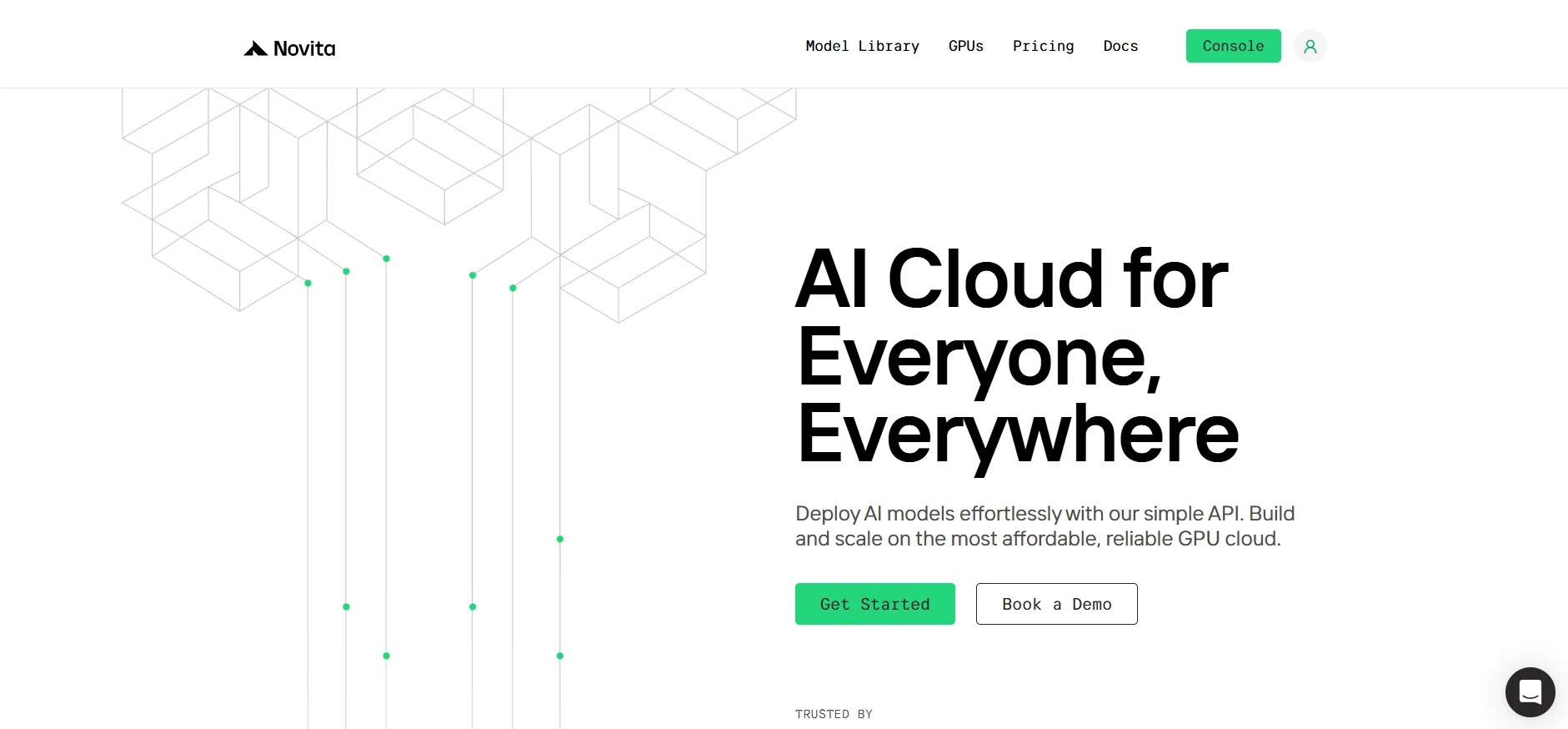
Step1:Register an account
If you’re new to Novita AI, begin by creating an account on our website. Once you’re registered, head to the “[GPUs](https://novita.ai/gpus/?utm_source=blogs_GPU&utm_medium=article&utm_campaign=H100 vs A100: Making the Right Choice for Your AI Infrastructure)” tab to explore available resources and start your journey.
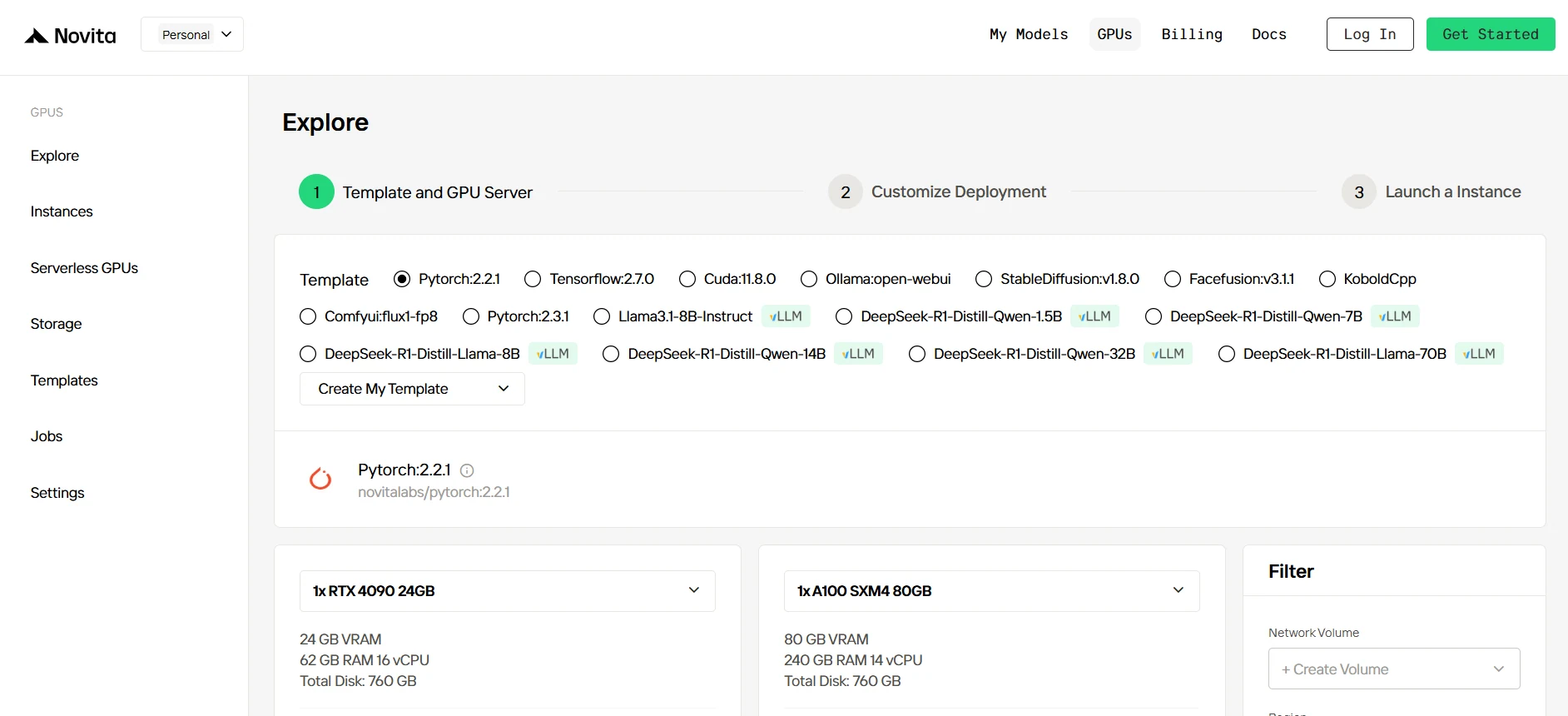
Step2:Exploring Templates and GPU Servers
Start by selecting a template that matches your project needs, such as PyTorch, TensorFlow, or CUDA. Choose the version that fits your requirements, like PyTorch 2.2.1 or CUDA 11.8.0. Then, select the A100 GPU server configuration, which offers powerful performance to handle demanding workloads with ample VRAM, RAM, and disk capacity.
[Try Novita AI’s High-Performance GPUs](https://novita.ai/gpus-console/?utm_source=blogs_GPU&utm_medium=article&utm_campaign=H100 vs A100: Making the Right Choice for Your AI Infrastructure)
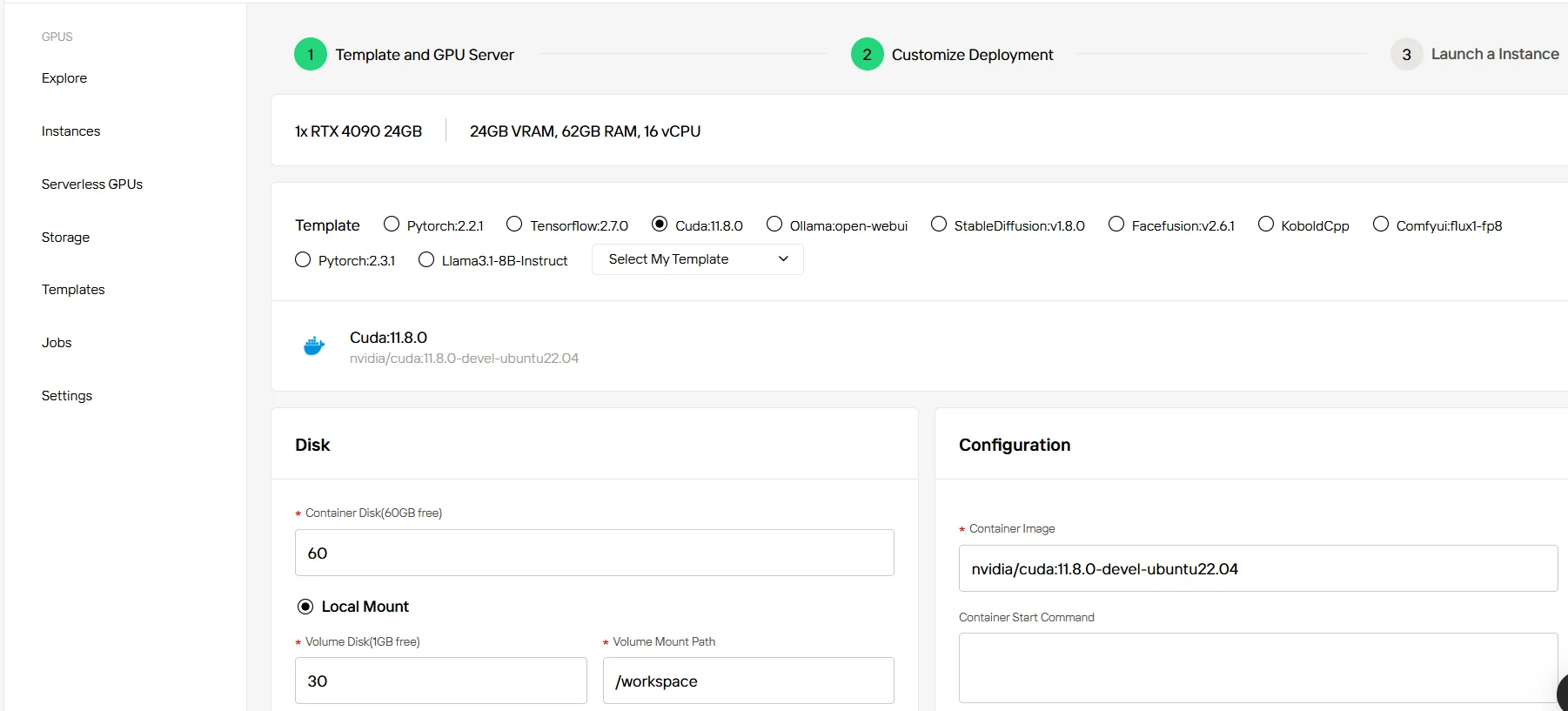
Step3:Tailor Your Deployment
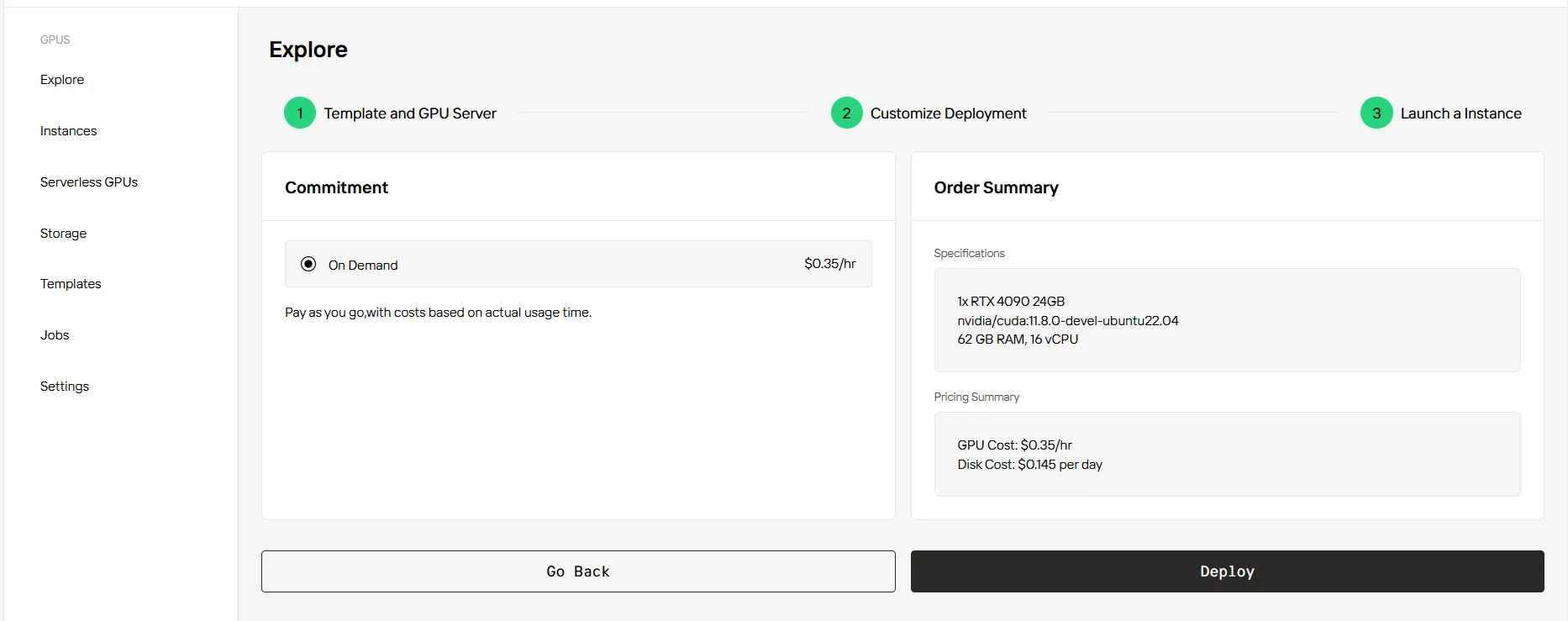
After selecting a template and GPU, customize your deployment settings by adjusting parameters like the operating system version (e.g., CUDA 11.8). You can also tweak other configurations to tailor the environment to your project’s specific requirements.
Step4:Launch an instance
Once you’ve finalized the template and deployment settings, click “Launch Instance” to set up your GPU instance. This will start the environment setup, enabling you to begin using the GPU resources for your AI tasks.
Conclusion
The choice between A100 and H100 depends on your specific use case, budget, and future requirements. While the H100 offers significant performance improvements and future-proofing benefits, the A100 remains a cost-effective choice for many current AI workloads. Consider your specific needs carefully and leverage cloud providers like Novita AI to test and validate before making a long-term commitment.
Frequently Asked Questions
What AI-specific features are offered by the A100 and H100?
The A100 features NVIDIA’s Tensor Cores, optimized for deep learning operations. The H100 takes this further with its Transformer Engine, designed specifically for next-gen AI tasks such as natural language processing and large-scale model training.
When is it the right time to migrate from A100 to H100?
If your current A100 setup can no longer meet your workload requirements or if you’re starting new, resource-intensive AI projects that require cutting-edge performance, it may be time to upgrade to the H100.
When should I choose the A100 over the H100?
The A100 is suitable for production workflows with models under 10B parameters, general AI tasks, and when budget constraints are a primary concern. It’s also a good choice for organizations with existing A100 infrastructure.
[Novita AI](https://novita.ai/?utm_source=blogs_GPU&utm_medium=article&utm_campaign= A100 vs RTX 4080: Ultimate GPU Showdown for AI in 2025) [i](https://novita.ai/?utm_source=blogs_GPU&utm_medium=article&utm_campaign=Choosing the Best GPU for Machine Learning in 2025: A Complete Guidehttps://novita.ai/?utm_source=blogs_GPU&utm_medium=article&utm_campaign=Choosing the Best GPU for Machine Learning in 2025: A Complete Guide)s an AI cloud platform that offers developers an easy way to deploy AI models using our simple API, while also providing a affordable and reliable GPU cloud for building and scaling.
Recommended Reading
A100 vs RTX 4080: Ultimate GPU Showdown for AI in 2025



