Novita AI is proud to announce the launch of its Qwen-Image-Edit service, delivering professional-grade image editing powered by the 20-billion-parameter Qwen-Image model—now available for only $0.02 per image.
By combining semantic control (Qwen2.5-VL) and appearance control (VAE encoder), Qwen-Image-Edit makes it possible to perform precise, flexible, and efficient edits. From IP transformations and style changes, to localized text editing in English and Chinese, to fine-grained appearance adjustments—Novita AI brings the full power of state-of-the-art image editing into your workflow at an affordable cost.
What is Qwen-Image-Edit?
https://www.youtube.com/watch?v=iw9WiAjNl7U
Qwen-Image-Edit Architecture
Qwen-Image-Edit is the image-editing variant of the 20-billion-parameter Qwen-Image model. It extends Qwen-Image’s advanced text rendering capabilities into editing tasks. It adopts a dual-path input design: routing the source image into both Qwen2.5-VL (for semantic control) and a VAE encoder (for appearance control), enabling precise and flexible editing.
1. Qwen2.5-VL Path (Semantic Control)
- What it is: Qwen2.5-VL is a multimodal vision-language model within the Qwen series. It specializes in understanding text prompts and the overall semantics of images.
- What it enables: High-level semantic control—such as changing styles, replacing objects, or rotating viewpoints—while ensuring semantic consistency across edits.
2. VAE Encoder Path (Appearance Control)
- What it is: A Variational Autoencoder (VAE) is a common image encoder used in generative models. It compresses the input image into a latent representation.
- What it enables:
- Preserves low-level details of the original image (color, texture, local shapes).
- Ensures that untouched regions remain fully consistent during local edits, avoiding “spillover” effects or unintended changes in unrelated areas.
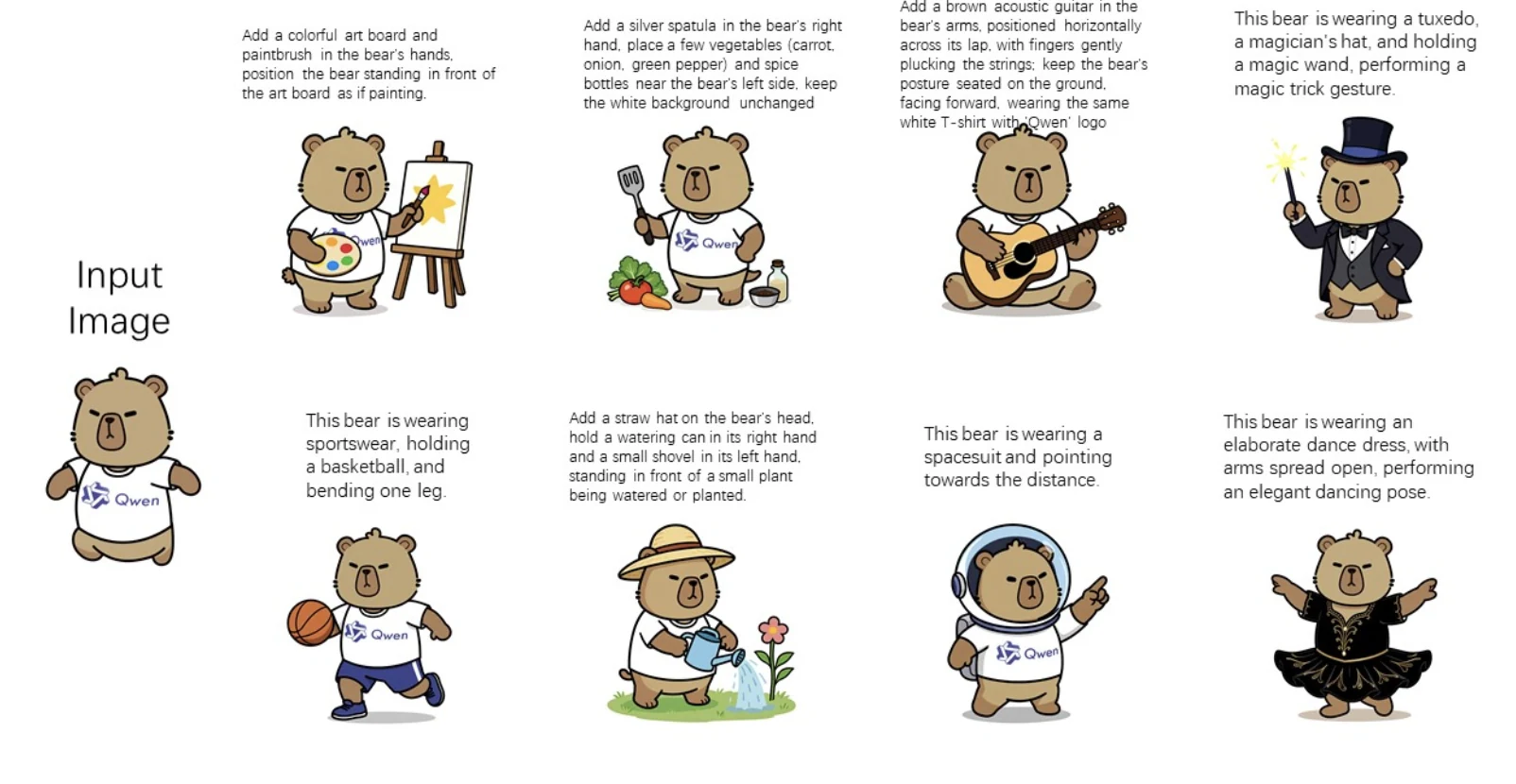
Qwen-Image-Edit demonstrates its strength in preserving character consistency while enabling diverse updates.
What is Qwen-Image-Edit’s Functionality?
1. Semantic Editing
Enables major transformations such as IP conversion, object rotation (including novel 90°/180° view synthesis), and style changes—all while preserving semantic consistency.
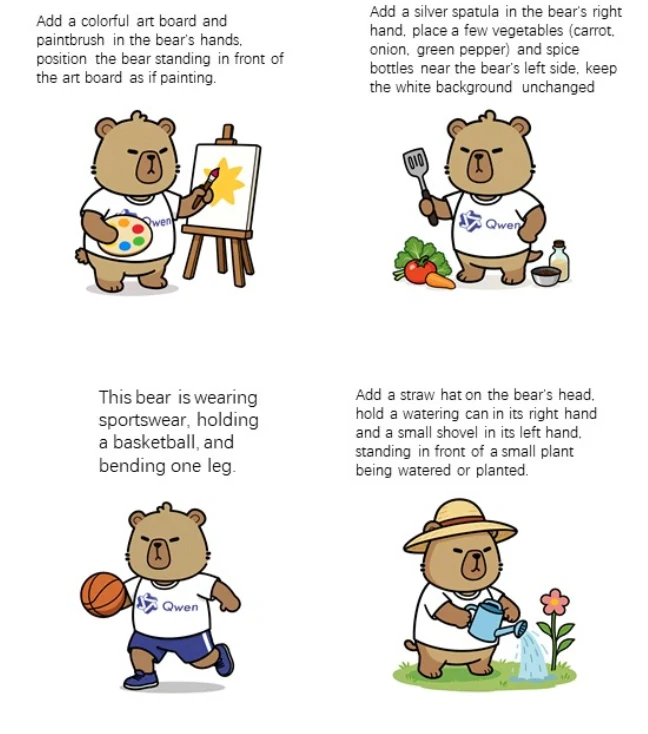
IP conversion
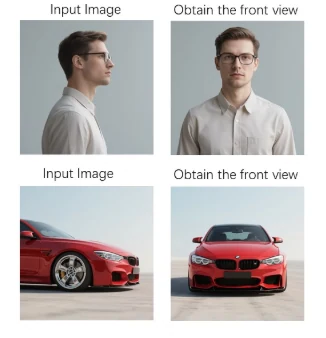
object rotation
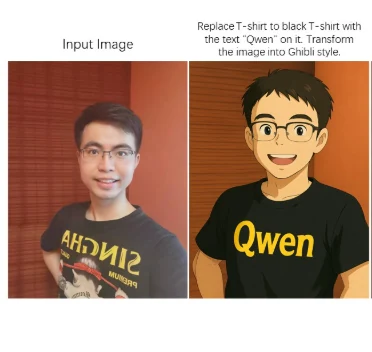
style changes
2. Appearance Editing
Supports adding, removing, or modifying visual elements (e.g., adding signs with reflections, deleting stray hairs, changing clothing or backgrounds) while keeping untouched regions fully intact.
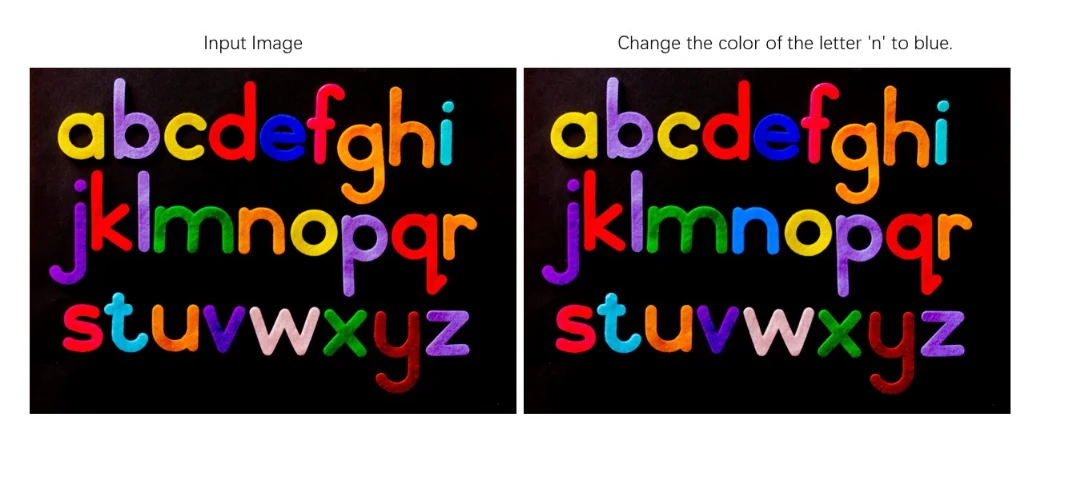
Modify the color of “n” to blue
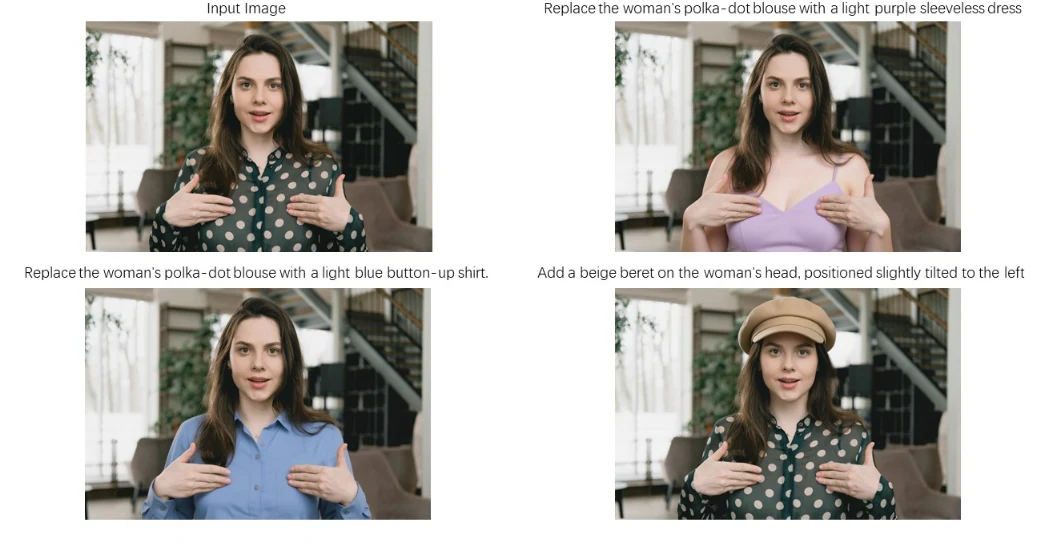
adjust the clothing
3. Precise Text Editing
Allows bilingual (Chinese & English) text insertion, deletion, or modification in images, while preserving font, size, and overall visual style—ideal for localized poster or headline edits.
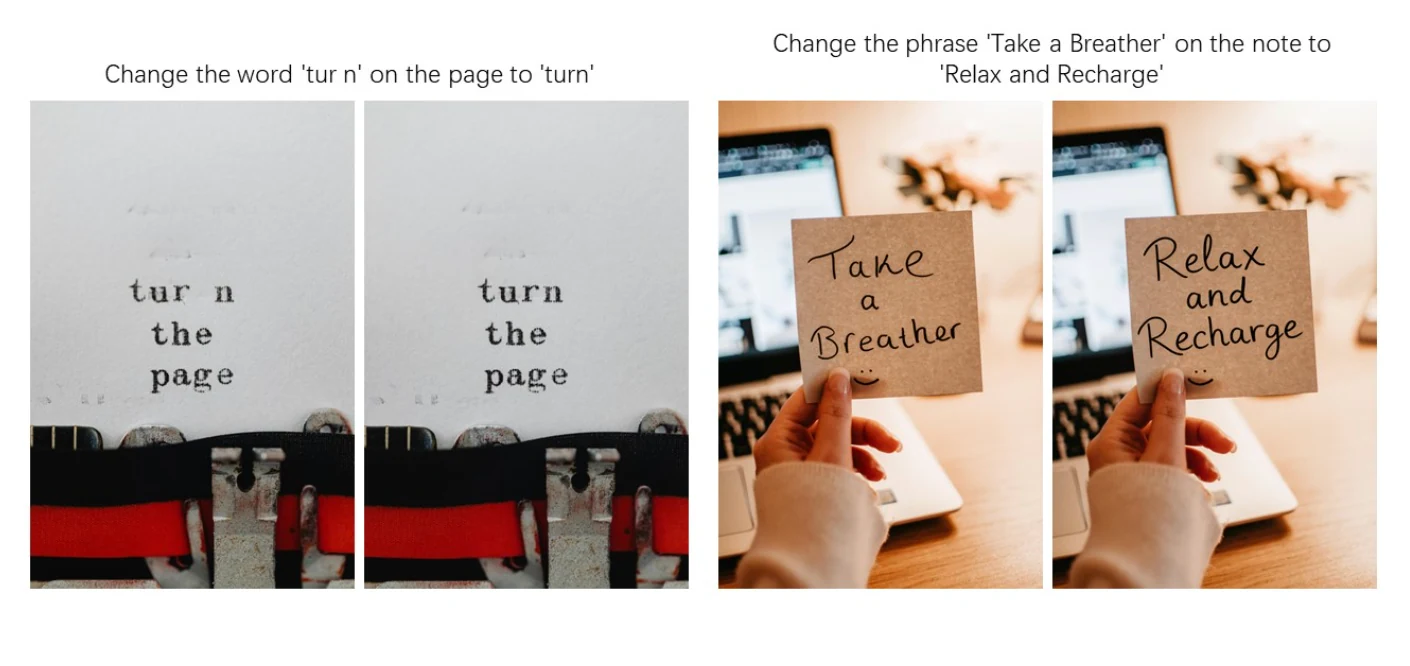
English
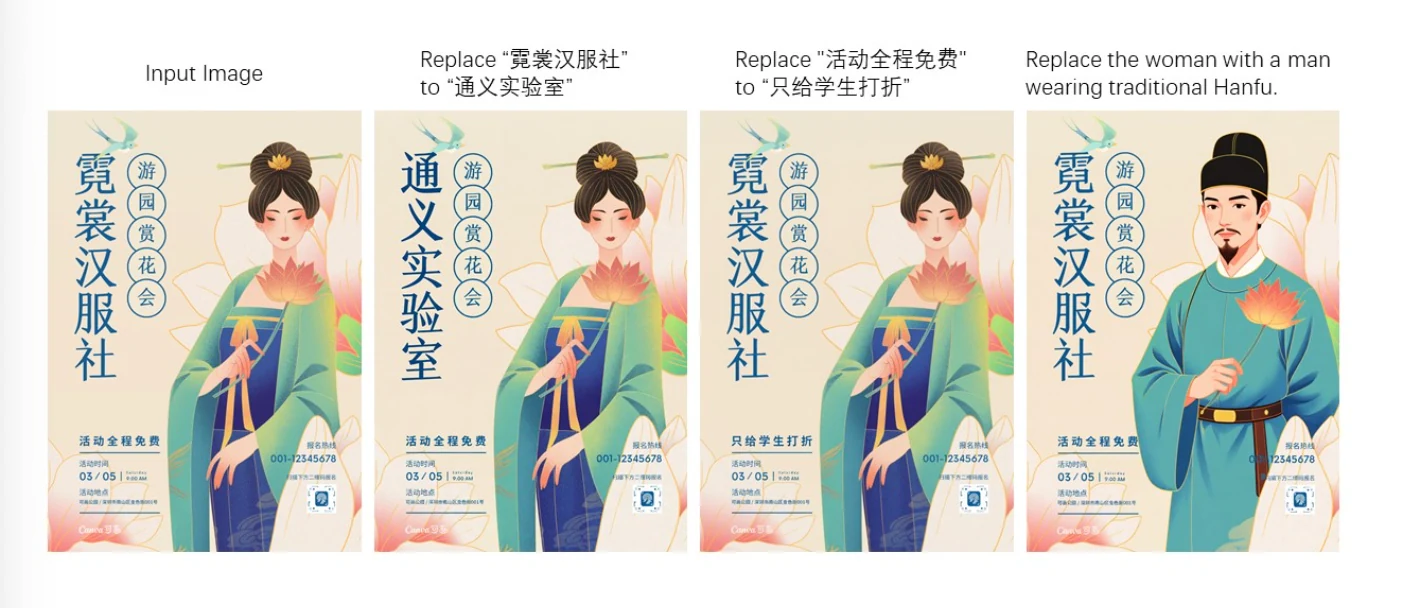
Chinese
Qwen-Image-Edit Benchmark
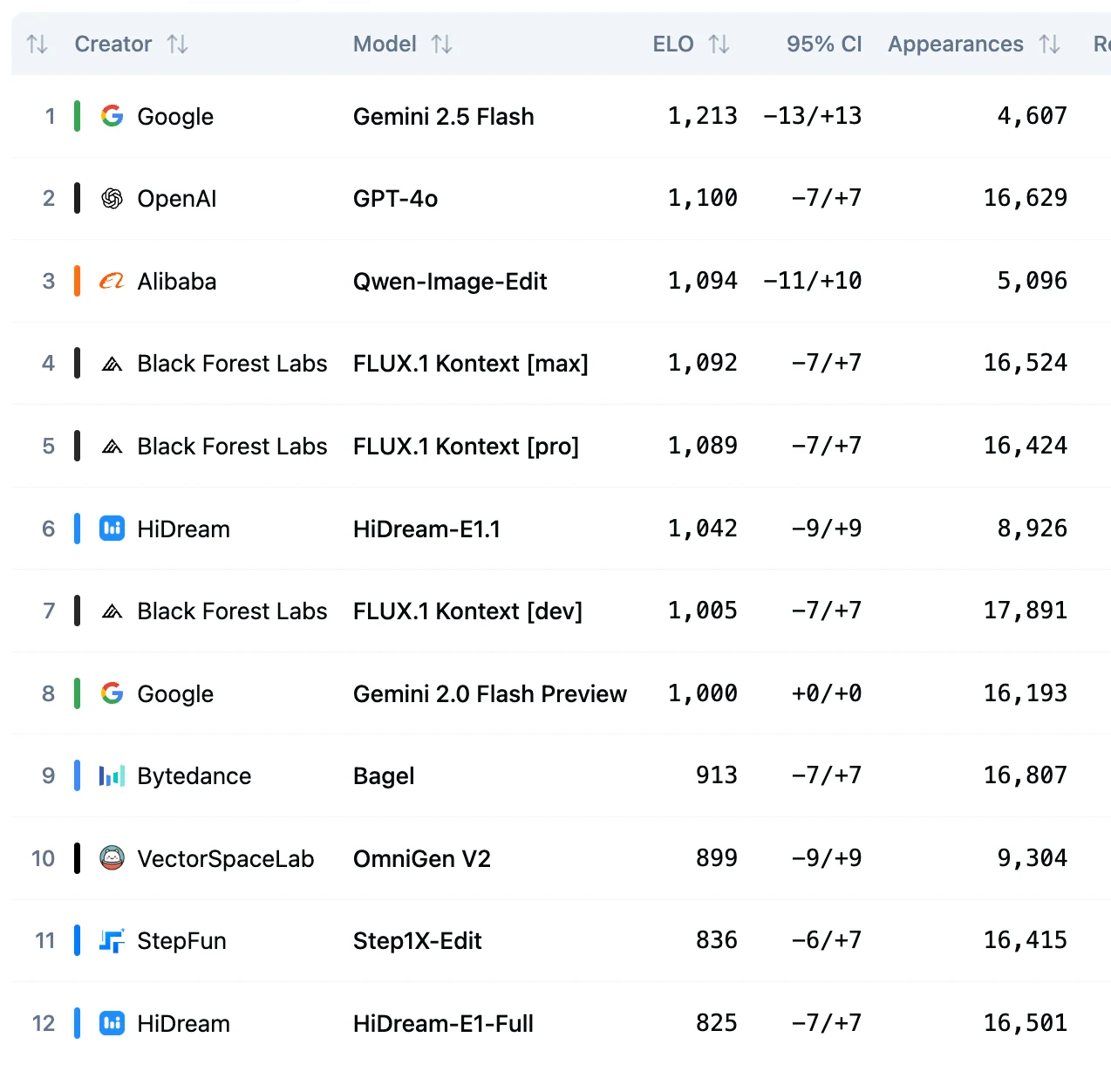
From Artificial Amalysis
What are the System Requirements for Qwen-Image-Edit?
Qwen launchs a DFloat11 lossless compression of the original Qwen/Qwen-Image-Edit BF16 weights. It reduces model size by ~32% while producing bit-identical outputs and enabling efficient GPU inference. With DFloat11, Qwen-Image-Edit runs on a single 32 GB GPU, or on a single 24 GB GPU with CPU offloading, without any loss in quality.
Run Qwen-Image-Edit on your own Novita AI GPU instance at ultra-low cost and start building your AI app today:
- RTX 5090 (32 GB VRAM) — 16 vCPU, 96 GB RAM — $0.50/hr
- L40S (48 GB VRAM) — 28 vCPU, 125 GB RAM — $0.55/hr
- A100 SXM (80 GB VRAM) — 14 vCPU, 240 GB RAM — $1.60/hr
- H100 SXM (80 GB VRAM) — 16 vCPU, 128 GB RAM — $1.80/hr
One-click Deploy, scale up to 8 GPUs per instance, and keep full control over your environment—perfect for fast prototyping or production workloads.
Compare Qwen-Image-Edit and Stable Diffusion, Nano Banana, DALL·E 4, Photoshop
| Feature / Tool | Qwen-Image-Edit | Stable Diffusion | Nano Banana | DALL·E 4 | Photoshop |
|---|---|---|---|---|---|
| Ease of Use | Plug‑and‑play with text prompts for editing | Flexible but needs prompt tuning | Very easy to use in google ecosystem | Need pro subscription | Steep learning curve; manual tools |
| Editing Style | Precise semantic & appearance editing; excellent text handling | Great for generation/inpainting | Integrate various elements | Fantastic for ideation, advertising concepts, and art creation. | Manual control; reliable but manually intensive |
| Speed | Slower generation; depends on hardware | Slower generation; depends on hardware | Very fast | About 1 Minutes | Very fast for manual workflows |
| Text Editing Capabilities | Excellent—including bilingual, English and Chinese | Poor; especially weak with Chinese or complex layouts | Not Mention | Not very accurate | Excellent (if fonts/elements available) |
1. If you need accurate text editing (signs, posters, bilingual content)
- ✅ Qwen-Image-Edit → Best choice. Handles English + Chinese text precisely, preserves fonts/styles, and edits text seamlessly.
- ❌ Stable Diffusion / DALL·E 4 → Struggle with accurate text.
- ✅ Photoshop → Works if you already have fonts/elements and don’t mind manual editing.
2. If you prioritize speed & convenience
- ✅ Nano Banana → Lightning-fast and very easy to use inside Google’s ecosystem. Great for quick iterations, character consistency, and consumer workflows.
- ✅ Photoshop → Instant manual edits (if you’re skilled).
- ❌ Qwen-Image-Edit / Stable Diffusion → Slower, hardware-dependent generation.
- ❌ DALL·E 4 → Around 1 minute per image, not suitable if you need rapid turnaround.
3. If you want creativity, ideation, and concept art
- ✅ DALL·E 4 → Fantastic for advertising concepts, art style exploration, and ideation.
- ✅ Stable Diffusion → Flexible for inpainting & style mixing if you’re willing to tune prompts or fine-tune models.
- ❌ Qwen-Image-Edit → Better at precise edits than freeform creativity.
- ❌ Photoshop → Creative but manual; slower for ideation at scale.
4. If you need precise local edits & professional control
- ✅ Qwen-Image-Edit → Excellent for semantic edits + appearance preservation, e.g., swapping clothes, removing details, rotating objects.
- ✅ Photoshop → Gold standard for pixel-level manual control.
- ❌ Nano Banana / DALL·E 4 → Less suited for fine-grained local control.
5. If ease of use matters most
- ✅ Nano Banana → Simplest, embedded in Google ecosystem, low friction.
- ✅ Qwen-Image-Edit → Prompt-based, plug-and-play.
- ❌ Stable Diffusion → Requires model management & prompt expertise.
- ❌ Photoshop → Steep learning curve, manual effort.
Is Qwen-Image-Edit Suitable for Professional Use?
Qwen-Image-Edit delivers studio-quality results that make it highly suitable for professional photography, marketing materials, and commercial design projects.
Benchmark performance: Published results show state-of-the-art accuracy across multiple editing benchmarks, validating its consistency and reliability in demanding workflows.
Fine-grained editing: As VentureBeat notes, it “gives Photoshop a run for its money”, excelling at detailed tasks like posters, signs, T-shirts, and calligraphy where text precision really matters.
Text editing excellence: Unlike many generative models, it supports bilingual (Chinese + English) precise text edits, maintaining font, size, and style—critical for localized commercial content like advertising campaigns or branded assets.
Best Practices for Qwen-Image-Edit
Novita launches the Qwen-Image-Edit API, with pricing at just $0.02 per image.
Step 1: Log In and Access the Model Library
Log in to your account and click on the Model Library button.

Step 2: Choose Your Model
Browse through the available options and select the model that suits your needs.
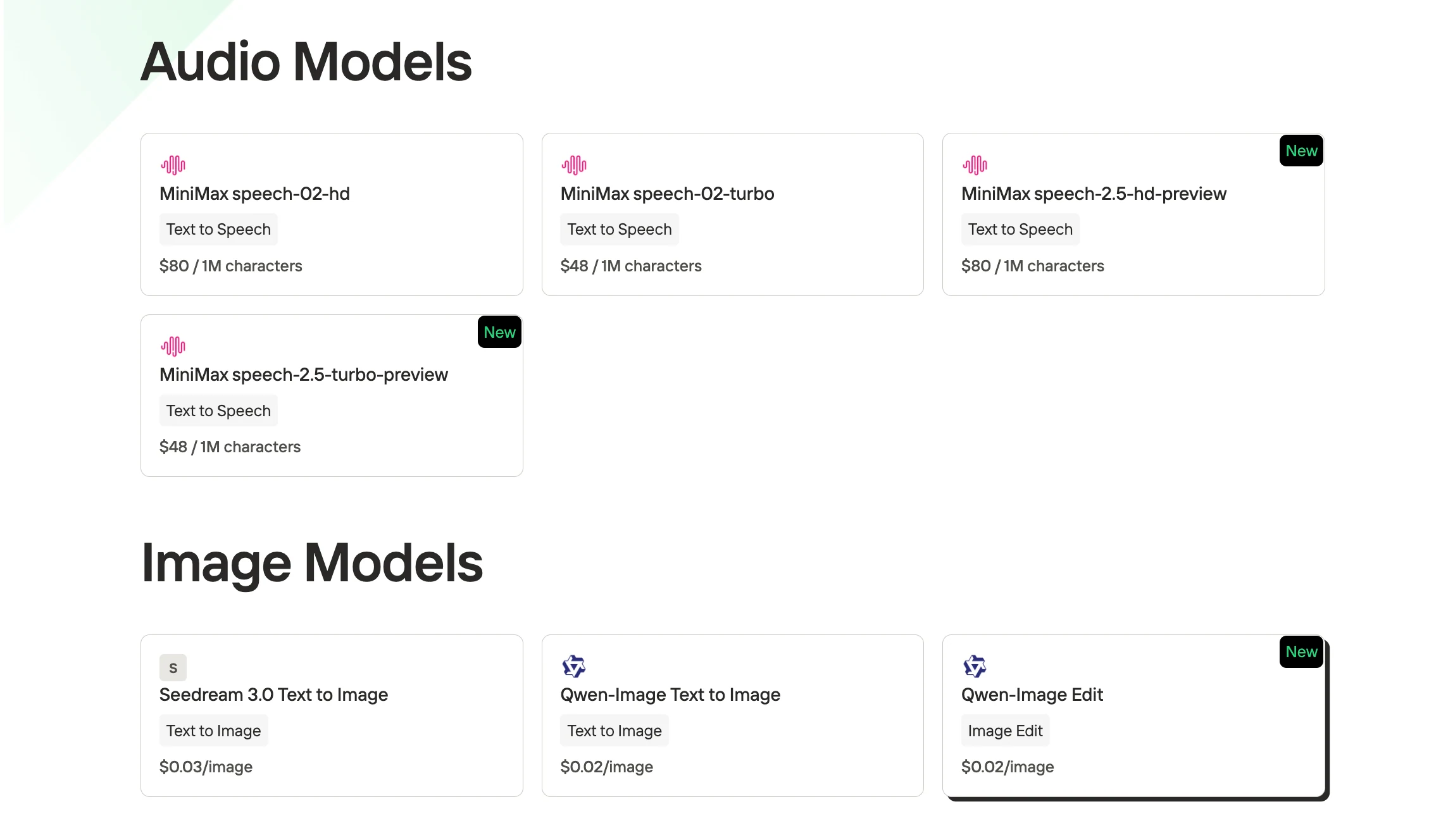
Step 3: Get Your API Key
To authenticate with the API, we will provide you with a new API key. Entering the “Settings“ page, you can copy the API key as indicated in the image.

Step 4: Install the API
Install API using the package manager specific to your programming language.
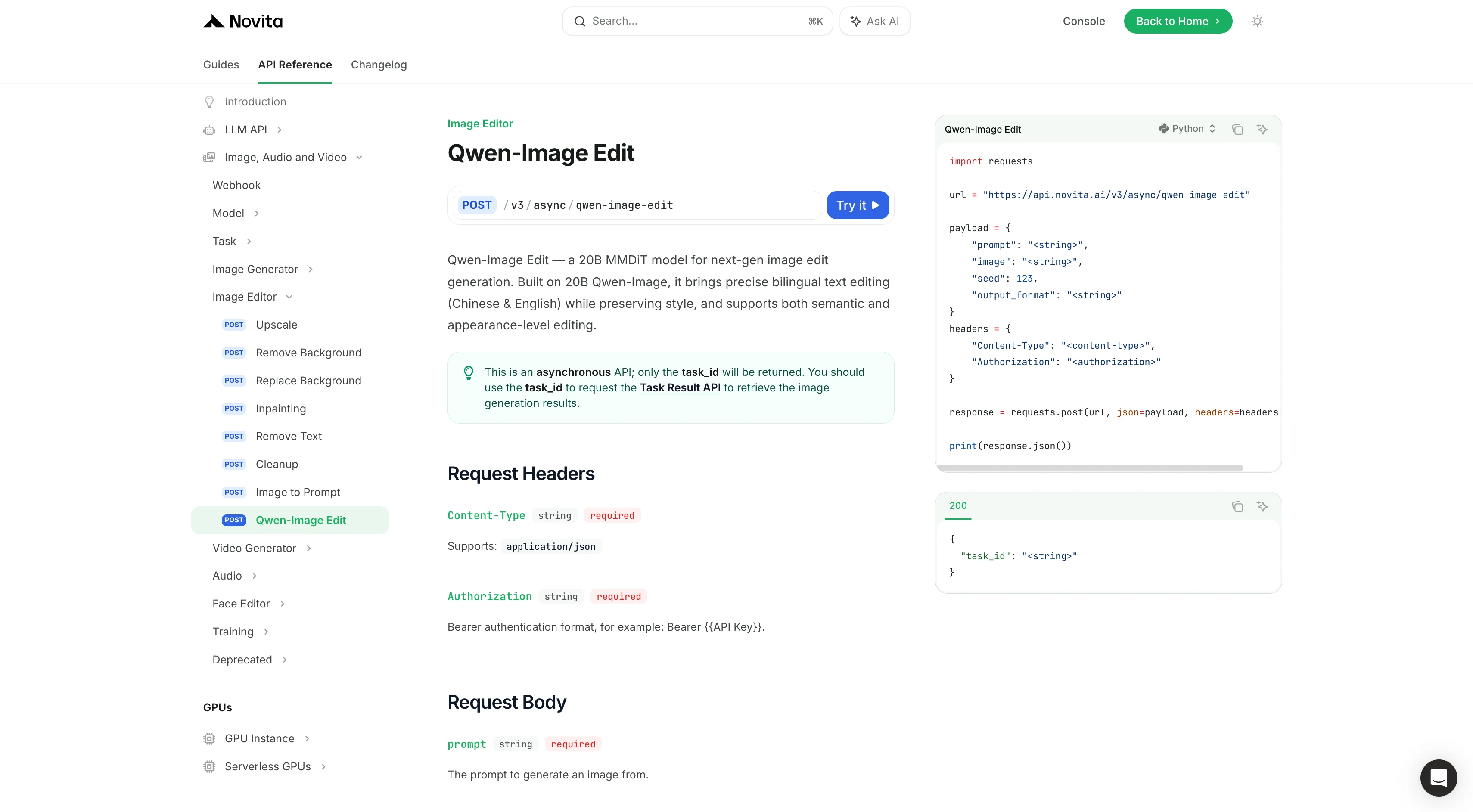
After installation, import the necessary libraries into your development environment. Initialize the API with your API key to start interacting with Novita AI LLM. This is an example of using chat completions API for python users.
Vidu 2.0 Image to Video API Example
import requests

url = "https://api.novita.ai/v3/async/qwen-image-edit"

payload = {
    "prompt": "<string>",
    "image": "<string>",
    "seed": 123,
    "output_format": "<string>"
}
headers = {
    "Content-Type": "<content-type>",
    "Authorization": "<authorization>"
}

response = requests.post(url, json=payload, headers=headers)

print(response.json())
Extract Image URL
import requests

url = "https://api.novita.ai/v3/async/task-result"

headers = {
    "Content-Type": "<content-type>",
    "Authorization": "<authorization>"
}

response = requests.get(url, headers=headers)

print(response.json())
With the release of Qwen-Image-Edit, Novita AI has lowered the barrier for professional image editing. For just $0.02 per image, creators, developers, and businesses can now access studio-quality editing capabilities that rival traditional tools like Photoshop—while offering unique advantages in automation, bilingual text handling, and semantic precision.
Try Qwen-Image-Edit today and unlock the future of intelligent image editing.
Frequently Asked Questions
What makes Qwen-Image-Edit different from other AI editors?
Qwen-Image-Edit offers dual-path architecture: semantic editing (high-level changes like style shifts, IP conversion, object rotation) and appearance editing (local modifications without damaging untouched regions). Unlike many models, it also supports precise bilingual text editing, ideal for posters and commercial assets.
How much does Qwen-Image-Edit cost?
Novita AI offers Qwen-Image-Edit at just $0.02 per image through its API, making it one of the most affordable professional-grade image editing solutions.
Is Qwen-Image-Edit suitable for professional use?
Yes. Qwen-Image-Edit delivers studio-quality results, validated by benchmarks and praised for its performance in professional scenarios like marketing design, poster editing, and T-shirt/calligraphy text accuracy.
Novita AI is the All-in-one cloud platform that empowers your AI ambitions. Integrated APIs, serverless, GPU Instance — the cost-effective tools you need. Eliminate infrastructure, start free, and make your AI vision a reality.