PixVerse V4.5 T2V is the latest text-to-video generation model that transforms simple text prompts into short, cinematic, and visually compelling clips. With support for multiple resolutions (up to 1080p), aspect ratios, dynamic motion modes, and advanced features like camera movements, lip-sync, speech, and even multi-image fusion, PixVerse V4.5 is designed for both creative storytelling and practical content production.
Now available through Novita AI’s API, PixVerse V4.5 offers one of the cheapest and most complete developer-friendly video generation solutions on the market—making it easier than ever to integrate AI video into your apps, platforms, and workflows.
What is PixVerse V4.5 T2V?
PixVerse V4.5 T2V refers to the Text-to-Video variant of PixVerse’s version 4.5 model—a powerful AI video generation suite that transforms text prompts into short, cinematic-looking video clips. It’s part of the broader PixVerse V4.5 suite, which also includes Image-to-Video (I2V) options.
https://www.youtube.com/watch?v=yUTNcoz1oSk
PixVerse V4.5 Features Beyond T2V
| Aspect | Details |
|---|---|
| Resolutions | 360p, 540p, 720p, 1080p (1080p only at 5s) |
| Aspect Ratios | 16:9, 4:3, 1:1, 3:4, 9:16 |
| Durations | 5s (any res), 8s (up to 720p) |
| Motion Modes | Normal (smooth), Fast (dynamic) |
| Camera | With over 20 movement styles (zoom, pan, rotate, push–pull, vertical moves) |
| Styling | Negative prompts, style presets (v3.5 only), watermark control,and supports negative prompts |
| Advanced Features | Multi-image fusion (I2V), camera controls, seamless transitions |
| Selectable Mode | Transition,Fusion,Entend,Sound,Speech,Restyle,Character |
PixVerse V4.5 T2V Generation Quality
- More fluid motion and realistic handling of complex, coordinated actions
- Multi-image reference and fusion, merging multiple input images into coherent video scenes—though this more applies to I2V, it showcases V4.5’s overall advancement.
- Better adherence to prompts, enabling precise translation of complex scene instructions.
- Physical realism in motion and actions, reflecting real-world physics
- Seamless first-last frame transitions, creating smooth loopable or cohesive clips.
PixVerse V4.5 T2V Benchmark
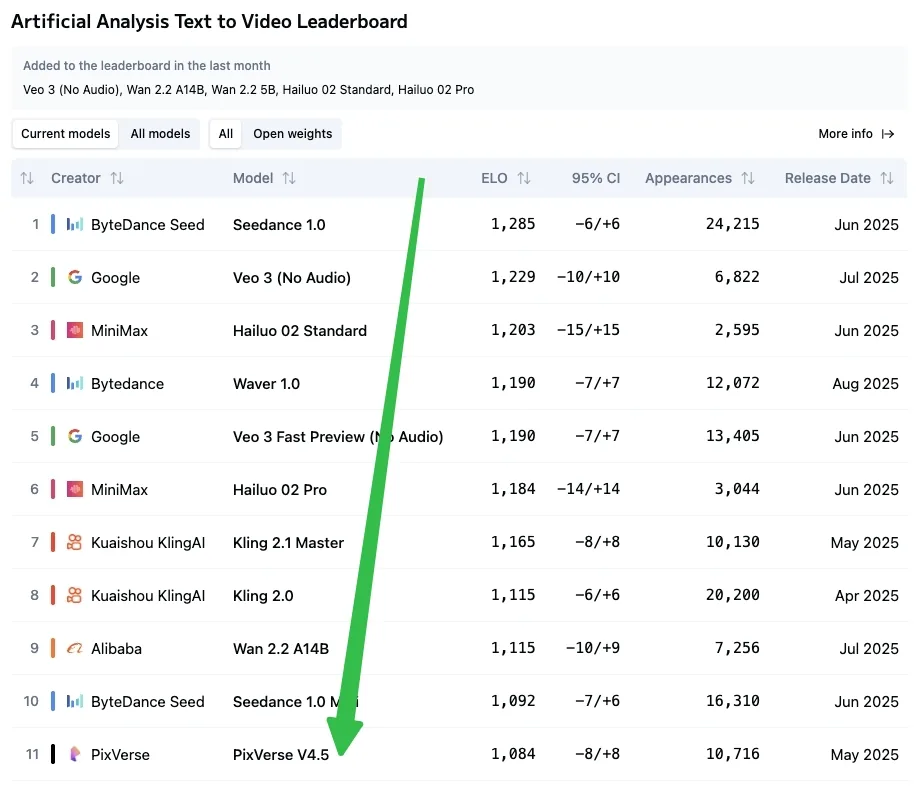
From Artificial Analysis
Compare PixVerse V4.5 T2V VS Wan, Hunyuan,Vidu,Kling
| Model | Developer | Max Resolution | Max Duration | License / Access | Architecture | Key Strengths |
|---|---|---|---|---|---|---|
| PixVerse V4.5 | PixVerse / 302.AI | 1080p | 8–12 s | Freemium | Proprietary diffusion | Flexible aspect ratios; built-in effects (lip-sync, “Zombie Transformation”); extendable clips |
| Wan 2.2 | Fal.ai / Alibaba | 1080p (via VAE) | 5–6 s (T2V) | Open-source (Apache 2.0) | Hybrid 3D VAE + Diffusion Transformer | Precise motion and physics simulation; multilingual & dynamic text effects; low VRAM requirements |
| HunyuanVideo | Tencent / Fal.ai | 720p (model file) | ~5–6 s | Open-source | Causal 3D VAE + Transformer | Unified image/video architecture; advanced lighting & camera-angle controls; smooth motion |
| Vidu | Tsinghua / ShengShu | 1080p | 16 s | Open-source (CC BY-SA) | Diffusion + U-ViT backbone | High coherence and dynamism; long-sequence generation; photography-style techniques |
| Kling v2.0 | Scenario / Kling AI | 1080p | 10 s (free tier) | Commercial | Proprietary diffusion | Granular camera movements (pan, tilt, zoom); negative-prompt filtering; professional mode |
Pixverse V4.5
Kling 1.6 T2V
Huanyuan T2V
Wan 2.2 T2V
Vidu
You can use Novita AI to test different AI Video Models
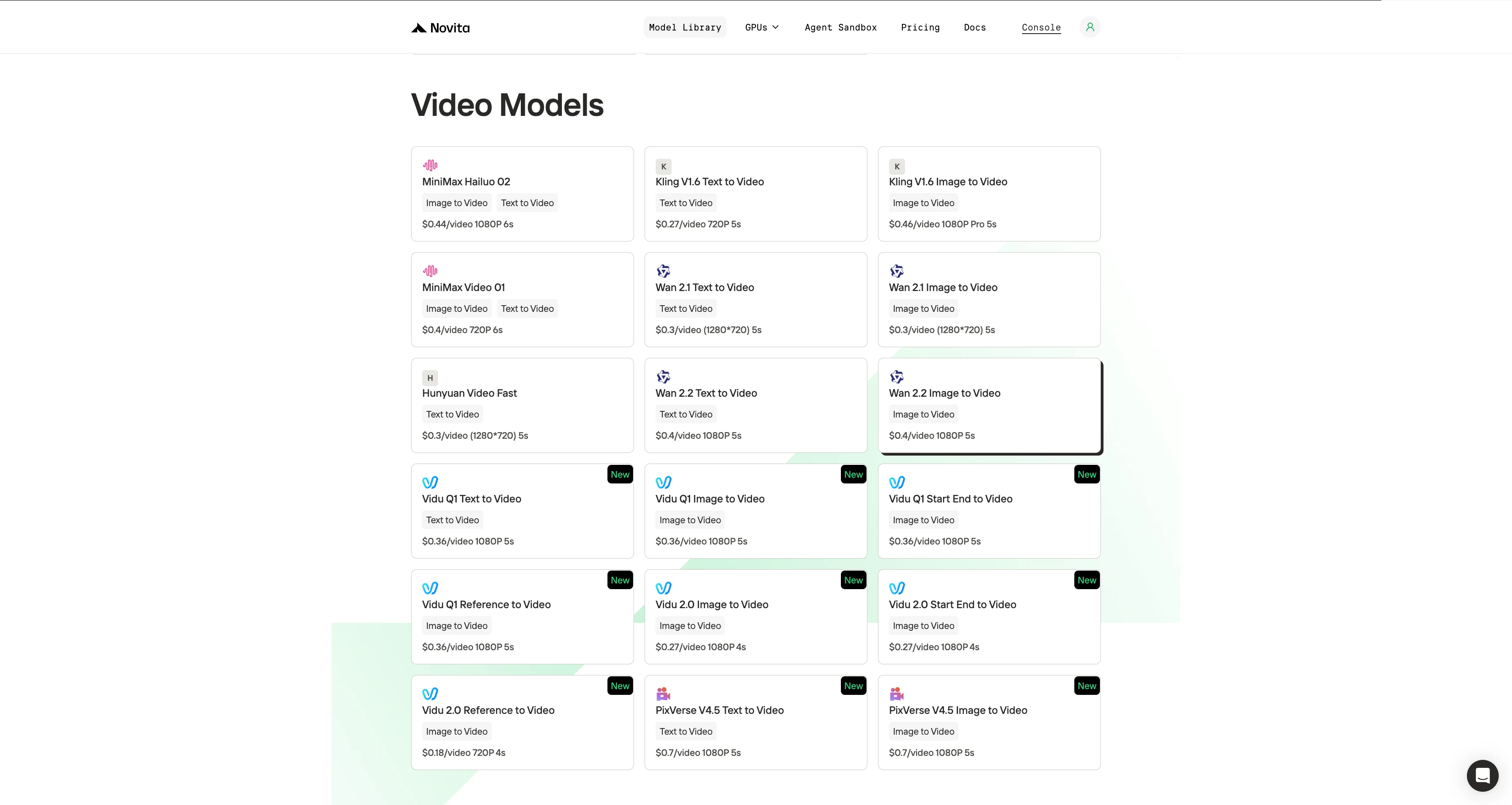
PixVerse V4.5 T2V Pricing
Pixverse V4.5 offers three different subscription plans, with the cheapest one costing as much as $8.
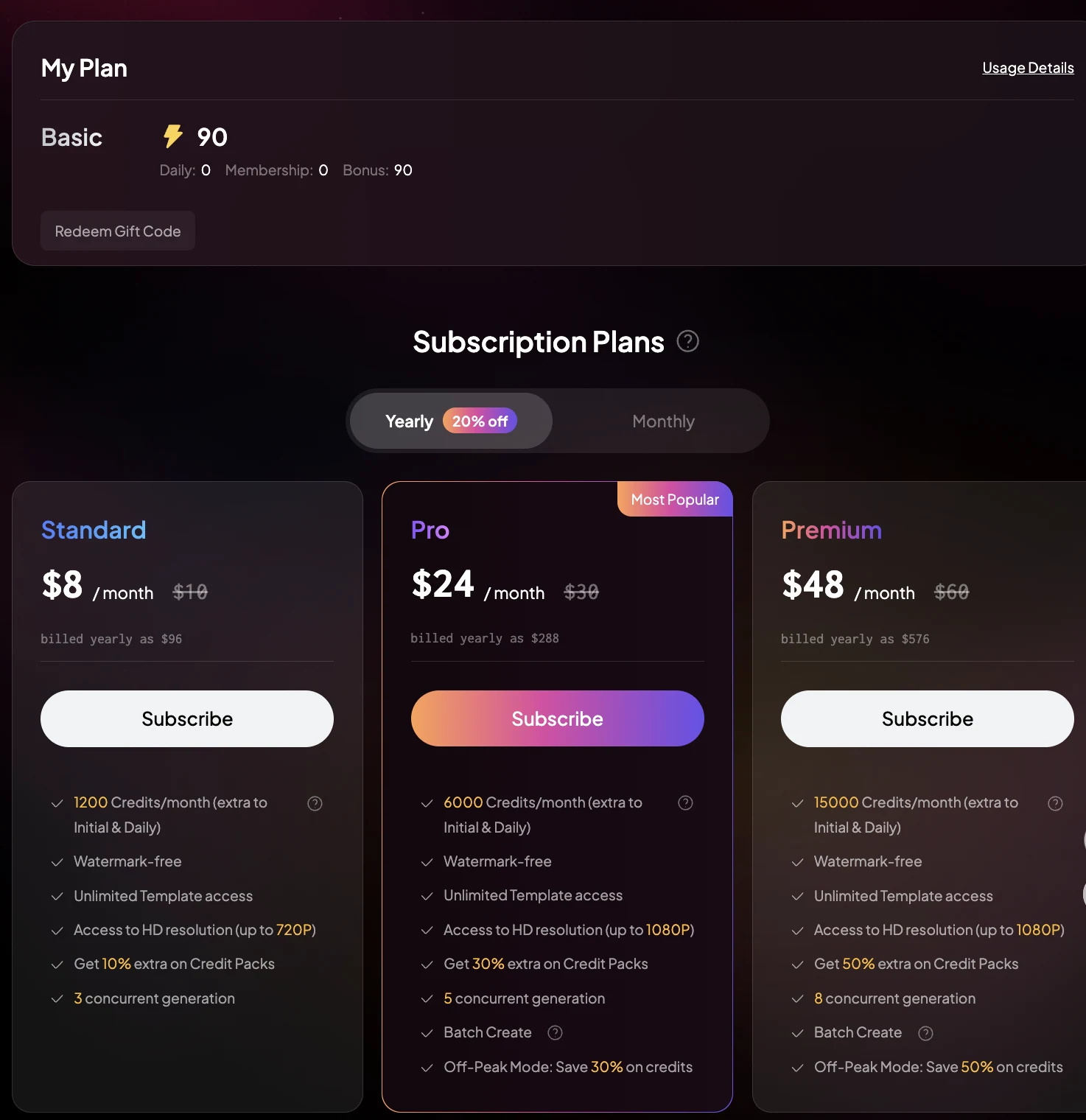
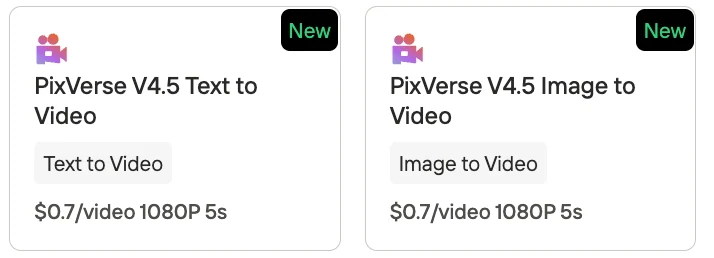
Novita exclusively offers Pixverse V4.5 for AI video generation—priced at just $0.7 per 5-second video!
You can directly leverage API access to create custom AI videos tailored to your needs, streamlining the process of turning your ideas into high-quality video content.
PixVerse V4.5 T2V Tutorial
Step 1: Log In and Access the Model Library
Log in to your account and click on the Model Library button.

Step 2: Choose Your Model
Browse through the available options and select the model that suits your needs.
Step 3: Get Your API Key
To authenticate with the API, we will provide you with a new API key. Entering the “Settings“ page, you can copy the API key as indicated in the image.

Step 4: Install the API
Install API using the package manager specific to your programming language.
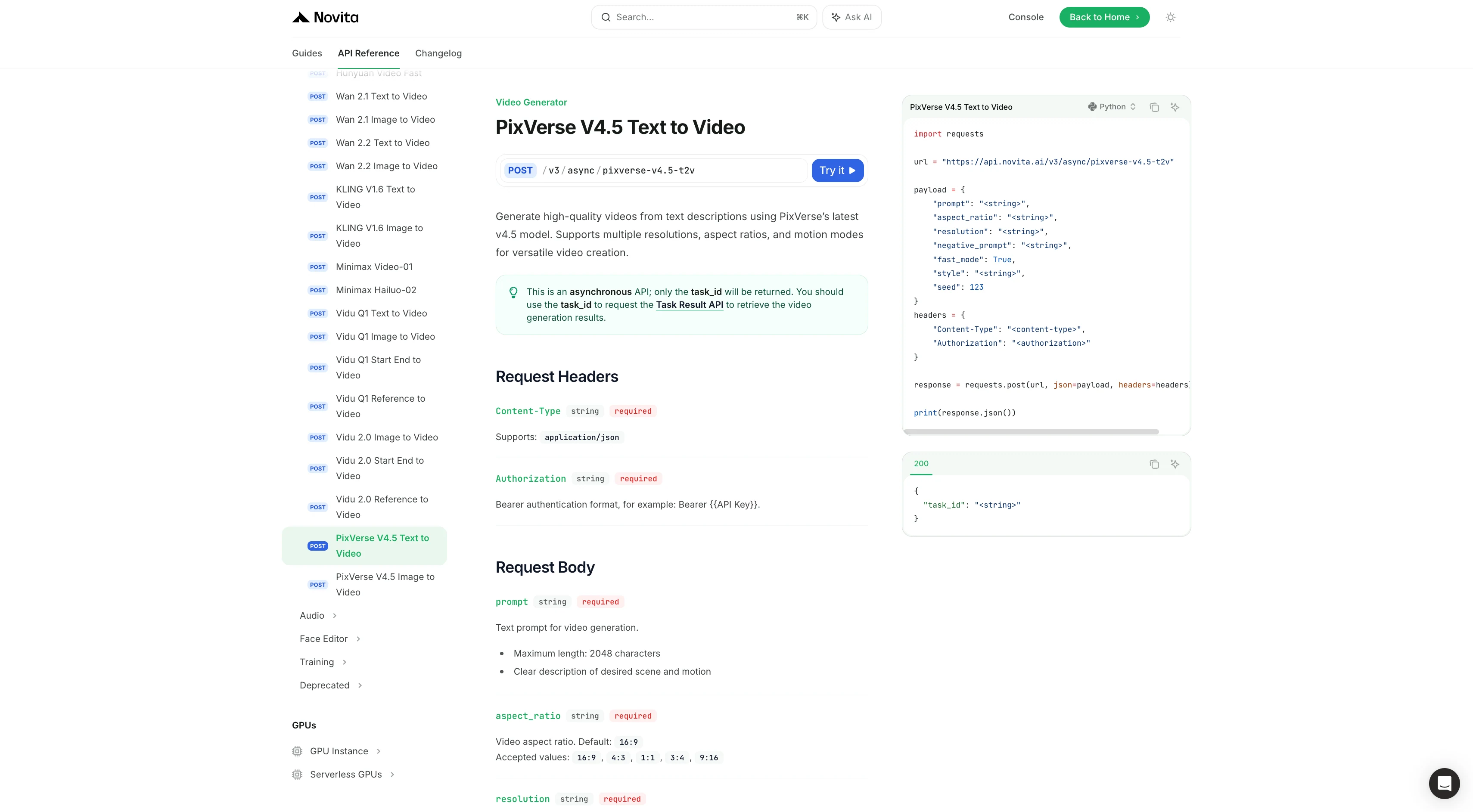
After installation, import the necessary libraries into your development environment. Initialize the API with your API key to start interacting with Novita AI LLM. This is an example of using chat completions API for python users.
Click “Try it!” — then follow the template to input your content and create your own Python prompt!
import requests

url = "https://api.novita.ai/v3/async/pixverse-v4.5-t2v"

payload = {
    "prompt": "<string>",
    "aspect_ratio": "<string>",
    "resolution": "<string>",
    "negative_prompt": "<string>",
    "fast_mode": True,
    "style": "<string>",
    "seed": 123
}
headers = {
    "Content-Type": "<content-type>",
    "Authorization": "<authorization>"
}

response = requests.post(url, json=payload, headers=headers)

print(response.json())
Step 5: Use Task ID to Get Video URL
import requests

url = "https://api.novita.ai/v3/async/task-result?task_id={Returned Task ID}"

headers = {
    "Content-Type": "<content-type>",
    "Authorization": "<authorization>"
}

response = requests.get(url, headers=headers)

print(response.json())
PixVerse V4.5 T2V Limitation
- Only 5 or 8-second video durations.
- Style variants may add visual noise.
- Fast motion can reduce clarity.
- Seed control may not guarantee identical outputs after model updates.
PixVerse V4.5 T2V—powered by Novita AI—delivers a cheap, complete, and developer-ready API for AI video generation. With just $0.7 per clip, flexible creative controls, and an easy-to-use API workflow, you can bring your text prompts to life as professional-quality videos.
Frequently Asked Questions
What are the limitations of PixVerse V4.5 T2V?
Currently, videos are limited to 5 or 8 seconds depending on resolution. Fast motion mode may reduce clarity, and style variants can sometimes introduce noise. Also, seed control does not always guarantee identical outputs after model updates.
How does PixVerse V4.5 compare to other models like Wan, Hunyuan, Vidu, or Kling?
PixVerse emphasizes flexibility, stylistic control, and built-in creative effects. While models like Vidu can generate longer clips (up to 16s) and Hunyuan focuses on realism, PixVerse strikes a balance between creativity, cost-efficiency, and fast turnaround.
What kind of prompts does PixVerse handle best?
PixVerse is strong with cinematic scenes, stylized animations, lip-sync videos, and multi-character interactions. It also supports negative prompts for fine-tuning results and offers 20+ camera movement presets.
Novita AI is the All-in-one cloud platform that empowers your AI ambitions. Integrated APIs, serverless, GPU Instance — the cost-effective tools you need. Eliminate infrastructure, start free, and make your AI vision a reality.