GLM 4.7 is an advanced 358B-parameter AI model built for reasoning, knowledge analysis, and long-form content generation. With an enormous 203K token context window, specialized “thinking” modes, and structured output support, it handles complex tasks that smaller models struggle with. Forget the headache of expensive GPU setups—API access lets you tap into its full power instantly, paying only for what you use. Whether you need real-time chat, multi-step reasoning, or large-scale document processing, GLM 4.7 makes it possible.
GLM 4.7 Model Overview
| Specification | Value |
|---|---|
| Total Parameters | 358.3B (32B active per forward pass) |
| Architecture | GLM 4 MoE Transformer (160 routed + 1 shared expert, 8 active per token) |
| Context Window | 202,752 tokens |
| Max Output Tokens | 128K–131K (provider-dependent) |
| Precision | bfloat16 (FP8 variants available) |
| License | MIT |
| Special Features | Interleaved/Preserved/Turn-level Thinking modes, function calling, structured outputs |
Benchmark Performance of GLM 4.7
| Benchmark | GLM 4.7 | Claude Sonnet 4.5 | GPT-5-High | DeepSeek V3.2 |
|---|---|---|---|---|
| MMLU-Pro | 84.3 | 88.2 | 87.5 | 85.0 |
| GPQA-Diamond | 85.7 | 83.4 | 85.7 | 82.4 |
| AIME 2025 | 95.7 | 87.0 | 94.6 | 93.1 |
| LiveCodeBench-v6 | 84.9 | 64.0 | 87.0 | 83.3 |
| SWE-bench Verified | 73.8 | 77.2 | 74.9 | 73.1 |
| Terminal Bench 2.0 | 41.0 | 42.8 | 35.2 | 46.4 |
| τ²-Bench (tool use) | 87.4 | 87.2 | 82.4 | 85.3 |
GLM 4.7 demonstrates strong and consistent performance on general knowledge, reasoning, and mathematical benchmarks—scoring especially high on tasks like AIME 2025 and LiveCodeBench-v6—while showing relatively weaker results on tool-use and software engineering benchmarks such as Terminal Bench 2.0 and SWE-bench. This suggests that GLM 4.7 is best suited for reasoning-intensive and knowledge-driven applications, like complex question answering or data analysis, but may be less optimal for tasks requiring direct code execution or software tool interaction.
Why API Access Matters for GLM 4.7?
Self-hosting a 358B MoE model demands significant GPU memory. The full weight set must fit in VRAM at inference time, regardless of how many parameters are active per token. The table below shows hardware requirements at each quantization level:
| Quantization | VRAM Required | Minimum H100 80GB |
|---|---|---|
| BF16 (full precision) | 717 GB | 9× H100 |
| FP8 / Q8_0 | 381 GB | 5× H100 |
| Q4_K_M | 216 GB | 3× H100 |
| Q3_K_M | 171 GB | 3× H100 |
| Q2_K | 131 GB | 2× H100 |
Self-hosting GLM 4.7 requires very expensive GPUs—at least 2×H100 for minimal deployment and 5×H100 for production-quality FP8—making the infrastructure cost high. Using an API avoids these fixed costs and charges only for actual usage, which is far more cost-effective for moderate workloads.
How to Choose a GLM 4.7 API Provider?
API provider selection hinges on five metrics: max output tokens, input/output pricing, latency (time-to-first-token), throughput (tokens/second), and context window support. The table below defines each metric and its impact on different use cases:
| Metric | Definition | Why It Matters |
|---|---|---|
| Max Output Tokens | Maximum tokens the model can generate in a single response | Limits long-form content generation (docs, reports, code refactoring). |
| Input Cost | Price per 1M input tokens (prompt + context) | Dominates cost for long-context use cases (repository analysis, multi-file code review). |
| Output Cost | Price per 1M output tokens (generated response) | Drives cost for high-output scenarios (code generation, content creation). |
| Cache Read | Discounted rate for re-using cached prompt prefixes | Reduces cost for repeated system prompts and long context reuse. |
| Latency (TTFT) | Time-to-first-token in seconds | Critical for real-time chat and interactive UIs. <0.7s feels instant; >2s causes user drop-off. |
| Throughput | Tokens generated per second during streaming | Affects perceived speed for long outputs. |
Key Takeaway: Long-context workflows (repository analysis, document processing) optimize for input cost and context window support. High-output scenarios (code generation, content creation) prioritize output cost and throughput. Real-time applications (chat, coding assistants) require <1s TTFT above all else. Cache read pricing becomes significant when the same long system prompt is reused across many requests.
GLM 4.7 API Provider Comparison
GLM 4.7 providers each have distinct strengths:
- Novita AI offers low cache costs and fast latency, making it ideal for interactive applications;
- SiliconFlow supports the longest context window and highest token capacity, suited for long-form document processing or large codebases;
- Z.ai (official) provides reliable, stable performance through an official channel;
- Atlas Cloud has the lowest output costs and balanced context limits, making it cost-effective for high-output scenarios like content or code generation.
Novita AI: Fast, Cost-Efficient, High-Throughput
Option A: Use the Playground
The easiest way to get to know GLM 4.7 is to try it directly in the Novita AI Playground.You can start interacting with GLM 4.7 instantly in the Novita AI Playground—no setup, no code. Just sign up, open the Playground, and test prompts in real time. New accounts receive free credits after registration, so you can try the model right away.
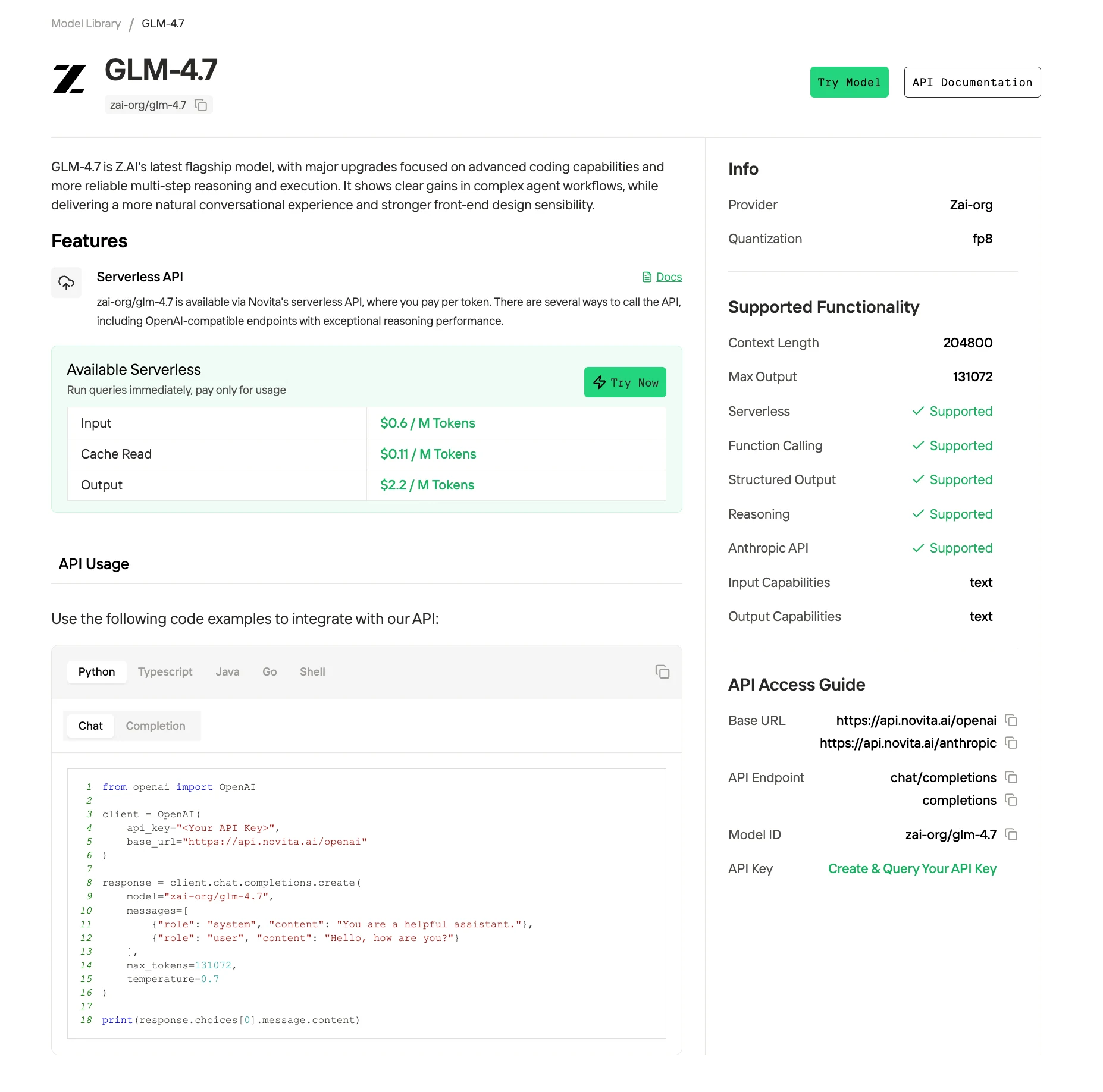
Option B: Integrate via API
Connect GLM 4.7 to your applications using Novita AI’s unified REST API.
Getting Your API Key on Novita AI
Step 1: Create or Login to Your Account
Visit [https://novita.ai](https://novita.ai) and sign up or log in to your existing account
Step 2: Navigate to Key Management
After logging in, find “API Keys”
Step 3: Create a New Key
Click the “Add New Key” button.
Step 4: Save Your Key Immediately
Copy and store the key as soon as it is generated; it is usually shown only once and cannot be retrieved later. Keep the key in a secure location such as a password manager or encrypted notes
Direct API Integration
from openai import OpenAI

client = OpenAI(
    api_key="<Your API Key>",
    base_url="https://api.novita.ai/openai"
)

response = client.chat.completions.create(
    model="zai-org/glm-4.7",
    messages=[
        {"role": "system", "content": "You are a helpful assistant."},
        {"role": "user", "content": "Hello, how are you?"}
    ],
    max_tokens=131072,
    temperature=0.7
)

print(response.choices[0].message.content)
Multi-Agent Workflows with OpenAI Agents SDK
Build sophisticated agent systems with plug-and-play integration—supporting handoffs, routing, and tool use via native function calling, plus the full long-context window for complex, multi-step tasks.
Option C: Connect with Third-Party Platforms
If you’re already building with agent frameworks or developer tools, Novita AI is designed to plug in with minimal friction:
- Agent frameworks & app builders: Follow Novita’s step-by-step integration guides to connect with popular tooling such as Continue, AnythingLLM, LangChain, and Langflow.
- Hugging Face Hub: Novita is listed as an Inference Provider on Hugging Face, so you can run supported models through Hugging Face’s provider workflow and ecosystem.
- OpenAI-compatible API: Novita’s LLM endpoints are compatible with the OpenAI API standard, making it easy to migrate existing OpenAI-style apps and connect many OpenAI-compatible tools (Cline, Cursor, Trae and Qwen Code).
- Anthropic-compatible API (Claude Code workflows): Novita also provides Anthropic SDK–compatible access so you can integrate Novita-backed models into Claude Code style agentic coding workflows.
- OpenCode (Built-in provider): Novita AI is now integrated directly into OpenCode as a supported provider, so users can select Novita in OpenCode without manual configuration.
SiliconFlow: Ultra-Long Context, Maximum Throughput
SiliconFlow is a cloud provider that hosts many third‑party LLMs, including GLM 4.7, with a strong focus on long context and high throughput. It is well suited for workloads like large‑scale document processing, long codebases, or applications that need to handle many parallel requests efficiently.
Z.AI (Official): Full Feature Set and Official Reliability
Z.AI (Official) is the home platform of the GLM family and exposes GLM 4.7 through its official APIs. Because it is the primary upstream provider, it usually offers the most complete feature set, including advanced reasoning and coding capabilities and early access to new modes or “thinking” features. It targets production use cases that care about model quality, stability, and staying aligned with the latest GLM releases.
Atlas Cloud: Low Output Cost and Balanced Performance
Atlas Cloud is a multi‑model inference platform that positions its GLM 4.7 offering as a cost‑efficient, balanced choice. It emphasizes low output token prices while still providing competitive latency, context length, and throughput, which makes it attractive for high‑volume content or code generation workloads.
Conclusion
Deploying GLM 4.7 is now easier than ever with provider-specific advantages:
- Novita AI: Fast, cost-efficient, high-throughput—perfect for interactive apps.
- SiliconFlow: Ultra-long context and maximum throughput for massive documents or codebases.
- Z.ai(Official): Full feature set and official reliability for production-ready deployments.
- Atlas Cloud: Low output costs with balanced performance for high-volume workloads.
With the right API choice, developers can unlock GLM 4.7’s full potential—building smarter apps, accelerating workflows, and delivering results at scale without the infrastructure overhead.
Frequently Asked Questions
Which GLM 4.7 API provider is best for interactive applications?
For real-time chat, coding assistants, or multi-step agent workflows, Novita AI offers the lowest latency and high throughput, making interactions feel instant while keeping costs manageable.
Can I integrate GLM 4.7 into my existing apps easily?
Absolutely. Novita AIprovides OpenAI APIs, plus guides for popular frameworks like LangChain, Langflow, and agent SDKs—so you can plug in GLM 4.7 without rewriting your code.
Novita AI is an AI & agent cloud platform helping developers and startups build, deploy, and scale models and agentic applications with high performance, reliability, and cost efficiency.
Recommended Reading