AI image generation is evolving beyond simple text-to-image conversion. Developers building visual workflows now demand character consistency across multiple generations, real-time web-aware content, and high-resolution outputs up to 4K — capabilities that earlier models couldn’t reliably deliver. Seedream 5.0 lite solves these challenges by combining ByteDance’s advanced multimodal reasoning, enabling professional-grade visual content creation without complex local deployment.
This guide walks through everything you need to access and use Seedream 5.0 lite: what makes it unique among image generation models, how to get started via API in under 5 minutes, and practical deployment strategies for e-commerce, marketing, and creative workflows that require stable character identities and trend-aware visuals.
Quick Answer: Seedream 5.0 lite is accessible via API providers like Novita AI, supporting text-to-image, image-to-image, and multi-image compositing (up to 14 references). The model excels at maintaining character consistency and integrating real-time web search for current-event visuals — ideal for campaign systems and product photography workflows.
What Is Seedream 5.0 lite?
Core Capabilities
| Feature | Capability | Best For |
|---|---|---|
| Character Consistency | Maintains identity across variations | Brand mascots, recurring characters |
| Web Search Integration | Real-time online data retrieval | Trend-aware marketing, current events |
| Multi-Image Compositing | Up to 14 reference images per generation | Complex scene composition, product mockups |
| Instruction Following | Precise prompt adherence, boxed editing | Iterative refinements, detailed modifications |
When to Choose Seedream 5.0 lite
Seedream 5.0 lite delivers the strongest value in three scenarios:
-
Campaign systems requiring character integrity: Marketing teams building multi-asset campaigns (social posts, banners, email headers) around a single character or product need every generated image to maintain visual consistency. Traditional models often introduce subtle facial feature variations that break brand coherence — Seedream 5.0 lite locks identity across generations.
-
E-commerce and product visualization: Product photography workflows benefit from the model’s ability to composite multiple reference images (product angles, background elements, styling props) while following detailed editing instructions. The high-resolution output ensures print-quality results for packaging and catalogs.
- Only real time web search: Social media managers and news-oriented visual creators can leverage the real-time web search feature to generate images that reference current events, trending topics, or seasonal aesthetics without manually researching and describing these elements in prompts.
How to Access Seedream 5.0 lite via API
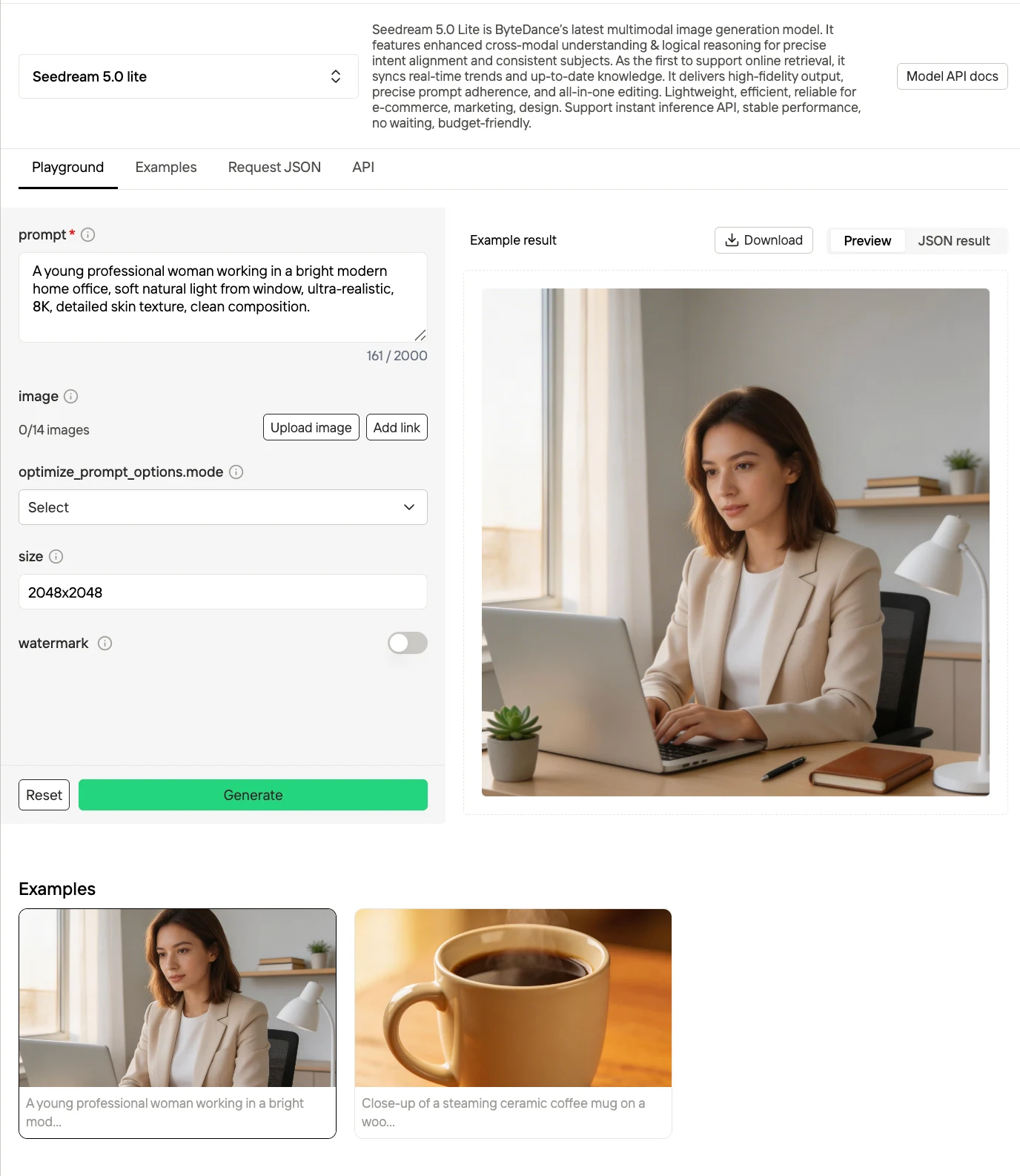
The fastest path to production-ready Seedream 5.0 lite usage is through API providers. Unlike local deployment (which requires GPU infrastructure and model hosting expertise), API access delivers instant inference with predictable costs and zero setup complexity. Novita AI offers comprehensive Seedream 5.0 lite integration, with full support for text-to-image, image-to-image, multi-image compositing, and sequential generation features.
Step 1: Get Your API Key from Novita AI
Navigate to Novita AI’s platform and create an account. After logging in:
- Go to Model Library and search for “Seedream 5.0 lite”
- Click Log in to Use to activate API access
- Navigate to Account → API Keys
- Generate a new API key and copy it
Step 2: Basic Text-to-Image Generation
Seedream 5.0 lite’s core use case is converting text prompts into high-quality images. Here’s a minimal Python example using Novita AI’s API:
curl --location --request POST 'https://api.novita.ai/v3/seedream-5.0-lite' \
--header "Content-Type: application/json" \
--header "Authorization: Bearer ${API_KEY}" \
--data-raw '{
  "size": "2048x2048",
  "prompt": "A young professional woman working in a bright modern home office, soft natural light from window, ultra-realistic, 8K, detailed skin texture, clean composition.",
  "watermark": false,
  "optimize_prompt_options": {
    "mode": "standard"
  },
  "sequential_image_generation": "disabled",
  "sequential_image_generation_options": {
    "max_images": 15
  }
}'
Prompt Engineering Best Practices
Effective Seedream 5.0 lite prompts follow these patterns:
- Structure: Subject + Context + Style + Quality: “A [detailed subject description], [setting/environment], [artistic style], [quality modifiers]”
- Example: “A confident female entrepreneur in her 40s with short silver hair and round glasses, standing in a bright modern startup office with glass walls and green plants, corporate professional photography style, sharp focus, high detail, natural lighting”
- Avoid vague descriptors: Replace “nice lighting” with “soft diffused natural light from north-facing window” or “dramatic Rembrandt lighting with side shadow”
- Specify exclusions when needed: Add negative prompts via the
negative_promptparameter (if supported by your API provider) to eliminate unwanted elements: “no distortion, no blurriness, no watermarks, no text artifacts”
Step 3: Image-to-Image Editing and Multi-Reference Compositing
Seedream 5.0 lite’s advanced feature set includes editing existing images and compositing up to 14 reference images. This enables workflows where you start with a base image (e.g., a product photo) and iteratively refine specific elements:
# Prompt Examples
Base image: [image_1_url]

Task: Edit the product appearance while preserving structure.

Instructions:
- Replace the background with a minimal studio setting (soft gray gradient)
- Change the bottle label to a modern luxury style (black + gold typography)
- Keep lighting direction consistent with original image

Reference images:
- [image_2_url] → label style reference
- [image_3_url] → lighting mood reference
Image input requirements: Array of input image information, supporting URL or Base64 encoding. Up to 14 reference images can be provided. Supported image formats: jpeg, png, webp, bmp, tiff, gif.
Step 4: Leveraging Real-Time Web Search
Seedream 5.0 lite’s web retrieval feature activates automatically when prompts reference current events, trending topics, or time-sensitive concepts. The model identifies trigger phrases like “latest,” “current,” “trending,” or specific dates and performs live web searches to inform the generation.
# Prompt Examples
Create an image summarizing the current trending AI models as of 2026,
including any recently popular tools or concepts.Limitations and Considerations
When Seedream 5.0 lite May Not Be the Best Choice
Despite its strengths, Seedream 5.0 lite has specific limitations worth considering:
- Text rendering limitations: While Seedream 5.0 lite generates cleaner text than many image models, complex typography or long text blocks (product labels with multiple paragraphs, detailed infographics) may still require post-processing in design software. The model excels at short phrases and headlines but struggles with dense textual content.
- Style consistency vs. style diversity: The model’s optimization for character consistency means it tends toward visual coherence. If your workflow requires dramatically different artistic styles across generations (e.g., comparing watercolor vs. oil painting vs. digital illustration interpretations of the same subject), you may need to use different specialized models for each style rather than relying on Seedream 5.0 lite alone.
Seedream 5.0 lite represents a clear shift in how image generation models are positioned within real-world workflows. Rather than optimizing purely for visual quality, it addresses three persistent bottlenecks in production use: character consistency, controllability, and contextual relevance. By combining multi-image compositing, precise instruction following, and real-time web-aware generation, it enables outputs that are not only visually coherent, but operationally reliable across repeated use.
For developers and teams, the implication is practical. Tasks that previously required stitching together multiple tools—manual editing, reference management, trend research—can now be consolidated into a single API-driven pipeline. This reduces iteration cost while improving consistency across assets, which is critical in scenarios like campaign systems, product visualization, and content at scale.
Conclusion
Seedream 5.0 lite represents a practical shift in image generation for production workflows. By combining character consistency, multi-image compositing, and real-time web-aware generation, it addresses bottlenecks that previously required multiple tools to solve.
Key Takeaway: Use Seedream 5.0 lite when your workflow demands consistent character identity across assets, complex reference compositing, or trend-aware visuals. For straightforward text-to-image tasks, it also delivers high-quality results via a simple API call. Try it for free on Novita AI.
Frequently Asked Questions
What makes Seedream 5.0 lite different from other image generation models?
Seedream 5.0 lite prioritizes character consistency across multiple generations and includes real-time web search integration for trend-aware content.
Can Seedream 5.0 lite generate realistic product photography?
Yes — Seedream 5.0 lite excels at product visualization workflows where maintaining consistent product appearance across different backgrounds is critical. It works best for e-commerce lifestyle images and marketing campaign systems requiring visual coherence.
Is Seedream 5.0 lite available for local deployment?
Not at this time. Seedream 5.0 lite is currently only accessible via API providers like Novita AI. ByteDance has not released self-hostable model weights for local deployment.
Novita AI is the All-in-one cloud platform that empowers your AI ambitions. Integrated APIs, serverless, GPU Instance — the cost-effective tools you need. Eliminate infrastructure, start free, and make your AI vision a reality.
Recommended Reading