The AI image generation landscape has undergone a seismic shift with models like Flux pushing the boundaries of photorealism and text rendering. However, these advancements come with steep computational demands – Flux Pro requires 24-32GB VRAM for 8K outputs, surpassing the capabilities of most consumer GPUs. While 89% of AI developers report GPU limitations as their primary bottleneck, the rise of cloud GPU rental platforms now offers a solution. This guide explores how to navigate the GPU rental ecosystem for Flux workflows, balancing performance needs with cost efficiency.
What is Flux
Flux is a text-to-image generation model created by Black Forest Labs. It uses advanced machine learning techniques, including generative adversarial networks (GANs) and diffusion models, to transform textual descriptions into high-quality, realistic images. Flux allows users to input detailed text prompts, which the model interprets to generate corresponding visuals.
This model is used in various applications such as:
- Creative industries: For generating artwork, concept art, and design visuals based on textual descriptions.
- Marketing and advertising: Helping brands create tailored imagery quickly from simple text prompts.
- Entertainment: Enabling quick prototyping of visual content for games, animations, and VR experiences.
Given the computationally intensive nature of these tasks, understanding how GPUs can accelerate the training and inference processes of Flux is essential.
Understanding Flux’s GPU Requirements
Technical Specifications Across Models
- CUDA Cores: CUDA cores are the primary computing units in NVIDIA GPUs that perform parallel computations. Flux’s text-to-image generation involves processing large datasets and performing complex operations like matrix multiplications. GPUs with more CUDA cores can handle these tasks more efficiently, resulting in faster training and inference times. For example, The Flux Pro version performs optimally on GPUs with 10,240+ CUDA cores.
- Tensor Cores: Tensor cores are specialized hardware designed to accelerate the deep learning computations involved in training neural networks. Flux relies heavily on tensor operations, such as matrix multiplications during training, to generate images from text. Tensor cores can significantly speed up these operations, especially when used with models like Flux that rely on large neural networks.
- VRAM (Video RAM): VRAM is critical for storing the large model weights and datasets Flux requires. The more VRAM a GPU has, the larger the batch size and model complexity it can handle. With Flux’s deep learning models, VRAM is necessary to store high-resolution images and manage the large number of parameters involved in generating accurate images.
- Memory Bandwidth: Memory bandwidth refers to the rate at which data can be read from or written to VRAM. Higher memory bandwidth improves data flow, ensuring that the GPU can quickly access the necessary data for training or inference. With high bandwidth (such as the A100’s 1,555 GB/s), the GPU can process large datasets faster, reducing bottlenecks and speeding up Flux’s image generation tasks.
Performance Factors in Rendering Workflows
- **GPU for Training vs. Inference:**During training, Flux’s model processes large amounts of data to map text to images, requiring GPUs with high processing power, VRAM, and memory bandwidth. After training, inference generates images from new text prompts, which, while less demanding, still benefits from high-performance GPUs. Mid-range GPUs offer a good balance of cost and performance for this task.
- **Efficiency in Rendering Workflows:**GPU acceleration in rendering workflows is crucial for Flux to generate high-quality images in a timely manner. Rendering detailed, high-resolution images from textual prompts requires significant parallel computing power. GPUs with more CUDA cores, Tensor cores, and VRAM enable Flux to process complex images and descriptions quickly, making real-time image generation feasible.
Why Rent GPUs for Flux?
Cost Efficiency
Renting GPUs for Flux allows developers to avoid the high upfront cost of purchasing powerful hardware. By renting, you only pay for the computational resources you use, making it a cost-effective solution, especially for short-term projects or when you’re experimenting with different models.
Decentralization Benefits
GPU rental services offer cloud-based solutions, meaning you can access high-performance GPUs remotely. This decentralization removes the need for physical hardware, allowing you to focus on the creative and technical aspects of your project without worrying about infrastructure.
Scalability & Flexibility
GPU rental services allow you to scale your computing power as needed. As Flux models become more complex or as demand for image generation increases, you can rent additional GPUs or switch to more powerful ones to meet your project’s needs. This flexibility ensures that your resources are aligned with your project’s scale and budget.
Supporting the Ecosystem
By renting GPUs, you contribute to a more sustainable computing ecosystem. Cloud GPU rental platforms like Novita AI, AWS, and Google Cloud allow resources to be shared across multiple users, maximizing the use of available hardware and reducing the environmental impact of underutilized resources.
Selecting the Right GPU for Flux
Factors to Consider
- VRAM Capacity: For optimal text-to-image generation with Flux, VRAM requirements vary by model version: Flux.1-dev requires a minimum of 24GB VRAM, while Flux Pro demands 32GB or more. These high VRAM specifications are crucial for handling the models’ complexity and ensuring smooth generation of high-quality images.
- Compute Power (CUDA Cores, Tensor Cores): Look for GPUs with a high number of CUDA and Tensor cores to accelerate the computational tasks involved in generating high-quality images from text. NVIDIA’s A100 and RTX 3090 are ideal for Flux operations, featuring both a large number of CUDA cores and dedicated Tensor cores, which together deliver the powerful computational capabilities needed for efficient image generation.
- Price-Performance Ratio: Choose a GPU that balances performance and cost. For example, the NVIDIA RTX 3090 offers excellent performance for image generation tasks at a relatively lower price point than the A100, making it a good option for many developers.
Popular GPU Rental Providers
Several companies offer cloud-based GPU rental services for developers working with Flux, including:
- Novita AI: Provides access to high-performance GPUs such as the A100 and RTX 4090 with flexible rental plans.
- AWS: Offers GPU instances with various configurations, including NVIDIA A100 and V100.
- Google Cloud: Provides cloud-based GPU rental for AI workloads, with easy integration for projects like Flux.
Using Novita AI with Flux
Novita AI provides specialized services for developers looking to run Flux efficiently. With access to powerful GPUs like the NVIDIA A100 and RTX 4090, developers can quickly spin up instances tailored to their needs, reducing the time spent on hardware configuration and maximizing their project’s performance. Novita AI’s cloud infrastructure ensures seamless integration with Flux, allowing for easy scaling and flexibility.
If you’re interested in Novita AI, follow these steps to get started:
Step1:Create an account
Visit the Novita AI website and create an account. Once registered, navigate to the “[GPUs](https://novita.ai/gpus/?utm_source=blogs_GPU&utm_medium=article&utm_campaign=GPU Rental for Flux: Everything Developers Need to Know)” tab to browse available resources and begin your AI journey.
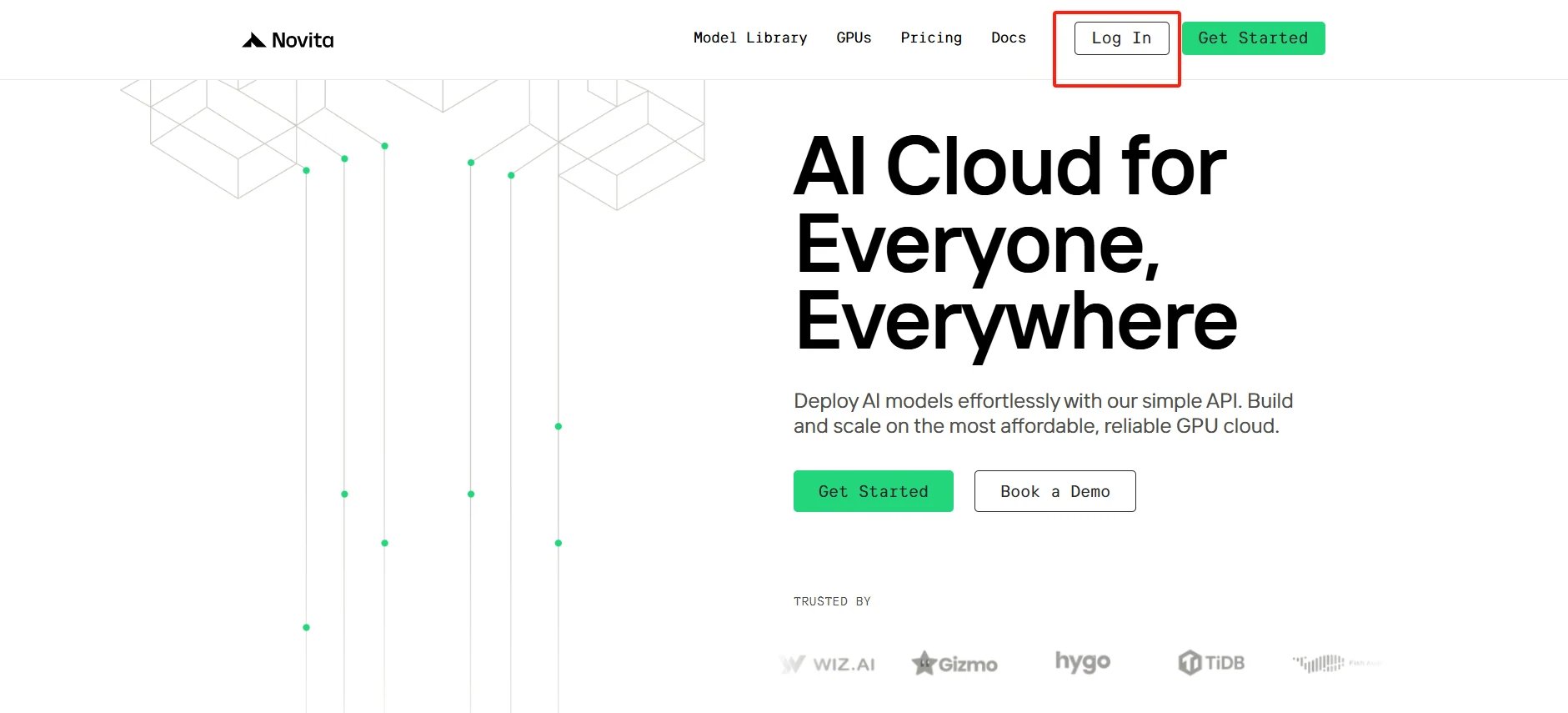
[Try using Novita AI now](https://novita.ai/?utm_source=blogs_GPU&utm_medium=article&utm_campaign=GPU Rental for Flux: Everything Developers Need to Know)
Step2:Select Your GPU
We offer a variety of pre-designed templates to suit your specific needs, or you can create your own custom template. With access to high-performance GPUs like the NVIDIA RTX 4090, featuring ample VRAM and RAM, our service ensures efficient training for even the most complex AI models. Choose the option that aligns best with your requirements.
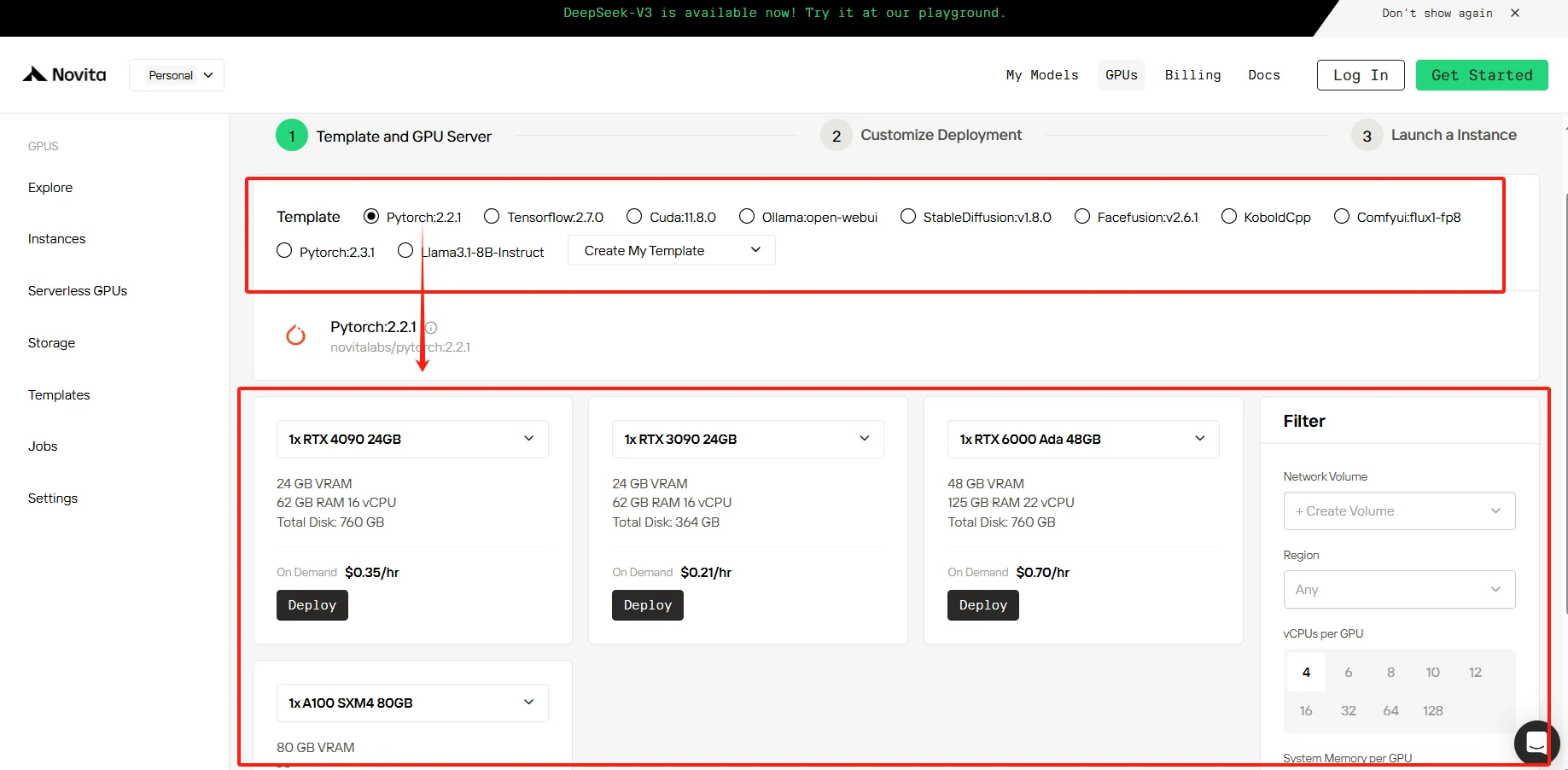
[Try Novita AI’s High-Performance GPUs](https://novita.ai/gpus-console/?utm_source=blogs_GPU&utm_medium=article&utm_campaign=GPU Rental for Flux: Everything Developers Need to Know)
Step3:Customize Your Setup
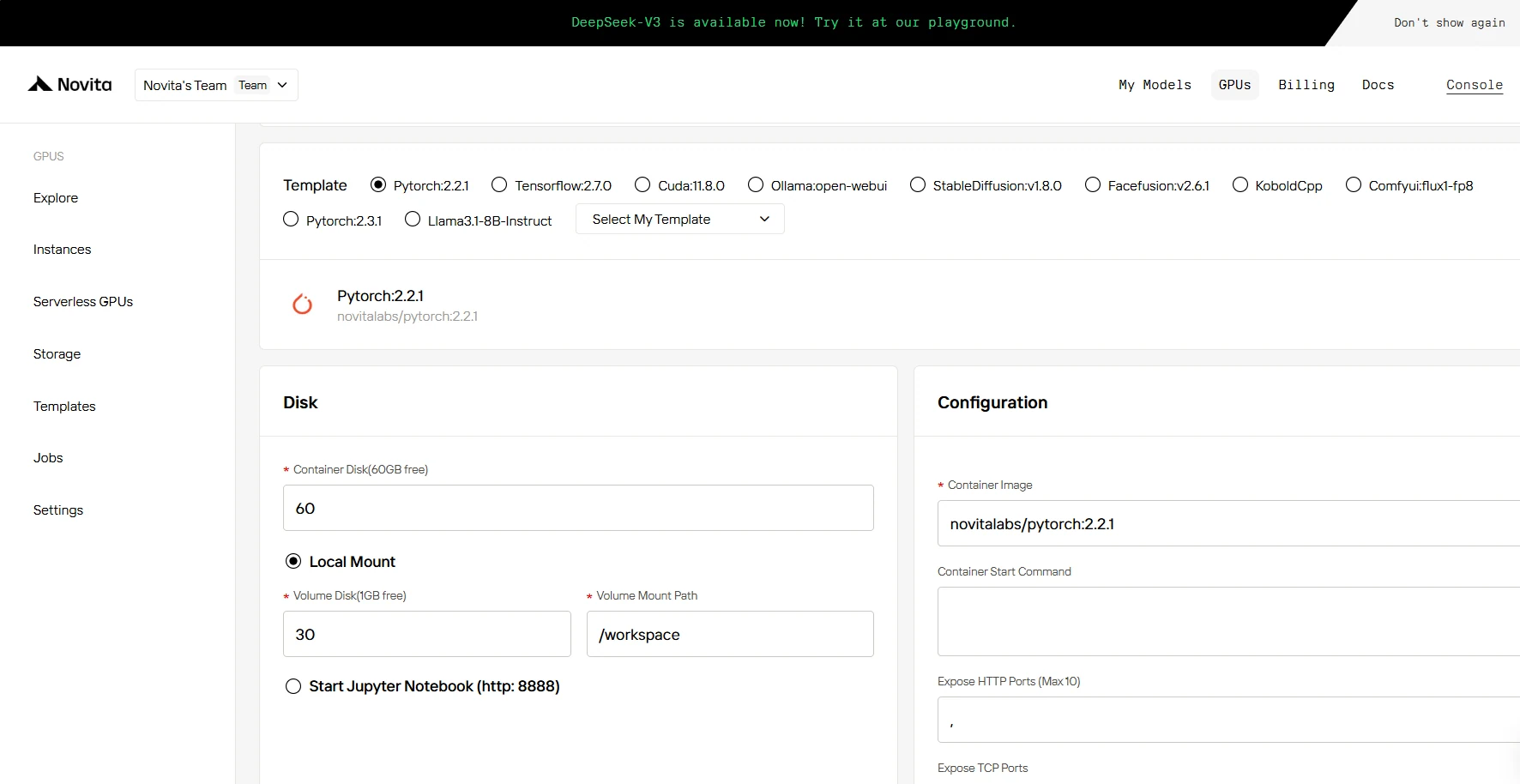
You can customize the storage to meet your specific requirements. The Container Disk includes 60GB of free storage, and the Volume Disk offers 1GB of free space. Additional storage can be purchased if your usage exceeds these limits.
Step4:Launch Your DeepSeek Instance
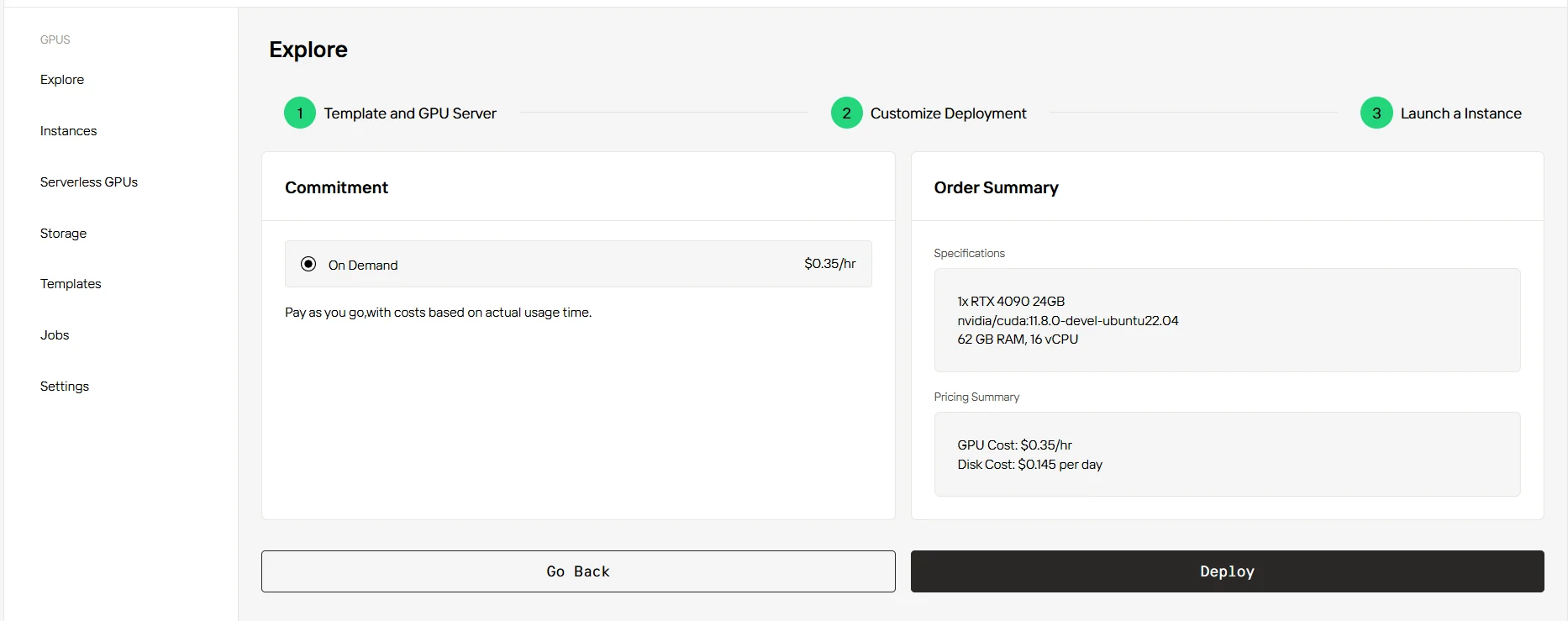
Select “On Demand” option and review your instance specifications and pricing summary. Once you’re satisfied with the configuration, simply click “Deploy” to launch your GPU instance.
Conclusion
GPU rental offers a flexible and potentially cost-effective solution for developers working with Flux. By carefully selecting the right GPU based on VRAM, compute power, and price-performance ratio, developers can access the computational resources needed to leverage Flux’s advanced capabilities. As the field of AI image generation continues to evolve, staying informed about hardware requirements and rental options will be crucial for maximizing the potential of tools like Flux.
Frequently Asked Questions
Can I rent GPUs for short periods, like a few hours or days?
Yes, most GPU rental services allow you to rent for any duration, from seconds to days or longer.
What makes Flux different from other text-to-image models like Stable Diffusion?
Flux specializes in high-resolution, context-aware generation with a modular architecture optimized for fine-tuning. Unlike Stable Diffusion, Flux v2+ supports multi-modal outputs and enterprise-scale rendering pipelines.
Are there any limitations on the software I can run on rented GPUs?
Most platforms allow you to run custom software, but check their terms of service. Some may have restrictions on certain activities like cryptocurrency mining.
[Novita AI](https://novita.ai/?utm_source=blogs_GPU&utm_medium=article&utm_campaign=GPU Rental for Flux: Everything Developers Need to Know) is an AI cloud platform that offers developers an easy way to deploy AI models using our simple API, while also providing the affordable and reliable GPU cloud for building and scaling.
Recommended Reading
Maximize DeepSeek Performance with Cloud GPU Rentals
What is GPU Cloud: A Comprehensive Guide
Rent Best GPUs in GPU Cloud for Stable Diffusion: Top Picks 2024



