Qwen2.5-Omni-7B, Alibaba Cloud’s latest multimodal AI model, is revolutionizing the way we approach artificial intelligence. With its ability to process diverse inputs like text, images, audio, and video while generating real-time responses, it has become a versatile tool for applications ranging from intelligent voice assistants to advanced content analysis. However, running a model with 7 billion parameters requires significant computational resources, making GPU rentals a cost-effective solution for developers and researchers.
What is Qwen2.5-Omni-7B?
Qwen2.5-Omni-7B is an end-to-end multimodal AI model developed by Alibaba Cloud. It is designed to process various input types—including text, images, audio, and video—and generate responses in both text and natural speech formats. This versatility makes it suitable for applications requiring comprehensive multimodal understanding and interaction.Key features include:
- High Performance: Pre-trained on diverse datasets for robust performance across tasks such as voice command following and multimodal reasoning evaluated on OmniBench benchmarks
- Multimodal Inputs: Supports text, images, audio, and video processing.
- Innovative Architecture: Utilizes Thinker-Talker Architecture for synchronized text generation and speech synthesis.
- Real-Time Responses: Offers low-latency audio and text outputs through block-wise streaming processing.
Its compact size (7B parameters) ensures deployability on edge devices while maintaining exceptional performance across modalities
The Role of GPUs in Qwen2.5-Omni-7B
GPUs are essential for efficiently training and deploying models like Qwen2.5-Omni-7B due to their ability to perform parallel processing. This capability accelerates the handling of large datasets and complex computations inherent in multimodal AI tasks. Utilizing GPUs ensures that such models operate effectively, delivering timely and accurate responses across various input modalities.These specialized processors are essential for:
- Enabling real-time inference
- Parallel processing of model operations
- Handling matrix computations efficiently
- Managing the model’s memory requirements
Why Rent GPUs for Qwen2.5-Omni-7B?
Renting GPUs offers several advantages:
- Cost Savings: Purchasing high-end GPUs involves significant capital investment. Renting allows for a pay-as-you-go model, reducing financial strain.
- Scalability and Flexibility: Renting provides the flexibility to scale GPU resources up or down based on project requirements, ensuring optimal resource utilization.
- Access to Advanced Hardware: Renting enables access to the latest GPU technologies, such as NVIDIA A100 or H100, which may be financially out of reach for individual purchases.
- Reduced Maintenance Overhead: With rented GPUs, the responsibility for hardware maintenance and upgrades lies with the service provider, allowing developers to focus on model development and deployment.
Choosing the Right GPUs for Qwen2.5-Omni-7B
Key Considerations When Choosing a GPU
Before diving into the specifics of individual GPUs, it’s important to understand the key factors that will impact your decision:
- Memory Capacity:
AI models, especially large language models like Qwen2.5-Omni-7B, require substantial GPU memory (VRAM) to store large datasets and model weights. For optimal performance with Qwen2.5-Omni-7B, a minimum of 64GB VRAM is recommended when working with the full model at higher precision or when using larger batch sizes for production workloads. - Processing Power:
The speed at which a GPU can process data is crucial for reducing training times. GPUs with higher compute power (measured in TFLOPS) are better suited for tasks like model training and large-scale inference, ensuring that computations are completed faster. - Cost-Effectiveness:
While high-performance GPUs are essential, budget constraints can also play a role in your decision. Striking a balance between performance and cost is important, especially for long-term projects. - Compatibility with Frameworks:
Make sure the GPU you choose is fully compatible with the AI frameworks you plan to use, such as TensorFlow, PyTorch, or others. CUDA cores and Tensor cores, found in NVIDIA GPUs, are often optimized for machine learning tasks.
Top GPU Options for Qwen2.5-Omni-7B
Here are some of the most suitable GPU options for running Qwen2.5-Omni-7B, each offering distinct advantages depending on your specific needs:
1. NVIDIA H100
The NVIDIA H100 takes AI performance to the next level with support for Tensor cores and cutting-edge technologies like multi-instance GPUs. Offering more bandwidth and faster computation, the H100 is optimized for demanding AI applications, particularly those requiring substantial data throughput. The H100 excels in training highly complex models like Qwen2.5-Omni-7B, ensuring smooth performance and faster training times.
Ideal for: Cutting-edge AI workloads, high throughput, and large models.
2. NVIDIA RTX 4090
The NVIDIA RTX 4090 provides a balance between performance and affordability. While not as powerful as the A100 or H100, the RTX 4090 offers 24GB of GDDR6X memory and impressive processing power for medium-to-large AI tasks. It’s ideal for developers or researchers who need powerful performance but want a more budget-conscious option compared to the higher-end GPUs.
Ideal for: Mid-scale deployments, testing, and development of Qwen2.5-Omni-7B.
3. NVIDIA RTX 6000
The NVIDIA RTX 6000 is another professional-grade GPU that offers robust performance, with 48GB of GDDR6 memory, making it highly suitable for large datasets and demanding AI workloads. Its performance and stability make it an excellent choice for research labs or enterprises working on high-priority AI projects. The RTX 6000 is particularly effective for multi-tasking in training and inference, ensuring efficient operations for Qwen2.5-Omni-7B.
Ideal for: Professional AI tasks, stability, and large-scale data processing.
Choosing Based on Your Budget and Project Needs
When selecting a GPU for Qwen2.5-Omni-7B, balancing performance requirements with budget constraints is crucial. Below is a summary of GPU options tailored to different needs and budgets, using Novita AI as an example:
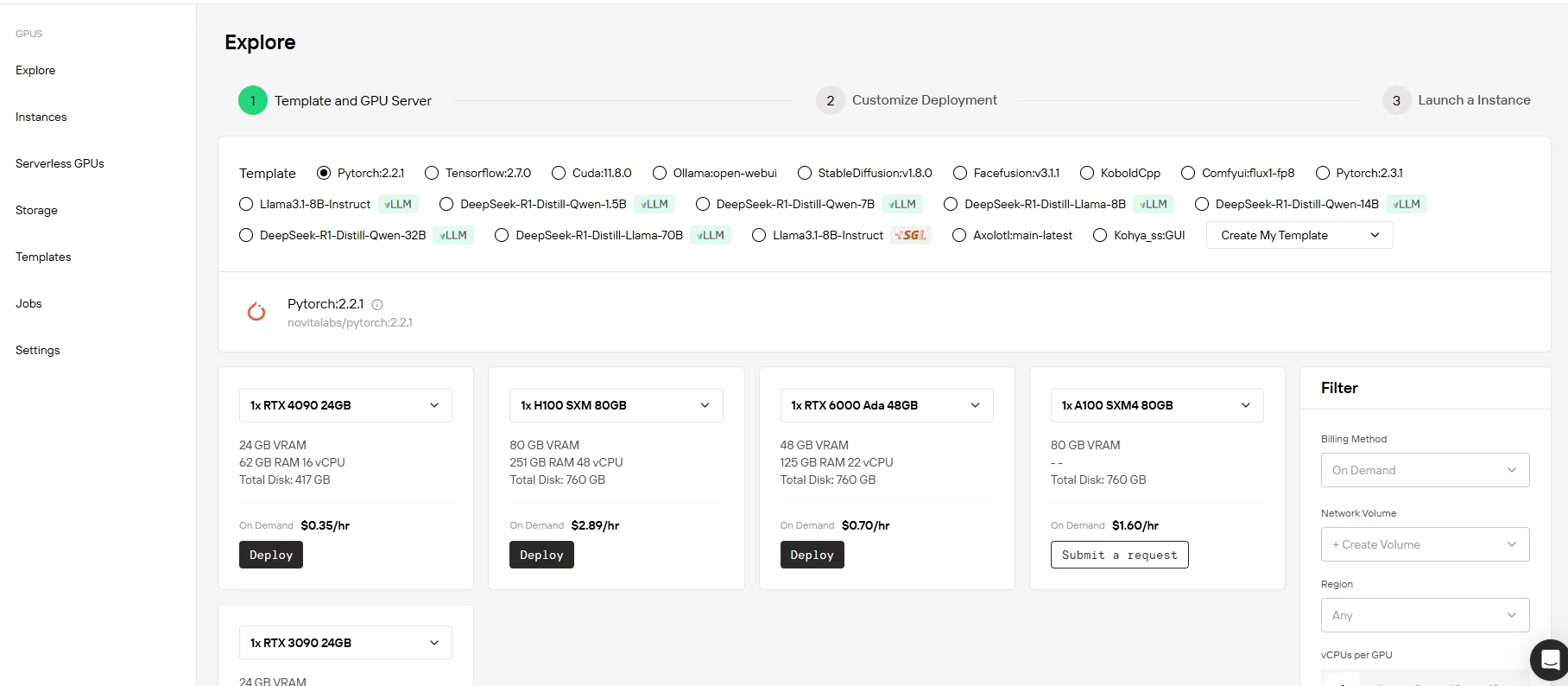
- NVIDIA H100: Suited for cutting-edge AI workloads requiring higher throughput and multi-instance capabilities. At Novita AI, cloud rental is approximately $2.89 per hour.
- NVIDIA RTX 4090: Perfect for developers seeking high performance at a more affordable rate, suitable for medium-scale models. At Novita AI, cloud rental is about $0.35 per hour.
- NVIDIA RTX 6000: A great option for professional, enterprise-level AI tasks, especially those requiring stability and substantial memory capacity. At Novita AI, cloud rental is approximately $0.70 per hour.
Please note that the above prices are estimates and may vary based on factors such as the cloud service provider, region, and usage duration. It’s advisable to assess your specific project requirements and budget to select the most appropriate GPU option.
Step-by-Step Guide to Renting and Setting Up GPUs for Qwen2.5-Omni-7B
Step1: Select a Cloud Service Provider
To start, choose a cloud service provider that offers high-performance GPUs like NVIDIA A100, H100, RTX 4090, or RTX 6000. For an efficient and cost-effective solution, you can opt for Novita AI, which specializes in cloud GPU services and provides flexible rental options for top-tier GPUs. Novita AI offers access to a variety of GPUs that are perfectly suited for deploying complex AI models such as Qwen2.5-Omni-7B.
It also offers a flexible pricing structure to suit different computational needs. Our options include both on-demand hourly rates and subscription plans that provide increasing discounts for longer-term commitments. All plans come with dedicated resources and premium support, ensuring you have the best performance and assistance as you work with your GPU instances.
| Option | RTX 3090 24 GB | RXT 4090 24 GB | RXT 6000 Ada 48GB | H100 SXM 80 GB |
| On Demand | $0.21/hr | $0.35/hr | $0.70/hr | $2.89/hr |
| 1-5 months | $136.00/month (10% OFF) | $226.80/month (10% OFF) | $453.60/month(10% OFF) | $1872.72/month (10% OFF) |
| 6-11 months | $129.00/month( (15% OFF) | $206.64/month (18% OFF) | $428.40/month(15% OFF) | $1664.64/month (20% OFF) |
| 12 months | $113.40/month(25% OFF) | $189.00/month (25% OFF) | $403.20/month(20% OFF) | $1498.18/month (28% OFF) |
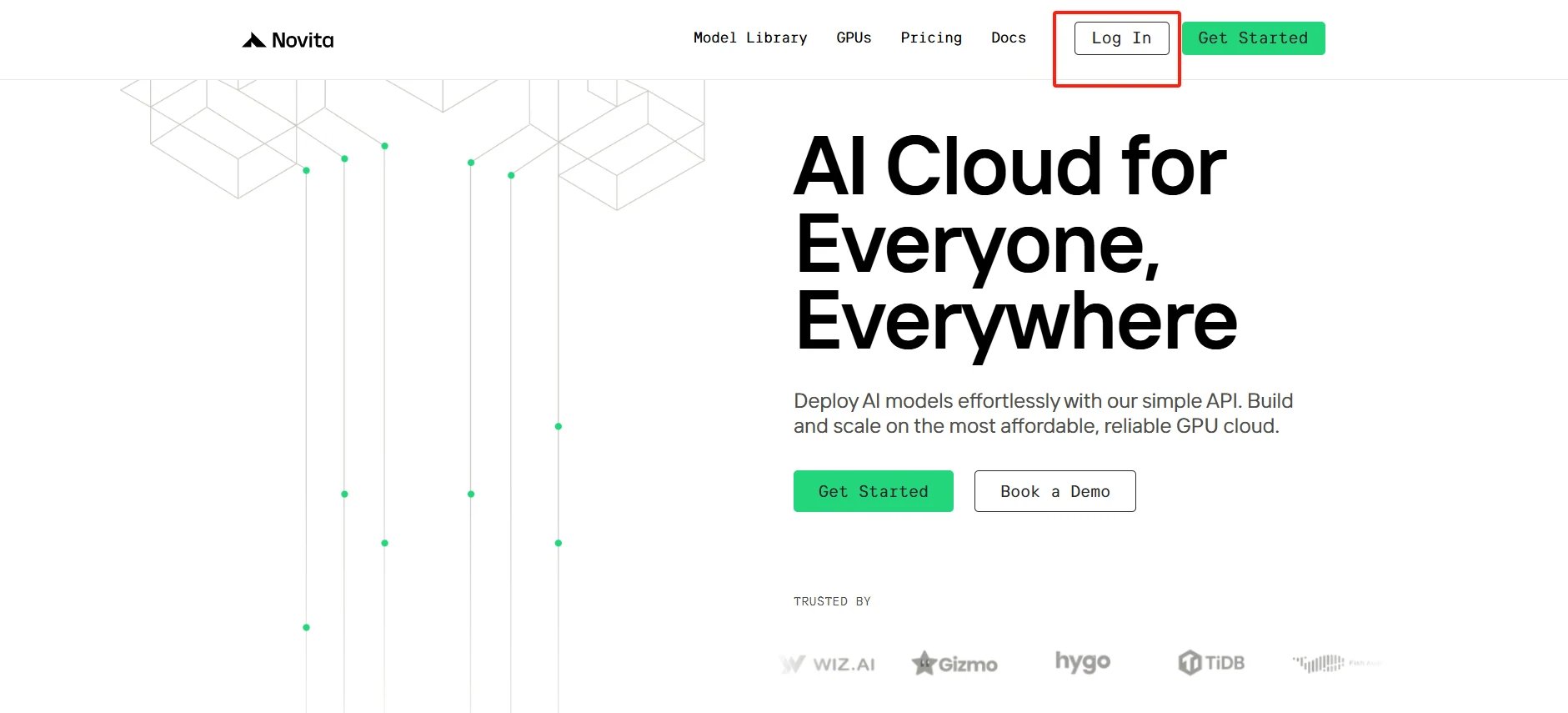
Then visit the Novita AI platform and create your account in just a few minutes. Once logged in, head to the “GPUs” section, where you can browse available instances, compare specifications, and choose the plan that best suits your computational needs. Our user-friendly interface makes it easy to deploy your first GPU instance and start your AI development journey.
[Try using Novita AI now](https://novita.ai/?utm_source=blogs_GPU&utm_medium=article&utm_campaign=Budget-Friendly AI: My Guide to Renting GPUs for Qwen2.5-Omni-7B)
Step2:Choose the Appropriate GPU and Instance Type
Once you’ve selected Novita AI as your provider, the next step is choosing the right GPU instance for your needs. Novita AI provides tailored GPU configurations to meet the processing demands of models like Qwen2.5-Omni-7B. You can choose from GPUs like the NVIDIA H100 for large-scale AI tasks or the RTX 4090 for more cost-effective but powerful deployments.
[Try Novita AI’s High-Performance GPUs](https://novita.ai/gpus-console/?utm_source=blogs_GPU&utm_medium=article&utm_campaign=Budget-Friendly AI: My Guide to Renting GPUs for Qwen2.5-Omni-7B)
Step3:Customize Your Setup
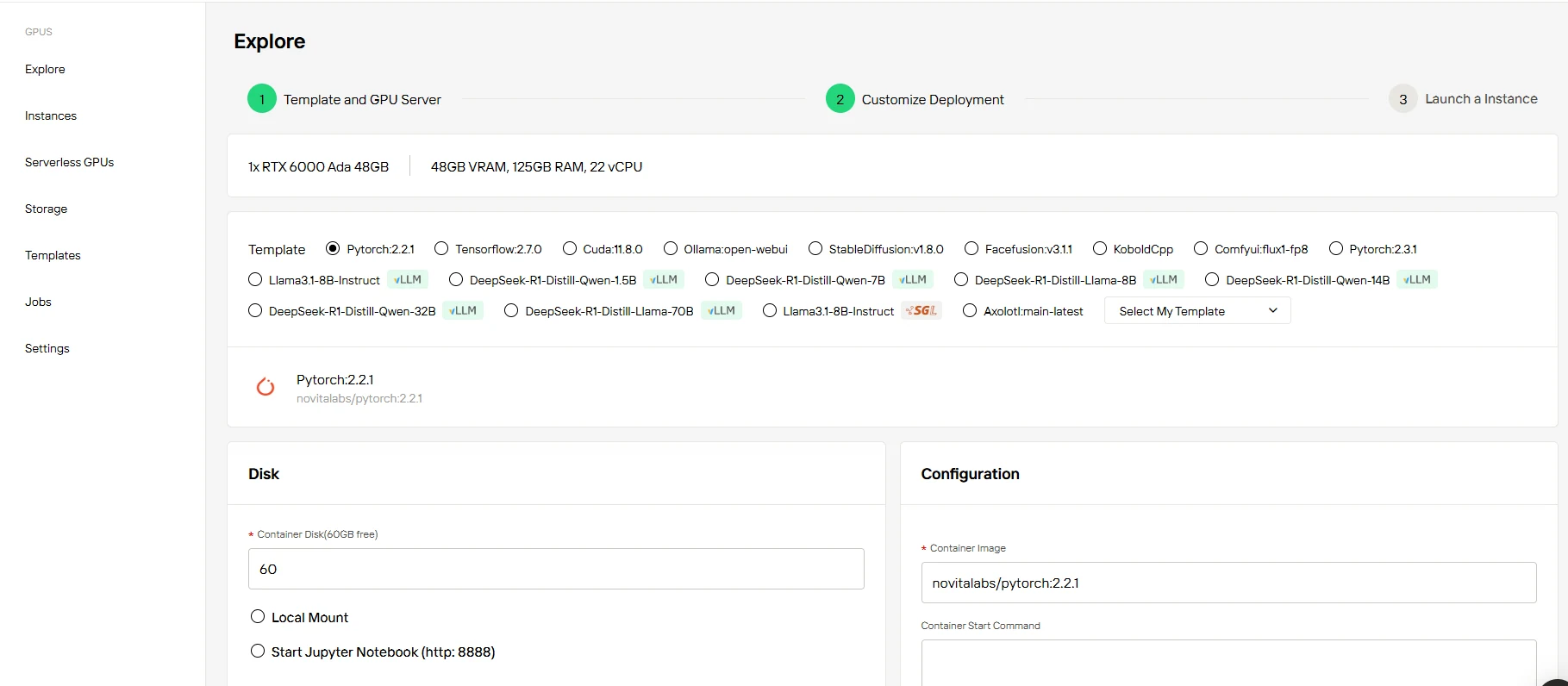
Start with 60GB of free Container Disk storage and easily scale as your needs evolve. Novita AI offers flexible on-demand pricing or subscription-based options, so you can choose the plan that fits your specific use case. Whether you’re in development, testing, or full deployment, Novita AI’s storage solutions seamlessly grow with your needs. You can easily purchase additional storage space as your dataset and AI model expand.
Step4:Launch Your GPU Instance for Qwen2.5-Omni-7B
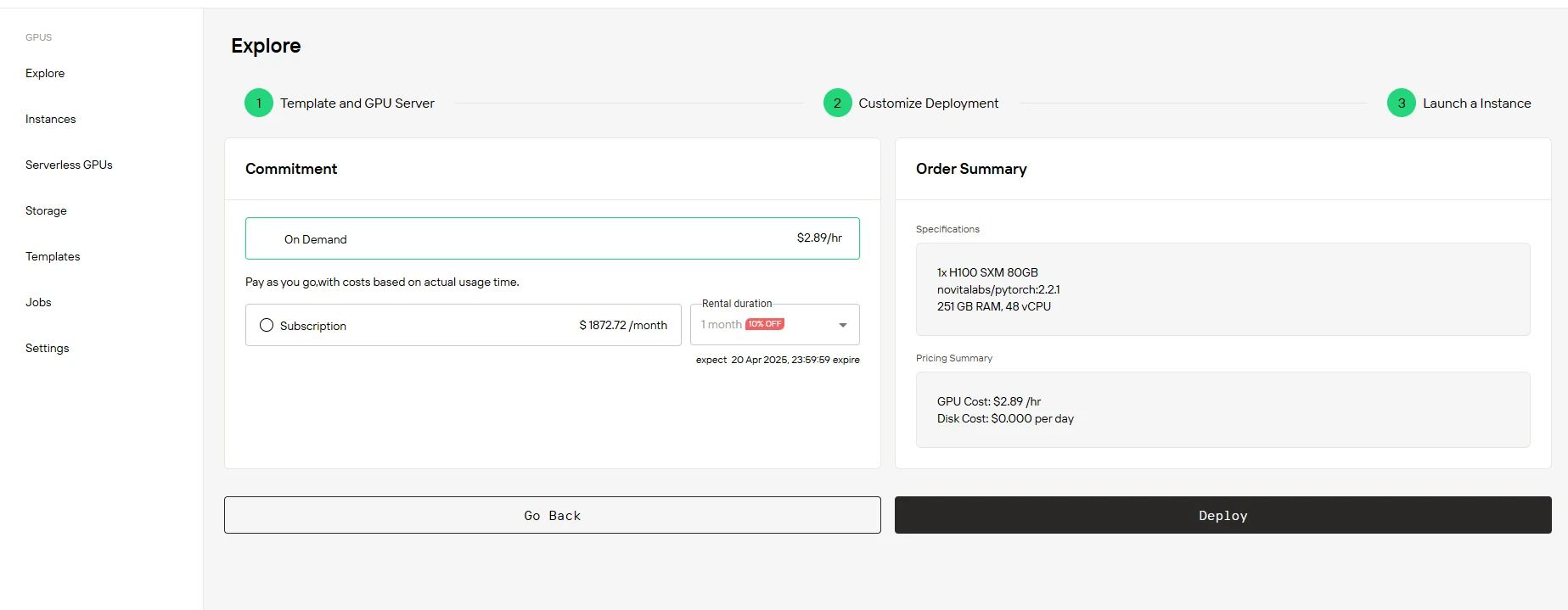
After selecting your GPU and customizing your setup, it’s time to launch your instance. Choose between the On Demand or Subscription options, depending on your project’s budget and duration. Review your chosen instance configuration and pricing breakdown to ensure everything aligns with your needs. Once you’re ready, simply click “Deploy”, and your GPU instance will be up and running, ready for use with Qwen2.5-Omni-7B.
Conclusion
Renting GPUs is a budget-friendly way to unlock the full potential of Qwen2.5-Omni-7B without the financial burden of purchasing hardware outright. By leveraging rental services and following a structured setup process, you can efficiently deploy this powerful multimodal AI model for tasks ranging from voice assistance to creative content generation.
Whether you’re prototyping or scaling production workloads, renting GPUs ensures flexibility, scalability, and access to state-of-the-art technology—all essential for staying ahead in the rapidly evolving AI landscape
Frequently Asked Questions
Do I need multiple GPUs to run Qwen2.5-Omni-7B?
No, a single GPU is sufficient for inference. Multiple GPUs are beneficial for fine-tuning or handling multiple simultaneous requests.
Can I run Qwen2.5-Omni-7B on consumer GPUs like RTX 4090?
Yes, but with potential limitations. Professional GPUs like H100 offer better stability and performance for production use.
What happens if the GPU instance crashes during usage?
Most platforms offer automatic recovery or quick restart options. Always implement proper checkpointing to prevent data loss.
[Novita AI](https://novita.ai/?utm_source=blogs_GPU&utm_medium=article&utm_campaign=Choosing the Right GPU Pricing Model: On-Demand vs Subscription) is an AI cloud platform that offers developers an easy way to deploy AI models using our simple API, while also providing the affordable and reliable GPU cloud for building and scaling.
Recommended Reading
Running Gemma 7B on Novita AI GPU Instances
Tutorial: How to Access Qwen2.5-VL-72B Locally, via API, on Cloud GPU



