With the rapid development of AI technology, choosing the right and economical GPU solution has become a key strategic decision for enterprises. This guide will provide an in-depth analysis of GPU options in the 2025 market, helping you find the optimal balance between budget and performance.
Why Budget GPUs Matter for AI in 2025
Budget GPUs are essential for democratizing access to AI development. They offer a cost-effective way for smaller organizations and individuals to engage in AI projects without the need for high-end hardware. This is particularly important as AI applications become more pervasive across industries, requiring efficient and affordable computing solutions.
In 2025, the trend towards edge computing and on-device AI processing is gaining momentum, driven by the need for reduced cloud computing costs, enhanced data privacy, and decreased latency in AI applications. Budget GPUs are well-positioned to support this shift by providing capable hardware for local AI processing.
Key Features to Look for in AI GPUs
When selecting a budget GPU for AI, several key features must be considered:
Critical Hardware Parameters
- Parallel Processing Capability: GPUs are designed for parallel processing, which is crucial for AI tasks like deep learning and machine learning.
- Memory Bandwidth: High-bandwidth memory (HBM) technologies support rapid data transfer, essential for AI computations.
- Tensor Cores (for NVIDIA GPUs): Specialized cores for matrix operations that significantly accelerate deep learning tasks.
Performance Metrics Explained
- FLOPS (Floating Point Operations Per Second): Measures computational power, with higher values indicating better performance for complex AI models.
- GPU Utilization: Tracks how efficiently the GPU is used, helping identify bottlenecks.
- Inference Latency: Critical for real-time AI applications, lower latency improves responsiveness.
Compatibility Considerations
- Software Ecosystem: Ensure compatibility with popular AI frameworks like TensorFlow and PyTorch.
- Platform Support: Consider GPUs that support NVIDIA’s CUDA platform for flexibility.
Top Budget GPU Picks for AI in 2025
Best Entry-Level Options
NVIDIA RTX 3090
For entry-level AI developers, the RTX 3090 is a powerful yet relatively affordable choice. It offers 24GB of memory, making it suitable for most deep learning model training tasks.
Pros:
- 24GB GDDR6X memory, capable of handling large models and datasets.
- Supports CUDA and Tensor Cores, offering excellent performance for AI frameworks like TensorFlow and PyTorch.
- Good value for money, balancing performance and cost well.
Cons:
- High power consumption, requiring strong cooling solutions.
- While still great value, it faces competition from newer, more powerful GPUs like the RTX 40 series.
Mid-Range Value Choices
NVIDIA RTX 4090
The RTX 4090 is the mid-range benchmark for AI performance in 2025. It delivers even greater computing power and more memory than the RTX 3090, making it ideal for users needing to train complex models efficiently.
Pros:
- 24GB GDDR6X memory, capable of handling more complex AI tasks such as large natural language processing (NLP) and computer vision models.
- Outstanding performance, particularly for deep learning workloads.
- Energy-efficient design, optimizing the balance between computing power and energy consumption.
Cons:
- Higher price point; while more powerful, it may exceed the budget of some developers.
- Larger size requires a strong power supply and efficient cooling system.
High-End Budget Recommendations
NVIDIA RTX 6000 Ada :
For high-budget advanced AI developers, the RTX 6000 is the ideal high-end option. It offers 48GB of memory and immense computing power, capable of handling the most complex deep learning tasks.
Pros:
- 48GB GDDR6 memory, perfect for handling massive AI models and high-end tasks like image generation and NLP.
- Supports multi-GPU parallel training, making it ideal for enterprise-level projects requiring large-scale cluster computing.
- Provides exceptional computing performance and memory bandwidth, ideal for continuous, high-performance workloads.
Cons:
- High price; though excellent value for high-end AI workloads, it’s not suitable for all developers.
- High power consumption, requiring strong power supplies and advanced cooling, suitable for users with high-end hardware configurations.
Cost-Performance Analysis for Budget AI GPUs
| Metric | NVIDIA RTX 3090 | NVIDIA RTX 4090 | NVIDIA RTX 6000 |
| Architecture | Ampere | Ada Lovelace | Ada Lovelace |
| VRAM Capacity | 24GB GDDR6X | 24GB GDDR6X | 48GB GDDR6X |
| CUDA Cores | 10,496 | 16,384 | 18,176 |
| Tensor Cores | 328 | 512 | 576 |
| Memory Bandwidth | 936 GB/s | 1,008 GB/s | 960 GB/s |
| FP16 Performance | 142 TFLOPS | 165 TFLOPS | 185 TFLOPS |
| Power Consumption | 350W | 450W | 300W |
| Approx. Price (2025) | $800-1,000 (Used) | $1,600-2,000 | $4,000-6,000 |
| Cloud Rental Cost (Novita AI) | $0.21/hr | $0.35/hr | $0.70/hr |
| Use Case Suitability | Entry-level AI development, inference, small-to-medium model training | High-performance consumer workloads, medium to large model training | Professional workloads, large models, heavy training tasks |
In the 2025 AI GPU market, these three NVIDIA cards serve distinct needs: The used RTX 3090 ($800-1,000) offers the best value for entry-level with 24GB VRAM; RTX 4090 ($1,600-2,000) dominates the mid-range market with Ada Lovelace architecture and balanced performance; RTX 6000 targets enterprise users with 48GB VRAM and professional reliability. Novita AI’s hourly rental options (3090:$0.21, 4090:$0.35, 6000:$0.70) provide flexible alternatives. Based on project scale and budget, we recommend the 3090 for small projects, 4090 for medium-scale tasks, and 6000 for enterprise applications to achieve optimal return on investment.
Choosing Novita AI for Cloud GPU Services
For organizations seeking to avoid upfront hardware investments while maintaining access to cutting-edge GPU resources, cloud GPU providers offer compelling alternatives. Among these providers, Novita AI has established itself as a leading option for budget-conscious AI teams.
If you’re interested in Novita AI, you can follow the steps below to learn more:
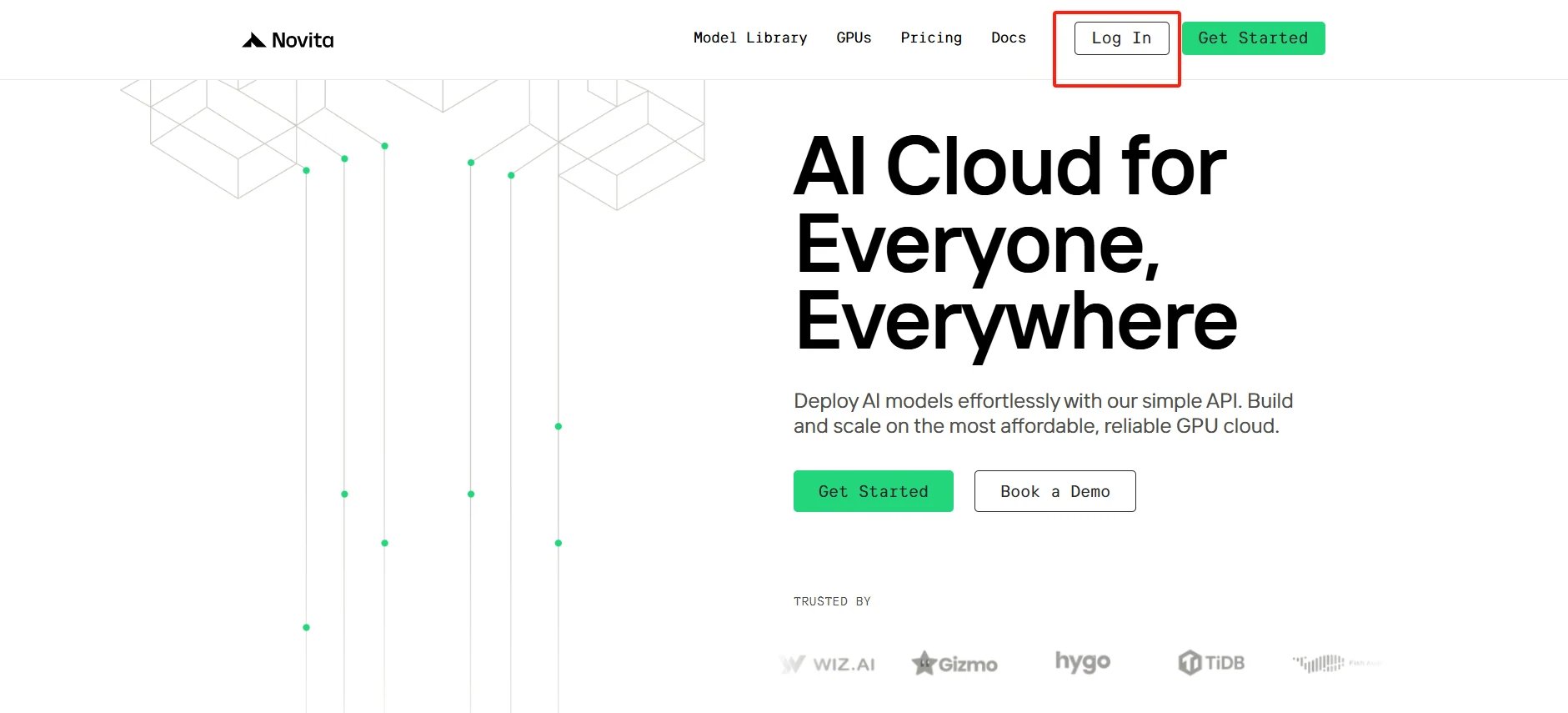
Step1:Register an account
New to Novita AI? Create your account and navigate to our GPU portal to discover enterprise-grade computing resources tailored for your AI workloads.
[Try using Novita AI now](https://novita.ai/?utm_source=blogs_GPU&utm_medium=article&utm_campaign=Best Budget GPUs for AI: A Comprehensive Guide 2025)
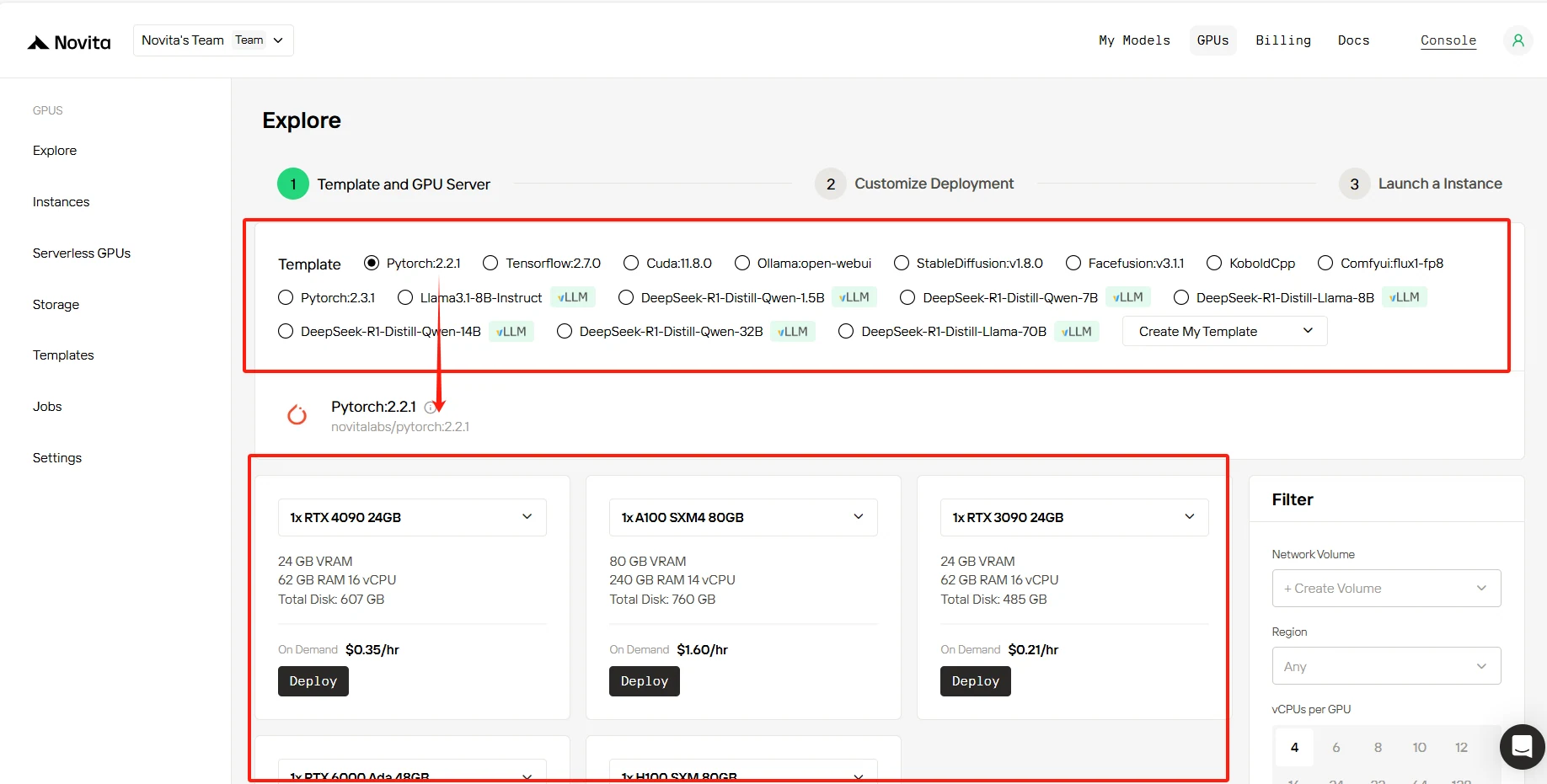
Step2:Select Your GPU
Customize your AI development environment by selecting from our optimized templates with PyTorch, TensorFlow, or CUDA support.
[Try Novita AI’s High-Performance GPUs](https://novita.ai/gpus-console/?utm_source=blogs_GPU&utm_medium=article&utm_campaign=Best Budget GPUs for AI: A Comprehensive Guide 2025)
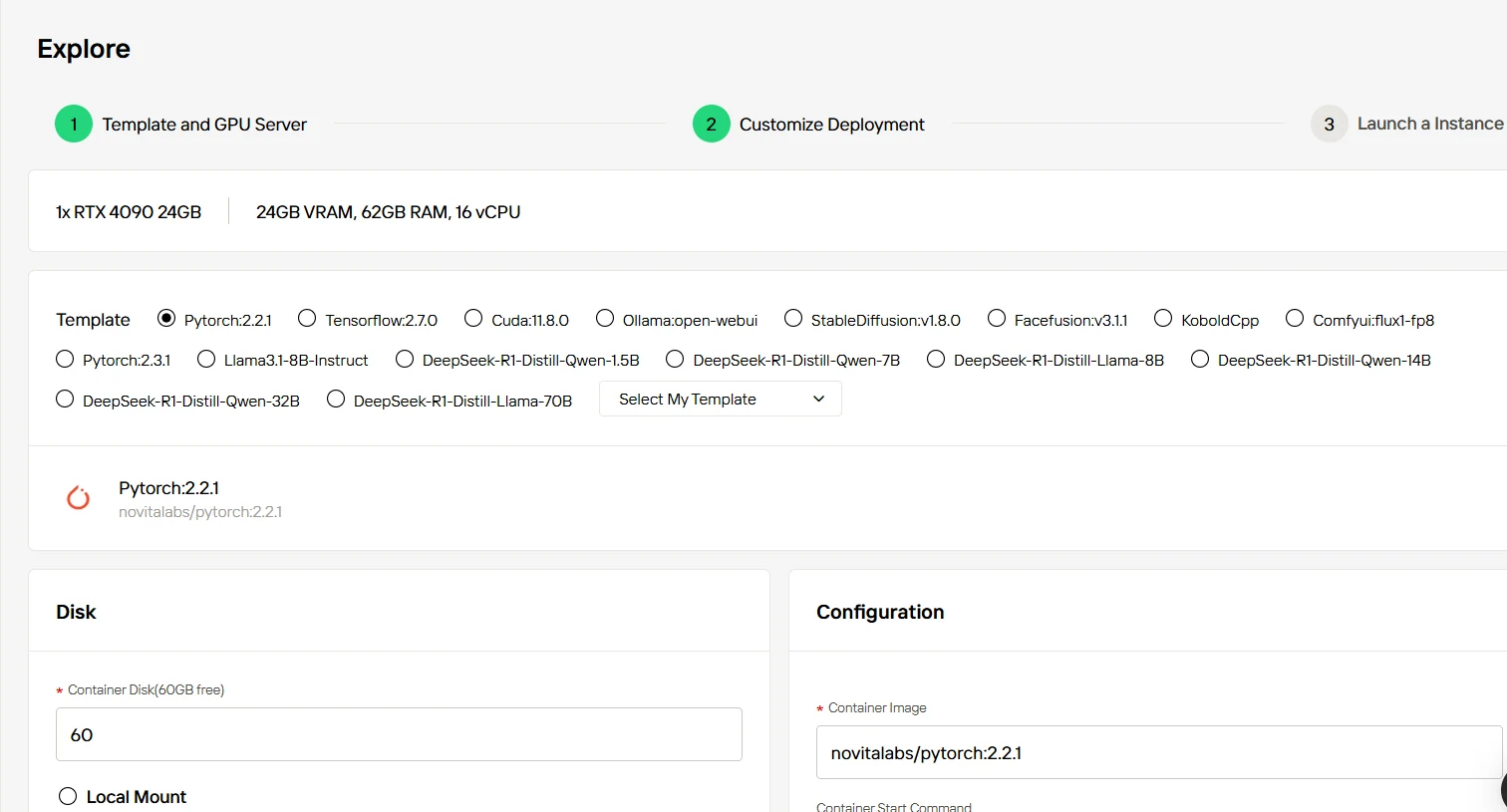
Step3:Customize Your Setup
Personalize your deployment environment to match your exact needs. Adjust core settings including CUDA version, system configurations, and resource parameters for optimal performance.
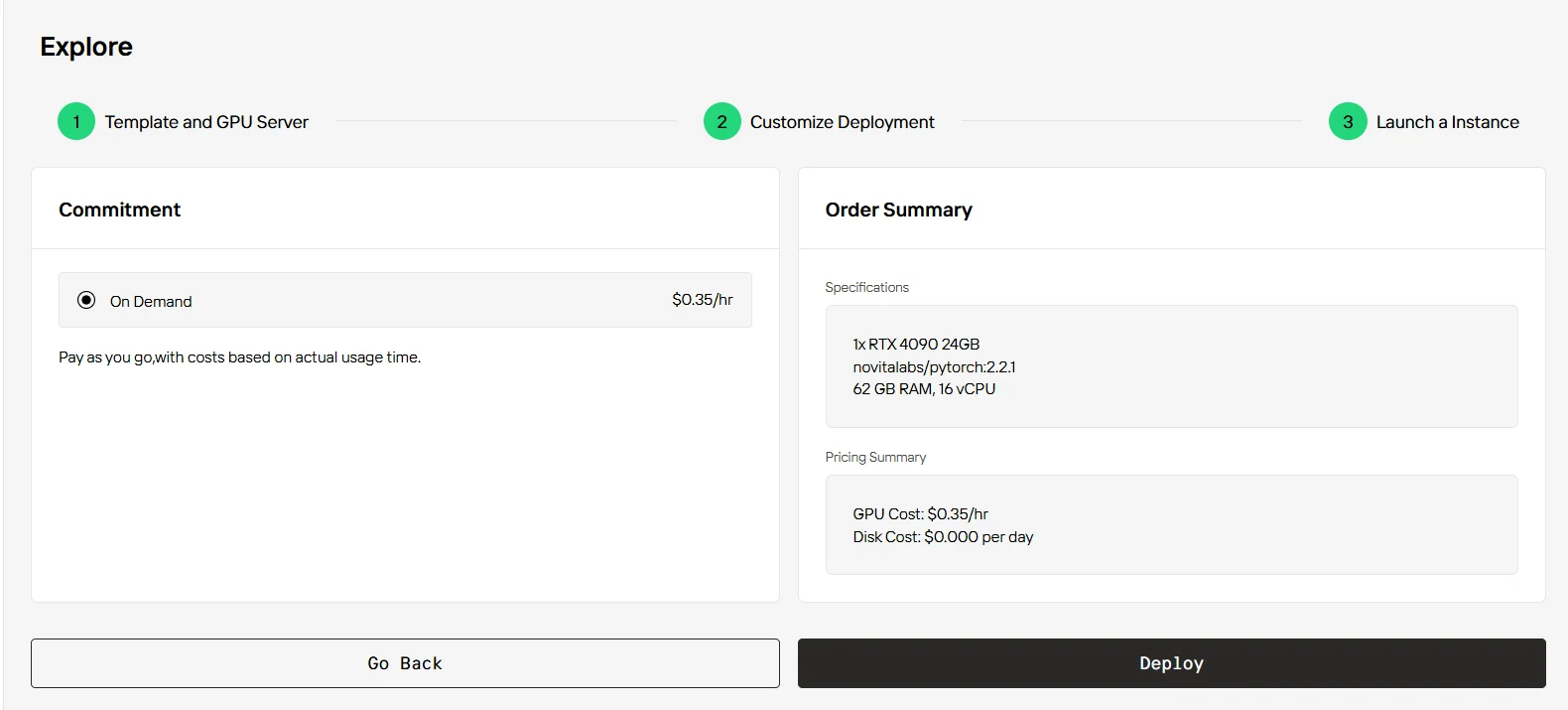
Step4:Launch Your Instance
Deploy your customized environment instantly - click ‘Deploy’ to activate your GPU resources. Your AI-ready workspace will be available within minutes.
Conclusion
For 2025, the RTX 3090 (used) remains the value champion for entry-level AI work, while the 4090 offers the best balanced solution for serious development. The RTX 6000 serves professional needs requiring large VRAM. Cloud services through Novita AI provide flexible alternatives to outright purchase. Choose based on your specific project requirements, budget constraints, and scaling needs.
Frequently Asked Questions
Is a used RTX 3090 still reliable for AI work in 2025?
Yes, if purchased from reputable sellers. Check mining history and ensure proper testing before purchase. The 24GB VRAM and mature drivers make it a solid choice despite being end-of-life.
What’s the minimum VRAM needed for modern AI tasks?
For most current AI applications, 24GB is the practical minimum. This allows running popular models like smaller versions of LLMs and stable diffusion.
Will these GPUs handle future AI models?
The 6000 with 48GB VRAM offers the most future-proofing. The 24GB in 3090/4090 may become limiting for larger future models but should remain adequate for most applications.
[Novita AI](https://novita.ai/?utm_source=blogs_GPU&utm_medium=article&utm_campaign=Best Budget GPUs for AI: A Comprehensive Guide 2025) is an AI cloud platform that offers developers an easy way to deploy AI models using our simple API, while also providing the affordable and reliable GPU cloud for building and scaling.
Recommended Reading
CPU vs. GPU for Machine Learning: Which is Best?
How to Select the Best GPU for LLM Inference: Benchmarking Insights
Choosing the Best GPU for Machine Learning in 2025: A Complete Guide



