重點摘要
Novita AI 推出了 Llama 4 Maverick!而且這個版本完整支援 ** 函式呼叫**(function calling)。
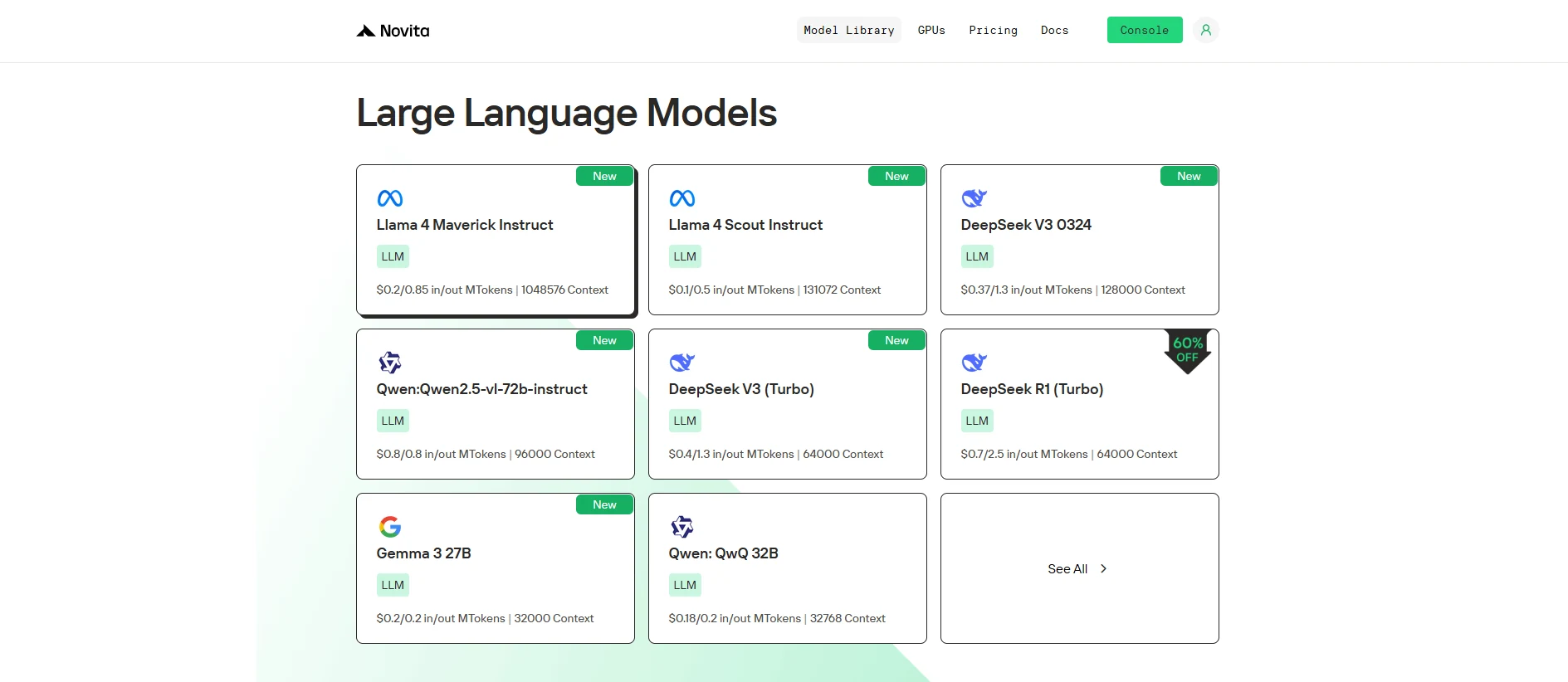
Llama 4 Maverick 結合了尖端的 128 專家混合(MoE) 架構與進階的 ** 多模態能力**。
如果你想要測試它的表現,可以直接在 Novita AI Playground 上開始免費試用!
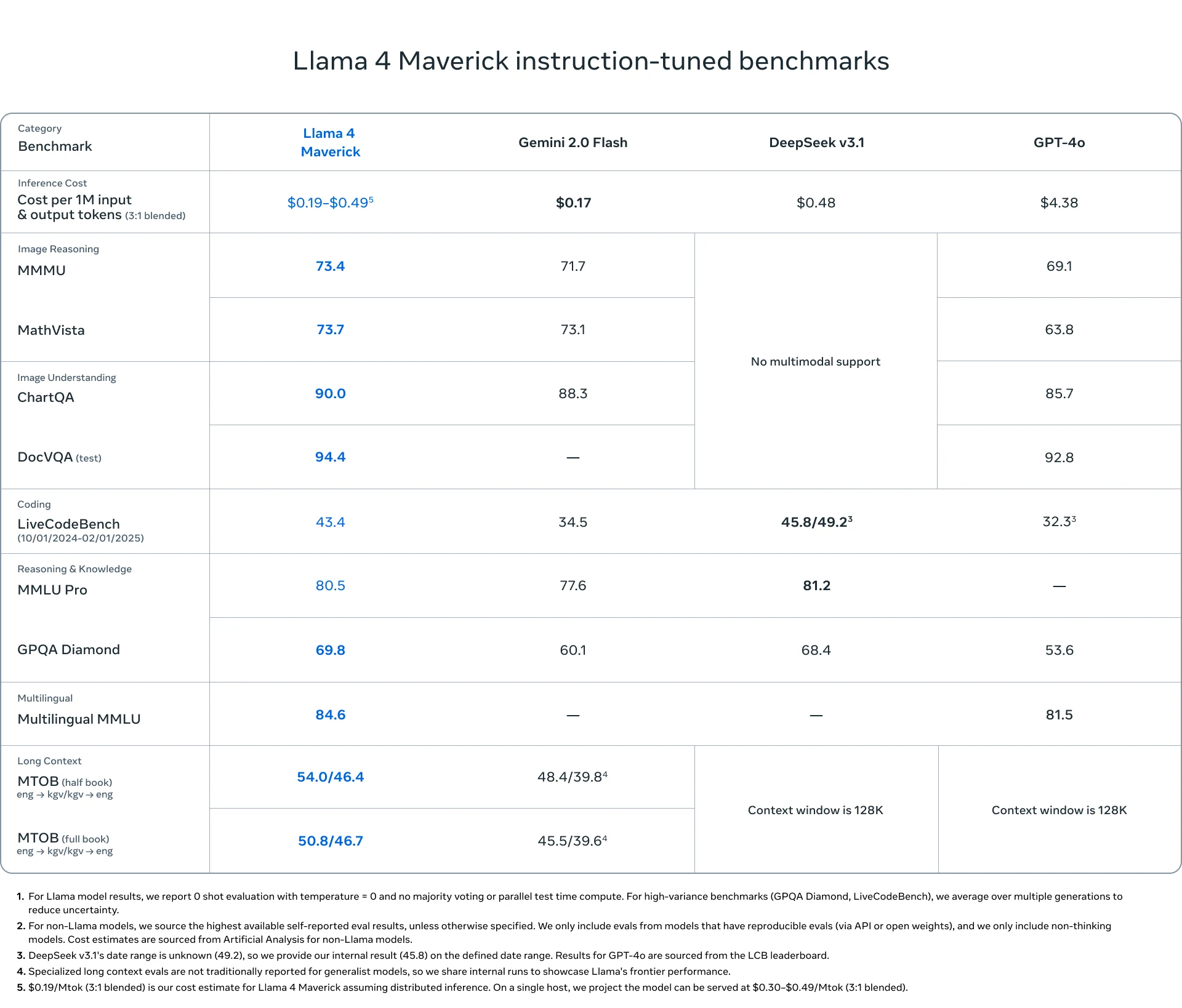
Llama 4 Maverick 憑藉其卓越的函式呼叫能力,重新定義了 AI,透過先進的架構提供無與倫比的效能、即時互動以及全球通用的功能。
什麼是函式呼叫?
函式呼叫 指的是系統(例如模型或應用程式)在執行期間能夠叫用或呼叫外部函式或服務的能力。這些函式可以是 API、資料庫或其他執行特定任務的服務,這些任務位於主要模型或系統的範圍之外。
- 外部服務:函式可以與 API、資料庫或第三方服務(例如支付處理器、天氣資料等)互動。
- 即時互動:函式呼叫在執行期間發生,提供即時資料或動作。
- 預定義函式:這些函式通常是預先定義好的,代表系統知道它們會做什麼(例如:擷取資料、處理交易)。
https://www.youtube.com/watch?v=aqdWSYWC\_LI
函式呼叫如何運作?
- 系統向外部函式(例如 API 或服務)發送請求。
- 該函式執行任務(例如:取得資料、處理資訊)。
- 結果回傳給系統,系統再用來進行後續處理。
函式呼叫有哪些好處?
- 即時資料:透過與外部來源互動提供最新資訊。
- 延伸功能:讓系統能夠使用外部服務(例如:付款處理、天氣資料)。
- 模組化:透過整合外部能力,讓系統更靈活且更容易適應,無需重新發明輪子。
函式呼叫 vs RAG
函式呼叫範例:
import requests

def get_weather(city: str):
    # 請用實際的 API 金鑰和 URL 替換
    api_key = "your_api_key"
    url = f"http://api.openweathermap.org/data/2.5/weather?q={city}&appid={api_key}&units=metric"

    response = requests.get(url)
    data = response.json()

    if response.status_code == 200:
        temperature = data['main']['temp']
        description = data['weather'][0]['description']
        return f"The current temperature in {city} is {temperature}°C with {description}."
    else:
        return "Sorry, I couldn't fetch the weather data at the moment."

# 使用函式取得紐約的天氣資訊
city = "New York"
weather_info = get_weather(city)
print(weather_info)
RAG 範例:
from transformers import pipeline

# 模擬知識庫(在實際應用中可以是資料庫或更大的資料集)
knowledge_base = {
    "force majeure": "Force Majeure refers to unforeseeable circumstances that prevent someone from fulfilling a contract.",
    "breach of contract": "A breach of contract occurs when one party fails to perform its obligations as outlined in the contract.",
    "arbitration": "Arbitration is a method of resolving disputes outside the courts, where an arbitrator makes a binding decision."
}

def retrieve_information(query: str):
    # 根據查詢擷取相關資訊(可替換為資料庫查詢或更進階的搜尋)
    query = query.lower()
    if query in knowledge_base:
        return knowledge_base[query]
    else:
        return "Sorry, I couldn't find any relevant information in the knowledge base."

def generate_answer(query: str):
    # 先擷取資訊
    retrieved_info = retrieve_information(query)

    # 使用文字生成模型(例如 GPT-2)根據擷取的資訊產生回覆
    model = pipeline("text-generation", model="gpt-2")
    answer = model(f"Based on the information: {retrieved_info}. Answer the following question: {query}")[0]['generated_text']

    return answer

# 使用者查詢
query = "What is force majeure in a contract?"
answer = generate_answer(query)
print(answer)
什麼是 Llama 4 Maverick?
| **分類 ** | ** 項目 ** | ** 詳細資訊** |
|---|---|---|
| 基本資訊 | 發布日期 | 2025 年 4 月 5 日 |
| 模型大小 | 400B 參數(每個 token 活躍 17B) | |
| 開源 | 開放原始碼 | |
| 架構 | 128 專家混合(MoE) | |
| 語言支援 | 語言支援 | 預先訓練涵蓋 200 種語言。支援阿拉伯語、英語、法語、德語、印地語、印尼語、義大利語、葡萄牙語、西班牙語、他加祿語、泰語和越南語。 |
| 多模態 | 多模態能力 | 輸入:多語言文字與圖片;輸出:多語言文字與程式碼 |
| 訓練 | 訓練資料 | 約 22 兆 tokens 的多模態資料(部分來自 Instagram 和 Facebook) |
| 預訓練 | MetaP:自適應專家配置 + 中期訓練 | |
| 後訓練 | SFT(簡單資料)→ RL(困難資料)→ DPO |
如何透過 Novita AI 使用 Llama 4 Maverick 函式呼叫
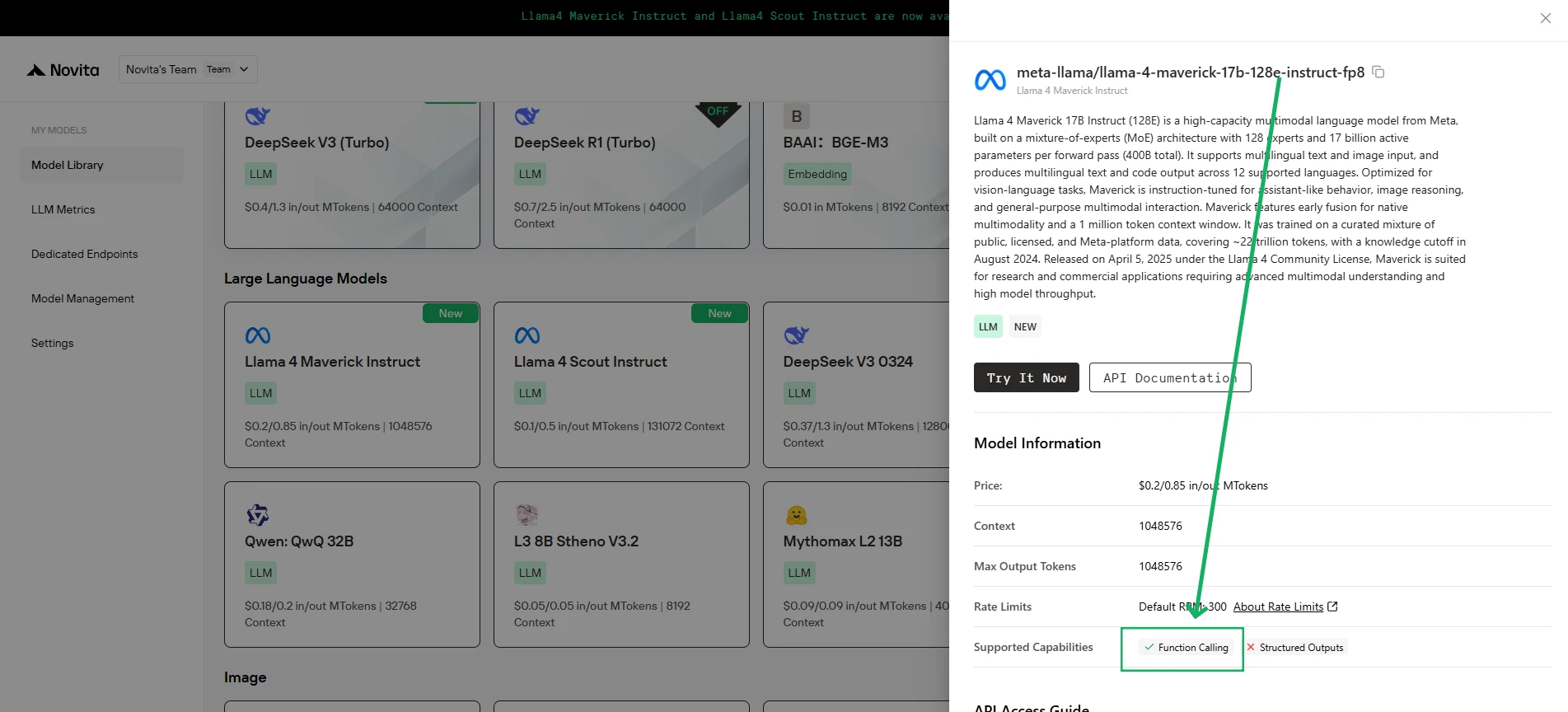
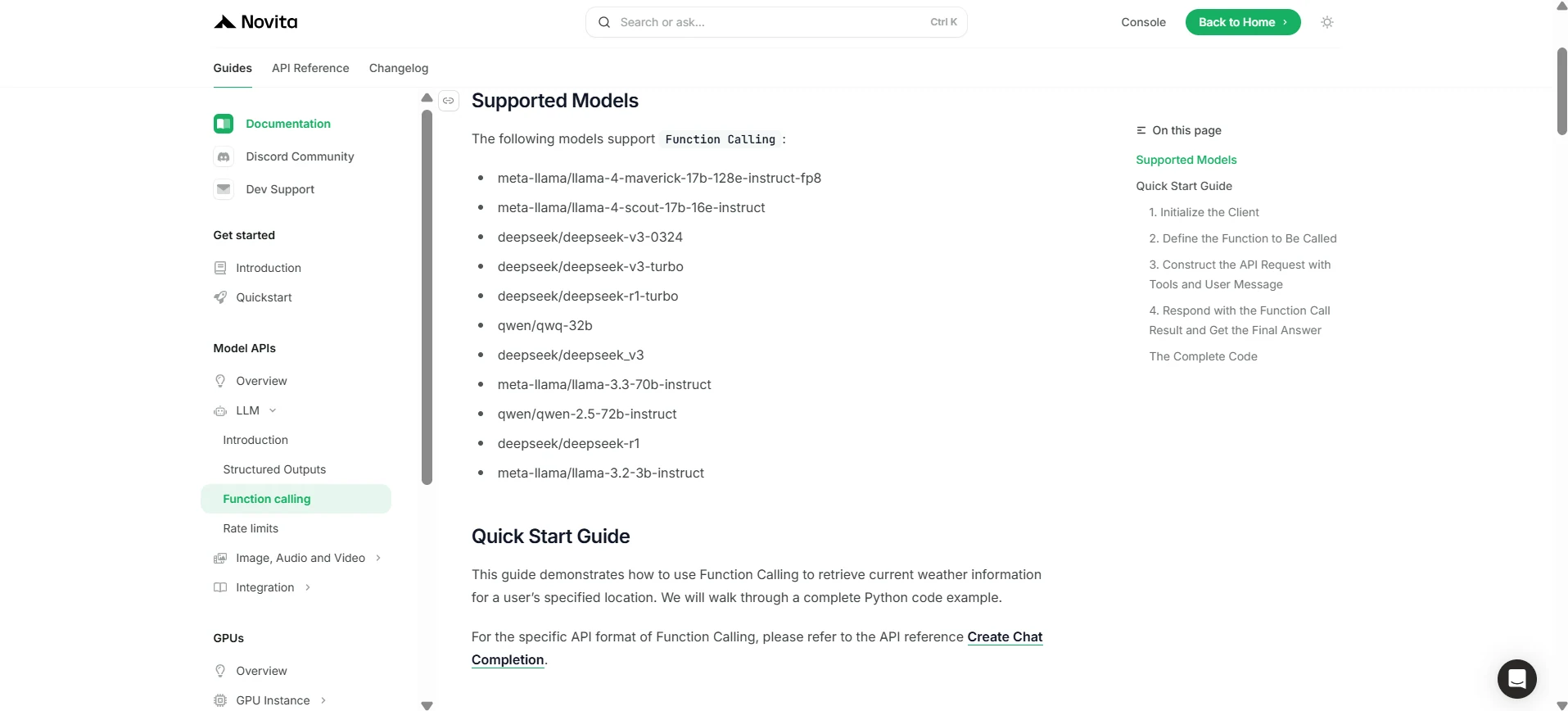
Novita AI 已針對每個 LLM 推出支援能力描述,您可以直接在 [console](https://novita.ai/models-console/?utm_source=blog_llm&utm_medium=article&utm_campaign=/ llama-4-maverick-function-calling/) 和 [docs](https://novita.ai/docs/guides/llm-function-calling/?utm_source=blog_llm&utm_medium=article&utm_campaign= llama-4-maverick-function-calling) 中查看。
1. 初始化客戶端
首先,您需要使用您的 Novita API 金鑰來初始化客戶端。
from openai import OpenAI
import json

client = OpenAI(
    base_url="https://api.novita.ai/v3/openai",
    # 從 https://novita.ai/settings/key-management 取得 Novita AI API 金鑰
    api_key="<YOUR Novita AI API Key>",
)

model = "meta-llama/llama-4-maverick-17b-128e-instruct-fp8"
- 定義要呼叫的函式
接著,定義模型可以呼叫的 Python 函式。在此範例中,是一個用來取得天氣資訊的函式。
# 模擬取得天氣資料的範例函式
def get_weather(location):
    """擷取指定位置目前的 weather 資訊。"""
    print("正在呼叫 get_weather 函式,位置:", location)
    # 在實際應用中,你應該在此呼叫外部天氣 API
    # 這是一個簡化範例,回傳硬編碼資料
    return json.dumps({"location": location, "temperature": "60 degrees Fahrenheit"})
2. 使用工具與使用者訊息建構 API 請求
現在,建立對 Novita 端點的 API 請求。此請求包含 tools 參數,定義模型可以使用的函式,以及使用者的訊息。
tools = [
    {
        "type": "function",
        "function": {
            "name": "get_weather",
            "description": "Get weather of an location, the user shoud supply a location first",
            "parameters": {
                "type": "object",
                "properties": {
                    "location": {
                        "type": "string",
                        "description": "The city and state, e.g. San Francisco, CA",
                    }
                },
                "required": ["location"]
            },
        }
    },
]

messages = [
    {
        "role": "user",
        "content": "What is the weather in San Francisco?"
    }
]

# 讓我們發送請求並印出回應
response = client.chat.completions.create(
    model=model,
    messages=messages,
    tools=tools,
)

# 在正式環境中請檢查回應是否包含 tool calls
tool_call = response.choices[0].message.tool_calls[0]
print(tool_call.model_dump())
3. 輸出
{'id': '0', 'function': {'arguments': '{"location": "San Francisco, CA"}', 'name': 'get_weather'}, 'type': 'function'}
4. 使用函式呼叫結果回覆並取得最終答案
下一步是處理函式呼叫、執行 get_weather 函式,並將結果送回模型以產生給使用者的最終回覆。
# 確保上一步已定義 tool_call
if tool_call:
    # 將助理的 tool call 訊息加入對話歷史
    messages.append(response.choices[0].message)

    function_name = tool_call.function.name
    if function_name == "get_weather":
        function_args = json.loads(tool_call.function.arguments)
        # 執行函式並取得回應
        function_response = get_weather(
            location=function_args.get("location"))
        # 將函式回應加入訊息
        messages.append(
            {
                "tool_call_id": tool_call.id,
                "role": "tool",
                "content": function_response,
            }
        )

    # 從模型取得最終回應,現在已包含函式結果
    answer_response = client.chat.completions.create(
        model=model,
        messages=messages,
        # 注意:此處不應包含 tools 參數
    )
    print(answer_response.choices[0].message)
5. 輸出
{'id': '0', 'function': {'arguments': '{"location": "San Francisco, CA"}', 'name': 'get_weather'}, 'type': 'function'}
憑藉其尖端設計與透過 Novita AI 的無縫整合,Llama 4 Maverick 超越了其他模型,為現代 AI 驅動的應用提供了強大、可靠且靈活的解決方案。
常見問題
什麼是函式呼叫?
它讓 LLM 能夠觸發外部工具或 API 來執行任務並擷取資料。
Llama 4 Maverick 如何與函式呼叫搭配運作?
Llama 4 Maverick 透過 Novita AI 簡化了即時系統整合。
是什麼讓 Llama 4 Maverick 更為優異?
Llama 4 Maverick 配備 400B 參數、128 專家混合架構以及強大的多語言 / 多模態能力,使其比其他模型更強大且更具多功能性。
Novita AI 是一個一站式雲端平台,能助您實現 AI 願景。整合 API、無伺服器運算、GPU 實例——您所需的成本效益工具。無需管理基礎設施,免費開始,讓您的 AI 願景成真。