Puntos clave
Novita AI ha presentado Llama 4 Maverick! Además, esta versión admite completamente function calling.
Llama 4 Maverick combina la arquitectura de vanguardia 128 Mixture-of-Experts (MoE) con avanzadas capacidades multimodales.
Si quieres probar su rendimiento, inicia una prueba gratuita directamente en Novita AI Playground.
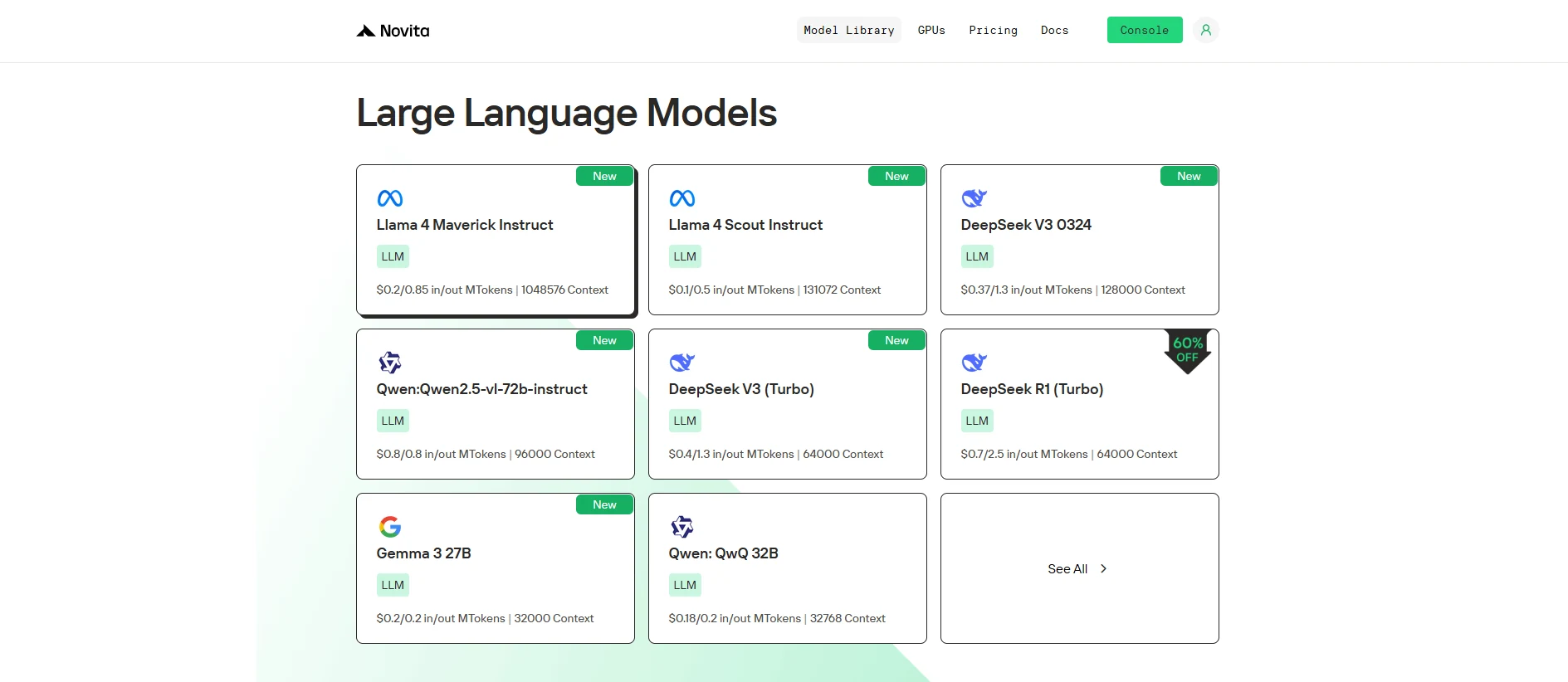
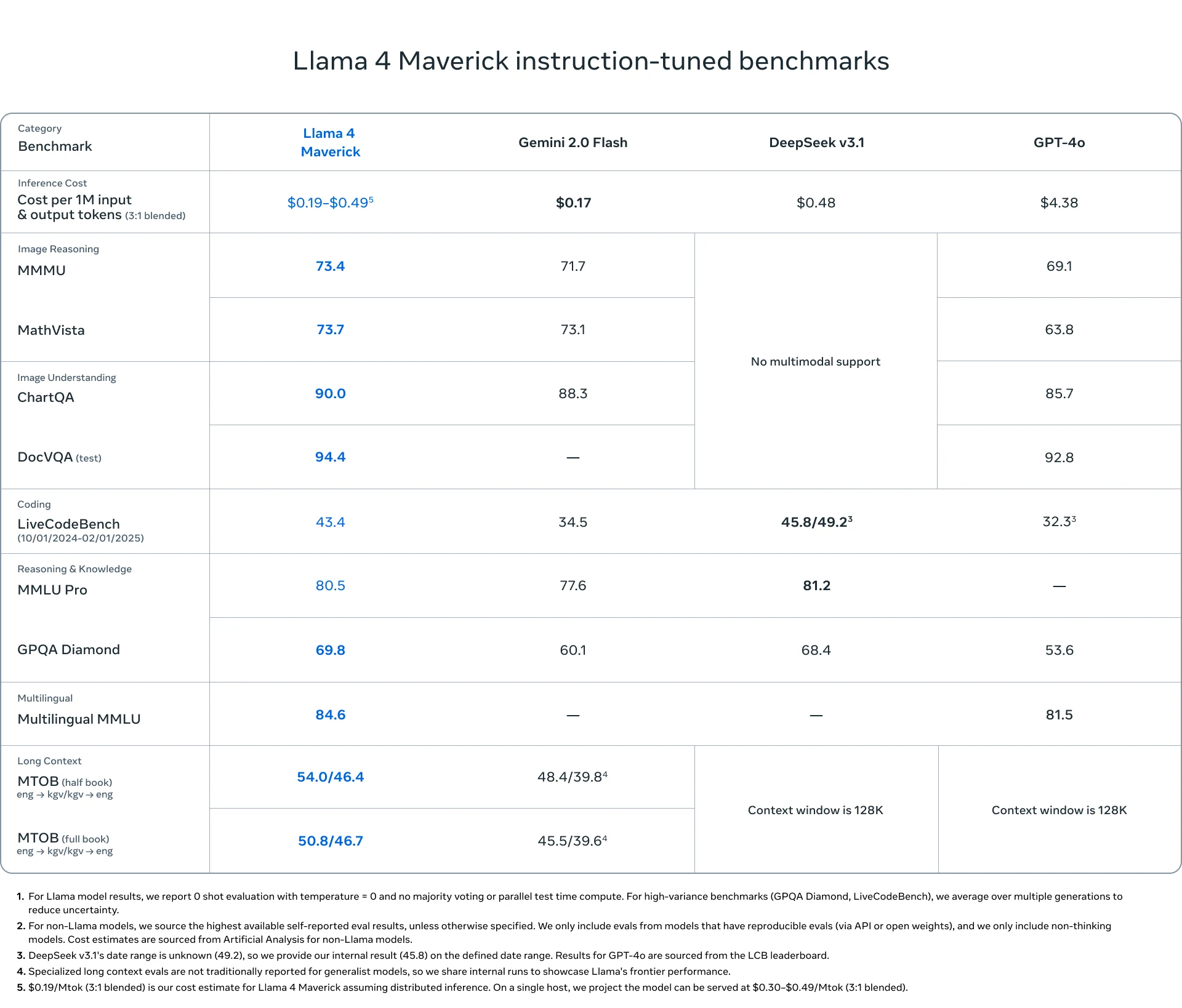
Llama 4 Maverick redefine la IA con capacidades superiores de function calling, ofreciendo rendimiento inigualable, interacción en tiempo real y funcionalidad global gracias a su arquitectura avanzada.
¿Qué es Function Calling?
Function calling se refiere a la capacidad de un sistema, como un modelo o aplicación, de invocar o llamar funciones o servicios externos durante su ejecución. Estas funciones pueden ser APIs, bases de datos u otros servicios que realizan tareas específicas fuera del alcance del modelo o sistema principal.
- Servicios externos: La función puede interactuar con APIs, bases de datos o servicios de terceros (por ejemplo, procesadores de pago, datos meteorológicos, etc.).
- Interacción en tiempo real: La llamada a la función ocurre durante la ejecución, proporcionando datos o acciones en vivo.
- Funciones predefinidas: Estas funciones suelen estar predefinidas, lo que significa que el sistema sabe lo que harán (por ejemplo, recuperar datos, procesar transacciones).
https://www.youtube.com/watch?v=aqdWSYWC\_LI
¿Cómo funciona Function Calling?
- El sistema envía una solicitud a una función externa (por ejemplo, API o servicio).
- La función realiza la tarea (por ejemplo, obtener datos, procesar información).
- El resultado se devuelve al sistema, que lo utiliza para procesamiento adicional.
¿Cuáles son los beneficios de Function Calling?
- Datos en tiempo real: Proporciona información actualizada al interactuar con fuentes externas.
- Funcionalidad extendida: Permite al sistema utilizar servicios externos (por ejemplo, procesamiento de pagos, datos meteorológicos).
- Modularidad: Hace que los sistemas sean más flexibles y adaptables al integrar capacidades externas sin reinventar la rueda.
Function Calling vs. RAG
Ejemplo de Function Calling:
import requests

def get_weather(city: str):
    # Replace with your actual API key and URL
    api_key = "your_api_key"
    url = f"http://api.openweathermap.org/data/2.5/weather?q={city}&appid={api_key}&units=metric"

    response = requests.get(url)
    data = response.json()

    if response.status_code == 200:
        temperature = data['main']['temp']
        description = data['weather'][0]['description']
        return f"The current temperature in {city} is {temperature}°C with {description}."
    else:
        return "Sorry, I couldn't fetch the weather data at the moment."

# Use the function to get weather info for New York
city = "New York"
weather_info = get_weather(city)
print(weather_info)
Ejemplo de RAG:
from transformers import pipeline

# Simulated knowledge base (this could be a database or a larger dataset in a real application)
knowledge_base = {
    "force majeure": "Force Majeure refers to unforeseeable circumstances that prevent someone from fulfilling a contract.",
    "breach of contract": "A breach of contract occurs when one party fails to perform its obligations as outlined in the contract.",
    "arbitration": "Arbitration is a method of resolving disputes outside the courts, where an arbitrator makes a binding decision."
}

def retrieve_information(query: str):
    # Retrieve relevant information based on the query (could be replaced with a database query or more advanced search)
    query = query.lower()
    if query in knowledge_base:
        return knowledge_base[query]
    else:
        return "Sorry, I couldn't find any relevant information in the knowledge base."

def generate_answer(query: str):
    # Retrieve information first
    retrieved_info = retrieve_information(query)

    # Use a text generation model (e.g., GPT-2) for generating a response based on the retrieved information
    model = pipeline("text-generation", model="gpt-2")
    answer = model(f"Based on the information: {retrieved_info}. Answer the following question: {query}")[0]['generated_text']

    return answer

# User query
query = "What is force majeure in a contract?"
answer = generate_answer(query)
print(answer)
¿Qué es Llama 4 Maverick?
| Categoría | Elemento | Detalles |
|---|---|---|
| Información básica | Fecha de lanzamiento | 5 de abril de 2025 |
| Tamaño del modelo | 400B parámetros (17B activos/token) | |
| Código abierto | Abierto | |
| Arquitectura | 128 Mixture-of-Experts (MoE) | |
| Soporte de idiomas | Soporte de idiomas | Preentrenado en 200 idiomas. Soporta árabe, inglés, francés, alemán, hindi, indonesio, italiano, portugués, español, tagalo, tailandés y vietnamita. |
| Multimodal | Capacidad multimodal | Entrada: texto e imagen multilingüe; salida: texto y código multilingües |
| Entrenamiento | Datos de entrenamiento | ~22 billones de tokens de datos multimodales (algunos de Instagram y Facebook) |
| Pre-entrenamiento | MetaP: Configuración adaptativa de expertos + entrenamiento intermedio | |
| Post-entrenamiento | SFT (Datos fáciles) → RL (Datos difíciles) → DPO |
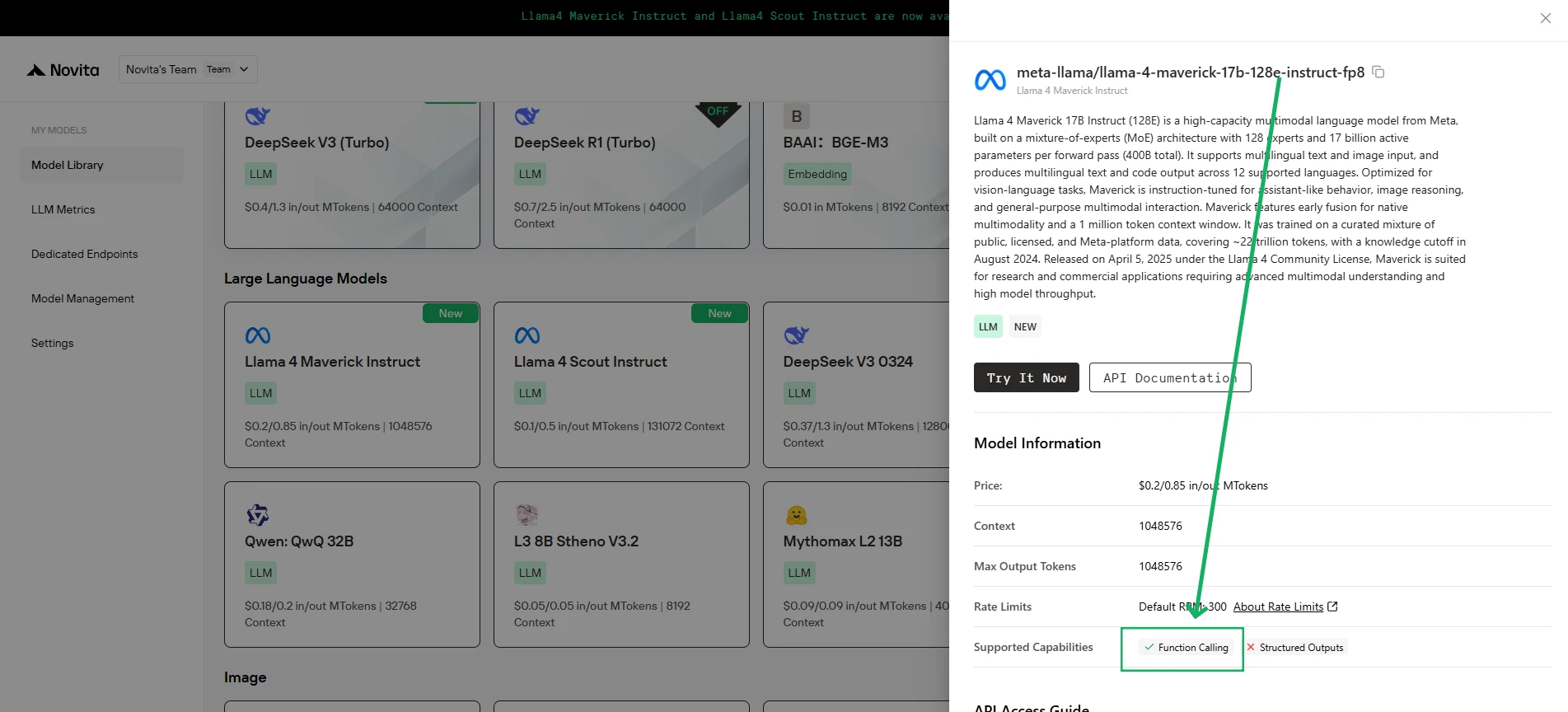
Cómo usar Llama 4 Maverick Function Calling a través de Novita AI
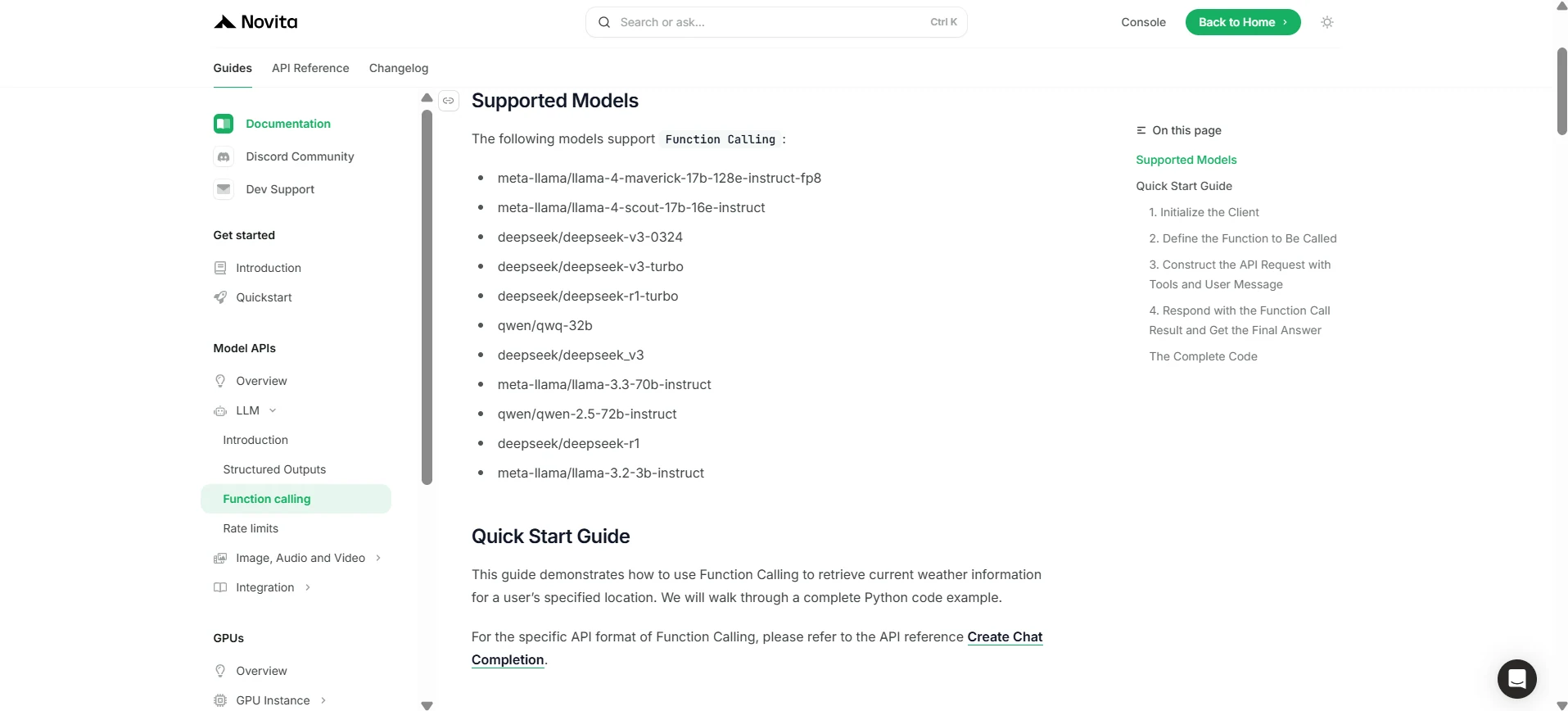
Novita AI ha lanzado descripciones de capacidades de soporte para cada LLM, que puedes ver directamente en la [consola](https://novita.ai/models-console/?utm_source=blog_llm&utm_medium=article&utm_campaign=/ llama-4-maverick-function-calling/) y en los [documentos](https://novita.ai/docs/guides/llm-function-calling/?utm_source=blog_llm&utm_medium=article&utm_campaign= llama-4-maverick-function-calling).
1. Inicializar el cliente
Primero, debes inicializar el cliente con tu clave API de Novita.
from openai import OpenAI
import json

client = OpenAI(
    base_url="https://api.novita.ai/v3/openai",
    # Get the Novita AI API Key from: https://novita.ai/settings/key-management.
    api_key="<YOUR Novita AI API Key>",
)

model = "meta-llama/llama-4-maverick-17b-128e-instruct-fp8"
- Definir la función a llamar
A continuación, define la función Python que el modelo puede llamar. En este ejemplo, es una función para obtener información meteorológica.
# Example function to simulate fetching weather data.
def get_weather(location):
    """Retrieves the current weather for a given location."""
    print("Calling get_weather function with location: ", location)
    # In a real application, you would call an external weather API here.
    # This is a simplified example returning hardcoded data.
    return json.dumps({"location": location, "temperature": "60 degrees Fahrenheit"})
2. Construir la solicitud API con herramientas y mensaje de usuario
Ahora, crea la solicitud API al endpoint de Novita. Esta solicitud incluye el parámetro tools, que define las funciones que el modelo puede usar, y el mensaje del usuario.
tools = [
    {
        "type": "function",
        "function": {
            "name": "get_weather",
            "description": "Get weather of an location, the user shoud supply a location first",
            "parameters": {
                "type": "object",
                "properties": {
                    "location": {
                        "type": "string",
                        "description": "The city and state, e.g. San Francisco, CA",
                    }
                },
                "required": ["location"]
            },
        }
    },
]

messages = [
    {
        "role": "user",
        "content": "What is the weather in San Francisco?"
    }
]

# Let's send the request and print the response.
response = client.chat.completions.create(
    model=model,
    messages=messages,
    tools=tools,
)

# Please check if the response contains tool calls if in production.
tool_call = response.choices[0].message.tool_calls[0]
print(tool_call.model_dump())
3. Salida
{'id': '0', 'function': {'arguments': '{"location": "San Francisco, CA"}', 'name': 'get_weather'}, 'type': 'function'}
4. Responder con el resultado de la llamada a la función y obtener la respuesta final
El siguiente paso es procesar la llamada a la función, ejecutar la función get_weather y enviar el resultado de vuelta al modelo para generar la respuesta final al usuario.
# Ensure tool_call is defined from the previous step
if tool_call:
    # Extend conversation history with the assistant's tool call message
    messages.append(response.choices[0].message)

    function_name = tool_call.function.name
    if function_name == "get_weather":
        function_args = json.loads(tool_call.function.arguments)
        # Execute the function and get the response
        function_response = get_weather(
            location=function_args.get("location"))
        # Append the function response to the messages
        messages.append(
            {
                "tool_call_id": tool_call.id,
                "role": "tool",
                "content": function_response,
            }
        )

    # Get the final response from the model, now with the function result
    answer_response = client.chat.completions.create(
        model=model,
        messages=messages,
        # Note: Do not include tools parameter here.
    )
    print(answer_response.choices[0].message)
5. Salida
{'id': '0', 'function': {'arguments': '{"location": "San Francisco, CA"}', 'name': 'get_weather'}, 'type': 'function'}
Con su diseño de vanguardia y una integración perfecta a través de Novita AI, Llama 4 Maverick supera a otros modelos, proporcionando una solución potente, confiable y flexible para aplicaciones modernas impulsadas por IA.
Preguntas Frecuentes
¿Qué es function calling?
Permite que los LLM activen herramientas o APIs externas para realizar tareas y recuperar datos.
¿Cómo funciona Llama 4 Maverick con function calling?
Llama 4 Maverick simplifica las integraciones en tiempo real con sistemas a través de Novita AI.
¿Qué hace superior a Llama 4 Maverick?
Llama 4 Maverick cuenta con 400B parámetros, 128 Mixture-of-Experts y sólidas capacidades multilingües/multimodales, lo que lo hace más potente y versátil que otros modelos.
Novita AI es la plataforma integral en la nube que impulsa tus ambiciones de IA. APIs integradas, serverless, instancias GPU — las herramientas rentables que necesitas. Elimina la infraestructura, comienza gratis y haz realidad tu visión de IA.