主なハイライト
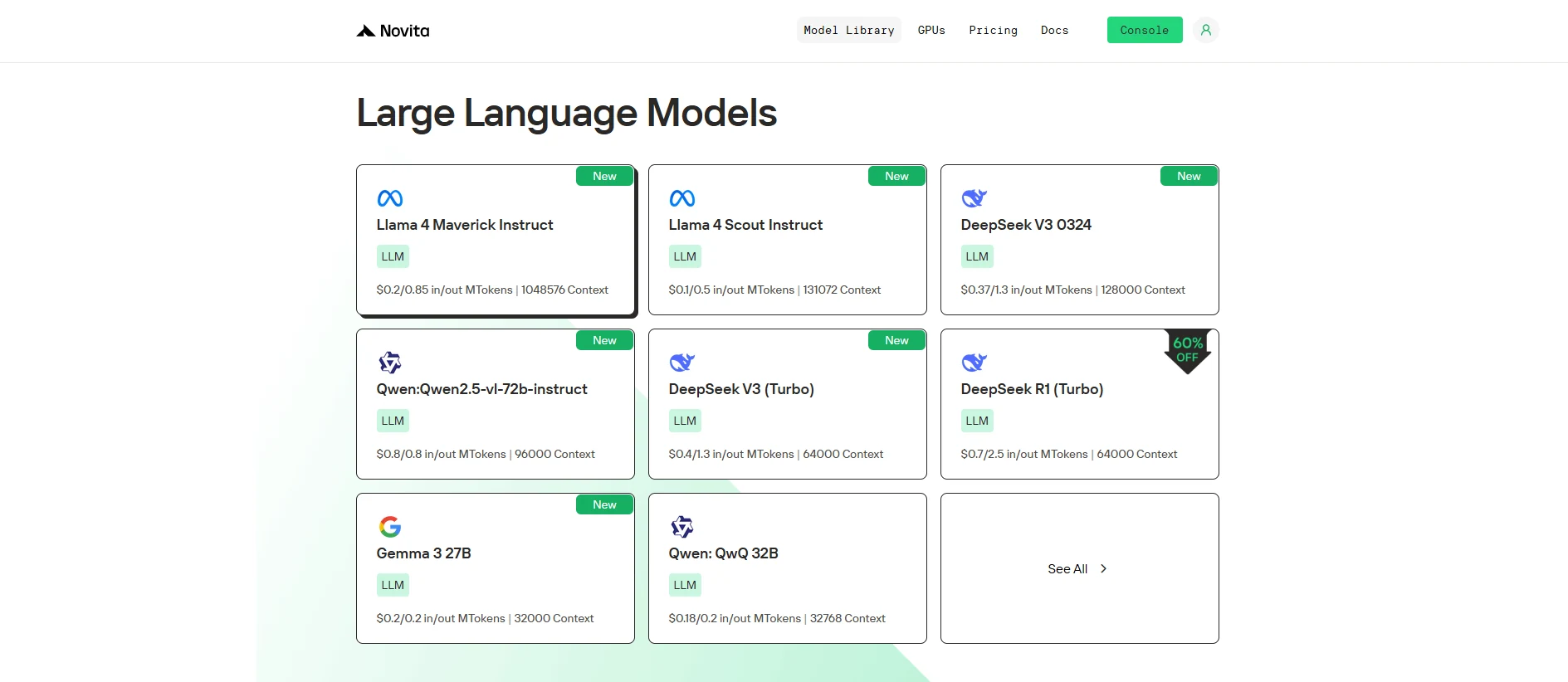
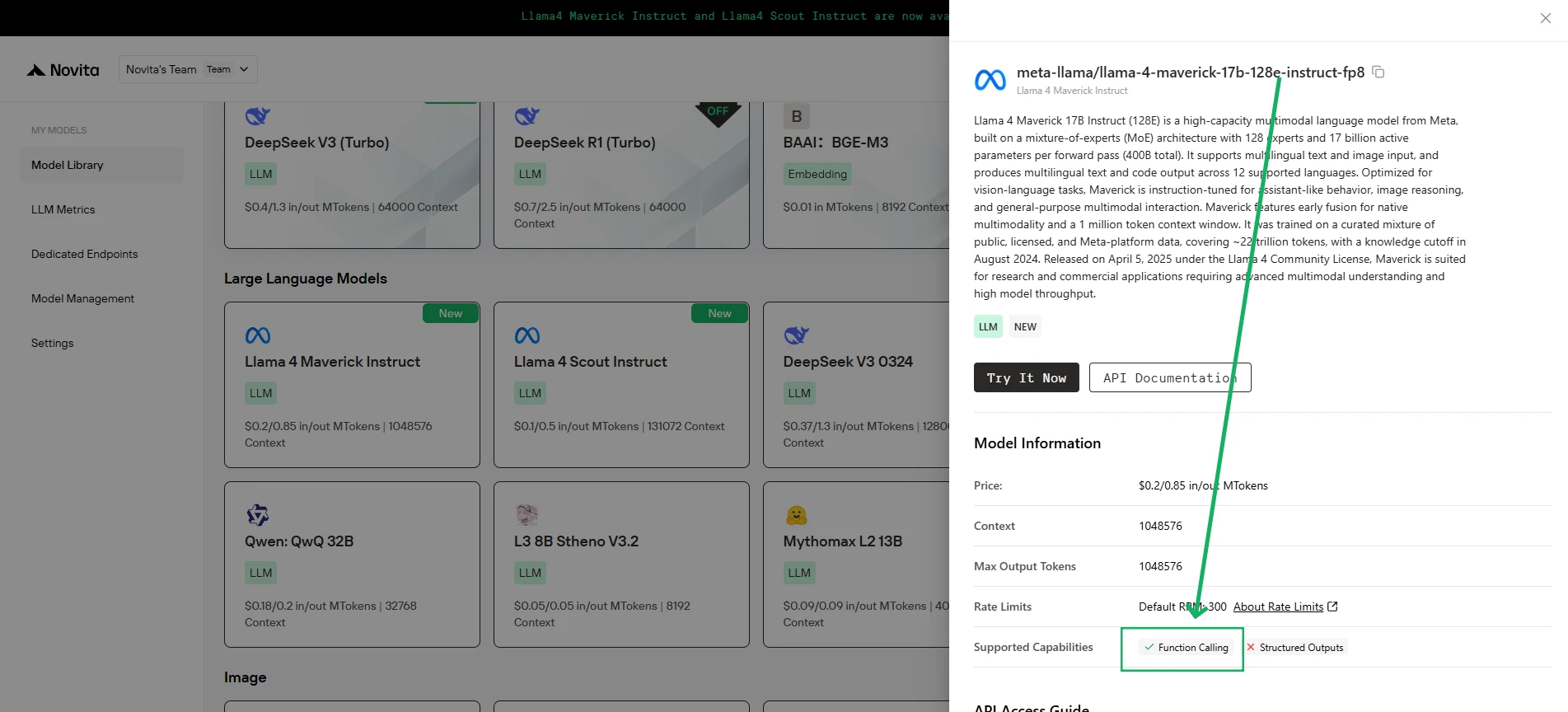
Novita AI は Llama 4 Maverick を導入しました!さらに、このバージョンは ** 関数呼び出し** を完全にサポートしています。
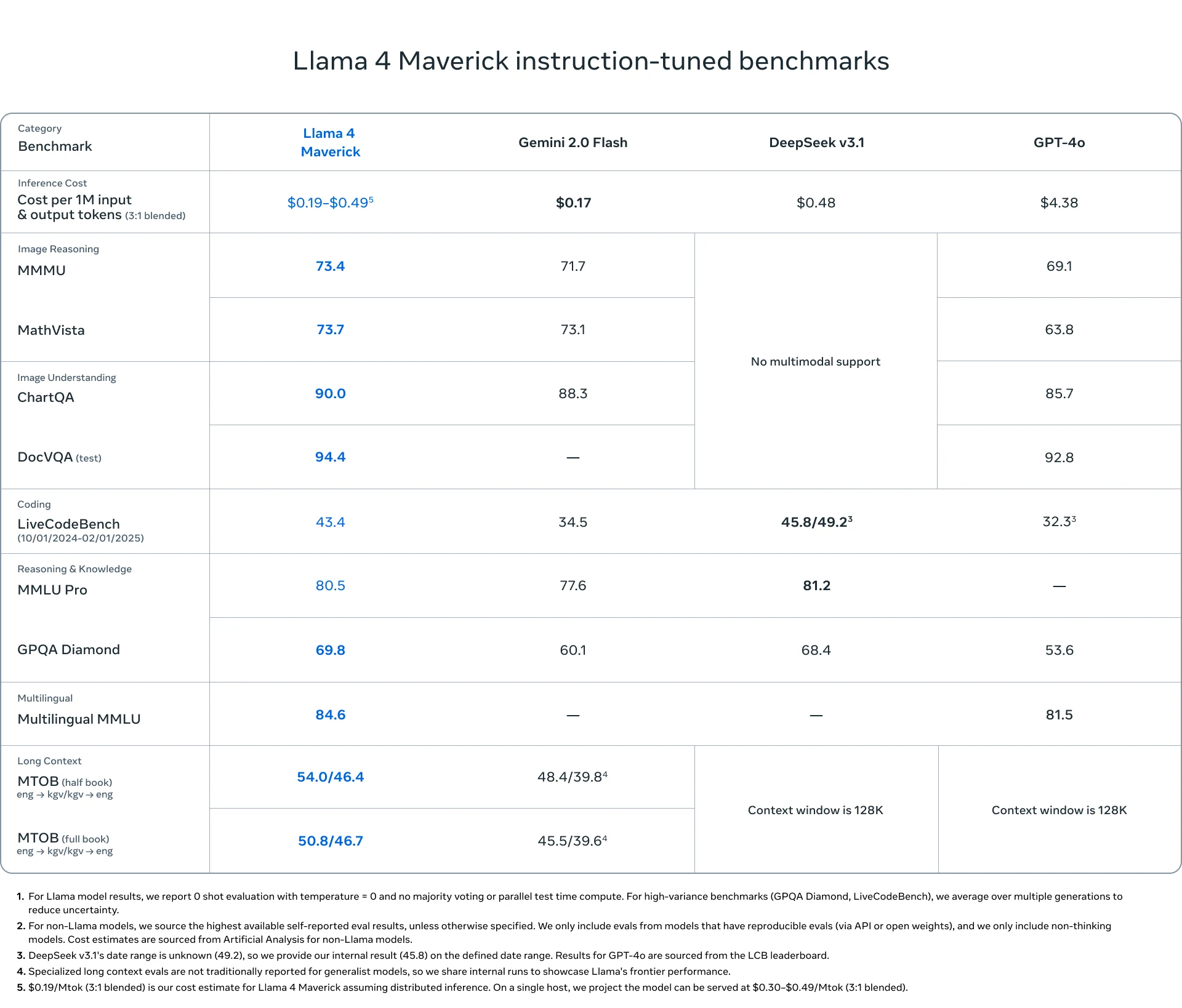
Llama 4 Maverick は、最先端の 128 Mixture-of-Experts (MoE) アーキテクチャと高度な ** マルチモーダル機能** を組み合わせています。
パフォーマンスをテストしたい場合は、Novita AI Playground で直接 無料トライアルを開始 してください。
Llama 4 Maverick は、優れた関数呼び出し機能で AI を再定義し、高度なアーキテクチャを通じて比類のないパフォーマンス、リアルタイムインタラクション、グローバルな機能を提供します。
関数呼び出しとは?
関数呼び出し とは、モデルやアプリケーションなどのシステムが、実行中に外部の関数やサービスを呼び出したり実行したりする機能のことです。これらの関数は、メインのモデルやシステムの範囲外で特定のタスクを実行する API、データベース、その他のサービスです。
- 外部サービス: 関数は API、データベース、またはサードパーティサービス(例:決済処理、天気データなど)とやり取りできます。
- リアルタイムインタラクション: 関数呼び出しは実行中に発生し、ライブデータやアクションを提供します。
- 事前定義された関数: これらの関数は通常事前に定義されており、システムは関数が何を行うか(例:データ取得、トランザクション処理)を認識しています。
https://www.youtube.com/watch?v=aqdWSYWC\_LI
関数呼び出しの仕組み
- システムが外部関数(API やサービスなど)にリクエストを送信します。
- 関数がタスク(データ取得、情報処理など)を実行します。
- 結果がシステムに返され、その後の処理に使用されます。
関数呼び出しのメリット
- リアルタイムデータ: 外部ソースとやり取りすることで最新情報を提供します。
- 機能の拡張: システムが外部サービス(決済処理、天気データなど)を利用できるようにします。
- モジュール性: 外部機能を統合することで、再発明することなくシステムの柔軟性と適応性を高めます。
関数呼び出しと RAG の比較
関数呼び出しの例:
import requests

def get_weather(city: str):
    # Replace with your actual API key and URL
    api_key = "your_api_key"
    url = f"http://api.openweathermap.org/data/2.5/weather?q={city}&appid={api_key}&units=metric"

    response = requests.get(url)
    data = response.json()

    if response.status_code == 200:
        temperature = data['main']['temp']
        description = data['weather'][0]['description']
        return f"The current temperature in {city} is {temperature}°C with {description}."
    else:
        return "Sorry, I couldn't fetch the weather data at the moment."

# Use the function to get weather info for New York
city = "New York"
weather_info = get_weather(city)
print(weather_info)
RAG の例:
from transformers import pipeline

# Simulated knowledge base (this could be a database or a larger dataset in a real application)
knowledge_base = {
    "force majeure": "Force Majeure refers to unforeseeable circumstances that prevent someone from fulfilling a contract.",
    "breach of contract": "A breach of contract occurs when one party fails to perform its obligations as outlined in the contract.",
    "arbitration": "Arbitration is a method of resolving disputes outside the courts, where an arbitrator makes a binding decision."
}

def retrieve_information(query: str):
    # Retrieve relevant information based on the query (could be replaced with a database query or more advanced search)
    query = query.lower()
    if query in knowledge_base:
        return knowledge_base[query]
    else:
        return "Sorry, I couldn't find any relevant information in the knowledge base."

def generate_answer(query: str):
    # Retrieve information first
    retrieved_info = retrieve_information(query)

    # Use a text generation model (e.g., GPT-2) for generating a response based on the retrieved information
    model = pipeline("text-generation", model="gpt-2")
    answer = model(f"Based on the information: {retrieved_info}. Answer the following question: {query}")[0]['generated_text']

    return answer

# User query
query = "What is force majeure in a contract?"
answer = generate_answer(query)
print(answer)
Llama 4 Maverick とは?
| **カテゴリ ** | ** 項目 ** | ** 詳細** |
|---|---|---|
| 基本情報 | リリース日 | 2025 年 4 月 5 日 |
| モデルサイズ | 400B パラメータ (17B アクティブ/トークン) | |
| オープンソース | オープン | |
| アーキテクチャ | 128 Mixture-of-Experts (MoE) | |
| 言語サポート | 言語サポート | 200 言語で事前学習。アラビア語、英語、フランス語、ドイツ語、ヒンディー語、インドネシア語、イタリア語、ポルトガル語、スペイン語、タガログ語、タイ語、ベトナム語に対応。 |
| マルチモーダル | マルチモーダル機能 | 入力: 多言語テキストと画像; 出力: 多言語テキストとコード |
| トレーニング | トレーニングデータ | 約 22 兆トークンのマルチモーダルデータ(一部は Instagram と Facebook から) |
| 事前トレーニング | MetaP: 適応型エキスパート構成 + 中間トレーニング | |
| ポストトレーニング | SFT (Easy Data) → RL (Hard Data) → DPO |
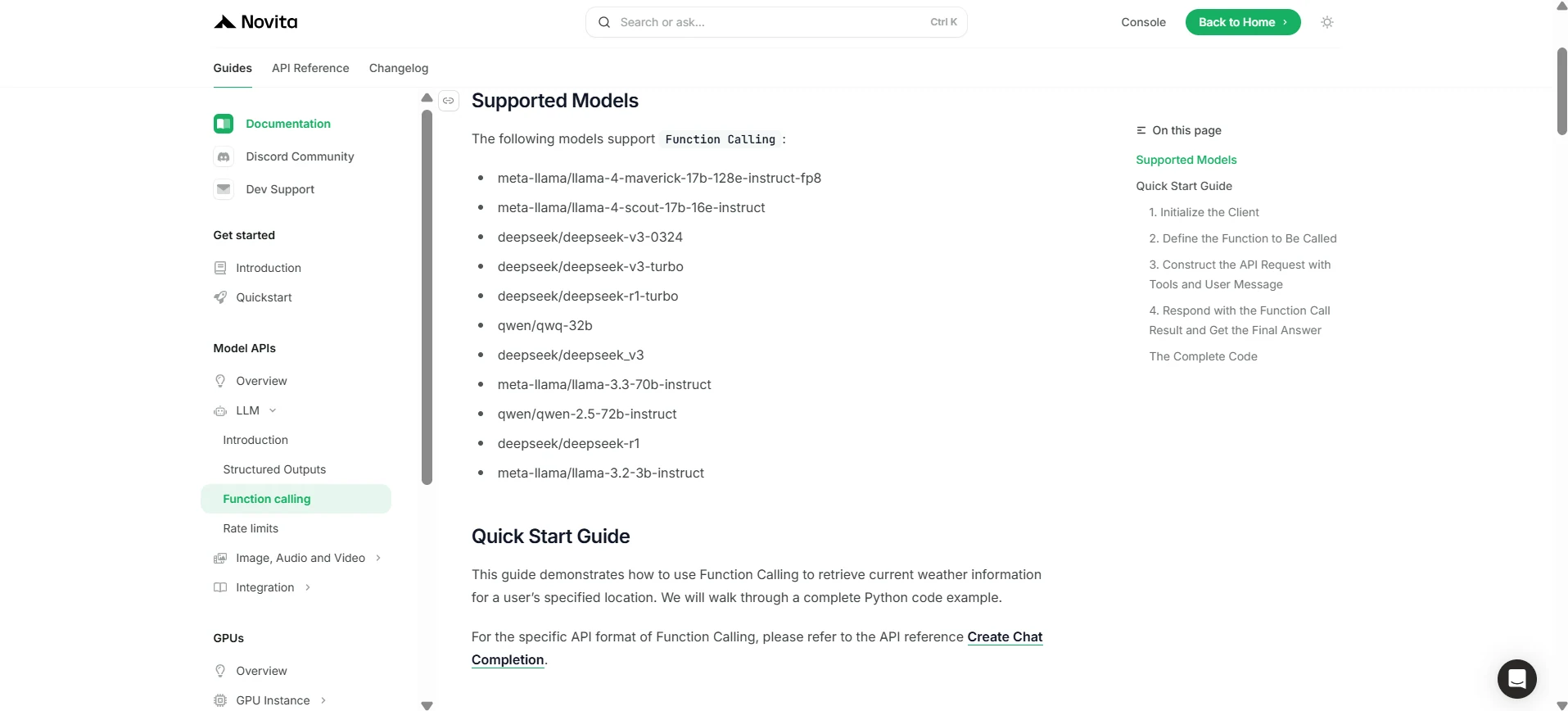
Novita AI で Llama 4 Maverick の関数呼び出しを使用する方法
Novita AI は各 LLM の機能説明のサポートを開始しており、[コンソール](https://novita.ai/models-console/?utm_source=blog_llm&utm_medium=article&utm_campaign=/ llama-4-maverick-function-calling/) や [ドキュメント](https://novita.ai/docs/guides/llm-function-calling/?utm_source=blog_llm&utm_medium=article&utm_campaign= llama-4-maverick-function-calling) で直接確認できます。
1. クライアントを初期化する
まず、Novita API キーを使用してクライアントを初期化します。
from openai import OpenAI
import json

client = OpenAI(
    base_url="https://api.novita.ai/v3/openai",
    # Get the Novita AI API Key from: https://novita.ai/settings/key-management.
    api_key="<YOUR Novita AI API Key>",
)

model = "meta-llama/llama-4-maverick-17b-128e-instruct-fp8"
呼び出す関数を定義する
次に、モデルが呼び出せる Python 関数を定義します。この例では、天気情報を取得する関数です。
# Example function to simulate fetching weather data.
def get_weather(location):
    """Retrieves the current weather for a given location."""
    print("Calling get_weather function with location: ", location)
    # In a real application, you would call an external weather API here.
    # This is a simplified example returning hardcoded data.
    return json.dumps({"location": location, "temperature": "60 degrees Fahrenheit"})
2. ツールとユーザーメッセージを含む API リクエストを構築する
次に、Novita エンドポイントへの API リクエストを作成します。このリクエストには、モデルが使用できる関数を定義する tools パラメータとユーザーメッセージが含まれます。
tools = [
    {
        "type": "function",
        "function": {
            "name": "get_weather",
            "description": "Get weather of an location, the user shoud supply a location first",
            "parameters": {
                "type": "object",
                "properties": {
                    "location": {
                        "type": "string",
                        "description": "The city and state, e.g. San Francisco, CA",
                    }
                },
                "required": ["location"]
            },
        }
    },
]

messages = [
    {
        "role": "user",
        "content": "What is the weather in San Francisco?"
    }
]

# Let's send the request and print the response.
response = client.chat.completions.create(
    model=model,
    messages=messages,
    tools=tools,
)

# Please check if the response contains tool calls if in production.
tool_call = response.choices[0].message.tool_calls[0]
print(tool_call.model_dump())
3. 出力
{'id': '0', 'function': {'arguments': '{"location": "San Francisco, CA"}', 'name': 'get_weather'}, 'type': 'function'}
- 関数呼び出しの結果を返し、最終回答を取得する
次のステップでは、関数呼び出しを処理し、get_weather 関数を実行して、その結果をモデルに送り返し、ユーザーへの最終応答を生成します。
# Ensure tool_call is defined from the previous step
if tool_call:
    # Extend conversation history with the assistant's tool call message
    messages.append(response.choices[0].message)

    function_name = tool_call.function.name
    if function_name == "get_weather":
        function_args = json.loads(tool_call.function.arguments)
        # Execute the function and get the response
        function_response = get_weather(
            location=function_args.get("location"))
        # Append the function response to the messages
        messages.append(
            {
                "tool_call_id": tool_call.id,
                "role": "tool",
                "content": function_response,
            }
        )

    # Get the final response from the model, now with the function result
    answer_response = client.chat.completions.create(
        model=model,
        messages=messages,
        # Note: Do not include tools parameter here.
    )
    print(answer_response.choices[0].message)
5. 出力
{'id': '0', 'function': {'arguments': '{"location": "San Francisco, CA"}', 'name': 'get_weather'}, 'type': 'function'}
最先端の設計と Novita AI によるシームレスな統合により、Llama 4 Maverick は他のモデルを凌駕し、最新の AI 駆動アプリケーション向けの強力で信頼性が高く柔軟なソリューションを提供します。
よくある質問
関数呼び出しとは?
LLM が外部ツールや API をトリガーしてタスクを実行し、データを取得できるようにします。
Llama 4 Maverick は関数呼び出しでどのように動作しますか?
Llama 4 Maverick は Novita AI を介してリアルタイムのシステム統合を簡素化します。
Llama 4 Maverick が優れている理由は?
Llama 4 Maverick は 400B パラメータ、128 Mixture-of-Experts、堅牢な多言語/マルチモーダル機能を備えており、他のモデルよりも強力で多用途です。
Novita AI は、AI の野望を実現するオールインワンのクラウドプラットフォームです。統合 API、サーバーレス、GPU インスタンス — 必要なコスト効率の高いツール。インフラストラクチャを排除し、無料で開始して、AI ビジョンを現実にしましょう。