Key Highlights
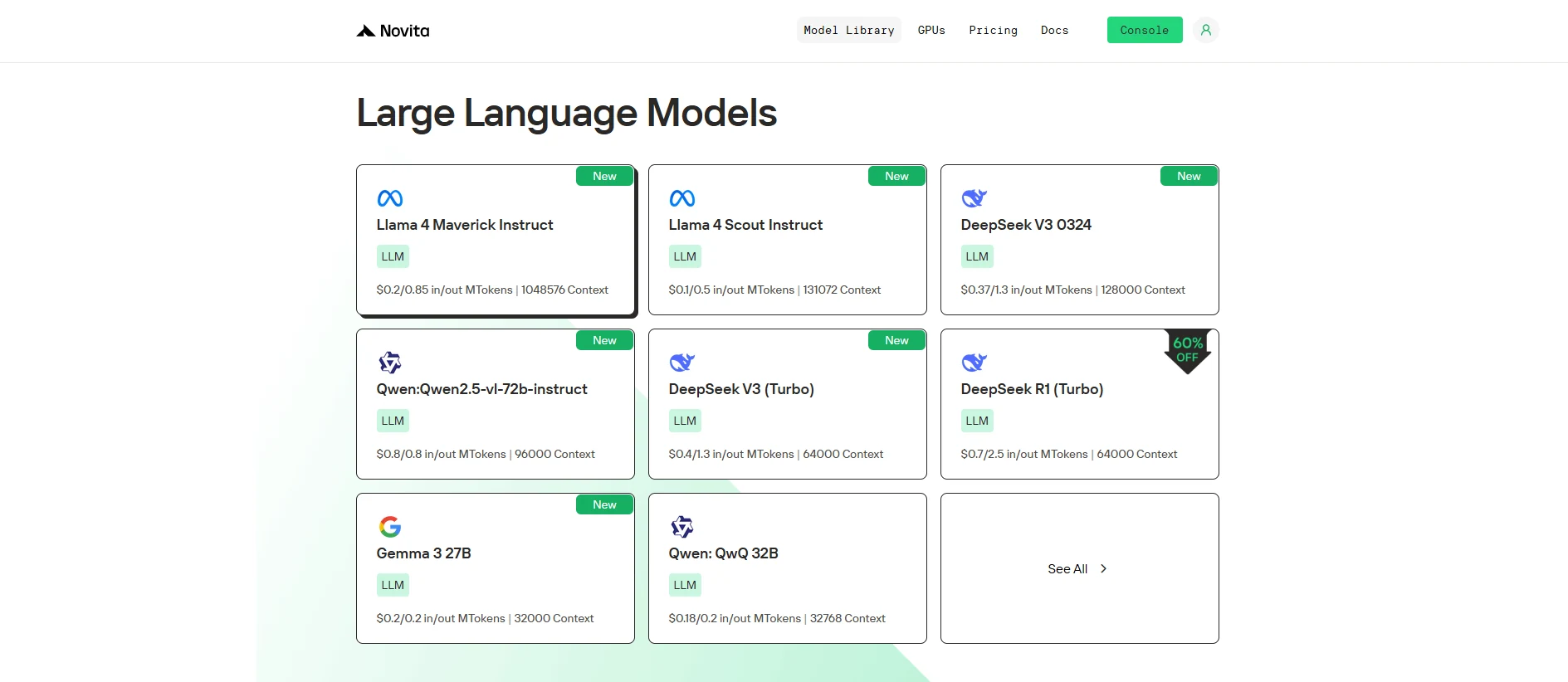
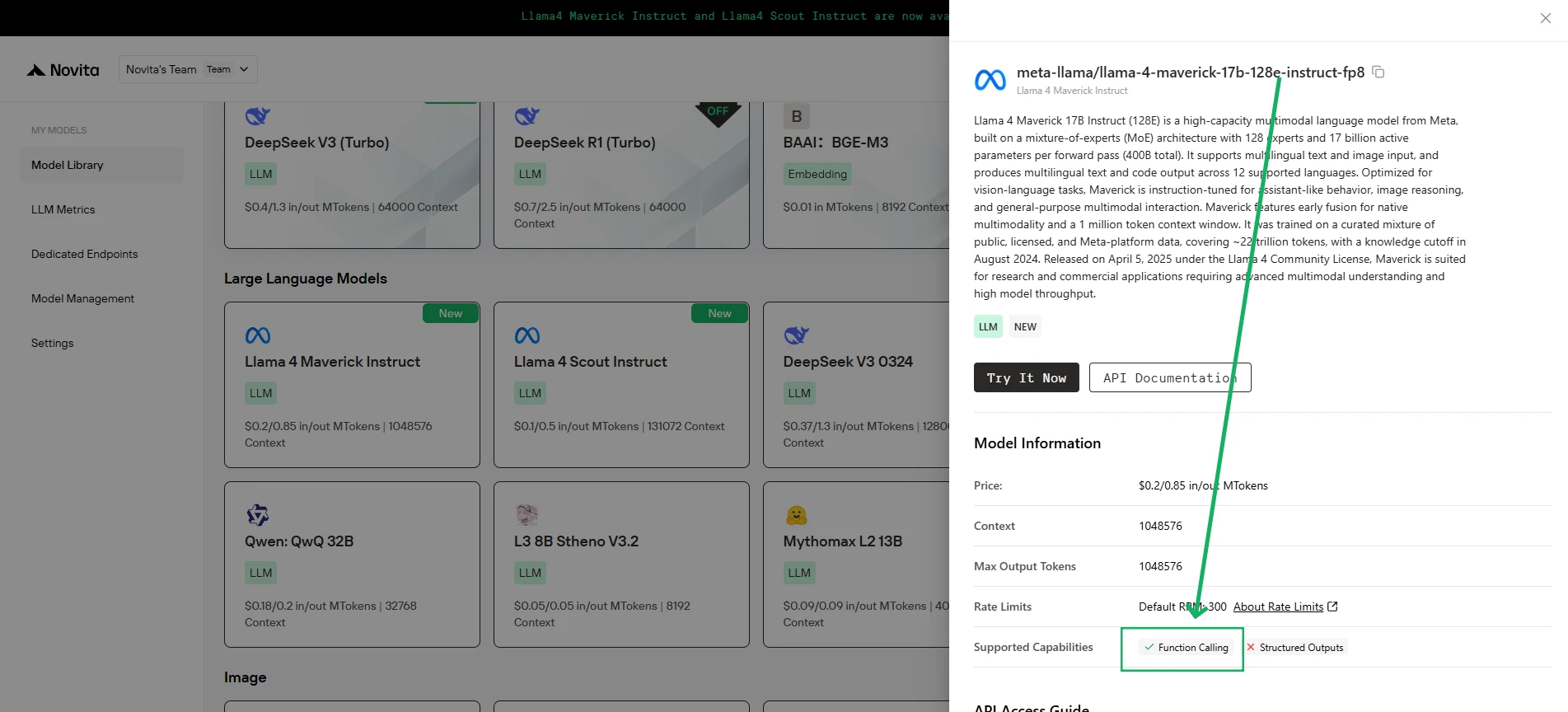
Novita AI has introduced Llama 4 Maverick ! Moreover, this version fully supports function calling.
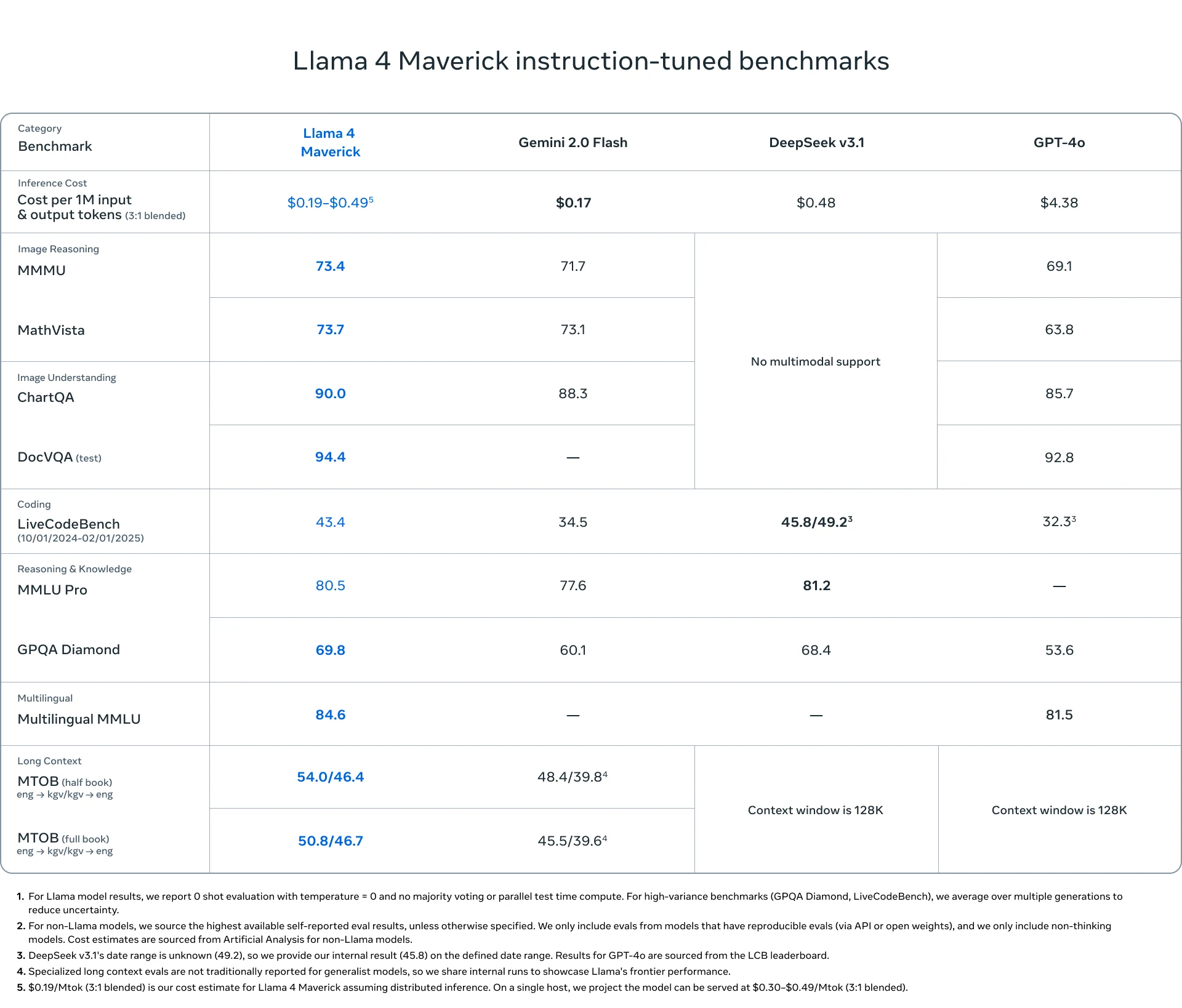
Llama 4 Maverick combines cutting-edge 128 Mixture-of-Experts (MoE) architecture with advanced multimodal capabilities
If you want to test its performance, start a free trail on Novita AI Playground directly!
Llama 4 Maverick redefines AI with superior function-calling capabilities, offering unmatched performance, real-time interaction, and global functionality through its advanced architecture.
What is Function Calling?
Function calling refers to the ability of a system, such as a model or application, to invoke or call external functions or services during its execution. These functions could be APIs, databases, or other services that perform specific tasks outside the scope of the main model or system.
- External services: The function could interact with APIs, databases, or third-party services (e.g., payment processors, weather data, etc.).
- Real-time interaction: The function call happens during execution, providing live data or actions.
- Predefined functions: These functions are typically predefined, meaning the system knows what they will do (e.g., retrieving data, processing transactions).
https://www.youtube.com/watch?v=aqdWSYWC\_LI
How Function Calling Works?
- The system sends a request to an external function (e.g., API or service).
- The function performs the task (e.g., fetching data, processing information).
- The result is returned to the system, which uses it for further processing.
What Benefits of Function Calling?
- Real-time data: Provides up-to-date information by interacting with external sources.
- Extended functionality: Allows the system to use external services (e.g., payment processing, weather data).
- Modularity: Makes systems more flexible and adaptable by integrating external capabilities without reinventing the wheel.
Function Calling vs. RAG
Function Calling Example:
import requests

def get_weather(city: str):
    # Replace with your actual API key and URL
    api_key = "your_api_key"
    url = f"http://api.openweathermap.org/data/2.5/weather?q={city}&appid={api_key}&units=metric"

    response = requests.get(url)
    data = response.json()

    if response.status_code == 200:
        temperature = data['main']['temp']
        description = data['weather'][0]['description']
        return f"The current temperature in {city} is {temperature}°C with {description}."
    else:
        return "Sorry, I couldn't fetch the weather data at the moment."

# Use the function to get weather info for New York
city = "New York"
weather_info = get_weather(city)
print(weather_info)
RAG Example:
from transformers import pipeline

# Simulated knowledge base (this could be a database or a larger dataset in a real application)
knowledge_base = {
    "force majeure": "Force Majeure refers to unforeseeable circumstances that prevent someone from fulfilling a contract.",
    "breach of contract": "A breach of contract occurs when one party fails to perform its obligations as outlined in the contract.",
    "arbitration": "Arbitration is a method of resolving disputes outside the courts, where an arbitrator makes a binding decision."
}

def retrieve_information(query: str):
    # Retrieve relevant information based on the query (could be replaced with a database query or more advanced search)
    query = query.lower()
    if query in knowledge_base:
        return knowledge_base[query]
    else:
        return "Sorry, I couldn't find any relevant information in the knowledge base."

def generate_answer(query: str):
    # Retrieve information first
    retrieved_info = retrieve_information(query)

    # Use a text generation model (e.g., GPT-2) for generating a response based on the retrieved information
    model = pipeline("text-generation", model="gpt-2")
    answer = model(f"Based on the information: {retrieved_info}. Answer the following question: {query}")[0]['generated_text']

    return answer

# User query
query = "What is force majeure in a contract?"
answer = generate_answer(query)
print(answer)
What is Llama 4 Maverick?
| Category | Item | Details |
|---|---|---|
| Basic Info | Release Date | April 5, 2025 |
| Model Size | 400B parameters (17B active/token) | |
| Open Source | Open | |
| Architecture | 128 Mixture-of-Experts (MoE) | |
| Language Support | Language Support | Pre-trained on 200 languages. Supports Arabic, English, French, German, Hindi, Indonesian, Italian, Portuguese, Spanish, Tagalog, Thai, and Vietnamese. |
| Multimodal | Multimodal Capability | Input: Multilingual text and image; output multilingual text and code |
| Training | Training Data | ~22 trillion tokens of multimodal data (some from Instagram and Facebook) |
| Pre-Training | MetaP: Adaptive Expert Configuration + mid-training | |
| Post-Training | SFT (Easy Data) → RL (Hard Data) → DPO |
How to Use Llama 4 Maverick Function Calling via Novita AI
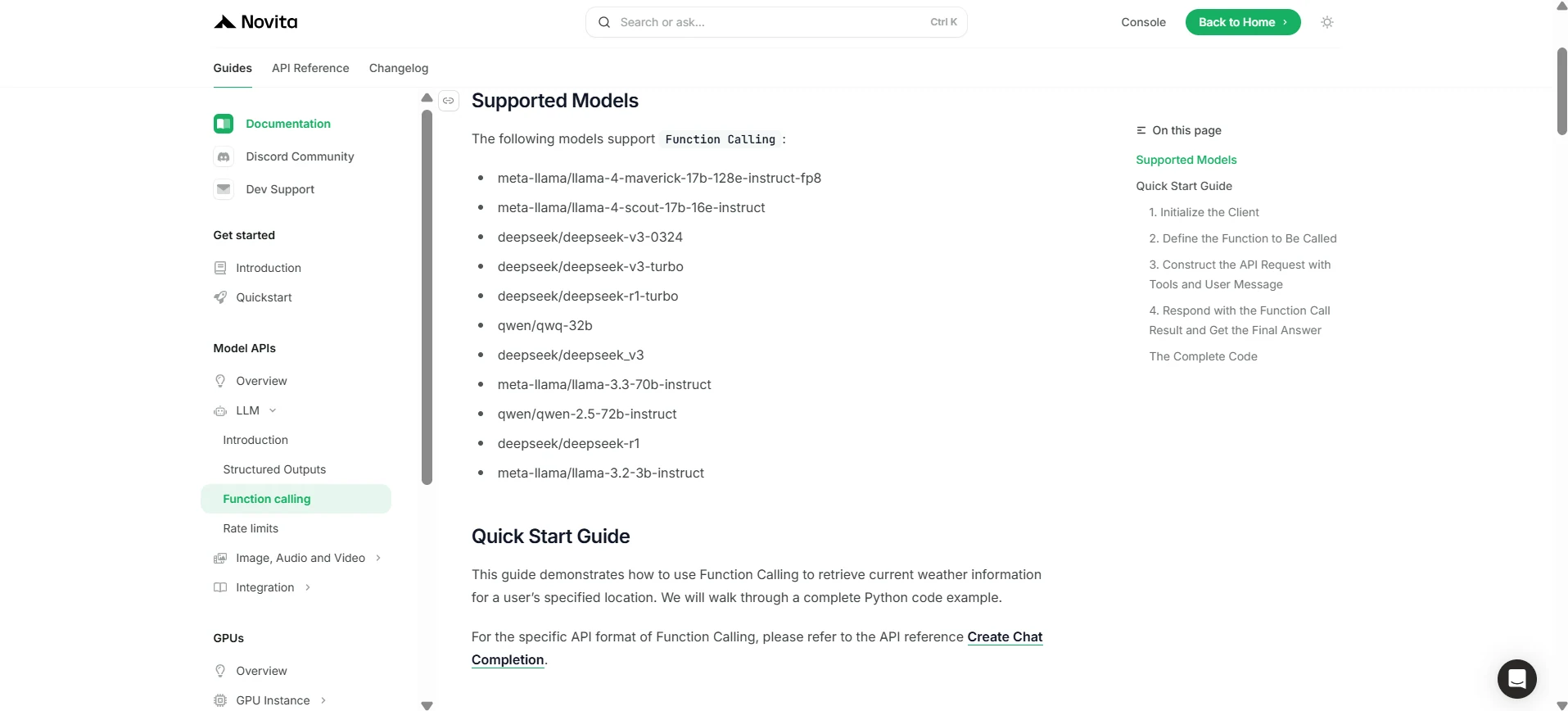
Novita AI has been launched support capability descriptions for each LLM, which you can directly view in the [console](https://novita.ai/models-console/?utm_source=blog_llm&utm_medium=article&utm_campaign=/ llama-4-maverick-function-calling/) and [docs](https://novita.ai/docs/guides/llm-function-calling/?utm_source=blog_llm&utm_medium=article&utm_campaign= llama-4-maverick-function-calling).
1. Initialize the Client
First, you need to initialize the client with your Novita API key.
from openai import OpenAI
import json

client = OpenAI(
    base_url="https://api.novita.ai/v3/openai",
    # Get the Novita AI API Key from: https://novita.ai/settings/key-management.
    api_key="<YOUR Novita AI API Key>",
)

model = "meta-llama/llama-4-maverick-17b-128e-instruct-fp8"- Define the Function to Be Called
Next, define the Python function that the model can call. In this example, it’s a function to get weather information.
# Example function to simulate fetching weather data.
def get_weather(location):
    """Retrieves the current weather for a given location."""
    print("Calling get_weather function with location: ", location)
    # In a real application, you would call an external weather API here.
    # This is a simplified example returning hardcoded data.
    return json.dumps({"location": location, "temperature": "60 degrees Fahrenheit"})
2. Construct the API Request with Tools and User Message
Now, create the API request to the Novita endpoint. This request includes the tools parameter, defining the functions the model can use, and the user’s message.
tools = [
    {
        "type": "function",
        "function": {
            "name": "get_weather",
            "description": "Get weather of an location, the user shoud supply a location first",
            "parameters": {
                "type": "object",
                "properties": {
                    "location": {
                        "type": "string",
                        "description": "The city and state, e.g. San Francisco, CA",
                    }
                },
                "required": ["location"]
            },
        }
    },
]

messages = [
    {
        "role": "user",
        "content": "What is the weather in San Francisco?"
    }
]

# Let's send the request and print the response.
response = client.chat.completions.create(
    model=model,
    messages=messages,
    tools=tools,
)

# Please check if the response contains tool calls if in production.
tool_call = response.choices[0].message.tool_calls[0]
print(tool_call.model_dump())
3. Output
{'id': '0', 'function': {'arguments': '{"location": "San Francisco, CA"}', 'name': 'get_weather'}, 'type': 'function'}4. Respond with the Function Call Result and Get the Final Answer
The next step is to process the function call, execute the get_weather function, and send the result back to the model to generate the final response to the user.
# Ensure tool_call is defined from the previous step
if tool_call:
    # Extend conversation history with the assistant's tool call message
    messages.append(response.choices[0].message)

    function_name = tool_call.function.name
    if function_name == "get_weather":
        function_args = json.loads(tool_call.function.arguments)
        # Execute the function and get the response
        function_response = get_weather(
            location=function_args.get("location"))
        # Append the function response to the messages
        messages.append(
            {
                "tool_call_id": tool_call.id,
                "role": "tool",
                "content": function_response,
            }
        )

    # Get the final response from the model, now with the function result
    answer_response = client.chat.completions.create(
        model=model,
        messages=messages,
        # Note: Do not include tools parameter here.
    )
    print(answer_response.choices[0].message)
5. Output
{'id': '0', 'function': {'arguments': '{"location": "San Francisco, CA"}', 'name': 'get_weather'}, 'type': 'function'}With its cutting-edge design and seamless integration through Novita AI, Llama 4 Maverick surpasses other models, providing a powerful, reliable, and flexible solution for modern AI-driven applications.
Frequently Asked Question
What is function calling?
It lets LLMs trigger external tools or APIs to perform tasks and retrieve data.
How does Llama 4 Maverick work with function calling?
LlLlama 4 Maverick simplifies real-time system integrations via Novita AI.
What makes Llama 4 Maverick superior?
Llama 4 Maverick features 400B parameters, 128 Mixture-of-Experts, and robust multilingual/multimodal capabilities, making it more powerful and versatile than other models.
Novita AI is the All-in-one cloud platform that empowers your AI ambitions. Integrated APIs, serverless, GPU Instance — the cost-effective tools you need. Eliminate infrastructure, start free, and make your AI vision a reality.