MiniMax M3 is live on Novita AI as minimax/minimax-m3. That makes the launch more than another model spec sheet: developers can try M3 through Novita’s OpenAI-compatible API and see how it behaves on large-codebase review, tool-heavy agent workflows, long-context planning, and multimodal input tasks that need a text answer.
What is MiniMax M3?
MiniMax M3 is a newer M-series model from MiniMax, aimed at coding, agentic reasoning, tool use, long-context work, and multimodal input understanding. On Novita AI, it is available as the serverless chat model minimax/minimax-m3.
The reason to test it is simple: M3 gives you a lot of room to carry project context, and it can read text, images, and video while returning text. That combination is useful when a task has more than one kind of evidence: source files, logs, screenshots, design notes, or a short product walkthrough.
For users, the practical boundary is simple: use M3 to understand mixed inputs and return text-based analysis, plans, explanations, or code suggestions. It is not an image generator or video generator. Test it with your own acceptance criteria before its output is used in production.
What changed now that M3 is live on Novita AI?
MiniMax M3 is available on Novita AI as minimax/minimax-m3. You can open the MiniMax-M3 model page for the live listing, then call it through Novita’s OpenAI-compatible chat completions endpoint.
For a first test, use the model ID, base URL, endpoint, supported modalities, context and output limits below, then run the small Python or curl request in the How-to section.
If your stack already uses the OpenAI SDK pattern, you can usually start by changing the base URL, API key, and model string. Before production rollout, run the same checks you would run for any model migration: latency, token usage, tool behavior, and cost on your own workload.
Novita API specs and model ID
| Novita model ID | minimax/minimax-m3 |
| Model display name | MiniMax-M3 |
| Model type | Chat |
| Context length | 1,000,000 tokens |
| Max output | 131,072 tokens |
| Input modalities | Text, image, video |
| Output modalities | Text |
| Supported features | Serverless, function calling, structured outputs, reasoning |
| OpenAI-compatible base URL | https://api.novita.ai/openai |
| Chat endpoint | /v1/chat/completions |
Use the Novita model page for the current MiniMax-M3 listing, and use the API reference when you need request fields, authentication, or parameter details.
How to use MiniMax M3 on Novita AI
Use this quick path when you want to test MiniMax M3 through Novita’s OpenAI-compatible API.
Step 1: Open the Novita LLM API docs
Start with Novita’s LLM API guide for the integration pattern. Keep the Create chat completion API reference nearby for request fields, response format, and optional parameters.
Step 2: Prepare your API key, base URL, and model ID
For a first call, you need three values: your Novita API key, the OpenAI-compatible base URL https://api.novita.ai/openai, and the model ID minimax/minimax-m3. Keep the API key in an environment variable or secret manager rather than hard-coding it in application code.
Step 3: Run a Python test request
Here is a minimal Python example using the OpenAI SDK pattern:
from openai import OpenAI

client = OpenAI(
    base_url="https://api.novita.ai/openai",
    api_key="YOUR_NOVITA_API_KEY",
)

response = client.chat.completions.create(
    model="minimax/minimax-m3",
    messages=[
        {
            "role": "system",
            "content": "You are a senior software engineering assistant. Be precise and cite uncertainty.",
        },
        {
            "role": "user",
            "content": "Review this migration plan and identify the top implementation risks.",
        },
    ],
    max_tokens=1200,
    temperature=0.2,
)

print(response.choices[0].message.content)
Step 4: Test the same request with curl
Here is the same idea with curl:
curl "https://api.novita.ai/openai/v1/chat/completions" \
  -H "Content-Type: application/json" \
  -H "Authorization: Bearer YOUR_NOVITA_API_KEY" \
  -d '{
    "model": "minimax/minimax-m3",
    "messages": [
      {
        "role": "system",
        "content": "You are a senior software engineering assistant. Be precise and cite uncertainty."
      },
      {
        "role": "user",
        "content": "Review this migration plan and identify the top implementation risks."
      }
    ],
    "max_tokens": 1200,
    "temperature": 0.2
  }'
Step 5: Evaluate with a realistic coding task
For the first evaluation, resist the temptation to ask for a whole app. Give M3 a small but realistic task instead: five relevant files, one failing test, and a request to explain the failure before proposing the smallest safe fix. That is a better signal for reasoning quality, code locality, and whether the long context is helping.
Key capabilities for developers
The useful way to read M3’s spec is not as a checklist of big numbers. Each capability points to a different kind of workload:
- 1M-token context: useful when the task needs more than a prompt and one file, such as repository review, long issue histories, logs, specs, or migration plans. It is less useful if the task is a short coding question where smaller models already do well.
- Function calling and structured outputs: worth testing for agents that need to call tools, return JSON-shaped results, or pass work to another service. These features do not make an agent reliable by themselves; they just give you the mechanics to evaluate tool-heavy workflows properly.
- Text, image, and video input: useful when engineering work includes visual evidence: UI screenshots, workflow recordings, architecture diagrams, or product walkthroughs. Since the output is text, the best fits are explanation, debugging, summarization, classification, and implementation planning.
- Reasoning support: most valuable when you ask M3 to compare options, find risks, or explain why a fix is safer than another one. For simple extraction or routing tasks, the extra reasoning budget may not be worth the cost.
The practical test is whether these capabilities reduce steps in your workflow. If they only make a prompt look more impressive, use a smaller or cheaper model. If they let the model keep the relevant project state, inspect visual context, and return structured decisions, M3 is a better candidate.
Benchmarks and evaluation notes
MiniMax reports strong M3 results across coding, terminal, browsing, and agentic benchmarks. Use the benchmark graphic below as a source-backed starting point, then compare M3 against your own prompts, repositories, tools, and cost targets on Novita AI.
The official MiniMax benchmark graphic shows M3 at SWE Bench Pro 59.0, Terminal Bench 2.1 66.0, VIBE V2 50.1, SVG-Bench 63.7, KernelBench Hard 28.8, BrowseComp 83.5, GDPval-rubrics 74.7, BankerToolBench 76.1, MCP Atlas 74.2, and OSWorld-verified 70.0. These are MiniMax-reported scores, so treat them as evaluation signals rather than a guarantee of production performance.
For agentic coding, build a small evaluation set before you switch traffic. Track solved-task rate, tool-call accuracy, retry behavior, cost per solved task, and failure modes on your own repositories.
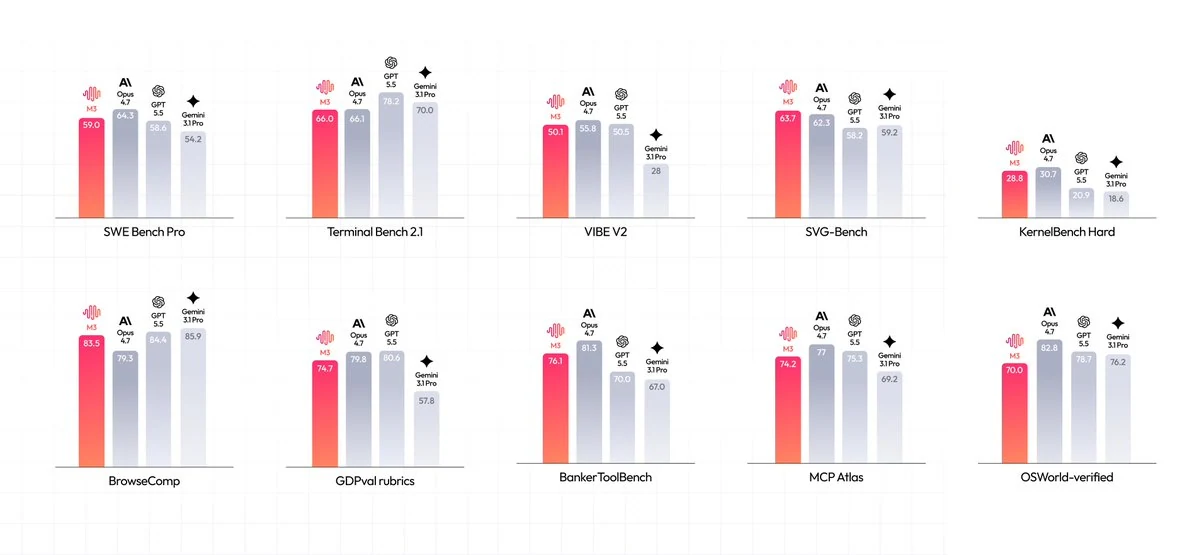
Source: MiniMax official benchmark graphic. Scores are MiniMax-reported and should be validated on your own workload before production use.
Pricing notes and cost checks
Novita’s live model-list API checked on June 1, 2026 returns raw pricing fields for minimax/minimax-m3: input 3000 and output 12000. Interpreted as USD per 1M tokens, those fields correspond to $0.30 per million input tokens and $1.20 per million output tokens. Check the Novita model page and account dashboard before production use, because displayed pricing can change.
For production estimates on Novita AI, use the live model page and account dashboard as the source of truth, then calculate from real input tokens, output tokens, cache-read behavior, and retry rate.
Avoid broad shortcuts such as “20% of Claude Sonnet.” For a useful comparison, use the current Novita model page or account dashboard rates and estimate against your own token mix, output length, retries, and latency target.
MiniMax M3 vs MiniMax M2.7, M2, and M1
If you already read the MiniMax M2.7 on Novita AI article, the main difference is scope. M2.7 covered a prior agentic coding model with a 204,800-token context window. M3 raises the ceiling to a 1M-token context window, adds multimodal input, and brings broader MiniMax-reported coverage across coding and agentic benchmarks.
Compared with M2.7 and M2.5, choose M3 when you need to test larger project states, tool-heavy workflows, or multimodal reasoning. Compared with MiniMax M1 on Novita AI, M3 is less about long context as a headline and more about applying that context to coding, browsing, terminal, and agent tasks.
Where MiniMax M3 fits
One practical test is large-codebase review. Give M3 a feature brief, the relevant source files, logs, failing test output, and previous implementation notes. Then ask it to identify the smallest safe change, or the top risks to resolve before anyone starts editing code.
It also belongs in tests for agentic coding assistants: search files, plan changes, call tools, and return structured results. Novita’s function-calling and structured-output support help here, but the real test is how M3 behaves when a tool fails, the context is noisy, or the right move is to stop and ask for clarification.
For product and engineering teams, the multimodal angle is also worth testing. M3 can read UI screenshots, inspect workflow recordings, pull implementation tasks out of architecture diagrams, or turn visual QA feedback into clearer tickets.
When MiniMax M3 may not be the right choice
Choose M3 for developer workflows where long context, tool use, or multimodal input can reduce review time. Use a smaller model when the job is simple extraction, short Q&A, or routing. In production, keep acceptance tests and human review around tasks where mistakes are expensive.
If your team needs independent benchmark evidence before adopting a model, run a Novita AI evaluation against representative repositories, prompts, tool loops, latency targets, and budget constraints. That gives you a cleaner answer than comparing launch-page numbers alone.
FAQ
Is MiniMax M3 live on Novita AI?
Yes. The live Novita model page lists MiniMax-M3, and the OpenAI-compatible models endpoint returns minimax/minimax-m3 as an active chat model.
What model ID should I use?
Use minimax/minimax-m3 with Novita’s OpenAI-compatible LLM API.
What context length does MiniMax M3 support on Novita?
Novita lists MiniMax-M3 with a 1,000,000-token context length and 131,072 max output tokens.
Does MiniMax M3 generate images or video?
No verified Novita claim in this draft supports image or video output generation. The verified modality set is text, image, and video input with text output.
How should I evaluate MiniMax M3 for coding agents?
Test it on realistic tasks: repository search, failing tests, long issue histories, tool calls, structured outputs, and noisy context. Track solved-task rate, tool-call quality, cost, latency, and failure recovery instead of relying only on published benchmark numbers.