- Yes, this should be correct. Now put it all together in Markdown, making sure the syntax is correct. </think>
- title: "Qwen 3 Coder vs GLM 4.5: 純粋なコーディングとツール呼び出しのどちらで優れているか?" description: "Qwen 3 CoderとGLM 4.5の違いを解説します。どちらのモデルがプログラミングタスクで優れているかをご確認ください。" locale: ja translationKey: "qwen-3-coder-vs-glm-4-5-which-excels-in-pure-coding-vs-tool-calling" pubDate: "2025-09-15 19:00:00" updatedDate: "2025-09-11 18:19:27" wpSlug: "qwen-3-coder-vs-glm-4-5-which-excels-in-pure-coding-vs-tool-calling" canonical: "/qwen-3-coder-vs-glm-4-5-which-excels-in-pure-coding-vs-tool-calling/" author: "Novita AI" categories: ["Novita AI"] tags: ["AI Model Comparison"] cover: "/uploads/2025/08/Frame-3-3.webp" isSticky: false readingMinutes: 9 wordpressId: 17237
- Qwen3 CoderとGLM 4.5の主なアーキテクチャの違いは何ですか?
- Qwen3 CoderとGLM 4.5のコード生成タスクにおけるベンチマーク結果
- 速度と価格比較:初心者向けQwen3 CoderとGLM 4.5
- Qwen3 CoderとGLM 4.5:リソースの観点でどちらのモデルがより効率的か?
- Qwen3 Coder vs GLM 4.5:Pythonプログラミングにはどちらが適しているか?
- ソフトウェア開発におけるQwen3 CoderとGLM 4.5の比較
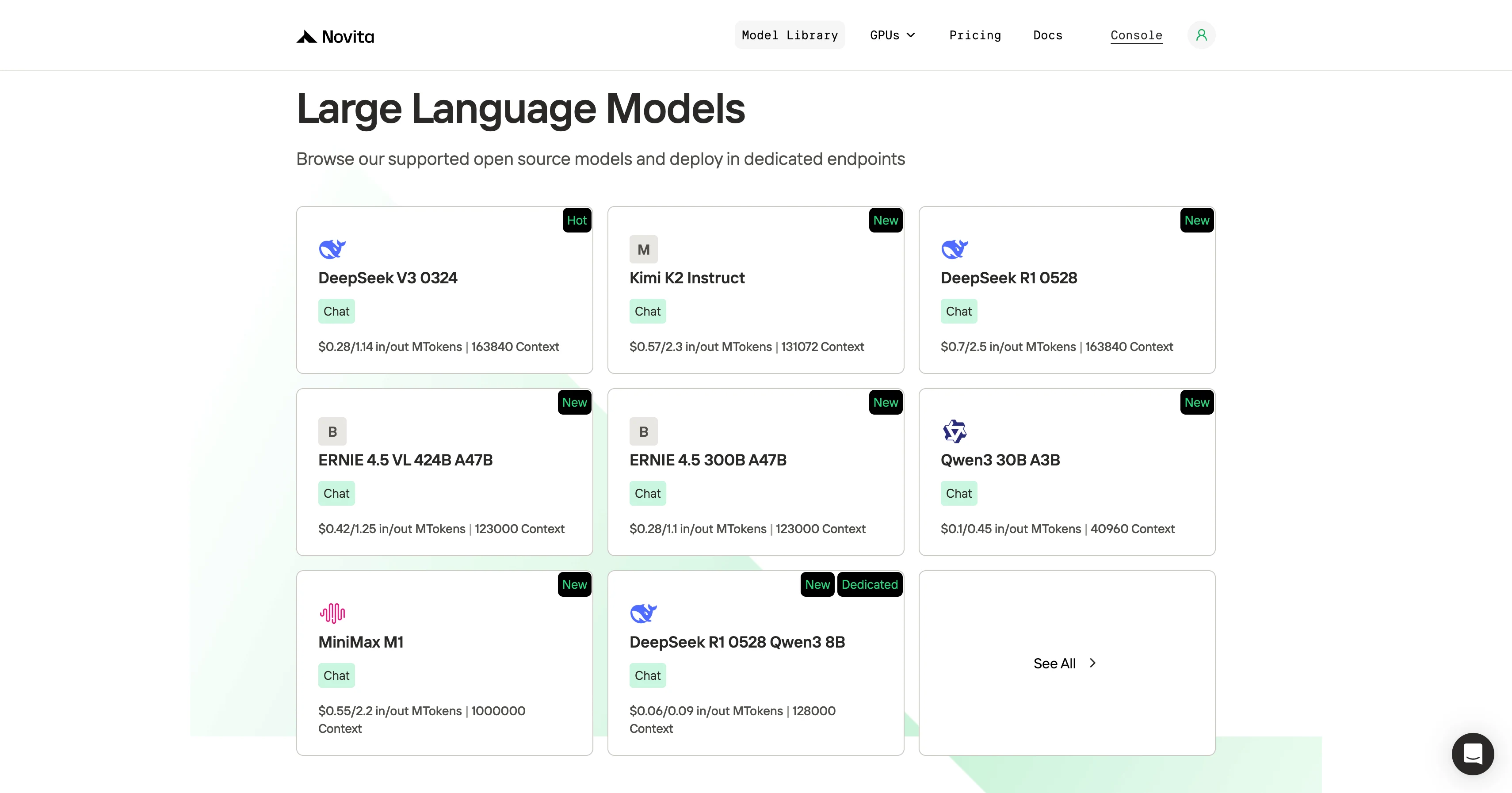
- CLIツールを使ってQwen 3 Coder 480B A35Bにアクセスする方法は?
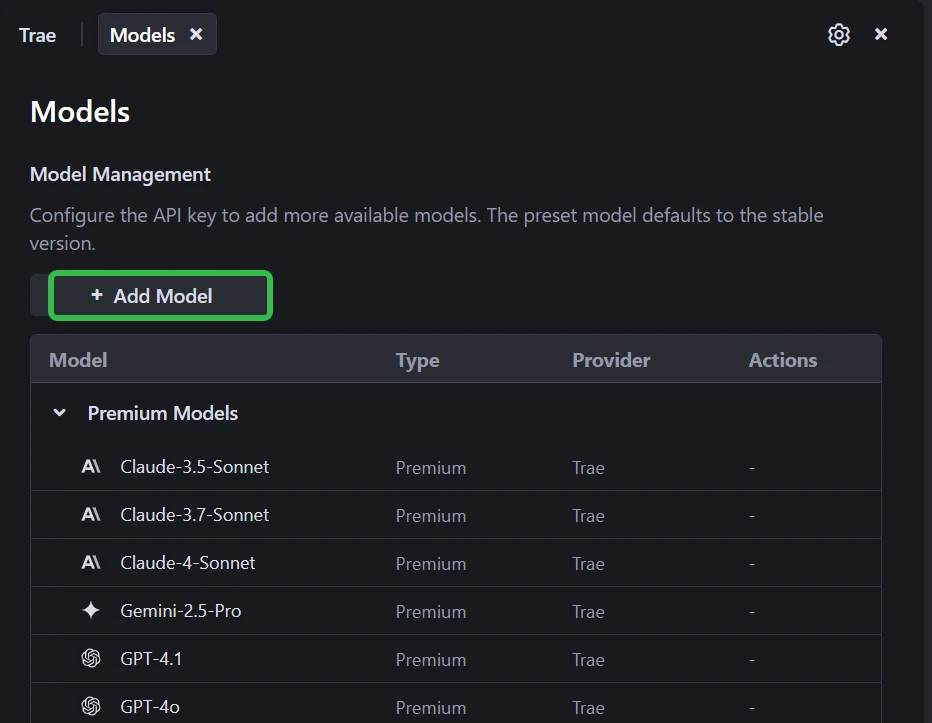
- Traeを使ったQwen 3 Coder 480B A35BとGLM 4.5の利用方法
- Qwen Codeを使ったQwen 3 Coder 480B A35BとGLM 4.5の利用方法
` blocks|Hybrid reasoning: both “thinking” mode (formally chain-of-thought style) and “non-thinking” mode supported|
Translate the table headers and content, keep the code blocks, numbers, model names:
| 機能 | Qwen3-Coder (480B-A35B-Instruct) | GLM-4.5 |
|---|---|---|
| アーキテクチャ (MoE) | 総パラメータ480B、推論あたりアクティブパラメータ約35B(160人の専門家のうち8人がアクティブ) | 総パラメータ355B、推論あたりアクティブパラメータ32B |
| コンテキスト長 | 262,144トークン(≈256K)をネイティブサポート | 適切なハードウェア環境下で最大128Kコンテキストをサポート |
| 推論モード | 非思考モードのみサポート;<think></think>ブロックを生成しない |
ハイブリッド推論:「思考」モード(正式にはチェーンオブシー思考スタイル)と「非思考」モードの両方をサポート |
Next heading: “## Benchmark Results for Qwen3 Coder and GLM 4.5 in Code Generation Tasks” → “## Qwen3 CoderとGLM 4.5のコード生成タスクにおけるベンチマーク結果”
Then the table:
| Benchmark / Scenario | Qwen3-Coder | GLM 4.5 |
|---|---|---|
| SWE-Bench Verified | 67.0 % | 64.2 % |
| SciCode (Coding) | 36% | 35% |
| LiveCodeBench (Coding) | 59% | 74% |
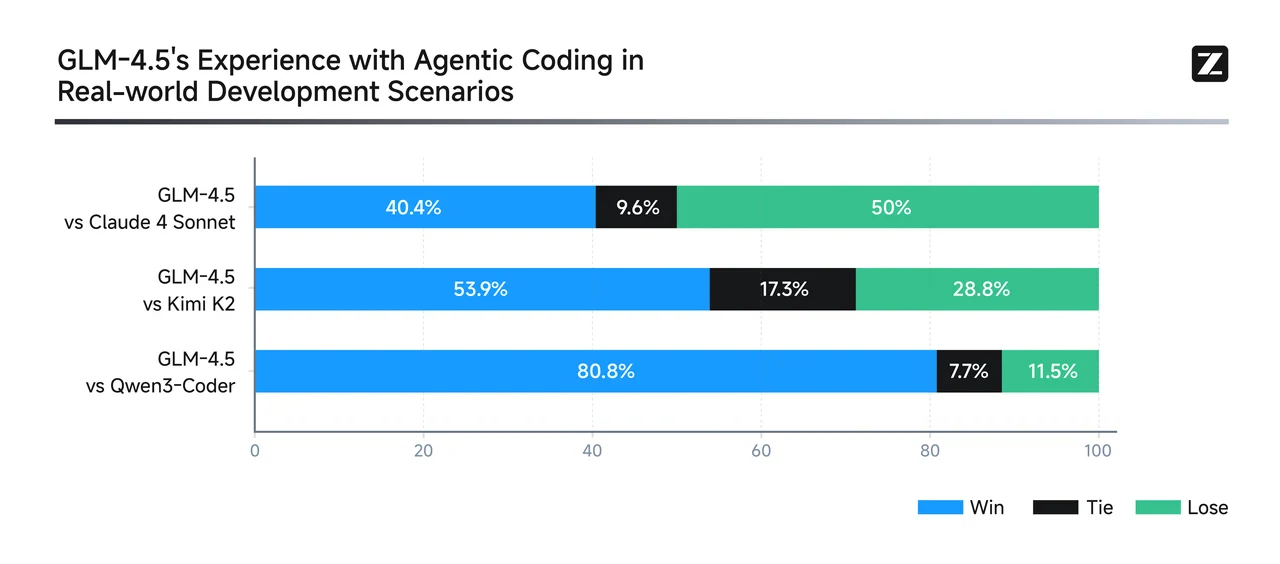
Translate headers:
| ベンチマーク / シナリオ | Qwen3-Coder | GLM 4.5 |
|---|---|---|
| SWE-Bench Verified | 67.0 % | 64.2 % |
| SciCode (コーディング) | 36% | 35% |
| LiveCodeBench (コーディング) | 59% | 74% |
Then the image: keep the path as is,
→ wait the alt text? Wait the user said don’t translate code blocks, inline code, model names etc. Wait alt text is part of the image, but wait the user said preserve image paths and Markdown syntax exactly. Wait the alt text is “Benchmark Results for Qwen3 Coder and GLM 4.5 in Code Generation Tasks” – should I translate that? Wait no, wait the user said “Do not translate code blocks, inline code, model names, product names, URLs, file paths, API parameters, or Markdown link URLs. Preserve image paths and Markdown syntax exactly.” Oh right, alt text is part of the Markdown image syntax, but wait the user didn’t say not to translate alt text? Wait wait let’s check the user’s instruction again: “Translate Markdown blog posts for developer readers. Return only the translated Markdown document. Preserve YAML frontmatter delimiters and field names. Translate title and description values when present. Set locale to the target locale. Set translationKey to the provided slug if it is missing. Do not translate code blocks, inline code, model names, product names, URLs, file paths, API parameters, or Markdown link URLs. Preserve image paths and Markdown syntax exactly.”
Wait image paths are to be preserved exactly, so the src is kept. The alt text: is that considered part of the content to translate? Wait let’s see, the user said translate the blog post for developer readers. The alt text is descriptive, so probably translate it? Wait but wait the user said “preserve image paths and Markdown syntax exactly” – syntax is the part, the path inside is preserved. The alt text is the content inside the brackets, which is part of the post content, so translate that. Wait but let’s confirm: the original alt text is “Benchmark Results for Qwen3 Coder and GLM 4.5 in Code Generation Tasks” → translate to “Qwen3 CoderとGLM 4.5のコード生成タスクにおけるベンチマーク結果” that’s fine.
Then the next line: “From GLM” → keep the link as is, translate the text? Wait “From GLM” → “(GLMより)” that’s okay, the link URL is preserved.
Then the blockquote:
Qwen3-Coder excels at multi-turn, agentic code workflows—especially in real-world-style debugging and tool-integration tasks. It achieves best-in-class results for open-source models and is competitive with top proprietary systems. For repository-scale bug fixes, multi-file edits, and automated agentic tool workflows: Qwen3-Coder is likely the stronger choice.
GLM-4.5 is a versatile generalist—ranking highly across reasoning, coding, and agentic benchmarks. It supports hybrid reasoning modes and offers robust performance across multiple domains, while maintaining a strong SWE-Bench presence. For balanced tasks spanning reasoning, coding, and tool integration—with moderate context needs: GLM-4.5 offers a compelling multi-domain performer.
Translate this blockquote, keep the bold, italic, model names:
Qwen3-Coderは、マルチターンのエージェント型コードワークフロー、特に実世界スタイルのデバッグやツール統合タスクで優れています。オープンソースモデルの中で最高クラスの結果を達成し、トップのプロプライエタリシステムにも匹敵する性能を発揮します。リポジトリ規模のバグ修正、マルチファイル編集、自動化されたエージェントツールワークフローには、Qwen3-Coderがより強い選択肢となるでしょう。
GLM-4.5は汎用的なジェネラリストであり、推論、コーディング、エージェントベンチマークのすべてで高い評価を得ています。ハイブリッド推論モードをサポートし、複数のドメインで堅牢な性能を発揮しながら、SWE-Benchでも高い成績を維持しています。推論、コーディング、ツール統合を横断するバランスの取れたタスク、特に中程度のコンテキスト要件の場合、GLM-4.5は魅力的なマルチドメインパフォーマーです。
Next heading: “## Speed and Price Comparison: Qwen3 Coder vs GLM 4.5 for Beginners” → “## 速度と価格比較:初心者向けQwen3 CoderとGLM 4.5”
Then the table:
| Model | VRAM | Recommended GPU |
| Qwen 3 Coder | 1050GB | 8 x H100 NVL |
| GLM 4.5 | 945GB | 8 x H100 NVL |
Translate headers:
| モデル | VRAM | 推奨GPU |
| Qwen 3 Coder | 1050GB | 8 x H100 NVL |
| GLM 4.5 | 945GB | 8 x H100 NVL |
Then the blockquote:
Although both need the same class of GPUs, GLM 4.5 runs faster and more efficiently because of its lower VRAM footprint, while Qwen3-Coder is heavier and slower under the same conditions. Translate: > 両方とも同じクラスのGPUを必要としますが、GLM 4.5はVRAM使用量が少ないため、より高速かつ効率的に動作します。一方、同じ条件下ではQwen3-Coderは重く、動作が遅くなります。
Then the images: keep the paths as is, the alt texts: “GLM 4.5 Price” → “GLM 4.5の料金”, “Qwen 3 Coder Price” → “Qwen 3 Coderの料金” – wait but are those alt texts? Let’s see, the original has:

GLM 4.5 Price

Qwen 3 Coder Price
Oh right, those are separate lines, so the text “GLM 4.5 Price” is a caption? So translate that to “GLM 4.5の料金”, “Qwen 3 Coderの料金”.
Then the next blockquote, same as before, translate the text, keep the prices and model names:
Novita AI, as one of the most important providers in the LLM API field, offers stable and highly cost-effective APIs. From the pricing information, we can see that Qwen3-Coder is slightly cheaper than GLM 4.5.
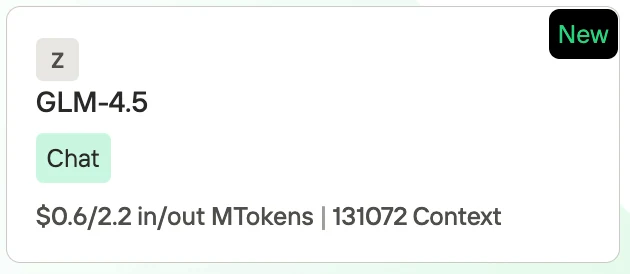
- GLM-4.5: $0.60 per 1M input tokens / $2.20 per 1M output tokens, with a context length of 131,072 tokens.
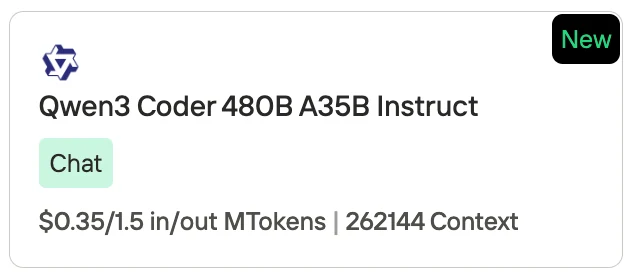
- Qwen3-Coder (480B A35B Instruct): $0.35 per 1M input tokens / $1.50 per 1M output tokens, with a context length of 262,144 tokens.
Translate:
Novita AIはLLM API分野で最も重要なプロバイダーの1つとして、安定性が高くコストパフォーマンスに優れたAPIを提供しています。料金情報から、Qwen3-CoderはGLM 4.5よりもわずかに安価であることがわかります。
- GLM-4.5:入力1Mトークンあたり$0.60 / 出力1Mトークンあたり$2.20、コンテキスト長は131,072トークン。
- Qwen3-Coder (480B A35B Instruct):入力1Mトークンあたり$0.35 / 出力1Mトークンあたり$1.50、コンテキスト長は262,144トークン。
Next heading: “## Qwen3 Coder and GLM 4.5: Which Model is More Efficient in Terms of Resource?” → “## Qwen3 CoderとGLM 4.5:リソースの観点でどちらのモデルがより効率的か?”
Then the table:
| Aspect | Qwen3-Coder (480B A35B) | GLM 4.5 (355B) | More Efficient Model |
|---|---|---|---|
| VRAM Requirement | ~1050 GB, needs 8× H100 NVL | ~945 GB, needs 8× H100 NVL | GLM 4.5 (≈10% lighter) |
| Inference Speed | Slower due to higher memory footprint | Faster, lower latency on same hardware | GLM 4.5 |
| Context Capacity | 262K tokens (extendable to 1M) | 131K tokens | Qwen3-Coder |
| Price (Novita AI) | $0.35 per 1M input / $1.50 per 1M output | $0.60 per 1M input / $2.20 per 1M output | Qwen3-Coder |
| Specialization | 70% training data in code; optimized for large-scale coding tasks | Balanced mix of reasoning, coding, and agentic tasks | Depends on use case |
| Overall Efficiency | Efficient for cost and long-context usage | Efficient for hardware and speed | Split: Qwen3 for cost/context, GLM 4.5 for compute/speed |
Translate headers and content, keep numbers, model names:
| 項目 | Qwen3-Coder (480B A35B) | GLM 4.5 (355B) | より効率的なモデル |
|---|---|---|---|
| VRAM要件 | 約1050GB、8× H100 NVLが必要 | 約945GB、8× H100 NVLが必要 | GLM 4.5(約10%軽量) |
| 推論速度 | メモリフットプリントが大きいため遅い | 同じハードウェア上で高速、低レイテンシ | GLM 4.5 |
| コンテキスト容量 | 262Kトークン(1Mまで拡張可能) | 131Kトークン | Qwen3-Coder |
| 価格(Novita AI) | 入力1Mトークンあたり$0.35 / 出力1Mトークンあたり$1.50 | 入力1Mトークンあたり$0.60 / 出力1Mトークンあたり$2.20 | Qwen3-Coder |
| 専門性 | 学習データの70%がコード;大規模コーディングタスクに最適化 | 推論、コーディング、エージェントタスクのバランスの取れた構成 | ユースケースによる |
| 総合効率性 | コストと長コンテキスト使用に効率的 | ハードウェアと速度に効率的 | 分割:Qwen3はコスト/コンテキスト向け、GLM 4.5はコンピュート/速度向け |
Then the blockquote:
- GLM 4.5 is more resource-efficient when we talk about hardware (VRAM, speed, latency).
- Qwen3-Coder is more efficient in terms of token cost and massive context handling.
👉 In practice:
- Choose GLM 4.5 if you care about faster inference and lighter compute load.
- Choose Qwen3-Coder if you need cheaper tokens and ultra-long context windows for large codebases.
Translate:
- ハードウェア(VRAM、速度、レイテンシ)の観点では、GLM 4.5の方がリソース効率が高いです。
- トークンコストと大規模コンテキスト処理の観点では、Qwen3-Coderの方が効率的です。
👉 実際には:
- 高速な推論と軽いコンピュート負荷を重視する場合はGLM 4.5を選択してください。
- 大規模コードベースに対して安価なトークンと超長コンテキストウィンドウが必要な場合はQwen3-Coderを選択してください。
Next heading: “## Qwen3 Coder vs GLM 4.5: Which is Better for Python Programming?” → “## Qwen3 Coder vs GLM 4.5:Pythonプログラミングにはどちらが適しているか?”
Then the table:
| Aspect | Qwen3-Coder | GLM 4.5 | Recommendation |
|---|---|---|---|
| Python Coding Benchmarks (HumanEval, MBPP, LCB) | Strong performer; user reports and evaluations suggest dominance in standard Python benchmarks | Also performs well, but slightly behind in pure Python code generation | Qwen3-Coder |
| Agentic / Tool-Calling Tasks | 77.1% | 90.6% | GLM 4.5—ideal for workflows involving API calls, external tools, or complex interactions |
| Supported Programming Languages | Supports 358 languages, including Python and obscure/legacy ones—great for multi-language or edge use cases | No specific data on multi-language support—presumably strong but less broad | Qwen3-Coder |
| Context Length | 256K token | 128K token window | Qwen3-Coder |
| Inference Speed & Efficiency | Heavier VRAM usage; slower inference due to 1050 GB requirement | Lighter (945 GB), faster, and more hardware-efficient | GLM 4.5 |
Translate headers and content:
| 項目 | Qwen3-Coder | GLM 4.5 | 推奨 |
|---|---|---|---|
| Pythonコーディングベンチマーク(HumanEval、MBPP、LCB) | 高性能;ユーザーレポートや評価によると、標準的なPythonベンチマークで優位 | パフォーマンスも高いが、純粋なPythonコード生成ではやや遅れ | Qwen3-Coder |
| エージェント / ツール呼び出しタスク | 77.1% | 90.6% | GLM 4.5:API呼び出し、外部ツール、複雑な連携を含むワークフローに最適 |
| サポートプログラミング言語 | Pythonやマイナー/レガシー言語を含む358種類の言語をサポート;マルチ言語やエッジユースケースに最適 | マルチ言語サポートの具体的なデータはないが、おそらく高性能だが範囲は狭い | Qwen3-Coder |
| コンテキスト長 | 256Kトークン | 128Kトークンウィンドウ | Qwen3-Coder |
| 推論速度と効率性 | VRAM使用量が大きく、1050GBの要件により推論が遅い | 軽量(945GB)、高速、ハードウェア効率が高い | GLM 4.5 |
Then the blockquote:
- Choose Qwen3-Coder if your primary needs are:
- Writing or refactoring pure Python code (e.g., notebooks, scripts, ML workflows).
- Working across many or niche languages (supporting 358).
- Handling large codebases or Python projects requiring extended context (256K–1M tokens).
- Minimizing cost per token—great for frequent Python iterations.
- Choose GLM 4.5 if you need:
- Reliable tool integration, API orchestration, or agentic workflows with external dependencies.
- High-speed, efficient inference on given hardware.
- Strong reasoning capabilities for debugging, explanation, or step-by-step Python logic tasks.
Translate:
- 主なニーズが以下の場合はQwen3-Coderを選択してください:
- 純粋なPythonコードの作成やリファクタリング(ノートブック、スクリプト、MLワークフローなど)
- 多数のニッチな言語での作業(358種類をサポート)
- 大規模コードベースや拡張コンテキスト(256K~1Mトークン)を必要とするPythonプロジェクトの処理
- トークンあたりのコストの最小化——頻繁なPythonイテレーションに最適
- 以下のニーズがある場合はGLM 4.5を選択してください:
- 信頼性の高いツール統合、APIオーケストレーション、外部依存関係を持つエージェントワークフロー
- 指定したハードウェアでの高速で効率的な推論
- デバッグ、説明、ステップバイステップのPythonロジックタスクのための強力な推論能力
Next section: “## Comparison of Qwen3 Coder and GLM 4.5 for Software” → “## ソフトウェア開発におけるQwen3 CoderとGLM 4.5の比較”
Then the line: “> Create a Tetris Game” → “> テトリスゲームを作成する”
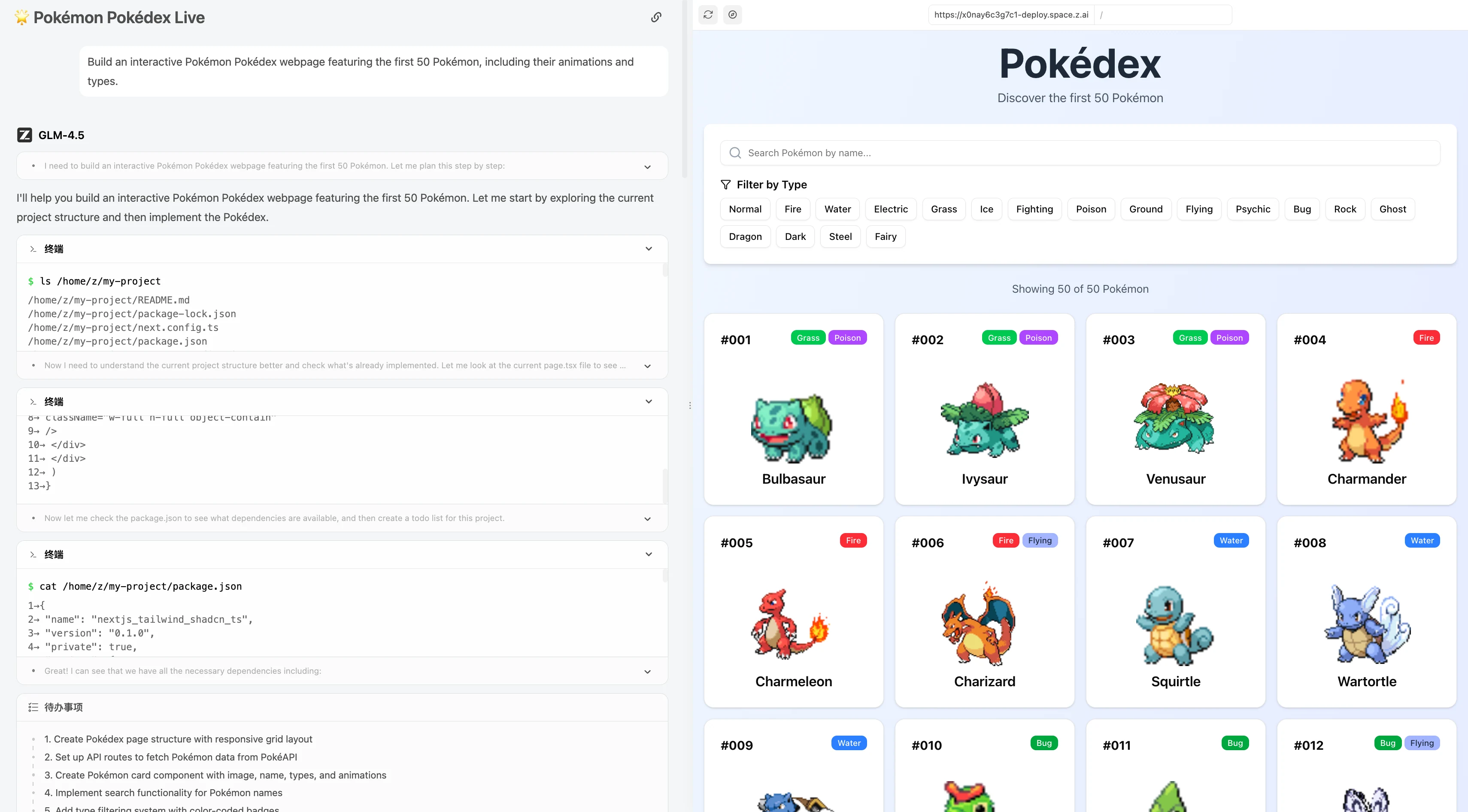
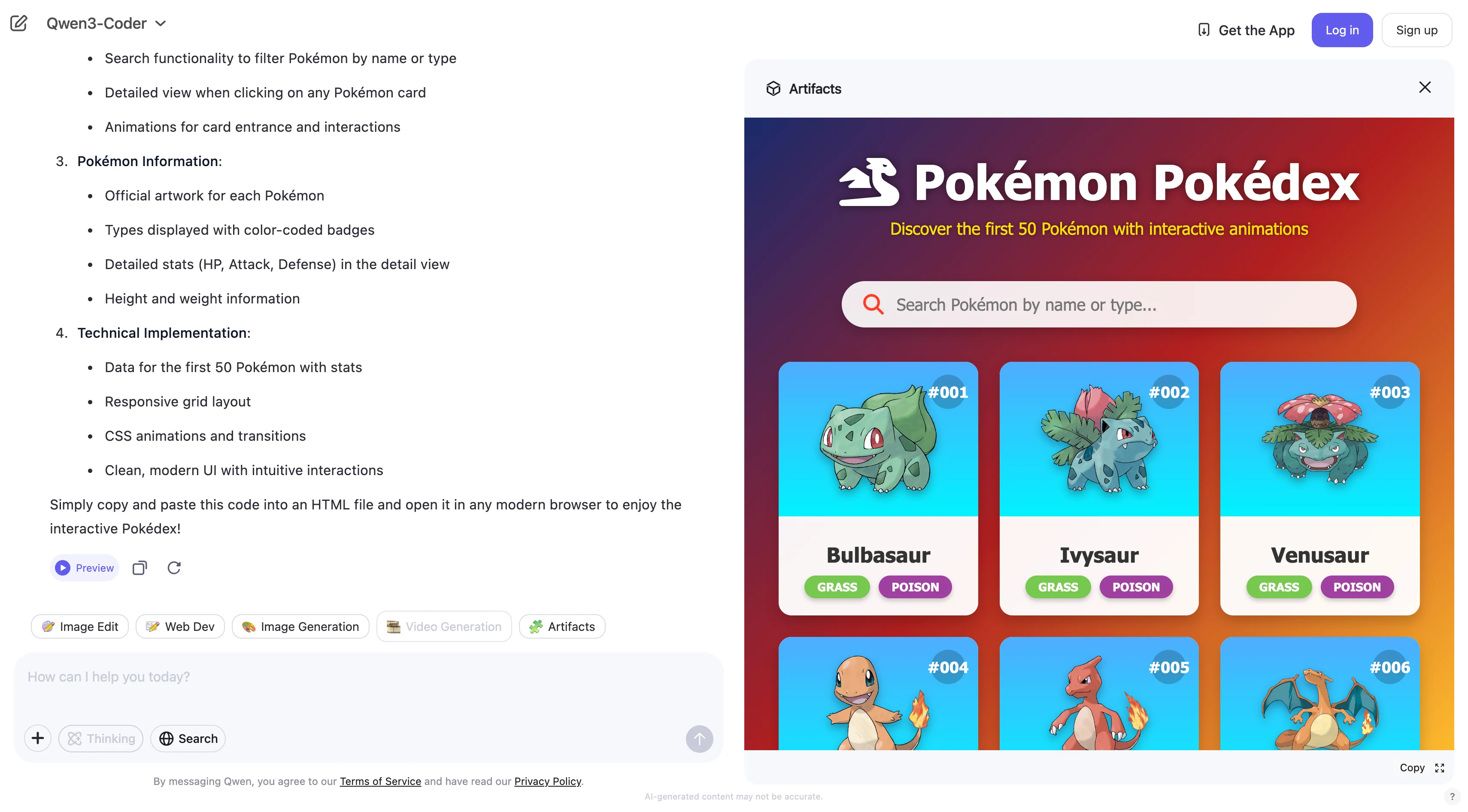
Then the captions: “Qwen 3 Coder” → “Qwen 3 Coder”, “GLM 4.5” → “GLM 4.5” (model names, don’t translate). Then the next task: “> Build an interactive Pokémon Pokédex webpage featuring the first 50 Pokémon, including their animations and types.” → “> 最初の50匹のポケモン、アニメーション、タイプを含むインタラクティブなポケモンポケモン図鑑ウェブページを構築する。”
Then the images: keep paths, alt texts: “
” → wait the alt text is “glm 4.5” which is a model name, so keep as is? Wait no, the alt text is “glm 4.5” which is the model name, so don’t translate. Then “GLM 4.5” caption, keep. Then “
” → alt text is “Qwen 3 coder tool calling” – translate to “Qwen 3 Coderのツール呼び出し”? Wait but model names are not translated, so Qwen 3 Coder stays, the rest is descriptive. Wait but let’s see, the user said don’t translate model names, so “Qwen 3 Coder” is kept, “tool calling” is a term, maybe keep? Wait no, “tool calling” is ツール呼び出し in Japanese, but wait the user said don’t translate API parameters, but tool calling is a feature name? Wait no, let’s check: the user said “Do not translate code blocks, inline code, model names, product names, URLs, file paths, API parameters, or Markdown link URLs.” So model names are Qwen 3 Coder, GLM 4.5, those are kept. The rest of the content is translated. So the alt text “Qwen 3 coder tool calling” → “Qwen 3 Coderのツール呼び出し” is okay? Wait but maybe the user wants the alt text translated? Wait no, let’s make sure: the user said preserve image paths exactly, which we are doing. The alt text is part of the Markdown, so translate it naturally, keeping model names as is.
Next heading: “## How to Access Qwen 3 Coder 480B A35B by CLI Tools?” → “## CLIツールを使ってQwen 3 Coder 480B A35Bにアクセスする方法は?”
Then the YouTube link: keep as is, https://www.youtube.com/watch?v=hsPzLalRnpc
Then the bullet points:
- Faster: You can use Qwen3-Coder directly from the command line—no website or extra software needed.
- Easier automation: It’s simple to write scripts that use Qwen3-Coder for coding tasks.
- Fits developers’ workflow: Most developers use the command line, so Qwen3-Coder becomes a natural part of daily work.
- Easy to scale: You can quickly process many files or projects using CLI commands.
Translate:
- 高速: ウェブサイトや追加ソフトウェアなしで、コマンドラインから直接Qwen3-Coderを使用できます。
- 自動化が容易: Qwen3-Coderを使用してコーディングタスクを行うスクリプトを簡単に作成できます。
- 開発者のワークフローに適合: ほとんどの開発者はコマンドラインを使用するため、Qwen3-Coderは日常業務の自然な一部となります。
- スケールが容易: CLIコマンドを使用して、多数のファイルやプロジェクトを迅速に処理できます。
Next subheading: “### The First: Get API Key” → “### 最初のステップ:APIキーの取得”
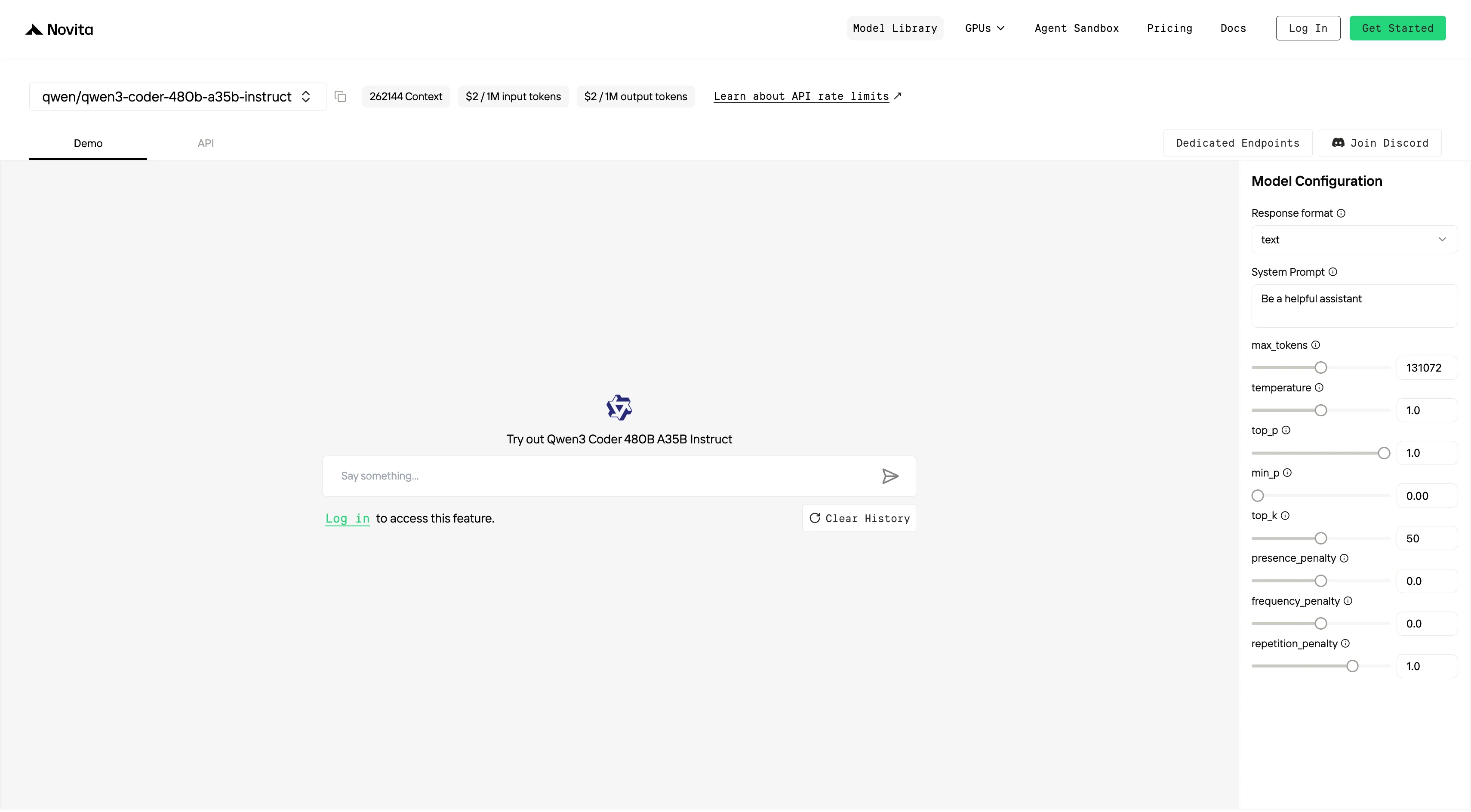
Then the step 1: “Step 1: Log in to your account and click on the Model Library button.” → “ステップ1:アカウントにログインし、モデルライブラリボタンをクリックします。”
Then the image: keep path, alt text “Log In and Access the Model Library” → “ログインとモデルライブラリへのアクセス”
Then the link: “Try Qwen 3 Coder Model and GLM 4.5 Now!” → translate the link text: “今すぐQwen 3 CoderモデルとGLM 4.5を試す!” (link URL is preserved)
Step 2: “Step 2: Choose Your Model” → “ステップ2:モデルを選択”
Then the text: “Browse through the available options and select the model that suits your needs.” → “利用可能なオプションを閲覧し、ニーズに合ったモデルを選択してください。”
Image alt text: “choose your model” → “モデルを選択”
Step3: “Step 3: Start Your Free Trial” → “ステップ3:無料トライアルを開始”
Text: “Begin your free trial to explore the capabilities of the selected model.” → “選択したモデルの機能を探索するために、無料トライアルを開始してください。”
Image alt text: “Start Your Free Trial on qwen 3” → “Qwen 3の無料トライアルを開始”
Step4: “Step 4: Get Your API Key” → “ステップ4:APIキーを取得”
Text: “To authenticate with the API, we will provide you with a new API key. Entering the “Settings“ page, you can copy the API key as indicated in the image.” → “APIでの認証のために、新しいAPIキーを提供します。「設定」ページに移動すると、画像の指示に従ってAPIキーをコピーできます。”
Image alt text: “get api key” → “APIキーを取得”
Step5: “Step 5: Install the API” → “ステップ5:APIをインストール”
Text: “Install API using the package manager specific to your programming language.” → “使用しているプログラミング言語専用のパッケージマネージャーを使用してAPIをインストールしてください。”
Then the next text: “After installation, import the necessary libraries into your development environment. Initialize the API with your API key to start interacting with Novita AI LLM. This is an example of using chat completions API for python users.” → “インストール後、開発環境に必要なライブラリをインポートしてください。APIキーでAPIを初期化し、Novita AI LLMとの対話を開始します。以下はPythonユーザー向けのチャット補完APIの使用例です。”
Then the code block: keep exactly as is, don’t translate anything inside:
pip install 'openai>=1.0.0'
from openai import OpenAI
client = OpenAI(
base_url="https://api.novita.ai/v3/openai",
api_key="",
)
model = "qwen/qwen3-coder-480b-a35b-instruct"
stream = True # or False
max_tokens = 131072
system_content = ""Be a helpful assistant""
temperature = 1
top_p = 1
min_p = 0
top_k = 50
presence_penalty = 0
frequency_penalty = 0
repetition_penalty = 1
response_format = { "type": "text" }
chat_completion_res = client.chat.completions.create(
model=model,
messages=[
{
"role": "system",
"content": system_content,
},
{
"role": "user",
"content": "Hi there!",
}
],
stream=stream,
max_tokens=max_tokens,
temperature=temperature,
top_p=top_p,
presence_penalty=presence_penalty,
frequency_penalty=frequency_penalty,
response_format=response_format,
extra_body={
"top_k": top_k,
"repetition_penalty": repetition_penalty,
"min_p": min_p
}
)
if stream:
for chunk in chat_completion_res:
print(chunk.choices[0].delta.content or "", end="")
else:
print(chat_completion_res.choices[0].message.content)
Next heading: “## Qwen 3 Coder 480B A35B and GLM 4.5 with Trae” → “## Traeを使ったQwen 3 Coder 480B A35BとGLM 4.5の利用方法” (link URL preserved)
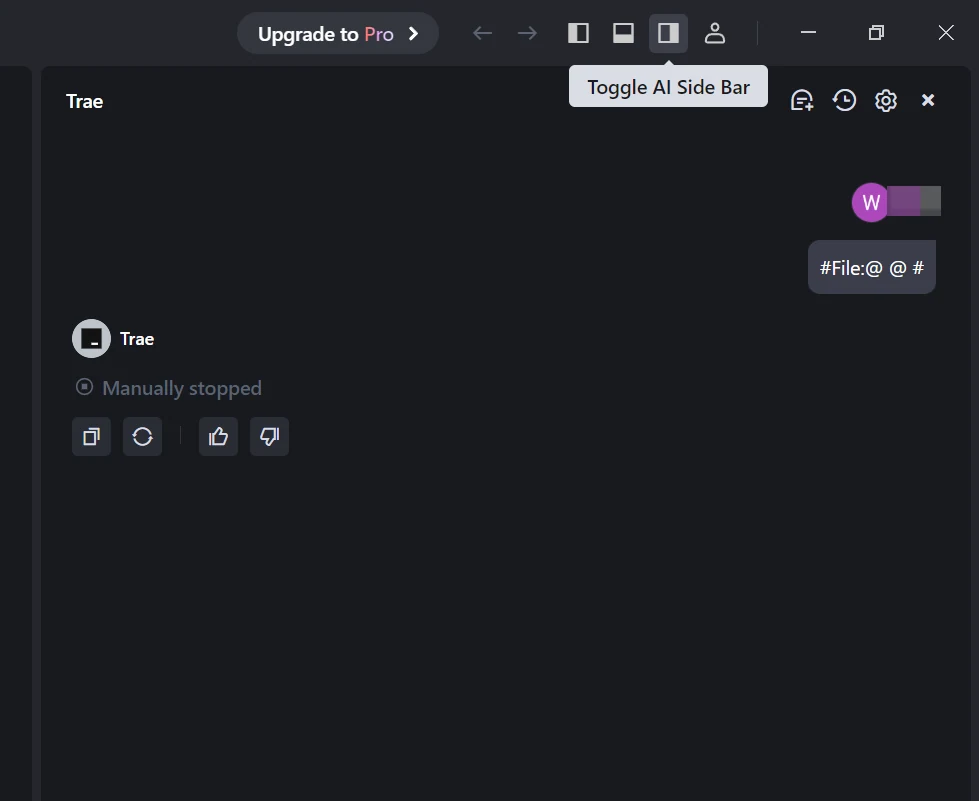
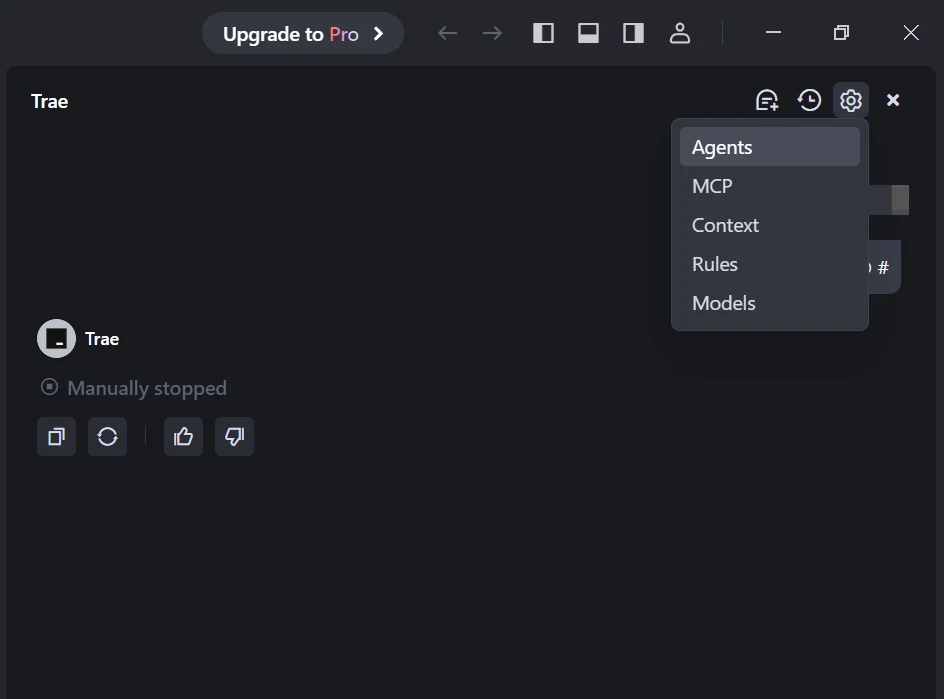
Then the step 1: “#### Step 1: Open Trae and Access Models” → “#### ステップ1:Traeを開き、モデルにアクセス”
Text: “Launch the Trae app. Click the Toggle AI Side Bar in the top-right corner to open the AI Side Bar. Then, go to AI Management and select Models.” → “Traeアプリを起動します。右上隅のAIサイドバーの切り替えボタンをクリックしてAIサイドバーを開きます。次に、AI管理に移動し、モデルを選択します。”
Images: keep paths, alt texts: “Toggle AI Side Bar” → “AIサイドバーの切り替え”, “go to AI Management and select Models” → “AI管理に移動し、モデルを選択”
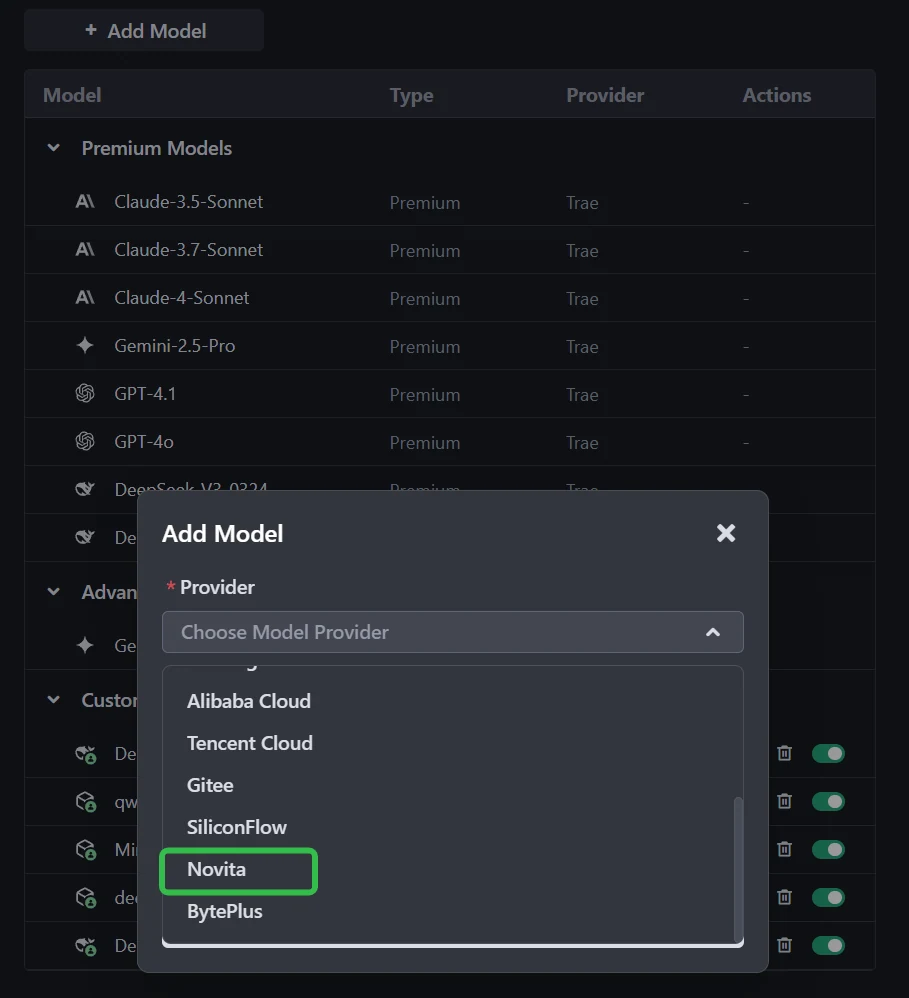
Step 2: “#### Step 2: Add a Custom Model and Choose Novita as Provider” → “#### ステップ2:カスタムモデルを追加し、プロバイダーとしてNovitaを選択”
Text: “Click the Add Model button to create a custom model entry. In the add-model dialog, select Provider = Novita from the dropdown menu.” → “モデルを追加ボタンをクリックして、カスタムモデルエントリを作成します。モデル追加ダイアログで、ドロップダウンメニューからプロバイダー = Novitaを選択します。”
Images: alt texts “Add a Custom Model” → “カスタムモデルの追加”, “Choose Novita as Prov” → “プロバイダーとしてNovitaを選択”
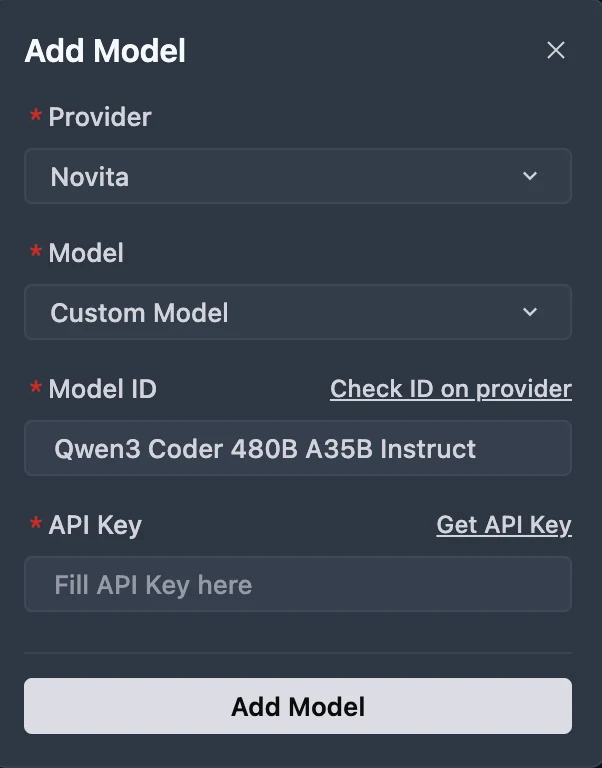
Step3: “#### Step 3: Select or Enter the Model” → “#### ステップ3:モデルを選択または入力”
Image alt text: “get api key” → “APIキーを取得”
Text: “From the Model dropdown, pick your desired model (DeepSeek-R1-0528, Kimi K2 DeepSeek-V3-0324, or MiniMax-M1-80k). If the exact model isn’t listed, simply type the model ID that you noted from the Novita library. Ensure you choose the correct variant of the model you want to use.” → “モデルのドロップダウンから、希望するモデル(DeepSeek-R1-0528、Kimi K2 DeepSeek-V3-0324、MiniMax-M1-80k)を選択します。正確なモデルがリストにない場合は、NovitaライブラリでメモしたモデルIDを入力してください。使用するモデルの正しいバリアントを選択していることを確認してください。”
Text: “You can get API Key on Novita console!” → “APIキーはNovitaコンソール!で取得できます” (link URL preserved)
Next heading: “## Qwen 3 Coder 480B A35B and GLM 4.5 with Qwen Code” → “## Qwen Codeを使ったQwen 3 Coder 480B A35BとGLM 4.5の利用方法” (link URL preserved)
Then the blockquote:
Qwen Code is developed on top of Gemini Code, but we have adapted the prompts and tool-calling protocols to maximize Qwen3-Coder’s performance in agentic coding tasks. Translate: > Qwen CodeはGemini Codeをベースに開発されていますが、エージェント型コーディングタスクにおけるQwen3-Coderの性能を最大化するために、プロンプトとツール呼び出しプロトコルを調整しています。
Next subheading: “#### Step 1: Install Qwen Code” → “#### ステップ1:Qwen Codeをインストール”
Text: “Prerequisites: Ensure you have Node.js version 20 or higher installed. You can download it from the official Node.js website.” → “前提条件: Node.jsのバージョン20以上がインストールされていることを確認してください。公式Node.jsウェブサイトからダウンロードできます。(リンクURLは保持)”
Then the text: “Install the package globally:” → “パッケージをグローバルにインストールします:”
Code block: keep exactly as is:
npm install -g @qwen-code/qwen-code
Next subheading: “#### Step 2: Configure Environment Variables” → “#### ステップ2:環境変数を設定”
Text: “For Windows (Command Prompt):” → “Windows(コマンドプロンプト)の場合:”
Code block: keep as is:
set OPENAI_API_KEY=Your_Novita_API_Key
set OPENAI_BASE_URL=https://api.novita.ai/v3/openai
set OPENAI_MODEL=qwen/qwen3-coder-480b-a35b-instruct
Text: “For Linux and Mac (Bash):” → “LinuxとMac(Bash)の場合:”
Code block: keep as is:
export OPENAI_API_KEY="Your_Novita_API_Key"
export OPENAI_BASE_URL="https://api.novita.ai/v3/openai"
export OPENAI_MODEL="qwen/qwen3-coder-480b-a35b-instruct"
Next subheading: “#### Step 3: Start Coding” → “#### ステップ3:コーディングを開始”
Text: “Once configured, you can start using Qwen Code with your chosen Novita AI model. The tool will now utilize the specified model for all coding assistance tasks.” → “設定が完了したら、選択したNovita AIモデルでQwen Codeの使用を開始できます。このツールは、すべてのコーディング支援タスクに指定されたモデルを利用するようになります。”
Code block: keep as is:
cd <your-project-directory>
qwen .
Next paragraph: “In coding tasks, both models shine—but in different ways:” → “コーディングタスクでは、両方のモデルが異なる形で輝いています:”
Bullet points:
- Qwen3-Coder is the stronger choice for pure coding performance: writing and refactoring Python, supporting niche languages, and handling massive codebases thanks to its 256K–1M token context and lower token costs.
- GLM-4.5 stands out when coding intersects with reasoning and integration: it is faster to run, more resource-efficient, and dominates in tool-calling, making it ideal for agentic programming environments.
Translate:
- Qwen3-Coderは純粋なコーディング性能においてより強い選択肢です:Pythonの作成やリファクタリング、ニッチな言語のサポート、256K~1Mトークンのコンテキストと低いトークンコストにより大規模コードベースの処理が可能です。
- GLM-4.5はコーディングが推論や統合と交差する場合に際立ちます:実行速度が速く、リソース効率が高く、ツール呼び出しで優位であるため、エージェント型プログラミング環境に最適です。
Then the two points:
👉 If you’re building software within huge codebases, choose Qwen3-Coder.
👉 If you’re building intelligent coding agents or API-driven applications, choose GLM-4.5.
Translate:
👉 大規模コードベース内のソフトウェアを構築する場合は、Qwen3-Coderを選択してください。
👉 インテリジェントなコーディングエージェントやAPI駆動アプリケーションを構築する場合は、GLM-4.5を選択してください。
Next heading: “#### Frequently Asked Questions” → “#### よくある質問”
Then the Q&A: Which model is better for Python programming? → Pythonプログラミングにはどちらのモデルが適していますか?
Answer: “Qwen3-Coder leads in standard Python benchmarks (HumanEval, MBPP, LiveCodeBench) and is generally preferred for notebooks, ML workflows, and script automation.” → “Qwen3-Coderは標準的なPythonベンチマーク(HumanEval、MBPP、LiveCodeBench)で首位であり、ノートブック、MLワークフロー、スクリプトの自動化に一般的に推奨されます。”
Next Q: Which model is better for multi-language or legacy code? → マルチ言語やレガシーコードにはどちらのモデルが適していますか?
Answer: “Qwen3-Coder supports 358 programming languages, making it better for diverse or edge-case development scenarios.” → “Qwen3-Coderは358種類のプログラミング言語をサポートしているため、多様な開発やエッジケースのシナリオに適しています。”
Next Q: Which model handles debugging and repository-scale workflows? → デバッグやリポジトリ規模のワークフローにはどちらのモデルが適していますか?
Answer: “Qwen3-Coder excels in multi-turn debugging, large code edits, and repository-scale tasks due to its ultra-long context (256K–1M tokens).” → “Qwen3-Coderは、超長コンテキスト(256K~1Mトークン)により、マルチターンデバッグ、大規模コード編集、リポジトリ規模のタスクで優れています。”
Then the blockquote:
Novita AI is the All-in-one cloud platform that empowers your AI ambitions. Integrated APIs, serverless, GPU Instance — the cost-effective tools you need. Eliminate infrastructure, start free, and make your AI vision a reality. Translate: > Novita AIは、AIの野望を実現するオールインワンのクラウドプラットフォームです。統合API、サーバーレス、GPUインスタンス——必要なコストパフォーマンスに優れたツールを提供します。インフラの管理を不要にし、無料で始めて、AIのビジョンを現実にしましょう。 (link URL preserved)
Next heading: “#### Recommend Reading” → “#### おすすめの記事”
Then the links: Llama 3.2 3B vs DeepSeek V3: Comparing Efficiency and Performance. → Llama 3.2 3B vs DeepSeek V3: 効率とパフォーマンスの比較 (link URL preserved)
How to Access ERNIE 4.5: Effortless Ways via Web, API, and Code → ERNIE 4.5へのアクセス方法:Web、API、コードによる簡単な方法 (link URL preserved)
Access DeepSeek V3.1 in Trae: Complete Setup and Integration Guide → TraeでDeepSeek V3.1にアクセス:完全なセットアップと統合ガイド (link URL preserved)
Wait wait, the user said don’t translate Markdown link URLs, which we are doing, only translating the link text, which is correct.
Wait let’s check all parts: code blocks are all kept exactly, model names are kept, URLs are kept, image paths are kept, YAML frontmatter is preserved except title and description are translated, added locale and translationKey. That’s all correct.
Wait wait, the user said “Set locale to the target locale.” So adding locale: ja in the frontmatter is correct. And translationKey is the provided slug, which we added.
Wait let’s check if any code blocks were translated: no, all code blocks are exactly as original. Inline code like <think></think> is kept as is. Model names like Qwen3-Coder, GLM-4.5, Novita AI, DeepSeek etc. are kept. URLs are all preserved. Image paths are exactly the same. Markdown syntax is all preserved, tables, blockquotes, headings, bullet points, all correct.
Wait let’s check the frontmatter again: original fields are all kept, added locale and translationKey, title and description translated. Correct.
Is there any part I missed? Let’s see: the part where it says “Qwen 3 Coder” and “GLM 4.5” in the comparison section, those are model names, so kept as is. The terms like MoE, VRAM, API, CLI, Node.js, npm, Bash, Windows, Python, HumanEval, MBPP, LCB, SWE-Bench, SciCode, LiveCodeBench, Trae, Qwen Code, Gemini Code, all are proper nouns or technical terms, kept as is, which is correct.
Wait the term “tool-calling” – is that a term that should be kept? Wait in Japanese, it’s often written as ツール呼び出し, but sometimes kept as tool-calling. Wait but the user said don’t translate API parameters, but tool-calling is a feature. Wait let’s see, in the original, it’s “tool-calling”, so maybe keep it as ツール呼び出し, which is the standard translation in Japanese tech contexts. That’s fine.
Another check: the prices are all kept as is, numbers are correct, context lengths are correct. All the benchmark numbers are preserved.
Yes, this should be correct. Now put it all together in Markdown, making sure the syntax is correct.
title: “Qwen 3 Coder vs GLM 4.5: 純粋なコーディングとツール呼び出しのどちらで優れているか?” description: “Qwen 3 CoderとGLM 4.5の違いを解説します。どちらのモデルがプログラミングタスクで優れているかをご確認ください。” locale: ja translationKey: “qwen-3-coder-vs-glm-4-5-which-excels-in-pure-coding-vs-tool-calling” pubDate: “2025-09-15 19:00:00” updatedDate: “2025-09-11 18:19:27” wpSlug: “qwen-3-coder-vs-glm-4-5-which-excels-in-pure-coding-vs-tool-calling” canonical: “/qwen-3-coder-vs-glm-4-5-which-excels-in-pure-coding-vs-tool-calling/” author: “Novita AI” categories: [“Novita AI”] tags: [“AI Model Comparison”] cover: “/uploads/2025/08/Frame-3-3.webp” isSticky: false readingMinutes: 9 wordpressId: 17237
コーディングにおいて、すべての大規模言語モデルが同じように作られているわけではありません。最も先進的な2つの候補であるQwen3-Coder (480B-A35B-Instruct)とGLM-4.5は、非常に異なるアプローチを取っています。
- Qwen3-Coderはコード特化型モデルで、学習データの約70%がプログラミング関連で構成されています。358種類のプログラミング言語をサポートし、Pythonでは最高水準の性能を発揮し、特にマルチターンデバッグ、大規模コードベースの編集、リポジトリ規模のワークフローに強みがあります。
- 一方のGLM-4.5は汎用的なジェネラリストモデルです。コード処理能力も非常に高いものの、真の強みはエージェントワークフローにあります:API、データベース、外部ツールを連携させ、90.6%というツール呼び出し成功率を誇り、現在のモデルの中で最高水準です。
👉 この記事では、重要な疑問にお答えします:Qwen3-CoderとGLM-4.5はコーディング性能において実際にどのように異なり、それぞれどのような開発者やワークフローに最適なのか?
Novita AIはLLM API分野で最も重要なプロバイダーの1つとして、安定性が高くコストパフォーマンスに優れたAPIを提供しています。料金情報から、Qwen3-CoderはGLM 4.5よりもわずかに安価であることがわかります。
- GLM-4.5:入力1Mトークンあたり$0.60 / 出力1Mトークンあたり$2.20、コンテキスト長は131,072トークン。
- Qwen3-Coder (480B A35B Instruct):入力1Mトークンあたり$0.35 / 出力1Mトークンあたり$1.50、コンテキスト長は262,144トークン。
Qwen3 CoderとGLM 4.5の主なアーキテクチャの違いは何ですか?
https://www.youtube.com/watch?v=ulfZwEa1x\_o
| 機能 | Qwen3-Coder (480B-A35B-Instruct) | GLM-4.5 |
|---|---|---|
| アーキテクチャ (MoE) | 総パラメータ480B、推論あたりアクティブパラメータ約35B(160人の専門家のうち8人がアクティブ) | 総パラメータ355B、推論あたりアクティブパラメータ32B |
| コンテキスト長 | 262,144トークン(≈256K)をネイティブサポート | 適切なハードウェア環境下で最大128Kコンテキストをサポート |
| 推論モード | 非思考モードのみサポート;<think></think>ブロックを生成しない |
ハイブリッド推論:「思考」モード(正式にはチェーンオブシー思考スタイル)と「非思考」モードの両方をサポート |
Qwen3 CoderとGLM 4.5のコード生成タスクにおけるベンチマーク結果
| ベンチマーク / シナリオ | Qwen3-Coder | GLM 4.5 |
|---|---|---|
| SWE-Bench Verified | 67.0 % | 64.2 % |
| SciCode (コーディング) | 36% | 35% |
| LiveCodeBench (コーディング) | 59% | 74% |

(GLMより)
Qwen3-Coderは、マルチターンのエージェント型コードワークフロー、特に実世界スタイルのデバッグやツール統合タスクで優れています。オープンソースモデルの中で最高クラスの結果を達成し、トップのプロプライエタリシステムにも匹敵する性能を発揮します。リポジトリ規模のバグ修正、マルチファイル編集、自動化されたエージェントツールワークフローには、Qwen3-Coderがより強い選択肢となるでしょう。
GLM-4.5は汎用的なジェネラリストであり、推論、コーディング、エージェントベンチマークのすべてで高い評価を得ています。ハイブリッド推論モードをサポートし、複数のドメインで堅牢な性能を発揮しながら、SWE-Benchでも高い成績を維持しています。推論、コーディング、ツール統合を横断するバランスの取れたタスク、特に中程度のコンテキスト要件の場合、GLM-4.5は魅力的なマルチドメインパフォーマーです。
速度と価格比較:初心者向けQwen3 CoderとGLM 4.5
| モデル | VRAM | 推奨GPU |
| Qwen 3 Coder | 1050GB | 8 x H100 NVL |
| GLM 4.5 | 945GB | 8 x H100 NVL |
両方とも同じクラスのGPUを必要としますが、GLM 4.5はVRAM使用量が少ないため、より高速かつ効率的に動作します。一方、同じ条件下ではQwen3-Coderは重く、動作が遅くなります。

GLM 4.5の料金

Qwen 3 Coderの料金
Novita AIはLLM API分野で最も重要なプロバイダーの1つとして、安定性が高くコストパフォーマンスに優れたAPIを提供しています。料金情報から、Qwen3-CoderはGLM 4.5よりもわずかに安価であることがわかります。
- GLM-4.5:入力1Mトークンあたり$0.60 / 出力1Mトークンあたり$2.20、コンテキスト長は131,072トークン。
- Qwen3-Coder (480B A35B Instruct):入力1Mトークンあたり$0.35 / 出力1Mトークンあたり$1.50、コンテキスト長は262,144トークン。
Qwen3 CoderとGLM 4.5:リソースの観点でどちらのモデルがより効率的か?
| 項目 | Qwen3-Coder (480B A35B) | GLM 4.5 (355B) | より効率的なモデル |
|---|---|---|---|
| VRAM要件 | 約1050GB、8× H100 NVLが必要 | 約945GB、8× H100 NVLが必要 | GLM 4.5(約10%軽量) |
| 推論速度 | メモリフットプリントが大きいため遅い | 同じハードウェア上で高速、低レイテンシ | GLM 4.5 |
| コンテキスト容量 | 262Kトークン(1Mまで拡張可能) | 131Kトークン | Qwen3-Coder |
| 価格(Novita AI) | 入力1Mトークンあたり$0.35 / 出力1Mトークンあたり$1.50 | 入力1Mトークンあたり$0.60 / 出力1Mトークンあたり$2.20 | Qwen3-Coder |
| 専門性 | 学習データの70%がコード;大規模コーディングタスクに最適化 | 推論、コーディング、エージェントタスクのバランスの取れた構成 | ユースケースによる |
| 総合効率性 | コストと長コンテキスト使用に効率的 | ハードウェアと速度に効率的 | 分割:Qwen3はコスト/コンテキスト向け、GLM 4.5はコンピュート/速度向け |
- ハードウェア(VRAM、速度、レイテンシ)の観点では、GLM 4.5の方がリソース効率が高いです。
- トークンコストと大規模コンテキスト処理の観点では、Qwen3-Coderの方が効率的です。
👉 実際には:
- 高速な推論と軽いコンピュート負荷を重視する場合はGLM 4.5を選択してください。
- 大規模コードベースに対して安価なトークンと超長コンテキストウィンドウが必要な場合はQwen3-Coderを選択してください。
Qwen3 Coder vs GLM 4.5:Pythonプログラミングにはどちらが適しているか?
| 項目 | Qwen3-Coder | GLM 4.5 | 推奨 |
|---|---|---|---|
| Pythonコーディングベンチマーク(HumanEval、MBPP、LCB) | 高性能;ユーザーレポートや評価によると、標準的なPythonベンチマークで優位 | パフォーマンスも高いが、純粋なPythonコード生成ではやや遅れ | Qwen3-Coder |
| エージェント / ツール呼び出しタスク | 77.1% | 90.6% | GLM 4.5:API呼び出し、外部ツール、複雑な連携を含むワークフローに最適 |
| サポートプログラミング言語 | Pythonやマイナー/レガシー言語を含む358種類の言語をサポート;マルチ言語やエッジユースケースに最適 | マルチ言語サポートの具体的なデータはないが、おそらく高性能だが範囲は狭い | Qwen3-Coder |
| コンテキスト長 | 256Kトークン | 128Kトークンウィンドウ | Qwen3-Coder |
| 推論速度と効率性 | VRAM使用量が大きく、1050GBの要件により推論が遅い | 軽量(945GB)、高速、ハードウェア効率が高い | GLM 4.5 |
- 主なニーズが以下の場合はQwen3-Coderを選択してください:
- 純粋なPythonコードの作成やリファクタリング(ノートブック、スクリプト、MLワークフローなど)
- 多数のニッチな言語での作業(358種類をサポート)
- 大規模コードベースや拡張コンテキスト(256K~1Mトークン)を必要とするPythonプロジェクトの処理
- トークンあたりのコストの最小化——頻繁なPythonイテレーションに最適
- 以下のニーズがある場合はGLM 4.5を選択してください:
- 信頼性の高いツール統合、APIオーケストレーション、外部依存関係を持つエージェントワークフロー
- 指定したハードウェアでの高速で効率的な推論
- デバッグ、説明、ステップバイステップのPythonロジックタスクのための強力な推論能力
ソフトウェア開発におけるQwen3 CoderとGLM 4.5の比較
テトリスゲームを作成する
Qwen 3 Coder
GLM 4.5
最初の50匹のポケモン、アニメーション、タイプを含むインタラクティブなポケモンポケモン図鑑ウェブページを構築する。

GLM 4.5

Qwen 3 coder
CLIツールを使ってQwen 3 Coder 480B A35Bにアクセスする方法は?
https://www.youtube.com/watch?v=hsPzLalRnpc
- 高速: ウェブサイトや追加ソフトウェアなしで、コマンドラインから直接Qwen3-Coderを使用できます。
- 自動化が容易: Qwen3-Coderを使用してコーディングタスクを行うスクリプトを簡単に作成できます。
- 開発者のワークフローに適合: ほとんどの開発者はコマンドラインを使用するため、Qwen3-Coderは日常業務の自然な一部となります。
- スケールが容易: CLIコマンドを使用して、多数のファイルやプロジェクトを迅速に処理できます。
最初のステップ:APIキーの取得
ステップ1:アカウントにログインし、モデルライブラリボタンをクリックします。

今すぐQwen 3 CoderモデルとGLM 4.5を試す!
ステップ2:モデルを選択
利用可能なオプションを閲覧し、ニーズに合ったモデルを選択してください。

ステップ3:無料トライアルを開始
選択したモデルの機能を探索するために、無料トライアルを開始してください。

ステップ4:APIキーを取得
APIでの認証のために、新しいAPIキーを提供します。「設定」ページに移動すると、画像の指示に従ってAPIキーをコピーできます。

ステップ5:APIをインストール
使用しているプログラミング言語専用のパッケージマネージャーを使用してAPIをインストールしてください。
インストール後、開発環境に必要なライブラリをインポートしてください。APIキーでAPIを初期化し、Novita AI LLMとの対話を開始します。以下はPythonユーザー向けのチャット補完APIの使用例です。
pip install 'openai>=1.0.0'
from openai import OpenAI
client = OpenAI(
base_url="https://api.novita.ai/v3/openai",
api_key="",
)
model = "qwen/qwen3-coder-480b-a35b-instruct"
stream = True # or False
max_tokens = 131072
system_content = ""Be a helpful assistant""
temperature = 1
top_p = 1
min_p = 0
top_k = 50
presence_penalty = 0
frequency_penalty = 0
repetition_penalty = 1
response_format = { "type": "text" }
chat_completion_res = client.chat.completions.create(
model=model,
messages=[
{
"role": "system",
"content": system_content,
},
{
"role": "user",
"content": "Hi there!",
}
],
stream=stream,
max_tokens=max_tokens,
temperature=temperature,
top_p=top_p,
presence_penalty=presence_penalty,
frequency_penalty=frequency_penalty,
response_format=response_format,
extra_body={
"top_k": top_k,
"repetition_penalty": repetition_penalty,
"min_p": min_p
}
)
if stream:
for chunk in chat_completion_res:
print(chunk.choices[0].delta.content or "", end="")
else:
print(chat_completion_res.choices[0].message.content)
Traeを使ったQwen 3 Coder 480B A35BとGLM 4.5の利用方法
ステップ1:Traeを開き、モデルにアクセス
Traeアプリを起動します。右上隅のAIサイドバーの切り替えボタンをクリックしてAIサイドバーを開きます。次に、AI管理に移動し、モデルを選択します。


ステップ2:カスタムモデルを追加し、プロバイダーとしてNovitaを選択
モデルを追加ボタンをクリックして、カスタムモデルエントリを作成します。モデル追加ダイアログで、ドロップダウンメニューからプロバイダー = Novitaを選択します。


ステップ3:モデルを選択または入力

モデルのドロップダウンから、希望するモデル(DeepSeek-R1-0528、Kimi K2 DeepSeek-V3-0324、MiniMax-M1-80k)を選択します。正確なモデルがリストにない場合は、NovitaライブラリでメモしたモデルIDを入力してください。使用するモデルの正しいバリアントを選択していることを確認してください。
APIキーはNovitaコンソール!で取得できます。
Qwen Codeを使ったQwen 3 Coder 480B A35BとGLM 4.5の利用方法
Qwen CodeはGemini Codeをベースに開発されていますが、エージェント型コーディングタスクにおけるQwen3-Coderの性能を最大化するために、プロンプトとツール呼び出しプロトコルを調整しています。
ステップ1:Qwen Codeをインストール
前提条件: Node.jsのバージョン20以上がインストールされていることを確認してください。公式Node.jsウェブサイトからダウンロードできます。
パッケージをグローバルにインストールします:
npm install -g @qwen-code/qwen-code
ステップ2:環境変数を設定
Windows(コマンドプロンプト)の場合:
set OPENAI_API_KEY=Your_Novita_API_Key
set OPENAI_BASE_URL=https://api.novita.ai/v3/openai
set OPENAI_MODEL=qwen/qwen3-coder-480b-a35b-instruct
LinuxとMac(Bash)の場合:
export OPENAI_API_KEY="Your_Novita_API_Key"
export OPENAI_BASE_URL="https://api.novita.ai/v3/openai"
export OPENAI_MODEL="qwen/qwen3-coder-480b-a35b-instruct"
ステップ3:コーディングを開始
設定が完了したら、選択したNovita AIモデルでQwen Codeの使用を開始できます。このツールは、すべてのコーディング支援タスクに指定されたモデルを利用するようになります。
cd <your-project-directory>
qwen .
コーディングタスクでは、両方のモデルが異なる形で輝いています:
- Qwen3-Coderは純粋なコーディング性能においてより強い選択肢です:Pythonの作成やリファクタリング、ニッチな言語のサポート、256K~1Mトークンのコンテキストと低いトークンコストにより大規模コードベースの処理が可能です。
- GLM-4.5はコーディングが推論や統合と交差する場合に際立ちます:実行速度が速く、リソース効率が高く、ツール呼び出しで優位であるため、エージェント型プログラミング環境に最適です。
👉 大規模コードベース内のソフトウェアを構築する場合は、Qwen3-Coderを選択してください。
👉 インテリジェントなコーディングエージェントやAPI駆動アプリケーションを構築する場合は、GLM-4.5を選択してください。
よくある質問
Pythonプログラミングにはどちらのモデルが適していますか?
Qwen3-Coderは標準的なPythonベンチマーク(HumanEval、MBPP、LiveCodeBench)で首位であり、ノートブック、MLワークフロー、スクリプトの自動化に一般的に推奨されます。
マルチ言語やレガシーコードにはどちらのモデルが適していますか?
Qwen3-Coderは358種類のプログラミング言語をサポートしているため、多様な開発やエッジケースのシナリオに適しています。
デバッグやリポジトリ規模のワークフローにはどちらのモデルが適していますか?
Qwen3-Coderは、超長コンテキスト(256K~1Mトークン)により、マルチターンデバッグ、大規模コード編集、リポジトリ規模のタスクで優れています。
Novita AIは、AIの野望を実現するオールインワンのクラウドプラットフォームです。統合API、サーバーレス、GPUインスタンス——必要なコストパフォーマンスに優れたツールを提供します。インフラの管理を不要にし、無料で始めて、AIのビジョンを現実にしましょう。
おすすめの記事
Llama 3.2 3B vs DeepSeek V3: 効率とパフォーマンスの比較