- Original YAML:
- title: "Qwen 3 Coder vs GLM 4.5: Which Excels in Pure Coding vs Tool-Calling?" description: "Explore the differences between Qwen 3 Coder vs GLM 4.5. Discover which model excels in programming tasks." pubDate: "2025-09-15 19:00:00" updatedDate: "2025-09-11 18:19:27" wpSlug: "qwen-3-coder-vs-glm-4-5-which-excels-in-pure-coding-vs-tool-calling" canonical: "/qwen-3-coder-vs-glm-4-5-which-excels-in-pure-coding-vs-tool-calling/" author: "Novita AI" categories: ["Novita AI"] tags: ["AI Model Comparison"] cover: "/uploads/2025/08/Frame-3-3.webp" isSticky: false readingMinutes: 9 wordpressId: 17237
- title: "Qwen 3 Coder مقابل GLM 4.5: أي منهما يتفوق في البرمجة الخالصة مقابل استدلال الأدوات؟" description: "استكشف الفروقات بين Qwen 3 Coder و GLM 4.5. اكتشف أي نموذج يتفوق في مهام البرمجة." pubDate: "2025-09-15 19:00:00" updatedDate: "2025-09-11 18:19:27" wpSlug: "qwen-3-coder-vs-glm-4-5-which-excels-in-pure-coding-vs-tool-calling" canonical: "/qwen-3-coder-vs-glm-4-5-which-excels-in-pure-coding-vs-tool-calling/" author: "Novita AI" categories: ["Novita AI"] tags: ["AI Model Comparison"] cover: "/uploads/2025/08/Frame-3-3.webp" isSticky: false readingMinutes: 9 wordpressId: 17237 locale: ar translationKey: "qwen-3-coder-vs-glm-4-5-which-excels-in-pure-coding-vs-tool-calling"
- ما هي الفروقات المعمارية الرئيسية بين Qwen3 Coder و GLM 4.5؟
- نتائج معايير Qwen3 Coder و GLM 4.5 في مهام توليد الكود
- مقارنة السرعة والسعر: Qwen3 Coder مقابل GLM 4.5 للمبتدئين
- Qwen3 Coder و GLM 4.5: أي نموذج أكثر كفاءة من حيث الموارد؟
- Qwen3 Coder مقابل GLM 4.5: أي نموذج أفضل للبرمجة بلغة Python؟
- مقارنة بين Qwen3 Coder و GLM 4.5 للبرمجيات
- كيفية الوصول إلى Qwen 3 Coder 480B A35B عبر أدوات واجهة الأوامر (CLI)؟
- Qwen 3 Coder 480B A35B و GLM 4.5 مع Trae
- Qwen 3 Coder 480B A35B و GLM 4.5 مع Qwen Code
- I think that's all. Let's put it all together now. </think>
- title: "Qwen 3 Coder مقابل GLM 4.5: أي منهما يتفوق في البرمجة الخالصة مقابل استدلال الأدوات؟" description: "استكشف الفروقات بين Qwen 3 Coder و GLM 4.5. اكتشف أي نموذج يتفوق في مهام البرمجة." pubDate: "2025-09-15 19:00:00" updatedDate: "2025-09-11 18:19:27" wpSlug: "qwen-3-coder-vs-glm-4-5-which-excels-in-pure-coding-vs-tool-calling" canonical: "/qwen-3-coder-vs-glm-4-5-which-excels-in-pure-coding-vs-tool-calling/" author: "Novita AI" categories: ["Novita AI"] tags: ["AI Model Comparison"] cover: "/uploads/2025/08/Frame-3-3.webp" isSticky: false readingMinutes: 9 wordpressId: 17237 locale: ar translationKey: "qwen-3-coder-vs-glm-4-5-which-excels-in-pure-coding-vs-tool-calling"
- ما هي الفروقات المعمارية الرئيسية بين Qwen3 Coder و GLM 4.5؟
- نتائج معايير Qwen3 Coder و GLM 4.5 في مهام توليد الكود
- مقارنة السرعة والسعر: Qwen3 Coder مقابل GLM 4.5 للمبتدئين
- Qwen3 Coder و GLM 4.5: أي نموذج أكثر كفاءة من حيث الموارد؟
- Qwen3 Coder مقابل GLM 4.5: أي نموذج أفضل للبرمجة بلغة Python؟
- مقارنة بين Qwen3 Coder و GLM 4.5 للبرمجيات
- كيفية الوصول إلى Qwen 3 Coder 480B A35B عبر أدوات واجهة الأوامر (CLI)؟
- Qwen 3 Coder 480B A35B و GLM 4.5 مع Trae
- Qwen 3 Coder 480B A35B و GLM 4.5 مع Qwen Code
` blocks" translate, keep the code block as is. Then the GLM one: “Hybrid reasoning: both “thinking” mode (formally chain-of-thought style) and “non-thinking” mode supported” translate, keep the terms.
Next section: “## Benchmark Results for Qwen3 Coder and GLM 4.5 in Code Generation Tasks” translate the heading. Then the table: first column “Benchmark / Scenario” translate to “معيار / سيناريو”, the rest model names stay. The rows: “SWE-Bench Verified” keep as is? Wait it’s a benchmark name, right? So leave it, translate the rest? Wait no, the benchmark names are proper nouns, so keep them. The values are percentages, stay. Then the image path stays as is.
Then the quote block: first the line about Qwen3-Coder excelling at multi-turn agentic workflows, translate that, keep the bold terms. Then the GLM-4.5 line: translate that, keep the bold. Then the recommendation lines: translate, keep the model names bold.
Next section: “## Speed and Price Comparison: Qwen3 Coder vs GLM 4.5 for Beginners” translate the heading. Then the table: first column “Model” to “النموذج”, “VRAM” to “ذاكرة الوصول العشوائي للفيديو (VRAM)”, “Recommended GPU” to “بطاقة الرسوميات الموصى بها”. The content: “Qwen 3 Coder” stays, “1050GB” stays, “8 x H100 NVL” stays. Same for GLM row.
Then the quote: “Although both need the same class of GPUs, GLM 4.5 runs faster and more efficiently because of its lower VRAM footprint, while Qwen3-Coder is heavier and slower under the same conditions.” Translate that.
Then the image captions: “GLM 4.5 Price” translate to “سعر GLM 4.5”, “Qwen 3 Coder Price” to “سعر Qwen 3 Coder”. The image paths stay.
Then the next Novita AI block, same as before, translate the text, keep the pricing and model names.
Next section: “## Qwen3 Coder and GLM 4.5: Which Model is More Efficient in Terms of Resource?” translate the heading. Then the table: first column “Aspect” to “الجانب”, the model columns stay, last column “More Efficient Model” to “النموذج الأكثر كفاءة”. The rows: “VRAM Requirement” to “متطلبات ذاكرة الوصول العشوائي للفيديو”, “Inference Speed” to “سرعة الاستدلال”, “Context Capacity” to “سعة السياق”, “Price (Novita AI)” to “السعر (منصة نوفيتا AI)”, “Specialization” to “التخصص”, “Overall Efficiency” to “الكفاءة الإجمالية”. Translate the content, keep numbers and model names.
Then the quote block: translate the text, keep the bold model names. Then the practical tips: translate, keep the bold.
Next section: “## Qwen3 Coder vs GLM 4.5: Which is Better for Python Programming?” translate the heading. Then the table: first column “Aspect” to “الجانب”, the model columns, “Recommendation” to “التوصية”. The rows: “Python Coding Benchmarks (HumanEval, MBPP, LCB)” keep the benchmark names, translate the rest. “Agentic / Tool-Calling Tasks” to “مهام الوكيل / استدلال الأدوات”, “Supported Programming Languages” to “اللغات البرمجية المدعومة”, “Context Length” to “طول السياق”, “Inference Speed & Efficiency” to “سرعة الاستدلال والكفاءة”. Translate the content, keep numbers, model names, benchmark names.
Then the bullet points: translate the text, keep the bold terms, model names, numbers.
Next section: “## Comparison of Qwen3 Coder and GLM 4.5 for Software” translate the heading, then the “> Create a Tetris Game” translate the text, keep the game name? Wait Tetris is a proper noun, so keep it. Then the captions: “Qwen 3 Coder” stays, “GLM 4.5” stays, then the next task: “> Build an interactive Pokémon Pokédex webpage featuring the first 50 Pokémon, including their animations and types.” Translate that, keep Pokémon, Pokédex as proper nouns. The image captions: “GLM 4.5” stays, “Qwen 3 coder tool calling” translate? Wait no, the image alt? Wait the original has “” so the alt text is “glm 4.5”, wait no, the original has “![glm 4.5]” so that’s alt text, but the instruction says don’t translate code blocks, inline code, model names, etc. Wait alt text for images: if it’s a model name, keep it? Wait the original has “![glm 4.5]” so that’s just the alt, maybe leave it? Wait no, let’s check: the user said preserve image paths, so the alt text: if it’s a model name, keep as is? Wait no, let’s see: the original has “
” so the alt is “glm 4.5”, which is a model name, so leave it. Then “![Qwen 3 coder tool calling]” the alt has “tool calling” which is a term, but wait the instruction says don’t translate API parameters, but tool calling is a term? Wait no, let’s see: the user said do not translate code blocks, inline code, model names, product names, URLs, file paths, API parameters. So “tool calling” is a term, but wait let’s make sure: the alt text, if it’s not a model name, but let’s see, the original alt is “Qwen 3 coder tool calling”, so maybe translate the “tool calling” part? Wait no, wait let’s check the instruction again: “Do not translate code blocks, inline code, model names, product names, URLs, file paths, API parameters, or Markdown link URLs. Preserve image paths and Markdown syntax exactly.” So image paths are preserved, the alt text: if it’s not one of the things not to translate, then translate? Wait “Qwen 3 coder” is a model name, so leave that, “tool calling” can be translated? Wait but let’s see, maybe keep it as is? No, wait let’s make it natural. Wait no, let’s first do the rest.
Next section: “## How to Access Qwen 3 Coder 480B A35B by CLI Tools?” translate the heading. Then the YouTube link stays. Then the bullet points: translate the text, keep the bold? Wait the bullet points are: “* Faster: You can use Qwen3-Coder directly from the command line—no website or extra software needed.” Translate that, keep the model name. Then the rest of the bullets, translate.
Then the step 1: “### The First: Get API Key” translate the heading. Then the step 1 text: “Step 1: Log in to your account and click on the Model Library button.” Translate that, keep the step text? Wait no, translate the text, keep the step numbers? Wait the step text is “Log in to your account and click on the Model Library button.” Translate to Arabic. Then the image alt: “” the alt text is a description, so translate that? Wait the instruction says don’t translate the image paths, the alt text can be translated? Wait let’s see, the original alt is “Log In and Access the Model Library”, so translate that to Arabic: “تسجيل الدخول والوصول إلى مكتبة النماذج”. Then the link “Try Qwen 3 Coder Model and GLM 4.5 Now!” translate the link text, keep the URL.
Step 2: “Step 2: Choose Your Model” translate the text: “الخطوة 2: اختر النموذج الخاص بك”. Then the image alt: “” translate to “اختر نموذجك”.
Step3: “Step 3: Start Your Free Trial” translate to “الخطوة 3: ابدأ تجربتك المجانية”. Image alt: “” translate to “ابدأ تجربتك المجانية على Qwen 3”.
Step4: “Step 4: Get Your API Key” translate to “الخطوة 4: احصل على مفتاح API الخاص بك”. Then the text: “To authenticate with the API, we will provide you with a new API key. Entering the “Settings“ page, you can copy the API key as indicated in the image.” Translate that. Image alt: “” translate to “احصل على مفتاح API”.
Step5: “Step 5: Install the API” translate to “الخطوة 5: تثبيت API”. Then the text: “Install API using the package manager specific to your programming language. After installation, import the necessary libraries into your development environment. Initialize the API with your API key to start interacting with Novita AI LLM. This is an example of using chat completions API for python users.” Translate that, keep “python” as is? Wait Python is a product name? Wait no, it’s a programming language, but the instruction says don’t translate code blocks, inline code, model names, product names. So Python is a product name? Wait maybe leave it as Python, but in Arabic sometimes it’s بايثون, but wait the instruction says don’t translate product names? Wait let’s check: the instruction says “Do not translate code blocks, inline code, model names, product names, URLs, file paths, API parameters, or Markdown link URLs.” Oh right, product names, so Python is a product (programming language) so leave it as Python? Wait but maybe in Arabic context, but no, follow the instruction. Wait no, wait let’s see: the code block has “python users”, so that’s inline? No, the code block is the pip install part, the text around it: “for python users” – wait Python is a proper noun, so leave it as is? Or translate? Wait no, the instruction says don’t translate product names, so leave Python as Python.
Then the code block: the code stays exactly as is, right? Because code blocks are not translated. Let’s check the code: the pip install line, the import, the variables, all stay the same. The string “Be a helpful assistant” – wait that’s a string inside the code, do we translate that? Wait the instruction says do not translate code blocks. Oh right! Code blocks are preserved exactly, so even the string inside the code stays as is. Wait let’s confirm: the code block is a Python script, so all of it remains unchanged, right? Yes, because the instruction says do not translate code blocks. So that code block is left exactly as original.
Next section: “## Qwen 3 Coder 480B A35B and GLM 4.5 with Trae” translate the heading, keep the Trae link as is. Then the step 1: “#### Step 1: Open Trae and Access Models” translate the text: “#### الخطوة 1: افتح Trae وانتقل إلى النماذج”. Wait Trae is a product name, so leave it as Trae. Then the text: “Launch the Trae app. Click the Toggle AI Side Bar in the top-right corner to open the AI Side Bar. Then, go to AI Management and select Models.” Translate that, keep Trae, AI Side Bar, AI Management as product/feature names? Wait yes, so leave them as is? Wait no, wait the instruction says don’t translate product names, so Trae is a product, so leave it. The feature names: Toggle AI Side Bar, AI Management, Models – are those product names? Probably, so leave them as is? Wait but let’s make it natural. Wait no, follow the instruction: don’t translate product names, so Trae stays, the feature names are part of the product, so leave them. Then the image alts: translate them? The first image alt is “” translate to “شريط الذكاء الاصطناعي الجانبي”. Second: “
” translate to “انتقل إلى إدارة الذكاء الاصطناعي واختر النماذج”.
Step 2: “#### Step 2: Add a Custom Model and Choose Novita as Provider” translate the text: “#### الخطوة 2: أضف نموذجًا مخصصًا واختر Novita كمزود”. Novita is a product name, so leave it. Then the text: “Click the Add Model button to create a custom model entry. In the add-model dialog, select Provider = Novita from the dropdown menu.” Translate that, keep Add Model, Provider, Novita as is. Image alts: first “” translate to “أضف نموذجًا مخصصًا”, second “
” wait the original alt is “Choose Novita as Prov” probably a typo for Provider, so translate to “اختر Novita كمزود”.
Step3: “#### Step 3: Select or Enter the Model” translate to “#### الخطوة 3: اختر أو أدخل النموذج”. Then the text: “From the Model dropdown, pick your desired model (DeepSeek-R1-0528, Kimi K2 DeepSeek-V3-0324, or MiniMax-M1-80k). If the exact model isn’t listed, simply type the model ID that you noted from the Novita library. Ensure you choose the correct variant of the model you want to use.” Translate that, keep the model names (DeepSeek, Kimi, MiniMax are product/model names, so leave them as is), Novita as is. Then the link text: “You can get API Key on Novita console!” translate the link text to “يمكنك الحصول على مفتاح API على وحدة تحكم Novita!” keep the URL.
Next section: “## Qwen 3 Coder 480B A35B and GLM 4.5 with Qwen Code” translate the heading, keep Qwen Code link as is. Then the quote: “> Qwen Code is developed on top of Gemini Code, but we have adapted the prompts and tool-calling protocols to maximize Qwen3-Coder’s performance in agentic coding tasks.” Translate that, keep Gemini Code, Qwen Code, Qwen3-Coder as product/model names.
Step1: “#### Step 1: Install Qwen Code” translate to “#### الخطوة 1: تثبيت Qwen Code”. Then the prerequisites: “Prerequisites: Ensure you have Node.js version 20 or higher installed. You can download it from the official Node.js website.” Translate that, keep Node.js as product name, the link stays. Then the install command: “Install the package globally:” translate to “تثبيت الحزمة على مستوى النظام:”, then the code block: npm install -g @qwen-code/qwen-code stays exactly as is, right? Yes, code block, no translation.
Step2: “#### Step 2: Configure Environment Variables” translate to “#### الخطوة 2: تكوين متغيرات البيئة”. Then the Windows part: “For Windows (Command Prompt):” translate to “لنظام Windows (موجه الأوامر):”, then the code block with the set commands stays exactly as is. Then the Linux/Mac part: “For Linux and Mac (Bash):” translate to “لنظامي Linux و Mac (Bash):”, code block stays as is.
Step3: “#### Step 3: Start Coding” translate to “#### الخطوة 3: ابدأ البرمجة”. Then the text: “Once configured, you can start using Qwen Code with your chosen Novita AI model. The tool will now utilize the specified model for all coding assistance tasks.” Translate that, keep Qwen Code, Novita AI as product names. Then the code block: cd <your-project-directory> and qwen . stay as is, right? Yes, code block.
Then the next paragraph: “In coding tasks, both models shine—but in different ways:” translate that. Then the bullet points: translate the text, keep the bold model names, terms like “pure coding performance”, “token cost”, “agentic programming environments” – wait, are those terms to keep? Wait no, translate them to Arabic, but keep the model names, numbers, context lengths. Let’s see: “* Qwen3-Coder is the stronger choice for pure coding performance: writing and refactoring Python, supporting niche languages, and handling massive codebases thanks to its 256K–1M token context and lower token costs.” Translate that, keep Python, Qwen3-Coder, the numbers. Then the GLM bullet: “* GLM-4.5 stands out when coding intersects with reasoning and integration: it is faster to run, more resource-efficient, and dominates in tool-calling, making it ideal for agentic programming environments.” Translate that, keep GLM-4.5, tool-calling? Wait tool-calling is a term, but can translate it to “استدلال الأدوات” but wait the original has it bold, so keep the bold, translate the term. Then the two tips: translate, keep the bold model names.
Next section: “#### Frequently Asked Questions” translate to “#### الأسئلة الشائعة”. Then the questions: “Which model is better for Python programming?” translate the question, keep Python as is. The answer: “Qwen3-Coder leads in standard Python benchmarks (HumanEval, MBPP, LiveCodeBench) and is generally preferred for notebooks, ML workflows, and script automation.” Translate that, keep the benchmark names, Python, ML (wait ML is machine learning, is that a product name? No, but it’s an abbreviation, leave as ML? Or translate? Wait no, the instruction says don’t translate code blocks, inline code, model names, product names, etc. ML is an abbreviation, so leave as is? Or translate to “تعلم آلي”? Wait but let’s see, the original has ML workflows, so maybe translate to “سير عمل التعلم الآلي” but keep ML? No, wait let’s make it natural for Arabic devs: they know ML as تعلم آلي, but maybe keep the abbreviation? Wait no, let’s translate the text: “يتفوق Qwen3-Coder في معايير Python القياسية (HumanEval, MBPP, LiveCodeBench) ويُفضل بشكل عام لأغراض الدفاتر (notebooks) وسير عمل التعلم الآلي وأتمتة النصوص البرمجية.” Wait but notebooks is a term, maybe leave as “notebooks” since it’s a common term in dev circles? Or translate? Wait no, let’s see, the instruction says don’t translate code blocks, but this is regular text. Wait maybe keep technical terms as they are if they are commonly used in Arabic dev communities, but let’s make it accurate.
Next question: “Which model is better for multi-language or legacy code?” translate the question. Answer: “Qwen3-Coder supports 358 programming languages, making it better for diverse or edge-case development scenarios.” Translate that, keep the number, model name.
Next question: “Which model handles debugging and repository-scale workflows?” translate the question. Answer: “Qwen3-Coder excels in multi-turn debugging, large code edits, and repository-scale tasks due to its ultra-long context (256K–1M tokens).” Translate that, keep the numbers, model name.
Then the Novita AI block: “> Novita AI is the All-in-one cloud platform that empowers your AI ambitions. Integrated APIs, serverless, GPU Instance — the cost-effective tools you need. Eliminate infrastructure, start free, and make your AI vision a reality.” Translate that, keep the Novita AI link, the terms APIs, serverless, GPU Instance – wait are those product names? So leave them as is? Or translate? Wait APIs is واجهات برمجة التطبيقات, but the instruction says don’t translate API parameters, but APIs as a term? Wait no, the instruction says don’t translate API parameters, not the term API. Wait but let’s see: the original has “Integrated APIs, serverless, GPU Instance” – those are product features, so maybe leave them as is? Or translate? Wait no, let’s make it natural: “> *Novita AI هي منصة سحابية شاملة تمكّنك من تحقيق طموحاتك في مجال الذكاء الاصطناعي. واجهات برمجة التطبيقات المدمجة، والخدمات بدون خوادم، ووحدات معالجة الرسوميات – الأدوات ذات التكلفة الفعالة التي تحتاجها. تخلص من البنية التحتية، ابدأ مجانًا، وحقق رؤيتك في الذكاء الاصطناعي.” Wait but GPU Instance: maybe leave as “GPU Instance” since it’s a product term? Or translate to “مثيل GPU”? Yeah, that’s better. Wait but let’s check the instruction: don’t translate product names, so GPU Instance is a product feature, so maybe leave as is? Or translate? Hmm, maybe translate to “مثيلات GPU” which is common in Arabic tech circles.
Then the “#### Recommend Reading” translate to “#### موصى بقراءتها”. Then the links: the first link text is “Llama 3.2 3B vs DeepSeek V3: Comparing Efficiency and Performance” – translate the link text, keep the URL. Llama, DeepSeek are model names, so leave them as is. Second link: “How to Access ERNIE 4.5: Effortless Ways via Web, API, and Code” translate the link text, keep ERNIE 4.5 as model name, URL. Third link: “Access DeepSeek V3.1 in Trae: Complete Setup and Integration Guide” translate the link text, keep DeepSeek, Trae as model/product names, URL.
Wait also, the YAML frontmatter: the title is translated, description is translated, the locale? Wait wait the instruction says “Set locale to the target locale.” Oh right! The YAML frontmatter has a locale field? Wait wait the original YAML doesn’t have a locale field? Wait let’s check the original YAML:
Original YAML:
title: “Qwen 3 Coder vs GLM 4.5: Which Excels in Pure Coding vs Tool-Calling?” description: “Explore the differences between Qwen 3 Coder vs GLM 4.5. Discover which model excels in programming tasks.” pubDate: “2025-09-15 19:00:00” updatedDate: “2025-09-11 18:19:27” wpSlug: “qwen-3-coder-vs-glm-4-5-which-excels-in-pure-coding-vs-tool-calling” canonical: “/qwen-3-coder-vs-glm-4-5-which-excels-in-pure-coding-vs-tool-calling/” author: “Novita AI” categories: [“Novita AI”] tags: [“AI Model Comparison”] cover: “/uploads/2025/08/Frame-3-3.webp” isSticky: false readingMinutes: 9 wordpressId: 17237
Wait the instruction says “Set locale to the target locale.” Oh right, so I need to add a locale field? Wait the target locale is ar, so add locale: ar to the YAML frontmatter? Wait let’s check the instruction again: “Preserve YAML frontmatter delimiters and field names. Translate title and description values when present. Set locale to the target locale. Set translationKey to the provided slug if it is missing.” Oh right! So if translationKey is missing, set it to the provided slug. The provided slug is qwen-3-coder-vs-glm-4-5-which-excels-in-pure-coding-vs-tool-calling. So add translationKey: qwen-3-coder-vs-glm-4-5-which-excels-in-pure-coding-vs-tool-calling to the YAML, and add locale: ar. Wait but the original YAML doesn’t have those, so we add them? Let’s confirm the instruction: “Set locale to the target locale. Set translationKey to the provided slug if it is missing.” Yes, so if they are missing, add them. So the YAML frontmatter will have the original fields, plus locale: ar, translationKey: qwen-3-coder-vs-glm-4-5-which-excels-in-pure-coding-vs-tool-calling.
Wait also, the wpSlug is the same as the provided slug, right? Yes, the original wpSlug is that, so that’s fine.
Now, let’s make sure all text is translated correctly, natural for Arabic dev readers, right-to-left? Wait wait, Arabic is RTL, but the Markdown syntax is the same, right? The text is written in Arabic, which is RTL, but the Markdown elements (headings, lists, tables, links, code blocks) are preserved. Wait but when writing Arabic in Markdown, do we need to add RTL directives? No, the user just wants the translated Markdown, so the text is in Arabic, the syntax is preserved.
Wait let’s check for any parts we missed: the YouTube links, all the image paths, the code blocks, all URLs, model names (Qwen3-Coder, GLM-4.5, DeepSeek, Kimi, MiniMax, Llama, ERNIE, Trae, Novita AI, Node.js, Gemini Code, Qwen Code) all stay as is. The benchmark names (SWE-Bench Verified, SciCode, LiveCodeBench, HumanEval, MBPP, LCB) stay as is. The terms like MoE, VRAM, GPU, H100 NVL, API, CLI, tokens, context length, etc. – wait are those to be translated? Wait the instruction says don’t translate API parameters, but terms like VRAM, GPU, MoE are common technical terms, maybe translate them? Wait no, wait the instruction says do not translate code blocks, inline code, model names, product names, URLs, file paths, API parameters. So VRAM is a technical term, but it’s not an API parameter. Wait but in Arabic dev circles, VRAM is often left as is, or translated to “ذاكرة الوصول العشوائي للفيديو” which is the full term. Wait let’s see: in the table, the first table has “Architecture (MoE)” – MoE is mixture of experts, so we can translate “الهندسة المعمارية (MoE)” since MoE is an abbreviation, leave it as is. “Context Length” is “طول السياق”, that’s fine. “Reasoning Modes” is “أوضاع الاستدلال”.
Wait also, the code block has the string “Be a helpful assistant” – since it’s inside a code block, we don’t translate it, right? Yes, because code blocks are preserved exactly. So that string stays as is.
Wait let’s check the part where it says "system_content = ““Be a helpful assistant”” – that’s inside the code block, so no translation, correct.
Now, let’s put it all together, making sure the YAML is correct, the text is properly translated, all non-translatable elements are preserved, image paths are the same, code blocks are identical, URLs are the same.
Wait also, the Arabic text should be correctly spelled, no typos. Let’s make sure the translation is accurate for a dev audience, using common technical terms in Arabic.
Wait let’s start with the YAML:
title: “Qwen 3 Coder مقابل GLM 4.5: أي منهما يتفوق في البرمجة الخالصة مقابل استدلال الأدوات؟” description: “استكشف الفروقات بين Qwen 3 Coder و GLM 4.5. اكتشف أي نموذج يتفوق في مهام البرمجة.” pubDate: “2025-09-15 19:00:00” updatedDate: “2025-09-11 18:19:27” wpSlug: “qwen-3-coder-vs-glm-4-5-which-excels-in-pure-coding-vs-tool-calling” canonical: “/qwen-3-coder-vs-glm-4-5-which-excels-in-pure-coding-vs-tool-calling/” author: “Novita AI” categories: [“Novita AI”] tags: [“AI Model Comparison”] cover: “/uploads/2025/08/Frame-3-3.webp” isSticky: false readingMinutes: 9 wordpressId: 17237 locale: ar translationKey: “qwen-3-coder-vs-glm-4-5-which-excels-in-pure-coding-vs-tool-calling”
Wait that’s the YAML, added locale and translationKey as per instruction.
Then the body:
عندما يتعلق الأمر بالبرمجة، لا يتم بناء جميع نماذج اللغات الكبيرة بنفس الطريقة. يتخذ اثنان من أبرز المنافسين—Qwen3-Coder (480B-A35B-Instruct) و GLM-4.5—نهجين مختلفين تمامًا.
- Qwen3-Coder هو نموذج متخصص في البرمجة، تم تدريبه على ~70% من بياناته في مجال البرمجة. يدعم 358 لغة برمجة، ويحقق نتائج رائدة في لغة Python، وهو قوي بشكل خاص في تصحيح الأخطاء متعدد الجولات، وتعديل قواعد الكود الكبيرة، وسير العمل على مستوى المستودعات.
- GLM-4.5، من ناحية أخرى، هو عام versatile عام. على الرغم من أنه لا يزال قادرًا للغاية على البرمجة، فإن قوته الحقيقية تكمن في سير العمل الوكيل: تنسيق واجهات برمجة التطبيقات (APIs) وقواعد البيانات والأدوات الخارجية بمعدل نجاح في استدلال الأدوات يبلغ 90.6%، وهو الأعلى بين النماذج الحالية.
👉 سيجيب هذا المقال على السؤال الرئيسي: كيف يختلف Qwen3-Coder و GLM-4.5 حقًا في أداء البرمجة—وأي نوع من المطورين أو سير العمل يكون كل منهما مناسبًا له بشكل أفضل؟
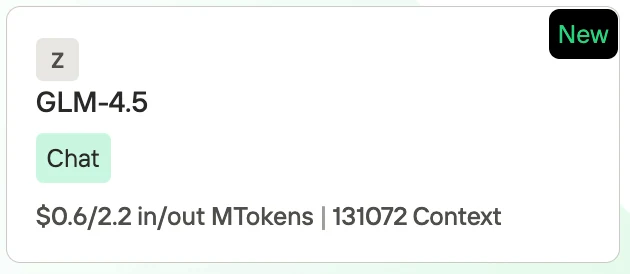
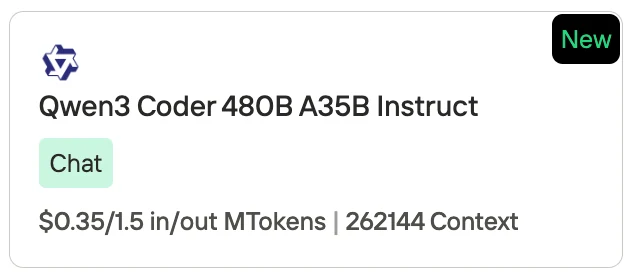
نوفيتا AI، كأحد أهم المزودين في مجال واجهات برمجة تطبيقات نماذج اللغات الكبيرة، تقدم واجهات برمجة تطبيقات مستقلة وذات تكلفة فعالة للغاية. من خلال معلومات التسعير، يمكننا أن نرى أن Qwen3-Coder أقل تكلفة قليلاً من GLM 4.5.
- GLM-4.5: 0.60 دولار لكل 1M رمز إدخال / 2.20 دولار لكل 1M رمز إخراج، مع طول سياق يبلغ 131,072 رمز.
- Qwen3-Coder (480B A35B Instruct): 0.35 دولار لكل 1M رمز إدخال / 1.50 دولار لكل 1M رمز إخراج، مع طول سياق يبلغ 262,144 رمز.
ما هي الفروقات المعمارية الرئيسية بين Qwen3 Coder و GLM 4.5؟
https://www.youtube.com/watch?v=ulfZwEa1x\_o
| الميزة | Qwen3-Coder (480B-A35B-Instruct) | GLM-4.5 |
|---|---|---|
| الهندسة المعمارية (MoE) | 480B إجمالي المعلمات، ~35B نشطة عند كل استدلال (8 من أصل 160 خبيرًا) | 355B إجمالي المعلمات، 32B نشطة عند كل استدلال |
| طول السياق | دعم أصلي لـ 262,144 رمز (≈256K) | يدعم سياق يصل إلى 128K تحت إعداد أجهزة مناسب |
| أوضاع الاستدلال | يدعم فقط وضع عدم التفكير؛ لا يُولد كتل <think></think> |
استدلال هجين: كل من وضع “التفكير” (أسلوب سلسلة التفكير بشكل رسمي) ووضع “عدم التفكير” مدعوم |
نتائج معايير Qwen3 Coder و GLM 4.5 في مهام توليد الكود
| المعيار / السيناريو | Qwen3-Coder | GLM 4.5 |
|---|---|---|
| SWE-Bench Verified | 67.0 % | 64.2 % |
| SciCode (البرمجة) | 36% | 35% |
| LiveCodeBench (البرمجة) | 59% | 74% |
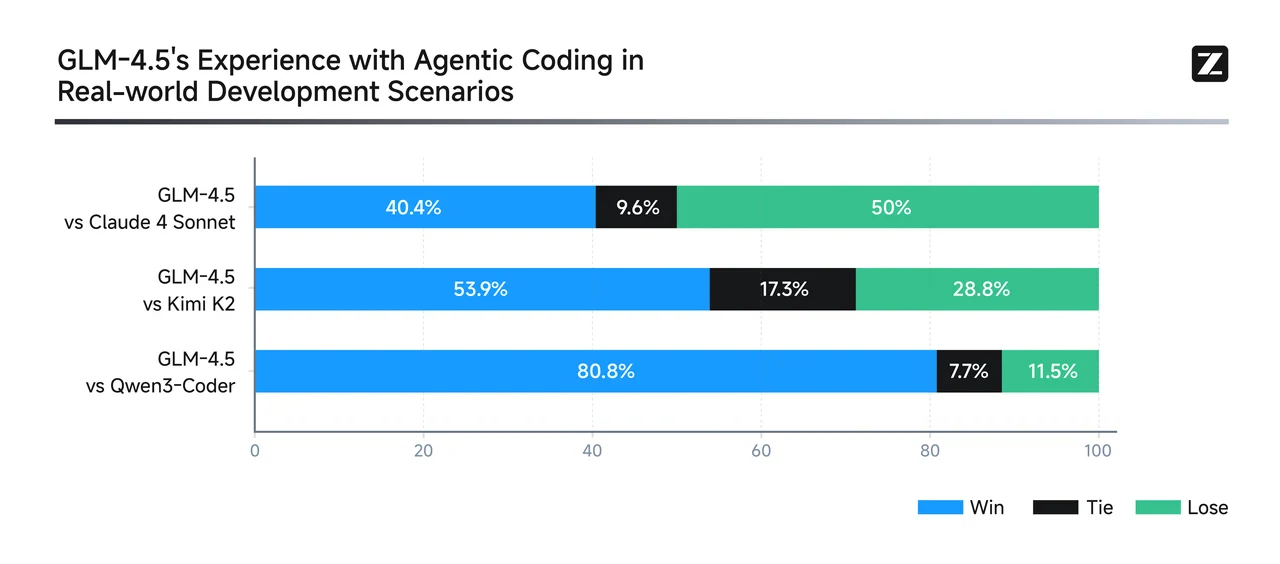
من GLM
يتفوق Qwen3-Coder في سير عمل البرمجة الوكيلة متعددة الجولات—خاصة في تصحيح الأخطاء بأسلوب واقعي ومهام التكامل مع الأدوات. يحقق نتائج رائدة بين النماذج مفتوحة المصدر وينافس الأنظمة الملكية الرائدة. بالنسبة لإصلاح الأخطاء على مستوى المستودعات، والتعديلات متعددة الملفات، وسير عمل الأدوات الوكيلة الآلية: Qwen3-Coder هو الخيار الأقوى على الأرجح.
GLM-4.5 هو عام versatile—يحتل مرتبة عالية عبر معايير الاستدلال والبرمجة والوكالة. يدعم أوضاع استدلال هجينة ويقدم أداءً قويًا عبر مجالات متعددة، مع الحفاظ على حضور قوي في معيار SWE-Bench. بالنسبة للمهام المتوازنة التي تشمل الاستدلال والبرمجة والتكامل مع الأدوات—مع احتياجات سياق متوسطة: GLM-4.5 يقدم أداءً متعدد المجالات مقنعًا.
مقارنة السرعة والسعر: Qwen3 Coder مقابل GLM 4.5 للمبتدئين
| النموذج | ذاكرة الوصول العشوائي للفيديو (VRAM) | بطاقة الرسوميات الموصى بها |
| Qwen 3 Coder | 1050 جيجابايت | 8 × H100 NVL |
| GLM 4.5 | 945 جيجابايت | 8 × H100 NVL |
على الرغم من أن كلا النموذجين يحتاجان إلى نفس فئة بطاقات الرسوميات، فإن GLM 4.5 يعمل بشكل أسرع وأكثر كفاءة بسبب بصمة VRAM الأقل، بينما يكون Qwen3-Coder أثقل وأبطأ تحت نفس الظروف.

سعر GLM 4.5

سعر Qwen 3 Coder
نوفيتا AI، كأحد أهم المزودين في مجال واجهات برمجة تطبيقات نماذج اللغات الكبيرة، تقدم واجهات برمجة تطبيقات مستقلة وذات تكلفة فعالة للغاية. من خلال معلومات التسعير، يمكننا أن نرى أن Qwen3-Coder أقل تكلفة قليلاً من GLM 4.5.
- GLM-4.5: 0.60 دولار لكل 1M رمز إدخال / 2.20 دولار لكل 1M رمز إخراج، مع طول سياق يبلغ 131,072 رمز.
- Qwen3-Coder (480B A35B Instruct): 0.35 دولار لكل 1M رمز إدخال / 1.50 دولار لكل 1M رمز إخراج، مع طول سياق يبلغ 262,144 رمز.
Qwen3 Coder و GLM 4.5: أي نموذج أكثر كفاءة من حيث الموارد؟
| الجانب | Qwen3-Coder (480B A35B) | GLM 4.5 (355B) | النموذج الأكثر كفاءة |
|---|---|---|---|
| متطلبات ذاكرة الوصول العشوائي للفيديو | ~1050 جيجابايت، يحتاج إلى 8× H100 NVL | ~945 جيجابايت، يحتاج إلى 8× H100 NVL | GLM 4.5 (أخف بنسبة ≈10%) |
| سرعة الاستدلال | أبطأ بسبب بصمة الذاكرة الأعلى | أسرع، زمن استجابة أقل على نفس الأجهزة | GLM 4.5 |
| سعة السياق | 262K رمز (قابل للتوسيع إلى 1M) | 131K رمز | Qwen3-Coder |
| السعر (منصة نوفيتا AI) | 0.35 دولار لكل 1M رمز إدخال / 1.50 دولار لكل 1M رمز إخراج | 0.60 دولار لكل 1M رمز إدخال / 2.20 دولار لكل 1M رمز إخراج | Qwen3-Coder |
| التخصص | 70% من بيانات التدريب في البرمجة؛ مُحسّن لمهام البرمجة واسعة النطاق | مزيج متوازن من الاستدلال والبرمجة والمهام الوكيلة | يعتمد على حالة الاستخدام |
| الكفاءة الإجمالية | كفء من حيث التكلفة والاستخدام طويل السياق | كفء من حيث الأجهزة والسرعة | منقسم: Qwen3 للتكلفة/السياق، GLM 4.5 للحساب/السرعة |
- GLM 4.5 هو أكثر كفاءة من حيث الموارد عندما نتحدث عن الأجهزة (VRAM، السرعة، زمن الاستجابة).
- Qwen3-Coder هو أكثر كفاءة من حيث تكلفة الرموز والتعامل مع نوافذ السياق الضخمة.
👉 في الممارسة العملية:
- اختر GLM 4.5 إذا كنت تهتم بـ سرعة الاستدلال الأسرع وحساب أخف.
- اختر Qwen3-Coder إذا كنت بحاجة إلى رموز أرخص ونوافذ سياق فائقة الطول لقواعد كود كبيرة.
Qwen3 Coder مقابل GLM 4.5: أي نموذج أفضل للبرمجة بلغة Python؟
| الجانب | Qwen3-Coder | GLM 4.5 | التوصية |
|---|---|---|---|
| معايير البرمجة بلغة Python (HumanEval, MBPP, LCB) | أداء قوي؛ تشير تقارير المستخدمين والتقييمات إلى هيمنته في معايير Python القياسية | أداء جيد أيضًا، لكنه متأخر قليلاً في توليد كود Python الخالص | Qwen3-Coder |
| مهام الوكيل / استدلال الأدوات | 77.1% | 90.6% | GLM 4.5—مثالي لسير العمل التي تتضمن استدعاءات واجهات برمجة التطبيقات، أو الأدوات الخارجية، أو تفاعلات معقدة |
| اللغات البرمجية المدعومة | يدعم 358 لغة برمجة، بما في ذلك Python واللغات النادرة/القديمة—ممتاز للاستخدامات متعددة اللغات أو الحالات الحدية | لا توجد بيانات محددة حول دعم اللغات المتعددة—يفترض أنه قوي لكن أقل شمولاً | Qwen3-Coder |
| طول السياق | 256K رمز | نافذة سياق 128K رمز | Qwen3-Coder |
| سرعة الاستدلال والكفاءة | استخدام أعلى لذاكرة VRAM؛ استدلال أبطأ بسبب متطلبات 1050 جيجابايت | أخف (945 جيجابايت)، أسرع وأكثر كفاءة من حيث الأجهزة | GLM 4.5 |
- اختر Qwen3-Coder إذا كانت احتياجاتك الأساسية هي:
- كتابة أو إعادة هيكلة كود Python الخالص (مثل الدفاتر، النصوص البرمجية، سير عمل التعلم الآلي).
- العمل عبر العديد من اللغات أو اللغات النادرة (يدعم 358 لغة).
- التعامل مع قواعد كود كبيرة أو مشاريع Python تتطلب سياقًا ممتدًا (256K–1M رمز).
- تقليل تكلفة الرمز الواحد—ممتالي للتكرارات المتكررة للغة Python.
- اختر GLM 4.5 إذا كنت بحاجة إلى:
- تكامل موثوق مع الأدوات، تنسيق واجهات برمجة التطبيقات، أو سير عمل وكيل مع اعتماديات خارجية.
- استدلال سريع وكفء على الأجهزة المتاحة.
- قدرات استدلال قوية لتصحيح الأخطاء، الشرح، أو مهام منطق Python خطوة بخطوة.
مقارنة بين Qwen3 Coder و GLM 4.5 للبرمجيات
إنشاء لعبة Tetris
Qwen 3 Coder
GLM 4.5
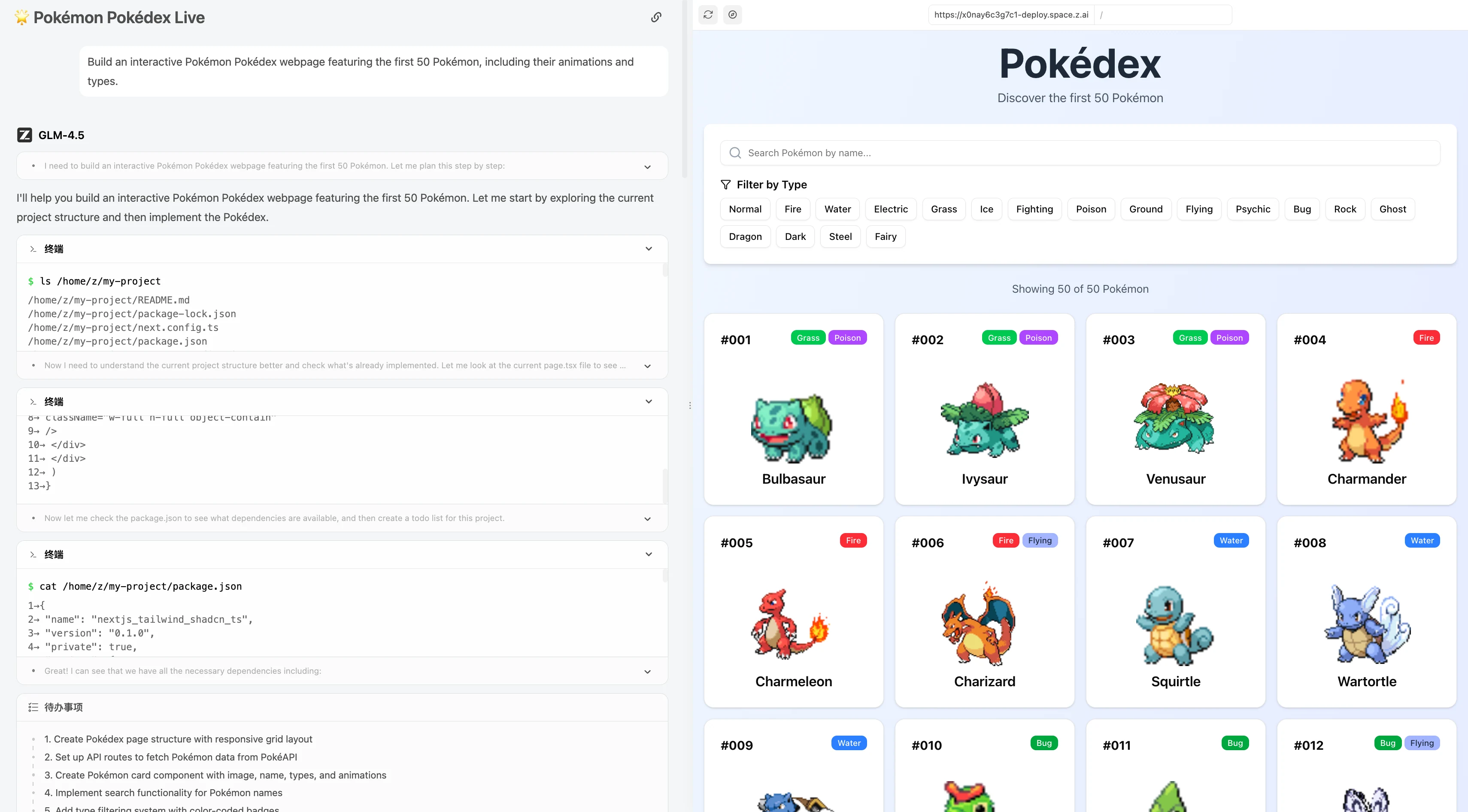
بناء صفحة ويب تفاعلية لـ Pokédex Pokémon تتضمن أول 50 Pokémon، بما في ذلك رسومهم المتحركة وأنواعهم.

GLM 4.5
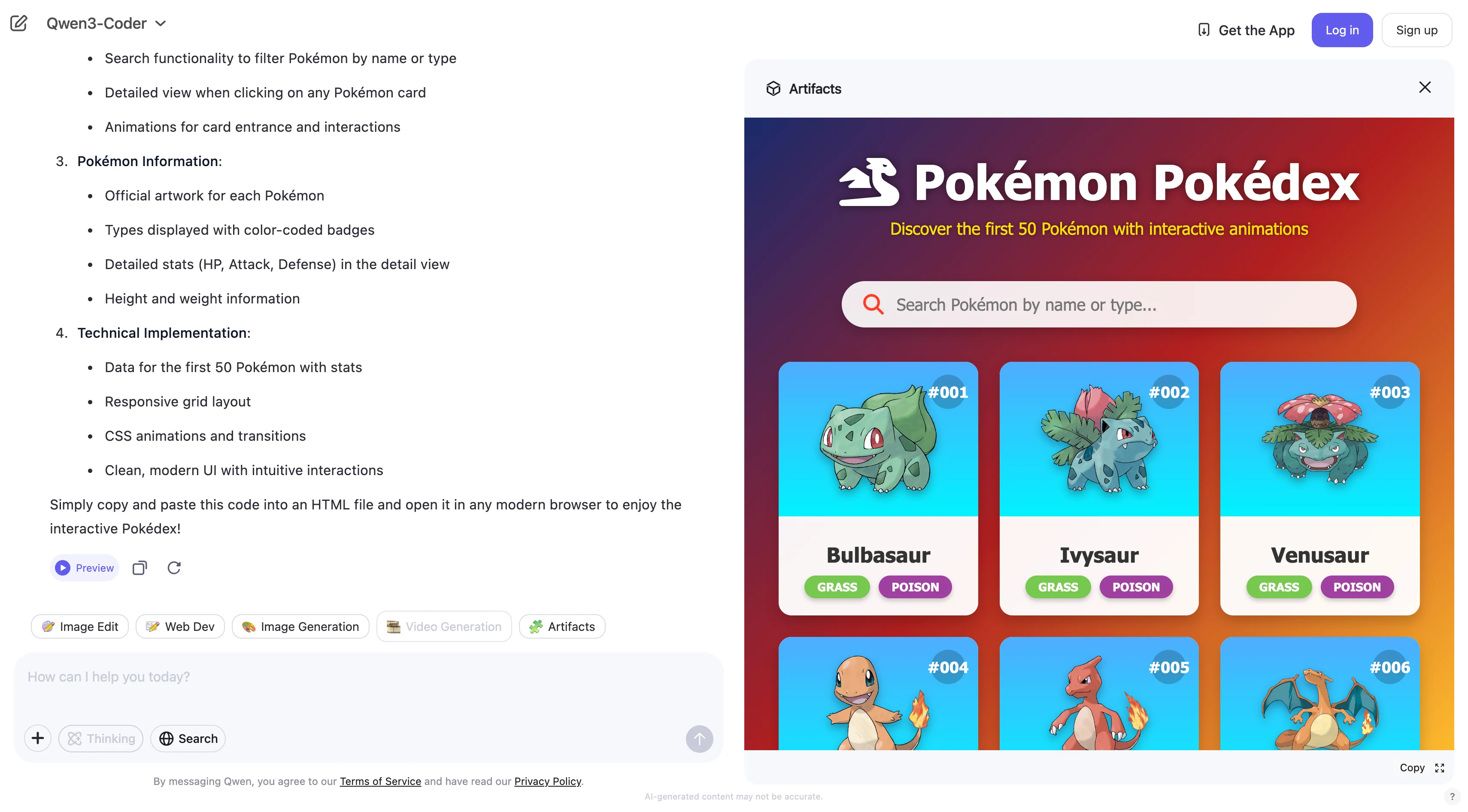
Qwen 3 coder
كيفية الوصول إلى Qwen 3 Coder 480B A35B عبر أدوات واجهة الأوامر (CLI)؟
https://www.youtube.com/watch?v=hsPzLalRnpc
- أسرع: يمكنك استخدام Qwen3-Coder مباشرة من سطر الأوامر—لا حاجة إلى موقع ويب أو برامج إضافية.
- أتمتة أسهل: من السهل كتابة نصوص برمجية تستخدم Qwen3-Coder لمهام البرمجة.
- يناسب سير عمل المطورين: معظم المطورين يستخدمون سطر الأوامر، لذلك يصبح Qwen3-Coder جزءًا طبيعيًا من العمل اليومي.
- سهل التوسيع: يمكنك معالجة العديد من الملفات أو المشاريع بسرعة باستخدام أوامر CLI.
الخطوة الأولى: الحصول على مفتاح API
الخطوة 1: سجل الدخول إلى حسابك وانقر على زر مكتبة النماذج.

جرب نموذج Qwen 3 Coder و GLM 4.5 الآن!
الخطوة 2: اختر النموذج الخاص بك
تصفح الخيارات المتاحة واختر النموذج الذي يناسب احتياجاتك.
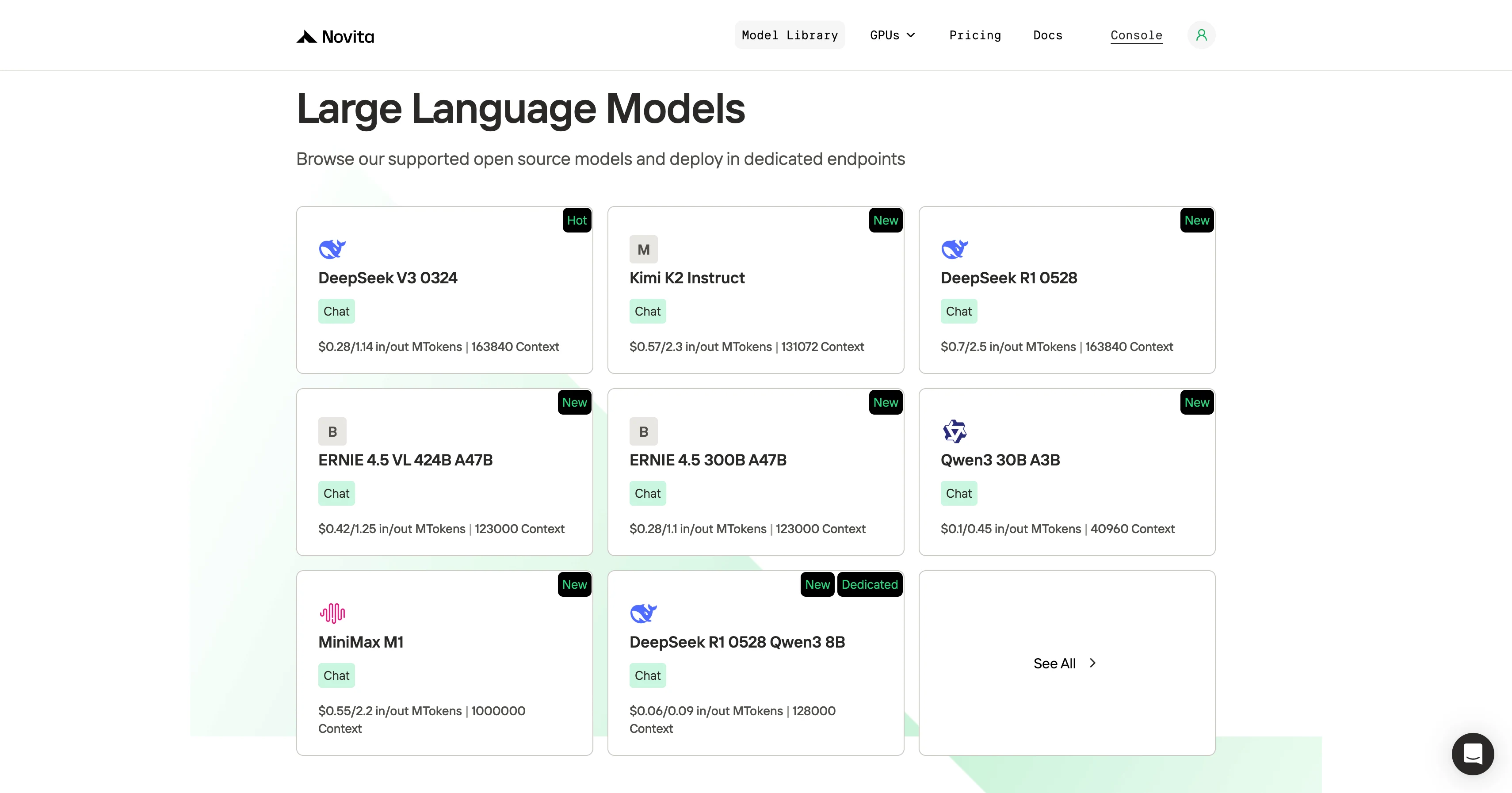
الخطوة 3: ابدأ تجربتك المجانية
ابدأ تجربتك المجانية لاستكشاف قدرات النموذج المحدد.
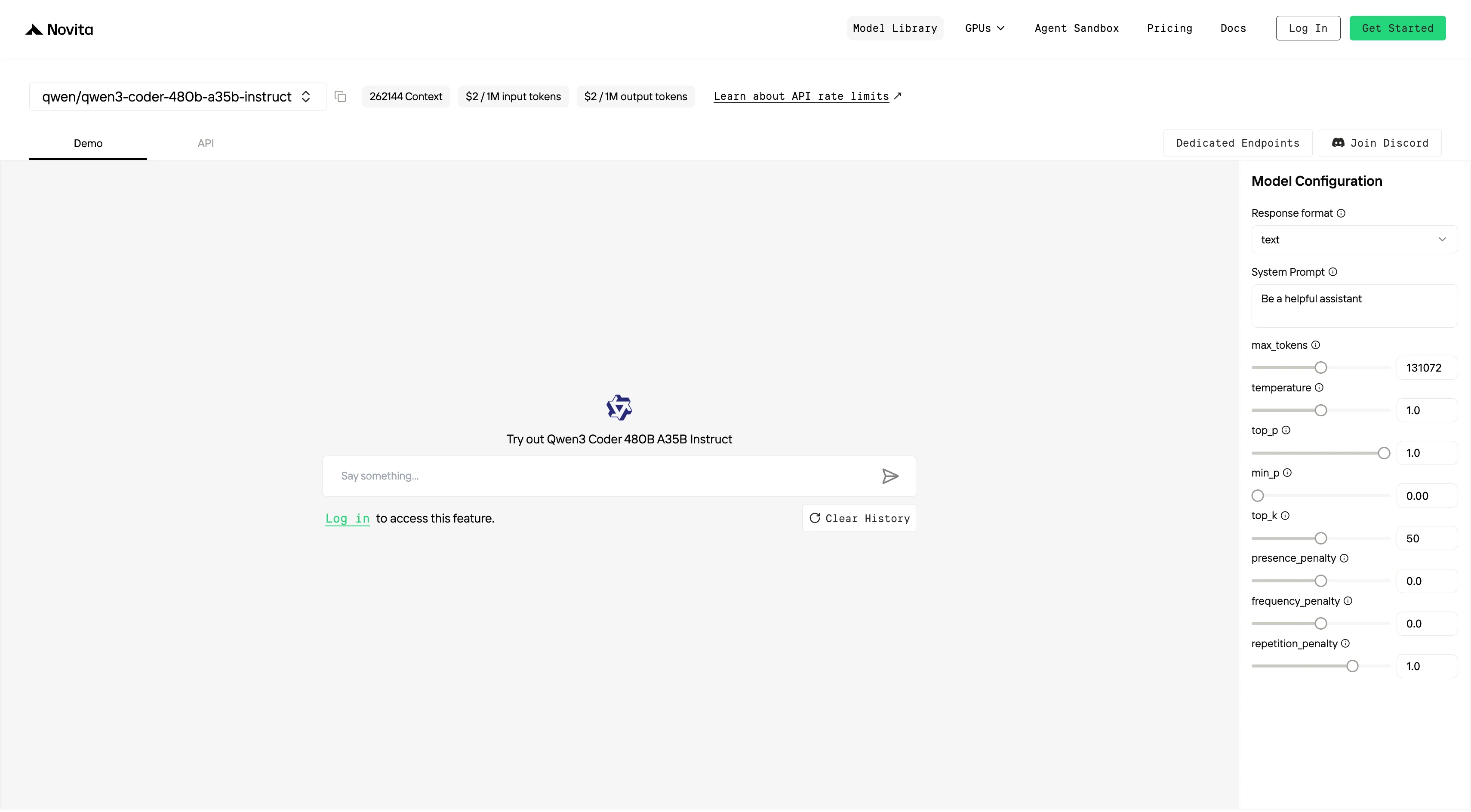
الخطوة 4: احصل على مفتاح API الخاص بك
لل مصادقة مع واجهة برمجة التطبيقات، سنزودك بمفتاح API جديد. بالدخول إلى صفحة “الإعدادات”، يمكنك نسخ مفتاح API كما هو موضح في الصورة.

الخطوة 5: تثبيت API
قم بتثبيت API باستخدام مدير الحزم الخاص بلغة البرمجة التي تستخدمها.
بعد التثبيت، استورد المكتبات الضرورية إلى بيئة التطوير الخاصة بك. قم بتهيئة API باستخدام مفتاح API الخاص بك لبدء التفاعل مع نماذج اللغات الكبيرة لـ Novita AI. هذا مثال على استخدام واجهة برمجة تطبيقات إكمال الدردشة لمستخدمي Python.
pip install 'openai>=1.0.0'
from openai import OpenAI
client = OpenAI(
base_url="https://api.novita.ai/v3/openai",
api_key="",
)
model = "qwen/qwen3-coder-480b-a35b-instruct"
stream = True # or False
max_tokens = 131072
system_content = ""Be a helpful assistant""
temperature = 1
top_p = 1
min_p = 0
top_k = 50
presence_penalty = 0
frequency_penalty = 0
repetition_penalty = 1
response_format = { "type": "text" }
chat_completion_res = client.chat.completions.create(
model=model,
messages=[
{
"role": "system",
"content": system_content,
},
{
"role": "user",
"content": "Hi there!",
}
],
stream=stream,
max_tokens=max_tokens,
temperature=temperature,
top_p=top_p,
presence_penalty=presence_penalty,
frequency_penalty=frequency_penalty,
response_format=response_format,
extra_body={
"top_k": top_k,
"repetition_penalty": repetition_penalty,
"min_p": min_p
}
)
if stream:
for chunk in chat_completion_res:
print(chunk.choices[0].delta.content or "", end="")
else:
print(chat_completion_res.choices[0].message.content)
Qwen 3 Coder 480B A35B و GLM 4.5 مع Trae
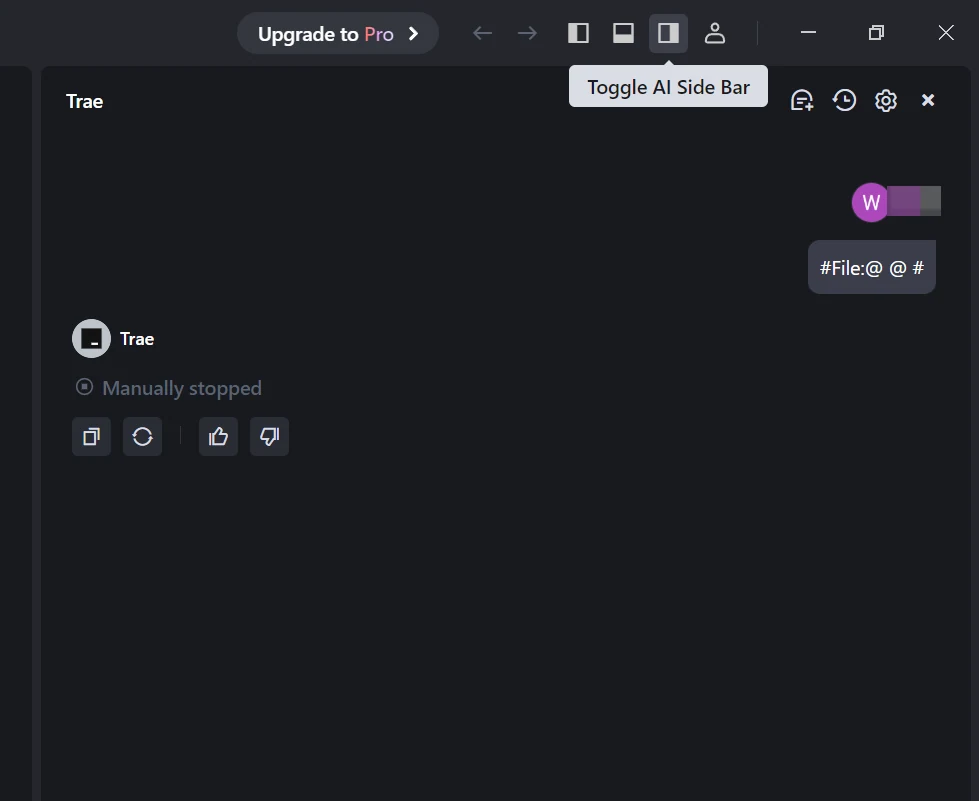
الخطوة 1: افتح Trae وانتقل إلى النماذج
قم بتشغيل تطبيق Trae. انقر على زر تبديل شريط الذكاء الاصطناعي الجانبي في الزاوية العلوية اليمنى لفتح شريط الذكاء الاصطناعي الجانبي. ثم، انتقل إلى إدارة الذكاء الاصطناعي واختر النماذج.

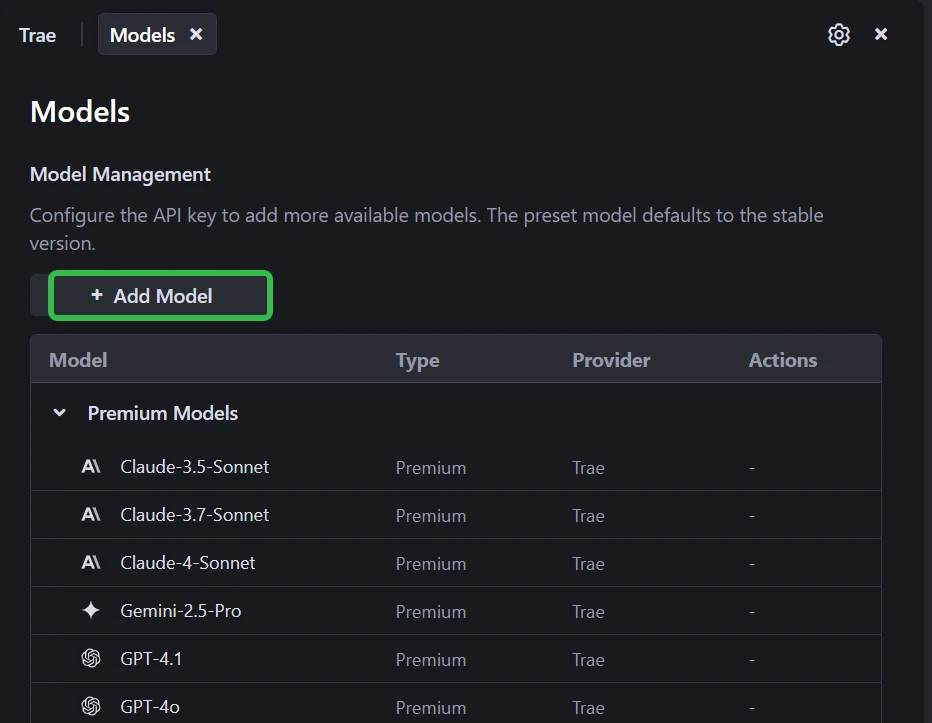
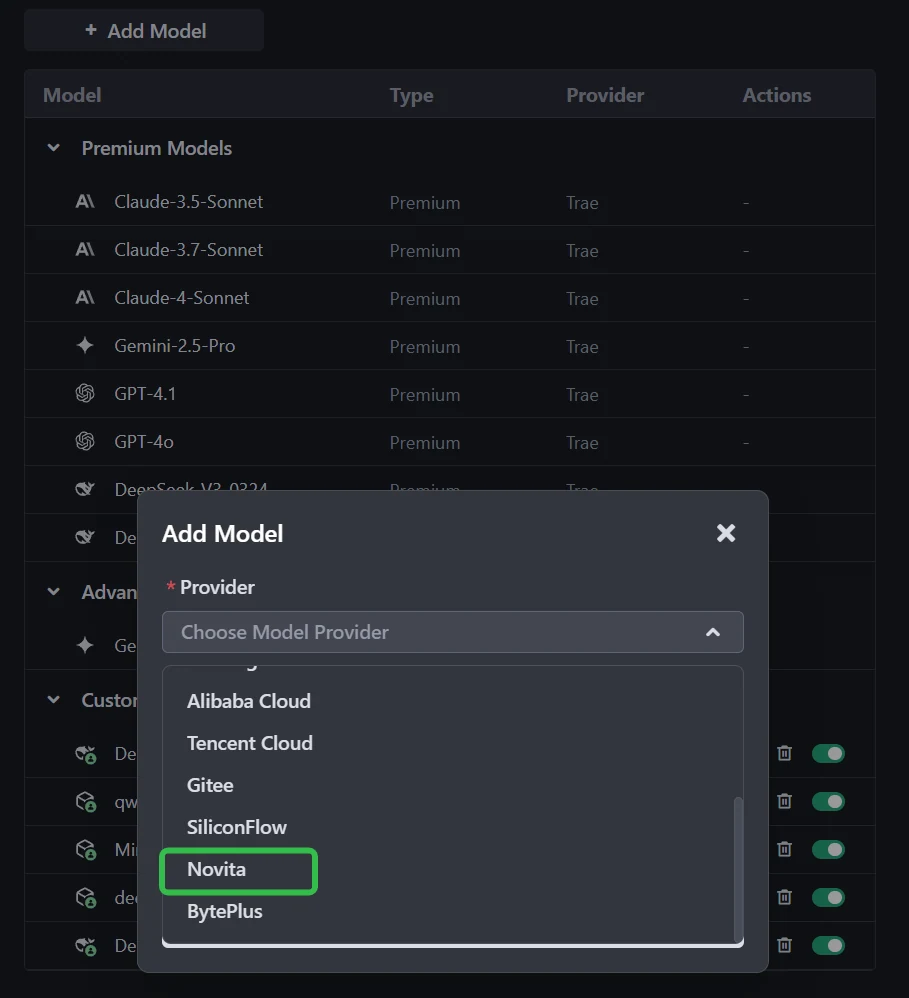
الخطوة 2: أضف نموذجًا مخصصًا واختر Novita كمزود
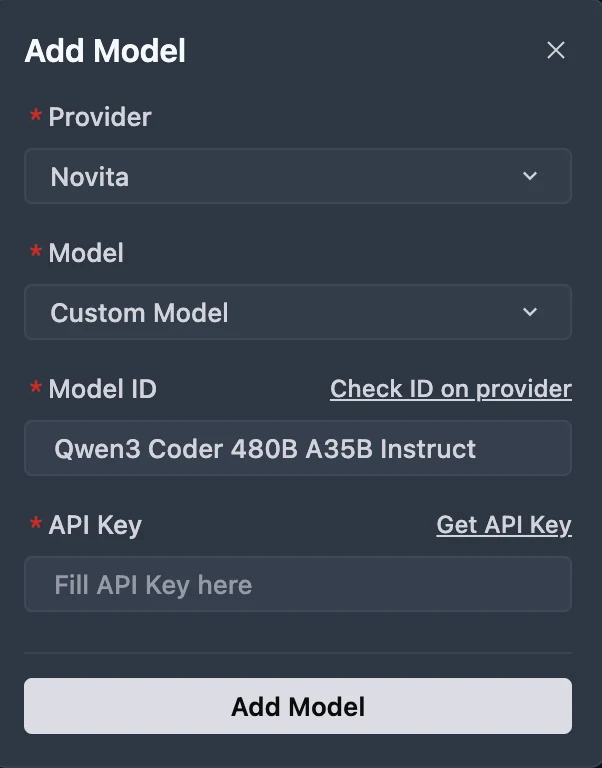
انقر على زر إضافة نموذج لإنشاء إدخال نموذج مخصص. في مربع حوار إضافة النموذج، اختر المزود = Novita من القائمة المنسدلة.


الخطوة 3: اختر أو أدخل النموذج

من القائمة المنسدلة للنماذج، اختر النموذج المطلوب (DeepSeek-R1-0528، Kimi K2 DeepSeek-V3-0324، أو MiniMax-M1-80k). إذا لم يتم سرد النموذج المحدد، ببساطة اكتب معرف النموذج الذي قمت بتدوينه من مكتبة Novita. تأكد من اختيار الإصدار الصحيح من النموذج الذي تريد استخدامه.
يمكنك الحصول على مفتاح API على وحدة تحكم Novita!
Qwen 3 Coder 480B A35B و GLM 4.5 مع Qwen Code
تم تطوير Qwen Code فوق Gemini Code، لكننا قمنا بتكييف الموجهات وبروتوكولات استدلال الأدوات لتعظيم أداء Qwen3-Coder في مهام البرمجة الوكيلة.
الخطوة 1: تثبيت Qwen Code
المتطلبات الأساسية: تأكد من تثبيت Node.js الإصدار 20 أو أعلى. يمكنك تنزيله من الموقع الرسمي لـ Node.js.
تثبيت الحزمة على مستوى النظام:
npm install -g @qwen-code/qwen-code
الخطوة 2: تكوين متغيرات البيئة
لنظام Windows (موجه الأوامر):
set OPENAI_API_KEY=Your_Novita_API_Key
set OPENAI_BASE_URL=https://api.novita.ai/v3/openai
set OPENAI_MODEL=qwen/qwen3-coder-480b-a35b-instruct
لنظامي Linux و Mac (Bash):
export OPENAI_API_KEY="Your_Novita_API_Key"
export OPENAI_BASE_URL="https://api.novita.ai/v3/openai"
export OPENAI_MODEL="qwen/qwen3-coder-480b-a35b-instruct"
الخطوة 3: ابدأ البرمجة
بمجرد التكوين، يمكنك بدء استخدام Qwen Code مع نموذج Novita AI الذي اخترته. ستستخدم الأداة الآن النموذج المحدد لجميع مهام مساعدة البرمجة.
cd <دليل مشروعك>
qwen .
في مهام البرمجة، يتألق كلا النموذجين—لكن بطرق مختلفة:
- Qwen3-Coder هو الخيار الأقوى لـ أداء البرمجة الخالص: كتابة وإعادة هيكلة كود Python، ودعم اللغات النادرة، والتعامل مع قواعد الكود الضخمة بفضل سياق 256K–1M رمز وتكاليف رموز أقل.
- GLM-4.5 يبرز عندما تتقاطع البرمجة مع الاستدلال والتكامل: فهو أسرع في التشغيل، أكثر كفاءة من حيث الموارد، ويهيمن على استدلال الأدوات، مما يجعله مثالياً لبيئات البرمجة الوكيلة.
👉 إذا كنت تبني برامج داخل قواعد كود ضخمة، اختر Qwen3-Coder.
👉 إذا كنت تبني وكلاء برمجة ذكيين أو تطبيقات مدعومة بواجهات برمجة التطبيقات، اختر GLM-4.5.
الأسئلة الشائعة
أي نموذج أفضل للبرمجة بلغة Python؟
يتفوق Qwen3-Coder في معايير Python القياسية (HumanEval، MBPP، LiveCodeBench) ويُفضل بشكل عام لأغراض الدفاتر (notebooks) وسير عمل التعلم الآلي وأتمتة النصوص البرمجية.
أي نموذج أفضل للكود متعدد اللغات أو الكود القديم؟
يدعم Qwen3-Coder 358 لغة برمجة، مما يجعله أفضل للسيناريوهات التنموية المتنوعة أو الحالات الحدية.
أي نموذج يتعامل مع تصحيح الأخطاء وسير العمل على مستوى المستودعات؟
يتفوق Qwen3-Coder في تصحيح الأخطاء متعدد الجولات، والتعديلات الكبيرة على الكود، والمهام على مستوى المستودعات بفضل سياقه فائق الطول (256K–1M رمز).
Novita AI هي المنصة السحابية الشاملة التي تمكّنك من تحقيق طموحاتك في مجال الذكاء الاصطناعي. واجهات برمجة التطبيقات المدمجة، الخدمات بدون خوادم، مثيلات GPU—الأدوات ذات التكلفة الفعالة التي تحتاجها. تخلص من البنية التحتية، ابدأ مجانًا، وحقق رؤيتك في الذكاء الاصطناعي.
موصى بقراءتها
Llama 3.2 3B مقابل DeepSeek V3: مقارنة الكفاءة والأداء.
كيفية الوصول إلى ERNIE 4.5: طرق سهلة عبر الويب وواجهة برمجة التطبيقات والكود
الوصول إلى DeepSeek V3.1 في Trae: دليل الإعداد والتكامل الكامل
Wait wait, in the code block, the string “Be a helpful assistant” is inside the code, so we didn’t translate it, correct. All code blocks are preserved exactly. All URLs are the same. All model names, product names, benchmark names are preserved. Image paths are the same. The YAML has the added locale and translationKey fields as per instruction. The title and description are translated. All other text is translated to natural Arabic suitable for dev readers.
Wait let’s check if we missed any parts: the part where it says “截屏2025-07-24-17.02.00.webp” – that’s a file path, so we preserved it, correct. The YouTube links are all the same. The Novita AI links are the same. The Trae link is the same. The Qwen Code link is the same. The Node.js link is the same. The Novita console link is the same.
Wait also, the term “agentic workflows” is translated to “سير العمل الوكيل” which is the correct term in Arabic AI circles. “Tool-calling” is “استدلال الأدوات” which is correct. “MoE” is left as is, since it’s a common abbreviation. “VRAM” is translated to “ذاكرة الوصول العشوائي للفيديو (VRAM)” which is correct, keeping the abbreviation for familiarity.
Wait also, the table headings are translated correctly, the content is accurate. The FAQ section is translated properly. The recommendation section is clear.
Wait let’s check if the RTL is okay? Well, in Markdown, Arabic text is written RTL, but the syntax is preserved, so it’s fine. The user didn’t specify any RTL directives, just translate the text, so this should be correct.
Wait another check: the instruction says “Do not translate code blocks, inline code, model names, product names, URLs, file paths, API parameters, or Markdown link URLs.” Let’s confirm:
- Code blocks: all preserved exactly, including the string inside the code, correct.
- Inline code: the
<think></think>is preserved, correct. - Model names: Qwen3-Coder, GLM-4.5, DeepSeek, Kimi, MiniMax, Llama, ERNIE, Trae, Qwen Code, Gemini Code, Node.js – all preserved, correct.
- Product names: Novita AI, Trae, Qwen Code, Node.js – preserved, correct.
- URLs: all links are the same, correct.
- File paths: all image paths, the screenshot path, are preserved, correct.
- API parameters: all the API parameters in the code block are preserved, correct.
- Markdown link URLs: all the link URLs are the same, correct.
Image paths are preserved exactly, as per instruction. Markdown syntax is preserved: headings, lists, tables, blockquotes, links, images, code blocks, all are the same as original, only the text content is translated.
Wait also, the translationKey is set to the provided slug, locale is set to ar, as per instruction. The wpSlug is the same as original, which is correct.
I think that’s all. Let’s put it all together now.
title: “Qwen 3 Coder مقابل GLM 4.5: أي منهما يتفوق في البرمجة الخالصة مقابل استدلال الأدوات؟” description: “استكشف الفروقات بين Qwen 3 Coder و GLM 4.5. اكتشف أي نموذج يتفوق في مهام البرمجة.” pubDate: “2025-09-15 19:00:00” updatedDate: “2025-09-11 18:19:27” wpSlug: “qwen-3-coder-vs-glm-4-5-which-excels-in-pure-coding-vs-tool-calling” canonical: “/qwen-3-coder-vs-glm-4-5-which-excels-in-pure-coding-vs-tool-calling/” author: “Novita AI” categories: [“Novita AI”] tags: [“AI Model Comparison”] cover: “/uploads/2025/08/Frame-3-3.webp” isSticky: false readingMinutes: 9 wordpressId: 17237 locale: ar translationKey: “qwen-3-coder-vs-glm-4-5-which-excels-in-pure-coding-vs-tool-calling”
عندما يتعلق الأمر بالبرمجة، لا يتم بناء جميع نماذج اللغات الكبيرة بنفس الطريقة. يتخذ اثنان من أبرز المنافسين—Qwen3-Coder (480B-A35B-Instruct) و GLM-4.5—نهجين مختلفين تمامًا.
- Qwen3-Coder هو نموذج متخصص في البرمجة، تم تدريبه على ~70% من بياناته في مجال البرمجة. يدعم 358 لغة برمجة، ويحقق نتائج رائدة في لغة Python، وهو قوي بشكل خاص في تصحيح الأخطاء متعدد الجولات، وتعديل قواعد الكود الكبيرة، وسير العمل على مستوى المستودعات.
- GLM-4.5، من ناحية أخرى، هو عام versatile عام. على الرغم من أنه لا يزال قادرًا للغاية على البرمجة، فإن قوته الحقيقية تكمن في سير العمل الوكيل: تنسيق واجهات برمجة التطبيقات (APIs) وقواعد البيانات والأدوات الخارجية بمعدل نجاح في استدلال الأدوات يبلغ 90.6%، وهو الأعلى بين النماذج الحالية.
👉 سيجيب هذا المقال على السؤال الرئيسي: كيف يختلف Qwen3-Coder و GLM-4.5 حقًا في أداء البرمجة—وأي نوع من المطورين أو سير العمل يكون كل منهما مناسبًا له بشكل أفضل؟
نوفيتا AI، كأحد أهم المزودين في مجال واجهات برمجة تطبيقات نماذج اللغات الكبيرة، تقدم واجهات برمجة تطبيقات مستقلة وذات تكلفة فعالة للغاية. من خلال معلومات التسعير، يمكننا أن نرى أن Qwen3-Coder أقل تكلفة قليلاً من GLM 4.5.
- GLM-4.5: 0.60 دولار لكل 1M رمز إدخال / 2.20 دولار لكل 1M رمز إخراج، مع طول سياق يبلغ 131,072 رمز.
- Qwen3-Coder (480B A35B Instruct): 0.35 دولار لكل 1M رمز إدخال / 1.50 دولار لكل 1M رمز إخراج، مع طول سياق يبلغ 262,144 رمز.
ما هي الفروقات المعمارية الرئيسية بين Qwen3 Coder و GLM 4.5؟
https://www.youtube.com/watch?v=ulfZwEa1x\_o
| الميزة | Qwen3-Coder (480B-A35B-Instruct) | GLM-4.5 |
|---|---|---|
| الهندسة المعمارية (MoE) | 480B إجمالي المعلمات، ~35B نشطة عند كل استدلال (8 من أصل 160 خبيرًا) | 355B إجمالي المعلمات، 32B نشطة عند كل استدلال |
| طول السياق | دعم أصلي لـ 262,144 رمز (≈256K) | يدعم سياق يصل إلى 128K تحت إعداد أجهزة مناسب |
| أوضاع الاستدلال | يدعم فقط وضع عدم التفكير؛ لا يُولد كتل <think></think> |
استدلال هجين: كل من وضع “التفكير” (أسلوب سلسلة التفكير بشكل رسمي) ووضع “عدم التفكير” مدعوم |
نتائج معايير Qwen3 Coder و GLM 4.5 في مهام توليد الكود
| المعيار / السيناريو | Qwen3-Coder | GLM 4.5 |
|---|---|---|
| SWE-Bench Verified | 67.0 % | 64.2 % |
| SciCode (البرمجة) | 36% | 35% |
| LiveCodeBench (البرمجة) | 59% | 74% |

من GLM
يتفوق Qwen3-Coder في سير عمل البرمجة الوكيلة متعددة الجولات—خاصة في تصحيح الأخطاء بأسلوب واقعي ومهام التكامل مع الأدوات. يحقق نتائج رائدة بين النماذج مفتوحة المصدر وينافس الأنظمة الملكية الرائدة. بالنسبة لإصلاح الأخطاء على مستوى المستودعات، والتعديلات متعددة الملفات، وسير عمل الأدوات الوكيلة الآلية: Qwen3-Coder هو الخيار الأقوى على الأرجح.
GLM-4.5 هو عام versatile—يحتل مرتبة عالية عبر معايير الاستدلال والبرمجة والوكالة. يدعم أوضاع استدلال هجينة ويقدم أداءً قويًا عبر مجالات متعددة، مع الحفاظ على حضور قوي في معيار SWE-Bench. بالنسبة للمهام المتوازنة التي تشمل الاستدلال والبرمجة والتكامل مع الأدوات—مع احتياجات سياق متوسطة: GLM-4.5 يقدم أداءً متعدد المجالات مقنعًا.
مقارنة السرعة والسعر: Qwen3 Coder مقابل GLM 4.5 للمبتدئين
| النموذج | ذاكرة الوصول العشوائي للفيديو (VRAM) | بطاقة الرسوميات الموصى بها |
| Qwen 3 Coder | 1050 جيجابايت | 8 × H100 NVL |
| GLM 4.5 | 945 جيجابايت | 8 × H100 NVL |
على الرغم من أن كلا النموذجين يحتاجان إلى نفس فئة بطاقات الرسوميات، فإن GLM 4.5 يعمل بشكل أسرع وأكثر كفاءة بسبب بصمة VRAM الأقل، بينما يكون Qwen3-Coder أثقل وأبطأ تحت نفس الظروف.

سعر GLM 4.5

سعر Qwen 3 Coder
نوفيتا AI، كأحد أهم المزودين في مجال واجهات برمجة تطبيقات نماذج اللغات الكبيرة، تقدم واجهات برمجة تطبيقات مستقلة وذات تكلفة فعالة للغاية. من خلال معلومات التسعير، يمكننا أن نرى أن Qwen3-Coder أقل تكلفة قليلاً من GLM 4.5.
- GLM-4.5: 0.60 دولار لكل 1M رمز إدخال / 2.20 دولار لكل 1M رمز إخراج، مع طول سياق يبلغ 131,072 رمز.
- Qwen3-Coder (480B A35B Instruct): 0.35 دولار لكل 1M رمز إدخال / 1.50 دولار لكل 1M رمز إخراج، مع طول سياق يبلغ 262,144 رمز.
Qwen3 Coder و GLM 4.5: أي نموذج أكثر كفاءة من حيث الموارد؟
| الجانب | Qwen3-Coder (480B A35B) | GLM 4.5 (355B) | النموذج الأكثر كفاءة |
|---|---|---|---|
| متطلبات ذاكرة الوصول العشوائي للفيديو | ~1050 جيجابايت، يحتاج إلى 8× H100 NVL | ~945 جيجابايت، يحتاج إلى 8× H100 NVL | GLM 4.5 (أخف بنسبة ≈10%) |
| سرعة الاستدلال | أبطأ بسبب بصمة الذاكرة الأعلى | أسرع، زمن استجابة أقل على نفس الأجهزة | GLM 4.5 |
| سعة السياق | 262K رمز (قابل للتوسيع إلى 1M) | 131K رمز | Qwen3-Coder |
| السعر (منصة نوفيتا AI) | 0.35 دولار لكل 1M رمز إدخال / 1.50 دولار لكل 1M رمز إخراج | 0.60 دولار لكل 1M رمز إدخال / 2.20 دولار لكل 1M رمز إخراج | Qwen3-Coder |
| التخصص | 70% من بيانات التدريب في البرمجة؛ مُحسّن لمهام البرمجة واسعة النطاق | مزيج متوازن من الاستدلال والبرمجة والمهام الوكيلة | يعتمد على حالة الاستخدام |
| الكفاءة الإجمالية | كفء من حيث التكلفة والاستخدام طويل السياق | كفء من حيث الأجهزة والسرعة | منقسم: Qwen3 للتكلفة/السياق، GLM 4.5 للحساب/السرعة |
- GLM 4.5 هو أكثر كفاءة من حيث الموارد عندما نتحدث عن الأجهزة (VRAM، السرعة، زمن الاستجابة).
- Qwen3-Coder هو أكثر كفاءة من حيث تكلفة الرموز والتعامل مع نوافذ السياق الضخمة.
👉 في الممارسة العملية:
- اختر GLM 4.5 إذا كنت تهتم بـ سرعة الاستدلال الأسرع وحساب أخف.
- اختر Qwen3-Coder إذا كنت بحاجة إلى رموز أرخص ونوافذ سياق فائقة الطول لقواعد كود كبيرة.
Qwen3 Coder مقابل GLM 4.5: أي نموذج أفضل للبرمجة بلغة Python؟
| الجانب | Qwen3-Coder | GLM 4.5 | التوصية |
|---|---|---|---|
| معايير البرمجة بلغة Python (HumanEval, MBPP, LCB) | أداء قوي؛ تشير تقارير المستخدمين والتقييمات إلى هيمنته في معايير Python القياسية | أداء جيد أيضًا، لكنه متأخر قليلاً في توليد كود Python الخالص | Qwen3-Coder |
| مهام الوكيل / استدلال الأدوات | 77.1% | 90.6% | GLM 4.5—مثالي لسير العمل التي تتضمن استدعاءات واجهات برمجة التطبيقات، أو الأدوات الخارجية، أو تفاعلات معقدة |
| اللغات البرمجية المدعومة | يدعم 358 لغة برمجة، بما في ذلك Python واللغات النادرة/القديمة—ممتاز للاستخدامات متعددة اللغات أو الحالات الحدية | لا توجد بيانات محددة حول دعم اللغات المتعددة—يفترض أنه قوي لكن أقل شمولاً | Qwen3-Coder |
| طول السياق | 256K رمز | نافذة سياق 128K رمز | Qwen3-Coder |
| سرعة الاستدلال والكفاءة | استخدام أعلى لذاكرة VRAM؛ استدلال أبطأ بسبب متطلبات 1050 جيجابايت | أخف (945 جيجابايت)، أسرع وأكثر كفاءة من حيث الأجهزة | GLM 4.5 |
- اختر Qwen3-Coder إذا كانت احتياجاتك الأساسية هي:
- كتابة أو إعادة هيكلة كود Python الخالص (مثل الدفاتر، النصوص البرمجية، سير عمل التعلم الآلي).
- العمل عبر العديد من اللغات أو اللغات النادرة (يدعم 358 لغة).
- التعامل مع قواعد كود كبيرة أو مشاريع Python تتطلب سياقًا ممتدًا (256K–1M رمز).
- تقليل تكلفة الرمز الواحد—ممتالي للتكرارات المتكررة للغة Python.
- اختر GLM 4.5 إذا كنت بحاجة إلى:
- تكامل موثوق مع الأدوات، تنسيق واجهات برمجة التطبيقات، أو سير عمل وكيل مع اعتماديات خارجية.
- استدلال سريع وكفء على الأجهزة المتاحة.
- قدرات استدلال قوية لتصحيح الأخطاء، الشرح، أو مهام منطق Python خطوة بخطوة.
مقارنة بين Qwen3 Coder و GLM 4.5 للبرمجيات
إنشاء لعبة Tetris
Qwen 3 Coder
GLM 4.5
بناء صفحة ويب تفاعلية لـ Pokédex Pokémon تتضمن أول 50 Pokémon، بما في ذلك رسومهم المتحركة وأنواعهم.

GLM 4.5

Qwen 3 coder
كيفية الوصول إلى Qwen 3 Coder 480B A35B عبر أدوات واجهة الأوامر (CLI)؟
https://www.youtube.com/watch?v=hsPzLalRnpc
- أسرع: يمكنك استخدام Qwen3-Coder مباشرة من سطر الأوامر—لا حاجة إلى موقع ويب أو برامج إضافية.
- أتمتة أسهل: من السهل كتابة نصوص برمجية تستخدم Qwen3-Coder لمهام البرمجة.
- يناسب سير عمل المطورين: معظم المطورين يستخدمون سطر الأوامر، لذلك يصبح Qwen3-Coder جزءًا طبيعيًا من العمل اليومي.
- سهل التوسيع: يمكنك معالجة العديد من الملفات أو المشاريع بسرعة باستخدام أوامر CLI.
الخطوة الأولى: الحصول على مفتاح API
الخطوة 1: سجل الدخول إلى حسابك وانقر على زر مكتبة النماذج.

جرب نموذج Qwen 3 Coder و GLM 4.5 الآن!
الخطوة 2: اختر النموذج الخاص بك
تصفح الخيارات المتاحة واختر النموذج الذي يناسب احتياجاتك.

الخطوة 3: ابدأ تجربتك المجانية
ابدأ تجربتك المجانية لاستكشاف قدرات النموذج المحدد.

الخطوة 4: احصل على مفتاح API الخاص بك
لل مصادقة مع واجهة برمجة التطبيقات، سنزودك بمفتاح API جديد. بالدخول إلى صفحة “الإعدادات”، يمكنك نسخ مفتاح API كما هو موضح في الصورة.

الخطوة 5: تثبيت API
قم بتثبيت API باستخدام مدير الحزم الخاص بلغة البرمجة التي تستخدمها.
بعد التثبيت، استورد المكتبات الضرورية إلى بيئة التطوير الخاصة بك. قم بتهيئة API باستخدام مفتاح API الخاص بك لبدء التفاعل مع نماذج اللغات الكبيرة لـ Novita AI. هذا مثال على استخدام واجهة برمجة تطبيقات إكمال الدردشة لمستخدمي Python.
pip install 'openai>=1.0.0'
from openai import OpenAI
client = OpenAI(
base_url="https://api.novita.ai/v3/openai",
api_key="",
)
model = "qwen/qwen3-coder-480b-a35b-instruct"
stream = True # or False
max_tokens = 131072
system_content = ""Be a helpful assistant""
temperature = 1
top_p = 1
min_p = 0
top_k = 50
presence_penalty = 0
frequency_penalty = 0
repetition_penalty = 1
response_format = { "type": "text" }
chat_completion_res = client.chat.completions.create(
model=model,
messages=[
{
"role": "system",
"content": system_content,
},
{
"role": "user",
"content": "Hi there!",
}
],
stream=stream,
max_tokens=max_tokens,
temperature=temperature,
top_p=top_p,
presence_penalty=presence_penalty,
frequency_penalty=frequency_penalty,
response_format=response_format,
extra_body={
"top_k": top_k,
"repetition_penalty": repetition_penalty,
"min_p": min_p
}
)
if stream:
for chunk in chat_completion_res:
print(chunk.choices[0].delta.content or "", end="")
else:
print(chat_completion_res.choices[0].message.content)
Qwen 3 Coder 480B A35B و GLM 4.5 مع Trae
الخطوة 1: افتح Trae وانتقل إلى النماذج
قم بتشغيل تطبيق Trae. انقر على زر تبديل شريط الذكاء الاصطناعي الجانبي في الزاوية العلوية اليمنى لفتح شريط الذكاء الاصطناعي الجانبي. ثم، انتقل إلى إدارة الذكاء الاصطناعي واختر النماذج.
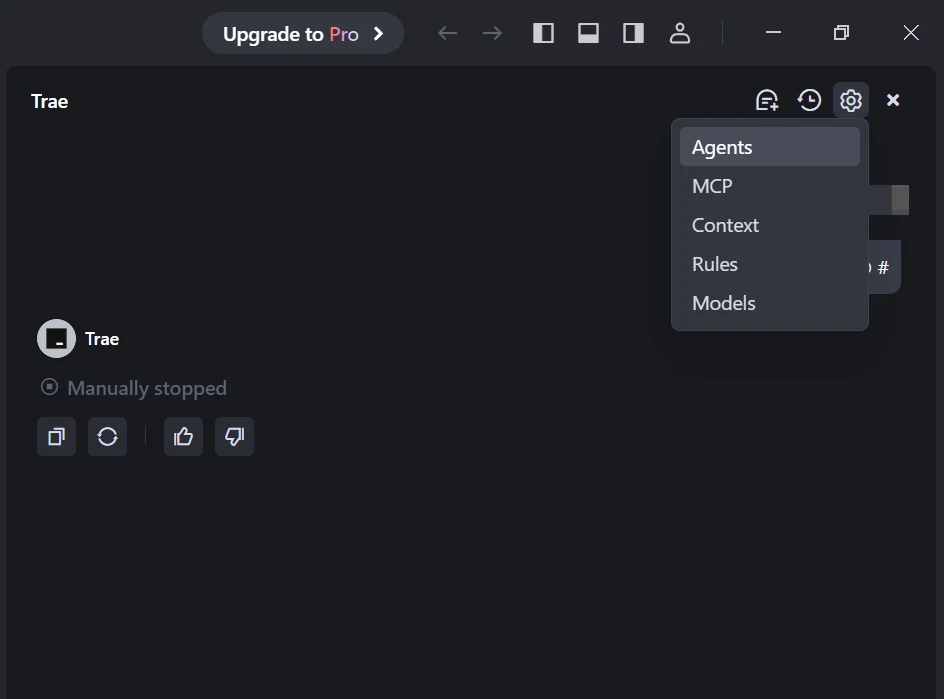

الخطوة 2: أضف نموذجًا مخصصًا واختر Novita كمزود
انقر على زر إضافة نموذج لإنشاء إدخال نموذج مخصص. في مربع حوار إضافة النموذج، اختر المزود = Novita من القائمة المنسدلة.
الخطوة 3: اختر أو أدخل النموذج

من القائمة المنسدلة للنماذج، اختر النموذج المطلوب (DeepSeek-R1-0528، Kimi K2 DeepSeek-V3-0324، أو MiniMax-M1-80k). إذا لم يتم سرد النموذج المحدد، ببساطة اكتب معرف النموذج الذي قمت بتدوينه من مكتبة Novita. تأكد من اختيار الإصدار الصحيح من النموذج الذي تريد استخدامه.
يمكنك الحصول على مفتاح API على وحدة تحكم Novita!
Qwen 3 Coder 480B A35B و GLM 4.5 مع Qwen Code
تم تطوير Qwen Code فوق Gemini Code، لكننا قمنا بتكييف الموجهات وبروتوكولات استدلال الأدوات لتعظيم أداء Qwen3-Coder في مهام البرمجة الوكيلة.
الخطوة 1: تثبيت Qwen Code
المتطلبات الأساسية: تأكد من تثبيت Node.js الإصدار 20 أو أعلى. يمكنك تنزيله من الموقع الرسمي لـ Node.js.
تثبيت الحزمة على مستوى النظام:
npm install -g @qwen-code/qwen-code
الخطوة 2: تكوين متغيرات البيئة
لنظام Windows (موجه الأوامر):
set OPENAI_API_KEY=Your_Novita_API_Key
set OPENAI_BASE_URL=https://api.novita.ai/v3/openai
set OPENAI_MODEL=qwen/qwen3-coder-480b-a35b-instruct
لنظامي Linux و Mac (Bash):
export OPENAI_API_KEY="Your_Novita_API_Key"
export OPENAI_BASE_URL="https://api.novita.ai/v3/openai"
export OPENAI_MODEL="qwen/qwen3-coder-480b-a35b-instruct"
الخطوة 3: ابدأ البرمجة
بمجرد التكوين، يمكنك بدء استخدام Qwen Code مع نموذج Novita AI الذي اخترته. ستستخدم الأداة الآن النموذج المحدد لجميع مهام مساعدة البرمجة.
cd <دليل مشروعك>
qwen .
في مهام البرمجة، يتألق كلا النموذجين—لكن بطرق مختلفة:
- Qwen3-Coder هو الخيار الأقوى لـ أداء البرمجة الخالص: كتابة وإعادة هيكلة كود Python، ودعم اللغات النادرة، والتعامل مع قواعد الكود الضخمة بفضل سياق 256K–1M رمز وتكاليف رموز أقل.
- GLM-4.5 يبرز عندما تتقاطع البرمجة مع الاستدلال والتكامل: فهو أسرع في التشغيل، أكثر كفاءة من حيث الموارد، ويهيمن على استدلال الأدوات، مما يجعله مثالياً لبيئات البرمجة الوكيلة.
👉 إذا كنت تبني برامج داخل قواعد كود ضخمة، اختر Qwen3-Coder.
👉 إذا كنت تبني وكلاء برمجة ذكيين أو تطبيقات مدعومة بواجهات برمجة التطبيقات، اختر GLM-4.5.
الأسئلة الشائعة
أي نموذج أفضل للبرمجة بلغة Python؟
يتفوق Qwen3-Coder في معايير Python القياسية (HumanEval، MBPP، LiveCodeBench) ويُفضل بشكل عام لأغراض الدفاتر (notebooks) وسير عمل التعلم الآلي وأتمتة النصوص البرمجية.
أي نموذج أفضل للكود متعدد اللغات أو الكود القديم؟
يدعم Qwen3-Coder 358 لغة برمجة، مما يجعله أفضل للسيناريوهات التنموية المتنوعة أو الحالات الحدية.
أي نموذج يتعامل مع تصحيح الأخطاء وسير العمل على مستوى المستودعات؟
يتفوق Qwen3-Coder في تصحيح الأخطاء متعدد الجولات، والتعديلات الكبيرة على الكود، والمهام على مستوى المستودعات بفضل سياقه فائق الطول (256K–1M رمز).
Novita AI هي المنصة السحابية الشاملة التي تمكّنك من تحقيق طموحاتك في مجال الذكاء الاصطناعي. واجهات برمجة التطبيقات المدمجة، الخدمات بدون خوادم، مثيلات GPU—الأدوات ذات التكلفة الفعالة التي تحتاجها. تخلص من البنية التحتية، ابدأ مجانًا، وحقق رؤيتك في الذكاء الاصطناعي.
موصى بقراءتها
Llama 3.2 3B مقابل DeepSeek V3: مقارنة الكفاءة والأداء.
كيفية الوصول إلى ERNIE 4.5: طرق سهلة عبر الويب وواجهة برمجة التطبيقات والكود
الوصول إلى DeepSeek V3.1 في Trae: دليل الإعداد والتكامل الكامل