When it comes to coding, not all large language models are built the same. Two of the most advanced contenders—Qwen3-Coder (480B-A35B-Instruct) and GLM-4.5—take very different approaches.
- Qwen3-Coder is a code-specialist model, trained with ~70% of its data in programming. It supports 358 programming languages, achieves state-of-the-art results in Python, and is especially strong in multi-turn debugging, large codebase editing, and repository-scale workflows.
- GLM-4.5, on the other hand, is a versatile generalist. While still highly capable in code, its real strength lies in agentic workflows: orchestrating APIs, databases, and external tools with a 90.6% tool-calling success rate, the highest among current models.
👉 This article will answer the key question: How do Qwen3-Coder and GLM-4.5 truly differ in coding performance—and what kind of developer or workflow is each best suited for?
Novita AI, as one of the most important providers in the LLM API field, offers stable and highly cost-effective APIs. From the pricing information, we can see that Qwen3-Coder is slightly cheaper than GLM 4.5.
- GLM-4.5: $0.60 per 1M input tokens / $2.20 per 1M output tokens, with a context length of 131,072 tokens.
- Qwen3-Coder (480B A35B Instruct): $0.35 per 1M input tokens / $1.50 per 1M output tokens, with a context length of 262,144 tokens.
What are the Main Architectural Differences Between Qwen3 Coder and GLM 4.5?
https://www.youtube.com/watch?v=ulfZwEa1x\_o
| Feature | Qwen3-Coder (480B-A35B-Instruct) | GLM-4.5 |
|---|---|---|
| Architecture (MoE) | 480B total parameters, ~35B active per inference (8 out of 160 experts) | 355B total parameters, 32B active per inference |
| Context Length | Native support for 262,144 tokens (≈256K) | Supports up to a 128K context under proper hardware setup |
| Reasoning Modes | Only supports non-thinking mode; does not generate <think></think> blocks | Hybrid reasoning: both “thinking” mode (formally chain-of-thought style) and “non-thinking” mode supported |
Benchmark Results for Qwen3 Coder and GLM 4.5 in Code Generation Tasks
| Benchmark / Scenario | Qwen3-Coder | GLM 4.5 |
|---|---|---|
| SWE-Bench Verified | 67.0 % | 64.2 % |
| SciCode (Coding) | 36% | 35% |
| LiveCodeBench (Coding) | 59% | 74% |
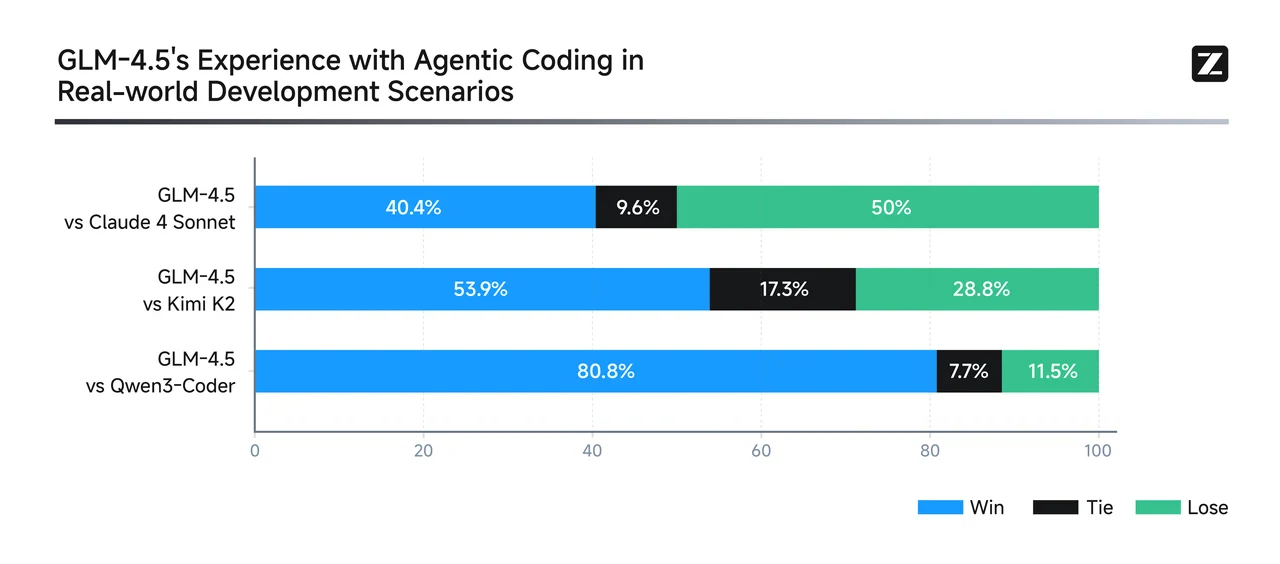
From GLM
Qwen3-Coder excels at multi-turn, agentic code workflows—especially in real-world-style debugging and tool-integration tasks. It achieves best-in-class results for open-source models and is competitive with top proprietary systems. For repository-scale bug fixes, multi-file edits, and automated agentic tool workflows: Qwen3-Coder is likely the stronger choice.
GLM-4.5 is a versatile generalist—ranking highly across reasoning, coding, and agentic benchmarks. It supports hybrid reasoning modes and offers robust performance across multiple domains, while maintaining a strong SWE-Bench presence. For balanced tasks spanning reasoning, coding, and tool integration—with moderate context needs: GLM-4.5 offers a compelling multi-domain performer.
Speed and Price Comparison: Qwen3 Coder vs GLM 4.5 for Beginners
| Model | VRAM | Recommended GPU |
| Qwen 3 Coder | 1050GB | 8 x H100 NVL |
| GLM 4.5 | 945GB | 8 x H100 NVL |
Although both need the same class of GPUs, GLM 4.5 runs faster and more efficiently because of its lower VRAM footprint, while Qwen3-Coder is heavier and slower under the same conditions.
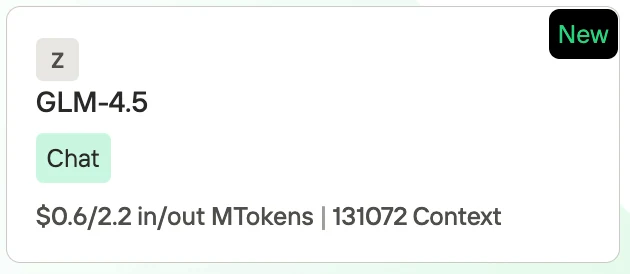
GLM 4.5 Price
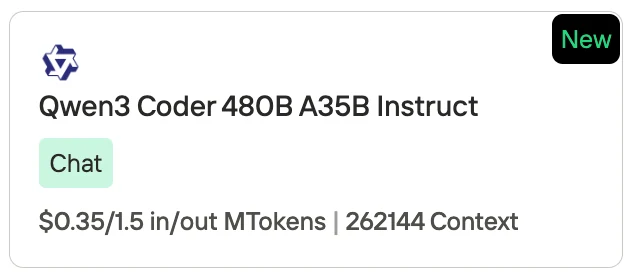
Qwen 3 Coder Price
Novita AI, as one of the most important providers in the LLM API field, offers stable and highly cost-effective APIs. From the pricing information, we can see that Qwen3-Coder is slightly cheaper than GLM 4.5.
- GLM-4.5: $0.60 per 1M input tokens / $2.20 per 1M output tokens, with a context length of 131,072 tokens.
- Qwen3-Coder (480B A35B Instruct): $0.35 per 1M input tokens / $1.50 per 1M output tokens, with a context length of 262,144 tokens.
Qwen3 Coder and GLM 4.5: Which Model is More Efficient in Terms of Resource?
| Aspect | Qwen3-Coder (480B A35B) | GLM 4.5 (355B) | More Efficient Model |
|---|---|---|---|
| VRAM Requirement | ~1050 GB, needs 8× H100 NVL | ~945 GB, needs 8× H100 NVL | GLM 4.5 (≈10% lighter) |
| Inference Speed | Slower due to higher memory footprint | Faster, lower latency on same hardware | GLM 4.5 |
| Context Capacity | 262K tokens (extendable to 1M) | 131K tokens | Qwen3-Coder |
| Price (Novita AI) | $0.35 per 1M input / $1.50 per 1M output | $0.60 per 1M input / $2.20 per 1M output | Qwen3-Coder |
| Specialization | 70% training data in code; optimized for large-scale coding tasks | Balanced mix of reasoning, coding, and agentic tasks | Depends on use case |
| Overall Efficiency | Efficient for cost and long-context usage | Efficient for hardware and speed | Split: Qwen3 for cost/context, GLM 4.5 for compute/speed |
- GLM 4.5 is more resource-efficient when we talk about hardware (VRAM, speed, latency).
- Qwen3-Coder is more efficient in terms of token cost and massive context handling.
👉 In practice:
- Choose GLM 4.5 if you care about faster inference and lighter compute load.
- Choose Qwen3-Coder if you need cheaper tokens and ultra-long context windows for large codebases.
Qwen3 Coder vs GLM 4.5: Which is Better for Python Programming?
| Aspect | Qwen3-Coder | GLM 4.5 | Recommendation |
|---|---|---|---|
| Python Coding Benchmarks (HumanEval, MBPP, LCB) | Strong performer; user reports and evaluations suggest dominance in standard Python benchmarks | Also performs well, but slightly behind in pure Python code generation | Qwen3-Coder |
| Agentic / Tool-Calling Tasks | 77.1% | 90.6% | GLM 4.5—ideal for workflows involving API calls, external tools, or complex interactions |
| Supported Programming Languages | Supports 358 languages, including Python and obscure/legacy ones—great for multi-language or edge use cases | No specific data on multi-language support—presumably strong but less broad | Qwen3-Coder |
| Context Length | 256K token | 128K token window | Qwen3-Coder |
| Inference Speed & Efficiency | Heavier VRAM usage; slower inference due to 1050 GB requirement | Lighter (945 GB), faster, and more hardware-efficient | GLM 4.5 |
- Choose Qwen3-Coder if your primary needs are:
- Writing or refactoring pure Python code (e.g., notebooks, scripts, ML workflows).
- Working across many or niche languages (supporting 358).
- Handling large codebases or Python projects requiring extended context (256K–1M tokens).
- Minimizing cost per token—great for frequent Python iterations.
- Choose GLM 4.5 if you need:
- Reliable tool integration, API orchestration, or agentic workflows with external dependencies.
- High-speed, efficient inference on given hardware.
- Strong reasoning capabilities for debugging, explanation, or step-by-step Python logic tasks.
Comparison of Qwen3 Coder and GLM 4.5 for Software
Create a Tetris Game
Qwen 3 Coder
GLM 4.5
Build an interactive Pokémon Pokédex webpage featuring the first 50 Pokémon, including their animations and types.
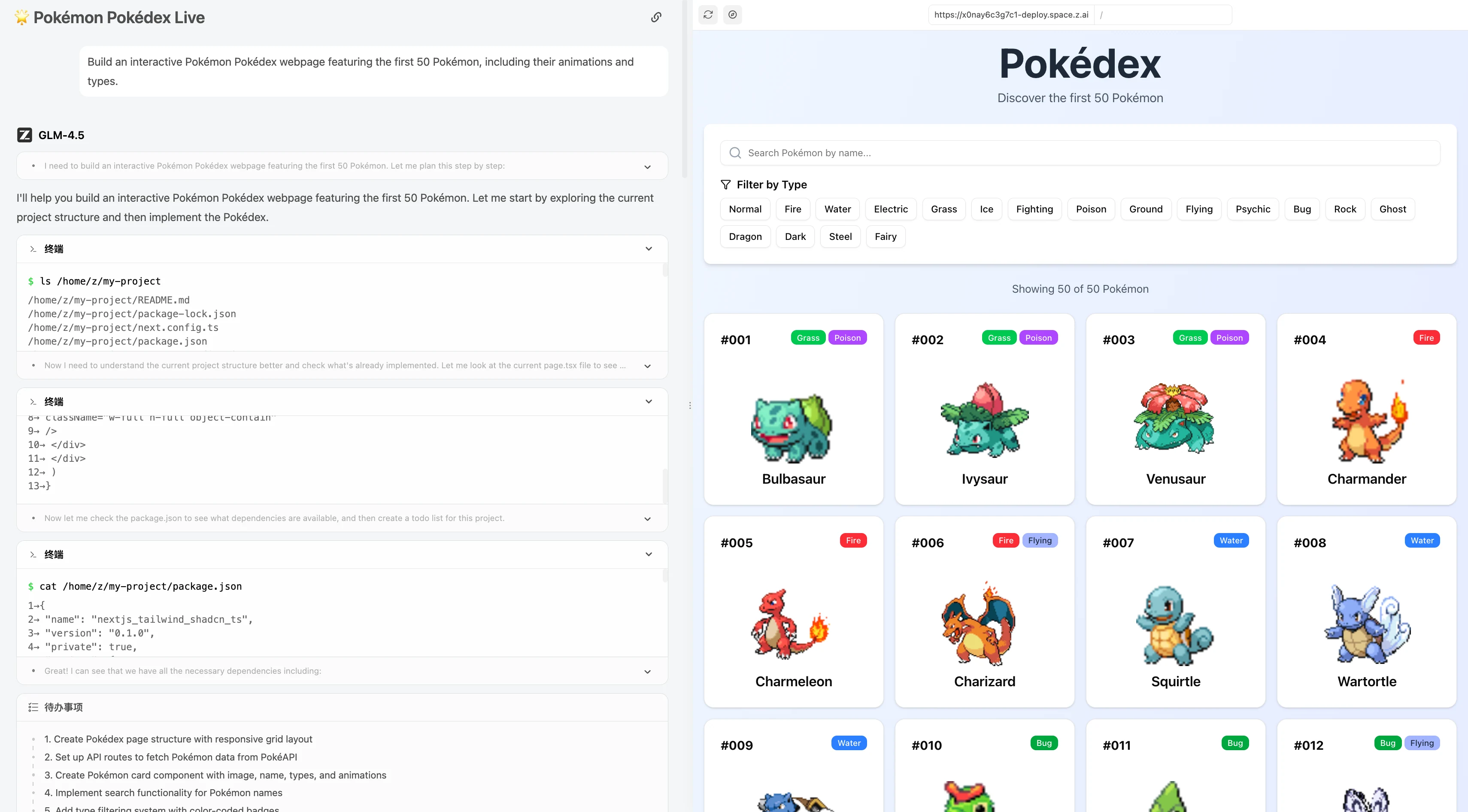
GLM 4.5
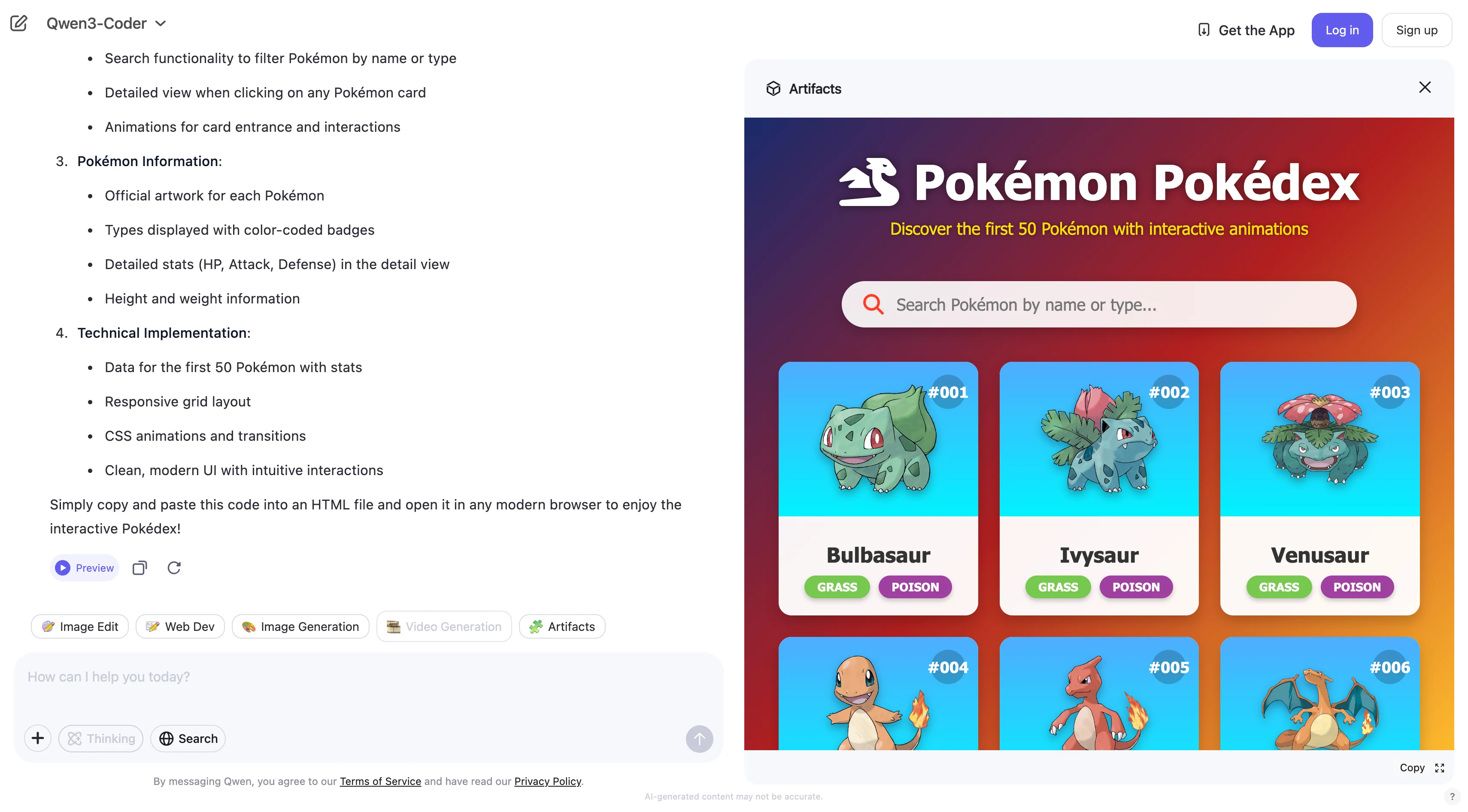
Qwen 3 coder
How to Access Qwen 3 Coder 480B A35B by CLI Tools?
https://www.youtube.com/watch?v=hsPzLalRnpc
- Faster: You can use Qwen3-Coder directly from the command line—no website or extra software needed.
- Easier automation: It’s simple to write scripts that use Qwen3-Coder for coding tasks.
- Fits developers’ workflow: Most developers use the command line, so Qwen3-Coder becomes a natural part of daily work.
- Easy to scale: You can quickly process many files or projects using CLI commands.
The First: Get API Key
Step 1: Log in to your account and click on the Model Library button.

Try Qwen 3 Coder Model and GLM 4.5 Now!
Step 2: Choose Your Model
Browse through the available options and select the model that suits your needs.
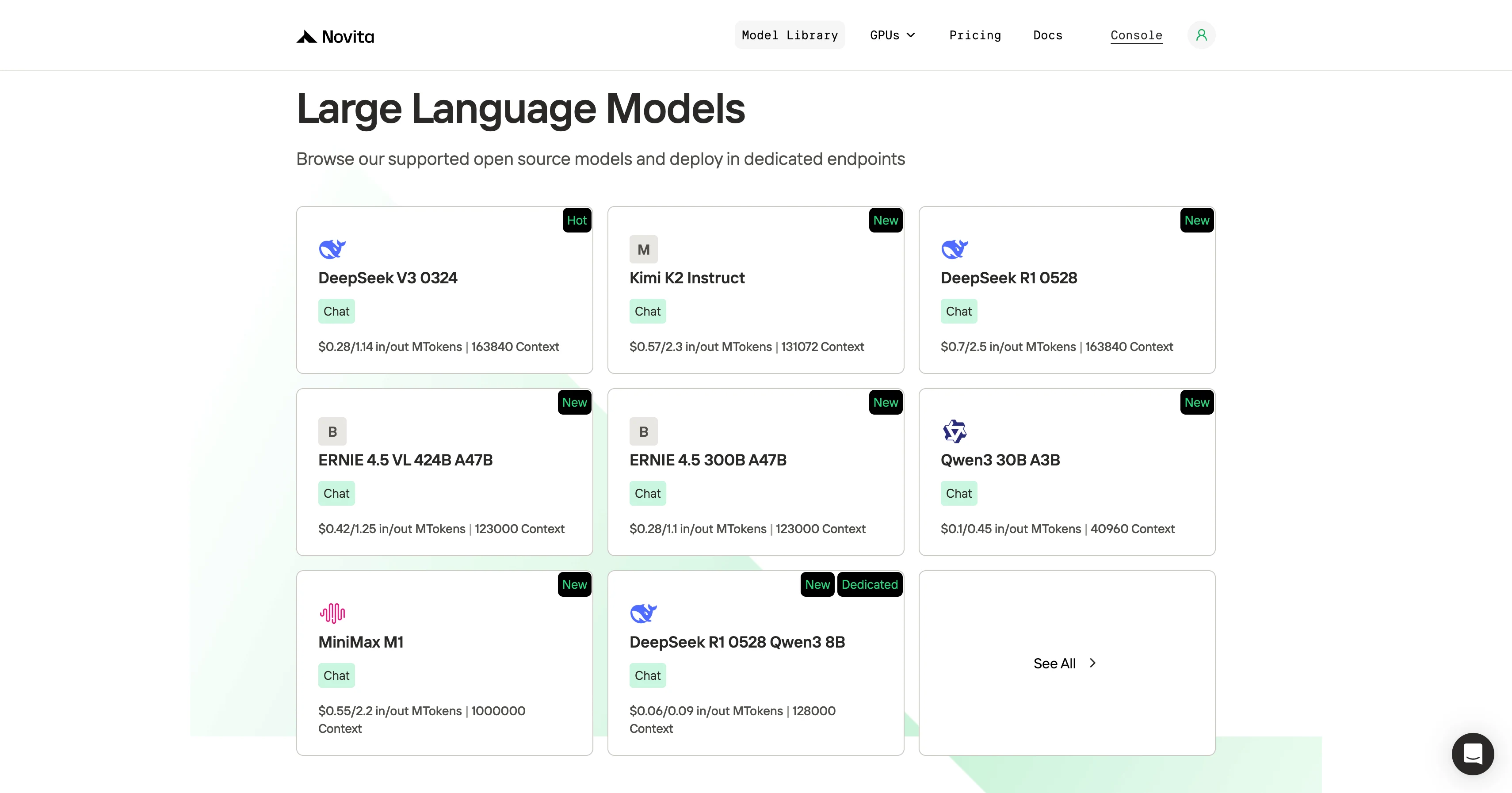
Step 3: Start Your Free Trial
Begin your free trial to explore the capabilities of the selected model.
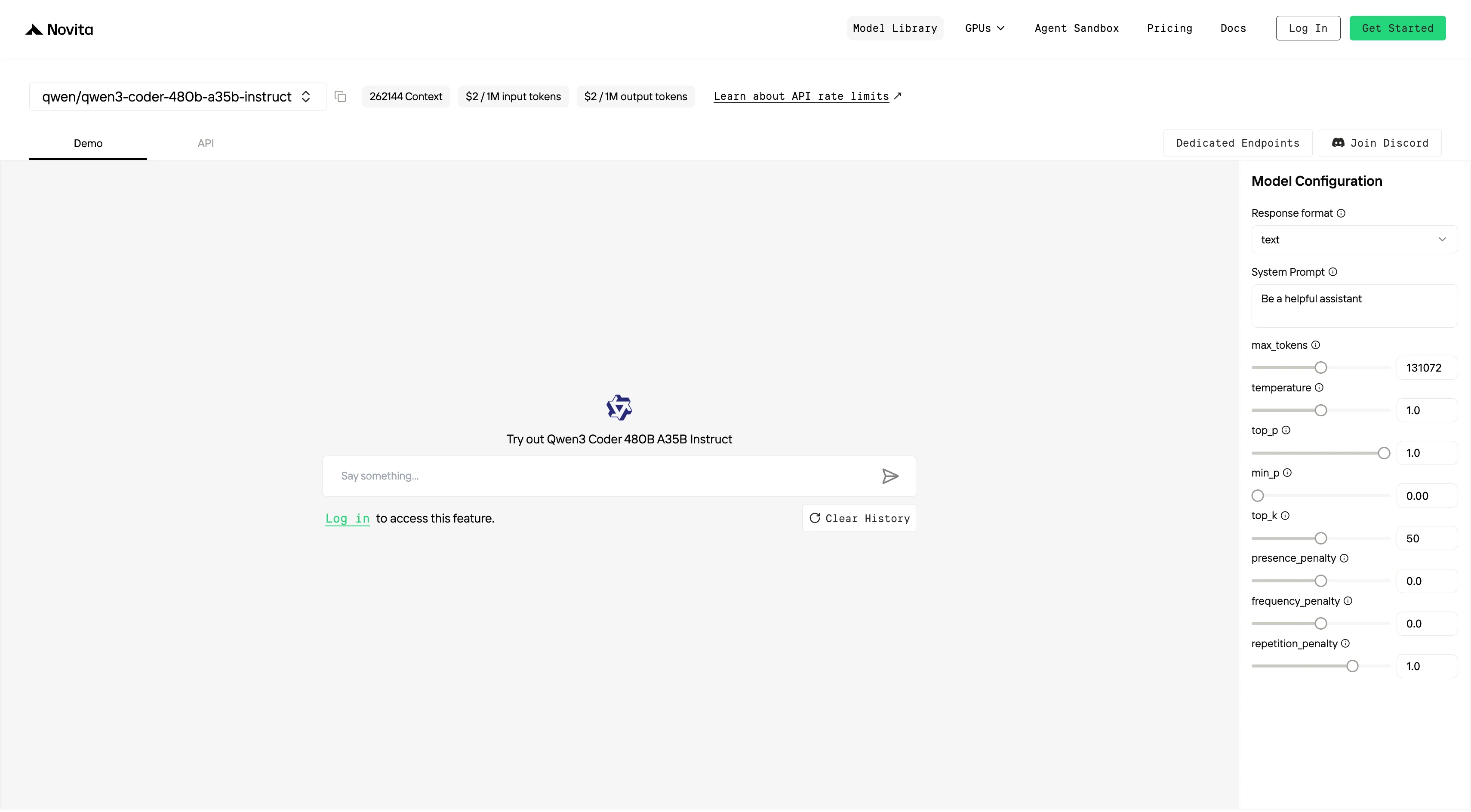
Step 4: Get Your API Key
To authenticate with the API, we will provide you with a new API key. Entering the “Settings“ page, you can copy the API key as indicated in the image.

Step 5: Install the API
Install API using the package manager specific to your programming language.
After installation, import the necessary libraries into your development environment. Initialize the API with your API key to start interacting with Novita AI LLM. This is an example of using chat completions API for python users.
pip install 'openai>=1.0.0'
from openai import OpenAI

client = OpenAI(
    base_url="https://api.novita.ai/v3/openai",
    api_key="",
)

model = "qwen/qwen3-coder-480b-a35b-instruct"
stream = True # or False
max_tokens = 131072
system_content = ""Be a helpful assistant""
temperature = 1
top_p = 1
min_p = 0
top_k = 50
presence_penalty = 0
frequency_penalty = 0
repetition_penalty = 1
response_format = { "type": "text" }

chat_completion_res = client.chat.completions.create(
    model=model,
    messages=[
        {
            "role": "system",
            "content": system_content,
        },
        {
            "role": "user",
            "content": "Hi there!",
        }
    ],
    stream=stream,
    max_tokens=max_tokens,
    temperature=temperature,
    top_p=top_p,
    presence_penalty=presence_penalty,
    frequency_penalty=frequency_penalty,
    response_format=response_format,
    extra_body={
      "top_k": top_k,
      "repetition_penalty": repetition_penalty,
      "min_p": min_p
    }
  )

if stream:
    for chunk in chat_completion_res:
        print(chunk.choices[0].delta.content or "", end="")
else:
    print(chat_completion_res.choices[0].message.content)
Qwen 3 Coder 480B A35B and GLM 4.5 with Trae
Step 1: Open Trae and Access Models
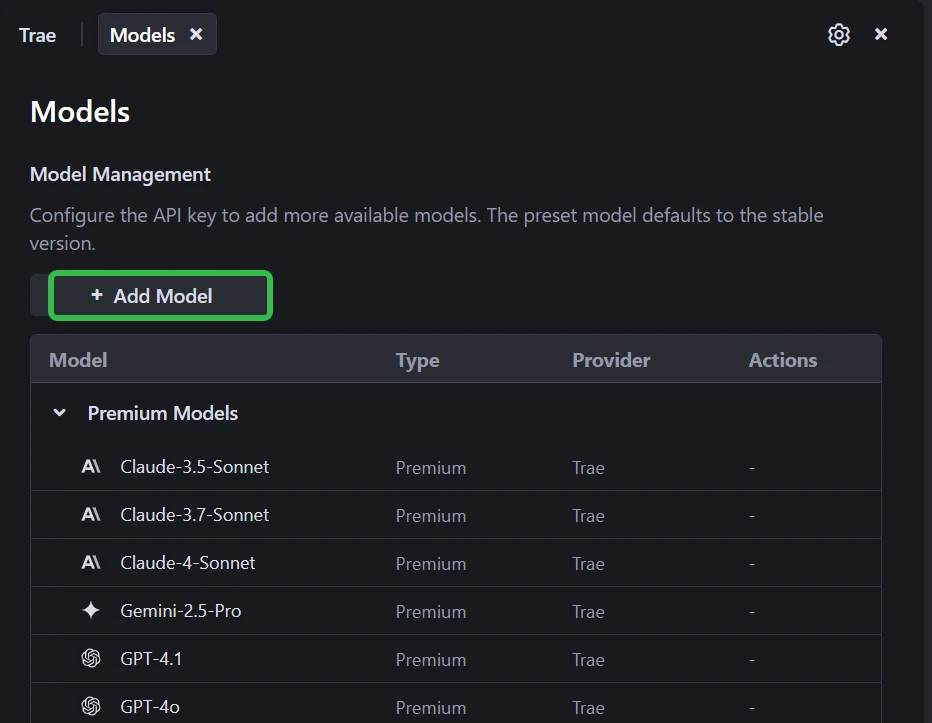
Launch the Trae app. Click the Toggle AI Side Bar in the top-right corner to open the AI Side Bar. Then, go to AI Management and select Models.
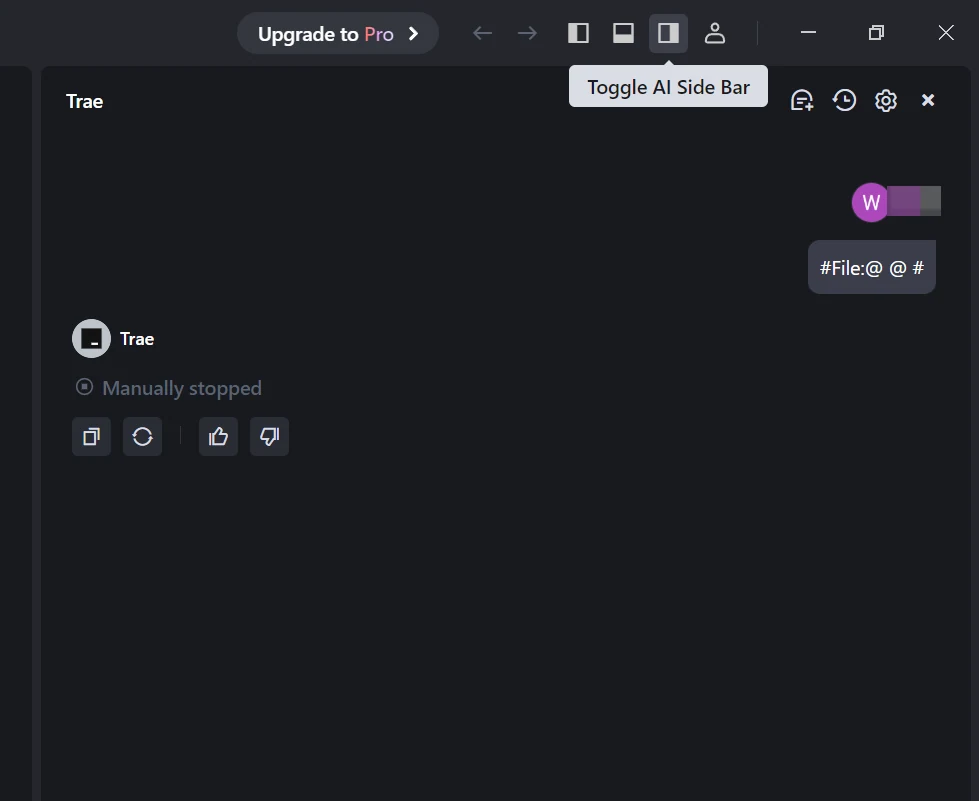
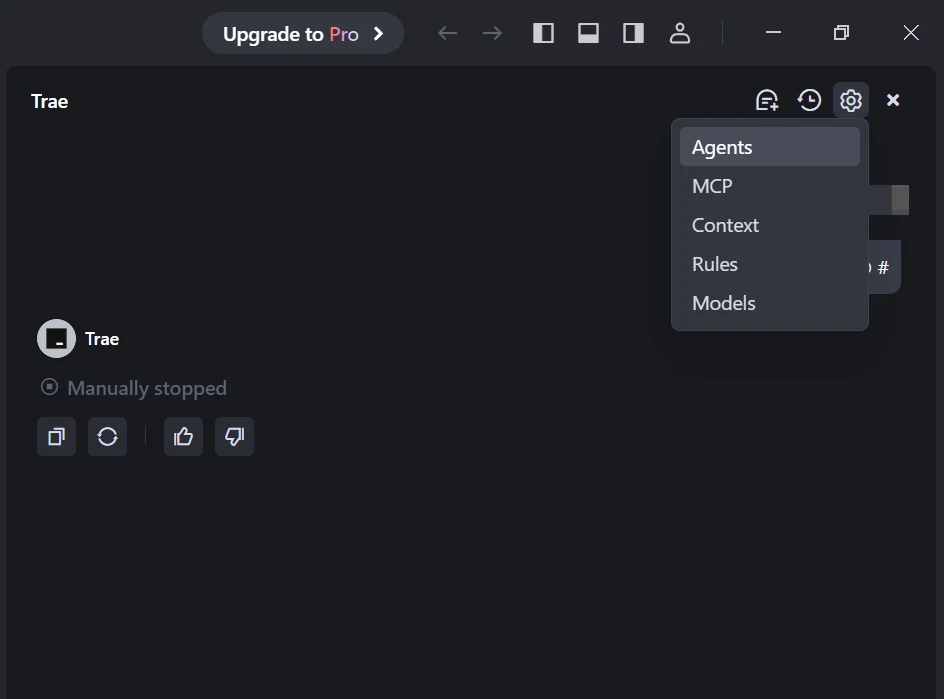
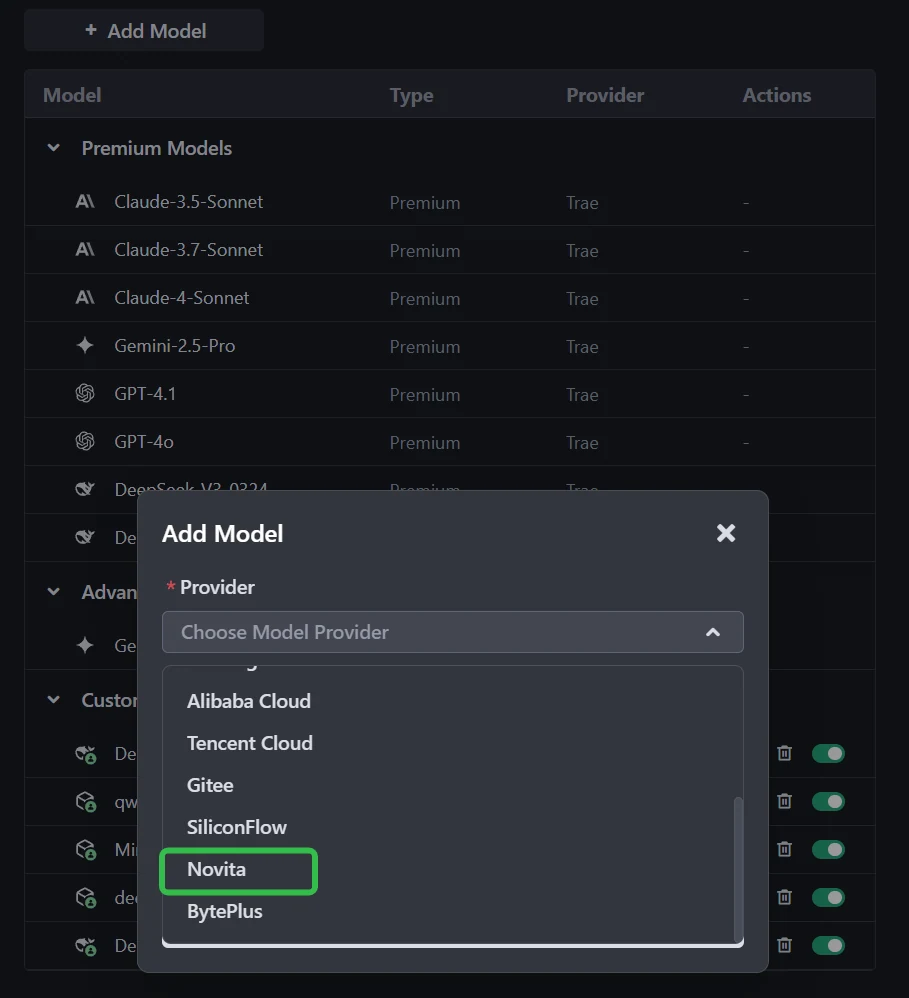
Step 2: Add a Custom Model and Choose Novita as Provider
Click the Add Model button to create a custom model entry. In the add-model dialog, select Provider = Novita from the dropdown menu.
Step 3: Select or Enter the Model
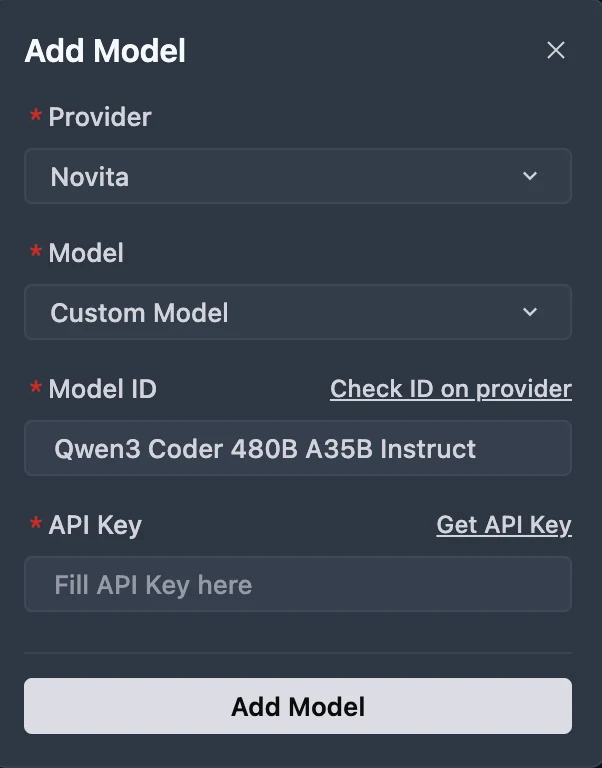
From the Model dropdown, pick your desired model (DeepSeek-R1-0528, Kimi K2 DeepSeek-V3-0324, or MiniMax-M1-80k). If the exact model isn’t listed, simply type the model ID that you noted from the Novita library. Ensure you choose the correct variant of the model you want to use.
You can get API Key on Novita console!
Qwen 3 Coder 480B A35B and GLM 4.5 with Qwen Code
Qwen Code is developed on top of Gemini Code, but we have adapted the prompts and tool-calling protocols to maximize Qwen3-Coder’s performance in agentic coding tasks.
Step 1: Install Qwen Code
Prerequisites: Ensure you have Node.js version 20 or higher installed. You can download it from the official Node.js website.
Install the package globally:
npm install -g @qwen-code/qwen-codeStep 2: Configure Environment Variables
For Windows (Command Prompt):
set OPENAI_API_KEY=Your_Novita_API_Key
set OPENAI_BASE_URL=https://api.novita.ai/v3/openai
set OPENAI_MODEL=qwen/qwen3-coder-480b-a35b-instruct
For Linux and Mac (Bash):
export OPENAI_API_KEY="Your_Novita_API_Key"
export OPENAI_BASE_URL="https://api.novita.ai/v3/openai"
export OPENAI_MODEL="qwen/qwen3-coder-480b-a35b-instruct"
Step 3: Start Coding
Once configured, you can start using Qwen Code with your chosen Novita AI model. The tool will now utilize the specified model for all coding assistance tasks.
cd <your-project-directory>
qwen .
In coding tasks, both models shine—but in different ways:
- Qwen3-Coder is the stronger choice for pure coding performance: writing and refactoring Python, supporting niche languages, and handling massive codebases thanks to its 256K–1M token context and lower token costs.
- GLM-4.5 stands out when coding intersects with reasoning and integration: it is faster to run, more resource-efficient, and dominates in tool-calling, making it ideal for agentic programming environments.
👉 If you’re building software within huge codebases, choose Qwen3-Coder.
👉 If you’re building intelligent coding agents or API-driven applications, choose GLM-4.5.
Frequently Asked Questions
Which model is better for Python programming?
Qwen3-Coder leads in standard Python benchmarks (HumanEval, MBPP, LiveCodeBench) and is generally preferred for notebooks, ML workflows, and script automation.
Which model is better for multi-language or legacy code?
Qwen3-Coder supports 358 programming languages, making it better for diverse or edge-case development scenarios.
Which model handles debugging and repository-scale workflows?
Qwen3-Coder excels in multi-turn debugging, large code edits, and repository-scale tasks due to its ultra-long context (256K–1M tokens).
Novita AI is the All-in-one cloud platform that empowers your AI ambitions. Integrated APIs, serverless, GPU Instance — the cost-effective tools you need. Eliminate infrastructure, start free, and make your AI vision a reality.
Recommend Reading
Llama 3.2 3B vs DeepSeek V3: Comparing Efficiency and Performance.
How to Access ERNIE 4.5: Effortless Ways via Web, API, and Code
Access DeepSeek V3.1 in Trae: Complete Setup and Integration Guide