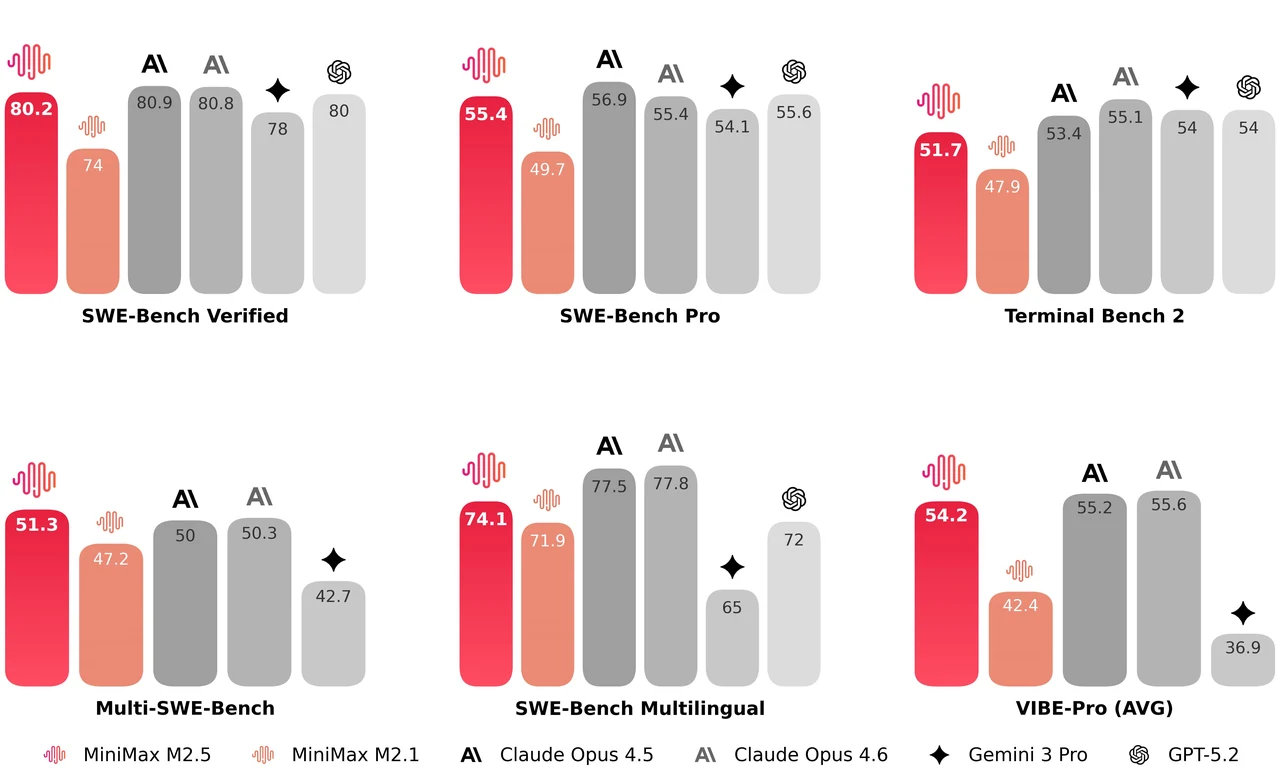
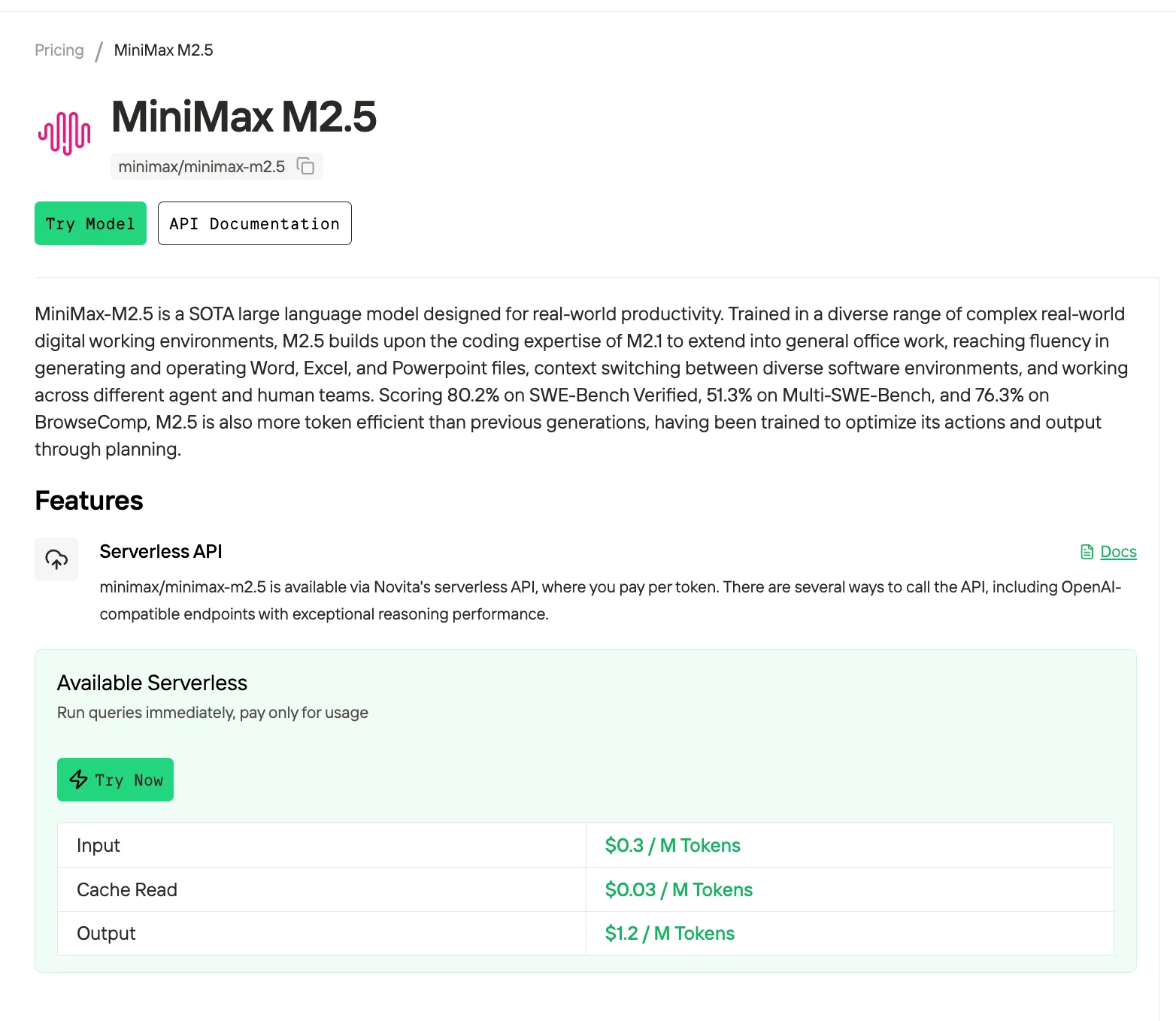
MiniMax M2.5 achieves 80.2% accuracy on the SWE-bench Verified benchmark, making it one of the most cost-effective agentic coding solutions available, with pricing as low as $0.30/$1.20 per 1M tokens via Novita AI. This guide explains how to integrate MiniMax M2.5 with OpenCode’s open-source terminal agent, providing a production-ready AI coding environment in under five minutes. We also compare OpenCode, Claude Code, and Trae to help you select the most suitable tool for your workflow.
Why MiniMax M2.5 Excels at Agentic Coding?
From HuggingFace
Agent-Specific Capabilities
M2.5 was trained in 200,000+ real-world coding environments covering 10+ languages (Go, Rust, TypeScript, Python, Java, C++, etc.). This extensive training gives it six critical advantages for agentic workflows:
| Capability | Impact on OpenCode Workflow |
|---|---|
| Spec-Writing Architecture Planning | Decomposes projects before coding — M2.5 actively plans structure and UI like an architect |
| Full-Stack Development | Handles server APIs, databases, frontend, mobile (iOS/Android) — not just webpage demos |
| Parallel Tool Calling | Executes multiple operations simultaneously — 37% faster task completion than M2.1 |
| Context-Efficient Reasoning | Uses 20% fewer search rounds than predecessors while achieving better results |
| BrowseComp: 76.3% | Expert-level search and information synthesis for complex research tasks |
On the SWE-bench Verified benchmark, M2.5 averages 3.52M tokens per task, compared with 3.72M for M2.1, indicating improved efficiency. It resolves issues in 22.8 minutes on average, delivering performance comparable to Claude Opus 4.6 but at roughly one-tenth of the cost.
Try Powerful MiniMax M2.5 Now!
What is OpenCode?
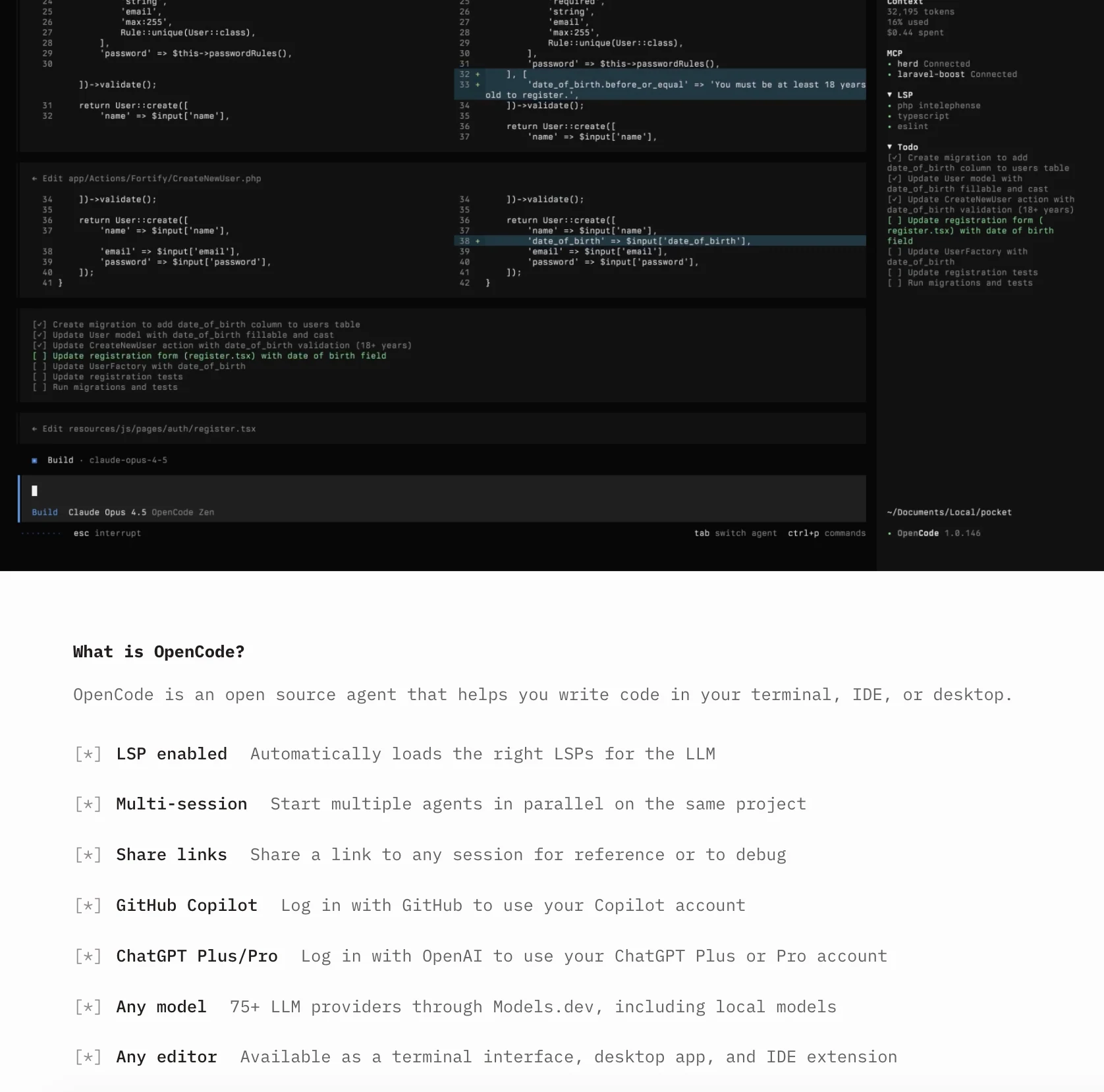
OpenCode is an open-source AI coding agent designed for terminal-based development workflows. According to its public GitHub repository, it has accumulated over 100,000 stars and contributions from hundreds of developers, indicating strong community adoption.
Key features include flexible model integration (e.g., via platforms such as Models.dev), support for Language Server Protocol (LSP) to enable context-aware code understanding, a client–server architecture for remote execution, and a set of built-in agents for different development tasks.
| Synergy | Benefit |
|---|---|
| Provider Flexibility | OpenCode’s agnostic design lets you route M2.5 through Novita AI ($0.30/$1.20 per 1M tokens) or any other provider |
| LSP Auto-Loading | OpenCode’s Language Server Protocol integration feeds M2.5’s 200k+ trained environments with real-time type info |
| Multi-Session Architecture | Run multiple M2.5 instances in parallel — perfect for M2.5’s parallel tool-calling capabilities |
OpenCode provides three agents for different development needs. The Build Agent (default) has full access for creating, modifying, deleting files, running commands, tests, and builds—use it for active development. The Plan Agent is read-only, ideal for exploring unfamiliar code, reviewing architecture, or planning refactors safely. The General Subagent handles complex, multi-step tasks and can be invoked with
@general. Press Tab to switch between build and plan agents. A typical workflow is: start with plan to explore, switch to build to modify, then return to plan to verify changes.For more details, see the article Agents in OpenCode.
OpenCode vs Claude Code vs Trae: Which Tool for Which Scenario?
Before setup, understand which tool fits your workflow. Here’s a scenario-based comparison:
| Scenario | Best Choice | Why |
|---|---|---|
| Terminal-native development | Preferred: OpenCode | Built by Neovim users for TUI workflows — native LSP, multi-session, 75+ providers |
| Cost optimization (high-volume inference) | Preferred: OpenCode | Provider flexibility lets you use Novita AI’s M2.5 at $0.30/$1.20 vs Claude Pro’s fixed pricing |
| Visual IDE with AI sidebar | Preferred: Trae | VS Code-based GUI, inline completion, Builder mode — ideal for GUI-first developers |
| Deep Claude ecosystem integration | Preferred: Claude Code | Native MCP support, optimized for Claude Pro/Max/Team plans |
| Remote control / mobile access | Preferred: OpenCode | Client/server architecture — run on workstation, control from mobile |
| Multi-model experimentation | Preferred: OpenCode | Switch between M2.5, DeepSeek, GPT, local models without reconfiguration |
| GitHub Actions / CI/CD automation | Preferred: OpenCode | /opencode or /oc comment triggers in PRs — built-in GitHub automation |
| Novice developers / low learning curve | Preferred: Trae | Visual interface, sidebar AI chat — no terminal expertise required |
Complete Setup Guide: MiniMax M2.5 in OpenCode
This guide uses Novita AI as the API provider for cost-effective access to MiniMax M2.5. Total setup time: 5 minutes.
Step 1: Install OpenCode
The fastest way to install OpenCode:
curl -fsSL https://opencode.ai/install | bashTip: Remove versions older than 0.1.x before installing.
Or install via package manager:
# npm
npm i -g opencode-ai@latest

# macOS / Linux (Homebrew)
brew install opencode

# Windows (Scoop)
scoop install opencode
Step 2: Get Novita AI API Key
- Navigate to the Novita AI Key Management page
- Click Create API Key and copy the generated key
- Save it securely — you’ll need it in the next step
Step 3: Connect Novita AI & Select Model
In the OpenCode prompt, run:
/connectSearch for Novita AI in the provider list, then paste your API key when prompted:
┌ API key
│
│
└ enter
After connecting, run /models to select your model. Choose MiniMax M2.5 (model id: minimax/minimax-m2.5).
/modelsThat’s it — OpenCode will route agent requests through Novita AI using MiniMax M2.5. You can now start coding directly in the Chat tab.
Working with OpenCode Agents
OpenCode includes two built-in agents you can switch between with the Tab key:
1. Build Agent (Default)
Purpose: Full-access development agent for active coding work.
Use cases:
- Implementing new features
- Bug fixing and refactoring
- Running tests and build commands
- File creation, editing, deletion
Example workflow:
# In OpenCode build agent mode
> Implement a REST API endpoint for user authentication with JWT tokens.
> Include input validation, password hashing with bcrypt, and error handling.
M2.5 will decompose the task (spec-writing architecture planning), generate the code across multiple files (handler, middleware, tests), and execute tests.
2. Plan Agent (Read-Only)
Purpose: Analysis and code exploration agent. Denies file edits by default, asks permission before running bash commands.
Use cases:
- Exploring unfamiliar codebases
- Architecture analysis and recommendations
- Security audits
- Planning changes before implementation
Example workflow:
# Switch to plan agent (press Tab)
> Analyze the authentication flow in this codebase.
> Identify security vulnerabilities and recommend improvements.
M2.5 will use its BrowseComp 76.3% search capabilities to traverse the codebase, understand context, and provide a detailed report — without modifying any files.
3. @general Subagent
Invoke for complex searches and multistep tasks requiring deep exploration:
> @general Find all instances where we're using deprecated API v1 endpoints,
> suggest migration paths to v2, and estimate refactoring scope.
The @general subagent leverages M2.5’s 20% fewer search rounds efficiency to complete research tasks faster than naive approaches.
Best Practices for MiniMax M2.5 in OpenCode
- Use the plan agent first for unfamiliar codebases: Let M2.5’s BrowseComp 76.3% capabilities map the architecture before making changes.
- Enable LSP for your primary languages: Feeds M2.5’s context-aware reasoning with type information and docs.
- Leverage parallel tool calling: Ask M2.5 to perform multiple operations in one prompt (e.g., “Run tests, generate docs, and create a PR”).
- Monitor token usage: With
autoCompact: true, OpenCode will summarize automatically, but explicit session management gives you more control. - Use @general for complex research: Multi-file searches, refactoring scope estimates, and architecture analysis benefit from the dedicated subagent.
- Name your sessions:
/save feature-auth-refactormakes it easy to resume long-running projects.
MiniMax M2.5 delivers high accuracy (80.2% on SWE-bench Verified) at a fraction of the cost, making agentic coding more accessible. Combined with OpenCode, developers get a terminal-ready AI coding environment in minutes, leveraging Build, Plan, and General agents for exploration, implementation, and validation. This setup streamlines workflows, reduces token usage, and handles complex multi-step tasks efficiently—an ideal solution for cost-conscious, terminal-native development.
Frequently Asked Questions
Can I use MiniMax M2.5 with OpenCode for free?
OpenCode is free and open-source, but you pay for API access to MiniMax M2.5 via Novita AI ($0.30/$1.20 per 1M tokens). Novita AI offers free credits for new users.
Can I run MiniMax M2.5 locally on my own GPUs instead of using Novita AI?
M2.5 is a large-scale MoE model requiring significant GPU resources for local deployment. For cost-effective local hosting, consider Novita AI’s GPU instances (RTX 4090 at $0.67/hr, H100 at $1.45/hr) with OpenCode’s client/server architecture to run M2.5 on remote GPUs you control.
How does MiniMax M2.5 compare to DeepSeek V3.2?
M2.5 scores 80.2% on SWE-bench Verified vs DeepSeek V3.2’s ~72%. M2.5 is optimized for agentic workflows with parallel tool calling and 2× faster throughput. Choose M2.5 for speed and agent tasks; choose DeepSeek for general-purpose chat and reasoning.
Novita AI is an AI cloud platform that offers developers an easy way to deploy AI models using our simple API, while also providing affordable and reliable GPU cloud for building and scaling.