The MiniMax Music series — Music 2.0, Music 2.5, Music 2.5+, and the Lyrics Generator — is now available on Novita AI. With a single API call, developers can generate full-length songs complete with vocals, control instrumentation, and auto-write lyrics from scratch. No subscriptions — just a clean, pay-per-use endpoint ready for production.
Whether you’re building a music app, content automation pipeline, or creative tool, the MiniMax Music series gives you fine-grained control over every layer of the output: melody, vocals, style, structure, and even the lyrics themselves.
What Is the MiniMax Music Series
MiniMax is a leading AI research company behind a range of multimodal models spanning text, speech, video, and music. Their Music series is a purpose-built lineup for AI music generation — starting from accessible, cost-efficient generation and scaling up to Grammy-grade audio fidelity with full production control.
The series launched progressively: Music 2.0 arrived in October 2025 as a major leap in vocal authenticity, while Music 2.5 followed in January 2026 with breakthrough precision control. Music 2.5+ extends the lineup with full instrumental support, and the Lyrics Generator rounds out the suite as a standalone AI lyric-writing tool.
Model Comparison at a Glance
All three music generation models share the same API endpoint and request structure. The difference is in quality, controllability, and what you’re optimizing for:
| Model | Best For | Price | Key Capability |
|---|---|---|---|
| Music 2.0 | Cost-efficient, high-volume apps | $0.0300 / song | High-fidelity vocals, wide range of singing styles and emotional expression |
| Music 2.5 | Balanced production use | $0.1500 / song | Paragraph-level precision control; studio-quality audio fidelity |
| Music 2.5+ | Rich instrumental & highest quality | $0.1500 / song | Everything in 2.5, plus full instrumental support with rich multi-instrument arrangements |
| Lyrics Generator | AI lyric writing | $0.0100 / song | Structured lyrics with [verse], [chorus], [bridge] tags + style descriptors |
When to use which:
- Music 2.0 — ideal for high-volume generation where cost efficiency matters more than maximum quality
- Music 2.5 — the right default for most production use cases; best balance of control, quality, and cost
- Music 2.5+ — choose this for the richest instrumental arrangements or when output quality is the top priority
Key Features for Developers
🎶 Music Generation API (/v3/minimax-music)
Vocal and Instrumental Control
The is_instrumental parameter controls whether the output includes vocals. Set it to true to generate a fully instrumental track — ideal for background music, game soundtracks, or ambient audio. Leave it false (default) for vocal songs paired with lyrics.
Flexible Audio Output
Configure output format and quality to match your application’s requirements:
- Format:
mp3,wav, orpcm - Sample rate: 16000, 24000, 32000, or 44100 Hz
- Bitrate: 32000, 64000, 128000, or 256000 bps
Use output_format: "url" to receive a pre-signed download URL instead of raw audio data — faster and easier to handle in most architectures.
AIGC Watermark
Set aigc_watermark: true to embed an AI-generated content watermark in the audio — useful for platforms that need to transparently label AI-created content.
🎼 Lyrics Generator API (/v3/minimax-music-lyrics)
The Lyrics Generator is a dedicated endpoint that writes structured song lyrics from a simple description — no music knowledge required.
Two Writing Modes
- write_full_song — generates a complete song from scratch. Pass a
promptdescribing the style and an optionaltitle; the API returns structured lyrics with[verse],[chorus],[bridge]tags, a suggested song title, andstyle_tagsyou can pass directly as thepromptin the Music API. - edit — takes your existing
lyricsand refines them for better rhythm, flow, and structure. Useful for polishing a rough draft before passing it into the Music API.
Built-in Lyrics Optimizer (Music API)
When sending lyrics to the Music API, set lyrics_optimizer: true to have the model automatically improve rhythm, syllable flow, and musicality before generating the track — without changing the meaning of your lyrics.
Live Demo: From Prompt to Full Song
To show the complete pipeline in action, we generated a song using the Novita AI API. Here’s exactly what happened:
Input prompt:"Synthwave, Dreamy, Cinematic, Late Night Drive, City Lights, Hopeful"Title:"Neon Horizon"
Step 1 — Generated lyrics (via /v3/minimax-music-lyrics, mode: write_full_song):
[Verse]
City hums a low soft tune
Underneath the silver moon
Streetlights paint the asphalt gleam
Living out a waking dream

[Pre-Chorus]
Engine whispers, tires glide
Leaving all the doubts inside
Every shadow starts to fade
In this moment we have made

[Chorus]
Oh, the neon river flows
Where this lonely feeling goes
Chasing futures, bright and bold
A story waiting to unfold

[Bridge]
Maybe tomorrow, skies will clear
Wash away the doubt and fear
But tonight, we're free to roam
This moving city feels like home

[Outro]
Returned style tags:"Synthwave, Dreamy, Cinematic, Late Night Drive, City Lights, Hopeful"
Step 2 — Generated full song (via /v3/minimax-music, model: music-2.5):
🎵 Demo audio: Neon Horizon — generated by MiniMax Music 2.5 via Novita AI:
Try It Without Code — Novita AI Playground
Not ready to integrate the API yet? You can test MiniMax Music directly in the Novita AI Playground — no code required. Fill in a style prompt and lyrics, pick a model, and generate your first song in seconds.
Try MiniMax Music in Novita AI Playground
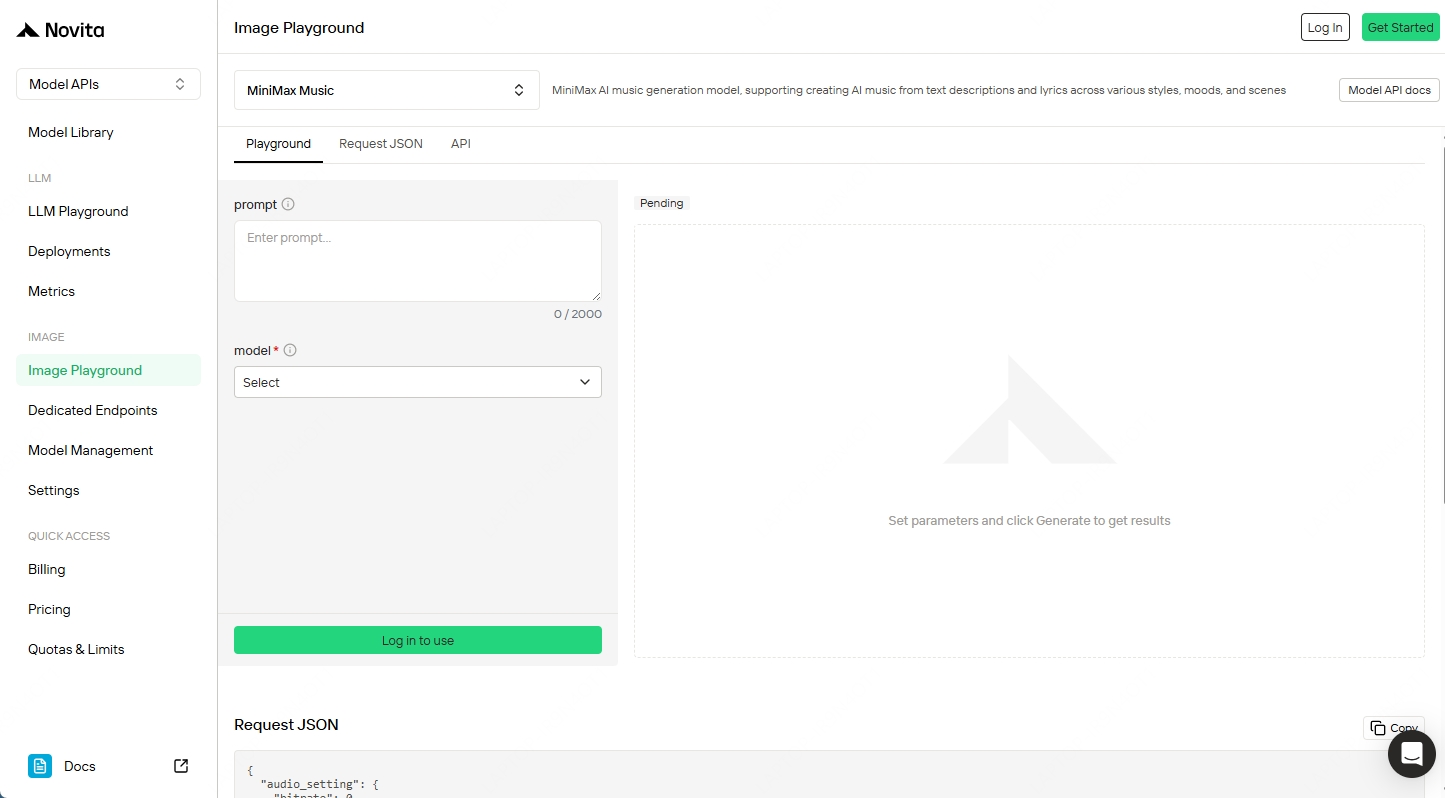
Novita Playground
How to Get Started on Novita AI
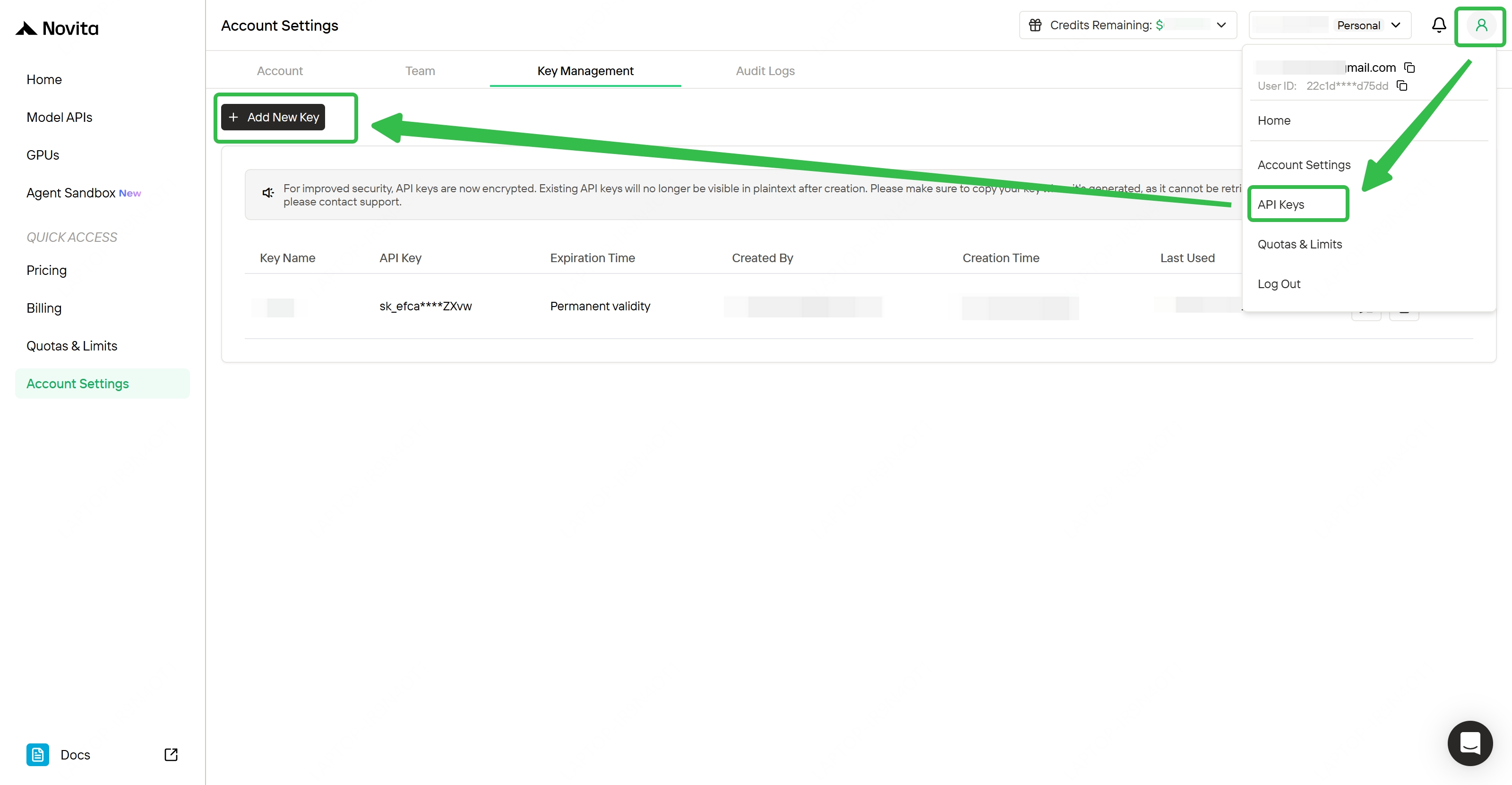
Prerequisite: API Key
- Sign up at novita.ai
- Go to Settings → API Keys
- Click Create New Key and copy your key
Keep your key private — store it as an environment variable, never hardcode it.
Generate Lyrics
Python:
import requests

url = "https://api.novita.ai/v3/minimax-music-lyrics"

payload = {
    "mode": "<string>",
    "title": "<string>",
    "lyrics": "<string>",
    "prompt": "<string>"
}
headers = {
    "Content-Type": "<content-type>",
    "Authorization": "<authorization>"
}

response = requests.post(url, json=payload, headers=headers)

print(response.text)
cURL:
curl --request POST
  --url https://api.novita.ai/v3/minimax-music-lyrics
  --header 'Authorization: <authorization>'
  --header 'Content-Type: <content-type>'
  --data '
{
  "mode": "<string>",
  "title": "<string>",
  "lyrics": "<string>",
  "prompt": "<string>"
}
'
Generate a Song
Python:
import requests

url = "https://api.novita.ai/v3/minimax-music"

payload = {
    "model": "<string>",
    "lyrics": "<string>",
    "prompt": "<string>",
    "audio_setting": {
        "format": "<string>",
        "bitrate": 123,
        "sample_rate": 123
    },
    "output_format": "<string>",
    "aigc_watermark": True,
    "is_instrumental": True,
    "lyrics_optimizer": True
}
headers = {
    "Content-Type": "<content-type>",
    "Authorization": "<authorization>"
}

response = requests.post(url, json=payload, headers=headers)

print(response.text)
cURL:
curl --request POST
  --url https://api.novita.ai/v3/minimax-music
  --header 'Authorization: <authorization>'
  --header 'Content-Type: <content-type>'
  --data '
{
  "model": "<string>",
  "lyrics": "<string>",
  "prompt": "<string>",
  "audio_setting": {
    "format": "<string>",
    "bitrate": 123,
    "sample_rate": 123
  },
  "output_format": "<string>",
  "aigc_watermark": true,
  "is_instrumental": true,
  "lyrics_optimizer": true
}
'
Conclusion
The MiniMax Music series is now available on Novita AI — no setup required, pay only for what you use. Whether you’re generating background scores, building a music creation tool, or automating content production, the Music 2.0 / 2.5 / 2.5+ lineup and Lyrics Generator give you a complete, production-ready stack. Try the pipeline above, or explore it in the Novita AI Playground.
Novita AI is an AI & agent cloud platform helping developers and startups build, deploy, and scale models and agentic applications with high performance, reliability, and cost efficiency.
Frequently Asked Questions
What’s the difference between Music 2.5 and Music 2.5+?
Music 2.5 delivers paragraph-level precision control and studio-quality audio fidelity — ideal for most production use cases. Music 2.5+ adds full instrumental support, enabling rich multi-instrument arrangements alongside vocals, or purely instrumental tracks when is_instrumental is set to true. If output quality is your top priority, choose 2.5+.
Can I generate purely instrumental music without vocals?
Yes. Set is_instrumental: true in your Music API request. This works across all three models (Music 2.0, 2.5, and 2.5+), with Music 2.5+ producing the richest instrumental arrangements.
Does the Lyrics Generator work with any Music model?
Yes. The Lyrics Generator (/v3/minimax-music-lyrics) is a standalone endpoint — its output is model-agnostic. The style_tags field in the response maps directly to the prompt field in any Music model request, making the two endpoints designed to work together seamlessly.