The MiniMax Speech 2.8 series is the latest upgrade to MiniMax’s leading text-to-speech lineup, introducing emotional tone tags — inline markers like (laughs), (sighs), and (gasps) that make AI-generated speech sound genuinely human. Available in four variants on Novita AI (HD Sync, HD Async, Turbo Sync, Turbo Async), the 2.8 series keeps the same pricing as its predecessor while adding a feature set that competitors simply don’t offer at this tier. If you’re building voice agents, audiobooks, or any audio content pipeline, this is the TTS model series to evaluate right now.
What Is the MiniMax Speech 2.8 Series?
MiniMax has consistently held a top position on the Artificial Analysis Speech Arena and the Hugging Face TTS Arena, outperforming industry heavyweights like OpenAI in blind evaluations.
The Speech 2.8 series is the latest evolution of that lineage. Built on MiniMax’s autoregressive Transformer architecture with a Flow-VAE decoder, it produces speech in a learned latent space rather than relying on traditional mel-spectrogram vocoders — the result is audio that sounds remarkably natural, with proper intonation, breathing, and emotional nuance.
The headline feature of the 2.8 series: emotional tone tags. For the first time, you can embed natural interjections directly into your text input, and the model renders them as authentic human sounds within the speech flow.
Novita AI now hosts the full Speech 2.8 series, giving developers instant API access with no cold starts.
Key Features and What’s New
Emotional Tone Tags
The standout addition. Insert parenthesized tags anywhere in your text, and the model weaves them seamlessly into the generated speech:
| Tag | Effect | Example |
(laughs) | Laughter | ”That’s hilarious (laughs)” |
(chuckle) | Light laugh | ”Good one (chuckle)” |
(sighs) | Sighing | ”Oh well (sighs), here we go” |
(gasps) | Surprised gasp | ”Wait (gasps)! Really?” |
(clears throat) | Throat clearing | ”(clears throat) Let’s begin” |
(coughs) | Coughing | ”Excuse me (coughs)” |
(sneezes) | Sneezing | ”Achoo (sneezes)! Sorry” |
This isn’t just a novelty — it solves a real problem. Until now, making TTS output sound spontaneous required post-production editing or layering sound effects manually. With tone tags, expressiveness is baked directly into the generation pipeline.
Continuous Sound Mode
A new continuous_sound parameter smooths transitions between clauses, eliminating the subtle audio “seams” that can make synthesized speech feel stitched together. This is especially noticeable in longer passages.
Inherited from the MiniMax Speech Series
The Speech 2.8 series retains the full feature set of its predecessors:
- 40+ languages with
language_boostfor enhanced minor language/dialect recognition - 9 emotion presets: happy, sad, angry, fearful, disgusted, surprised, calm, fluent, whisper
- Voice cloning: use system voices, cloned voices, or text-generated voices
- Voice mixing: blend up to 4 voices with weighted ratios via
timber_weights - Voice modification: adjust pitch, timbre, and intensity independently (range -100 to 100)
- Sound effects: spacious echo, auditorium echo, telephone distortion, robotic
- Audio output formats: MP3, PCM, FLAC, WAV
- Sample rates: 8,000 to 44,100 Hz
- Pronunciation dictionary: custom rules for brand names, acronyms, and specialized terms
- Streaming output: for real-time applications
- Text limit: up to 10,000 characters per request (sync), up to 1,000,000 characters (async)
Model Variants: HD vs. Turbo, Sync vs. Async
Novita AI offers four endpoints in the Speech 2.8 series:
| Variant | Endpoint | Best For |
| Speech 2.8 HD Sync | POST``/v3/minimax-speech-2.8-hd | Premium quality, real-time — audiobooks, professional voiceovers |
| Speech 2.8 HD Async | POST /v3/async/minimax-speech-2.8-hd | Premium quality, long-form — bulk audiobook production, batch processing |
| Speech 2.8 Turbo Sync | POST /v3/minimax-speech-2.8-turbo | Low latency, real-time — voice agents, chatbots, live customer support |
| Speech 2.8 Turbo Async | POST /v3/async/minimax-speech-2.8-turbo | Fast processing, long-form — mass content generation, large-scale dubbing |
HD vs. Turbo: HD delivers studio-grade audio fidelity — richer tonal detail, more nuanced emotion rendering. Turbo optimizes for speed at slightly lower fidelity, making it ideal for real-time interactive scenarios.
Sync vs. Async: Sync returns audio in the API response (up to 10,000 characters). Async accepts up to 1,000,000 characters and returns a task_id for polling — perfect for audiobooks and batch workflows.
How It Compares to Speech 2.6
| Feature | Speech 2.6 | Speech 2.8 |
| Audio Quality | Excellent | Excellent |
| Emotional Tone Tags | ❌ | ✅ (laughs, sighs, gasps, etc.) |
| Continuous Sound Mode | ❌ | ✅ |
| 40+ Languages | ✅ | ✅ |
| Voice Cloning | ✅ | ✅ |
| Voice Mixing (up to 4) | ✅ | ✅ |
| Emotion Presets (9 types) | ✅ | ✅ |
The upgrade path is clear: the Speech 2.8 series gives you everything Speech 2.6 does, plus emotional tone tags and continuous sound mode, at the same price point. There’s no reason not to migrate.
Pricing on Novita AI
MiniMax Speech 2.8 series on Novita AI follows the same pricing structure as the 2.6 series:
| Model | Price |
| Speech 2.8 Turbo (Sync & Async) | $60 / 1M characters |
| Speech 2.8 HD (Sync & Async) | $100 / 1M characters |
For the latest pricing details, visit the Novita AI Pricing Console.
Ready to try the MiniMax Speech 2.8 series? Sign up for Novita AI and get free credits to start generating expressive, human-like speech in minutes. No infrastructure setup required.
Who Should Use Which Variant
Imagine you’re deciding which variant fits your project. Here’s a quick guide based on real use cases:
🎙️ “I’m building a podcast or audiobook platform”
→ Speech 2.8 HD Async
You need the highest audio fidelity, and your content is long-form. The async endpoint handles up to 1M characters per request — submit an entire chapter and retrieve the audio when it’s ready. Pair tone tags with emotion presets to bring characters to life: a narrator who (sighs) at a plot twist or (laughs) at a joke makes the listening experience dramatically more engaging.
🤖 “I’m building a real-time voice agent or chatbot”
→ Speech 2.8 Turbo Sync
Latency is everything. Turbo Sync is designed for real-time response, keeping conversations feeling natural. Add a (chuckle) when your agent cracks a joke, or a (clears throat) before delivering important information — small touches that make AI interactions feel less robotic.
🎮 “I’m adding voice to game NPCs or interactive apps”
→ Speech 2.8 HD Sync
Game characters need expressive, high-quality voices. HD Sync gives you studio-grade audio in real-time. Use voice mixing to create unique character timbres, and sprinkle in tone tags for dramatic moments — a villain who (laughs) menacingly, a companion who (gasps) at discoveries.
📹 “I’m producing video voiceovers at scale”
→ Speech 2.8 Turbo Async
You need fast batch processing without breaking the bank. Turbo Async balances speed and quality for high-volume video content — explainers, social media clips, training materials. Submit scripts in bulk and retrieve polished audio files.
How to Get Started on Novita AI
Step 1: Try It in the Playground
Before writing a single line of code, explore the MiniMax Speech 2.8 series directly in the Novita AI Playground:
- Speech 2.8 HD Sync Playground
- Speech 2.8 Turbo Sync Playground
- Speech 2.8 HD Async Playground
- Speech 2.8 Turbo Async Playground
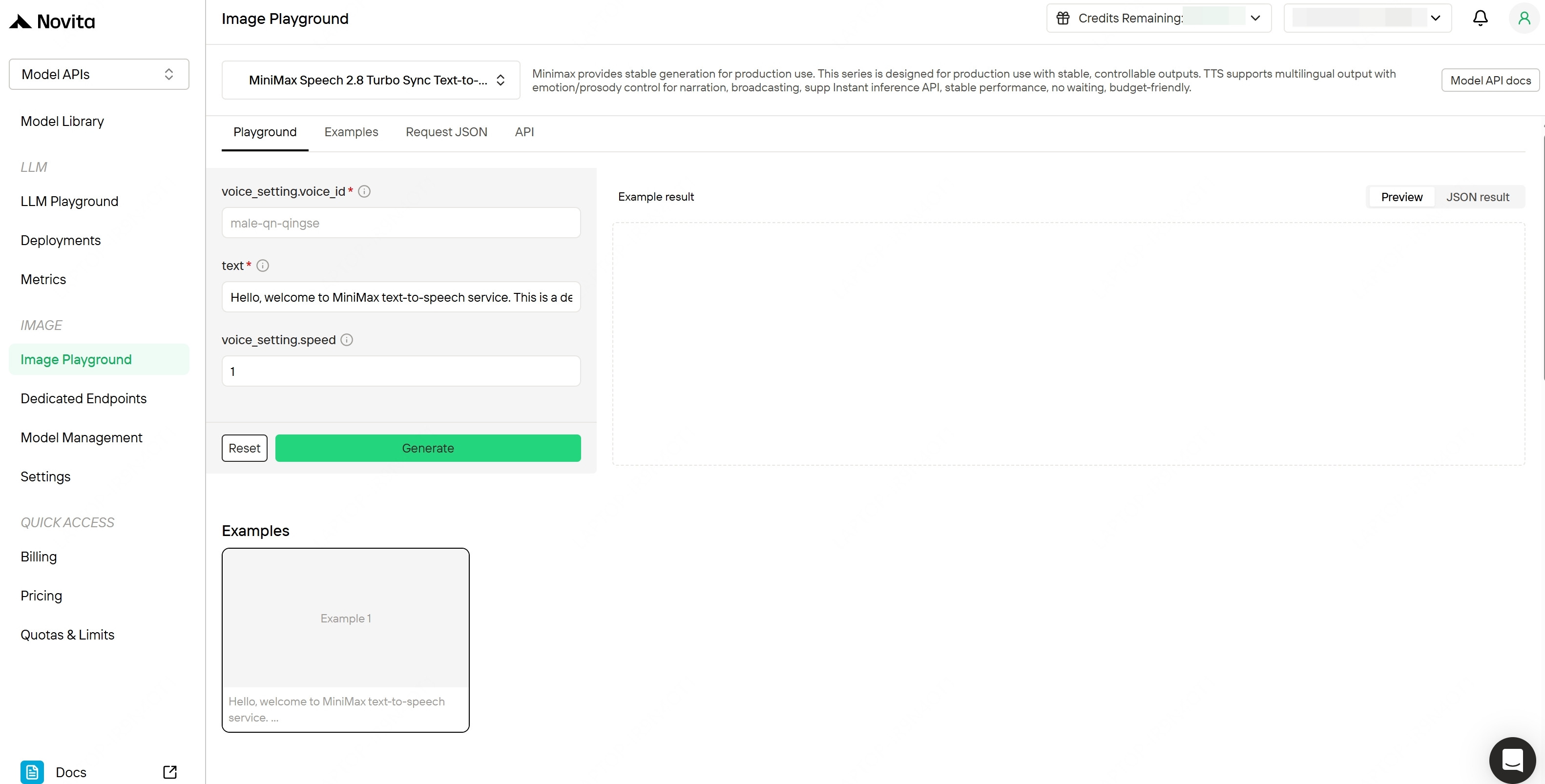
Novita Playground
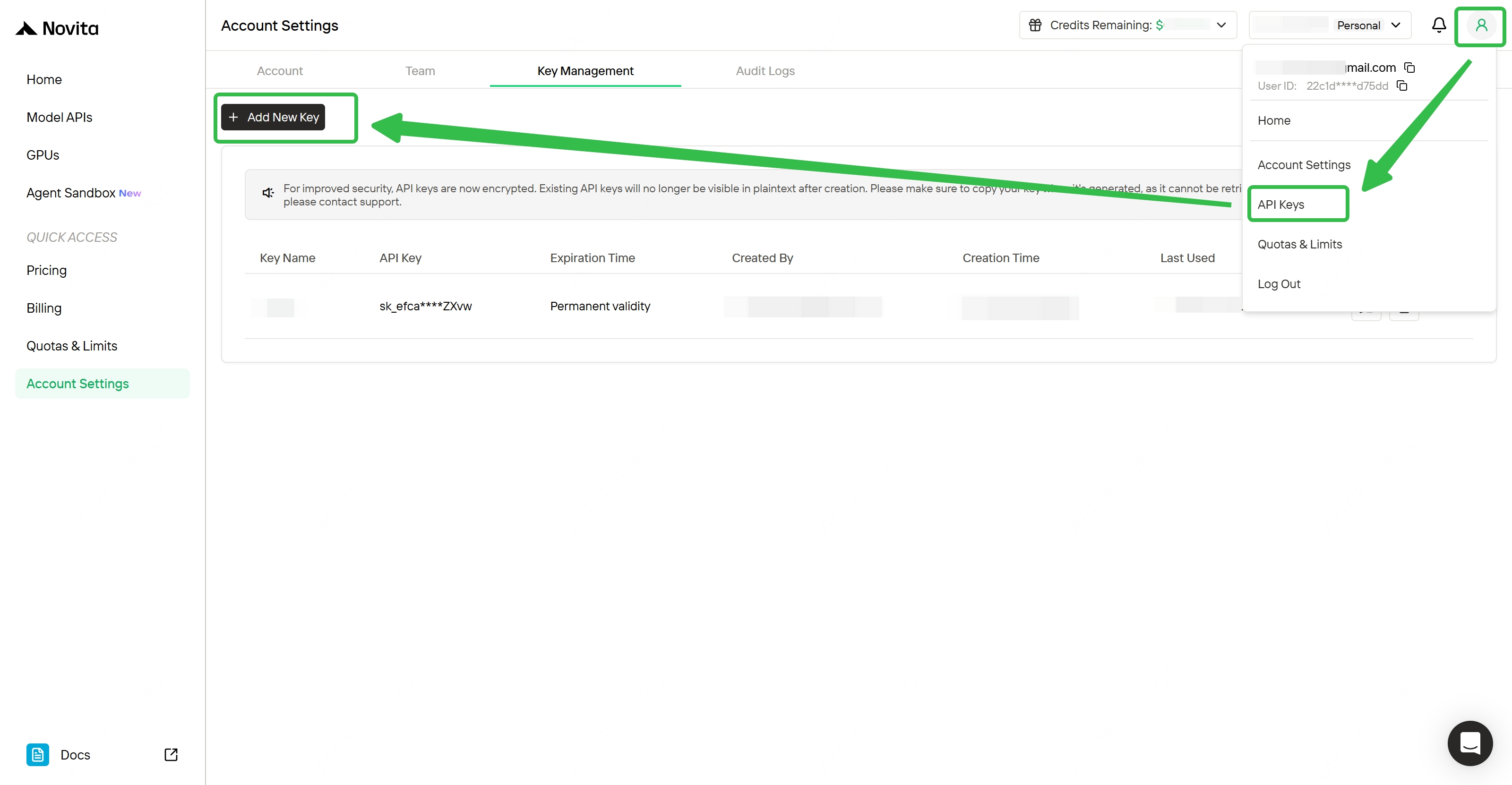
Step 2: Get Your API Key
- Sign up for a Novita AI account (free tier available)
- Navigate to the API Keys section in your dashboard
- Generate a new key and save it
Step 3: Make Your First API Call
MiniMax Speech 2.8 supports two calling modes:
| Mode | Best For | Response Type |
| Sync | Real-time dialogue, instant responses | Audio returned immediately |
| Async | Audiobooks, long content, batch processing | Task ID → poll for result |
Option A: Sync Call (Instant Audio)
Use this for short text when you need immediate results.
cURL Example:
curl --request POST \
  --url https://api.novita.ai/v3/minimax-speech-2.8-hd \
  --header 'Authorization: <authorization>' \
  --header 'Content-Type: <content-type>' \
  --data '
{
  "text": "<string>",
  "stream": true,
  "voice_modify": {
    "pitch": 123,
    "timbre": 123,
    "intensity": 123,
    "sound_effects": "<string>"
  },
  "audio_setting": {
    "format": "<string>",
    "bitrate": 123,
    "channel": 123,
    "force_cbr": true,
    "sample_rate": 123
  },
  "output_format": "<string>",
  "voice_setting": {
    "vol": 123,
    "pitch": 123,
    "speed": 123,
    "emotion": "<string>",
    "voice_id": "<string>",
    "latex_read": true,
    "text_normalization": true
  },
  "aigc_watermark": true,
  "language_boost": "<string>",
  "stream_options": {
    "exclude_aggregated_audio": true
  },
  "timber_weights": [
    {
      "weight": 123,
      "voice_id": "<string>"
    }
  ],
  "subtitle_enable": true,
  "continuous_sound": true,
  "pronunciation_dict": {
    "tone": [
      {}
    ]
  }
}
'- Python Example:
import requests

url = "https://api.novita.ai/v3/minimax-speech-2.8-hd"

payload = {
    "text": "<string>",
    "stream": True,
    "voice_modify": {
        "pitch": 123,
        "timbre": 123,
        "intensity": 123,
        "sound_effects": "<string>"
    },
    "audio_setting": {
        "format": "<string>",
        "bitrate": 123,
        "channel": 123,
        "force_cbr": True,
        "sample_rate": 123
    },
    "output_format": "<string>",
    "voice_setting": {
        "vol": 123,
        "pitch": 123,
        "speed": 123,
        "emotion": "<string>",
        "voice_id": "<string>",
        "latex_read": True,
        "text_normalization": True
    },
    "aigc_watermark": True,
    "language_boost": "<string>",
    "stream_options": { "exclude_aggregated_audio": True },
    "timber_weights": [
        {
            "weight": 123,
            "voice_id": "<string>"
        }
    ],
    "subtitle_enable": True,
    "continuous_sound": True,
    "pronunciation_dict": { "tone": [{}] }
}
headers = {
    "Content-Type": "<content-type>",
    "Authorization": "<authorization>"
}

response = requests.post(url, json=payload, headers=headers)

print(response.text)
Option B: Async Call (For Long Text)
Use this for long text, or when you want to batch multiple requests.
1. Submit the task
- cURL
curl --request POST \
  --url https://api.novita.ai/v3/async/minimax-speech-2.8-hd \
  --header 'Authorization: <authorization>' \
  --header 'Content-Type: <content-type>' \
  --data '
{
  "text": "<string>",
  "text_file_id": 123,
  "voice_modify": {
    "pitch": 123,
    "timbre": 123,
    "intensity": 123,
    "sound_effects": "<string>"
  },
  "audio_setting": {
    "format": "<string>",
    "bitrate": 123,
    "channel": 123,
    "audio_sample_rate": 123
  },
  "voice_setting": {
    "vol": 123,
    "pitch": 123,
    "speed": 123,
    "emotion": "<string>",
    "voice_id": "<string>",
    "english_normalization": true
  },
  "aigc_watermark": true,
  "language_boost": "<string>",
  "continuous_sound": true,
  "pronunciation_dict": {
    "tone": [
      {}
    ]
  }
}
'- Python
import requests

url = "https://api.novita.ai/v3/async/minimax-speech-2.8-hd"

payload = {
    "text": "<string>",
    "text_file_id": 123,
    "voice_modify": {
        "pitch": 123,
        "timbre": 123,
        "intensity": 123,
        "sound_effects": "<string>"
    },
    "audio_setting": {
        "format": "<string>",
        "bitrate": 123,
        "channel": 123,
        "audio_sample_rate": 123
    },
    "voice_setting": {
        "vol": 123,
        "pitch": 123,
        "speed": 123,
        "emotion": "<string>",
        "voice_id": "<string>",
        "english_normalization": True
    },
    "aigc_watermark": True,
    "language_boost": "<string>",
    "continuous_sound": True,
    "pronunciation_dict": { "tone": [{}] }
}
headers = {
    "Content-Type": "<content-type>",
    "Authorization": "<authorization>"
}

response = requests.post(url, json=payload, headers=headers)

print(response.text)
2. Poll for completion
- cURL
 curl --request GET \
  --url https://api.novita.ai/v3/async/task-result \
  --header 'Authorization: <authorization>' \
--header 'Content-Type: <content-type>'- Python
import requests

url = "https://api.novita.ai/v3/async/task-result"

headers = {
    "Content-Type": "<content-type>",
    "Authorization": "<authorization>"
}

response = requests.get(url, headers=headers)

print(response.text)
Step 4: Explore Advanced Features
Once you have the basics working, try these:
- Voice mixing: Blend up to 4 voices for a unique timbre using
timber_weights - Sound effects: Add
spacious_echoorroboticfilter viavoice_modify.sound_effects - Pronunciation dictionary: Define custom pronunciation rules for brand names and acronyms
- Streaming mode: Set
"stream": truefor real-time audio delivery in interactive apps - Voice modification: Fine-tune
pitch,timbre, andintensityinvoice_modify(range -100 to 100 each)
Conclusion
The MiniMax Speech 2.8 series brings a meaningful upgrade to an already top-tier TTS model family. The addition of emotional tone tags and continuous sound mode addresses two of the most common pain points in AI voice synthesis: making speech sound spontaneous, and eliminating unnatural transitions between clauses.
With four variants available on Novita AI — HD and Turbo, each in Sync and Async modes — the series covers every use case, from real-time voice agents to large-scale audiobook production. The pricing remains consistent with the 2.6 series, so you get strictly more capability for the same cost.
If you’re currently using Speech 2.6 or evaluating TTS options, the Speech 2.8 series is a straightforward upgrade. Try it in the Novita AI Playground or get started with the API today.
Novita AI is an AI cloud platform that offers developers an easy way to deploy AI models using our simple API, while also providing affordable and reliable GPU cloud for building and scaling.
Frequently Asked Questions
Which variant should I choose: HD or Turbo?
Choose HD when audio quality is the priority — audiobooks, professional voiceovers, premium content.
Choose Turbo when latency matters — voice agents, chatbots, real-time interactive applications. Both support the full feature set including tone tags.
When should I use Sync vs. Async?
Use Sync for real-time, short-to-medium text (up to 10,000 characters).
Use Async for long-form content (up to 1,000,000 characters) or batch processing workflows.
Does Novita AI offer a free tier for testing?
Yes. Sign up for a Novita AI account to receive free credits, which you can use to test the Speech 2.8 series and other models in the Playground or via API.