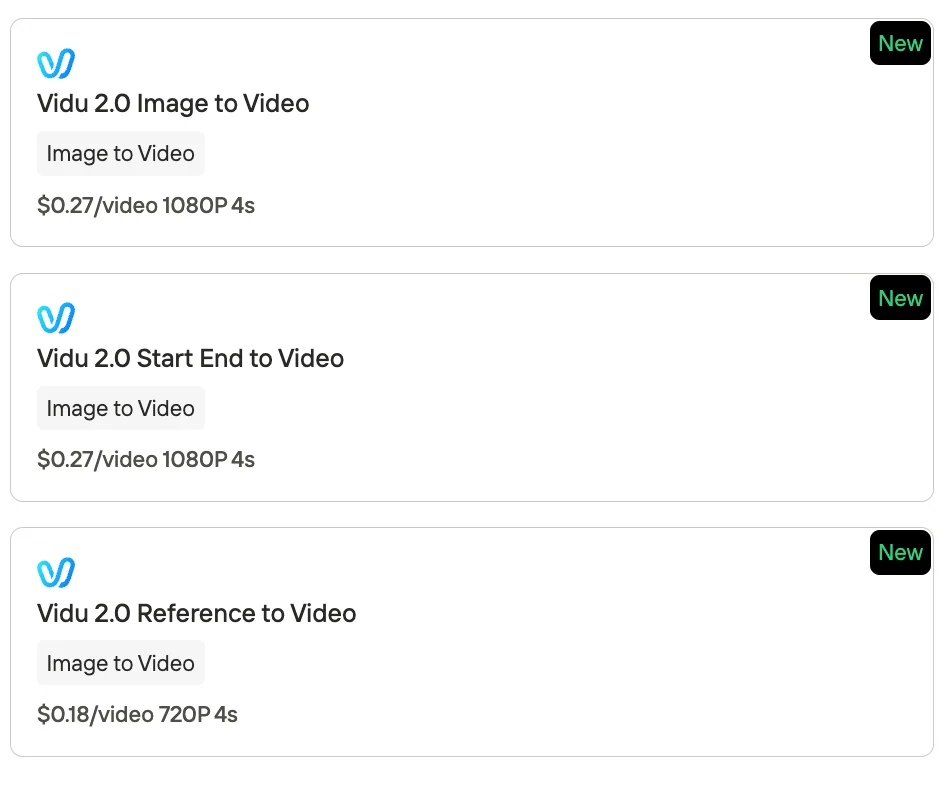
Novita AI has launched the Vidu 2.0 API — a video generation model that is ultra-fast, stable, and affordable. It can render a 4-second video in about 10 seconds, while supporting multiple input modes: Image-to-Video, Start-End Frame Control, and Reference-to-Video for consistency.
For real-world use, this means:
- Faster iteration: near real-time previews save production and revision time.
- Lower cost: only $0.18–$0.27 per 4s video, making it scalable for high-volume needs.
- Stable results: characters and styles remain consistent across frames.
From marketing clips and product showcases to character animations, Vidu 2.0 delivers ready-to-use, high-quality output in seconds.
What is Vidu 2.0?
Vidu 2.0 is an AI-driven video creation platform (available via web and mobile app) that uses advanced generative models to produce short video clips from user inputs. It supports multiple input modes – you can give it a single image, a pair of start/end images, or reference images of a character/scene, and Vidu will generate a smooth video sequence that “brings your vision to life”.
Key Features and Benefits of Vidu 2.0
Performance & Efficiency
- Blazing-Fast Generation: Generates videos in seconds (e.g., 4s clip in ~10s), enabling near real-time preview and rapid iteration.
Output Quality
- High-Quality Output: Smooth motion, consistent visuals, stable character appearance, with cinematic lighting, camera moves, and complex actions.
Creative Flexibility
- Multiple Creative Modes: Animate a single image, morph images, or use reference images for guided content; supports a wide range of creative tasks.
- Superior Anime & Art Styles: Excels at anime/illustration aesthetics with natural motion and preserved drawn details; also supports photorealistic/live-action styles.
Ease of Use & Workflow
- One-Click Prompt Templates: Pre-built prompt snippets for common effects/actions; lowers learning curve and speeds up experimentation.
- User-Friendly Interface & Tools: Simple workflow (upload → choose mode → adjust → generate); includes built-in templates, “My References” library, and AI sound effect generator.
Modes of Use in Vidu 2.0
| Mode | How It Works | Best For |
|---|---|---|
| Vidu 2.0 Image to Video | Upload a single image; Optional text prompt can guide the action | Quick animations, cinematic photo effects, social media clips. |
| Vidu 2.0 Start-End to Video | Provide a starting image and an ending image | Before/after videos, style transformations, timelapse-like effects, story-driven transitions. |
| Vidu 2.0 Reference to Video | Upload up to 7 reference images (characters, objects, styles); | Storytelling, recurring characters, branding, product showcases, custom protagonists. |
Vidu 2.0 vs Other I2V Video
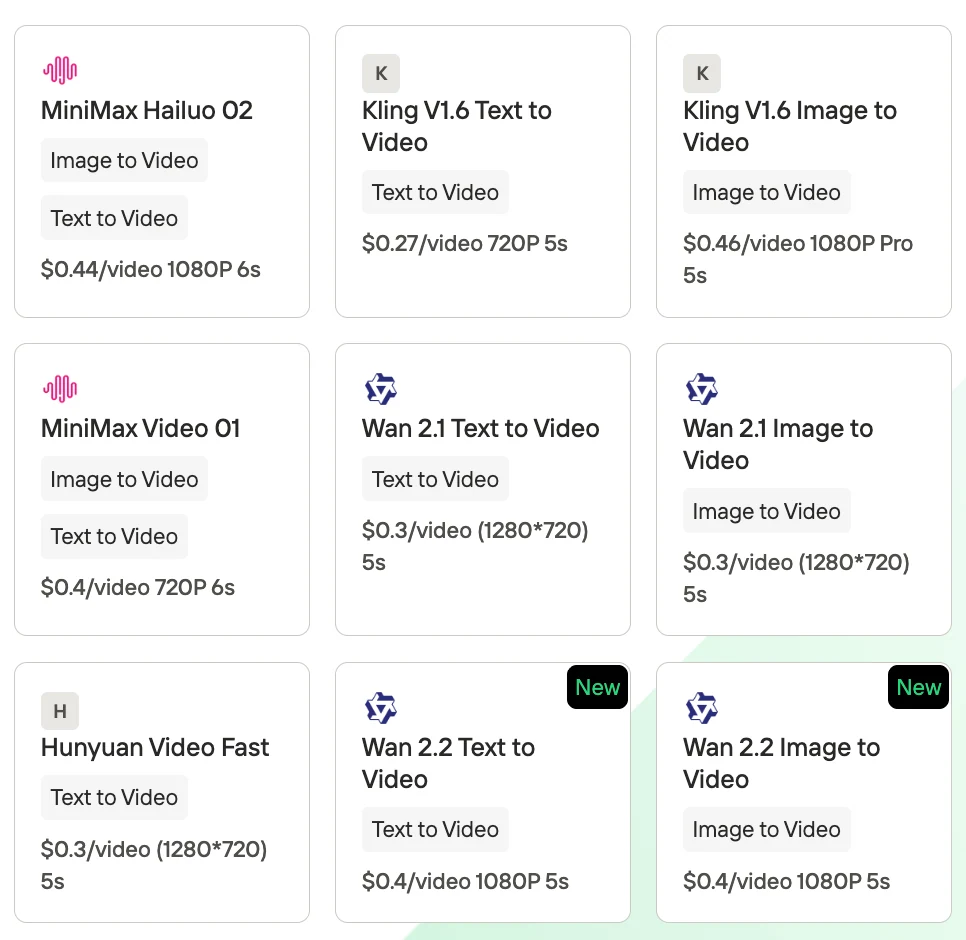
How does Vidu 2.0 stack up against other top AI image-to-video (I2V) generators? Below is a comparison of Vidu and several leading tools – Wan, Kling, Hailuo, Sora, Runway, and Pika – highlighting their model types, output quality, speed, accessibility, and key strengths. Each of these tools represents a state-of-the-art approach to AI video generation in 2025, so understanding their differences can help you choose the right one for your needs.
| Tool | Model Type | Quality | Speed | Accessibility | Strengths |
|---|---|---|---|---|---|
| Vidu 2.0 | Proprietary U-ViT diffusion model | 512p–720p, highly consistent visuals, great for anime/artistic videos | Very fast – ~4s clip in 10s | Cloud (web & app), freemium, no special hardware needed | Ultra-fast, easy UI, one-click templates, strong character consistency, affordable |
| Wan (2.2) | Open-source diffusion, Mixture-of-Experts (14B params) | Up to 720p, cinematic, strong prompt fidelity | Moderate – minutes per short clip, needs GPU | Open-source on GitHub, pay-per-use via APIs | Free/flexible, strong at cinematic scenes & big motions, good for research/custom use |
| Kling (2.1) | cProprietary | 720p–1080p, top photorealism, lifelike characters | Moderate – minutes per clip (~3 min for 5–10s) | Closed beta / partner platforms, pay-per-use | Best-in-class visual fidelity, cinematic look, multiple model tiers |
| Hailuo (02) | Proprietary | Up to 720p, smooth motion, optimized for action | Fast – ~6s in ~30s | Available via MiniMax API/platform (paid) | Excels at complex action/motion (fights, dances), strong multi-character handling |
| Sora (OpenAI) | Proprietary | Decent, longer clips (5–10s+), some artifacts | Slow, esp. for longer clips | Limited (ChatGPT Plus users & partners only) | Can generate longer videos, good prompt understanding, research-focused |
| Runway Gen-2 | Proprietary | Up to 720p+, smooth camera motion | Fast – near real-time for short clips | Widely accessible SaaS, free trial + paid plans, API available | User-friendly creative suite, integrates with editing tools, solid all-rounder |
| Pika | Proprietary diffusion | Up to 720p, clean visuals, effect-heavy | Fast – seconds for 2–4s clips | Web app & Discord, open access (sign-up required) | Fun effects & transitions, great for memes/marketing, easy sharing |
Ultimately, each tool has its niche: Hailuo for action scenes, Kling for cinematic realism, Runway for an integrated editing workflow, Wan for open-source experimentation, Pika for snappy animated effects, and Vidu as a versatile, fast general-purpose solution. Depending on your project’s needs (and your budget or technical comfort), you might favor one or use a combination.
Troubleshooting for Running Vidu 2.0
| Issue | Cause | Tips / Fix |
|---|---|---|
| Generation Queue Stuck | Glitch or prompt flagged by content filter | Avoid disallowed content; log out/in or wait a few minutes; contact Discord if persistent |
| Video Not Following Prompt | Prompt too long/complex; wrong mode used | Simplify/rephrase prompts; use Templates; pick correct mode (e.g. Start-End for fixed ending) |
| Inconsistent Characters | Character/object not stable across frames | Use Reference-to-Video with multiple clear reference images of the same subject |
| Output Quality Issues | Standard res (512p); extreme prompts/motions | Use upscale/720p plan for higher quality; reduce motion complexity; stability improved in v2.0 |
| Slow or Failed Generation | Server load or peak hours | Try off-peak (unlimited free); batch-generate up to 4 clips in parallel |
| Account / Credits Issues | Daily credits/subscription glitches | Check plan/limits; contact support@vidu.com or Discord for fixes |
| Compatibility | Browser/app issues | Use native app on mobile; switch to desktop if app fails; update to latest version |
| Community Help | Common user questions | Join Vidu Discord or r/aivideo subreddit; devs do AMAs and share updates |
If you want to try Wan,Kling, Hailuo, Hunyuan, you can also get access to Novita AI to start a free trail!
Vidu 2.0 Reference to Video Test
Input: In the style of Cowboy Bebop:The figure from Image 1 pilots the ship from Image 2 through the void of space. Stars dot the inky blackness, distant nebulas hue the background in faint swathes of color. The ship glides steady, engines humming a low, constant drone. The pilot’s posture is relaxed but alert, hands resting loosely on the controls as they cut through asteroid debris and drift past derelict satellites—just another stretch of empty, endless frontier.

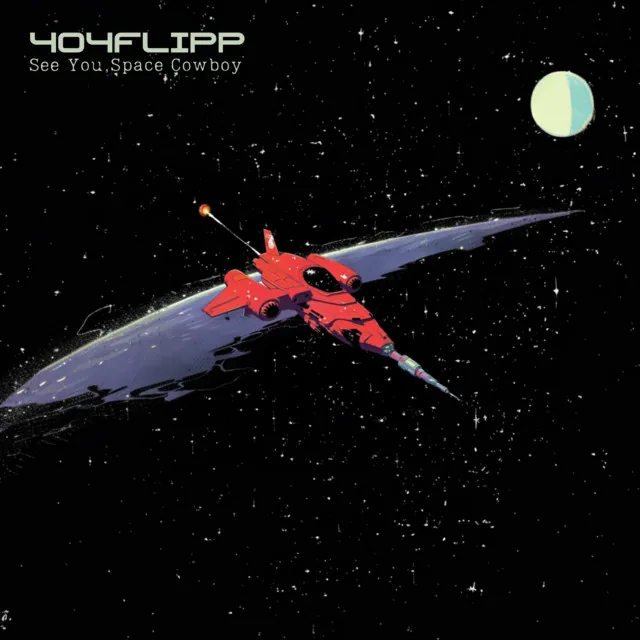
Output:
Same Prompt for Vidu Q1:
How to Access Vidu 2.0 at $0.18-0.27 4s video?
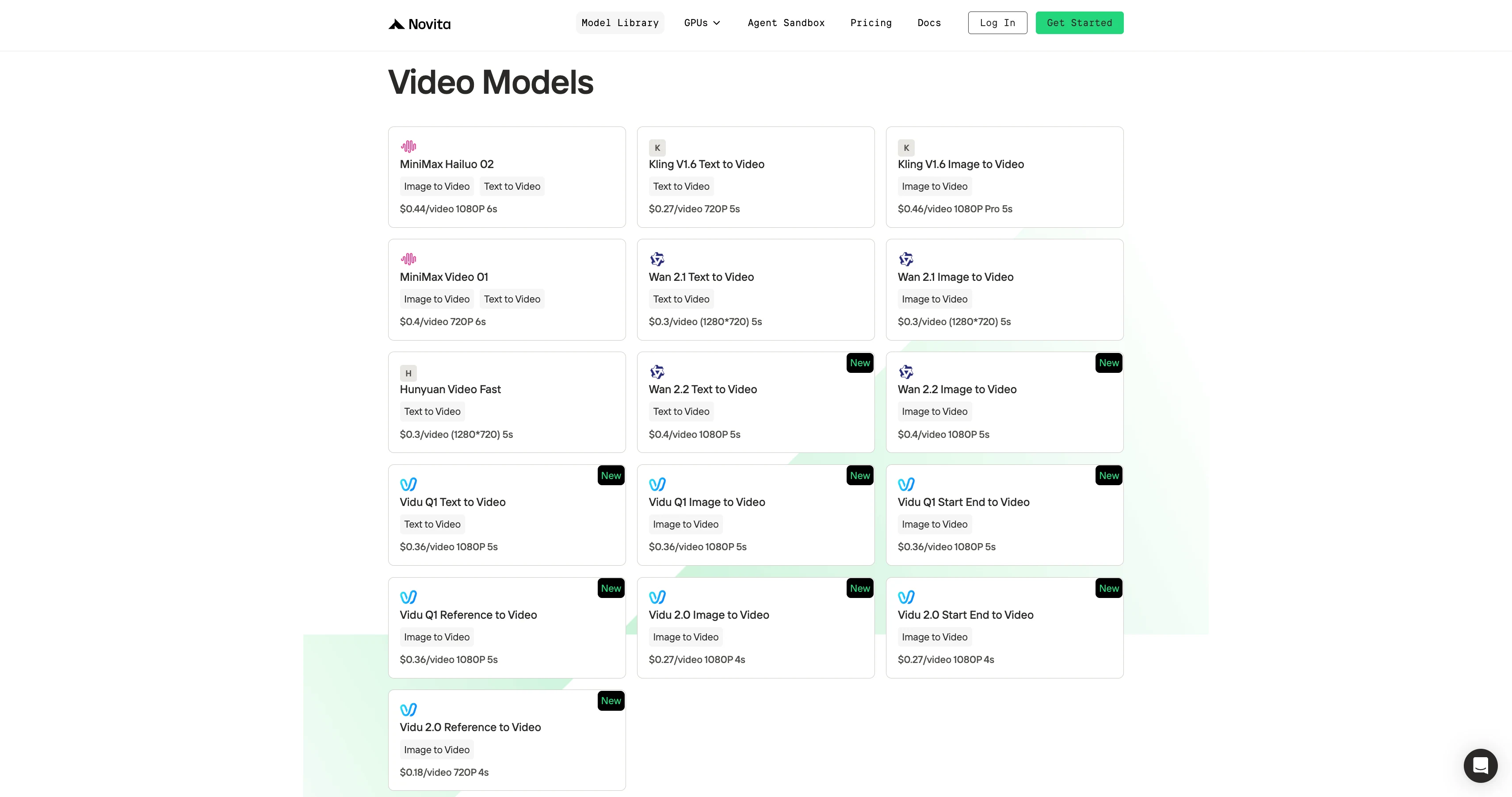
Step 1: Log In and Access the Model Library
Log in to your account and click on the Model Library button.

Step 2: Choose Your Model
Browse through the available options and select the model that suits your needs.
Step 3: Get Your API Key
To authenticate with the API, we will provide you with a new API key. Entering the “Settings“ page, you can copy the API key as indicated in the image.

Step 4: Install the API
Install API using the package manager specific to your programming language.
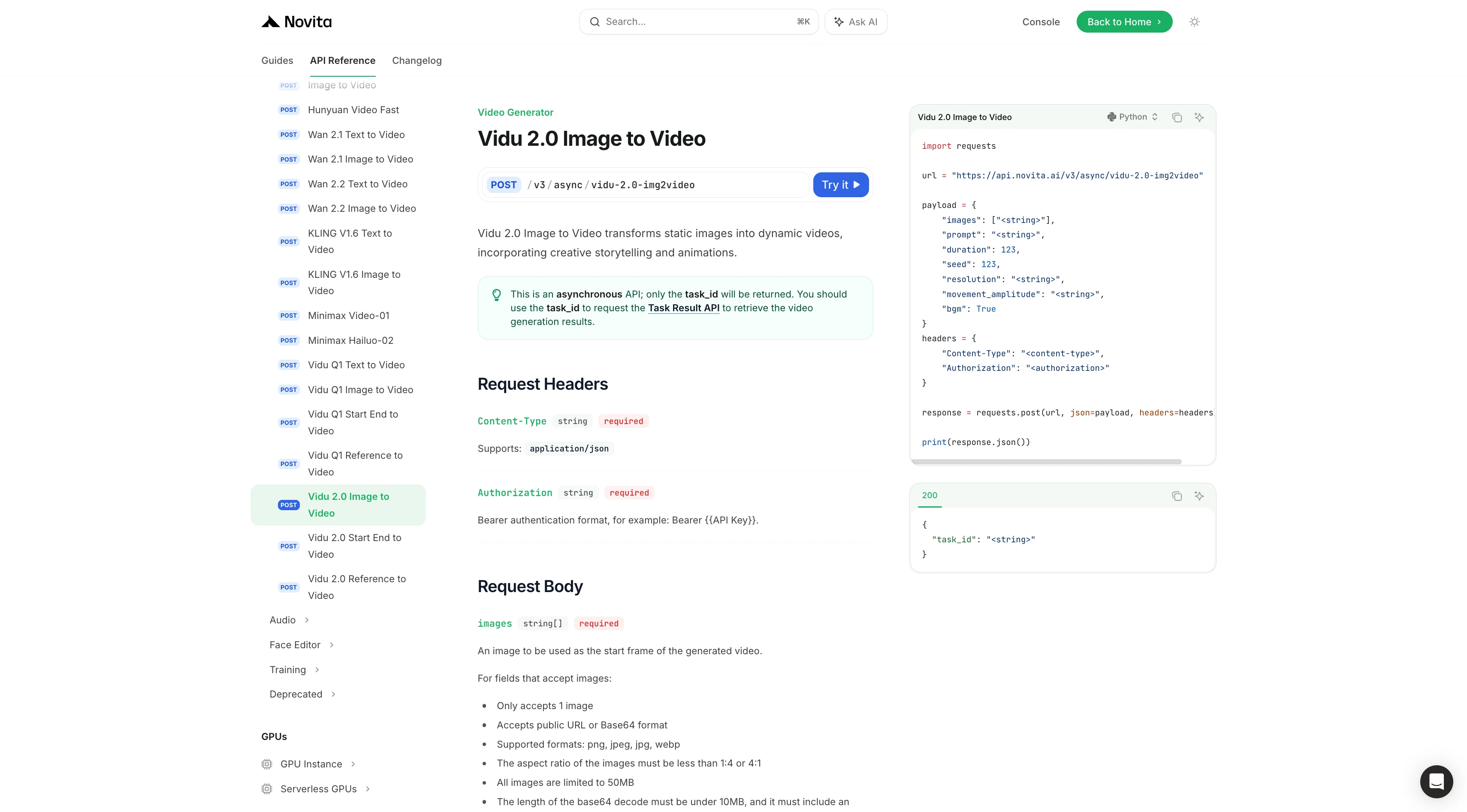
After installation, import the necessary libraries into your development environment. Initialize the API with your API key to start interacting with Novita AI LLM. This is an example of using chat completions API for python users.
Vidu 2.0 Image to Video API Example
import requests

url = "https://api.novita.ai/v3/async/vidu-2.0-img2video"

payload = {
    "images": ["<string>"],
    "prompt": "<string>",
    "duration": 123,
    "seed": 123,
    "resolution": "<string>",
    "movement_amplitude": "<string>",
    "bgm": True
}
headers = {
    "Content-Type": "<content-type>",
    "Authorization": "<authorization>"
}

response = requests.post(url, json=payload, headers=headers)

print(response.json())
Vidu 2.0 Start End to Video API Example
import requests

url = "https://api.novita.ai/v3/async/vidu-2.0-startend2video"

payload = {
    "images": ["<string>"],
    "prompt": "<string>",
    "duration": 123,
    "seed": 123,
    "resolution": "<string>",
    "movement_amplitude": "<string>",
    "bgm": True
}
headers = {
    "Content-Type": "<content-type>",
    "Authorization": "<authorization>"
}

response = requests.post(url, json=payload, headers=headers)

print(response.json())
Vidu 2.0 Reference to Video API Example
import requests

url = "https://api.novita.ai/v3/async/v3/async/vidu-2.0-reference2video"

payload = {
    "images": ["<string>"],
    "prompt": "<string>",
    "duration": 123,
    "seed": 123,
    "aspect_ratio": "<string>",
    "resolution": "<string>",
    "movement_amplitude": "<string>",
    "bgm": True
}
headers = {
    "Content-Type": "<content-type>",
    "Authorization": "<authorization>"
}

response = requests.post(url, json=payload, headers=headers)

print(response.json())
Vidu 2.0 sets a new standard in AI video generation: fast, reliable, affordable, and versatile.
With Novita AI’s API, developers and creators can easily integrate high-quality video generation into workflows — no expensive GPUs, no long waits.
It’s an ideal choice for social media, branding, content production, and creative apps where speed and cost efficiency matter. If you want a practical, production-ready video model, Vidu 2.0 is the tool to try.
Frequently Asked Questions
What is Vidu 2.0’s biggest advantage?
Speed + cost + consistency. It delivers high-quality results in seconds at a very low price.
How much does it cost?
Around $0.18–$0.27 per 4-second video on Novita AI, one of the most affordable options available.
What input modes are supported of Vidu 2.0?
Three modes:
Image-to-Video: animate a single image
Start-End-to-Video: smooth transitions between two frames
Reference-to-Video: keep characters/objects consistent across the whole clip
Novita AI is the All-in-one cloud platform that empowers your AI ambitions. Integrated APIs, serverless, GPU Instance — the cost-effective tools you need. Eliminate infrastructure, start free, and make your AI vision a reality.