ForgeCode supports Novita AI as a built-in provider starting in v2.2.2. That means you can access models like Kimi-K2.5, GLM-5, and MiniMax-M2.5 directly from your terminal — no extra configuration layers, no separate apps. This guide walks you through the setup, which is typically a few minutes of work.
What Is ForgeCode?
ForgeCode is a CLI-based coding harness that integrates directly into Zsh. Instead of switching between your editor, a browser-based chat, and a terminal, you type : followed by a prompt and ForgeCode handles the rest — code edits, file creation, debugging, all inside the shell you already use.
At the time of writing it ranked #1 on TermBench 2.0 with 81.8% accuracy; leaderboard standings change, so check the current board. ForgeCode uses a multi-agent architecture with three specialized agents:
- Forge — the default agent for direct implementation: fixing bugs, writing code, creating features
- Muse — a planning agent that analyzes your codebase and proposes solutions without executing them
- Sage — a read-only research agent that both Forge and Muse call automatically when they need deeper codebase understanding
The key differentiator: ForgeCode supports hundreds of LLM providers natively. You can switch between models from different vendors mid-session without restarting, and your conversation context carries over.
Why Use Novita AI with ForgeCode?
ForgeCode already supports major providers like OpenAI and Anthropic. Here is why Novita AI is worth adding:
Access to open-source frontier models. Novita AI hosts models you will not find on most other providers — Kimi-K2.5, GLM-5, and MiniMax-M2.5 among them. These are competitive coding models that you can test against proprietary options on the same real tasks, inside the same ForgeCode session.
Lower cost on coding workloads. Novita AI’s pricing runs significantly below proprietary model APIs. For example, MiniMax-M2.5 costs just $0.30 per million input tokens — a fraction of what GPT-5.4 or Claude Sonnet charges. For developers who use coding agents daily, this adds up.
OpenAI and Anthropic-compatible API. Novita AI provides both OpenAI-compatible and Anthropic-compatible API endpoints. ForgeCode expects the OpenAI format from providers, and Novita AI fits that directly — no adapter layers, no custom configuration, just a base URL and an API key.
Pay-as-you-go billing. No subscriptions required. You pay only for the tokens you actually use, which makes it easy to experiment with multiple models without commitment.
Prerequisites
Before you start, you will need two things:
1. ForgeCode Installed
Install ForgeCode and configure the Zsh plugin:
# Install ForgeCode
curl -fsSL https://forgecode.dev/install.sh | sh

# Verify installation
forge --help

# Set up the Zsh plugin
forge zsh setup
After running forge setup, restart your terminal for the plugin to take effect. If the : prompt trigger is not working, this is the most common cause.
2. Novita AI API Key
- Sign up or log in at novita.ai
- Find API Keys
- Click Add New Key
- Copy the key and keep it ready
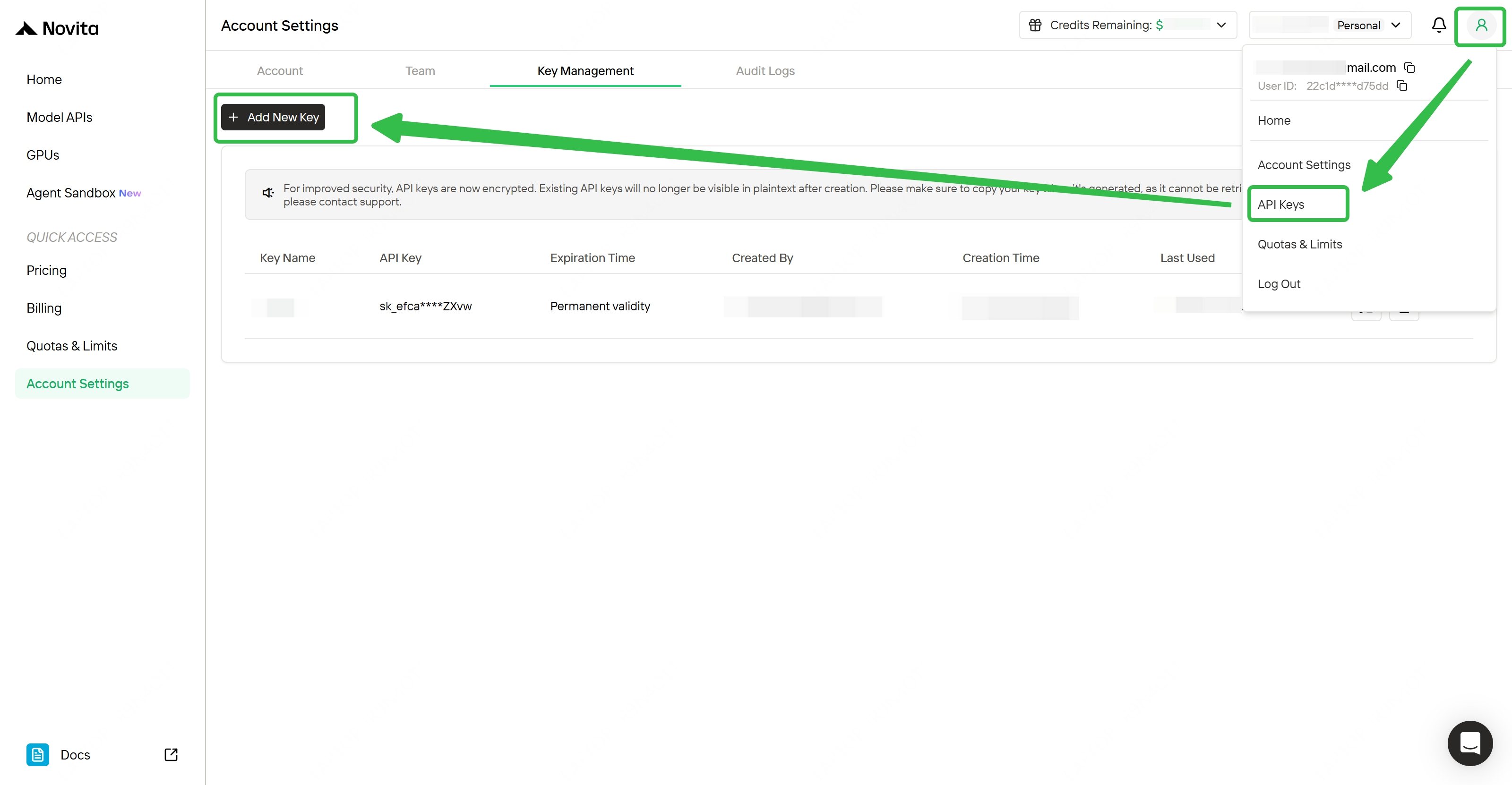
That is everything you need. The rest happens inside ForgeCode.
The same key works anywhere Novita AI’s API is supported, not just ForgeCode. The base URL for OpenAI-compatible clients is https://api.novita.ai/openai/v1, and the key is managed from Key Management in account settings. See the Model APIs reference for direct API use. Keep the key out of source control and out of committed .env files.
If you run coding agents daily, the Novita Coding Plan offers flexible monthly billing across the model lineup as an alternative to pay-as-you-go.
How to Connect Novita AI to ForgeCode
Step 1: Run the Login Flow
Open your terminal and type:
:loginForgeCode presents a list of available providers. Select Novita from the list.
Step 2: Enter Your API Key
Paste your Novita AI API key when prompted. The key is masked in the terminal for security. Confirm the provider switch when asked.
Step 3: Choose a Model
After login, open the model picker:
:modelBrowse or search for Novita models. Select one and press Enter. ForgeCode remembers your choice across sessions — you can change it anytime with :model.
That is the entire setup. Your workflow stays exactly the same; only the provider behind it changes.
Which Novita AI Models Work with ForgeCode?
Here is the lineup available through Novita AI. Pricing and context windows below were verified against the Novita AI model API on 2026-08-26; check the pricing page for current rates before budgeting, since these change.
| Model | Input (/M tokens) | Output (/M tokens) | Cache read (/M tokens) | Context | Best For |
|---|---|---|---|---|---|
| Kimi-K2.5 | $0.60 | $3.00 | $0.10 | 262K | General coding, reasoning, tool use |
| GLM-5 | $1.00 | $3.20 | $0.20 | 202K | Agentic coding, structured reasoning |
| MiniMax-M2.5 | $0.30 | $1.20 | $0.03 | 204K | Long-context coding sessions |
The “Best For” column reflects general suitability rather than benchmark results — this guide does not publish comparative coding benchmarks, so treat those as starting suggestions and test on your own tasks.
The real advantage of having Novita AI in ForgeCode is comparison. Run the same refactoring task across Kimi-K2.5, GLM-5, and MiniMax-M2.5, and you will quickly develop a feel for which model fits which type of work. ForgeCode makes switching instant — type :model, pick a different one, and your context carries over.
Conclusion
ForgeCode plus Novita AI gives you terminal-native access to a range of open-source coding models at competitive pricing. The setup is short: get an API key, run :login, pick a model, and start coding.
Novita AI models are available on ForgeCode — no setup overhead, pay only for what you use. Try it today with the steps above, or explore model options on the Novita AI Playground.
Novita AI is an AI and agent cloud platform helping developers and startups build, deploy, and scale models and agentic applications with high performance, reliability, and cost efficiency.
Frequently Asked Questions
What is ForgeCode?
ForgeCode is a CLI-based coding harness that integrates with Zsh, letting you send AI prompts directly from your terminal. It ranked #1 on TermBench 2.0 at the time of writing and supports multiple AI providers including Novita AI.
Do I need to change my workflow after connecting Novita AI?
No. The setup is just :login, select Novita, paste your API key, and pick a model. After that, you use ForgeCode exactly the same way — the provider changes, your workflow does not.
Which Novita AI model should I try first in ForgeCode?
Start with Kimi-K2.5 for general coding tasks. It handles reasoning and tool use well. For cost-sensitive workloads, MiniMax M2.5 offers strong performance at $0.30 per million input tokens.