With 754B parameters (40B active) and specialized architecture for long-horizon agentic workflows, GLM-5 is purpose-built for the exact use case that makes Claude Code powerful: multi-step, tool-calling-heavy coding sessions that require sustained reasoning over thousands of lines of code.
This guide shows you how to integrate GLM-5 into Claude Code via API providers like Novita AI, giving you access to frontier-level coding intelligence at $1.00/$3.20 per million tokens—a fraction of proprietary model costs. Whether you’re debugging complex systems, refactoring legacy codebases, or building multi-file features, GLM-5’s 200K+ context window and proven agentic capabilities make it an ideal Claude Code backend.
Why GLM-5 Excels at Agentic Coding Tasks
Before diving into setup, it’s essential to understand why GLM-5 is uniquely suited for Claude Code workflows. Unlike chat-focused models, GLM-5 was trained with explicit emphasis on complex systems engineering and long-horizon agentic tasks—the exact workloads Claude Code demands.
Proven Agentic Benchmark Performance
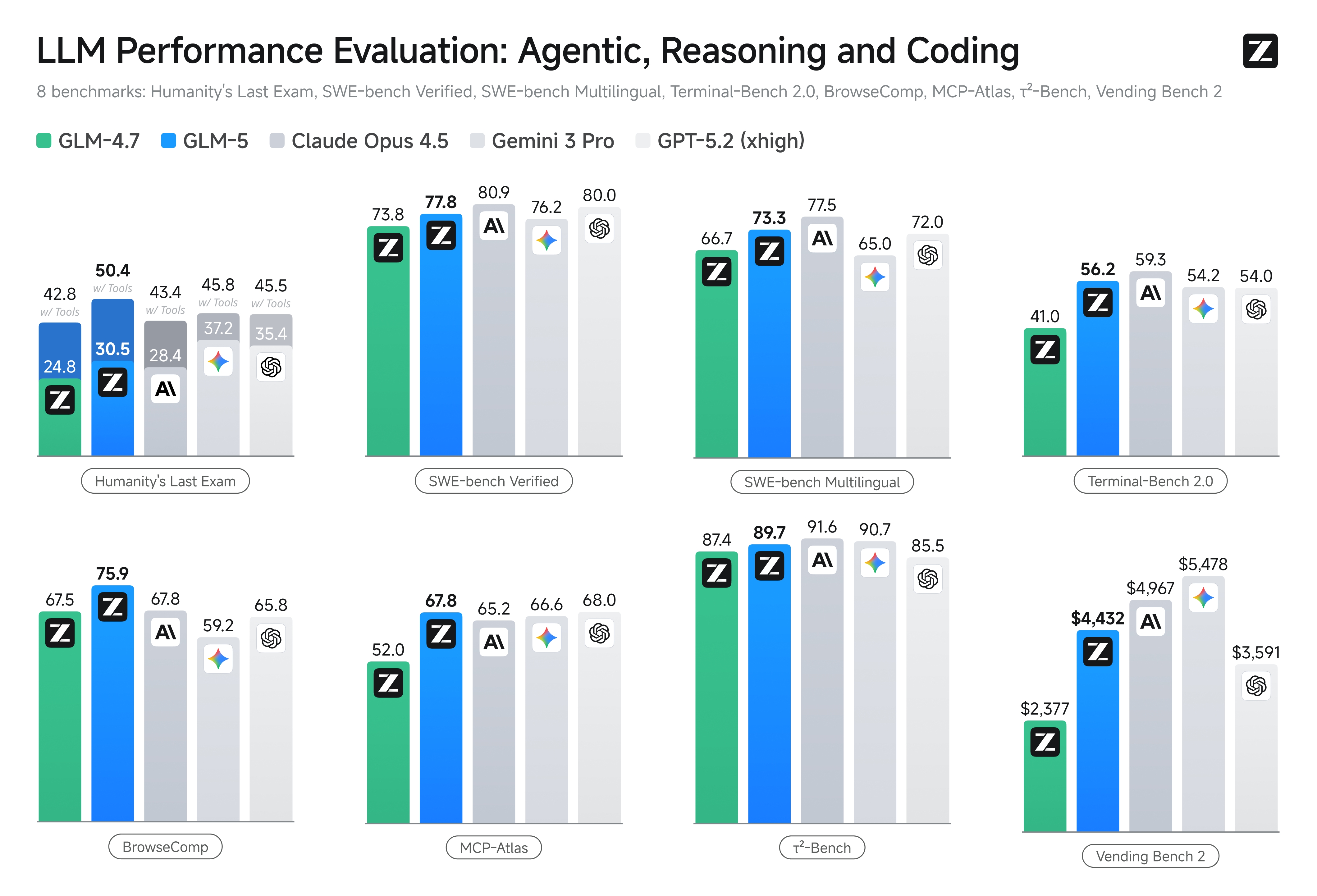
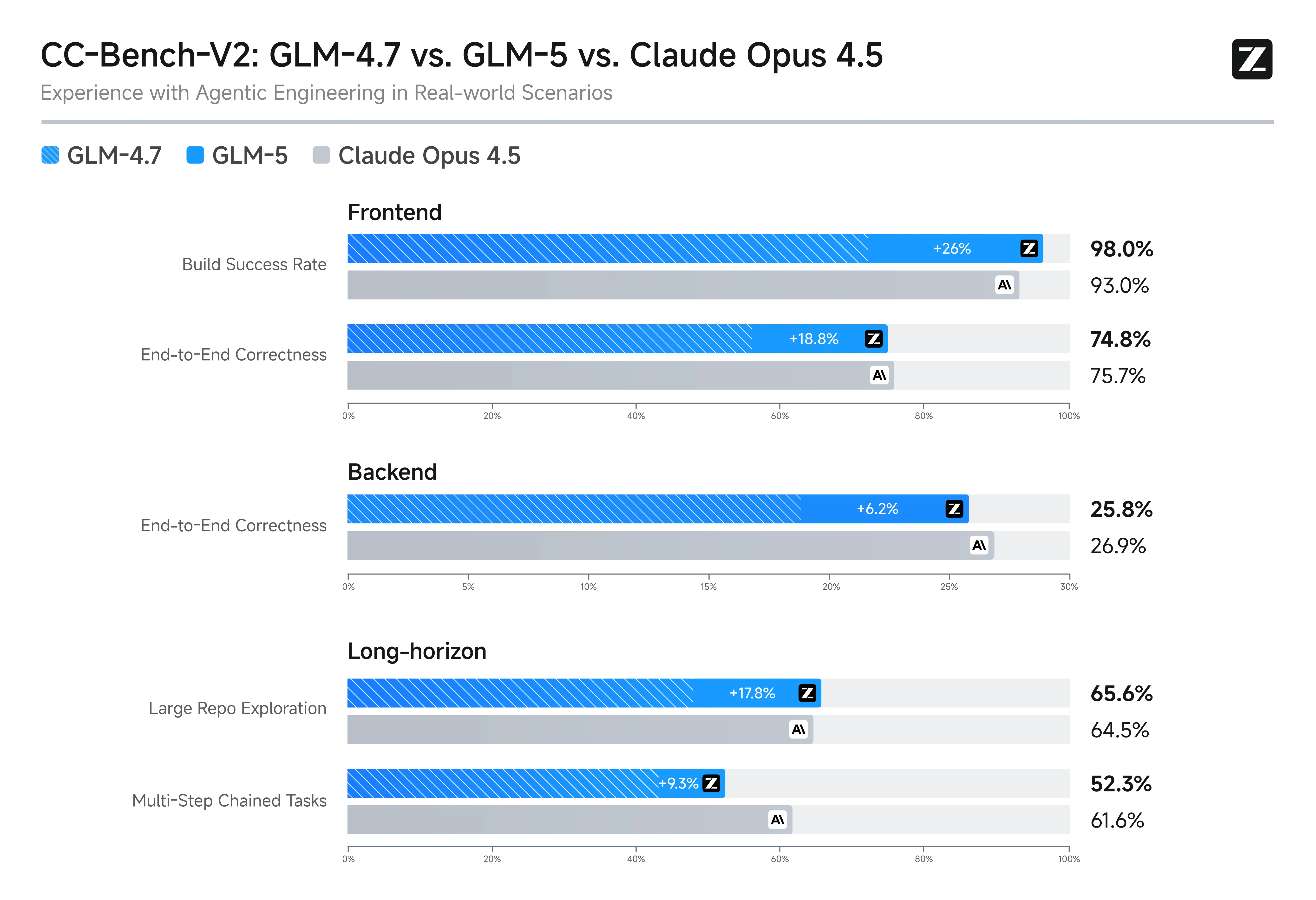
The Frontend Build Success Rate (98%) indicates that GLM-5 behaves more like an “engineering-execution” model, meaning it is highly capable of producing outputs that can actually run successfully in real development environments.
Architecture Optimized for Code Generation
- DeepSeek Sparse Attention (DSA): Efficiently handles 200K+ context windows, crucial for repo-level awareness
- 28.5T token training corpus: Larger and more diverse than GLM-4.5’s 23T tokens, improving code pattern recognition
- Reinforcement learning via
slime: Asynchronous RL infrastructure fine-tuned the model specifically for tool-calling accuracy and multi-turn coherence
Tool-Calling and Function Support
GLM-5 includes native --tool-call-parser glm47 support (verified in vLLM and SGLang deployment docs), meaning it can:
- Parse and execute structured function calls without hallucinating syntax
- Maintain tool-calling accuracy across 10+ sequential steps
- Handle Claude Code’s
Read,Write,Edit, andBashtools reliably
Vending Bench 2 ROI Comparison
| Model | Final Money Balance (≈ Day 365) | Cost | ROI = Balance / Cost |
|---|---|---|---|
| Gemini 3 Pro | 5300 | 5478.16 | 0.97 |
| Claude Opus 4.5 | 4950 | 4967.06 | 1.00 |
| GLM-5 | 4350 | 4432.12 | 0.98 |
| GPT-5.2 | 3550 | 3591.33 | 0.99 |
| GLM-4.7 | 2350 | 2376.82 | 0.99 |
| Kimi K2.5 | 1150 | 1198.46 | 0.96 |
GLM-5 is a high-execution, high-reward agent model, but it achieves this through high compute/tool usage cost. It is essentially a “pay more, get more” engineering-oriented agent.
What is Claude Code?
Claude Code is Anthropic’s agentic coding assistant, delivered as a desktop application (macOS/Linux). It combines a VS Code-like editor with a terminal-aware AI agent that can read files, write code, execute commands, and iterate on tasks autonomously. Think of it as “Cursor with full terminal access + multi-step task execution.”
Key strengths:
- Deep terminal integration (can run
npm install,git commit,pytest, etc. directly) - Persistent workspace state across sessions
- 10+ specialized tools (Glob, Grep, WebFetch, Edit with exact string replacement)
- MCP (Model Context Protocol) support for custom tool plugins
Use Cases
| Use Case | Scenario |
|---|---|
| Complex Systems Refactoring | Migrating a monolith to microservices across 50+ files |
| Terminal-Heavy Workflows | Deploying a Docker stack, running migrations, debugging K8s |
| Deep Debugging Sessions | Tracing segfaults, analyzing core dumps, fixing race conditions |
| Custom Workflow Automation | Integrating GLM-5 with MCP servers (Slack, GitHub, Notion) |
How to Use GLM-5 in Claude Code: Complete Setup Guide
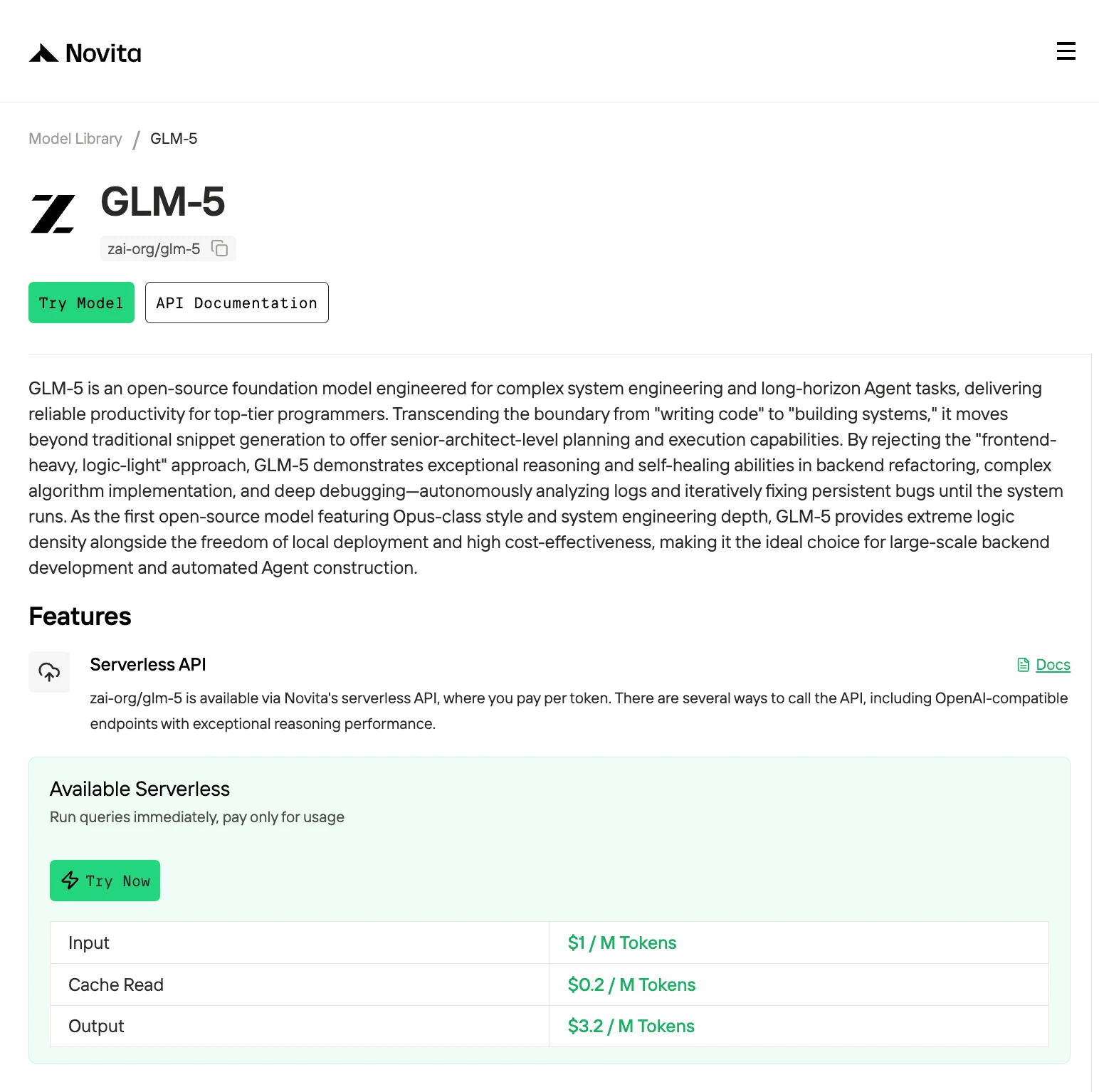
Claude Code supports custom models via OpenAI-compatible API endpoints. We’ll use Novita AI as the provider since it offers serverless GLM-5 hosting with transparent pricing ($1.00/$3.20 per million tokens).
Step 1: Get Your Novita AI API Key
- Visit novita.ai
- Sign up or log in to your account
- Navigate to API Keys in the dashboard
- Click Create New Key and copy the key
- Store it securely—you’ll need it for environment variables
Step 2: Install Claude Code
#macOS, Linux, WSL:
curl -fsSL https://claude.ai/install.sh | bash

#Windows PowerShell:
irm https://claude.ai/install.ps1 | iex

#Windows CMD:
curl -fsSL https://claude.ai/install.cmd -o install.cmd && install.cmd && del install.cmd
Windows requires Git for Windows. Install it first if you don’t have it.
Step 3: Configure Environment Variables
Claude Code reads configuration from environment variables. Set these in your shell profile:
For macOS/Linux:
# Set the Anthropic SDK compatible API endpoint provided by Novita.
export ANTHROPIC_BASE_URL="https://api.novita.ai/anthropic"
export ANTHROPIC_AUTH_TOKEN="<Novita API Key>"
# Set the model provided by Novita.
export ANTHROPIC_MODEL="zai-org/glm-5"
export ANTHROPIC_SMALL_FAST_MODEL="zai-org/glm-5"
For Windows:
# Add to your PowerShell profile

$env:ANTHROPIC_BASE_URL = "https://api.novita.ai/anthropic"
$env:ANTHROPIC_AUTH_TOKEN = "Novita API Key"
$env:ANTHROPIC_MODEL = "zai-org/glm-5"
$env:ANTHROPIC_SMALL_FAST_MODEL = "zai-org/glm-5"
Important: The ANTHROPIC_SMALL_FAST_MODEL variable is used for quick tasks (file navigation, search).
Step 4: Start Claude Code
Next, navigate to your project directory and start Claude Code. Claude Code will analyze the current project directory and use it as the working context. You will see the Claude Code prompt inside a new interactive session.
cd <your-project-directory>
claude .
Step 5: Use Git with Claude Code
Claude Code makes Git operations conversational:
> what files have I changed?> commit my changes with a descriptive messageYou can also prompt for more complex Git operations:
> create a new branch called feature/quickstart> show me the last 5 commits> help me resolve merge conflictsPerformance Tips: Getting the Most from GLM-5
1. Leverage Context Windows Fully
GLM-5’s 200K+ context is a major advantage. Instead of asking “fix this function,” load the entire module:
Prompt: "Read all files in src/auth/. Analyze the authentication flow, identify security vulnerabilities, and propose fixes with code examples."2. Use Specific Tool Calls
Guide GLM-5 toward the right tools explicitly when needed:
Prompt: "Use Grep to find all occurrences of 'deprecated_function' across the codebase, then use Edit to replace them with 'new_function'."3. Enable Speculative Decoding (For Self-Hosted)
If running GLM-5 locally via vLLM, use --speculative-config.method mtp for 30-50% faster generation.
4. Chain Tasks Incrementally
Break complex projects into 3-5 step chunks:
Session 1: "Design the database schema for a blogging platform. Create SQLAlchemy models."
Session 2: "Implement CRUD endpoints for posts using FastAPI."
Session 3: "Add authentication middleware and rate limiting."
The model’s 754B-parameter MoE architecture, 200K+ context window, and specialized training on complex systems engineering make it uniquely suited for repo-level refactoring, multi-step debugging, and agentic automation. Whether you choose Claude Code for terminal-heavy workflows or not, GLM-5’s performance benchmarks and cost efficiency position it as a top choice for developer-focused AI tools in 2026.
Frequently Asked Questions
Can GLM-5 run locally, or must I use an API?
GLM-5 can run locally via vLLM or SGLang, but requires 16× H100 80GB GPUs for FP8 quantization. API hosting (Novita, OpenRouter) is more practical for most users.
How does GLM-5 compare to DeepSeek V3 for coding?
GLM-5 scores higher on agentic benchmarks (Intelligence Index 50 vs. DeepSeek V3’s 45), while DeepSeek V3 is faster for pure code completion. Choose GLM-5 for multi-step tasks.
Does GLM-5 support function calling and tool use?
Yes—GLM-5 includes native --tool-call-parser glm47 and --enable-auto-tool-choice support, verified in official deployment guides.
Novita AI is an AI cloud platform that offers developers an easy way to deploy AI models using our simple API, while also providing the affordable and reliable GPU cloud for building and scaling.
Recommended Reading
Use Qwen3-Coder-Next in Claude Code: An 80% Cheaper Alternative
[Kimi k2.5 API for Cursor: Developer Guide](http://Kimi k2.5 API for Cursor: Developer Guide)