GLM-4.5V is the latest open-source multimodal large language model (LLM) from Zhipu AI, built to handle both language and vision tasks in one unified system. It represents a major upgrade from the earlier GLM-4.1V model, featuring a Mixture-of-Experts (MoE) architecture with 106 billion parameters (about 12B active per input).
This design allows GLM-4.5V to achieve superior performance at lower inference cost by activating specialized “expert” subnetworks only as needed. The model introduces 3D Rotatory Positional Encoding (3D-RoPE) for an extended 64k token context, enabling it to handle long documents and multi-dimensional inputs with ease.
In simpler terms, GLM-4.5V can “see” and reason about images and videos while also engaging in natural language dialogue, making it a powerful vision-language model (VLM) for developers.
What is GLM 4.5V?
1. Advanced Visual Reasoning
- Goes beyond basic captioning — understands complex images, scientific diagrams, and comparisons
- Supports spatial reasoning: identifies objects and bounding boxes
- Achieved top scores on visual QA benchmarks like MMBench & MMBench+
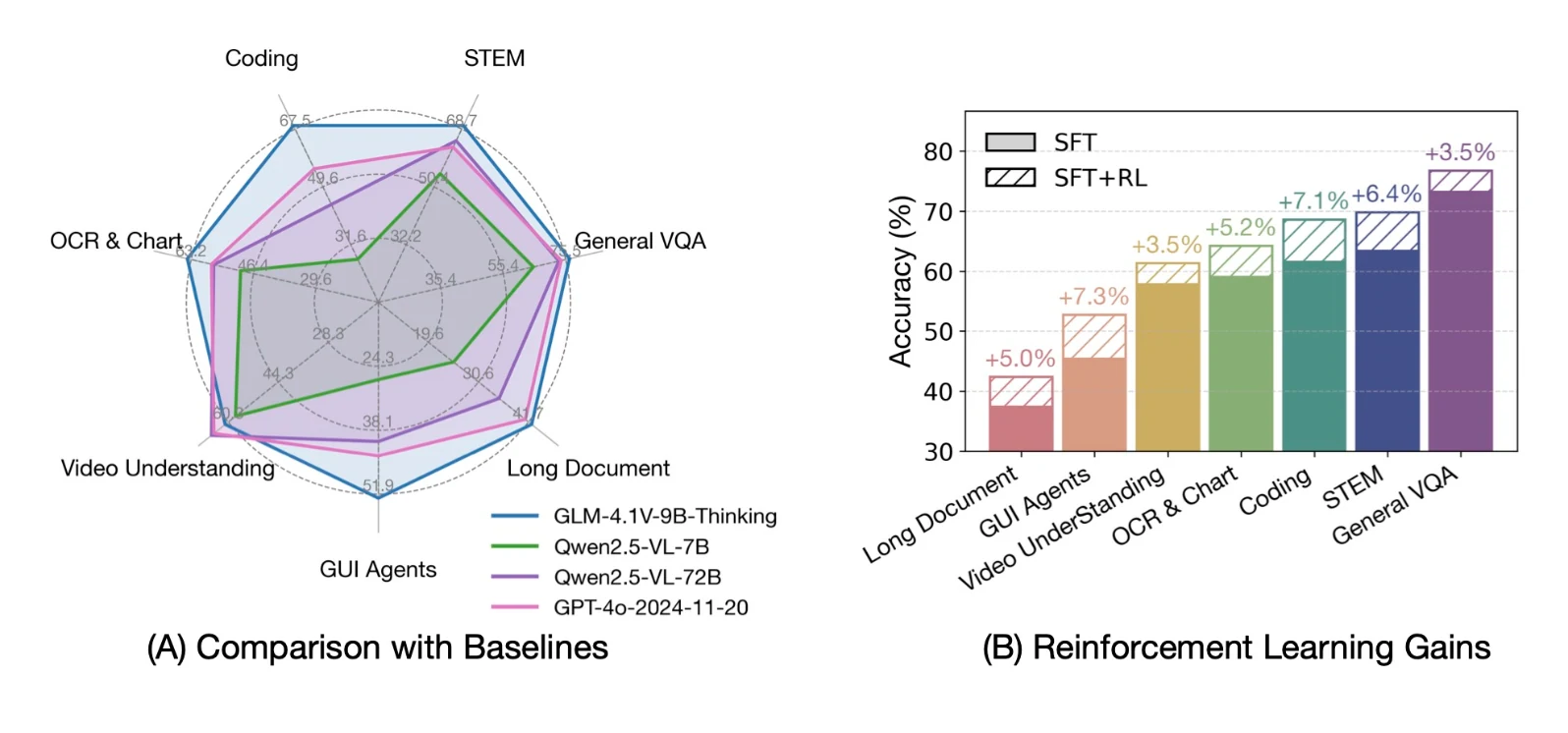
From Hugging Face
2. Multimodal Input + Thinking Mode
- Accepts text, images, and videos in conversations
- Offers a “Thinking Mode” switch: enables step-by-step reasoning before final answer
- Ideal for complex tasks requiring logical explanations
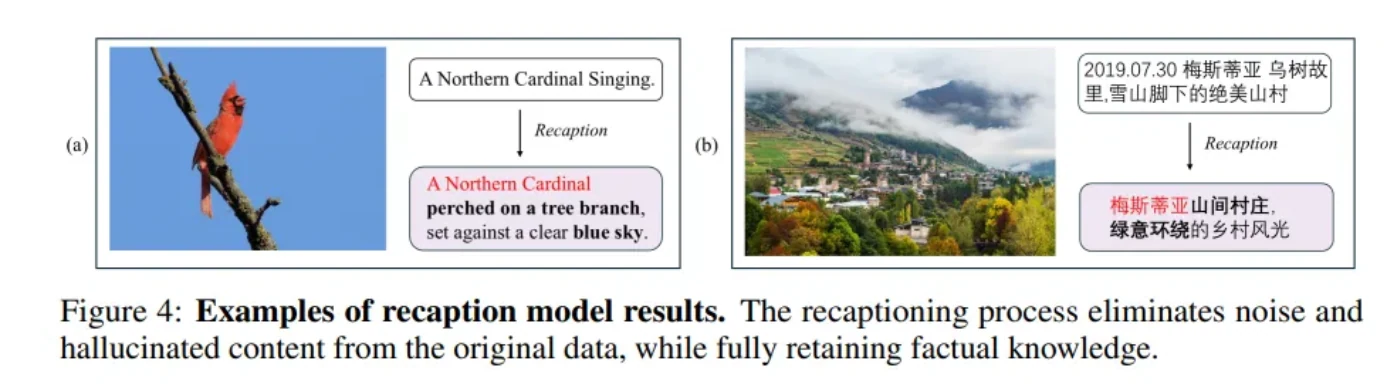
From Hugging Face
3. Unified Tool Use
- Designed for AI agent use cases — can autonomously call external tools or APIs
- Built-in support for function calling, compatible with OpenAI’s interface
- Uses demonstration-based training for tool usage
GLM-4.5V is a powerful, developer-friendly multimodal AI model capable of handling image understanding, visual QA, document OCR, code generation, and GUI automation — all through a unified interface. It’s ideal for AI agents, productivity tools, research, and more.
GLM 4.5V System Requirements
| Aspect | Details |
|---|---|
| Model Size | 106B parameters (MoE); 12B active per token |
| VRAM | 640GB |
| Baseline GPU Need | 8× NVIDIA H100 (80GB each) |
| Precision Options | Supports FP16, FP8, INT8, INT4 quantization formats |
| Low-VRAM Setup (Optimized) | Possible with 2×80GB GPUs using FP8 and careful partitioning |
| Parallelism Support | Tensor & model parallelism supported (e.g., 4×40GB GPUs) |
| Key Libraries | vLLM, SGLang |
How to Access the GLM 4.5V API
ccessing GLM-4.5V through Novita AI offers multiple pathways tailored to different technical expertise levels and use cases. Whether you’re a business user exploring AI capabilities or a developer building production applications, Novita AI provides the tools you need.
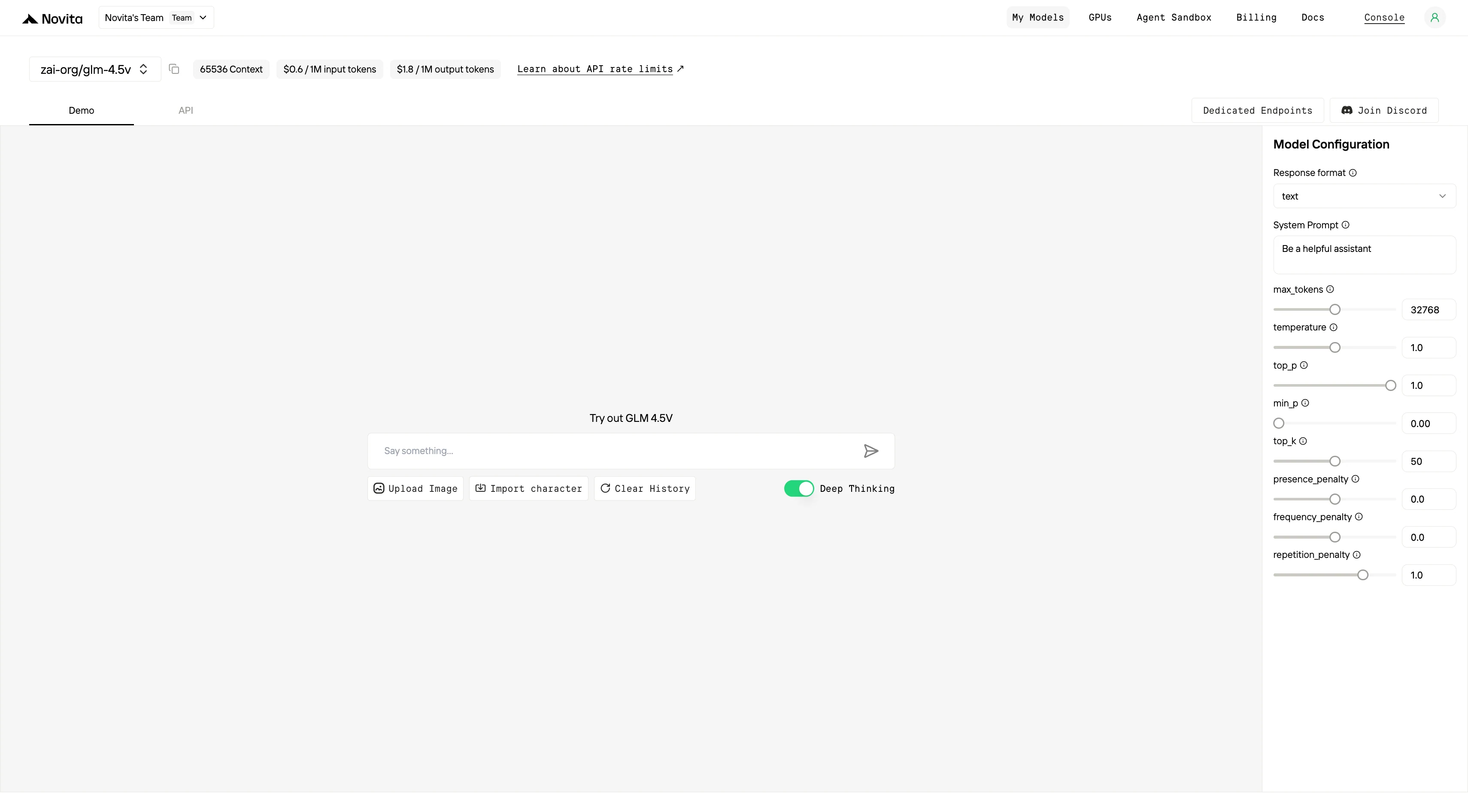
1.Use the Playground (Available Now - No Coding Required)
- Instant Access: Sign up and start experimenting with GLM-4.5V models in seconds
- Interactive Interface: Test complex visual reasoning prompts and visualize chain-of-thought outputs in real-time
- Model Comparison: Compare GLM-4.5V with other leading models for your specific use case
The playground enables you to upload images directly, test various prompts, and see immediate results without any technical setup. Perfect for prototyping, testing ideas, and understanding model capabilities before full implementation.
2.Integrate via API (Live and Ready - For Developers)
Connect GLM-4.5V to your applications with Novita AI’s unified REST API.
Option 1: Direct API Integration (Python Example)
from openai import OpenAI

client = OpenAI(
    base_url="https://api.novita.ai/v3/openai",
    api_key="",
)

model = "zai-org/glm-4.5v"
stream = True # or False
max_tokens = 65536
system_content = ""Be a helpful assistant""
temperature = 1
top_p = 1
min_p = 0
top_k = 50
presence_penalty = 0
frequency_penalty = 0
repetition_penalty = 1
response_format = { "type": "text" }

chat_completion_res = client.chat.completions.create(
    model=model,
    messages=[
        {
            "role": "system",
            "content": system_content,
        },
        {
            "role": "user",
            "content": "Hi there!",
        }
    ],
    stream=stream,
    max_tokens=max_tokens,
    temperature=temperature,
    top_p=top_p,
    presence_penalty=presence_penalty,
    frequency_penalty=frequency_penalty,
    response_format=response_format,
    extra_body={
      "top_k": top_k,
      "repetition_penalty": repetition_penalty,
      "min_p": min_p
    }
  )

if stream:
    for chunk in chat_completion_res:
        print(chunk.choices[0].delta.content or "", end="")
else:
    print(chat_completion_res.choices[0].message.content)
Key Features:
- OpenAI-Compatible API for seamless integration
- Flexible parameter control for fine-tuning responses
- Streaming support for real-time responses
Option 2: Multi-Agent Workflows with OpenAI Agents SDK
Build sophisticated multi-agent systems using GLM-4.5V:
- Plug-and-Play Integration: Use GLM-4.5V in any OpenAI Agents workflow
- Advanced Agent Capabilities: Support for handoffs, routing, and tool integration with superior visual reasoning performance
- Scalable Architecture: Design agents that leverage GLM-4.5V’s unified reasoning, coding, and visual analysis capabilities
3.Connect with Third-Party Platforms
Development Tools: Seamlessly integrate with popular IDEs and development environments like Cursor, Trae, Qwen Code and Cline through OpenAI-compatible APIs.
Orchestration Frameworks: Connect with LangChain, Dify, CrewAI, Langflow, and other AI orchestration platforms using official connectors.
Hugging Face Integration: Novita AI serves as an official inference provider of Hugging Face, ensuring broad ecosystem compatibility.
Using the GLM 4.5V Command Line Interface (CLI)
For developers who prefer running models locally or want more control over the environment, GLM-4.5V can be used via a command-line interface as well. Zhipu AI has open-sourced the model weights and provided tools to run the model on your own hardware.
The model is available on Hugging Face Hub as zai-org/GLM-4.5V. You can download the model and then use the Transformers library to generate outputs. For example, in a Python script or Jupyter notebook:
python3 inference/trans_infer_cli.py --model-path zai-org/GLM-4.5V --image test.jpg --question "这张图里有什么?"| Feature | CLI | API |
|---|---|---|
| Usage | Enter commands + parameters in the terminal | Call libraries/HTTP requests in code |
| Output | Printed directly in the terminal | Returns objects/JSON, easy for further processing |
| Best for | Testing models, quick inference, small scripts | Application development, service integration, large-scale calls |
| Flexibility | Fixed parameters, limited combinations | Fully programmable, supports complex logic |
| Dependencies | Only need a script/CLI tool | Requires writing code and managing dependencies |
Build a Simple Image Recognition Tool using MCP and GLM4.5V
If you want to leverage the capabilities of GLM—such as building a simple image recognition tool to demonstrate its integration of visual recognition and reasoning—you can use the MCP functionality supported by Novita AI. Below is the sample code:
import os
import sys
from mcp.server.fastmcp import FastMCP
import requests
import uvicorn
from starlette.applications import Starlette
from starlette.routing import Mount

base_url = "https://api.novita.ai/v3"
headers = {
    "Content-Type": "application/json",
    "Authorization": f"Bearer {os.environ['NOVITA_API_KEY']}"
}

mcp = FastMCP("Novita_API")

@mcp.tool()
def list_models() -> str:
    """
    List all available models from the Novita API.
    """
    url = base_url + "/openai/models"
    response = requests.request("GET", url, headers=headers)
    data = response.json()["data"]

    text = ""
    for i, model in enumerate(data, start=1):
        text += f"Model id: {model['id']}\
"
        text += f"Model description: {model['description']}\
"
        text += f"Model type: {model['model_type']}\
\
"

    return text

@mcp.tool()
def get_model(model_id: str, message) -> str:
    """
    Provide a model ID and a message to get a response from the Novita API.
    """
    url = base_url + "/openai/chat/completions"
    payload = {
        "model": model_id,
        "messages": [
            {
                "content": message,
                "role": "user",
            }
        ],
        "max_tokens": 200,
        "response_format": {
            "type": "text",
        },
    }
    response = requests.request("POST", url, json=payload, headers=headers)
    content = response.json()["choices"][0]["message"]["content"]
    return content

@mcp.tool()
def vision_chat(model_id: str, image_url: str, question: str) -> str:
    """
    Use GLM-4.1V-9B-Thinking to answer a question about an image.
    """
    url = base_url + "/openai/chat/completions"
    payload = {
        "model": model_id,
        "messages": [
            {
                "role": "user",
                "content": [
                    {
                        "type": "image_url",
                        "image_url": {
                            "url": image_url,
                        }
                    },
                    {
                        "type": "text",
                        "text": question,
                    }
                ]
            }
        ],
        "max_tokens": 500
    }
    response = requests.post(url, json=payload, headers=headers)
    return response.json()["choices"][0]["message"]["content"]

if __name__ == "__main__":
   # Run using stdio transport
mcp.run(transport="stdio")Troubleshooting Common GLM 4.5V
1. Memory and Loading Errors (CUDA OOM)
Cause: The model is too large to fit into available GPU memory.
Solutions:
- Use the recommended inference backend
- Example: Enable
--attention-backend fa3in SGLang to reduce memory usage.
- Example: Enable
- Use more GPUs with smaller tensor parallel size
- Example: Set TP=8 (8 GPUs) instead of TP=4 to allocate smaller model chunks per GPU.
- Load a quantized model (8-bit or 4-bit)
- For example, use
load_in_8bit=Truewhen using HuggingFace Transformers.
- For example, use
- Choose cloud instances with higher VRAM
- Example: A100 (80GB) or H200 (141GB); H200 may run the model on a single GPU.
- Process long inputs in smaller chunks
- Split long videos into shorter segments or disable thinking mode to reduce output size.
2. Image Input Not Recognized
Cause: The image is not formatted or passed correctly to the model.
Solutions:
-
For OpenAI-style APIs, structure input as a special message
- Example:
[{"type": "image_url", "image_url": {"url": "<URL>"}}, {"type": "text", "text": "your question"}]
- Example:
-
When using HuggingFace Transformers, use
AutoProcessor- Example: Call
processor(images=[...], text=[...])before inference.
- Example: Call
-
Ensure the image URL is public or use base64 encoding if supported
- If the model ignores the image or says it didn’t receive one, the input may be invalid.
4. Strange Output Formatting
Issues:
- Outputs include raw HTML (e.g.,
<div>...</div>) - Unexpected escape characters (e.g.,
<) - Repeated or appended answers
Solutions:
- Instruct the model to format code in Markdown (e.g., use triple backticks)
- Apply patches to fix HTML escaping (available in official repos)
- Disable thinking mode if not needed
- Post-process the output to remove duplicate content
5. Tool Use Artifacts
Issue: Model outputs tool-related commands (e.g., <|search|>).
Solution:
Use the standard chat completion API instead of agent endpoints, and avoid prompts that mimic tool-usage scenarios.
6. Accuracy Limitations
Known limitations:
- May struggle with fine-grained visual tasks like counting or face recognition
- Text-only questions may be better answered by specialized text models
- Slow with very long documents or videos; may hit timeouts
Recommendations:
- Use streaming mode for long inputs to receive partial outputs
- Break large inputs into smaller segments
- Check your API provider’s actual context length limits
GLM-4.5V is a game-changer for vision-language AI, bringing capabilities that were previously in the realm of proprietary models to the open-source and self-hosted world. We’ve covered what GLM-4.5V is and why it’s special, the setup you need to run it, how to troubleshoot common issues, and multiple ways to access it (cloud API or local CLI). With this knowledge, developers can confidently incorporate GLM-4.5V into their projects
Should I upgrade from Gemma 3 27B to GLM 4.5V?
GLM-4.5V is Zhipu AI’s latest open-source multimodal large language model. It can handle both language and vision tasks, including text, images, and videos, with advanced reasoning abilities.
What can GLM-4.5V do?
It supports advanced visual reasoning (e.g., scientific diagrams, spatial reasoning, visual QA), long-document understanding, code generation, OCR, GUI automation, and multimodal dialogue.
How is GLM-4.5V different from earlier models?
It improves on GLM-4.1V by using a Mixture-of-Experts (MoE) architecture with 106B parameters (12B active per input), plus 3D-RoPE for a 64k context length, enabling lower cost and stronger performance.
Novita AI is the All-in-one cloud platform that empowers your AI ambitions. Integrated APIs, serverless, GPU Instance — the cost-effective tools you need. Eliminate infrastructure, start free, and make your AI vision a reality.