AI-powered software development is moving fast, driven by two big trends: powerful open-source models and fully integrated AI development environments. GPT‑OSS is OpenAI’s open‑weight model series, known for strong reasoning, agent‑like abilities, and deep customization. TRAE, from ByteDance, is an AI IDE designed to act as a complete “AI Engineer” that can build software on its own.
The question is: what happens when you combine GPT‑OSS’s controllable reasoning power with TRAE’s tool‑rich, automated development framework? Together, they create a workflow that’s both automated and tailored to your exact needs. This guide explains how to connect them and unlock their full potential.
What is Trae?
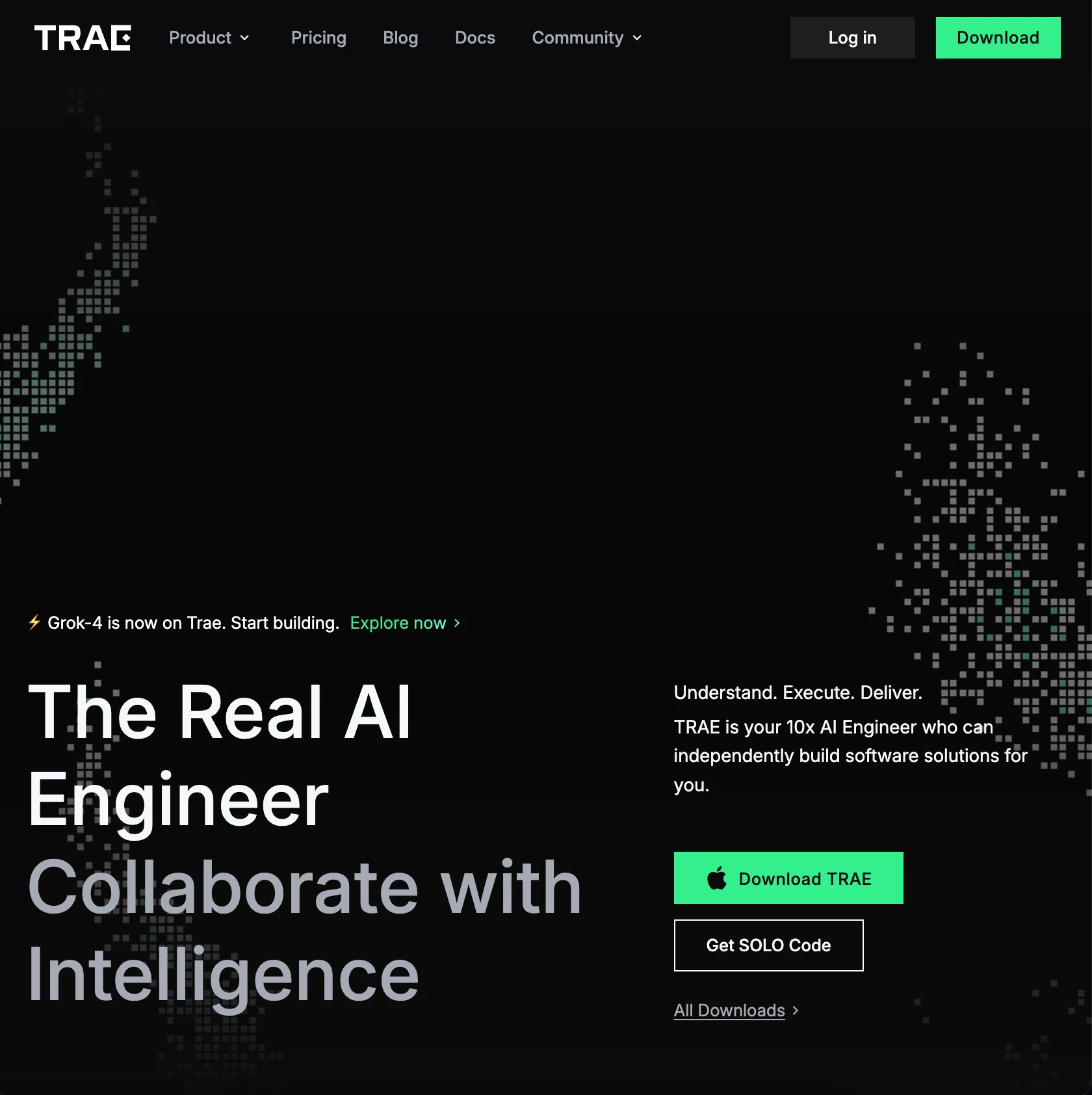
TRAE is also the name of an AI-powered integrated development environment (IDE) created by ByteDance.It is designed to function as an “AI Engineer” that can independently build software solutions by understanding complex tasks and executing them.TRAE aims to streamline the development workflow by allowing users to delegate tasks to the AI.
Trae’s Key Functions
Enhanced Tool Integration & Capabilities (Model Context Protocol - MCP)
- External Tool Integration: TRAE integrates with various external tools, enabling AI agents to use them for more effective task execution.
- MCP Support: It supports the Model Context Protocol (MCP), an open standard for connecting AI applications with external data sources and tools. This acts like a universal “USB-C” port for AI, solving the challenge of connecting AI models to siloed data.
- Expanded AI Capabilities: Through MCP, agents can access external resources like Google Drive, Slack, GitHub, and databases to better understand and complete complex tasks.
Deeper Contextual Understanding & Precise Control
- Deep Understanding of Dev Context: TRAE deeply understands your development context, including code repositories, online search results, and shared documents.
- Precise Behavior Customization: You can customize rules to tailor the AI’s behavior to your workflow, ensuring it executes tasks exactly as you intend.
- Multi-modal Interaction: Supports image uploads (e.g., design mockups, error screenshots) to help describe requirements, allowing the AI to generate more accurate code.
CUE: Smart Prediction & One-Key Editing
- Predicts Your Next Edit: The CUE (Context Understanding Engine) feature understands your intent and predicts your next move by analyzing your editing behavior.
- One-Key Navigation & Application: Simply press the
Tabkey to jump to the next suggested change or apply smart suggestions across multiple lines at once. - Continuous Optimization: The feature is continuously optimized for better performance and responsiveness, providing a smoother experience for code modification, generation, and bug fixing.
Comprehensive IDE Features & AI Assistance
- Dual Development Modes: Offers IDE Mode for a traditional, user-controlled workflow, and SOLO Mode where the AI leads development from requirements to delivery for full automation.
- Full-Fledged IDE: Provides standard IDE features like code editing, project management, and version control.
- AI Programming Assistance: Features various AI-powered assists, including smart code completion, refactoring, chat-based Q&A, and project generation from natural language.
- Built-in Web Preview: Supports direct preview of web pages inside the IDE for easier front-end development and debugging.
What is Trae Solo?
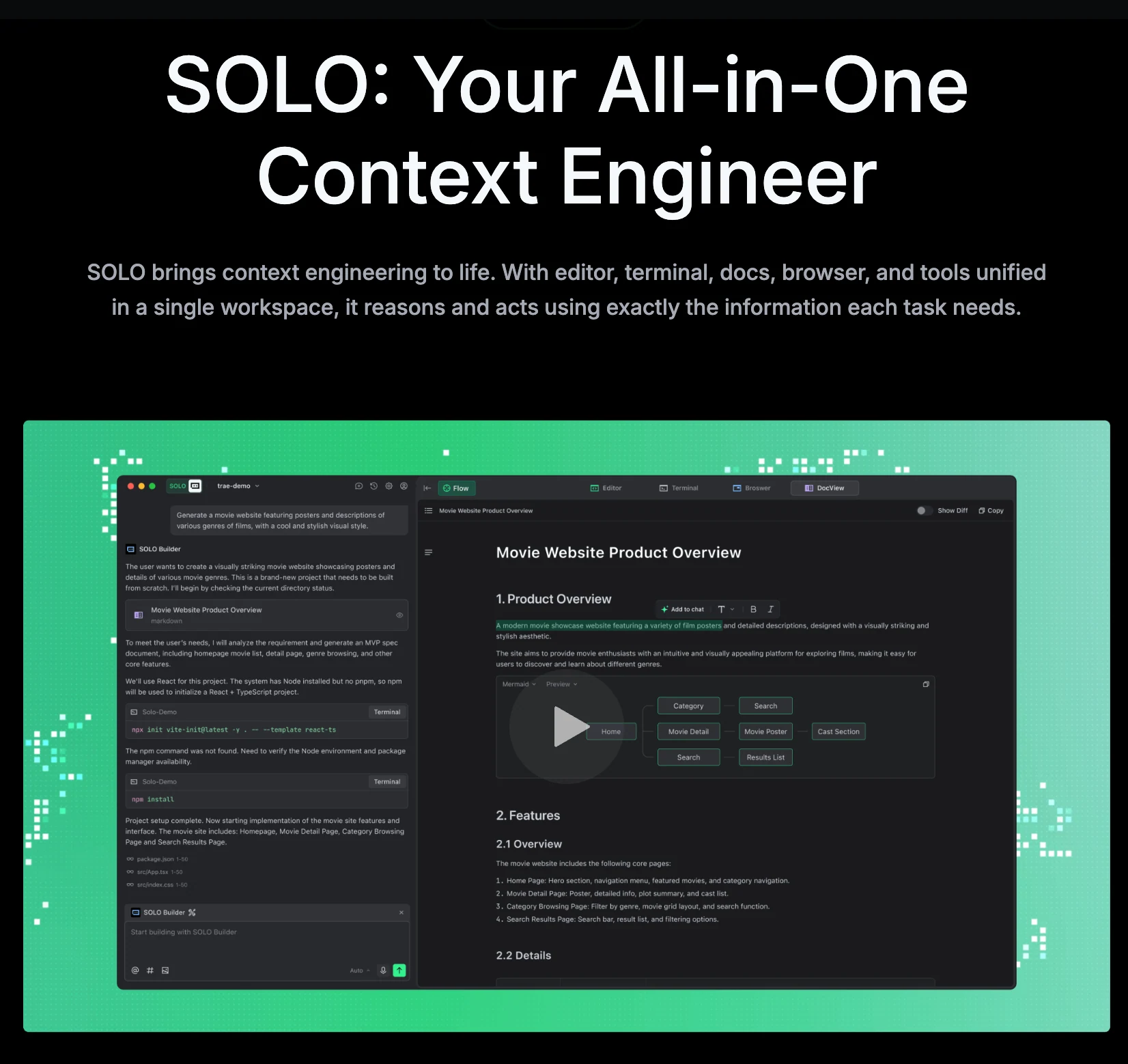
- Unified Workspace & AI Tool Hub:
SOLO mode integrates all necessary development tools—the IDE, browser, terminal, and documents—directly into the AI. This allows the AI to reason and act with precision based on the specific needs of each task, seamlessly bridging the gap from idea to execution. - AI-Led, End-to-End Development:
You simply provide the requirements, and SOLO autonomously handles the entire development lifecycle, including:- Requirement Analysis
- Prototyping
- Frontend Development
- Backend Development
- Debugging & Optimization
- Build & Deployment
- Unified Monitoring View:
Users can chat with the AI and monitor all development activities from a single, unified view. The “Extended View” provides a detailed look at all real-time execution details. - Multi-modal Interaction: “Speak” Your Requirements:
SOLO mode supports voice input, allowing you to interact with TRAE as naturally as you would with a human teammate. The AI’s output is not limited to code; an expandable dynamic view on the right provides visual and intuitive feedback. - The Context Engineer:
SOLO mode is designed to be the ultimate “Context Engineer,” capable of understanding the full scope of your work to ensure its actions and outputs are based on the most comprehensive and accurate information available.
In summary, the goal of TRAE SOLO mode is to enable “AI that ships complete software.” It empowers developers to build and release real software faster through a simple “Talk. Think. Ship.” process.
What is GPT OSS?
GPT-OSS (Open-Source Series) is a family of powerful, open-weight language models released by OpenAI that are designed to be freely available for commercial use and can be run locally on consumer hardware.The series includes two main models, a 20-billion and a 120-billion parameter version, which are optimized for strong reasoning, tool use, and efficiency, marking a significant shift by OpenAI towards greater transparency in the AI community.. These models allow developers and researchers to fine-tune them for custom purposes with full control over their data and infrastructure, bridging the gap between closed, proprietary systems and open-source AI.
| Model | Layers | Total Params | Active Params Per Token | Total Experts | Active Experts Per Token | Context Length | Single GPU VRAM Requirement |
| gpt-oss-120b | 36 | 117B | 5.1B | 128 | 4 | 128k | 80GB |
| gpt-oss-20b | 24 | 21B | 3.6B | 32 | 4 | 128k | 16GB |
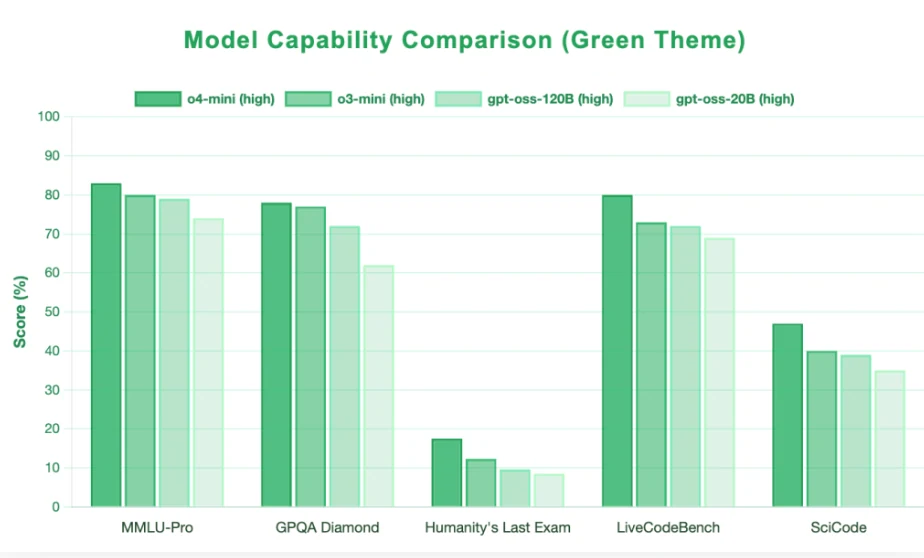
Why Choose GPT OSS for AI Code?
Customize Format: Harmony
GPT‑OSS models use a special conversation format called Harmony. This format organizes messages into clear roles — system, user, and assistant — and lets you control how the model thinks and responds. With Harmony, you can adjust reasoning depth (low, medium, high), decide whether to show or hide the thinking process, and make the model call functions in a stable, structured way. Many other open‑source models don’t have these controls built in, but GPT‑OSS understands them natively because it was trained to follow Harmony instructions. This makes it easier to get consistent, reliable, and tool‑friendly outputs.
What Harmony Can Control
Harmony format lets you adjust several key behavior parameters for GPT‑OSS models:
| Parameter | Description | Example |
|---|---|---|
| Reasoning Depth | Controls how much step‑by‑step thinking the model does. | "Reasoning: low", "Reasoning: medium", "Reasoning: high" |
| Function Calling | Native support for OpenAI‑style function_call / tool_calls JSON output. | "Always call function weather_api when asked about weather" |
| Reasoning Visibility | Show or hide the full chain‑of‑thought in <think> tags. | "Show reasoning" / "Hide reasoning" |
| Output Format Rules | Force structured output like JSON, Markdown, etc. | "Output in JSON format" |
An Example Harmony Request
{
  "messages": [
    {
      "role": "system",
      "content": "Reasoning: medium; Hide reasoning; Output in JSON format"
    },
    {
      "role": "user",
      "content": "Explain how quicksort works."
    }
  ]
}
Benefits When Using Harmony with Tools Like Trae
When integrated with code generation, debugging, and execution platforms such as Trae, Harmony format offers several practical advantages:
-
Stable Structured Output
- Harmony ensures the model’s output follows a predictable JSON or code block format.
- Trae can parse this directly without fragile regex or post‑processing.
-
Reasoning Depth Control
- Use low reasoning for rapid prototyping or simple code.
- Use high reasoning for complex algorithms where correctness matters most.
- Saves GPU/CPU resources by matching reasoning cost to task complexity.
-
Toggle Reasoning Visibility
- Show
<think>reasoning for debugging and learning. - Hide reasoning in production to reduce tokens and avoid leaking internal logic.
- Show
-
Clear Multi‑turn Context Management
systemrules persist across turns, ensuring consistent code style and execution rules.- Easy to iterate: modify user instructions without losing global settings.
-
Seamless API Integration
- Harmony mimics the OpenAI Responses API, so any toolchain or IDE plugin compatible with OpenAI can work with GPT‑OSS with minimal changes.
GPT OSS Tool Use
GPT‑OSS models are trained to natively use external tools as part of their reasoning process, with built‑in support for browsing, Python execution, and file patching. These tools are activated by defining them in the system message of a Harmony‑formatted prompt.
1. Browser Tool
-
Purpose: Search the web, open pages, and find text on pages.
-
Methods:
search— search for key phrases.open— open a specific page.find— locate content on a page.
-
Features:
- Scrollable text window to manage context size.
- Caching for faster revisits to the same page.
- Trained to cite sources in answers.
-
Usage: Add the browser tool definition via
.with_browser()or.with_tools()in thesystemprompt. -
Note: Reference implementation is for education only — use your own backend in production.
2. Python Tool
-
Purpose: Perform calculations or run small programs as part of the chain‑of‑thought.
-
Features:
- Trained with a stateful Python tool for multi‑step reasoning.
- Reference implementation uses a stateless mode.
- Can override default tool descriptions in
openai‑harmony.
-
Usage: Add via
.with_python()or.with_tools()in thesystemprompt. -
Security Warning: Reference code runs in a permissive Docker container—add your own restrictions in production.
3. Apply Patch Tool
- Purpose: Create, update, or delete local files.
- Use Case: Modify code or project files as part of an automated development loop.
How to use GPT OSS in Trae?
Prerequisites: Get API Key
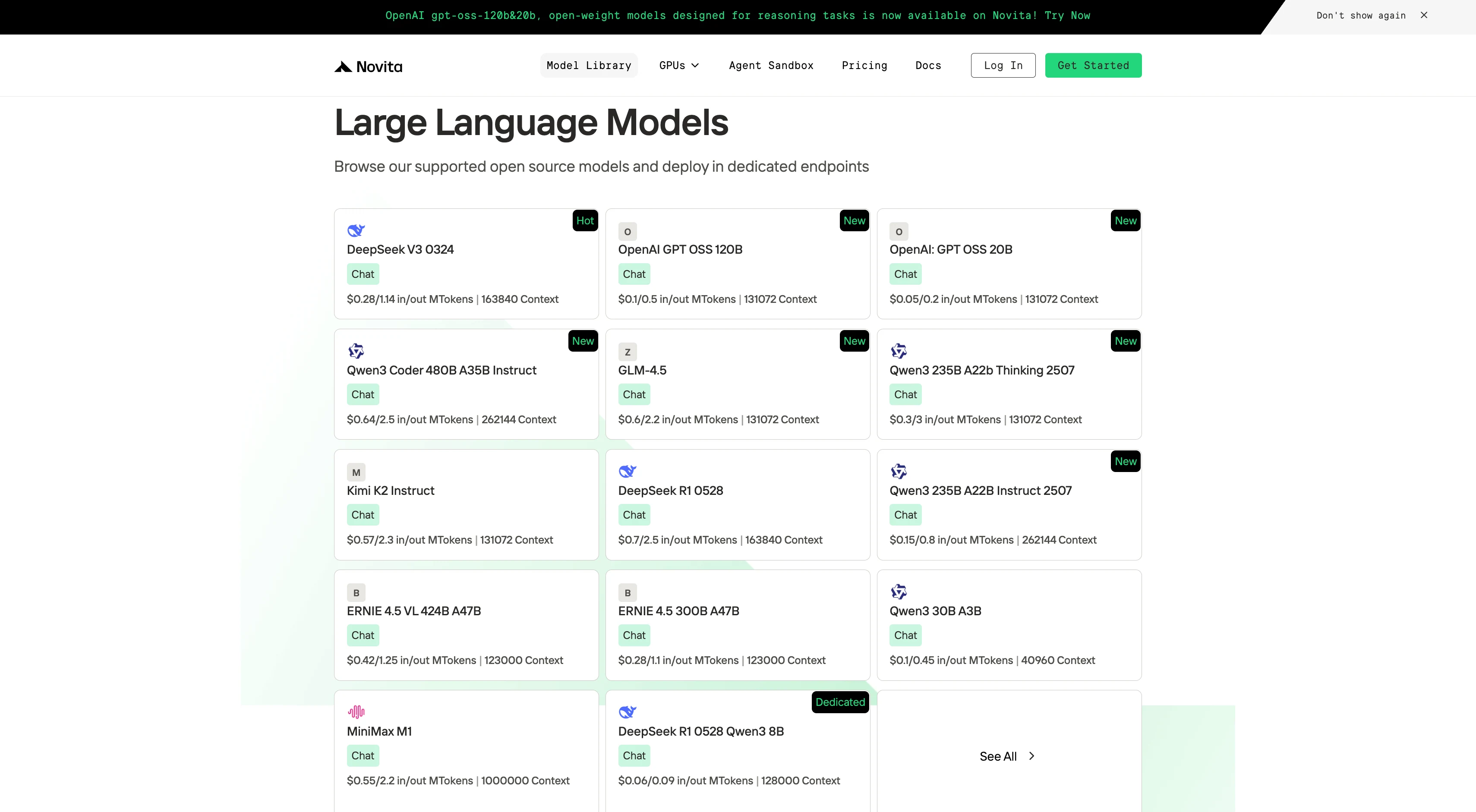
Novita AI provides GPT-OSS 120B
APIs with 131K context and costs of $0.1/input and $0.5/output. Novita AI also provides GPT-OSS 20B with 131 context and costs of $0.05/input and $0.2/output ,delivering strong support for maximizing GPT OSS’s code agent potential.Novita AI
Step 1: Log In and Access the Model Library
Log in to your account and click on the Model Library button.

Step 2: Choose Your Model
Browse through the available options and select the model that suits your needs.
Step 3: Start Your Free Trial
Begin your free trial to explore the capabilities of the selected model.
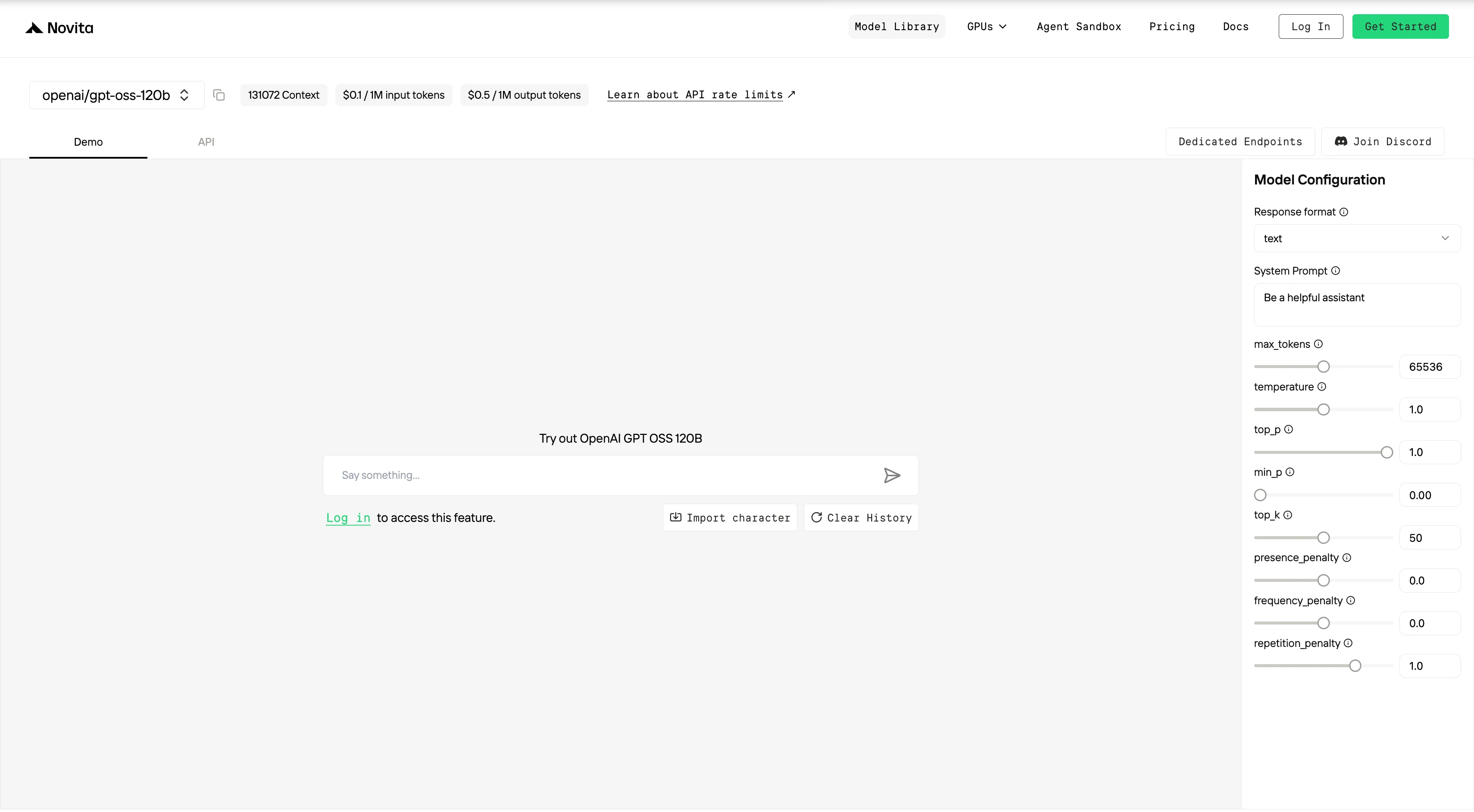
Step 4: Get Your API Key
To authenticate with the API, we will provide you with a new API key. Entering the “Settings“ page, you can copy the API key as indicated in the image.

Step 5: Install the API
Install API using the package manager specific to your programming language.
After installation, import the necessary libraries into your development environment. Initialize the API with your API key to start interacting with Novita AI LLM. This is an example of using chat completions API for python users.
from openai import OpenAI

client = OpenAI(
    base_url="https://api.novita.ai/v3/openai",
    api_key="",
)

model = "openai/gpt-oss-120b"
stream = True # or False
max_tokens = 65536
system_content = ""Be a helpful assistant""
temperature = 1
top_p = 1
min_p = 0
top_k = 50
presence_penalty = 0
frequency_penalty = 0
repetition_penalty = 1
response_format = { "type": "text" }

chat_completion_res = client.chat.completions.create(
    model=model,
    messages=[
        {
            "role": "system",
            "content": system_content,
        },
        {
            "role": "user",
            "content": "Hi there!",
        }
    ],
    stream=stream,
    max_tokens=max_tokens,
    temperature=temperature,
    top_p=top_p,
    presence_penalty=presence_penalty,
    frequency_penalty=frequency_penalty,
    response_format=response_format,
    extra_body={
      "top_k": top_k,
      "repetition_penalty": repetition_penalty,
      "min_p": min_p
    }
  )

if stream:
    for chunk in chat_completion_res:
        print(chunk.choices[0].delta.content or "", end="")
else:
    print(chat_completion_res.choices[0].message.content)
Use GPT‑OSS in TRAE
Step 1: Open Trae and Access Models
Launch the Trae app. Click the Toggle AI Side Bar in the top-right corner to open the AI Side Bar. Then, go to AI Management and select Models.
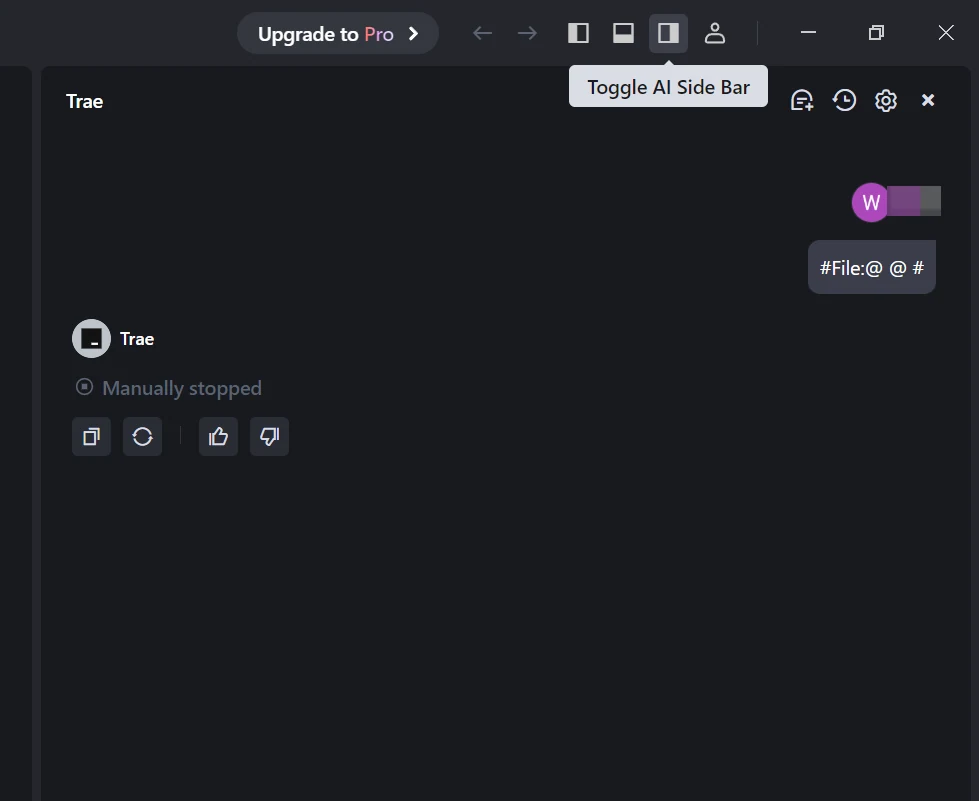
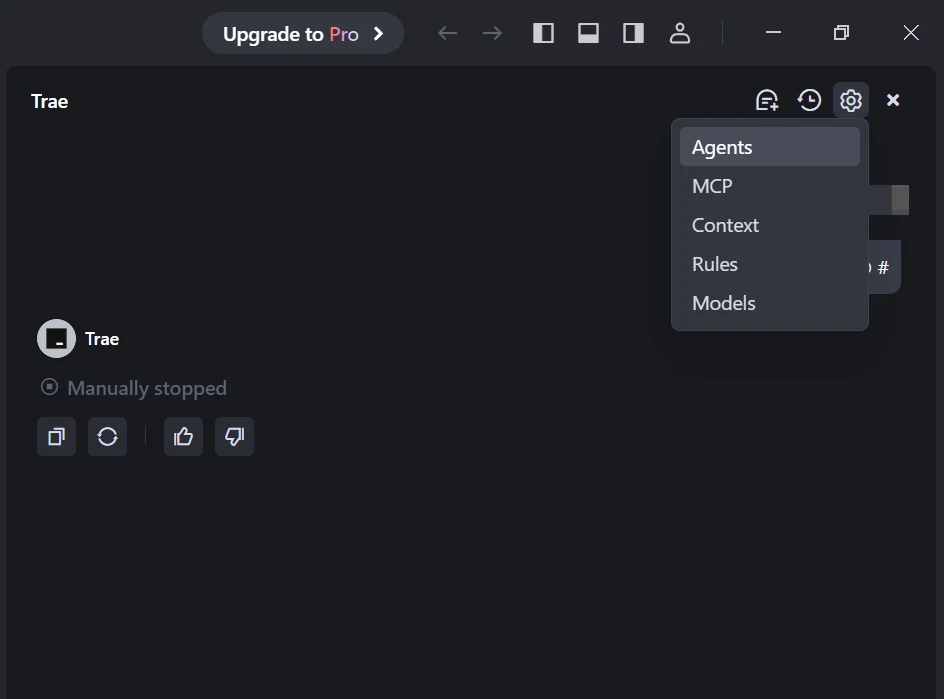
Step 2: Add a Custom Model and Choose Novita as Provider and Select Models
Click the Add Model button to create a custom model entry. In the add-model dialog, select Provider = Novita from the dropdown menu.
From the Model dropdown, pick your desired model (DeepSeek-R1-0528, Kimi K2, GLM 4.5, DeepSeek-V3-0324, or MiniMax-M1-80k). If the exact model isn’t listed, simply type the model ID that you noted from the Novita library. Ensure you choose the correct variant of the model you want to use.
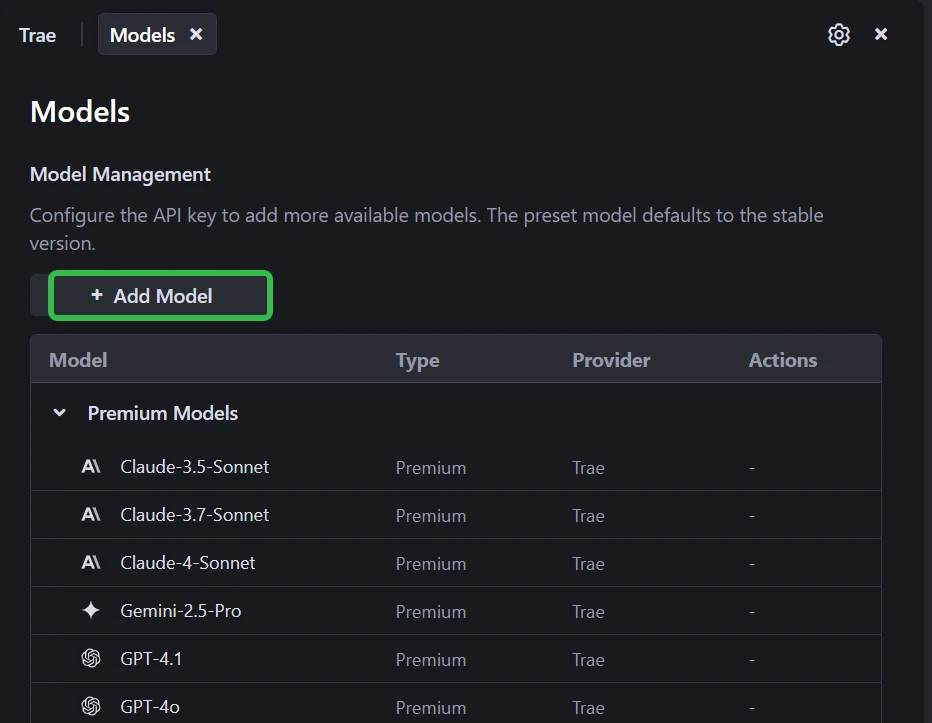
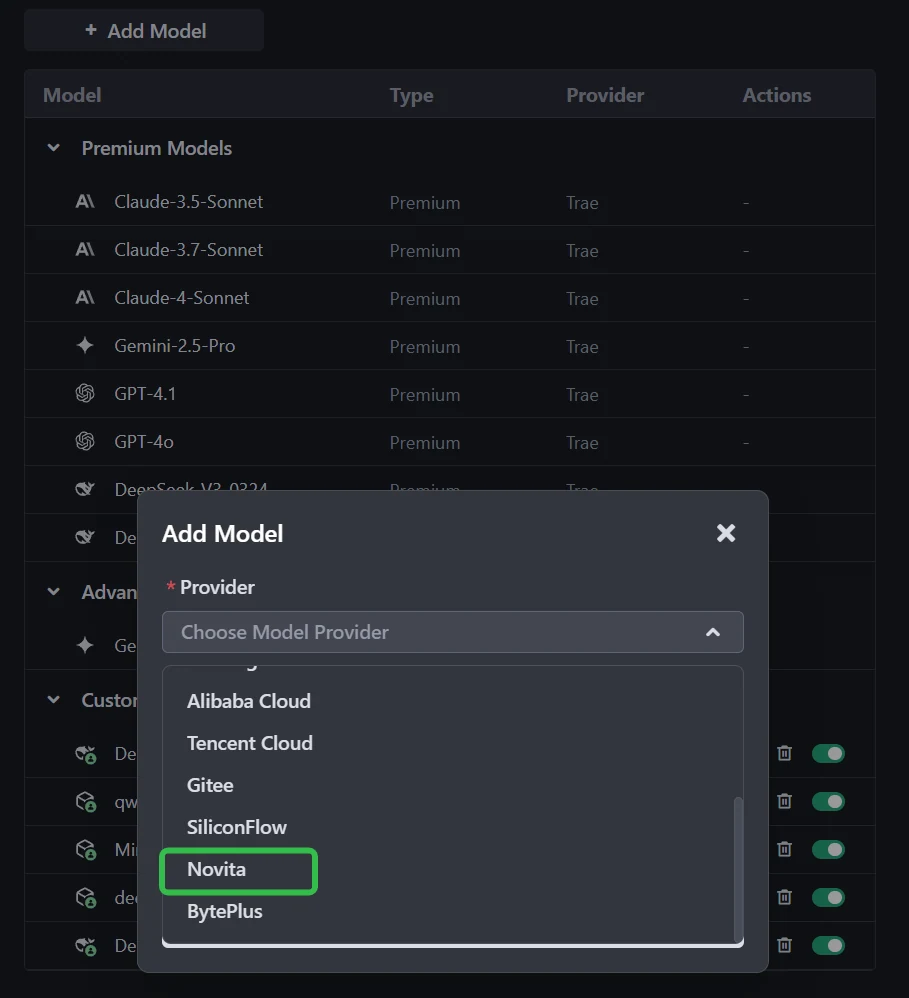
Step 3: Enter Your API Key
Copy the Novita AI API key from your Novita console and paste it into the API Key field in Trae.
LImitation of GPT OSS
| Feature | GPT-OSS (Self-Hosted Model) | GPT-5 API (Managed Platform) |
|---|---|---|
| Core Offering | A raw model (the “engine”) | A complete, integrated platform (the “car”) |
| Model Capability | Strong, but a generation behind | State-of-the-art, flagship reasoning |
| Built-in Tools | None. Requires massive DIY effort. | Fully Managed: Web Search, File Search, Code Interpreter. |
| Context Window | Practically limited by your hardware (e.g., 8k-32k) | Massive (400k), fully managed. |
| Agent Framework | DIY with open-source libraries. No observability. | Integrated SDK with built-in observability. |
| Enterprise Features | None. No compliance, SSO, or admin controls. | Full Suite: SOC 2, HIPAA, RBAC, SSO, etc. |
| Support | Community-based and self-service. | Dedicated account team and prioritized support. |
| Maintenance | Your full responsibility. Setup, scaling, uptime. | Zero. Handled entirely by OpenAI. |
Integrating GPT‑OSS with TRAE brings the best of both worlds:
- GPT‑OSS is the “brain,” controlled through the Harmony format to adjust reasoning depth, structure outputs, and hide or show thought processes.
- TRAE is the “body,” offering an integrated workspace, tool connections, and autonomous software lifecycle management—especially in SOLO Mode.
- Novita AI bridges the gap, hosting GPT‑OSS for you so you can use it via API without expensive hardware.
This combination lets developers build a custom “AI Engineer” that understands their requirements and executes them exactly as intended, making truly autonomous software delivery possible.
Frequently Asked Questions
Why use GPT‑OSS with TRAE instead of a closed‑source API model?
You get full control. Harmony format lets TRAE control reasoning depth, output format, and whether the thought process is shown. You can also fine‑tune GPT‑OSS on your own code for a perfect fit.
Do I need to host GPT‑OSS myself?
No. Services like Novita AI host it for you and give you an API key, so you don’t need expensive GPUs or complex setup.
What is the Harmony format and why is it important?
It’s a special message format GPT‑OSS understands. It makes outputs stable, structured, and easy for TRAE to process—no fragile parsing needed.
Novita AI is the All-in-one cloud platform that empowers your AI ambitions. Integrated APIs, serverless, GPU Instance — the cost-effective tools you need. Eliminate infrastructure, start free, and make your AI vision a reality.
Recommend Reading
Qwen 3 in RAG Pipelines: All-in-One LLM, Embedding, and Reranking Models
Trae or Claude Code: Which Is More Suitable to Use with Kimi K2?