Choosing the right development tool is key to getting the most out of powerful AI like Kimi K2. Trae and Claude Code are two popular options, each offering unique ways to connect with and use Kimi K2 in your projects. This guide will help you understand their strengths, so you can decide which is the better fit for your needs.
Does Kimi K2 Really Change the Future of AI Agents?
Parameters: 32 billion active, 1 trillion total Architecture: Open Mixture of Experts (MoE)
Variants:
- Foundation model (for research, fine-tuning, and customization)
- Post-trained chat model (fast, general-purpose responses)
Languages: Excels in Chinese and English
Disk Space: 1.09 TB for full model
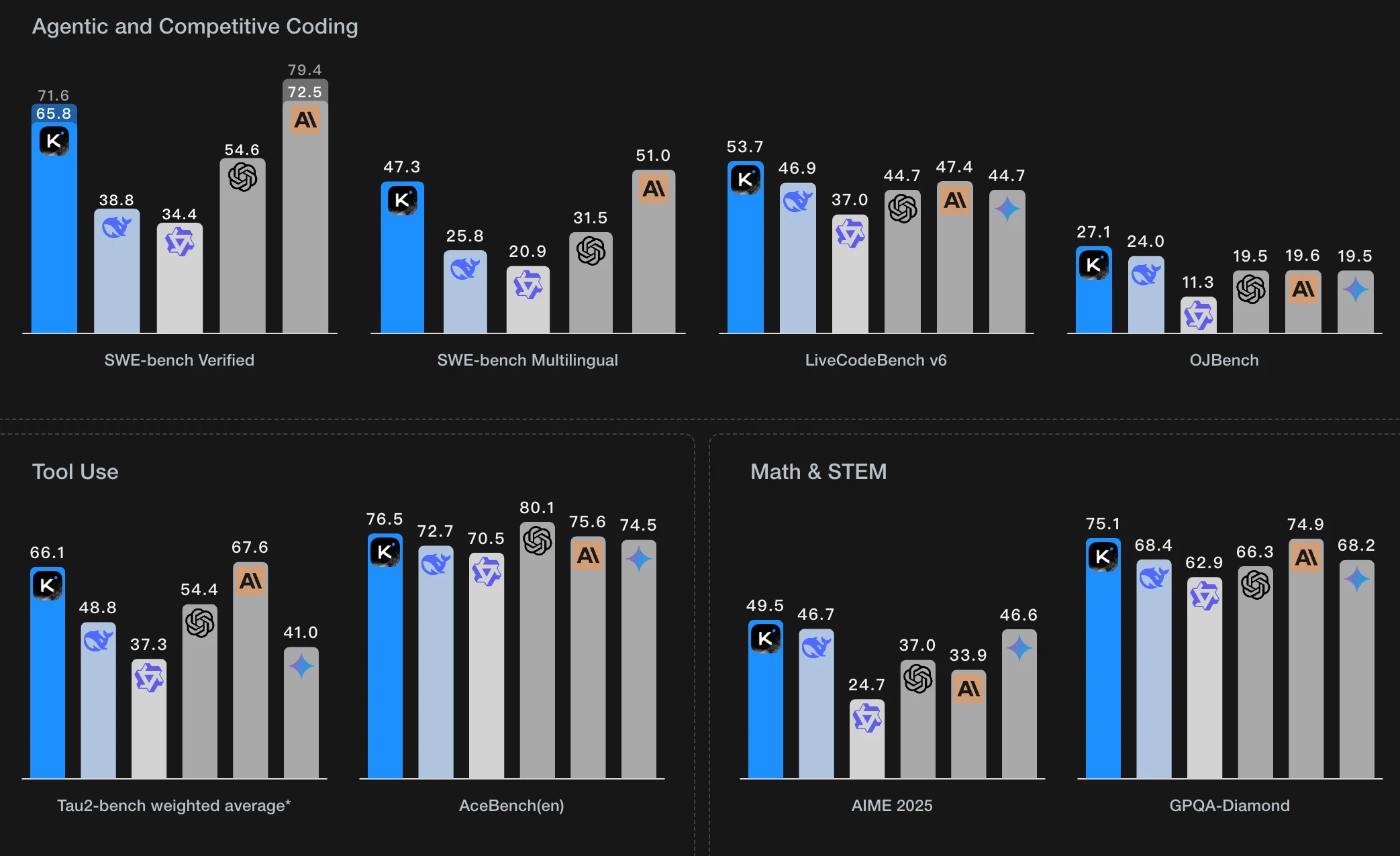
STEM: Top performance in math and science benchmarks—best in class
Coding & Tools: Excellent at coding and using tools; almost matches Claude models
General Knowledge: Solid, but not quite as strong as leading models like Claude Opus 4 or GPT-4.1
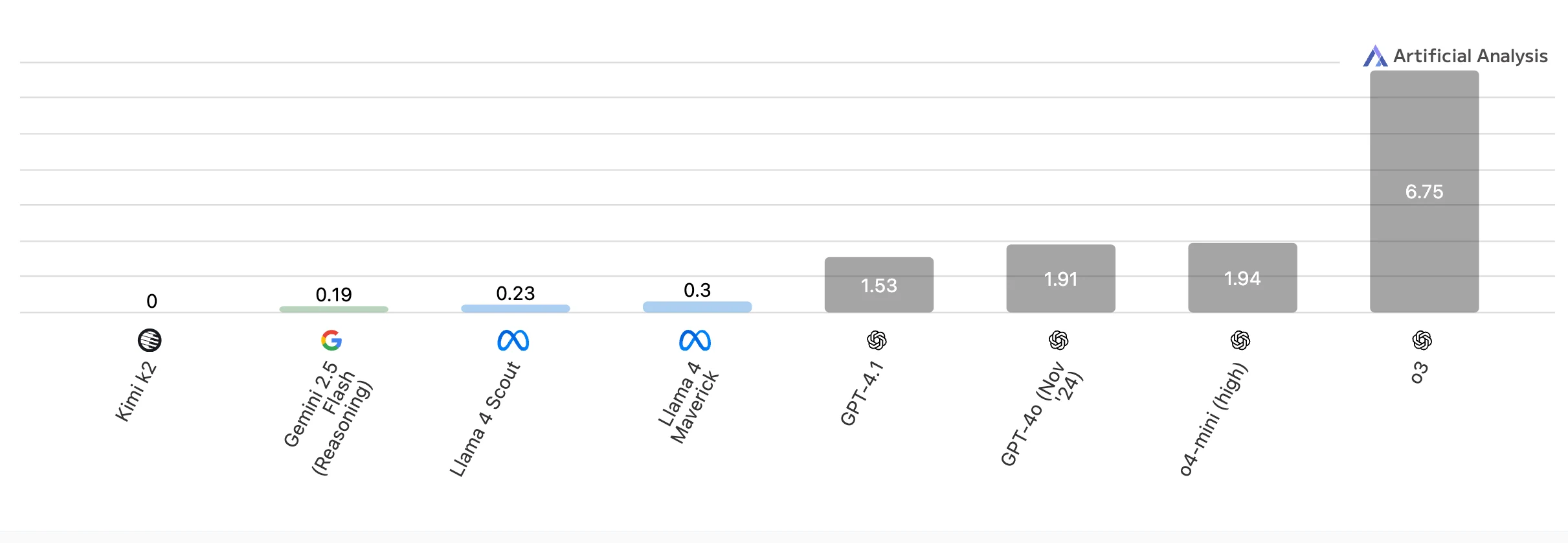
Kimi K2 is a powerhouse in STEM, coding, and tool use, but less dominant in general knowledge. But the price is the lowest among all compatible models!
Why Kimi K2 Works Best with Claude Code or Trae?
- Seamless Integration:
These environments are designed to work natively with AI models, ensuring smooth communication and efficient workflow. - Advanced Coding Interfaces:
They offer powerful coding tools, syntax highlighting, version control, and debugging, which help users fully leverage Kimi K2’s coding abilities. - Tool Orchestration:
Native platforms enable Kimi K2 to interact with a wide range of software tools and APIs, maximizing its agentic and tool-use capabilities. - Enhanced Workflow Management:
These environments provide project management, collaboration, and automation features that streamline development and deployment. - Real-time Feedback:
Users can get immediate results and suggestions, making it easier to iterate and improve code or solutions quickly. - Maximized Performance:
By combining Kimi K2’s strengths with the specialized features of Claude Code or Trae, users can achieve higher productivity and better outcomes, especially in complex or large-scale projects.
Claude Code vs Trae
What is Claude Code?
Claude Code is an agentic command line tool that revolutionizes developer interaction with AI for coding. Unlike traditional code editors, Claude Code offers advanced agent abilities—surpassing Cursor. Developers can delegate complex coding tasks directly from their terminal using natural language.
What is Trae?
Trae is a cross-platform (macOS and Windows) integrated development environment built on Visual Studio Code technology. It combines a modern code editor with seamless AI integration to help developers write better code faster.
General
| Feature | Claude Code (Anthropic) | Trae (ByteDance) |
|---|---|---|
| Name | Claude Code | Trae |
| Company | Anthropic | ByteDance |
| Website | https://www.anthropic.com/claude-code | https://www.trae.ai/ |
Platforms Supported
| Feature | Claude Code (Anthropic) | Trae (ByteDance) |
|---|---|---|
| Windows | ✅ | ❌ |
| Mac | ✅ | ✅ |
| Linux | ✅ | ❌ |
| Cloud | ✅ | ❌ |
| On-Premises | ❌ | ❌ |
| iPhone | ❌ | ❌ |
| iPad | ❌ | ❌ |
| Android | ✅ | ❌ |
| Chromebook | ✅ | ❌ |
Training
| Feature | Claude Code (Anthropic) | Trae (ByteDance) |
|---|---|---|
| Documentation | ✅ | ✅ |
| Webinars | ❌ | ❌ |
| Live Online | ❌ | ❌ |
| In Person | ❌ | ❌ |
Support
| Feature | Claude Code (Anthropic) | Trae (ByteDance) |
|---|---|---|
| Phone Support | ❌ | ✅ |
| 24/7 Live Support | ❌ | ✅ |
| Online Support | ✅ | ✅ |
API
| Feature | Claude Code (Anthropic) | Trae (ByteDance) |
|---|---|---|
| Offers API | Only Anthropic API | OpenAI, Anthropic,etc. |
MCP
| Feature | Claude Code (Anthropic) | Trae (ByteDance) |
|---|---|---|
| MCP Integration | Requires manual setup by finding and integrating code from various MCPs (Model Control Points) | Can be added directly from the marketplace with suitable MCP Server options |
How to Use Kimi K2 with Claude Code and Trae?
Novita AI is a cloud platform that provides API access to a wide range of open-source AI models, including large language models (LLMs) like LLaMA, DeepSeek, Mistral, Qwen, and more. With Novita AI, you can sign up for an account, generate an API key, and choose from dozens of hosted models to integrate into your tools.
Novita AI integrates the Anthropic API to use kimi k2 in Claude Code and Trae,surpassing many industry providers.
It also provides APIs with 131K context, 131K max output, 2.01s latency, 11.06 TPS throughput, and costs of $0.57/input and $2.30/output, delivering strong support for maximizing Kimi K2’s code agent potential.
Prerequisites-Get Novita AI API Key
Step 1: Log in to your account and click on the Model Library button.

Step 2: Choose Your Model
Browse through the available options and select the model that suits your needs.
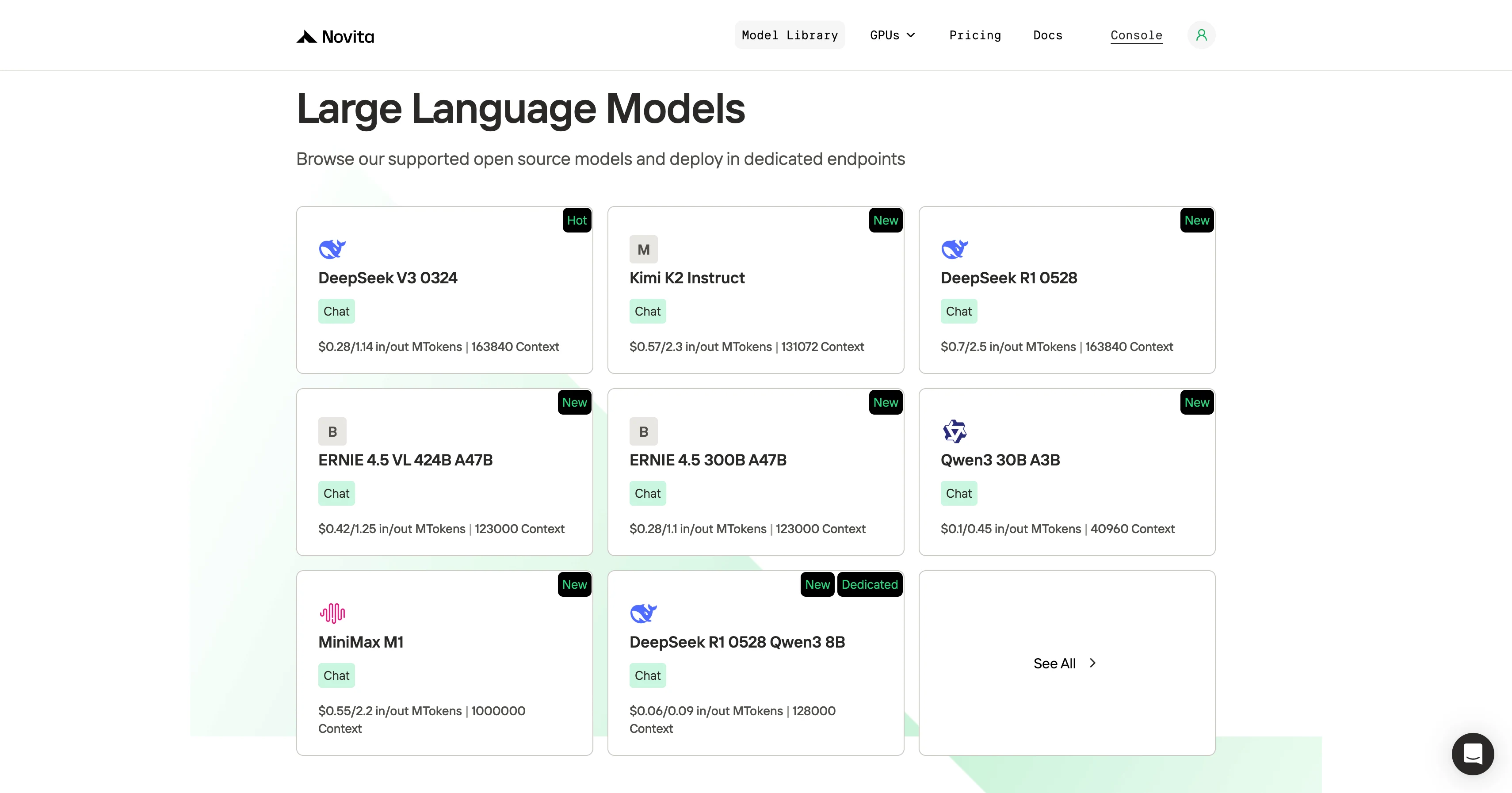
Step 3: Start Your Free Trial
Begin your free trial to explore the capabilities of the selected model.
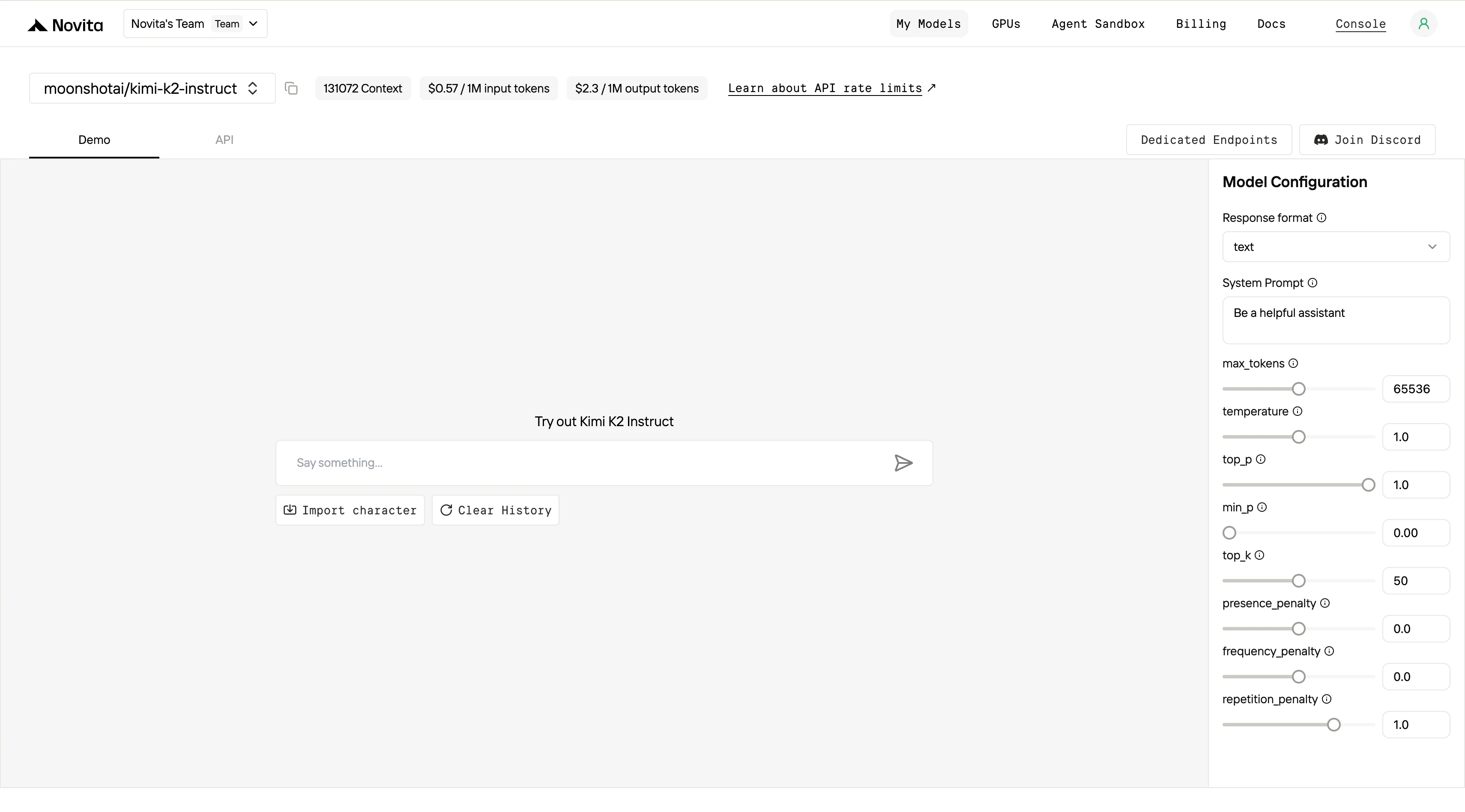
Step 4: Get Your API Key
To authenticate with the API, we will provide you with a new API key. Entering the “Settings“ page, you can copy the API key as indicated in the image.

Step 5: Install the API
Install API using the package manager specific to your programming language.
After installation, import the necessary libraries into your development environment. Initialize the API with your API key to start interacting with Novita AI LLM. This is an example of using chat completions API for python users.
from openai import OpenAI

client = OpenAI(
    base_url="https://api.novita.ai/v3/openai",
    api_key="<YOUR Novita AI API Key>",
)

model = "moonshotai/kimi-k2-instruct"
stream = True # or False
max_tokens = 65536
system_content = ""Be a helpful assistant""
temperature = 1
top_p = 1
min_p = 0
top_k = 50
presence_penalty = 0
frequency_penalty = 0
repetition_penalty = 1
response_format = { "type": "text" }

chat_completion_res = client.chat.completions.create(
    model=model,
    messages=[
        {
            "role": "system",
            "content": system_content,
        },
        {
            "role": "user",
            "content": "Hi there!",
        }
    ],
    stream=stream,
    max_tokens=max_tokens,
    temperature=temperature,
    top_p=top_p,
    presence_penalty=presence_penalty,
    frequency_penalty=frequency_penalty,
    response_format=response_format,
    extra_body={
      "top_k": top_k,
      "repetition_penalty": repetition_penalty,
      "min_p": min_p
    }
  )

if stream:
    for chunk in chat_completion_res:
        print(chunk.choices[0].delta.content or "", end="")
else:
    print(chat_completion_res.choices[0].message.content)
Claude Code Guide
Step 1: Installing Claude Code
Before installing Claude Code, ensure your system meets the minimum requirements. Node.js 18 or higher must be installed on your local environment. You can verify your Node.js version by running node --version in your terminal.
For Windows
Open Command Prompt and execute the following commands:
npm install -g @anthropic-ai/claude-code
npx win-claude-code@latest
The global installation ensures Claude Code is accessible from any directory on your system. The npx win-claude-code@latest command downloads and runs the latest Windows-specific version.
For Mac and Linux
Open Terminal and run:
npm install -g @anthropic-ai/claude-codeMac users can proceed directly with the global installation without requiring additional platform-specific commands. The installation process automatically configures the necessary dependencies and PATH variables.
Step 2 :Setting Up Environment Variables
Environment variables configure Claude Code to use Kimi-K2 through Novita AI’s API endpoints. These variables tell Claude Code where to send requests and how to authenticate.
For Windows
Open Command Prompt and set the following environment variables:
set ANTHROPIC_BASE_URL=https://api.novita.ai/anthropic
set ANTHROPIC_AUTH_TOKEN=<Novita API Key>
set ANTHROPIC_MODEL=moonshotai/kimi-k2-instruct
set ANTHROPIC_SMALL_FAST_MODEL=moonshotai/kimi-k2-instruct
Replace <Novita API Key> with your actual API key obtained from the Novita AI platform. These variables remain active for the current session and must be reset if you close the Command Prompt.
For Mac and Linux
Open Terminal and export the following environment variables:
export ANTHROPIC_BASE_URL="https://api.novita.ai/anthropic"
export ANTHROPIC_AUTH_TOKEN="<Novita API Key>"
export ANTHROPIC_MODEL="moonshotai/kimi-k2-instruct"
export ANTHROPIC_SMALL_FAST_MODEL="moonshotai/kimi-k2-instruct"
Step 3: Starting Claude Code
With installation and configuration complete, you can now start Claude Code in your project directory. Navigate to your desired project location using the cd command:
cd <your-project-directory>
claude .
The dot (.) parameter instructs Claude Code to operate in the current directory. Upon startup, you’ll see the Claude Code prompt appear in an interactive session.
This indicates the tool is ready to receive your instructions. The interface provides a clean, intuitive environment for natural language programming interactions.
Step 4: Using Claude Code in VSCode or Cursor
Claude Code integrates seamlessly with popular development environments. It enhances your existing workflow rather than replacing it.
You can use Claude Code directly in the terminal within VSCode or Cursor. This maintains access to your familiar development tools while leveraging AI assistance.
Additionally, Claude Code plugins are available for both VSCode and Cursor. These plugins provide deeper integration with these editors, offering inline AI assistance, code suggestions, and project management features directly within your IDE interface.
Trae Guide
Step 1: Open Trae and Access Models
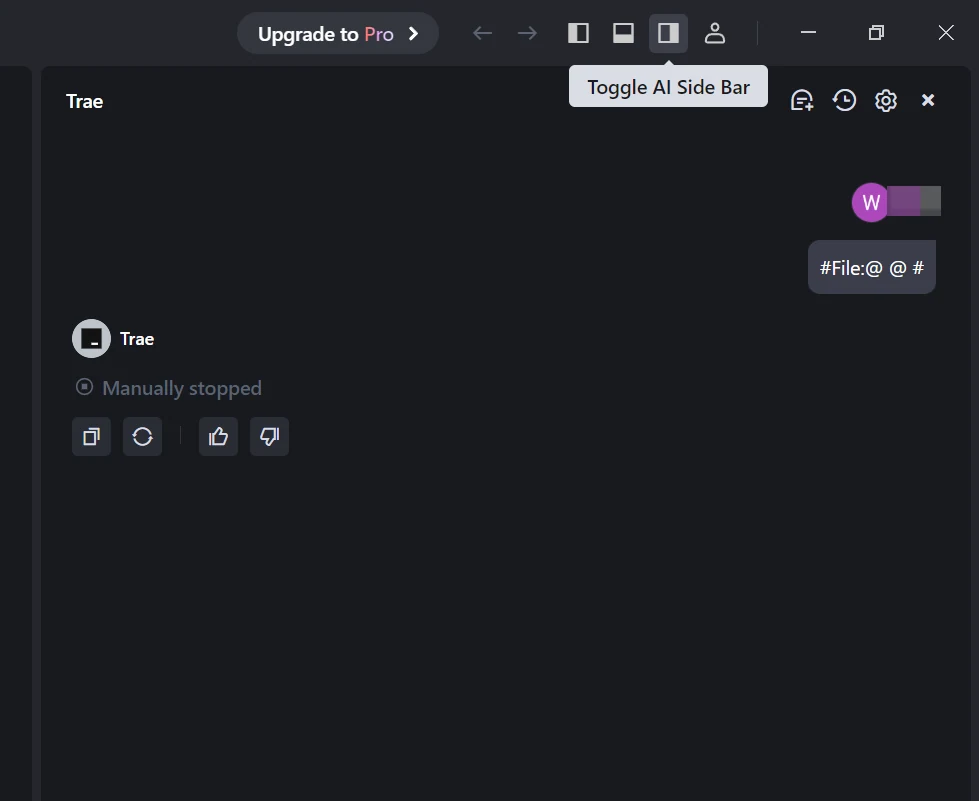
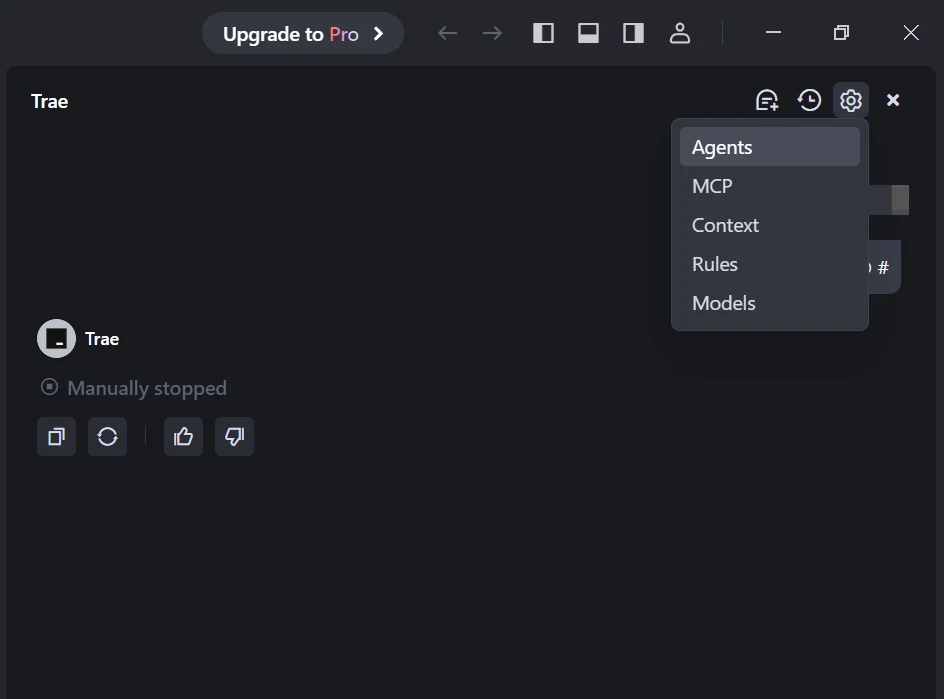
Launch the Trae app. Click the Toggle AI Side Bar in the top-right corner to open the AI Side Bar. Then, go to AI Management and select Models.
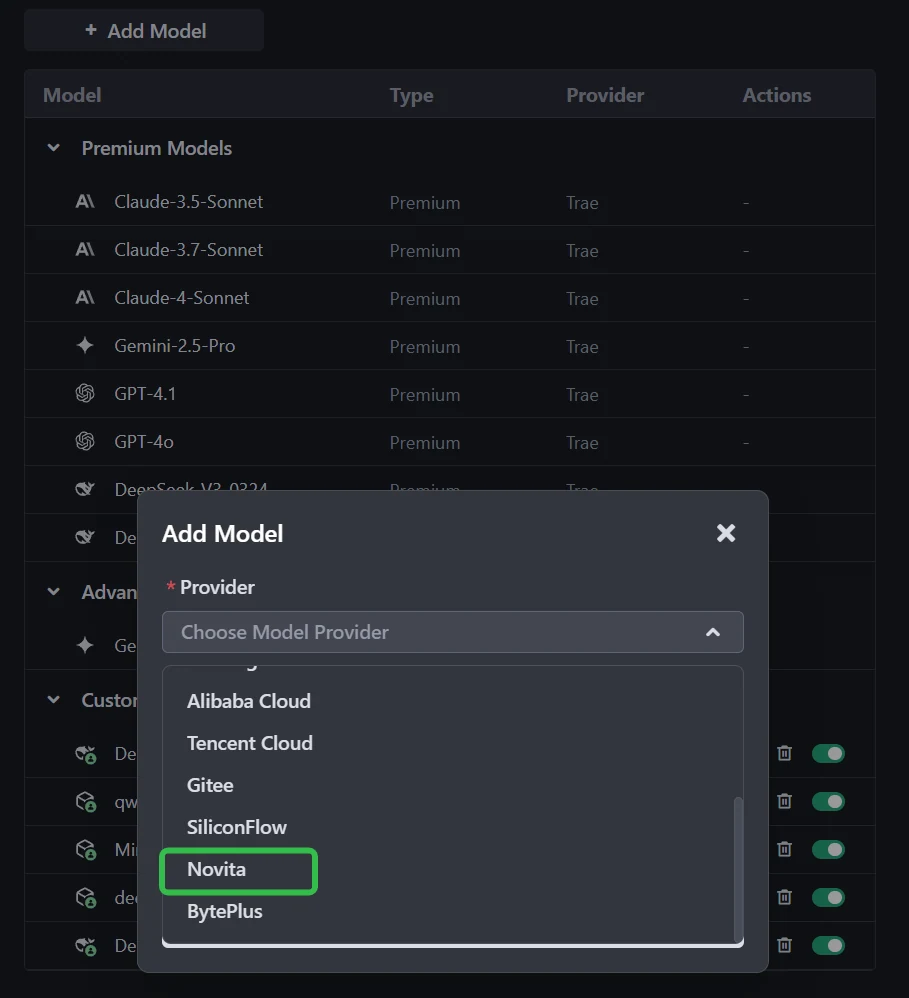
Step 2: Add a Custom Model and Choose Novita as Provider
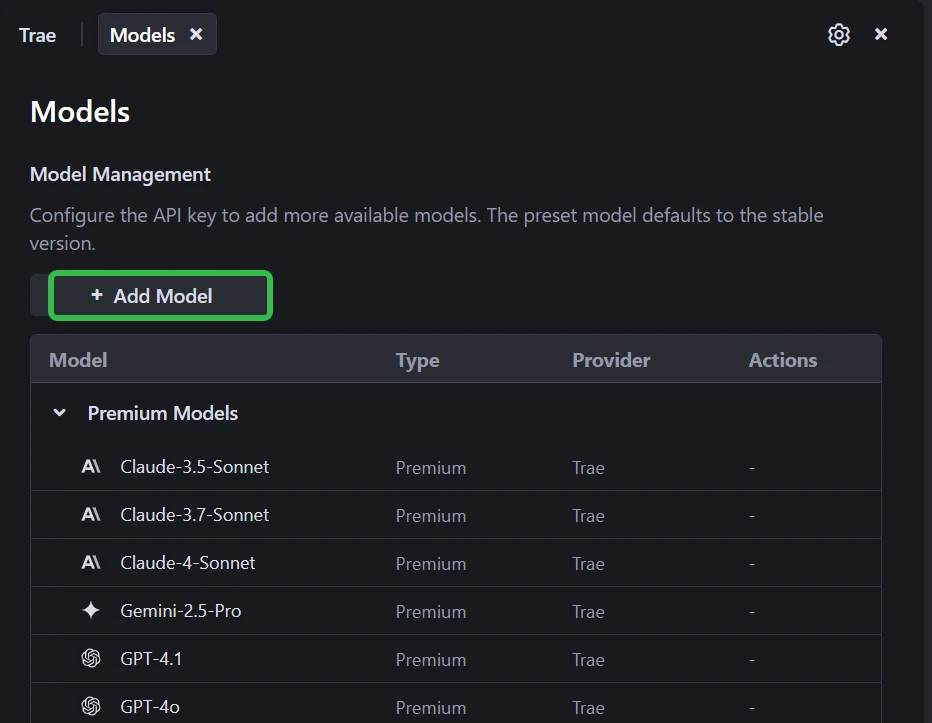
Click the Add Model button to create a custom model entry. In the add-model dialog, select Provider = Novita from the dropdown menu.
Step 3: Select or Enter the Model
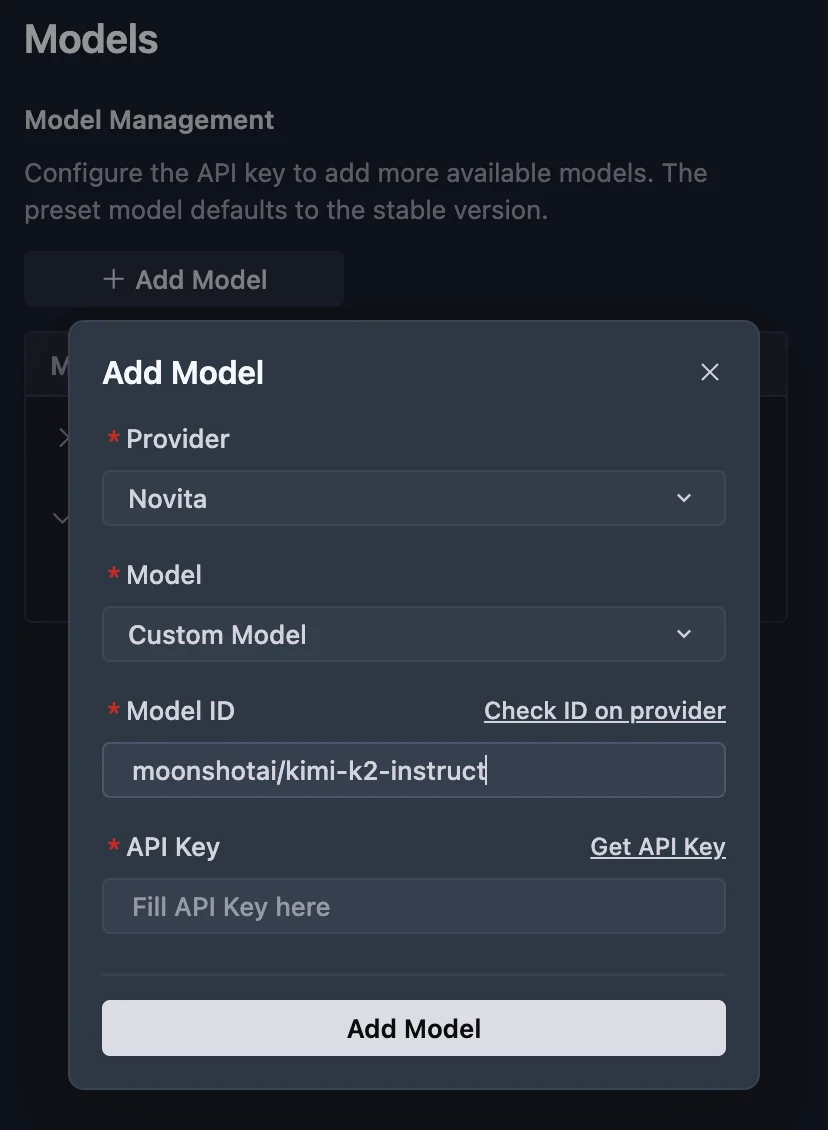
From the Model dropdown, pick your desired model (DeepSeek-R1-0528, Kimi K2 DeepSeek-V3-0324, or MiniMax-M1-80k). If the exact model isn’t listed, simply type the model ID that you noted from the Novita library. Ensure you choose the correct variant of the model you want to use.
Step 4: Enter Your API Key
Copy the Novita AI API key from your Novita console and paste it into the API Key field in Trae.
Step 5: Save the Configuration
Click Add Model to save. Trae will validate the API key and model selection in the background.
Both Trae and Claude Code make it easy to integrate Kimi K2 into your development workflow. If you prefer a modern, flexible IDE with support for multiple AI providers, Trae is a great choice—especially if you value a familiar interface and easy model switching. If you want deep command-line automation, advanced agent features, and seamless codebase understanding, Claude Code will serve you well. Consider your workflow, platform, and how you want to interact with Kimi K2 before making your choice.
Frequently Asked Questions
Which tool is easier for beginners? Trae or Claude Code?
Trae offers a familiar interface similar to VS Code, which most developers find easy to learn. Claude Code is more command-line focused, which may appeal to experienced users.
Can I switch between Trae and Claude Code after starting my project?
Yes. Novita AI Kimi K2 API key works on both platforms, so you can try each and choose the one that fits your workflow best.
Is there a difference in performance when using Kimi K2 on Trae vs. Claude Code?
Performance mainly depends on Kimi K2’s API and your internet connection. Both Trae and Claude Code offer efficient integration.
Novita AI is the All-in-one cloud platform that empowers your AI ambitions. Integrated APIs, serverless, GPU Instance — the cost-effective tools you need. Eliminate infrastructure, start free, and make your AI vision a reality.
Recommend Reading
Llama 3.2 3B vs DeepSeek V3: Comparing Efficiency and Performance.



