The NVIDIA H100 and H200 GPUs are pivotal for accelerating AI and high-performance computing (HPC) workloads. Released in 2022, the H100 set a benchmark with its Hopper architecture, while the H200 (released in 2024) builds on this foundation with enhanced memory, computational power, and energy efficiency. This comparison of the H100 vs H200 explores their technical differences, performance metrics, and ideal use cases to help you choose the right GPU for your needs.
Key Features and Specifications of H100 vs H200
GPU Memory (Capacity, Type, Bandwidth)
| Feature | NVIDIA H100 | NVIDIA H200 |
|---|---|---|
| Memory Type | HBM3 | HBM3e |
| Capacity | 80 GB (SXM) | 141 GB (SXM) |
| Bandwidth | 3.35 TB/s | 4.8 TB/s |
The H200 nearly doubles the H100’s memory capacity and boosts bandwidth by 43%, significantly reducing bottlenecks in large AI models and data-intensive HPC tasks.
Computational power
NVIDIA H100 Computational Power:
- Tensor Cores: The H100 is powered by 4th-Generation Tensor Cores, which enhance AI processing for deep learning and large-scale neural networks.
- Compute Performance: Equipped with fourth-generation Tensor Cores and a Transformer Engine, providing up to 9X faster training and 30X faster inference for large language models. It supports various precisions, including FP64, TF32, FP32, FP16, INT8, and FP8.
- Use Cases: Perfect for large-scale AI training, real-time inference, data analytics, and simulation-based tasks.
NVIDIA H200 Computational Power:
- Tensor Cores: The H200 uses the 4th-Generation Tensor Cores, offering enhanced AI acceleration, particularly for large-scale models and complex machine learning tasks.
- Compute Performance: The NVIDIA H200 delivers up to 1.7X faster LLM inference performance and 1.3X better HPC performance over the H100 NVL, with improved scalability, memory, and energy efficiency, making it ideal for diverse AI and HPC workloads in enterprise data centers.
- Use Cases: The H200 is designed for next-gen AI research, autonomous systems, real-time processing of massive datasets, and large-scale AI model development.
Thermal design power
- H100: Configurable up to 700W, balancing power and performance.
- H200: Shares a 700W base TDP but supports up to 1,000W for extreme workloads, improving performance-per-watt efficiency by 50% for LLM tasks.
Applications and Use Cases of H100 and H200
The H100 and H200 are both geared towards heavy computational workloads, but depending on your industry and needs, one may suit your requirements better.
H100 Applications
- AI and Machine Learning: Perfect for training deep learning models.
- Data Science and Analytics: Useful for large-scale data processing.
- Scientific Research: Ideal for simulations and research-heavy tasks.
- Cloud Computing: Employed by cloud service providers to run AI and ML applications at scale.
H200 Applications
- Autonomous Vehicles: Required for real-time processing of massive datasets generated by sensors and cameras.
- Next-Generation AI Research: Suitable for training larger AI models with more data.
- Healthcare and Life Sciences: Used for genomics and medical imaging, which require massive compute power for real-time analysis.
- Robotics and Edge AI: Perfect for edge computing in robotics with higher computational demands.
H100 and H200 Price Comparison
Here’s a table comparing the prices of NVIDIA H100 and H200 GPUs:
| GPU Model | Retail Price Range | Server/Enterprise Bundle Price | Cloud Rental Price |
|---|---|---|---|
| NVIDIA H100 | $25,000 - $40,000 | $150,000 - $300,000 | $2.89 per hour(e.g., with Novita AI) |
| NVIDIA H200 | $30,000 - $40,000 | Can exceed $500,000 for full systems | $2 - $10 per hour |
How to Choose Between H100 and H200
When deciding between the H100 and H200, consider the following:
- Energy Efficiency: While both GPUs offer efficiency improvements over their predecessors, the H200’s advanced design also prioritizes energy consumption, which could be a significant factor in long-term operating costs, especially in large-scale deployments.
- Performance Needs: If you require superior performance for large AI models or HPC tasks, the H200 is preferable. It offers better scalability and enhanced computational power, making it ideal for the most demanding workloads.
- Budget Constraints: The H100 offers excellent performance at a lower cost, making it a more budget-friendly option for those who don’t need the maximum performance offered by the H200.
- Future Scalability: The H200’s enhanced memory and bandwidth make it more future-proof for growing AI workloads, especially when dealing with larger datasets or more complex models. If you anticipate scaling up your AI infrastructure in the near future, the H200 could be a more sustainable choice.
Choose Novita AI as Your Cloud GPU Service Provider
Novita AI offers a robust GPU cloud platform designed for AI workloads, providing scalable, high-performance computing at competitive rates. You can select from flexible On-Demand pricing for pay-as-you-go convenience or opt for Subscription plans to better manage your costs. Gain access to cutting-edge GPUs, including the RTX H100, without the need for capital investment. Our solution supports seamless model deployment and optimization, making it ideal for custom projects and resource-heavy applications, all while maintaining budget efficiency with our dual pricing models. Explore our detailed GPU pricing for more information.
Ready to kickstart your cloud GPU journey with Novita AI? Here’s how to get started:
Step1:Create an account
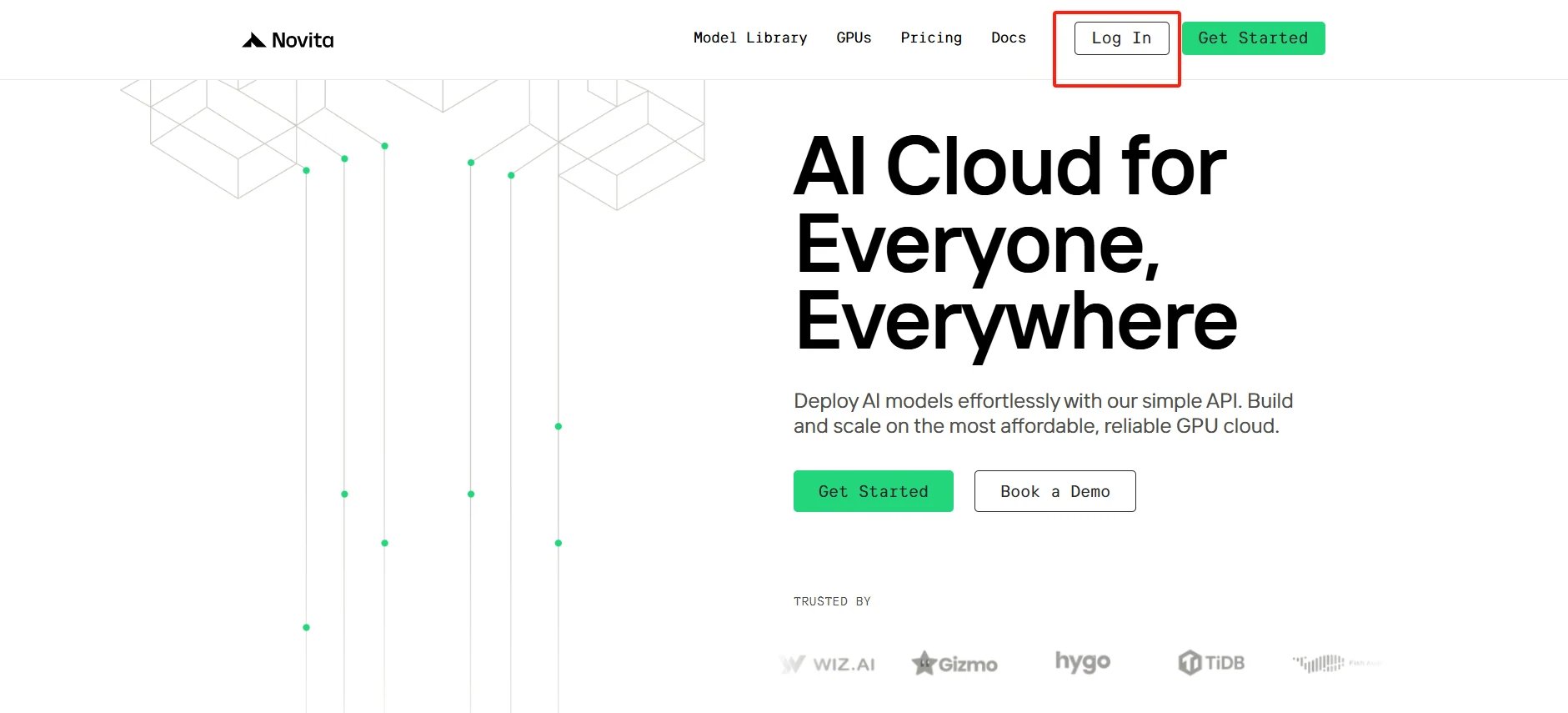
Head to the Novita AI website, sign up for an account, and explore the “GPUs” section to discover our high-performance computing solutions and start your AI projects today.
[Try using Novita AI now](https://novita.ai/?utm_source=blogs_GPU&utm_medium=article&utm_campaign=H100 vs H200: A Comprehensive Comparison for 2025)
Step2:Select Your GPU
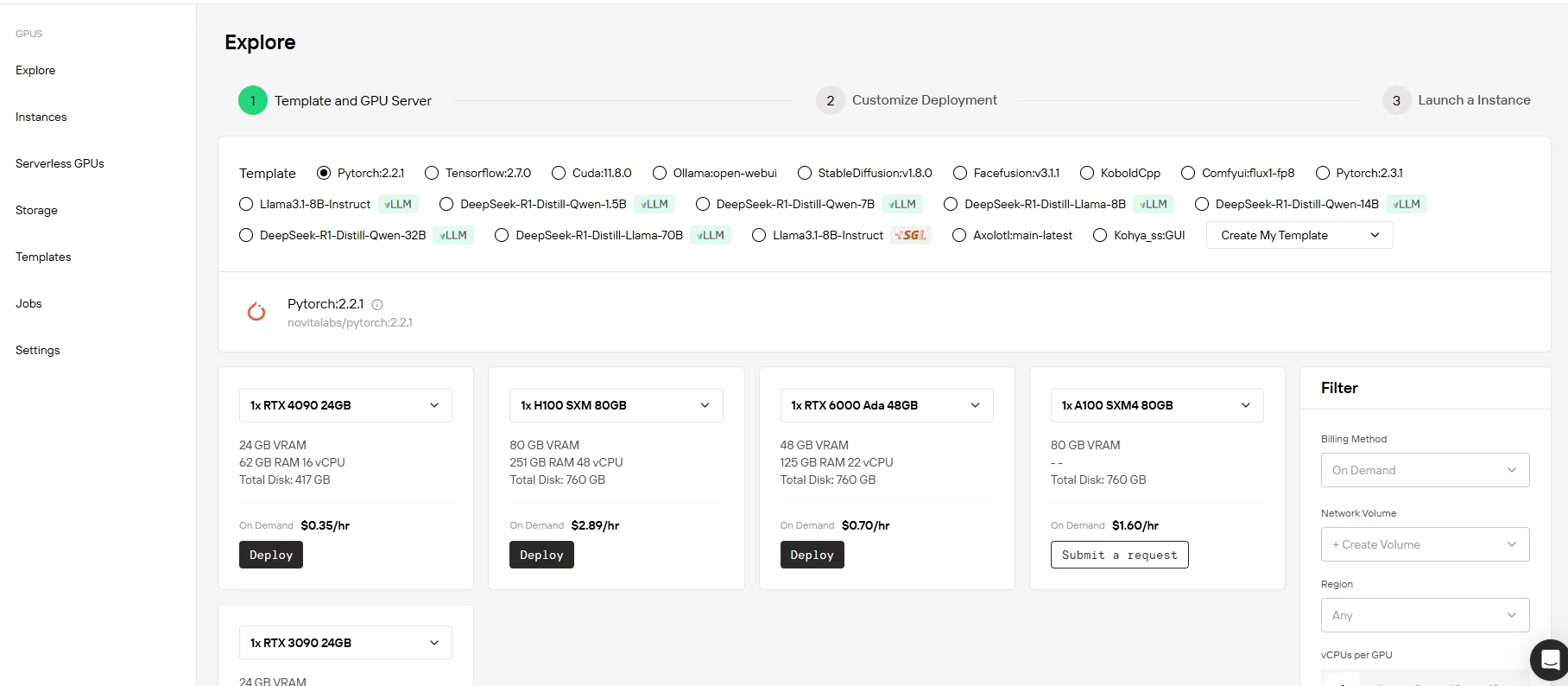
Whether you choose from our carefully curated template library or construct a customized solution, our platform has all the essential components you require. Backed by cutting - edge hardware such as NVIDIA RTX H100 GPUs, which come with abundant memory resources, we ensure outstanding performance, even when handling your most demanding AI workloads.
[Try Novita AI’s High-Performance GPUs](https://novita.ai/gpus-console/?utm_source=blogs_GPU&utm_medium=article&utm_campaign=H100 vs H200: A Comprehensive Comparison for 2025)
Step3:Customize Your Setup
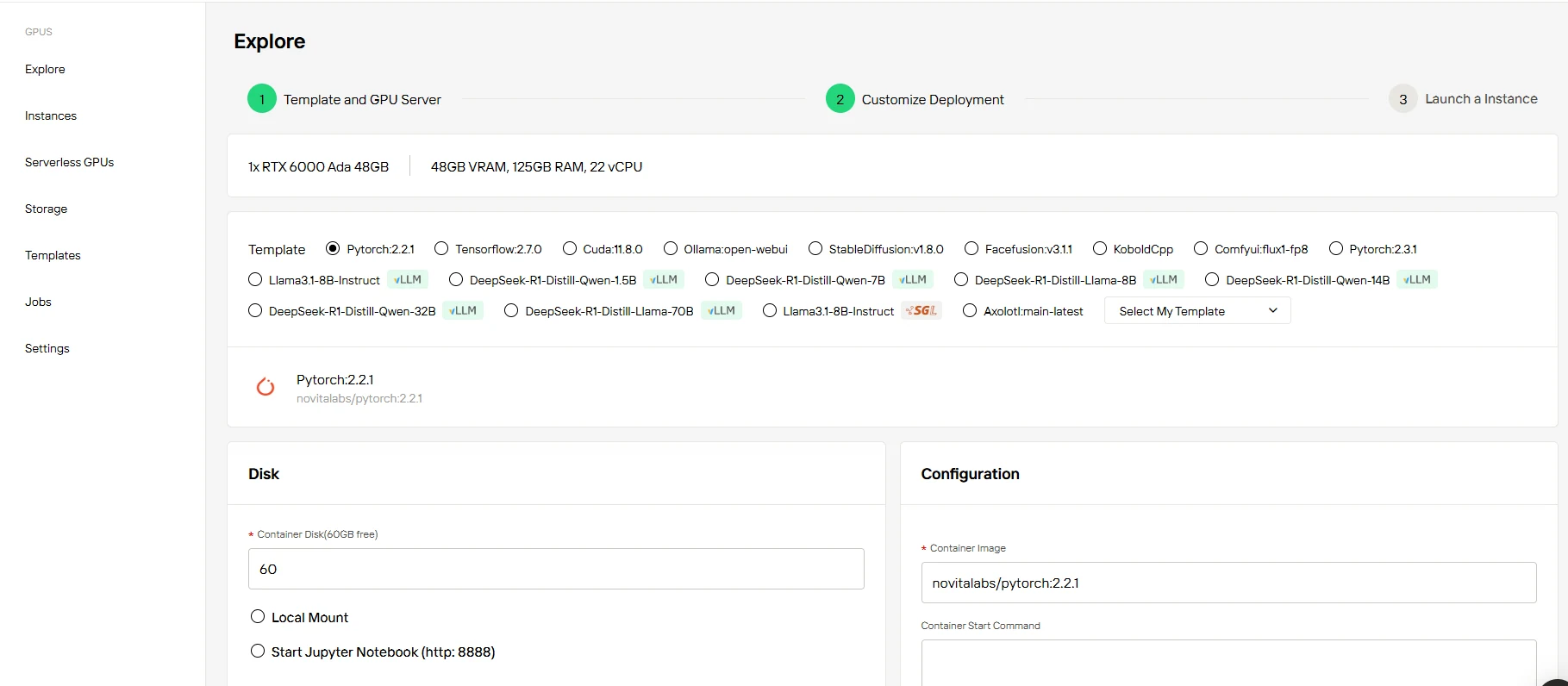
Every account comes with 60GB of free Container Disk storage. As your projects scale, you can effortlessly upgrade your storage to meet growing data demands.
Step4:Launch Your Instance
Choose the “On Demand” option, review your configuration and pricing, and then click “Deploy” to quickly launch your GPU instance.
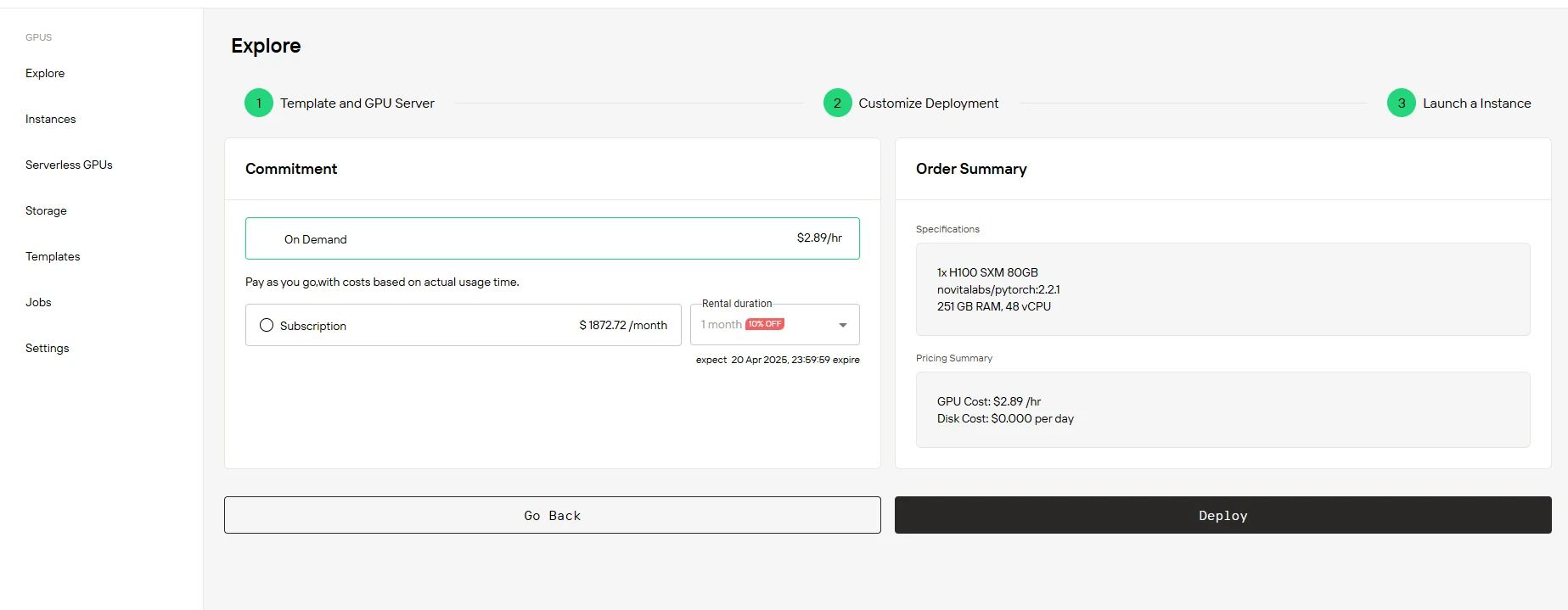
Announcing the launch of Novita GPU Instance Subscription Plans!
Key Features:
- Flexible Billing Options: Choose between pay-as-you-go or monthly subscription when creating your instance
- Enhanced Resource Guarantee: During your subscription period, your instance resources remain reserved even when powered off, significantly improving user experience
- Seamless Service Conversion: Easily convert from pay-as-you-go to subscription model, with option to renew during subscription period
- Subscription Discounts: Monthly subscriptions offer at least 10% savings compared to pay-as-you-go rates, with greater discounts for longer commitment periods
Here is our detailed pricing structure for various GPU instances. We provide both on-demand hourly rates and subscription plans with greater discounts for longer-term commitments. All plans come with dedicated resources and premium support. Choose the plan that best fits your computational needs and usage preferences.
| Option | RTX 3090 24 GB | RXT 4090 24 GB | RXT 6000 Ada 48GB | H100 SXM 80 GB |
| On Demand | $0.21/hr | $0.35/hr | $0.70/hr | $2.89/hr |
| 1-5 months | $136.00/month (10% OFF) | $226.80/month (10% OFF) | $453.60/month(10% OFF) | $1872.72/month (10% OFF) |
| 6-11 months | $129.00/month( (15% OFF) | $206.64/month (18% OFF) | $428.40/month(15% OFF) | $1664.64/month (20% OFF) |
| 12 months | $113.40/month(25% OFF) | $189.00/month (25% OFF) | $403.20/month(20% OFF) | $1498.18/month (28% OFF) |
Conclusion
Both the H100 and H200 are powerful GPUs, each offering unique advantages. The H100 is a great choice for businesses and researchers with moderate computational needs, while the H200 is ideal for cutting-edge industries requiring maximum performance, especially for large-scale AI and machine learning tasks. By understanding their differences and applications, you can make an informed decision on which GPU best suits your needs.For flexible, cost-efficient access to both GPUs, Novita AI’s cloud platform provides scalable solutions with global infrastructure and competitive pricing
Frequently Asked Questions
How do the thermal design power (TDP) values compare between the H100 and H200?
While the H100 and H200 GPUs have similar thermal requirements, the H200’s increased computational power may result in slightly higher thermal output, requiring more advanced cooling solutions, especially for high-demand workloads.
Can both GPUs handle vision AI tasks?
Yes, both GPUs are capable of handling vision AI tasks like image recognition, but the H200 offers faster processing due to its advanced architecture.
How do I choose between the H100 and H200 for my workload?
If your workload involves large-scale AI models, complex machine learning, or HPC tasks, the H200 would be the better choice due to its higher computational power and scalability. On the other hand, if you’re working with smaller models or have budget constraints, the H100 is an excellent choice that still offers top-tier performance.
[Novita AI](https://novita.ai/?utm_source=blogs_GPU&utm_medium=article&utm_campaign=H100 vs H200: A Comprehensive Comparison for 2025) is an AI cloud platform that offers developers an easy way to deploy AI models using our simple API, while also providing the affordable and reliable GPU cloud for building and scaling.
Recommended Reading
NVIDIA RTX 4090 vs. RTX 6000 Ada: Choosing the Right GPU for Your Needs
A100 vs H100: Making the Right Choice for Your AI Infrastructure



