Production coding agents often fail in one of three ways: shallow reasoning, fragile tool orchestration, or loss of context during long debugging sessions. Developers need a model that can handle multi-file refactors, terminal automation, and architecture planning without constant re-prompting or manual correction.
This article addresses that gap by explaining why GLM-5, when paired with OpenCode, performs reliably in complex engineering workflows. We examine benchmark performance, agentic workflow alignment, tool integration, context management, cost efficiency, and real-world scenarios to show how this pairing supports production-grade coding agents rather than simple code completion.
Why GLM-5 Excels at Agentic Coding
GLM-5 was purpose-built for complex engineering workflows, not casual chat. Its 753.9B total parameters (40B active per inference) focus training budget on coding agents, tool calling, and multi-turn reasoning—achieving 73.3% on SWE-bench Multilingual and 43.2% on CyberGym despite being fully open-weights.
Benchmark Performance: Coding & Agent Tasks
| Benchmark | GLM-5 | DeepSeek V3.2 | Claude Opus 4.5 |
|---|---|---|---|
| SWE-bench Verified | 77.8% | 73.1% | 80.9% |
| SWE-bench Multilingual | 73.3% | 70.2% | 77.5% |
| Terminal Bench 2.0(Claude Code) | 56.2% / 61.1% | 46.4% | 57.9% |
| CyberGym | 43.2% | 17.3% | 50.6% |
| BrowseComp (w/ Context) | 75.9% | 67.6% | 67.8% |
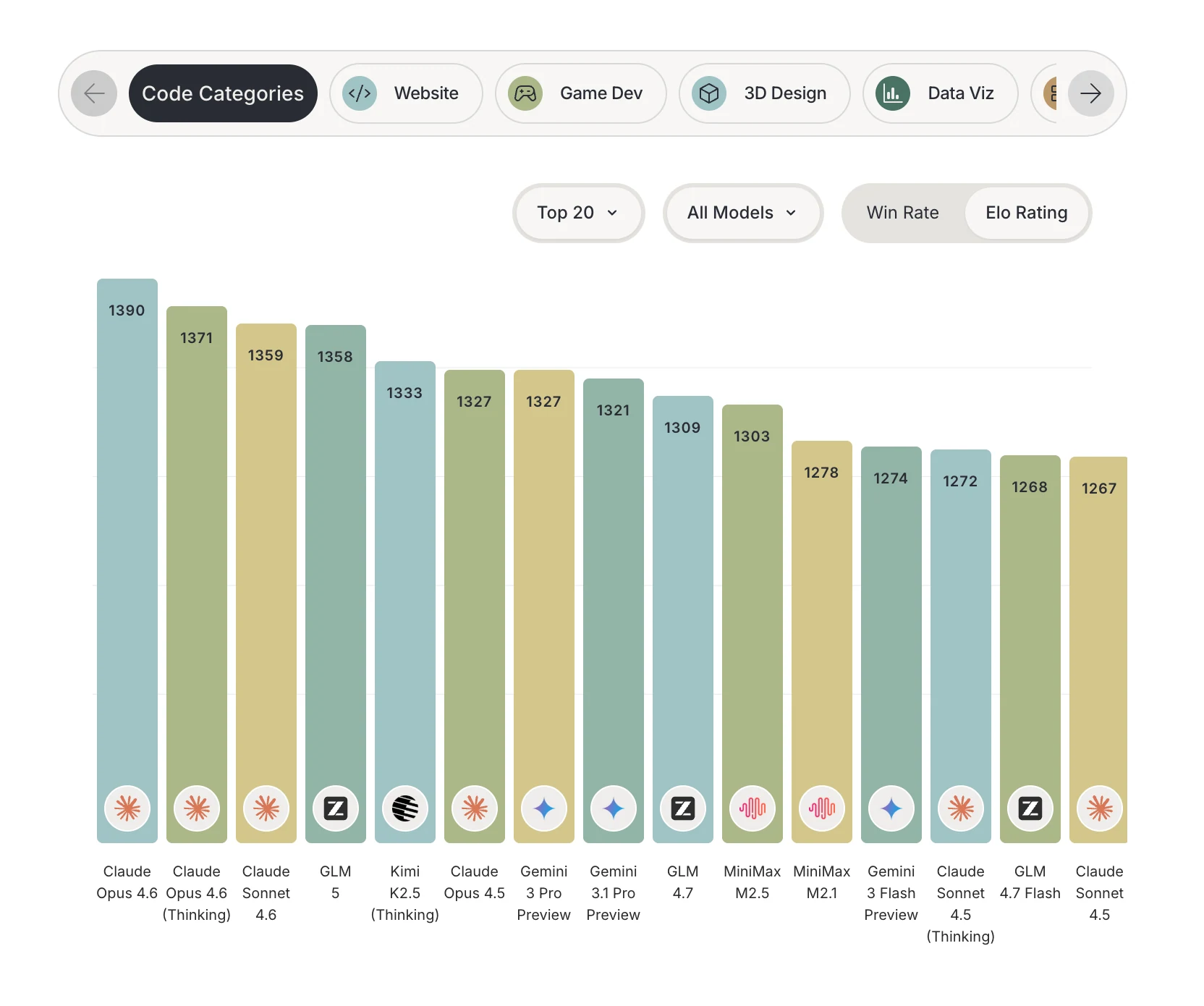
It also Shows excellent ability at design. Data from DesignArena
Why GLM-5 Works Best with OpenCode
- Native Agentic Interaction Support
GLM-5 is built to handle long-horizon, multi-step agentic workflows with strong reasoning and planning capability. Its turn-level thinking control aligns naturally with OpenCode’s plan-execute-verify development loop, enabling reasoning where it matters (architecture decisions) and minimal overhead where it doesn’t (syntax fixes). Combined with OpenCode’s ability to preserve interactive context across long sessions, this enables deep, uninterrupted coding workflows. - Rich Toolchain Integration
The tool is highly customizable with plugins and skills, making it adaptable to various workflows. Whether you’re working on backend APIs, frontend components, or data pipelines, OpenCode molds to your development style. GLM-5’s structured function calling and JSON outputs streamline tool invocation, removing layers of middleware and reducing end-to-end latency from roughly eight orchestration steps to a simple model → execution flow. - High-Fidelity Coding Interface
GLM-5 shows improved coding and reasoning performance compared to its predecessors and other open weights models, meaning it understands code structure, diffs, import chains, and multi-file refactors more robustly. This complements OpenCode’s file-change tracking and LSP integration, producing highly consistent edits without hand-holding. - Real-Time Feedback Loop
OpenCode stores every model response locally, enabling persistent context and iterative debugging across sessions. GLM-5’s ability to maintain massive context windows (up to 200K tokens) lets it reuse history efficiently, which translates to significant cost and time savings on iterative debug tasks. - Performance Optimization
GLM-5’s Mixture-of-Experts architecture activates only a subset of its parameters per token, which keeps inference efficient even at large scales. Paired with OpenCode’s streaming interface for partial token display, developers see results quickly (partial tokens in under 10–12 seconds), even though full inference may take longer.
Complete Setup Guide: GLM-5 in OpenCode
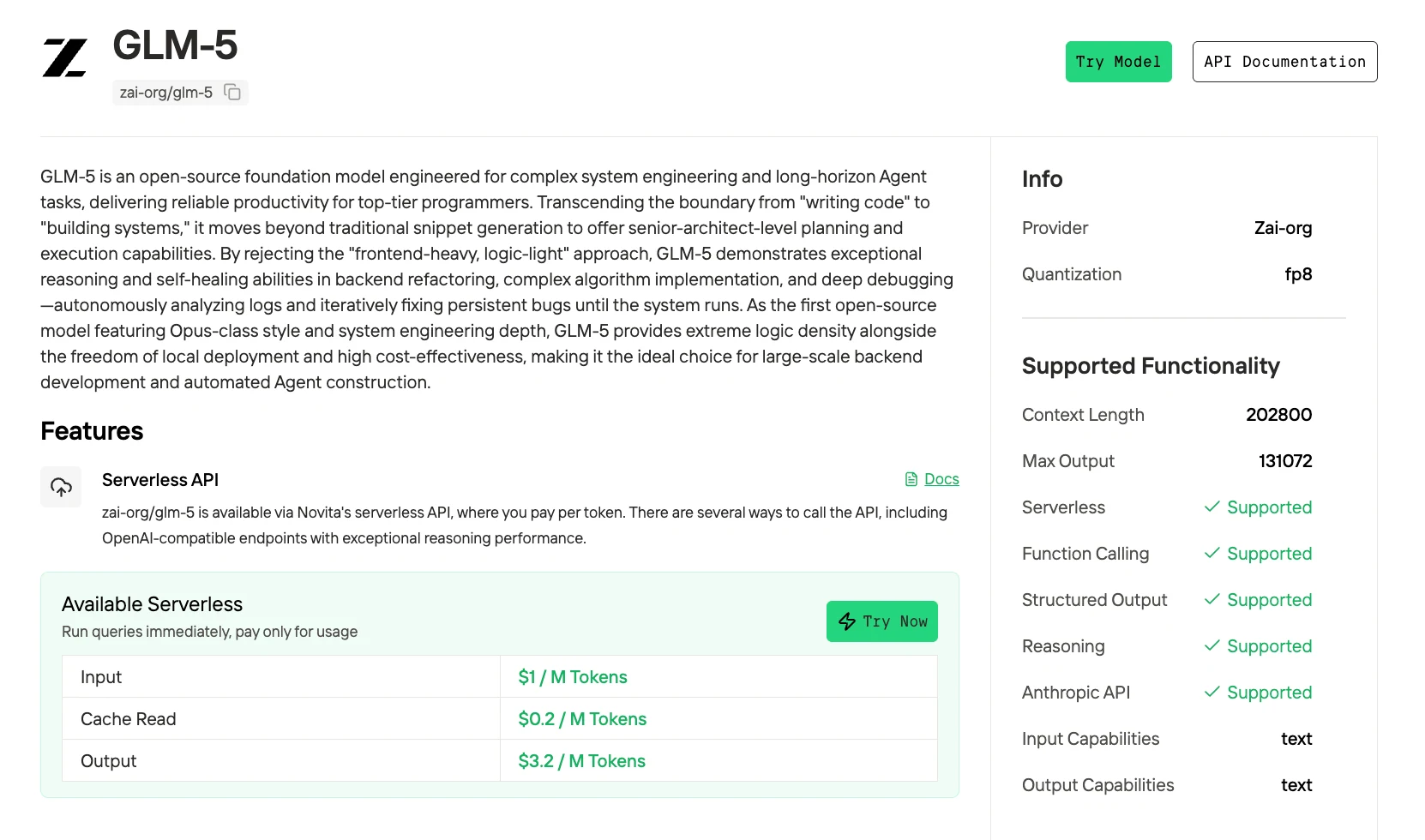
This guide uses Novita AI as the API provider for cost-effective access to GLM-5. Total setup time: 5 minutes.
Step 1: Install OpenCode
The fastest way to install OpenCode:
curl -fsSL https://opencode.ai/install | bashStart:
opencodeStep 2: Get Novita AI API Key
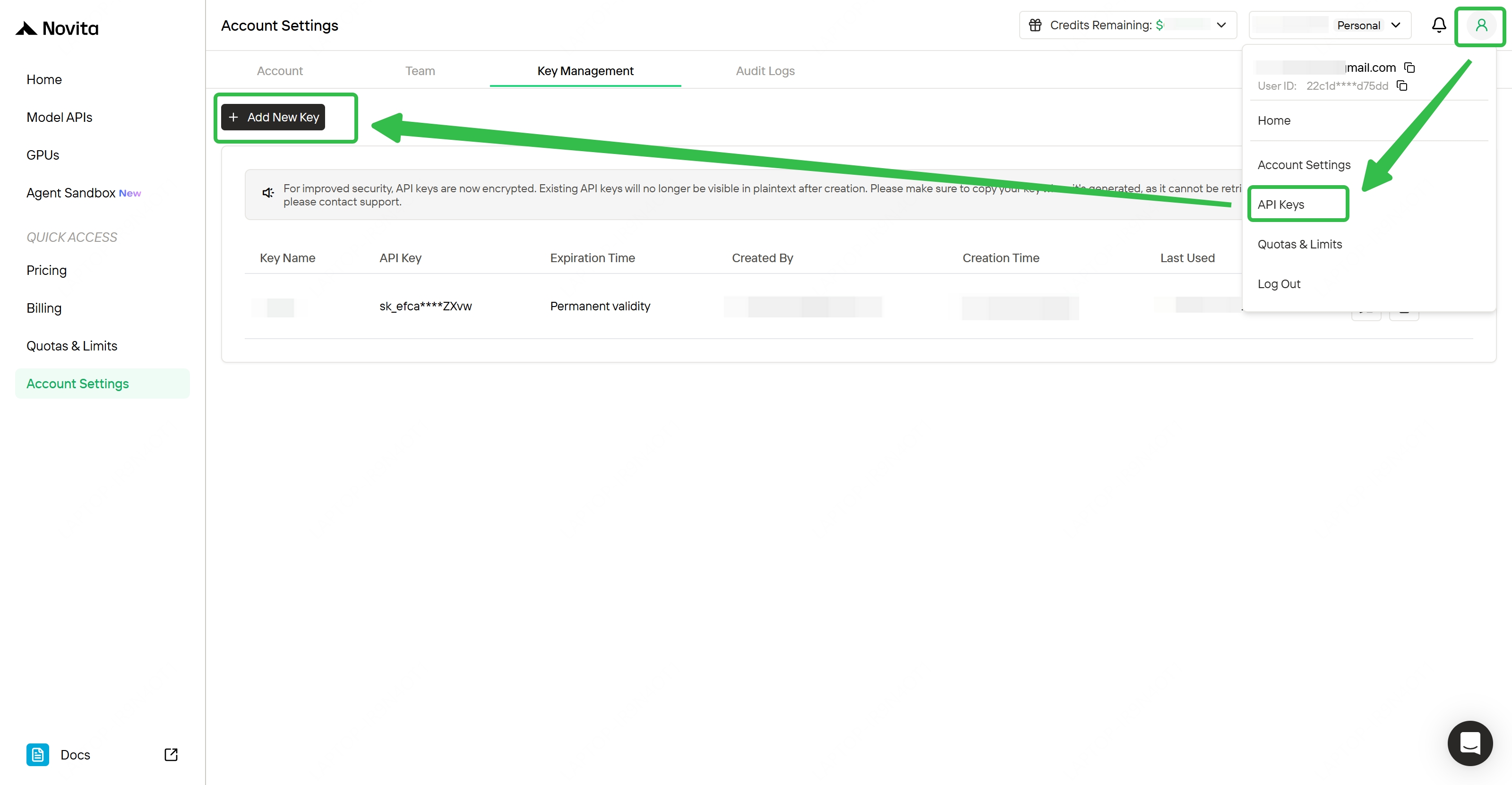
- Visit novita.ai and create an account
- Navigate to Dashboard → API Keys
- Click Create New Key and copy the generated key
- Save it securely — you’ll need it for the next step
Step 3: Configure OpenCode for Novita AI
- Launch OpenCode:
opencode- In the OpenCode prompt, run:
/connect- Search and select Novita AI, then paste your Novita API key.
┌ API key
│
│
└ enter- After connecting Novita AI, you need to configure which model to use in your OpenCode config. Run the
/modelscommand to select a model and select GLM-5 (model id:GLM-5).
/modelsThat’s it—OpenCode will route agent requests through Novita AI’s API using the model you selected.
Step 4: Launch OpenCode
# Start OpenCode in current directory
opencode

# Or specify a project directory
opencode /path/to/your/project
On first launch, OpenCode will display a TUI (Terminal User Interface) and connect to Novita AI’s GLM-5 endpoint.
Real-World Use Cases: GLM-5 in OpenCode
1. Multi-File Codebase Refactor
Scenario: Migrate Express API from CommonJS to ESM across 47 files.
OpenCode prompt: "Convert all require() statements to import, update package.json type field, and fix dynamic imports in /routes"
2. Autonomous Debugging with Self-Check
Scenario: Production API returning 500 errors on /users/:id endpoint.
OpenCode workflow: Enable GLM-5 thinking mode, provide error logs and route handler. GLM-5 generates hypothesis (null database connection), writes test case, proposes fix (connection pool timeout), implements retry logic, and verifies with test execution—all in single-sentence to deliverable workflow.
3. Architecture Planning for New Feature
Scenario: Add real-time notifications to SaaS app (WebSocket vs SSE vs polling).
OpenCode plan mode: Run /plan "Add real-time notifications system". GLM-5 analyzes existing auth middleware, database schema, and frontend state management—proposes SSE for simplicity, provides file structure, and generates implementation checklist with time estimates.
4. Terminal Automation with GitHub Actions
Scenario: Auto-generate release notes from commit history.
OpenCode integration: Use /opencode comment trigger on GitHub PR. GLM-5 reads commit messages, categorizes changes (features/fixes/breaking), and writes markdown release notes—all via OpenCode’s bash tool and MCP servers.
Common Gotchas and Solutions of Using GLM-5 in OpenCode
| Issue | Problem | Recommended Solution |
|---|---|---|
| Generic Frontend Code | Weak SVG generation and limited CSS animation creativity. | Use GLM-5 for component logic, state management, and architecture. Switch to Claude or Trae for UI design and animation-heavy work. |
| Configuration Not Persisting | Model selection resets after restarting OpenCode. | Ensure .opencode.json is located in ~/.opencode.json or the XDG config path. Verify with: `cat ~/.opencode.json |
| Out of Context Errors | Long debugging sessions exceed the 200K token window. | Enable autoCompact: true in config. OpenCode auto-summarizes at ~95% capacity and creates a new session with condensed history. |
GLM-5 excels at agentic coding because it was designed for long-horizon reasoning, structured tool use, and large-scale engineering tasks. When combined with OpenCode’s plan-execute-verify loop, streaming interface, and persistent session storage, the result is a scalable and cost-efficient production coding system.
The strength of this pairing lies in structural alignment: GLM-5 provides deep reasoning and coding intelligence, while OpenCode provides deterministic execution and workflow control.
Conclusion
GLM-5 and OpenCode form a structurally aligned pair: GLM-5 brings deep reasoning, 200K context, and structured tool use, while OpenCode provides deterministic execution, persistent sessions, and a plan-execute-verify workflow. Together, they deliver a production-grade agentic coding system that handles everything from multi-file refactors to autonomous debugging—without constant re-prompting.
Key Takeaway: If you need a cost-efficient, open-weights model for serious engineering tasks, GLM-5 via Novita AI on OpenCode is a practical and performant choice. Try GLM-5 on Novita AI and see the difference in your next coding session.
Frequently Asked Questions
Why does GLM-5 outperform many open models on coding benchmarks?
GLM-5 achieves strong results on SWE-bench Multilingual and CyberGym because its 754B MoE architecture focuses on agentic coding and multi-turn reasoning rather than casual chat tasks.
Why is GLM-5 particularly effective inside OpenCode?
GLM-5 supports structured function calling and long-horizon reasoning, which aligns directly with OpenCode’s plan-execute-verify workflow and tool orchestration system.
Can GLM-5 handle multi-file refactors in OpenCode?
Yes. GLM-5 understands diffs, import chains, and project-level structure, while OpenCode provides LSP integration and file tracking to execute consistent multi-file changes.
Novita AI is an AI & agent cloud platform helping developers and startups build, deploy, and scale models and agentic applications with high performance, reliability, and cost efficiency.
Recommended Reading