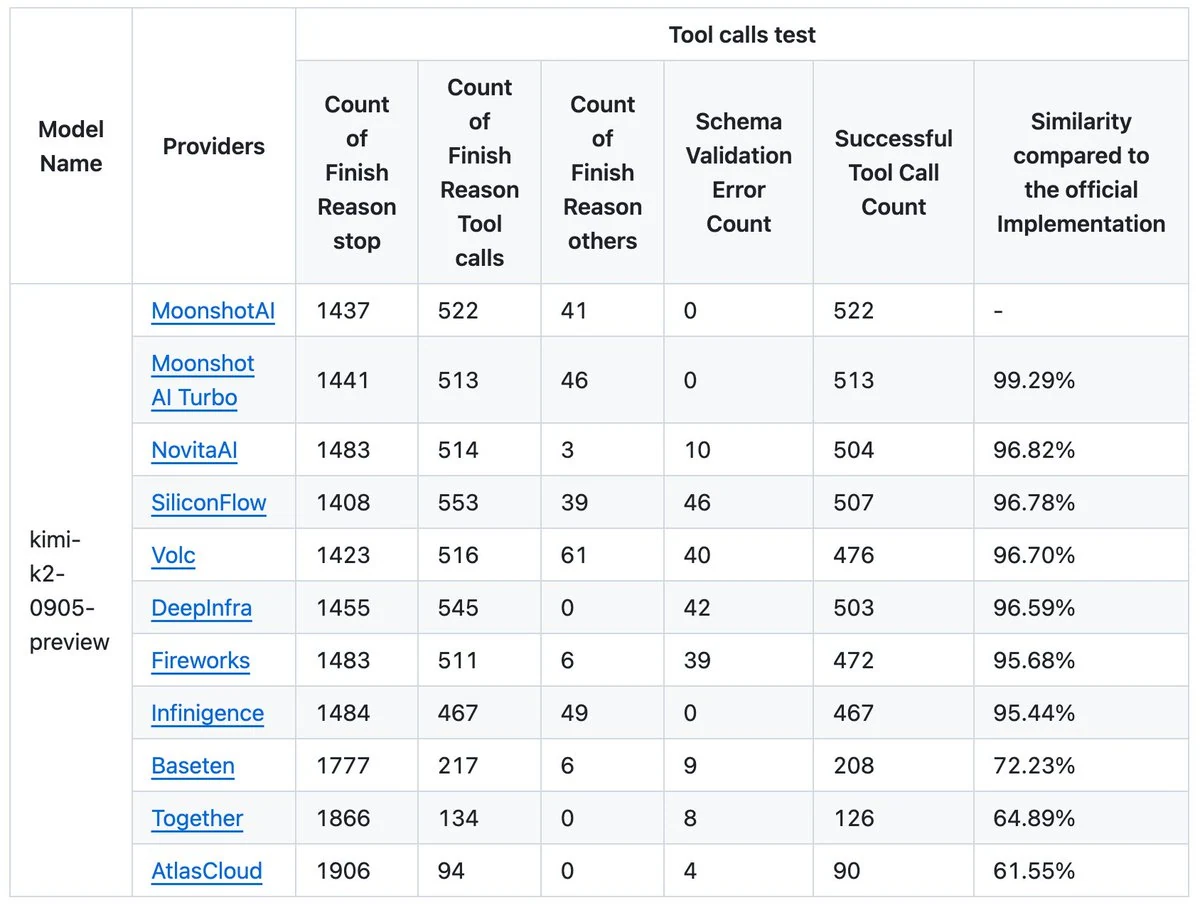
Novita AI stands out as the premier non‑official provider for Kimi K2‑Instruct‑0905, delivering near‑perfect fidelity to the original Moonshot AI experience — 96.82 % similarity — while providing lower error rates and an exceptionally high success rate for tool calls. Acting as a “full‑blood” API provider, Novita AI equips developers and enterprises with a full suite of production‑ready features: autonomous tool‑calling, streaming chat support, multi‑turn context retention, and flexible integration with frameworks like OpenAI SDK, Claude Code, and Trae.
From X
NovitaAI is the best among the non-official providers (like SiliconFlow, Volc, etc.) because:
- It’s the closest match to the original MoonshotAI behavior (96.82% similarity),
- Produces fewer output errors,
- Has a very high success rate for tool calls.
How to Evaluate an AI API Provider
Tool Calls
Tool Calls are a key indicator of how intelligent and capable an API provider’s infrastructure truly is. They show whether a model can connect to external tools reliably, know when to take action, and execute those actions accurately. A provider with strong tool‑calling performance demonstrates seamless system integration, stable and predictable automation, and human‑like practical intelligence — enabling the AI to not only generate responses but also perform real, useful tasks effectively.
You can check these metrics to test API Tool Calls Ability!
| Metric | Meaning |
|---|---|
| Tool Call Count | How many times the model attempted to use tools. High count can mean active tool‑using behavior. |
| Tool Call Success Count | How many tool calls completed correctly — indicates reliability. |
| Schema Validation Error Count | How often tool‑call outputs failed to match the expected data format. Fewer errors = better compliance. |
| Tool Call Similarity | How closely the provider’s results match the official reference implementation — shows fidelity and precision. |
Comprehensive index
| Metric | **Kimi K2 (0905)**Performance on Novita AI | Meaning |
|---|---|---|
| Total Context | 262.1K tokens | The maximum amount of text (tokens) the model can handle in one request — including both input and output. |
| Max Output | 262.1K tokens | The maximum text length the model can generate per response. |
| Input Price | $0.60 / 1 M tokens | The cost per one million input tokens. |
| Output Price | $2.50 / 1 M tokens | The cost per one million output tokens. |
Kimi K2 0905 + Full‑Blood API Provider = Enterprise‑Grade AI Agent Platform
Kimi K2 0905: Core Model Strength
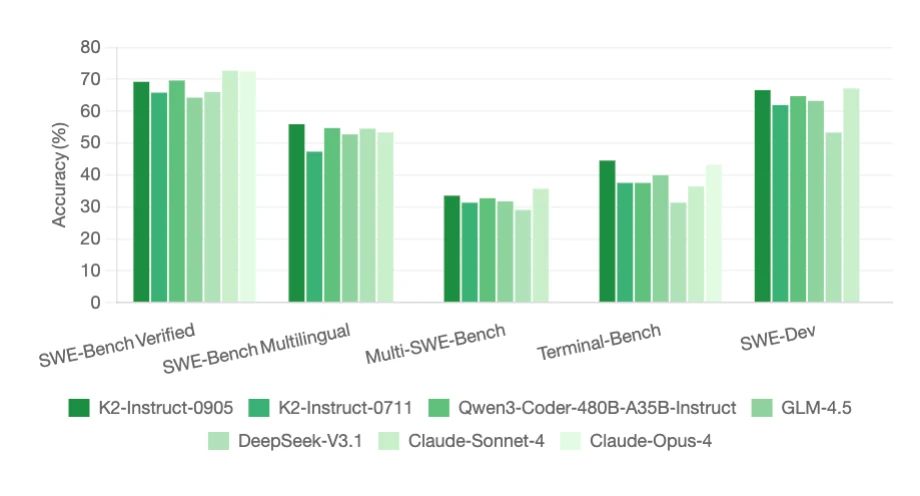
Based on the Kimi K2‑Instruct‑0905 information from Hugging Face, the K2 series is a Mixture‑of‑Experts (MoE) model with:
- 1 trillion total parameters, 32 billion active, and 256 K context window,
- SwiGLU activation, MLA attention, and 384 experts (8 active per token),
- Outstanding coding and reasoning benchmarks
From Hugging Face
Full‑Blood API Provider Like Novita AI: What It Adds?
A “full‑blood” API provider means the platform fully supports:
- Tool‑calling interface (autonomous tool selection, schema validation, and JSON I/O);
- Streaming chat completions and multi‑turn memory handling;
- Agent orchestration, rate/payload optimization, and secure third‑party integration;
- Stable inference engines (e.g., vLLM, SGLang, TensorRT‑LLM) to run Kimi efficiently.
Bringing them together yields:
- Full‑scale Agent Performance:
Kimi K2 runs as an autonomous reasoning and action agent capable of natural tool use. - Seamless Workflow Integration:
Novita AI exposes unified endpoints compatible with OpenAI/Anthropic formats, making it easy to plug Kimi into existing systems with minimal refactoring. - High Context Intelligence:
The 262 K+ context and rich memory enable long‑horizon reasoning and end‑to‑end document or project understanding. - Production‑Ready Economics:
With pricing around $0.60 / M input and $2.50 / M output tokens, operational costs stay predictable at scale.
Best Use Cases for Kimi K2 0905 API
Suitable use cases:
- Autonomous coding agents – leverage Kimi K2’s enhanced reasoning to write, review, and debug code.
- Frontend design assistants – generate clean, aesthetic, and responsive UI components.
- Long‑document analysis – handle extensive files or logs with the 256 K token context.
- Technical writing helpers – create structured documentation or API guides with cross‑reference understanding.
- Research summarization bots – process lengthy reports or scientific papers coherently.
https://www.youtube.com/watch?v=Y8ZF6DgM0SM
Unsuitable use cases:
- High‑frequency trading bots – rate limits will kill performance.
- Large‑scale real‑time translation – requires paid tier for throughput.
- Ultra‑low‑latency inference systems – response times can’t meet microsecond constraints.
- Continuous streaming or sensor feeds – context window and API pacing make it inefficient.
- Heavy image/video captioning pipelines – Kimi K2 is optimized for text reasoning, not high‑bandwidth multimodal data.
Tip : Cache Aggressively
Store and reuse previous API responses to avoid redundant calls. With a strong caching strategy (≈65% hit rate), you can cut API usage by 60%+, saving thousands of requests, boosting speed, and stabilizing performance — turning memory into efficiency and cost control.
1 Minute Quick Start Guide: Get your First API Running
Prerequisites-Get Novita AI API Key
Step 1: Log in to your account and click on the Model Library button.

Step 2: Choose Your Model
Browse through the available options and select the model that suits your needs.
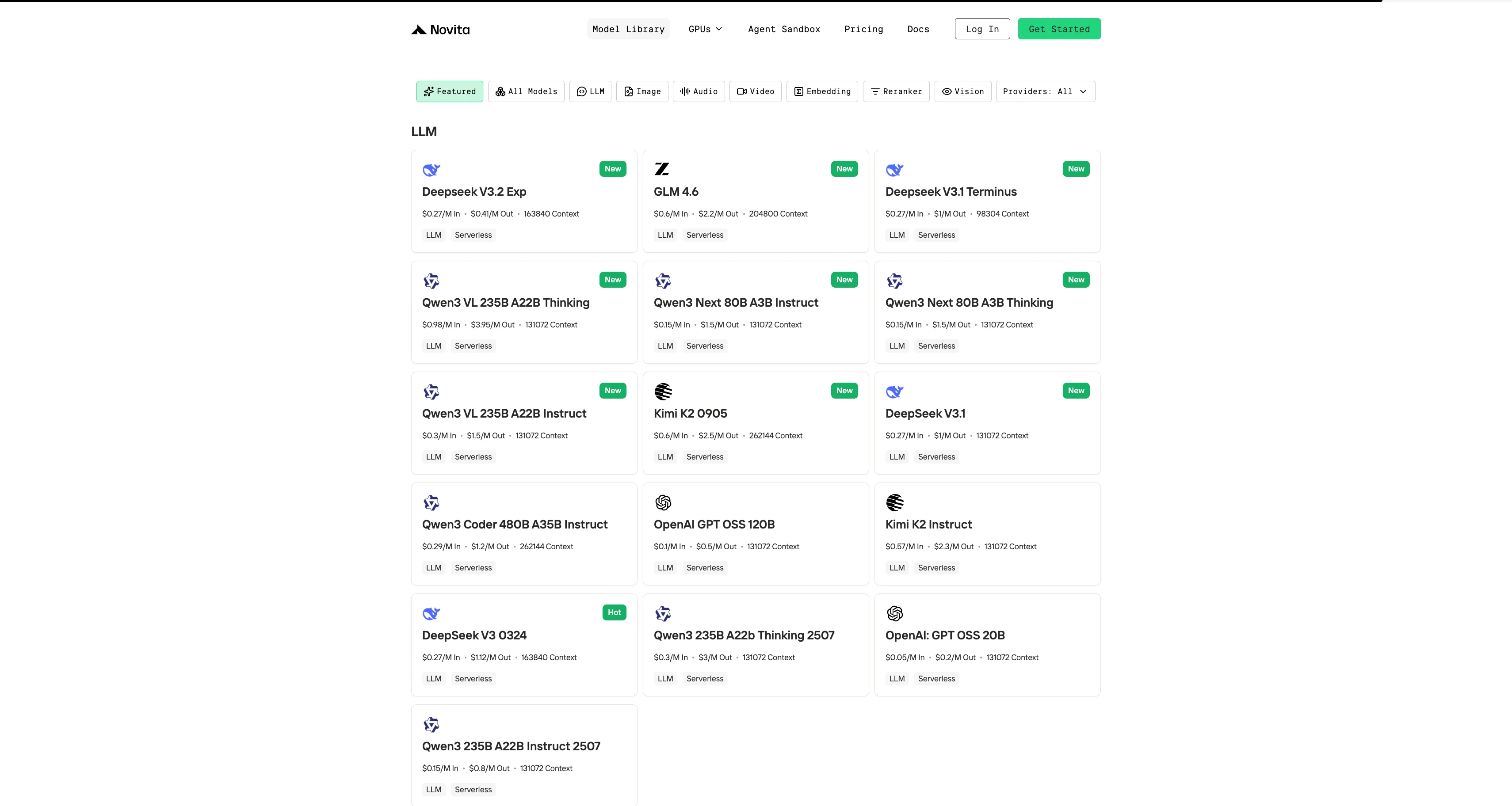
Step 3: Start Your Free Trial
Begin your free trial to explore the capabilities of the selected model.
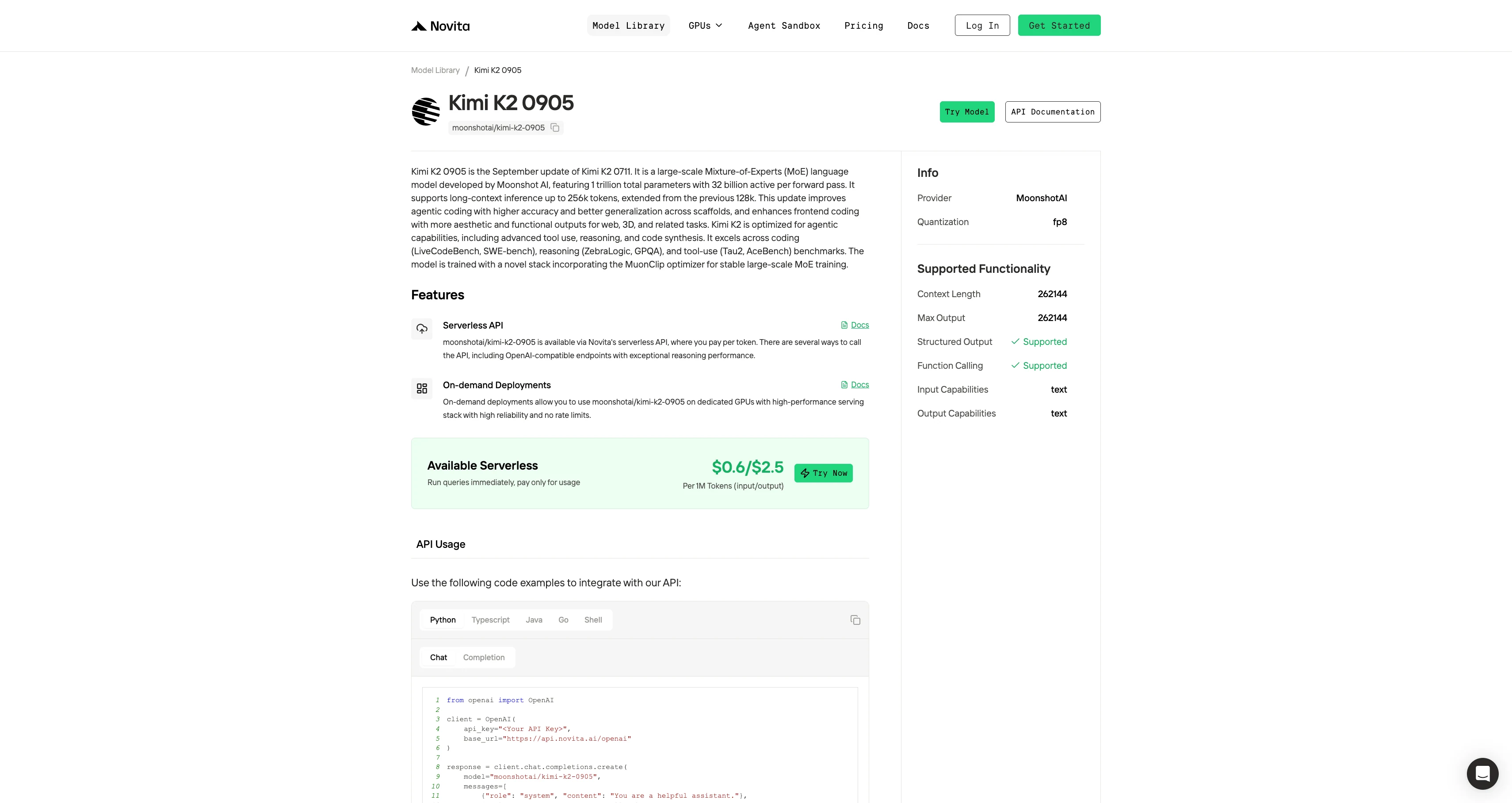
Step 4: Get Your API Key
To authenticate with the API, we will provide you with a new API key. Entering the “Settings“ page, you can copy the API key as indicated in the image.

Step 5: Install the API
Install API using the package manager specific to your programming language.
After installation, import the necessary libraries into your development environment. Initialize the API with your API key to start interacting with Novita AI LLM. This is an example of using chat completions API for python users.
#Chat API
from openai import OpenAI

client = OpenAI(
    api_key="<Your API Key>",
    base_url="https://api.novita.ai/openai"
)

response = client.chat.completions.create(
    model="moonshotai/kimi-k2-0905",
    messages=[
        {"role": "system", "content": "You are a helpful assistant."},
        {"role": "user", "content": "Hello, how are you?"}
    ],
    max_tokens=262144,
    temperature=0.7
)

print(response.choices[0].message.content)
#Completion API
from openai import OpenAI
client = OpenAI(
api_key="<Your API Key>",
base_url="https://api.novita.ai/openai"
)
response = client.completions.create(
model="moonshotai/kimi-k2-0905",
prompt="The following is a conversation with an AI assistant.",
max_tokens=262144,
temperature=0.7
)
print(response.choices[0].text)Claude Code Guide
Step 1: Installing Claude Code
Before installing Claude Code, ensure your system meets the minimum requirements. Node.js 18 or higher must be installed on your local environment. You can verify your Node.js version by running node --version in your terminal.
For Windows
Open Command Prompt and execute the following commands:
npm install -g @anthropic-ai/claude-code
npx win-claude-code@latest
The global installation ensures Claude Code is accessible from any directory on your system. The npx win-claude-code@latest command downloads and runs the latest Windows-specific version.
For Mac and Linux
Open Terminal and run:
npm install -g @anthropic-ai/claude-codeMac users can proceed directly with the global installation without requiring additional platform-specific commands. The installation process automatically configures the necessary dependencies and PATH variables.
Step 2 : Setting Up Environment Variables
Environment variables configure Claude Code to use Kimi-K2 through Novita AI’s API endpoints. These variables tell Claude Code where to send requests and how to authenticate.
For Windows
Open Command Prompt and set the following environment variables:
set ANTHROPIC_BASE_URL=https://api.novita.ai/anthropic
set ANTHROPIC_AUTH_TOKEN=<Novita API Key>
set ANTHROPIC_MODEL=moonshotai/kimi-k2-0905
set ANTHROPIC_SMALL_FAST_MODEL=moonshotai/kimi-k2-0905
Replace <Novita API Key> with your actual API key obtained from the Novita AI platform. These variables remain active for the current session and must be reset if you close the Command Prompt.
For Mac and Linux
Open Terminal and export the following environment variables:
export ANTHROPIC_BASE_URL="https://api.novita.ai/anthropic"
export ANTHROPIC_AUTH_TOKEN="<Novita API Key>"
export ANTHROPIC_MODEL="moonshotai/kimi-k2-0905"
export ANTHROPIC_SMALL_FAST_MODEL="moonshotai/kimi-k2-0905"
Step 3: Starting Claude Code
With installation and configuration complete, you can now start Claude Code in your project directory. Navigate to your desired project location using the cd command:
cd <your-project-directory>
claude .
The dot (.) parameter instructs Claude Code to operate in the current directory. Upon startup, you’ll see the Claude Code prompt appear in an interactive session.
This indicates the tool is ready to receive your instructions. The interface provides a clean, intuitive environment for natural language programming interactions.
Step 4: Using Claude Code in VSCode or Cursor
Claude Code integrates seamlessly with popular development environments. It enhances your existing workflow rather than replacing it.
You can use Claude Code directly in the terminal within VSCode or Cursor. This maintains access to your familiar development tools while leveraging AI assistance.
Additionally, Claude Code plugins are available for both VSCode and Cursor. These plugins provide deeper integration with these editors, offering inline AI assistance, code suggestions, and project management features directly within your IDE interface.
Trae Guide
Step 1: Open Trae and Access Models
Launch the Trae app. Click the Toggle AI Side Bar in the top-right corner to open the AI Side Bar. Then, go to AI Management and select Models.
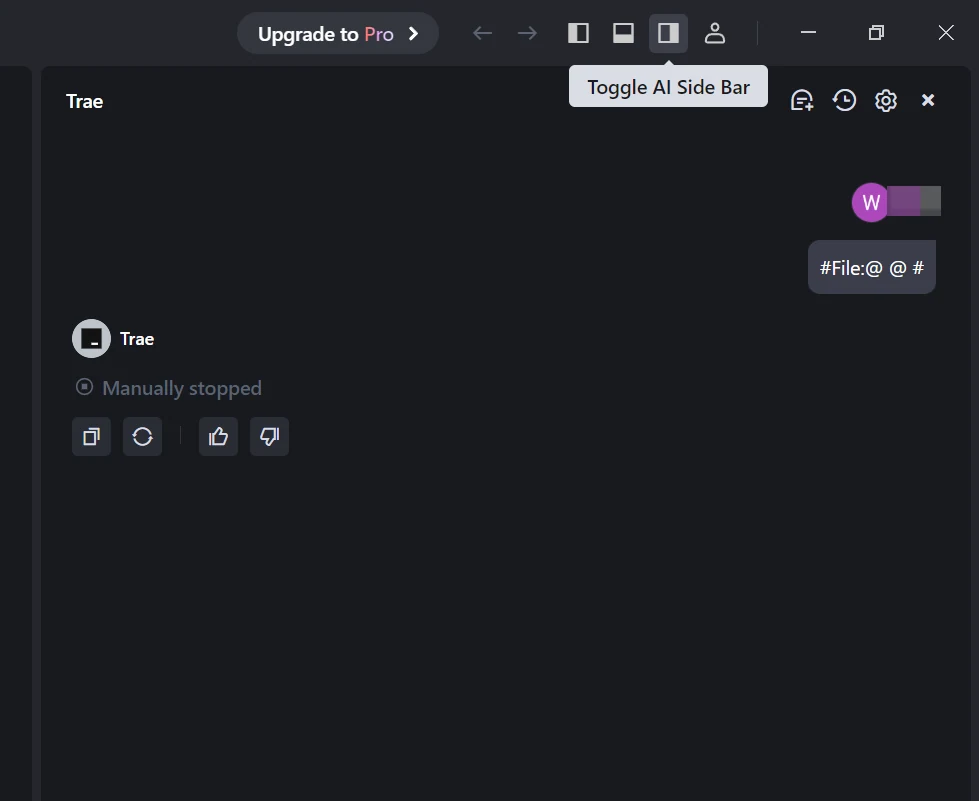
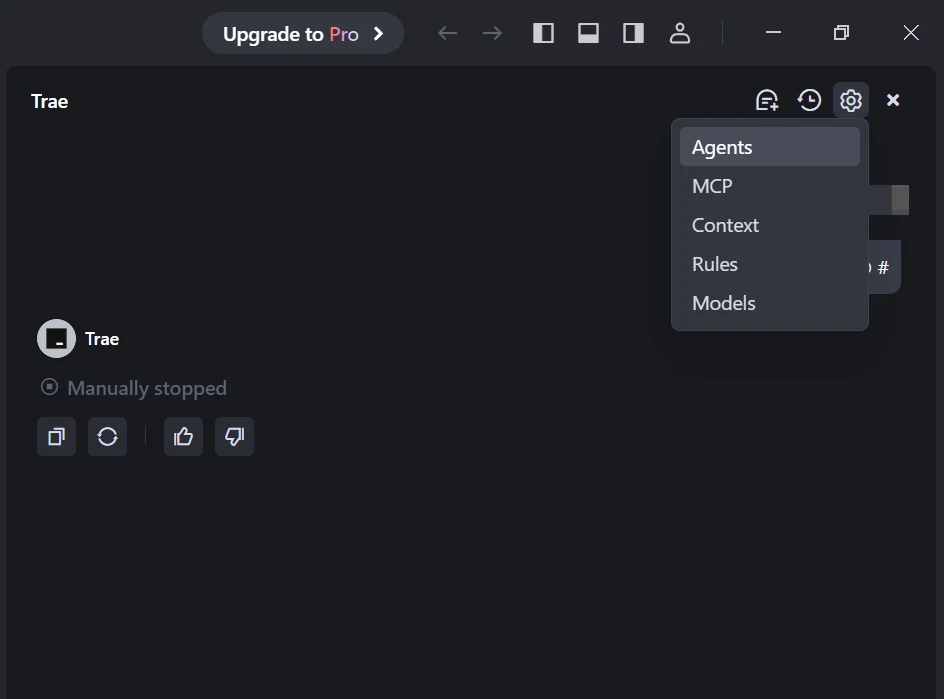
Step 2: Add a Custom Model and Choose Novita as Provider
Click the Add Model button to create a custom model entry. In the add-model dialog, select Provider = Novita from the dropdown menu.
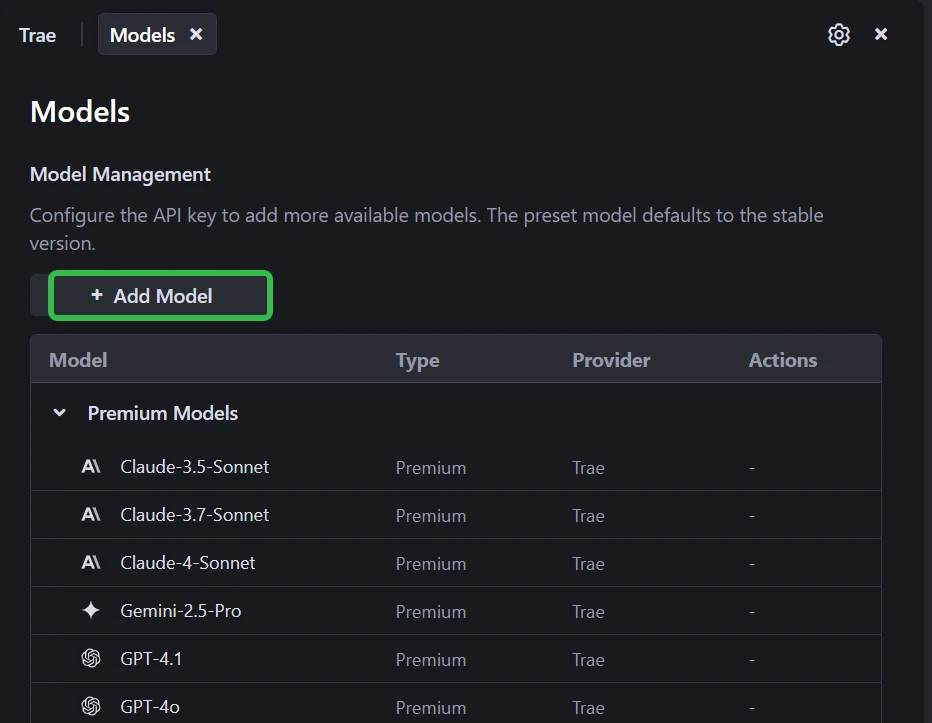
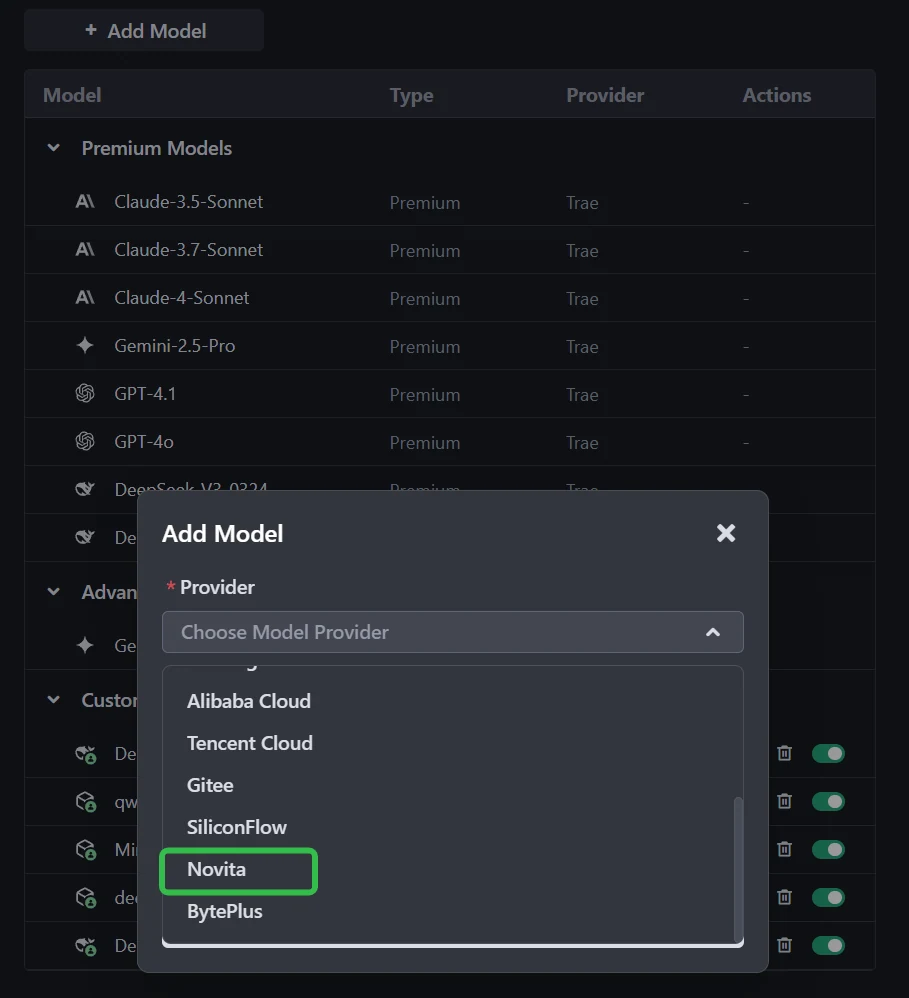
Step 3: Select or Enter the Model
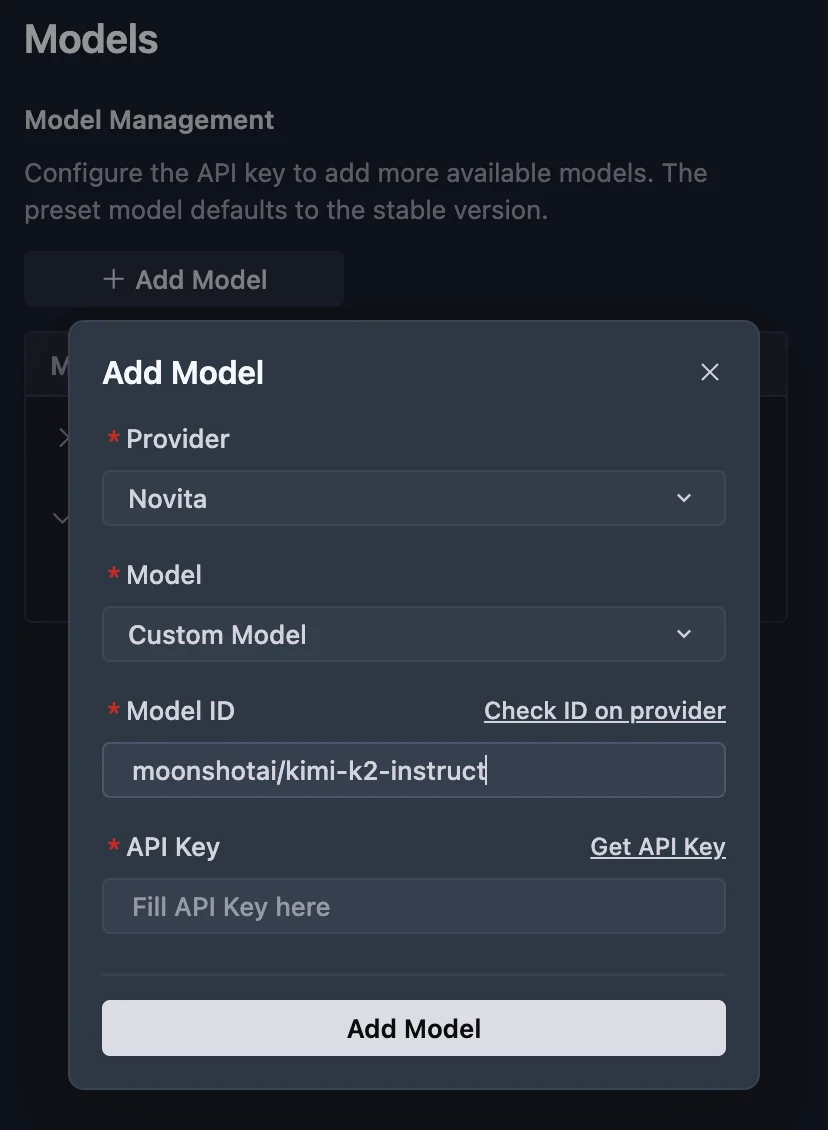
From the Model dropdown, pick your desired model (DeepSeek-R1-0528, kimi-k2-0905,DeepSeek-V3-0324, or MiniMax-M1-80k). If the exact model isn’t listed, simply type the model ID that you noted from the Novita library. Ensure you choose the correct variant of the model you want to use.
Step 4: Enter Your API Key
Copy the Novita AI API key from your Novita console and paste it into the API Key field in Trae.
Step 5: Save the Configuration
Click Add Model to save. Trae will validate the API key and model selection in the background.
By pairing Kimi K2 0905’s vast intelligence with Novita AI’s optimized infrastructure, developers gain a stable, high‑performance platform that blends advanced reasoning, natural tool‑use capabilities, and predictable operating costs. Novita AI’s strong cache strategy, schema validation accuracy, and multi‑framework compatibility make it not just an alternative provider — but a strategic upgrade for anyone building intelligent coding assistants, research automation, or document‑understanding systems. In short, Novita AI turns Kimi K2 0905 into a reliable, action‑capable, enterprise‑ready AI agent.
Frequently Asked Questions
What makes Novita AI better than other unofficial providers (like SiliconFlow or Volc)?
Novita AI achieves 96.82 % behavioral similarity to MoonshotAI, minimizing output deviations while maintaining higher tool‑calling reliability and lower schema‑validation errors.
What problems does Novita AI solve for Kimi K2 users?
It provides stable APIs, consistent performance under load, affordable long‑context inference, improved caching efficiency (saving 60 %+ of daily calls), and seamless compatibility with multiple SDKs and agent frameworks.
How do tool‑calling metrics show Novita AI’s superiority?
Novita AI demonstrates higher tool‑call success counts and lower validation error ratios. This means actions like code execution, data retrieval, or external service integration happen reliably without manual retries.
Novita AI is the All-in-one cloud platform that empowers your AI ambitions. Integrated APIs, serverless, GPU Instance — the cost-effective tools you need. Eliminate infrastructure, start free, and make your AI vision a reality.
Recommend Reading
Llama 3.2 3B vs DeepSeek V3: Comparing Efficiency and Performance.
Deepseek R1 0528 vs O3: Can China’s Model Beat the Best?
How to Access Qwen3-Next-80B-A3B in Trae with Extended Context Support