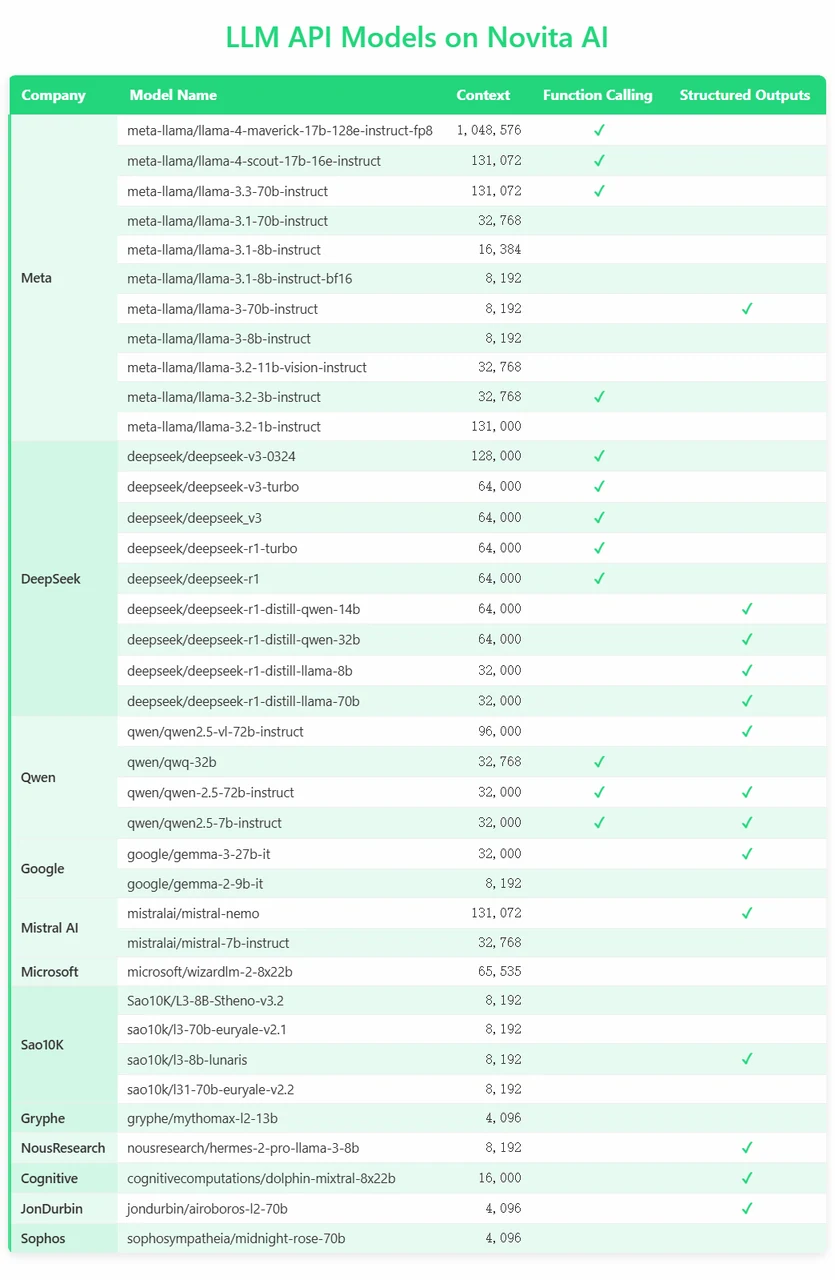
Modern AI models are evolving beyond simple text generation. With features like Function Calling and Structured Outputs, developers can now build smarter, more reliable applications. At Novita AI, you can now quickly check whether a model supports these capabilities right inside the Console—making integration faster and more efficient.
What is Function Calling?
Function calling is a capability in AI, especially with large language models (LLMs), that enables the model to interact with external functions, tools, or APIs to perform specific tasks beyond generating text responses. Instead of just producing text, the model identifies when a particular function should be called based on the user’s prompt, determines the correct function to invoke, and specifies the necessary parameters for that function. The actual execution of the function is handled by an external system or application, not by the model itself.
https://www.youtube.com/watch?v=aqdWSYWC\_LI
How Function Calling Works?
Function Calling allows AI models to interact with external tools, APIs, or internal functions during a conversation.Instead of simply generating text, the model can recognize when a function is needed, generate the correct function call with structured arguments, and execute it to retrieve results.This bridges the gap between natural language understanding and real-world action, enabling models to perform tasks like fetching real-time data, managing workflows, or triggering system actions automatically.
What Are the Benefits of Function Calling?
- Real-World Interaction: Models can trigger actions, not just provide information.
- Automation: Streamline processes like data retrieval, bookings, form submissions, and more.
- Structured Understanding: Instead of relying only on text generation, the model organizes output into predefined formats, reducing errors.
- Enhanced Use Cases: Build dynamic apps, assistants, and systems that are more reliable and efficient.
- Developer Efficiency: By knowing a model supports Function Calling upfront, you can plan integrations faster without heavy modifications.
What is Structured Outputs?
Structured outputs refer to the ability of large language models (LLMs) to generate responses that conform to a predefined, specific format rather than producing free-form text. These outputs are typically in machine-readable formats such as JSON, XML, filled templates, or tabular data, which makes them easier to parse, validate, and integrate into software systems or workflows.
How Structured Outputs Are Generated
- Prompting Techniques: The model is guided through carefully crafted prompts to produce output in the desired format.
- Function Calling APIs: More robustly, structured outputs can be generated by using function calling interfaces where the model returns arguments conforming strictly to a function’s schema, often enforced by setting parameters like
strict: true. - Finite State Machine (FSM) Guidance: Internally, generation can be constrained so that each token produced adheres to the rules of the output format, reducing errors in structure.
Use Cases and Benefits
- Extracting structured data from unstructured text, such as event details, user information, or query parameters.
- Triggering external APIs or functions with precise parameters generated by the model.
- Building complex multi-step workflows that rely on consistent and validated data exchange.
- Improving reliability in applications like chatbots, data extraction, and automation systems by reducing ambiguity in model outputs.
Function Calling and Structured Outputs
| Aspect | 🛠️ Function Calling | 🗂️ Structured Outputs |
|---|---|---|
| Purpose | Trigger an external function | Return structured information |
| Orientation | Action-oriented | Information-oriented |
| Output | Function name + arguments | Predefined structured data (e.g., JSON) |
| Example | Call a weather API to get forecast | Return a weather report in JSON format |
| Usage Scenario | When you need the model to take an action | When you need clean, parseable data without an action |
How to Check Function Calling and Structured Outputs on Novita AI?
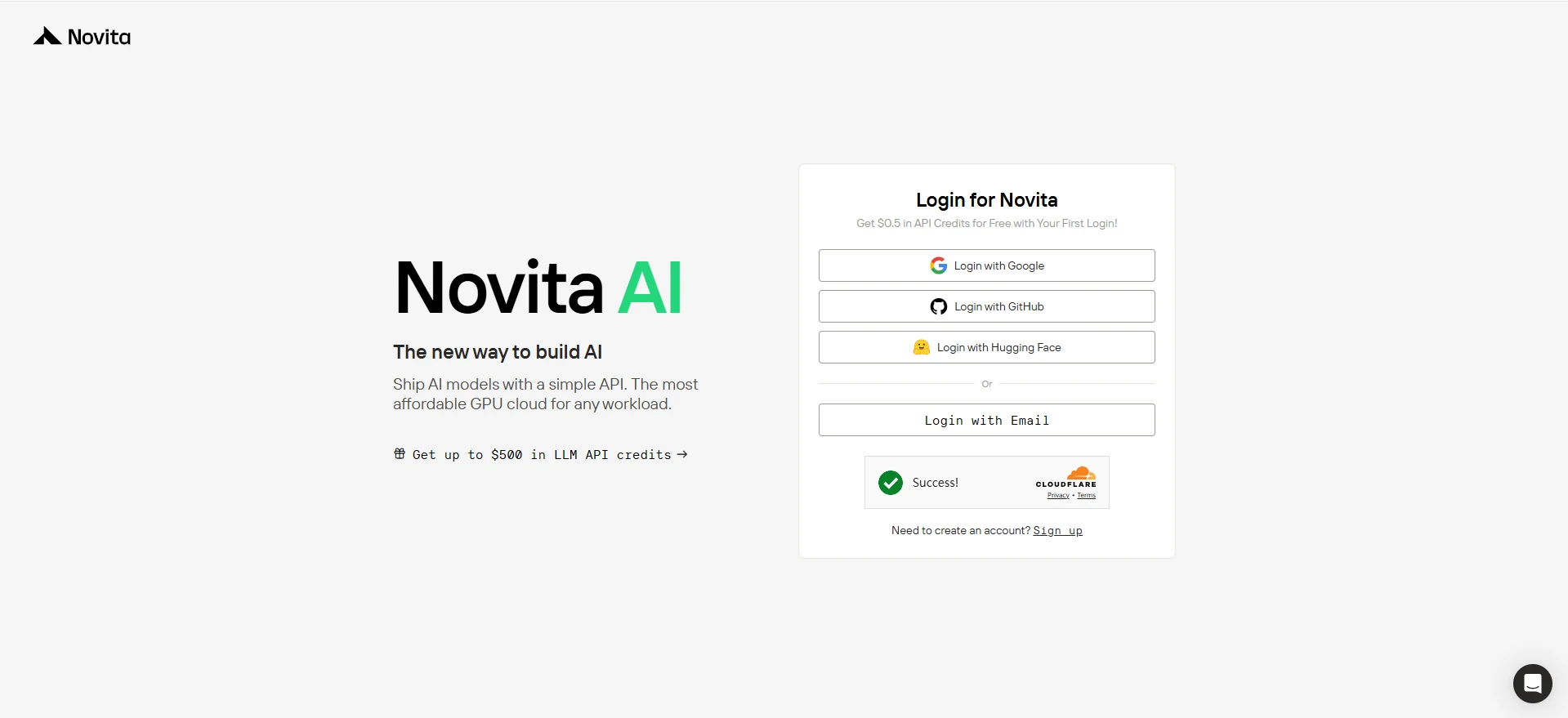
1: Log in Novita AI
Once you land on the Novita AI homepage, simply hit the “Log In” or “Get Started” button at the top right. You can easily log in with Google, GitHub, Hugging Face, or just your Email—your choice!

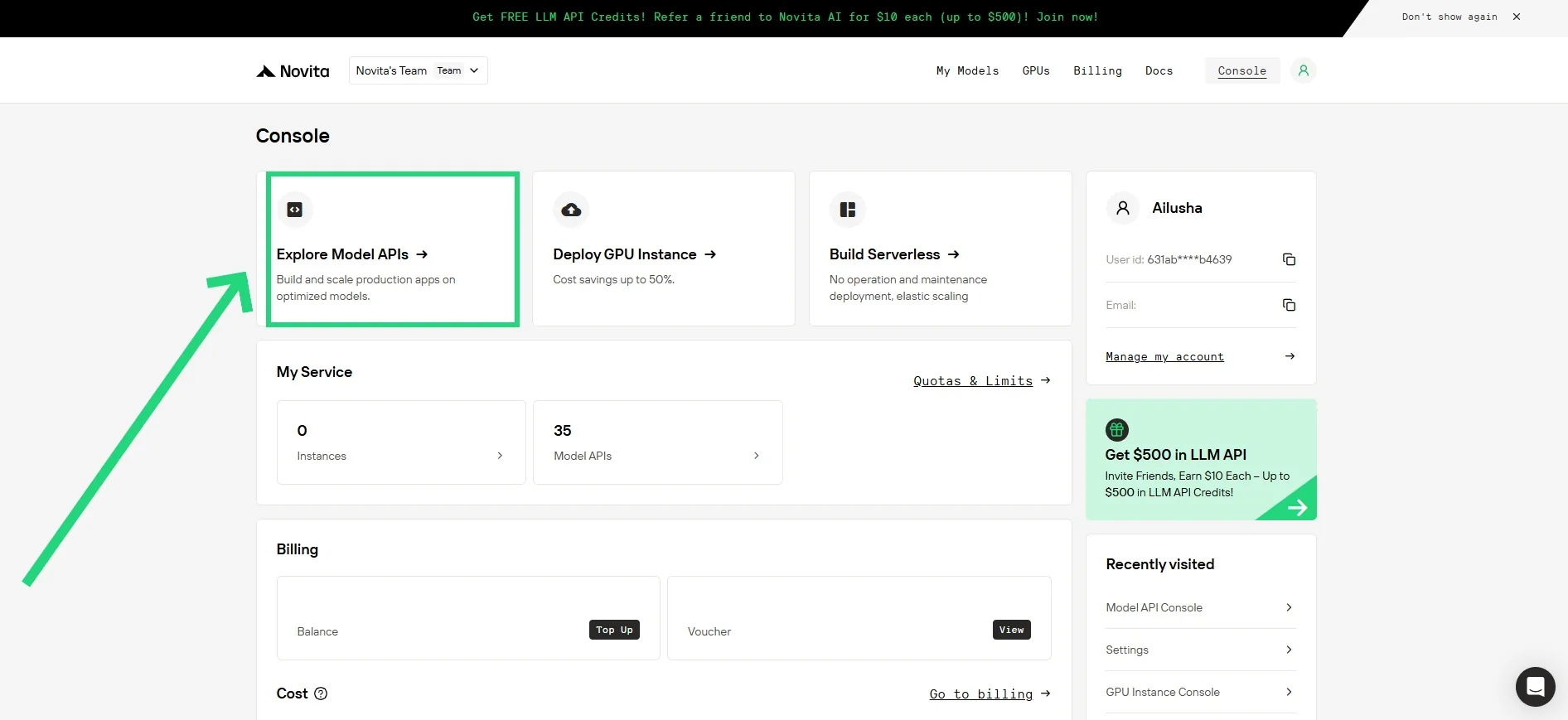
Click “Model API” in Console!
Once you’re logged in, you’ll be directed to the Novita Console dashboard. From the top, click on “Model API”. This section gives you access to a full list of available models, along with detailed information about their capabilities—including whether they support Function Calling and Structured Outputs.
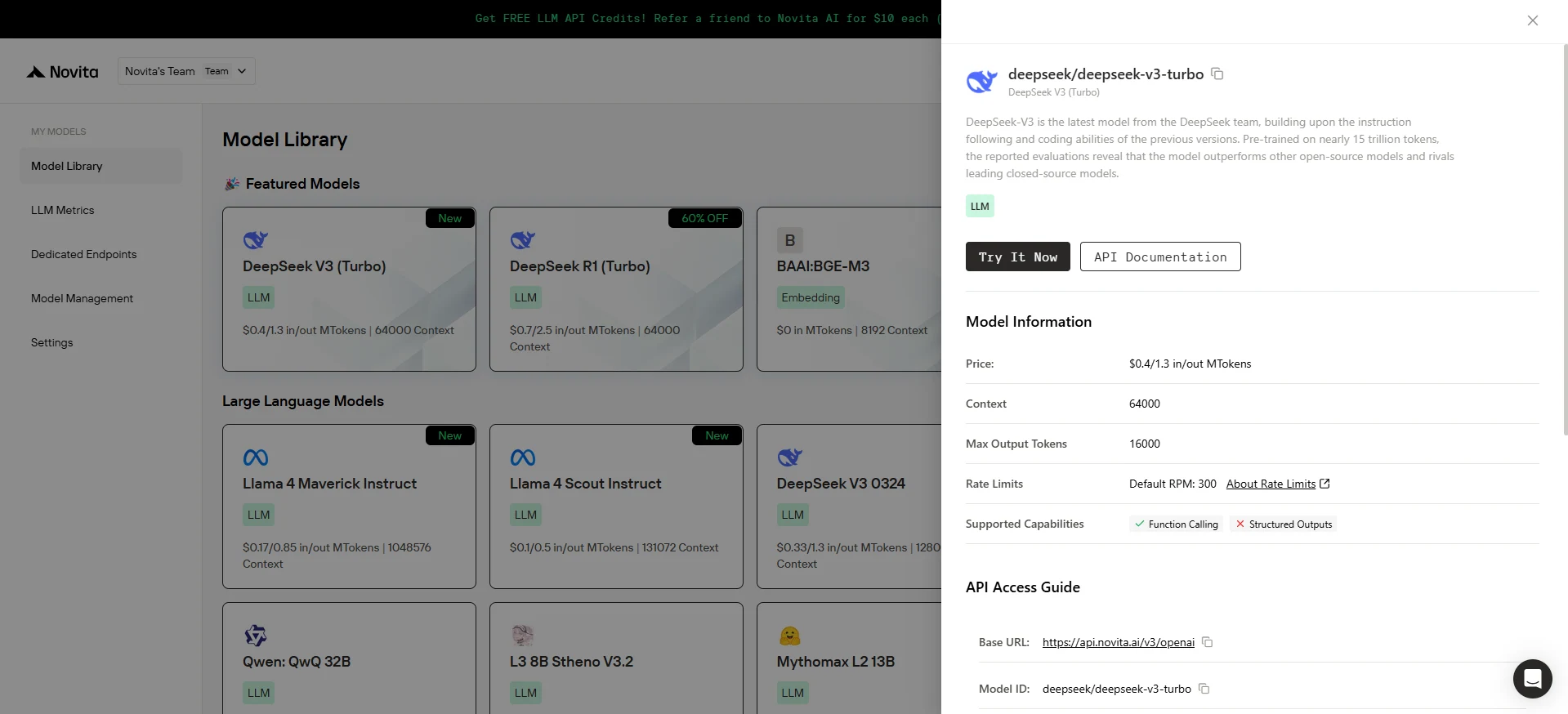
Choose your Model and Check it!
Just find the model you’re interested in, click on it, and a panel will pop up on the right. Under “Supported Capabilities,” you’ll instantly see whether Function Calling and Structured Outputs are supported.
How to Use Function Calling on Novita AI?
1. Initialize the Client
First, you need to initialize the client with your Novita API key.
from openai import OpenAI
import json

client = OpenAI(
    base_url="https://api.novita.ai/v3/openai",
    # Get the Novita AI API Key from: https://novita.ai/settings/key-management.
    api_key="<YOUR Novita AI API Key>",
)

model = "meta-llama/llama-4-maverick-17b-128e-instruct-fp8"- Define the Function to Be Called
Next, define the Python function that the model can call. In this example, it’s a function to get weather information.
# Example function to simulate fetching weather data.
def get_weather(location):
    """Retrieves the current weather for a given location."""
    print("Calling get_weather function with location: ", location)
    # In a real application, you would call an external weather API here.
    # This is a simplified example returning hardcoded data.
    return json.dumps({"location": location, "temperature": "60 degrees Fahrenheit"})
2. Construct the API Request with Tools and User Message
Now, create the API request to the Novita endpoint. This request includes the tools parameter, defining the functions the model can use, and the user’s message.
tools = [
    {
        "type": "function",
        "function": {
            "name": "get_weather",
            "description": "Get weather of an location, the user shoud supply a location first",
            "parameters": {
                "type": "object",
                "properties": {
                    "location": {
                        "type": "string",
                        "description": "The city and state, e.g. San Francisco, CA",
                    }
                },
                "required": ["location"]
            },
        }
    },
]

messages = [
    {
        "role": "user",
        "content": "What is the weather in San Francisco?"
    }
]

# Let's send the request and print the response.
response = client.chat.completions.create(
    model=model,
    messages=messages,
    tools=tools,
)

# Please check if the response contains tool calls if in production.
tool_call = response.choices[0].message.tool_calls[0]
print(tool_call.model_dump())
3. Output
{'id': '0', 'function': {'arguments': '{"location": "San Francisco, CA"}', 'name': 'get_weather'}, 'type': 'function'}4. Respond with the Function Call Result and Get the Final Answer
The next step is to process the function call, execute the get_weather function, and send the result back to the model to generate the final response to the user.
# Ensure tool_call is defined from the previous step
if tool_call:
    # Extend conversation history with the assistant's tool call message
    messages.append(response.choices[0].message)

    function_name = tool_call.function.name
    if function_name == "get_weather":
        function_args = json.loads(tool_call.function.arguments)
        # Execute the function and get the response
        function_response = get_weather(
            location=function_args.get("location"))
        # Append the function response to the messages
        messages.append(
            {
                "tool_call_id": tool_call.id,
                "role": "tool",
                "content": function_response,
            }
        )

    # Get the final response from the model, now with the function result
    answer_response = client.chat.completions.create(
        model=model,
        messages=messages,
        # Note: Do not include tools parameter here.
    )
    print(answer_response.choices[0].message)
5. Output
{'id': '0', 'function': {'arguments': '{"location": "San Francisco, CA"}', 'name': 'get_weather'}, 'type': 'function'}How to Use Structured Outputs on Novita AI?
1. Initialize the Client
First, you need to initialize the client with your Novita API key.
from openai import OpenAI

client = OpenAI(
    base_url="https://api.novita.ai/v3/openai",
    # Get the Novita AI API Key from: https://novita.ai/settings/key-management.
    api_key="<YOUR Novita AI API Key>",
)

# Go to the [Models](https://novita.ai/models) page to see the models that support `Structured Outputs`.
model = "mistralai/mistral-7b-instruct"
2. Define the JSON schema
This example creates a schema for extracting expense information from the user’s input.
# Define system prompt for expense tracking.
system_prompt = """You are an expense tracking assistant.
Extract expense information from the user's input and format it according to the provided schema."""

# Define JSON schema for structured response.
response_format = {
    "type": "json_schema",
    "json_schema": {
        "name": "expense_tracking_schema",
        "schema": {
            "type": "object",
            "properties": {
                "expenses": {
                    "type": "array",
                    "items": {
                        "type": "object",
                        "properties": {
                            "description": {
                                "type": "string",
                                "description": "Description of the expense"
                            },
                            "amount": {
                                "type": "number",
                                "description": "Amount spent in dollars"
                            },
                            "date": {
                                "type": "string",
                                "description": "When the expense occurred"
                            },
                            "category": {
                                "type": "string",
                                "description": "Category of expense (e.g., food, office, travel)"
                            }
                        },
                        "required": [
                            "description",
                            "amount"
                        ]
                    }
                },
                "total": {
                    "type": "number",
                    "description": "Total amount of all expenses"
                }
            },
            "required": [
                "expenses",
                "total"
            ],
        },
    },
}
3. Request chat completion API
Now, make the chat completion request to the Novita endpoint.
This request includes the response_format parameter, defining the JSON schema we defined in the previous step.
chat_completion = client.chat.completions.create(
    model=model,
    messages=[
        {
            "role": "system",
            "content": system_prompt,
        },
        {
            "role": "user",
            "content": """I spent $120 on dinner at an Italian restaurant last Friday with my colleagues.
Also bought office supplies for $45 on Monday.""",
        },
    ],
    max_tokens=1024,
    temperature=0.8,
    stream=False,
    response_format=response_format,
)

response_content = chat_completion.choices[0].message.content

# Parse and prettify the JSON
try:
    json_response = json.loads(response_content)
    prettified_json = json.dumps(json_response, indent=2)
    print(prettified_json)
except json.JSONDecodeError:
    print("Could not parse response as JSON. Raw response:")
    print(response_content)
4. Output:
{
  "expenses": [
    {
      "date": "2023-03-17",
      "description": "Dinner at Italian restaurant",
      "amount": 120,
      "category": "Food & Dining"
    },
    {
      "date": "2023-03-13",
      "description": "Office supplies",
      "amount": 45,
      "category": "Office Supplies"
    }
  ],
  "total": 165
}
Function Calling and Structured Outputs significantly expand what AI models can do. Whether you need to automate workflows, fetch real-time data, or extract structured information, Novita AI makes it easy to find models that match your needs. Start building smarter applications today by exploring models on the Novita Console!
Frequently Asked Questions
What is Function Calling in AI models?
It allows models to trigger external tools or APIs by generating structured function calls based on user prompts.
What is Structured Outputs?
Structured Outputs refer to model responses in strict, machine-readable formats like JSON, ideal for easy integration.
How are Function Calling and Structured Outputs different?
Function Calling is action-driven (e.g., fetch weather), while Structured Outputs focus on returning clean, formatted data.
Novita AI is the All-in-one cloud platform that empowers your AI ambitions. Integrated APIs, serverless, GPU Instance — the cost-effective tools you need. Eliminate infrastructure, start free, and make your AI vision a reality.



