Key Highlights
What it does: Function calling enables AI models to interact with external tools and APIs, perform specific tasks, and access real-time data for system operations and automated workflows.
Supported models: DeepSeek V3 series, GPT series, Gemma 2, and Mistral Nemo.
How to implement? You can install API via Novita AI and learn it from Docs.
Function calling enhances large language models (LLMs) by enabling interaction with the external world. Beyond generating text, LLMs can execute tasks, access real-time data, and perform complex operations. Acting as a bridge between AI knowledge and actionable tasks, function calling empowers AI agents or chatbots to interact with external tools and services. DeepSeek V3, a powerful open-source model, stands out for its strong performance and efficiency.
What is Function Calling
Function calling enhances large language models (LLMs) by enabling interaction with the external world. Beyond generating text, LLMs can execute tasks, access real-time data, and perform complex operations. Acting as a bridge between AI knowledge and actionable tasks, function calling empowers AI agents or chatbots to interact with external tools and services. DeepSeek V3, a powerful open-source model, stands out for its strong performance and efficiency.
How Does Function Calling Work
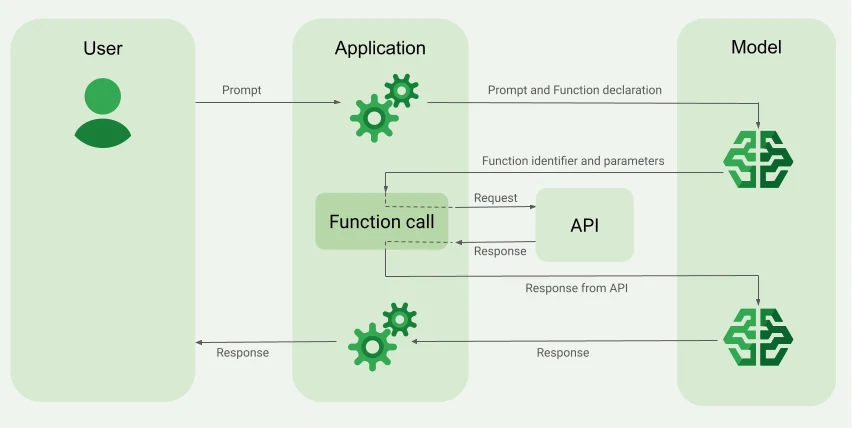
from Google Cloud
- Function Declaration: Define reusable code blocks (functions) with clear descriptions of their capabilities, inputs, and outputs.
- Prompt Submission: Provide the LLM with a prompt and a set of function declarations to inform it about the available tools.
- Model Analysis: The LLM evaluates the prompt and determines whether any of the provided functions need to be invoked to fulfill the request.
- Structured Output: If a function call is required, the LLM generates structured output in JSON format, specifying the function name and parameter values.
- Function Invocation: The application or system uses the structured output to call the specified function, passing the required parameters.
- Function Execution: The external service or API executes the function based on the provided parameters.
- Output Response: The external service returns the result or confirmation to the AI.
- Model Response: The LLM uses the received output to create a natural language response for the user or for further processing.
What Problems Can Function Calling Solve
Real-Time Information Access
- Stock price updates
- Current weather data retrieval
- Breaking news access
System Interactions
- Email sending
- Social media posting
- Database querying and writing
Workflow Automation
- Data scraping and processing
- Multi-step task execution
- Complex analysis automation
Data Accuracy
- Information timeliness assurance
- Precise query result provision
- Reduction of outdated data errors
Enhanced AI Capabilities
- Dynamic API integration
- Contextual task execution
- Real-world action performance
User Experience Improvement
- Personalized responses
- Task completion without leaving the conversation
- Seamless integration of external services
How to Use DeepSeek V3 Function Calling via Novita AI
This guide demonstrates how to use Function Calling to retrieve current weather information for a user’s specified location. We will walk through a complete Python code example. For the specific API format of Function Calling, please refer to the API reference Create Chat Completion.
Get $20 credits at Novita AI now!
- Initialize the Client
First, you need to initialize the client with your Novita API key.
from openai import OpenAI
import json

client = OpenAI(
    base_url="https://api.novita.ai/v3/openai",
    # Get the Novita AI API Key from: https://novita.ai/settings/key-management.
    api_key="<YOUR Novita AI API Key>",
)

model = "deepseek/deepseek_v3"- Define the Function to Be Called
Next, define the Python function that the model can call. In this example, it’s a function to get weather information.
# Example function to simulate fetching weather data.
def get_weather(location):
    """Retrieves the current weather for a given location."""
    print("Calling get_weather function with location: ", location)
    # In a real application, you would call an external weather API here.
    # This is a simplified example returning hardcoded data.
return json.dumps({"location": location, "temperature": "60 degrees Fahrenheit"})- Construct the API Request with Tools and User Message
Now, create the API request to the Novita endpoint. This request includes the tools parameter, defining the functions the model can use, and the user’s message.
tools = [
    {
        "type": "function",
        "function": {
            "name": "get_weather",
            "description": "Get weather of an location, the user shoud supply a location first",
            "parameters": {
                "type": "object",
                "properties": {
                    "location": {
                        "type": "string",
                        "description": "The city and state, e.g. San Francisco, CA",
                    }
                },
                "required": ["location"]
            },
        }
    },
]

messages = [
    {
        "role": "user",
        "content": "What is the weather in San Francisco?"
    }
]

# Let's send the request and print the response.
response = client.chat.completions.create(
    model=model,
    messages=messages,
    tools=tools,
)

# Please check if the response contains tool calls if in production.
tool_call = response.choices[0].message.tool_calls[0]
print(tool_call.model_dump())- Output
{'id': '0', 'function': {'arguments': '{"location": "San Francisco, CA"}', 'name': 'get_weather'}, 'type': 'function'}- Respond with the Function Call Result and Get the Final Answer
The next step is to process the function call, execute the get_weather function, and send the result back to the model to generate the final response to the user.
# Ensure tool_call is defined from the previous step
if tool_call:
    # Extend conversation history with the assistant's tool call message
    messages.append(response.choices[0].message)

    function_name = tool_call.function.name
    if function_name == "get_weather":
        function_args = json.loads(tool_call.function.arguments)
        # Execute the function and get the response
        function_response = get_weather(
            location=function_args.get("location"))
        # Append the function response to the messages
        messages.append(
            {
                "tool_call_id": tool_call.id,
                "role": "tool",
                "content": function_response,
            }
        )

    # Get the final response from the model, now with the function result
    answer_response = client.chat.completions.create(
        model=model,
        messages=messages,
        # Note: Do not include tools parameter here.
    )
print(answer_response.choices[0].message)- Output
{'id': '0', 'function': {'arguments': '{"location": "San Francisco, CA"}', 'name': 'get_weather'}, 'type': 'function'}Common Issues and Best Practices for Function Calling
Function calling in AI models presents both challenges and opportunities. Here’s a comparison of common issues and corresponding best practices:
- Inaccurate Interpretation and Clear Prompts
Issue: Models may inaccurately interpret user intentions, leading to unnecessary or incorrect function calls.
Best Practice: Provide clear and concise system prompts that describe the chatbot’s purpose and available functions. Use multi-shot turns to demonstrate both direct responses and appropriate function calls.
- Complex Workflow Management
Issue: Difficulty in managing complex workflows with multiple interdependent steps.
Best Practice: Start with prompt engineering before moving to more complex methods. Focus on quality over quantity when fine-tuning, beginning with a small set of high-quality examples.
- Nuanced Decision-Making
Issue: Challenges in interpreting function outputs and external data for nuanced decision-making.
Best Practice: Use retrieval-augmented generation (RAG) to inject context when necessary. Combine techniques like fine-tuning and RAG to balance their respective strengths and weaknesses.
- Data Structure Complexity
Issue: Limitations in operating on evolving, intricate data structures like graphs and nested objects.
Best Practice: Choose the right level of abstraction, balancing clean code with performance. Keep functions lean and focused to improve efficiency and readability.
- Legacy System Integration
Issue: Struggles with integrating across messy, ambiguous legacy systems.
Best Practice: Optimize the most frequently called functions or hotspots identified through profiling. Consider batching operations to reduce overhead when dealing with legacy systems.
- Safety Concerns
Issue: Safety concerns when executing privileged functions without sophisticated judgment.
Best Practice: Implement robust error handling mechanisms to manage unexpected API responses. Ensure strong data protection measures and compliance with regulations to safeguard user trust and sensitive information.
- Scalability and Performance
Issue: Unproven reliability in meeting rigorous scalability, availability, and performance needs for mission-critical systems.
Best Practice: Leverage compiler optimizations and use low temperature settings for more focused and deterministic outputs. Profile and optimize hotspots to yield the most significant performance gains.
- Overreliance on Function Calls
Issue: Models may call functions unnecessarily or inappropriately, even when not needed.
Best Practice: Carefully manage how function calls are implemented. Ensure proper error handling and fallback mechanisms are in place to maintain system reliability, even when external services are unavailable.
- Privacy and Transparency Concerns
Issue: Ethical concerns about transparency and user consent when LLMs make decisions or take actions on behalf of users.
Best Practice: Implement clear documentation and user consent mechanisms. Ensure that data handling is responsible and compliant with privacy regulations such as GDPR or HIPAA.
In conclusion, Function calling marks a major advancement for LLMs, enabling seamless interaction with Enterprise Data and Systems and empowering developers to build more dynamic and functional applications. By integrating effortlessly with external applications, systems, and APIs, LLMs become highly versatile, capable of handling a wide range of tasks with efficiency. Models like DeepSeek V3 are leading the charge, providing streamlined access to this transformative technology and unlocking endless possibilities for AI innovation.
Frequently Asked Questions
What is function calling in the context of LLMs?
Function calling is a technique that allows large language models to recognize when a specific task requires an external function or tool and generate structured data to execute that function.
What are the main benefits of using function calling?
Key benefits include increased efficiency in processing tasks, enhanced flexibility for developers to update functions easily, scalability for adding new functionalities without extensive changes, and personalized user interactions.
Novita AI is the All-in-one cloud platform that empowers your AI ambitions. Integrated APIs, serverless, GPU Instance — the cost-effective tools you need. Eliminate infrastructure, start free, and make your AI vision a reality.