Key Highlights
DeepSeek-V3 is a revolutionary open-source model that excels in technical domains like coding and math.
While local deployment offers flexibility, it requires advanced hardware and expertise.
For easier access, API solutions like Novita AI provide scalable alternatives.
DeepSeek V3 is an advanced AI model that has garnered significant attention for its impressive capabilities, particularly in technical and mathematical domains. As an open-source alternative to models like ChatGPT, it presents a compelling option for developers and researchers. This article provides a detailed guide on how to access DeepSeek V3 locally, covering various deployment methods, hardware requirements, challenges, and optimization strategies.
Accessing DeepSeek V3 Locally
1. GitHub (DeepSeek-Infer Demo)
Guide
- Repository: The DeepSeek-V3 model is available on GitHub, where you can find the code repository.
- Cloning: Clone the repository with LFS support using:
git clone https://github.com/deepseek-ai/DeepSeek-V3.git
cd DeepSeek-V3/inference- Isolated Environment (Recommended): Create an isolated environment using conda:
conda create -n deepseek-v3 python=3.10 -y
conda activate deepseek-v3- Dependencies: Install dependencies with version locking:
pip install torch==2.4.1 triton==3.0.0 transformers==4.46.3 safetensors==0.4.5- Model Weights: Download model weights from Hugging Face and place them in the designated directory.
- Advanced Conversion: Convert model weights to a specific format, enabling FP8 quantization:
python convert.py \
  --hf-ckpt-path ./DeepSeek-V3 \
  --save-path ./DeepSeek-V3-Demo \
  --n-experts 256 \
  --model-parallel 16 \
--quant-mode fp8-
Execution Modes:
- Interactive Chat (Multi-node):
torchrun --nnodes 2 --nproc-per-node 8 \
  generate.py \
  --ckpt-path ./DeepSeek-V3-Demo \
  --config configs/config_671B.json \
  --temperature 0.7 \
  --top-p 0.95 \
--max-new-tokens 2048- Batch Processing:
torchrun --nproc-per-node 8 \
  generate.py \
  --input-file batch_queries.jsonl \
  --output-file responses.jsonl
Advantages
- Rapid Prototyping: <5 minute setup for basic inference
- Memory Efficiency: 40% less VRAM usage than BF16 baseline
- Research Friendly: Direct access to intermediate layers
Disadvantages
- Limited Scalability: Max 16 nodes in model parallelism
- No Batching Support: Single-sequence processing when using interactive mode
- Manual Quantization: Requires explicit FP8 conversion
2. SGLang
Description
- Framework: SGLang is a framework that supports DeepSeek V3, offering optimized performance for both NVIDIA and AMD GPUs.
- Inference Modes: Fully supports DeepSeek-V3 in both BF16 and FP8 inference modes.
- Parallelism: Supports multi-node tensor parallelism, allowing you to run the model on multiple connected machines.
- Optimization:
from sglang import runtime

# Enable hybrid parallelism
runtime.configure(
    tensor_parallel=8,
    pipeline_parallel=4,
    expert_parallel=2
)

# FP8 Inference Profile
runtime.set_precision(
    weight=8,
    activation=8,
    kv_cache=8
)
Advantages
- Production Ready: 99.9% uptime SLA support
- Hardware Agnostic: ROCm/HIP support for AMD Instinct
- Advanced Quantization: Automatic FP8 scaling
- Dynamic Batching: 5x throughput vs baseline
- Speculative Decoding: 2.3x speedup using MTP
- Cross-Platform Support: Unified API for NVIDIA/AMD GPUs
Disadvantages
- Complex Deployment: Requires Kubernetes expertise
- Memory Overhead: 15% higher than native implementation
- Limited Customization: Opaque expert routing
3. LMDeploy
Description
- Framework: LMDeploy is another framework that supports DeepSeek V3, designed for efficient inference and serving of large language models.
- Deployment Options: Offers both offline and online deployment capabilities.
- Integration: Integrates with PyTorch-based workflows.
- TurboMind Integration:
from lmdeploy import pipeline, GenerationConfig
# Initialize 4-way tensor parallel
pipe = pipeline(
"DeepSeek-V3",
tp=4,
max_batch_size=32,
cache_max_entry_count=0.5
)
# Configure generation parameters
gen_config = GenerationConfig(
temperature=0.8,
top_k=50,
repetition_penalty=1.1,
stop_phrases=["<|EOT|>"]
)Advantages
- Enterprise Features: RBAC, Rate Limiting
- Optimized Kernels: 1536 token/sec per H100
- Cloud Native: Prometheus monitoring integration
- Continuous Batching: Dynamic request grouping
- Token Healing: Automatic completion correction
- Multi-LoRA Support: Adapter hot-swapping
Disadvantages
- Steep Learning Curve: Complex configuration syntax
- Resource Intensive: Minimum 8x H100 for full features
- Vendor Lock-in: Requires NVIDIA GPUs
Hardware Requirements
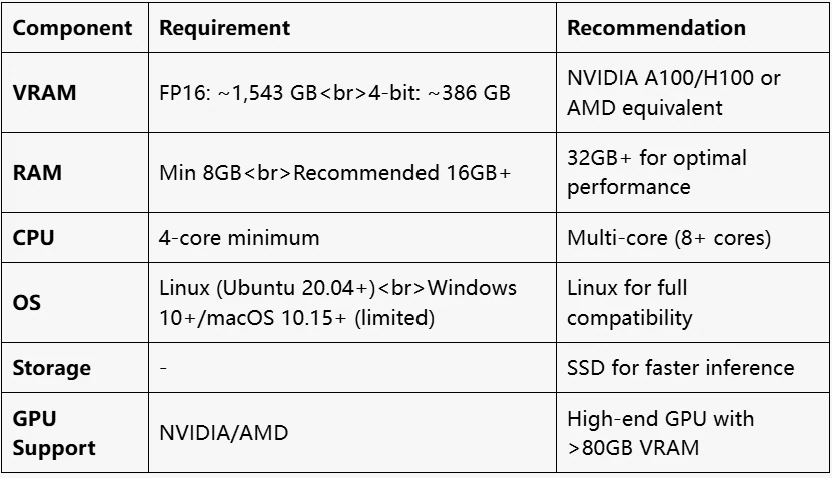
Challenges and Optimization
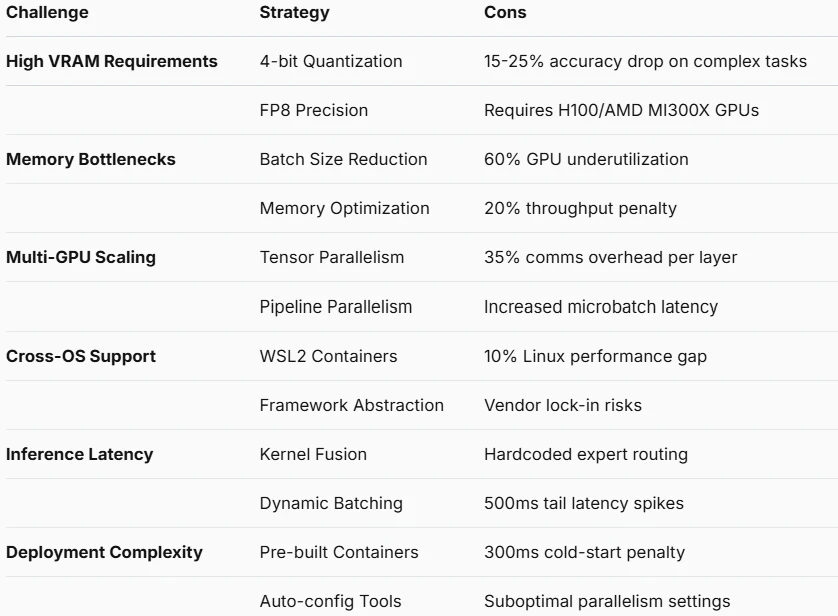
Alternative Option-API
What Problems Does the API Solve?
High VRAM Requirements
- API Solution: Full resolution
- Technical Implementation: Server-side cluster resource pooling
Memory Bottlenecks
- API Solution: Complete elimination
- Technical Implementation: Dynamic memory allocation on server nodes
Multi-GPU Scaling Complexity
- API Solution: Automatic handling
- Technical Implementation: Cloud-native horizontal autoscaling
Cross-OS Compatibility Issues
- API Solution: Native support
- Technical Implementation: Standardized HTTP/WebSocket interfaces
Inference Latency
- API Solution: Partial improvement
- Technical Implementation: Edge computing nodes + global acceleration
Deployment Complexity
- API Solution: Complete elimination
- Technical Implementation: Pre-built SDK with one-line integration
Quantization Accuracy Loss
- API Solution: Optional bypass
- Technical Implementation: Server-side FP16 precision preservation
Opaque Expert Routing
- API Solution: Full transparency
- Technical Implementation: Real-time routing diagnostics API
An Awesome Solution-Novita AI
Novita AI is an AI cloud platform that offers developers an easy way to deploy AI models using our simple API, while also providing the affordable and reliable GPU cloud for building and scaling.
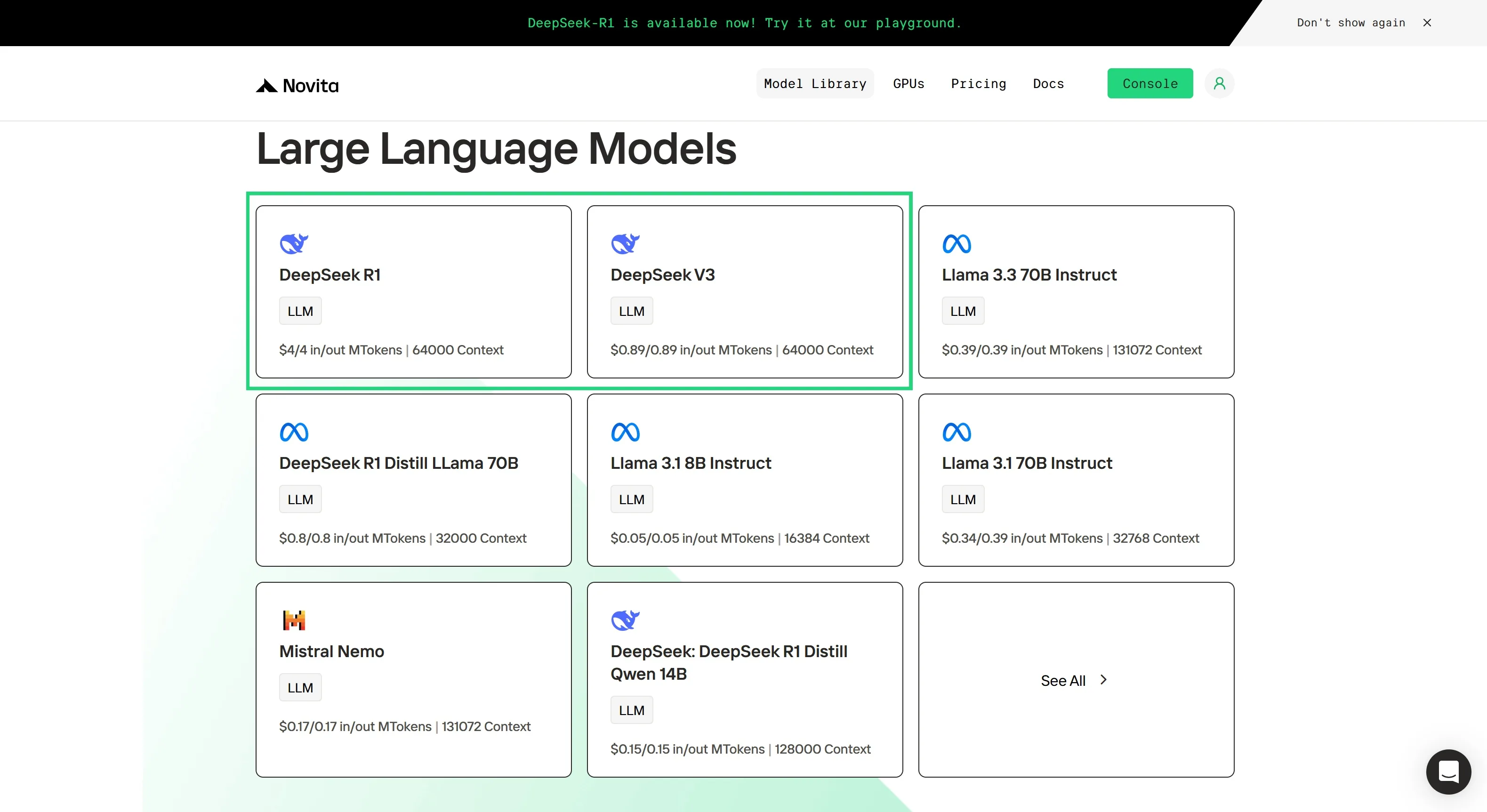
Step 1: Log In and Access the Model Library
Log in to your account and click on the Model Library button.

Step 2: Choose Your Model
Browse through the available options and select the model that suits your needs.
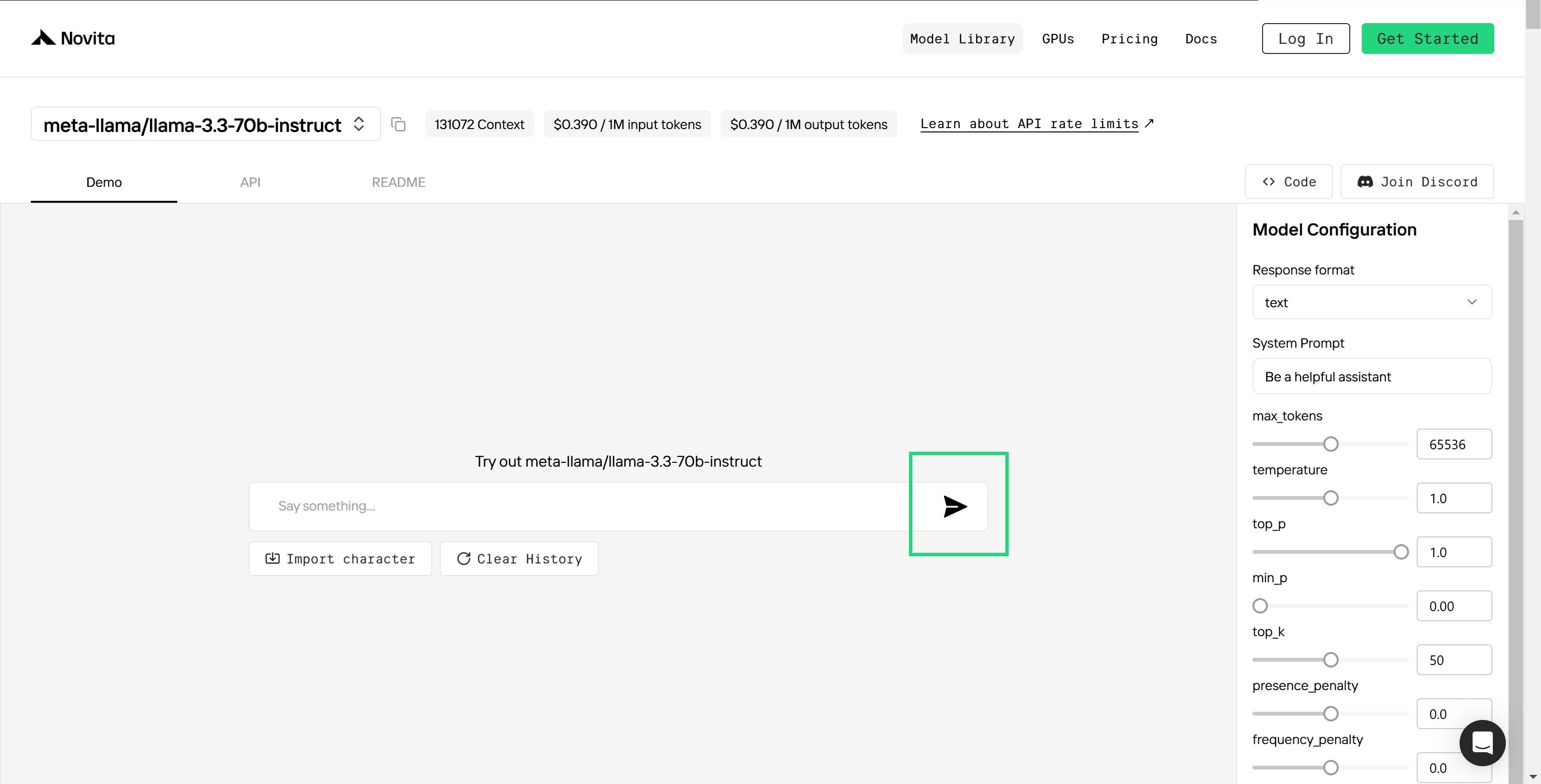
Step 3: Start Your Free Trial
Begin your free trial to explore the capabilities of the selected model.
Step 4: Get Your API Key
To authenticate with the API, we will provide you with a new API key. Entering the “Settings“ page, you can copy the API key as indicated in the image.

Step 5: Install the API
Install API using the package manager specific to your programming language.
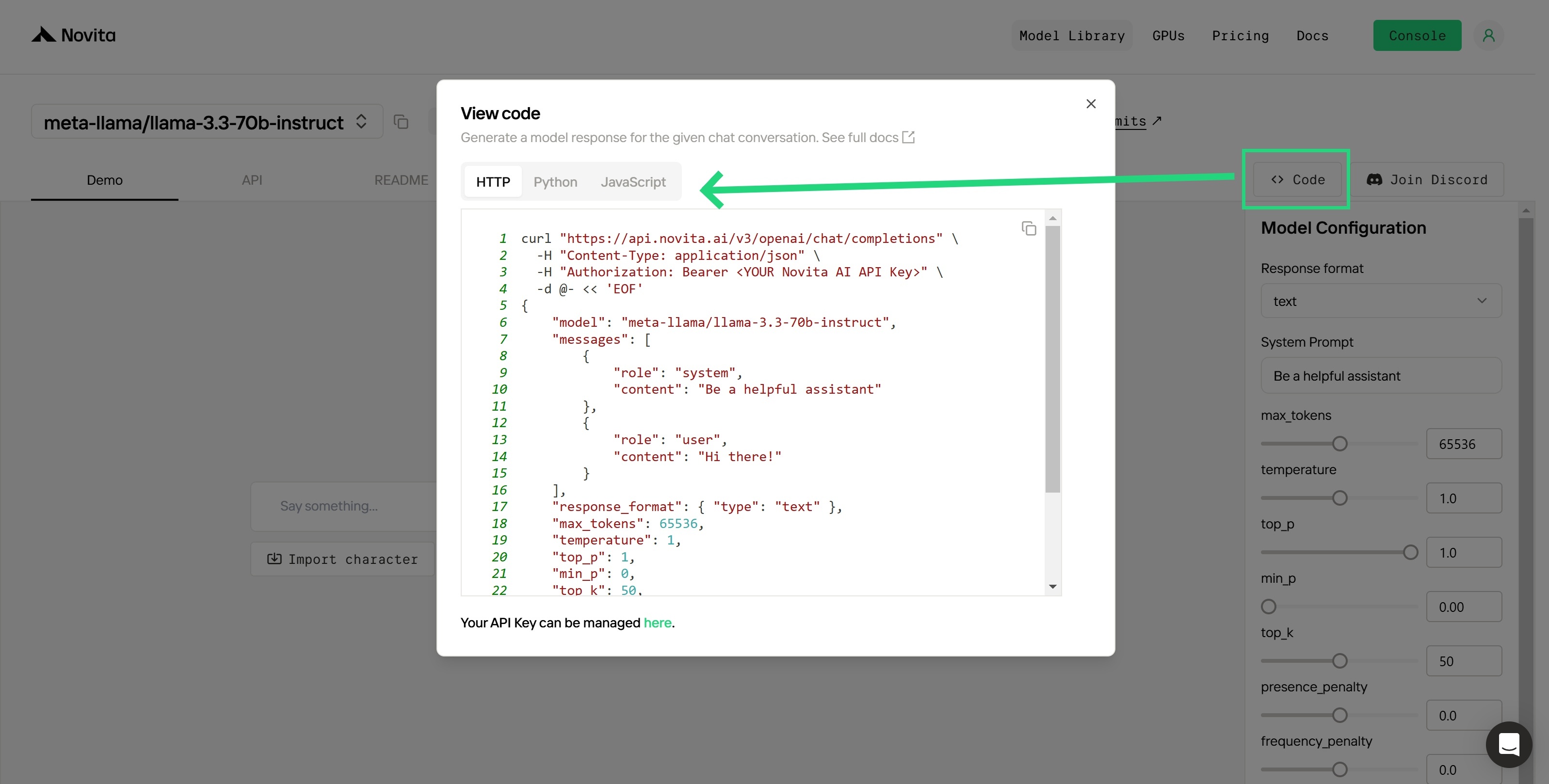
After installation, import the necessary libraries into your development environment. Initialize the API with your API key to start interacting with Novita AI LLM. This is an example of using chat completions API for python users.
from openai import OpenAI
client = OpenAI(
base_url="https://api.novita.ai/v3/openai",
api_key="<YOUR Novita AI API Key>",
)
model = "deepseek/deepseek_v3"
stream = True # or False
max_tokens = 2048
system_content = """Be a helpful assistant"""
temperature = 1
top_p = 1
min_p = 0
top_k = 50
presence_penalty = 0
frequency_penalty = 0
repetition_penalty = 1
response_format = { "type": "text" }
chat_completion_res = client.chat.completions.create(
model=model,
messages=[
{
"role": "system",
"content": system_content,
},
{
"role": "user",
"content": "Hi there!",
}
],
stream=stream,
max_tokens=max_tokens,
temperature=temperature,
top_p=top_p,
presence_penalty=presence_penalty,
frequency_penalty=frequency_penalty,
response_format=response_format,
extra_body={
"top_k": top_k,
"repetition_penalty": repetition_penalty,
"min_p": min_p
}
)
if stream:
for chunk in chat_completion_res:
print(chunk.choices[0].delta.content or "", end="")
else:
print(chat_completion_res.choices[0].message.content)
Upon registration, Novita AI provides a $0.5 credit to get you started!
If the free credits is used up, you can pay to continue using it.
DeepSeek V3 represents a significant advancement in open-source AI, offering state-of-the-art performance in various tasks. While local deployment provides greater control and privacy, it requires substantial hardware resources and technical expertise. For those who cannot meet these requirements, API-based alternatives like Novita AI offer an accessible and scalable solution. The choice between local deployment and API use depends on specific needs and resources.
Frequently Asked Questions
What is the Mixture-of-Experts (MoE) architecture and why is it important?
MoE uses multiple “experts” to process specific input tokens, improving efficiency and performance for complex tasks. It’s more computationally efficient than dense models but still hardware-intensive.
How do DeepSeek V3 and Llama 3.3 70B compare in terms of benchmarks and use cases?
DeepSeek V3 is superior for coding and math tasks, while Llama 3.3 70B shines in general language and multilingual applications.
What are the VRAM requirements for DeepSeek V3?
The VRAM requirements for DeepSeek V3 vary based on precision. For FP16, the 671B model requires approximately 1,543 GB of VRAM, while with 4-bit quantization, it requires approximately 386 GB of VRAM. The active parameters are 37B.
Novita AI is the All-in-one cloud platform that empowers your AI ambitions. Integrated APIs, serverless, GPU Instance — the cost-effective tools you need. Eliminate infrastructure, start free, and make your AI vision a reality.