GLM 4.5, as an advanced large language model (LLM) with agent capabilities, takes automation and intelligent decision-making to the next level through function calling. By leveraging function calling, GLM 4.5 can interact with external tools and APIs, perform actions, retrieve data, and automate complex workflows—making it far more than just a conversational model.
However, integrating and troubleshooting function calling can be challenging. This article provides practical guidance and solutions to common issues you may encounter when using function calling with GLM 4.5, such as parser errors, incorrect output formats, or schema design pitfalls. Through clear examples, troubleshooting tips, and best practices, this article helps you quickly identify and resolve problems—enabling you to fully unlock the agentic potential of GLM 4.5 in your real-world applications.
What Better Results can Function Calling Help GLM 4.5 Achieve?
Function calling is a powerful feature introduced in large language models such as GLM 4.5. It allows the model to interact with external tools, APIs, or structured code in a controlled and reliable way. Here are the main benefits and improved results that function calling brings to GLM 4.5:
https://www.youtube.com/watch?v=KUEmEb71vzQ
1. More Accurate and Reliable Outputs
- Improved Factuality: By delegating tasks like calculations, data lookups, or database queries to external functions, GLM 4.5 can avoid mistakes common in purely text-based answers.
- Fewer Hallucinations: The model relies on verified results from APIs or functions, reducing the chance of generating incorrect or fabricated information.
2. Automation of Complex Tasks
- Task Chaining: GLM 4.5 can break down a user request into multiple steps, calling appropriate functions for each step and combining the results.
- Workflow Automation: It can automate multi-step business processes, data processing, or report generation by orchestrating sequences of function calls.
3. Enhanced Integration with Real-World Systems
- Access to Live Data: With function calling, the model can fetch real-time information from databases, web services, or IoT devices, making its responses more up-to-date and context-aware.
- Custom Actions: Businesses can define custom functions (e.g., sending emails, placing orders), enabling the model to perform domain-specific actions securely.
4. Improved User Experience
- Interactive Applications: Users can interact with the model as if they were using an app, with the model triggering backend functions transparently.
- Personalization: Functions can fetch user-specific data or settings, enabling personalized responses.
5. Better Error Handling and Explainability
- Transparent Reasoning: Function calling helps track which external resources or tools were used, making the model’s reasoning process more auditable.
- Controlled Execution: Developers can monitor and limit what functions the model can call, improving safety and predictability.
What are the limitations of function calling in GLM-4.5?
1. Over-calling
GLM-4.5 may sometimes make excessive or unnecessary calls to external tools or APIs. This increases token usage and operational costs, as more computational resources are consumed without always benefiting the final result.
2. Streaming Edge Cases
In streaming mode, if partial JSON data is sent before the full response is complete, downstream applications may receive incomplete information. Without proper buffering, this can lead to errors or failures in processing the output.
3. Resource Footprint
For function calling, this means that limited hardware resources can impact the model’s ability to efficiently handle large numbers of requests, process complex data, or execute intricate chains of tool calls. In resource-constrained environments, function calling performance and accuracy may be noticeably reduced.
Benefits of Using Function Calling with GLM-4.5
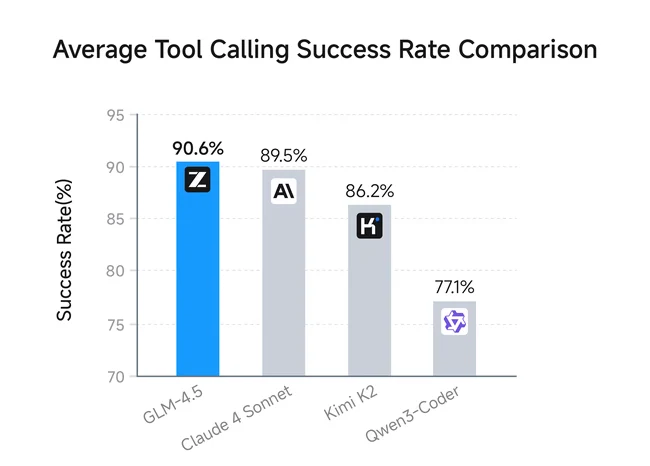
An independent evaluation of GLM-4.5’s agentic coding capabilities was performed using Claude Code, covering 52 diverse coding tasks such as frontend development, tool creation, data analysis, testing, and algorithm implementation. GLM-4.5 achieved a leading tool-calling success rate of 90.6%, outperforming Claude-4-Sonnet (89.5%), Kimi K2 (86.2%), and Qwen3-Coder (77.1%).
Tutorial: Using Function Calling in GLM-4.5 for Beginners
This guide demonstrates how to use Function Calling to retrieve current weather information for a user’s specified location. We will walk through a complete Python code example.
For the specific API format of Function Calling, please refer to the Docs!
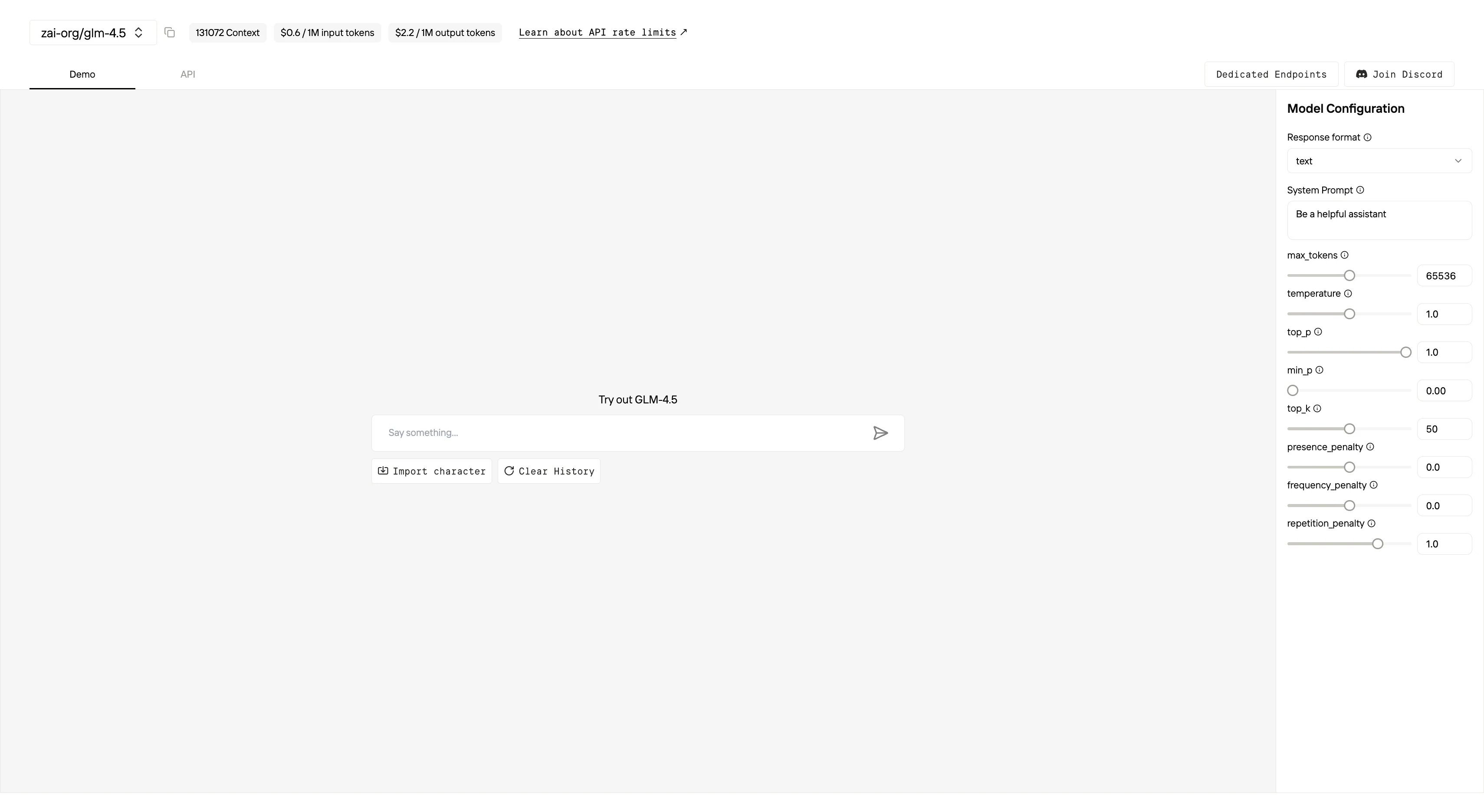
- Initialize the Client
First, you need to initialize the client with your Novita API key.
from openai import OpenAI
import json

client = OpenAI(
    base_url="https://api.novita.ai/v3/openai",
    # Get the Novita AI API Key from: https://novita.ai/settings/key-management.
    api_key="<YOUR Novita AI API Key>",
)

model = "zai-org/glm-4.5"- Define the Function to Be Called
Next, define the Python function that the model can call. In this example, it’s a function to get weather information.
# Example function to simulate fetching weather data.
def get_weather(location):
    """Retrieves the current weather for a given location."""
    print("Calling get_weather function with location: ", location)
    # In a real application, you would call an external weather API here.
    # This is a simplified example returning hardcoded data.
return json.dumps({"location": location, "temperature": "60 degrees Fahrenheit"})- Construct the API Request with Tools and User Message
Now, create the API request to the Novita endpoint. This request includes the tools parameter, defining the functions the model can use, and the user’s message.
tools = [
    {
        "type": "function",
        "function": {
            "name": "get_weather",
            "description": "Get weather of an location, the user shoud supply a location first",
            "parameters": {
                "type": "object",
                "properties": {
                    "location": {
                        "type": "string",
                        "description": "The city and state, e.g. San Francisco, CA",
                    }
                },
                "required": ["location"]
            },
        }
    },
]

messages = [
    {
        "role": "user",
        "content": "What is the weather in San Francisco?"
    }
]

# Let's send the request and print the response.
response = client.chat.completions.create(
    model=model,
    messages=messages,
    tools=tools,
)

# Please check if the response contains tool calls if in production.
tool_call = response.choices[0].message.tool_calls[0]
print(tool_call.model_dump())- Output
{'id': '0', 'function': {'arguments': '{"location": "San Francisco, CA"}', 'name': 'get_weather'}, 'type': 'function'}- Respond with the Function Call Result and Get the Final Answer
The next step is to process the function call, execute the get_weather function, and send the result back to the model to generate the final response to the user.
# Ensure tool_call is defined from the previous step
if tool_call:
    # Extend conversation history with the assistant's tool call message
    messages.append(response.choices[0].message)

    function_name = tool_call.function.name
    if function_name == "get_weather":
        function_args = json.loads(tool_call.function.arguments)
        # Execute the function and get the response
        function_response = get_weather(
            location=function_args.get("location"))
        # Append the function response to the messages
        messages.append(
            {
                "tool_call_id": tool_call.id,
                "role": "tool",
                "content": function_response,
            }
        )

    # Get the final response from the model, now with the function result
    answer_response = client.chat.completions.create(
        model=model,
        messages=messages,
        # Note: Do not include tools parameter here.
    )
print(answer_response.choices[0].message)- Output
{'id': '0', 'function': {'arguments': '{"location": "San Francisco, CA"}', 'name': 'get_weather'}, 'type': 'function'}Novita AI Now Offers Compatibility with Anthropic SDK
The combination of GLM-4.5 and Claude Code has rapidly gained attention in the AI community, delivering advanced agentic capabilities for real-world applications. To further streamline this integration, Novita AI now offers compatibility with the Anthropic SDK, allowing you to easily harness the power of GLM-4.5 through the familiar Claude Code interface.
You can check this docs to get more details!
1. Install the Anthropic SDK
pip install anthropic2. Initialize the Client
The Anthropic SDKs are designed to pull the API key and base URL from the environmental variables: ANTHROPIC_API_KEY and ANTHROPIC_BASE_URL. Also, you can supply the parameters to the Anthropic client when initializing it.
You can view and manage your API keys on the settings page.
- Using Environment Variables
export ANTHROPIC_BASE_URL="https://api.novita.ai/anthropic"
export ANTHROPIC_API_KEY="<YOUR_NOVITA_API_KEY>"- Set the parameters while initializing the Anthropic client
import anthropic

client = anthropic.Anthropic(
    base_url="https://api.novita.ai/anthropic",
    api_key="<YOUR_NOVITA_API_KEY>"
)
3. Call the API
import anthropic

# Initialize the client, if you already set `ANTHROPIC_BASE_URL` and `ANTHROPIC_API_KEY`
# in the environment variables, you can omit the `api_key` and `base_url` parameters.
client = anthropic.Anthropic(
    base_url="https://api.novita.ai/anthropic",
    api_key="<YOUR_NOVITA_API_KEY>"
)

message = client.messages.create(
    model="zai-org/glm-4.5",
    max_tokens=1000,
    temperature=1,
    system="You are a world-class poet. Respond only with short poems.",
    messages=[
        {
            "role": "user",
            "content": [
                {
                    "type": "text",
                    "text": "Why is the ocean salty?"
                }
            ]
        }
    ]
)

print(message.content)
How to Improve the Accuracy of GLM-4.5 Function Calling
1. Schema Clarity
-
What it means: Use short, unique parameter names and avoid nested
anyOfuntil the parser is more robust. -
What it solves:
- Prevents parameter confusion and naming conflicts, making it easier for the model to fill in arguments correctly.
- Reduces parsing errors and failed function calls caused by overly complex schemas.
2. System Prompt
-
What it means: Instruct the model to “first decide if a tool is needed; otherwise, answer directly.”
-
What it solves:
- Reduces unnecessary or excessive tool/function calls (over-calling).
- Helps save computational resources and operational costs.
3. Temperature ≤ 0.2
-
What it means: Set the temperature parameter to 0.2 or lower.
-
What it solves:
- Lowers output randomness, ensuring more predictable and consistent behavior.
- Prevents schema drift, so the model sticks to the intended parameter structure and reduces errors.
4. Use tool_choice="required"
-
What it means: Set this option when the user explicitly requests a function call.
-
What it solves:
- Ensures the model always makes the required function call, improving reliability and user satisfaction.
5. Parallel Calls Sparingly
-
What it means: Only parallelize truly independent functions; otherwise, generate calls sequentially.
-
What it solves:
- Prevents argument mixing or logical inconsistency between calls.
- Ensures each call receives the correct context and inputs, leading to more accurate results.
Troubleshooting GLM-4.5 Function Calling Errors
| Symptom | Likely Cause | Fix / Solution |
|---|---|---|
| IndexError: list index out of range in parser | Using the default parser; GLM ID format differs. | Start the server with --tool-call-parser glm4_moe. |
| Random text mixed with JSON | Temperature too high or missing tool_choice. | Lower the temperature; set tool_choice to "auto" or "required". |
| Endless tool recursion | Model hallucinating repeated calls. | Track executed calls and abort duplicates in the host logic. |
| OOM / OutOfResources | FP8 build still exceeds shared memory on Triton kernels. | Reduce num_stages or switch to Int4-Int8-Mix quantization. |
| No call emitted | Tool schema too vague. | Add a strict required list and explicit enum values. |
Function calling transforms GLM 4.5 from a conversational model into an intelligent agent that can execute tasks and automate processes in real time. By understanding typical issues and their solutions—such as parser errors, JSON formatting, or schema design—you can ensure smooth integration and unlock the full potential of GLM 4.5’s agentic abilities. We hope this article has clarified common questions and empowered you to deploy GLM 4.5 function calling with confidence.
Frequently Asked Questions
Why is function calling important for GLM 4.5 as an agentic LLM?
Function calling allows GLM 4.5 to interact programmatically with external services, databases, and tools. This enables automation, multi-step reasoning, information retrieval, and real-world actions beyond text generation.
How do I avoid endless recursion or repeated tool calls?
Implement host-side logic to track and abort duplicate function calls, preventing infinite loops.
What are best practices for schema design to ensure function calls are emitted?
Use concise, unique parameter names, provide explicit enums, and define required parameters to make the schema clear for the model.
Novita AI is the All-in-one cloud platform that empowers your AI ambitions. Integrated APIs, serverless, GPU Instance — the cost-effective tools you need. Eliminate infrastructure, start free, and make your AI vision a reality.