Large language models (LLMs) like Llama-3-Nemotron-Ultra-253B-V1 are revolutionizing AI, enabling advanced reasoning, coding, and multilingual chat capabilities. However, harnessing their full power requires access to high-performance GPUs—hardware that is often out of reach for individuals and smaller organizations. Renting GPUs through cloud platforms has emerged as the most practical and cost-effective way to run these state-of-the-art models.
Understanding Llama-3-Nemotron-Ultra-253B-V1
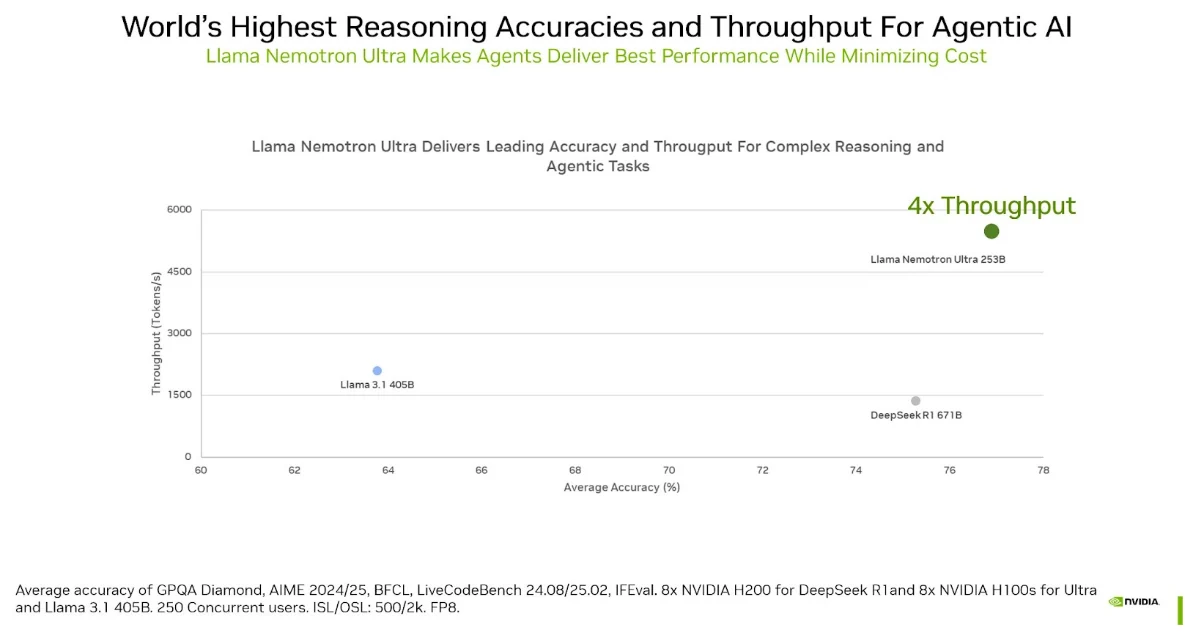
Llama-3-Nemotron-Ultra-253B-V1 is NVIDIA’s advanced LLM, derived from Meta’s Llama-3.1-405B-Instruct. It is designed for general-purpose reasoning, chat, coding, retrieval-augmented generation (RAG), and tool calling. The model features a context window of up to 128,000 tokens and supports multiple languages, including English, German, French, Italian, Portuguese, Hindi, Spanish, and Thai.
What sets this model apart is its efficiency: thanks to a novel Neural Architecture Search (NAS) and vertical compression methods, it achieves high accuracy while reducing memory footprint and latency. This means it can handle complex tasks with fewer GPUs, making it more accessible for commercial and research applications.
Source from: https://www.nvidia.com/
Why You Need Powerful GPUs for Llama-3-Nemotron-Ultra-253B-V1
GPU Requirements for Large Language Models
LLMs like Llama-3-Nemotron-Ultra-253B-V1 are computationally demanding. For inference, the model is optimized to fit on a single node with 8x NVIDIA H100 GPUs, each with 80GB VRAM. Training or fine-tuning such a model requires even more compute, high memory bandwidth, and fast interconnects.
Benefits of Renting GPUs
- Cost-Effectiveness: Renting avoids the steep upfront costs of purchasing GPUs, as well as ongoing expenses like maintenance, upgrades, and energy consumption.
- Access to Latest Technology: Rental services frequently update their hardware, letting you use the newest GPUs without worrying about obsolescence.
- Scalability: Easily scale resources up or down based on project needs—ideal for experimentation, bursts of training, or temporary deployments.
- Faster Time to Market: Rapid deployment and flexible rental periods mean you can start training or inference in minutes, not weeks.
How to Choose the Right GPU for Llama-3-Nemotron-Ultra-253B-V1
Understanding the Specifications You Need
When selecting GPUs for Llama-3-Nemotron-Ultra-253B-V1, consider:
- VRAM: The model is designed to fit on a single 8×H100 node for inference. Each NVIDIA H100-80GB GPU has 80GB of VRAM, meaning the total VRAM required is approximately 640GB (8 × 80GB).
- Compute Power: NVIDIA H100 and A100 are the top choices due to their AI-optimized architecture and high throughput.
- Bandwidth: High memory bandwidth ensures faster data transfer, crucial for large models.
- Interconnect: NVLink or similar high-speed interconnects are important for multi-GPU setups.
Top GPUs for Llama-3-Nemotron-Ultra-253B-V1
Based on the model’s requirements, the following GPUs are recommended:
| GPU Model | VRAM | Best Use Case |
|---|---|---|
| NVIDIA H100 | 80GB | Inference & training, top choice |
| NVIDIA A100 | 40/80GB | Training, large-scale inference |
| NVIDIA RTX 6000 Ada | 48GB | Smaller LLMs, prototyping |
Step-by-Step Guide to Renting GPUs for Your AI Models
Novita AI is a leading platform offering flexible and efficient cloud GPU computing resources for businesses and researchers. With top-tier GPUs like the H100 and RTX 4090, Novita AI supports complex AI model deployment and training, providing access to powerful computing without the need for hefty hardware investments. Its pay-as-you-go model and easy-to-use interface make it ideal for projects requiring high-performance computing, such as training large models like Llama-3 and Nemotron-Ultra 253B.
Renting GPUs for high-demand AI tasks like training or deploying Llama-3 and Nemotron-Ultra 253B is straightforward with platforms like Novita AI. Here’s a step-by-step walkthrough to get you started:
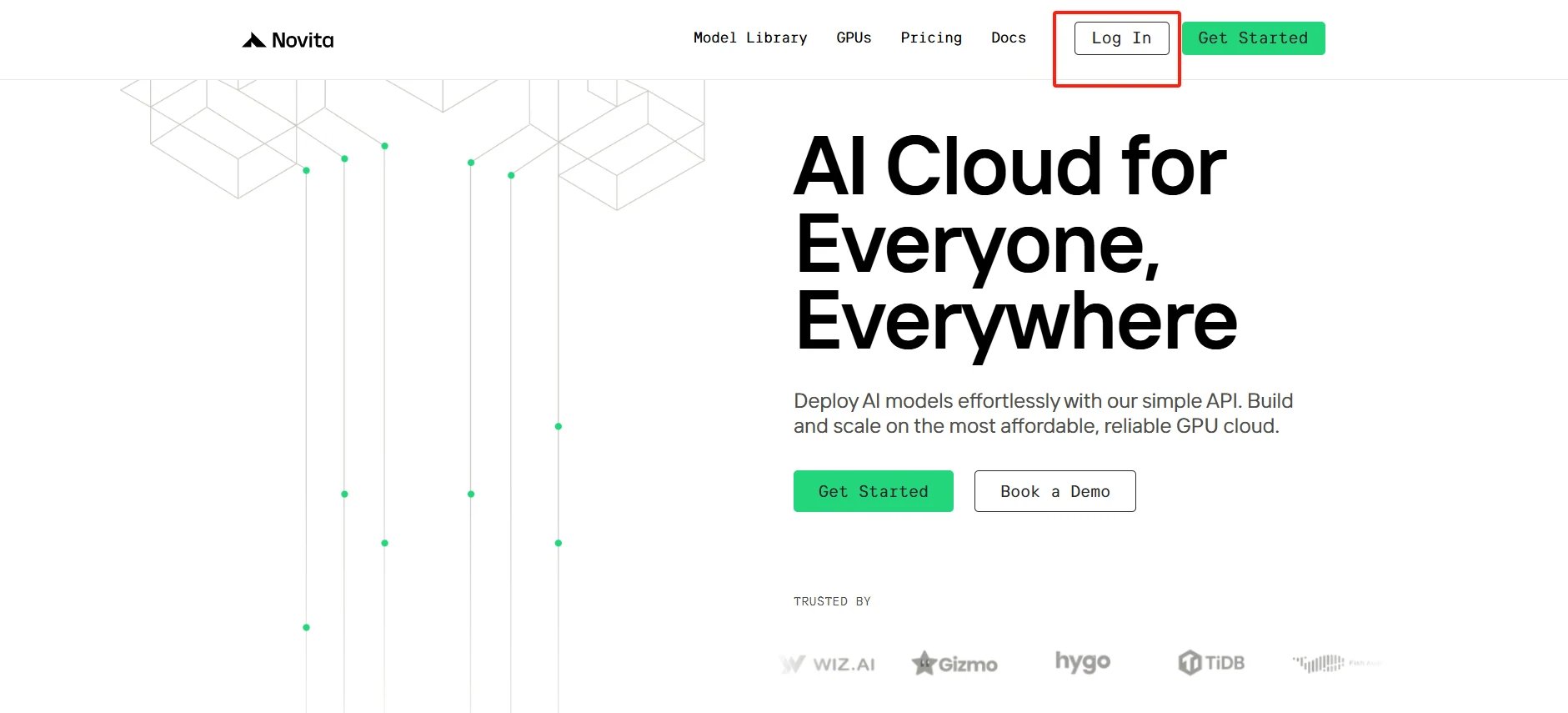
Step1:Create an account
Get started in minutes: Create your account on Novita AI’s platform and navigate to our GPU marketplace. Browse our curated selection of high-performance instances, featuring detailed specifications and benchmark data. Select your optimal configuration based on your model requirements, and launch your instance with just a few clicks. Our streamlined deployment process ensures you can focus on what matters most - your AI development.
[Try using Novita AI now](https://novita.ai/?utm_source=blogs_GPU&utm_medium=article&utm_campaign=Taming the Beast: How to Rent GPUs for Llama-3 and Nemotron-Ultra 253B)
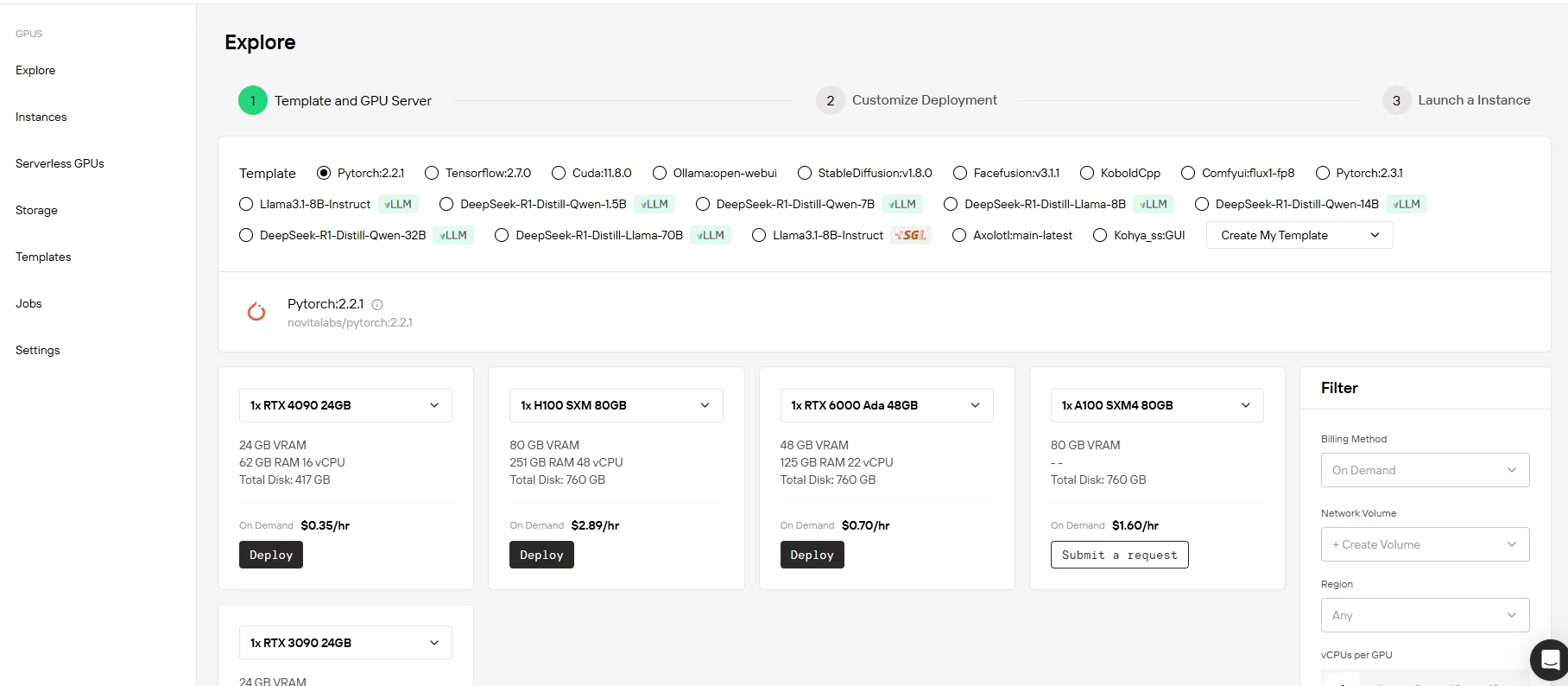
Step2:Select Your GPU
Experience unparalleled computing power with our state-of-the-art GPU infrastructure. Our platform features the latest NVIDIA GPUs, delivering exceptional performance for large language models. With extensive VRAM capacity and optimized RAM configurations, we ensure your AI models train at peak efficiency. Choose from our comprehensive template library or build your custom solution - our platform adapts to your workflow.
[Try Novita AI’s High-Performance GPUs](https://novita.ai/gpus-console/?utm_source=blogs_GPU&utm_medium=article&utm_campaign=Taming the Beast: How to Rent GPUs for Llama-3 and Nemotron-Ultra 253B)
Step3:Customize Your Setup
Start strong with 60GB of free Container Disk storage, and scale seamlessly as your projects grow. Our flexible storage solutions adapt to your needs, whether you’re prototyping or deploying to production. Choose between pay-as-you-go flexibility or cost-effective subscription plans - all with instant provisioning and no hidden fees.
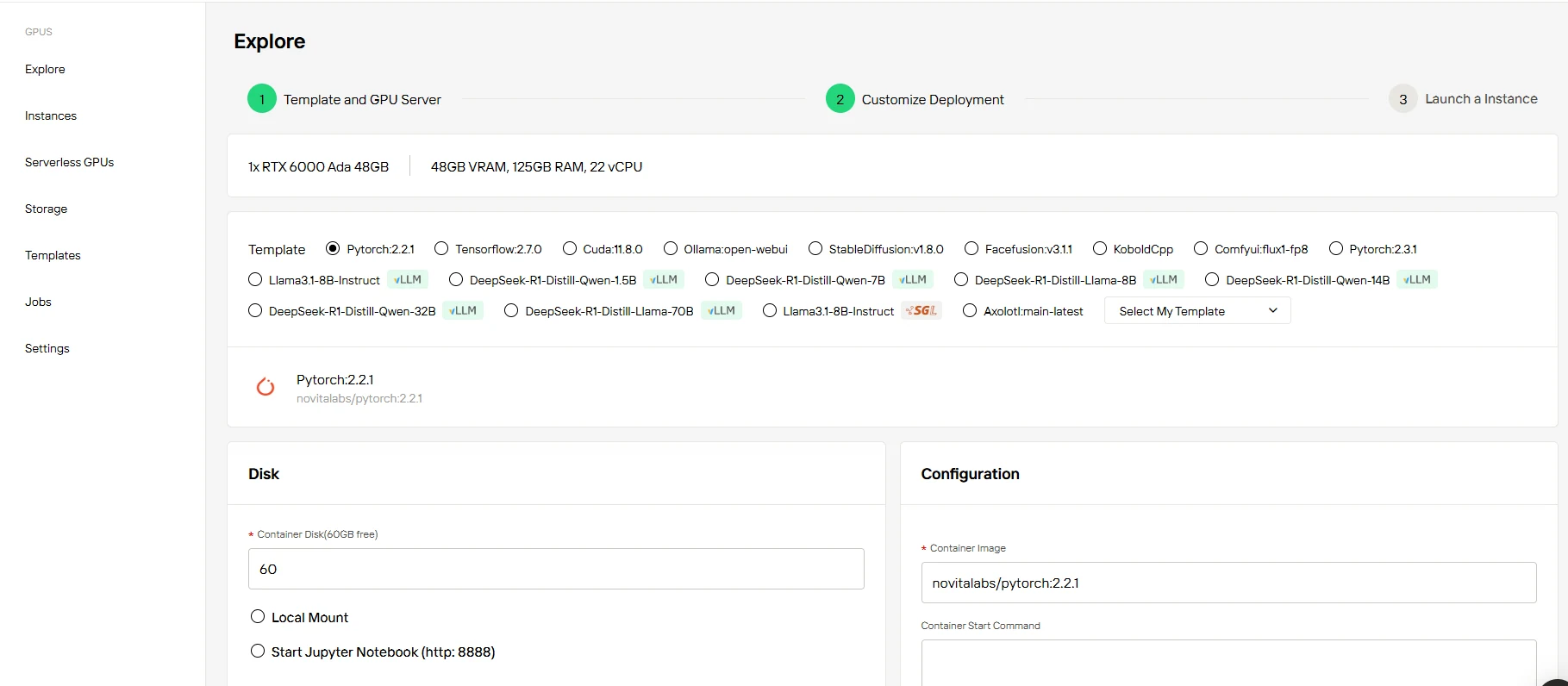
Details on specific subscription tiers and pricing are provided below the table:
| Option | RTX 3090 24 GB | RXT 4090 24 GB | RXT 6000 Ada 48GB | H100 SXM 80 GB |
| 1-5 months | $136.00/month (10% OFF) | $226.80/month (10% OFF) | $453.60/month(10% OFF) | $1872.72/month (10% OFF) |
| 6-11 months | $129.00/month( (15% OFF) | $206.64/month (18% OFF) | $428.40/month(15% OFF) | $1664.64/month (20% OFF) |
| 12 months | $113.40/month(25% OFF) | $189.00/month (25% OFF) | $403.20/month(20% OFF) | $1498.18/month (28% OFF) |
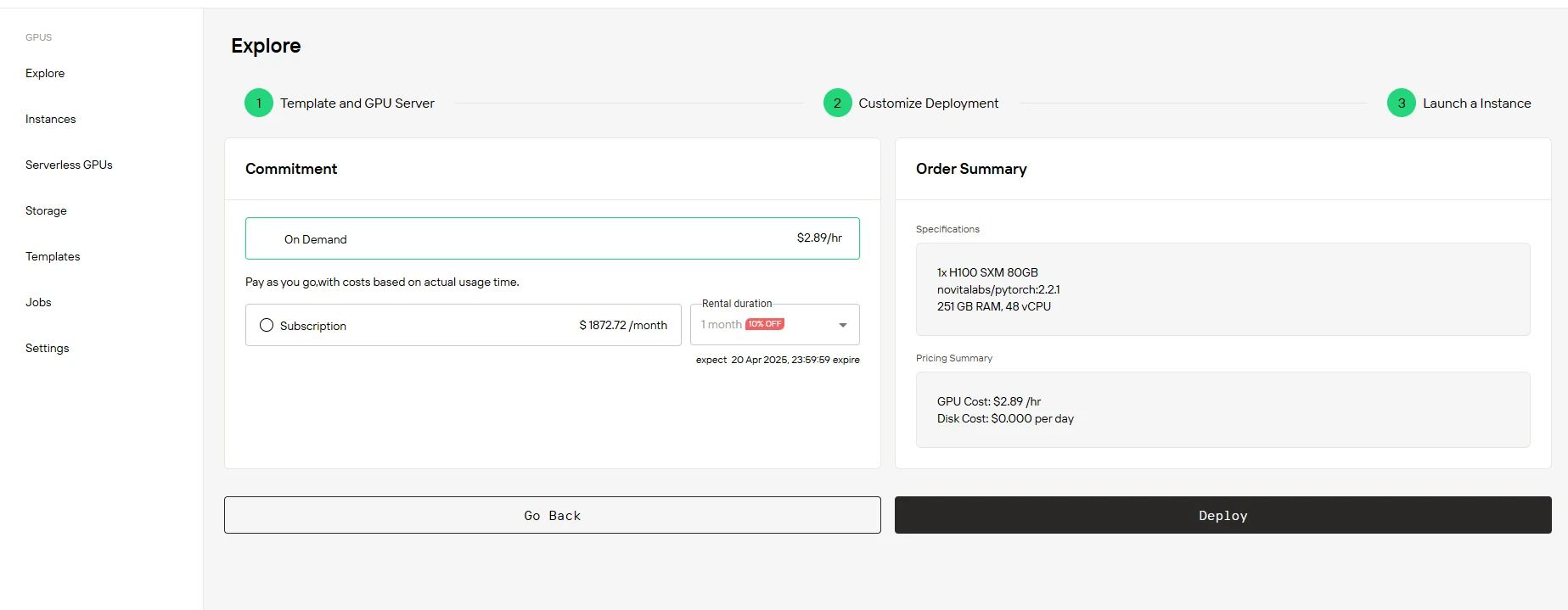
Step4:Launch Your Instance
Choose your path to performance: flexible On Demand pricing or cost-efficient Subscription plans. Review your customized configuration and pricing details, then launch your instance with a single click. Your GPU environment is ready immediately - no complex setup, no waiting. Start innovating right away.
Conclusion
Renting GPUs is the most practical, scalable, and cost-effective solution for running advanced models like Llama-3 and Nemotron-Ultra 253B. By understanding your model’s requirements and choosing the right hardware, you can harness the full power of modern AI without the overhead of hardware ownership. Whether you’re a solo researcher or an enterprise AI team, GPU rental platforms put world-class compute at your fingertips—so you can focus on building, experimenting, and innovating with the latest in large language models.
Frequently Asked Questions
What GPU specifications should I look for when renting for Llama-3-Nemotron-Ultra-253B-V1?
Focus on GPUs with at least 80GB VRAM (such as NVIDIA H100 or A100), high memory bandwidth, and support for the latest AI-optimized architectures (Hopper or Ampere). Multi-GPU configurations with fast interconnects (like NVLink) are recommended for optimal performance.
Can I use Llama-3-Nemotron-Ultra-253B-V1 for commercial applications?
Yes, the model is ready for commercial use and is designed to be integrated into production environments for a variety of advanced AI tasks.
What should I look for in a GPU rental provider?
Key factors include available GPU models and VRAM, scalability options, pricing, ease of setup, and support for your preferred software stack (CUDA, PyTorch, TensorFlow).
[Novita AI](https://novita.ai/?utm_source=blogs_GPU&utm_medium=article&utm_campaign=The Uncertain Future of GPU Pricing: Why Cloud GPUs Offer Stability in 2025) is an AI cloud platform that offers developers an easy way to deploy AI models using our simple API, while also providing the affordable and reliable GPU cloud for building and scaling.
Recommended Reading
[Discover the Power of Llama 3 Models](http://Discover the Power of Llama 3 Models)
[Mastering Llama 3: How to Use it in 3 Approaches](http://Mastering Llama 3: How to Use it in 3 Approaches)
[Advanced AI Development with Llama 3 400B](http://Advanced AI Development with Llama 3 400B)



