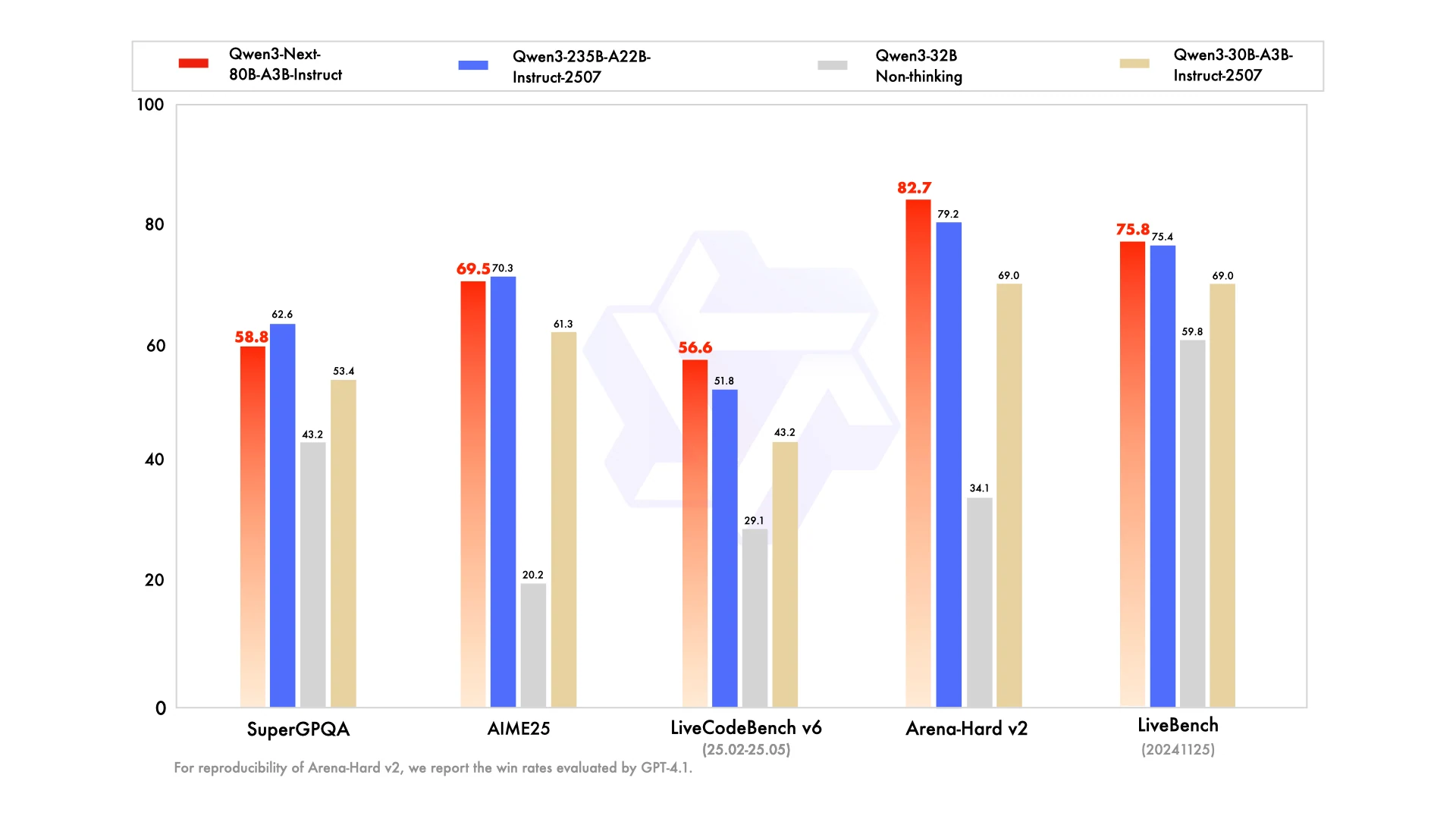
Why can a model with “only” 80 billion parameters stand shoulder to shoulder with a giant 235B model? Conventional wisdom suggests that bigger models always mean more power, more accuracy, and better reasoning. Yet, Qwen3-Next-80B-A3B challenges this assumption.
This article explores the core question: how does a smaller-scale model manage to rival a system nearly three times its size, and with far less VRAM? We will examine the architectural choices, efficiency techniques, and performance trade-offs that make this possible, and what it means for developers and organizations seeking the right balance between speed, cost, and capability.
Why Qwen3-Next-80B-A3B Can Rival a 235B Model with Far Fewer VRAM
The ability of the 80-billion-parameter Qwen3-Next-80B-A3B to compete with a colossal 235-billion-parameter model stems from its highly efficient architecture, primarily its use of a High-Sparsity Mixture-of-Experts (MoE) design.
From Hugging Face
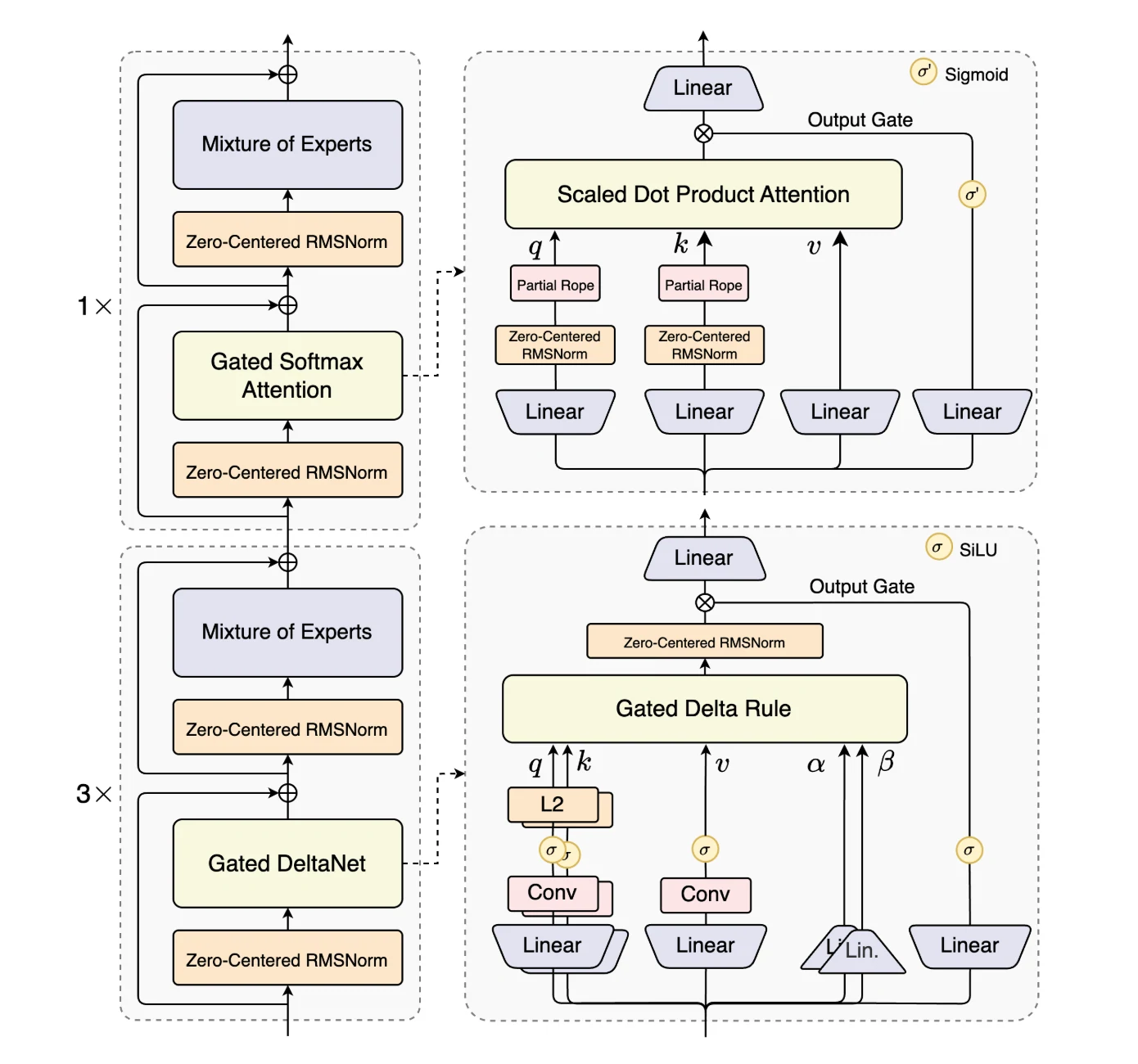
Qwen3-Next-80B-A3B is the first model in the Qwen3-Next series and stands out for its architectural innovations that maximize long-context efficiency and throughput.
It introduces Hybrid Attention, combining Gated DeltaNet and Gated Attention to replace standard attention, enabling efficient context modeling at ultra-long sequence lengths.
A High-Sparsity Mixture-of-Experts (MoE) design lowers the activation ratio drastically, reducing FLOPs per token while preserving model capacity.
To ensure robustness, the model integrates Stability Optimizations such as zero-centered and weight-decayed layer normalization.
Finally, Multi-Token Prediction (MTP) improves pretraining efficiency and accelerates inference. Together, these enhancements make Qwen3-Next-80B-A3B uniquely suited for handling large-scale, long-context workloads with both efficiency and stability.
From Hugging Face
VRAM Requirements for Qwen3-Next-80B-A3B Inference
A crucial point to understand is that while only a fraction of the parameters are active during inference, the entire 80 billion parameters must still be loaded into the GPU’s Video VRAM.
The VRAM needed for inference is primarily determined by the model’s size and the precision of its weights. Here’s a basic calculation for loading the model weights:
FP16/BF16 (16-bit precision): This is a common precision for inference, using 2 bytes per parameter. 80 billion parameters × 2 bytes/parameter = 160 GB of VRAM
This 160 GB is just for the model weights. Additional VRAM is required for the KV cache (which stores attention information for the context), activations, and other operational overhead. Therefore, in practice, you would need more than 160 GB of VRAM to run the unquantized model, especially with long context lengths.
VRAM Requirements for Different Tasks
While the base VRAM for model loading is static, the dynamic VRAM usage fluctuates depending on the specifics of the task at hand. This is primarily due to the KV Cache, context length, and batch size. The KV Cache stores the attention keys and values for each token in the input sequence, and its size is a major contributor to dynamic VRAM consumption.
Text Generation (e.g., Chatbots, Summarization, Creative Writing)
- Typical Context Length: For conversational AI or summarizing shorter documents, the context length might be relatively small (e.g., a few thousand tokens). This results in a smaller KV Cache and thus lower dynamic VRAM usage.
- Long-Form Generation: For tasks like writing long articles or maintaining a very long conversational history, the context grows, and so does the KV Cache. The Qwen3-Next model supports a very long context of up to 256,000 tokens, and utilizing this full capacity would lead to a significant increase in VRAM requirements.
For instance, even on a powerful setup with 2 H20 GPUs (96GB each), 256k inputs can lead to memory issues.
From Hugging Face
Code Generation
- Repository-Level Context: A key application of advanced code generation models is to understand an entire codebase for tasks like adding new features or debugging complex issues. In such scenarios, the input context can be very large, consisting of multiple files and tens of thousands of lines of code. This will substantially increase the VRAM needed for the KV Cache.
- Simple Code Snippets: Conversely, generating a small, self-contained function or completing a single line of code will have a minimal impact on dynamic VRAM, similar to short-form text generation.
Model Variants (Instruct vs. Thinking):
- The core architecture of the “Instruct” and “Thinking” versions of Qwen3-Next-80B-A3B is the same, with 80B total and 3B active parameters.Therefore, their base VRAM requirements for model loading are identical. However, the “Thinking” model may generate longer intermediate reasoning steps, potentially leading to slightly higher dynamic VRAM usage during complex problem-solving tasks.
In summary, the VRAM requirement is not inherently different for “text generation” versus “code generation” but rather depends on the scale of the input and output for a given task. A complex, multi-file code generation task will require more dynamic VRAM than a simple, single-paragraph text summarization, and vice-versa.
GPU Recommendations for Running Qwen3-Next-80B-A3B Smoothly
CPU Performance
Yes, the Qwen3-Next 80B model can run on a CPU. In the demo, the presenter explained that although the model has 80 billion parameters, only about 3 billion are activated during inference. This makes CPU execution possible—something that seemed impossible just a few weeks ago.
The downside is speed. For example, when asked “What is the smallest country in the world?” the model took 55 minutes to answer (Vatican City ).
https://www.youtube.com/watch?v=F0dBClZ33R4
GPU Performance
The Qwen3-Next 80B model also runs on a single GPU. With four or more GPUs, the speed—especially with long contexts—becomes extremely fast, close to blazing.In terms of memory, running the model in full precision requires a little over 68 GB of VRAM.
| Feature | NVIDIA A100 SXM | NVIDIA H100 SXM | NVIDIA H200 SXM | NVIDIA B200 |
|---|---|---|---|---|
| GPU Architecture | Ampere | Hopper | Hopper | Blackwell |
| Release Year | 2020 | 2022 | 2023 | 2024 |
| Memory (VRAM) | 40GB or 80GB HBM2e | 80GB HBM3 | 141GB HBM3e | 192GB HBM3e |
| Memory Bandwidth | 2.0 TB/s (for 80GB model) | 3.35 TB/s | 4.8 TB/s | 8.0 TB/s |
| Interconnect | NVLink 3.0 (600 GB/s total bandwidth) | NVLink 4.0 (900 GB/s total bandwidth) | NVLink 4.0 (900 GB/s total bandwidth) | NVLink 5.0 (1.8 TB/s total bandwidth) |
| Max FP16/BF16 Performance | 312 TFLOPS (Sparsity: 624 TFLOPS) | 989 TFLOPS (Sparsity: 1,979 TFLOPS) | 989 TFLOPS (Sparsity: 1,979 TFLOPS) | 2,250 TFLOPS (Sparsity: 4,500 TFLOPS) |
| New Precision Support | TF32 | FP8 | FP8 | FP4, FP6 |
| Key Innovation | Multi-Instance GPU (MIG), TF32 | Transformer Engine (FP8 support), DPX | Increased HBM3e memory and bandwidth | 2nd-Gen Transformer Engine (FP4/FP6), Blackwell Chiplet Design |
| Typical Max Power (TDP) | Up to 400W | Up to 700W | Up to 1000W | Up to 1200W |
- A100 SXM: The Ampere-based GPU that revolutionized AI by introducing TF32 precision and Multi-Instance GPU (MIG) for better performance and resource utilization.
- H100 SXM: Upgraded to the Hopper architecture, its key update was the Transformer Engine with FP8 support, dramatically accelerating AI training for Transformer models.
- H200 SXM: An evolution of the H100, its major update is the adoption of faster and larger HBM3e memory (141GB), significantly boosting memory bandwidth for large model inference.
- B200: A major leap to the Blackwell architecture, it introduces a dual-chiplet design and a 2nd-Gen Transformer Engine with new FP4/FP6 precision support, delivering massive performance gains for trillion-parameter AI models.
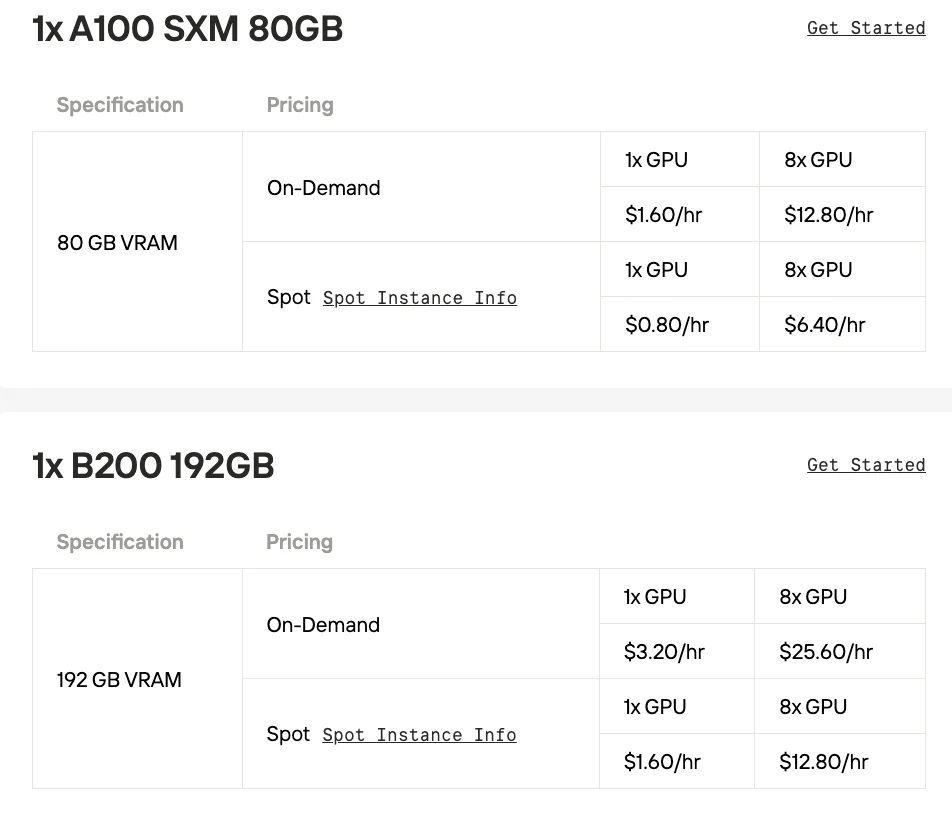
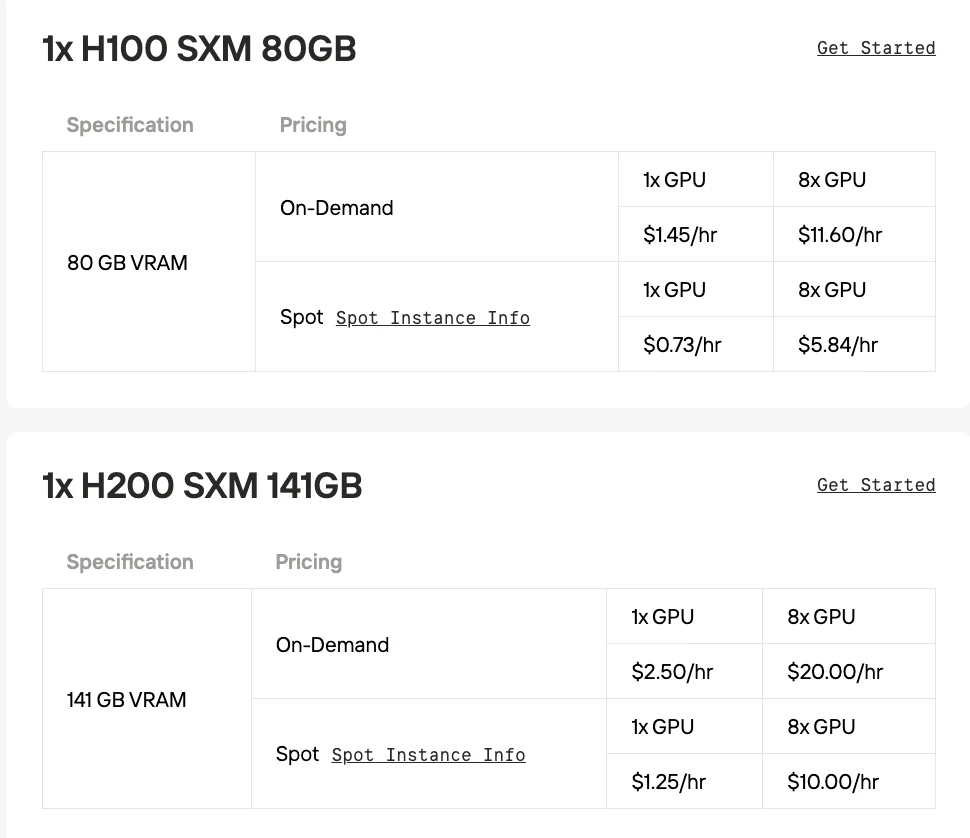
If you want to experience the model through local deployment, Novita AI offers affordable and stable GPU instance services. It also provides a spot pricing option to further minimize costs, helping you test the model’s capabilities.
Minimizing VRAM Usage While Maintaining Performance
Several techniques can help reduce the VRAM footprint of Qwen3-Next-80B-A3B, making the model easier to run on a wider range of hardware.
Quantization is the most effective approach. By converting the model’s weights from higher-precision formats (like FP16) to lower-precision ones, memory usage drops significantly.
- INT8 (8-bit): Cuts VRAM needs for weights by about half compared to FP16. For the 80B model, this brings the requirement to around 80 GB.
- INT4 (4-bit): Reduces VRAM for weights by about 75% compared to FP16, lowering the requirement to roughly 40 GB.
GGUF format is widely used for running models on CPUs and Macs, but it also has GPU applications. A key advantage for mixture-of-experts models like Qwen3-Next is that GGUF allows some expert layers to be offloaded to system RAM, lowering VRAM requirements at the expense of slower performance when those layers are activated.
CPU offloading takes this further: parts of the model, especially rarely used expert layers, can reside in system RAM and be moved to VRAM only when needed. This reduces VRAM demands significantly but creates latency due to slower transfers between RAM and GPU memory.
Specialized inference engines such as vLLM or SGLang are highly recommended. These frameworks are built for large language models and use optimizations like efficient KV cache management to reduce memory overhead.
Flash Attention provides another path, offering a more memory-efficient and faster version of the attention algorithm by leveraging GPU high-speed SRAM more effectively.
Finally, reducing context length can be a practical solution. If your application doesn’t need very long contexts, lowering the maximum context length directly shrinks the KV cache size and saves VRAM.
Test Qwen3-Next-80B-A3B the Simple Way: Use the API
Novita AI is an AI cloud platform that offers developers an easy way to deploy AI models using our simple API.
Qwen3-Next-80B-A3B Instruct costs $0.15/M input and $1.5/M output, with a 65,536-token context.
Qwen3-Next-80B-A3B Thinking also costs $0.15/M input and $1.5/M output, with the same 65,536-token context.
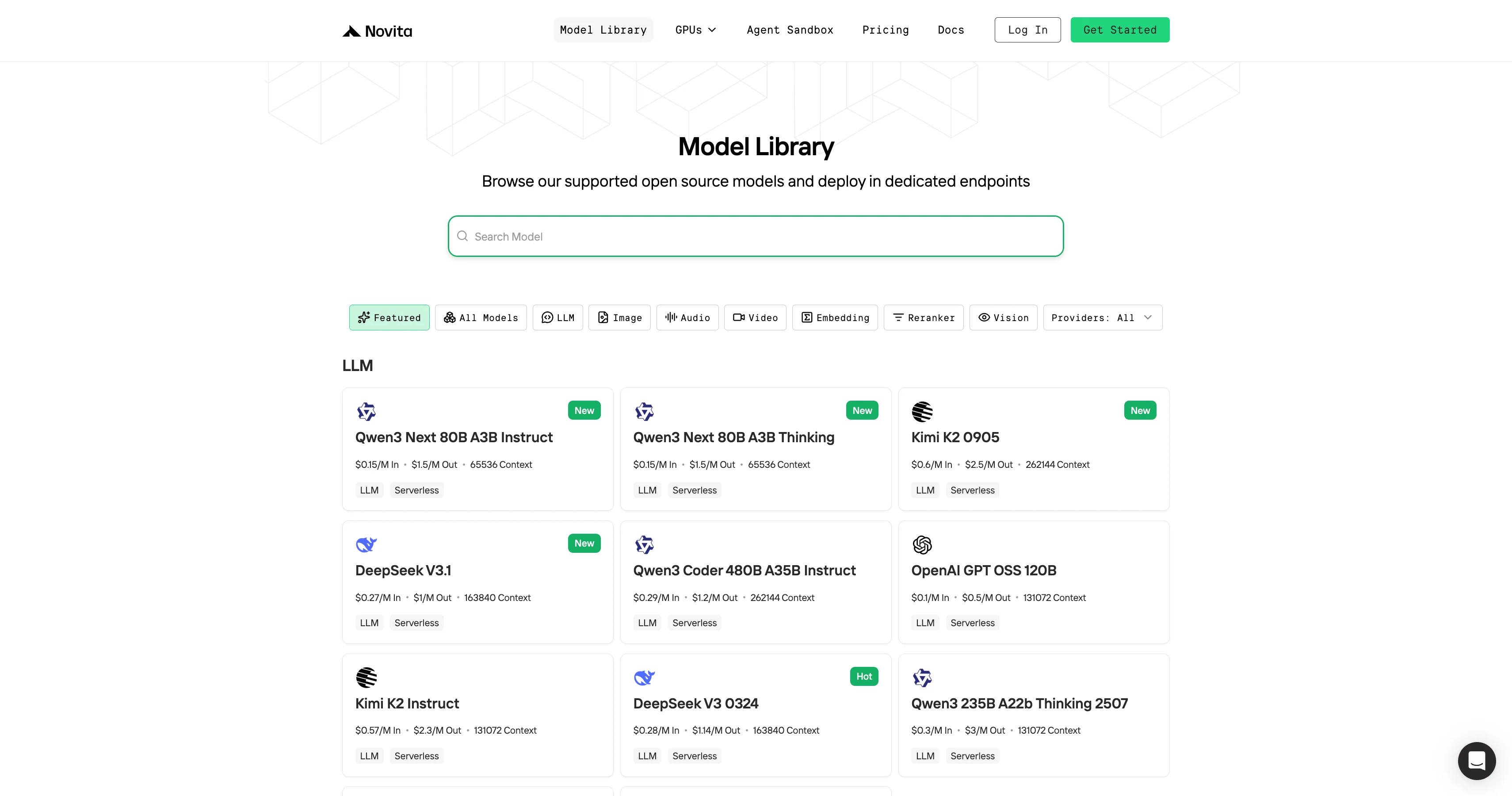
Step 1: Log In and Access the Model Library
Log in to your account and click on the Model Library button.

Step 2: Choose Your Model
Browse through the available options and select the model that suits your needs.
Step 3: Start Your Free Trial
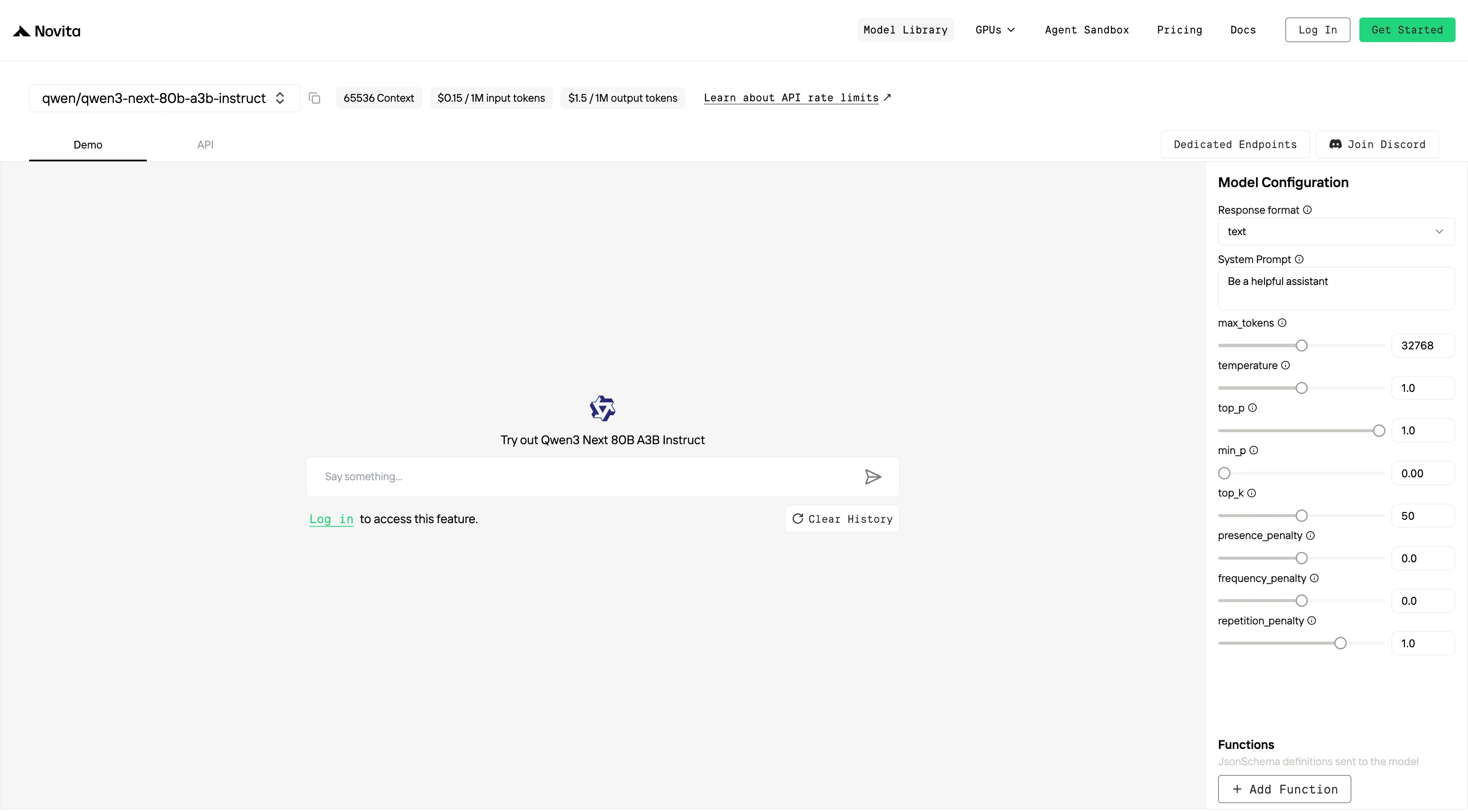
Begin your free trial to explore the capabilities of the selected model.
Step 4: Get Your API Key
To authenticate with the API, we will provide you with a new API key. Entering the “Settings“ page, you can copy the API key as indicated in the image.

Step 5: Install the API
Install API using the package manager specific to your programming language.
After installation, import the necessary libraries into your development environment. Initialize the API with your API key to start interacting with Novita AI LLM. This is an example of using chat completions API for python users.
#Chat API
from openai import OpenAI

client = OpenAI(
    api_key="<Your API Key>",
    base_url="https://api.novita.ai/openai"
)

response = client.chat.completions.create(
    model="qwen/qwen3-next-80b-a3b-instruct",
    messages=[
        {"role": "system", "content": "You are a helpful assistant."},
        {"role": "user", "content": "Hello, how are you?"}
    ],
    max_tokens=65536,
    temperature=0.7
)

print(response.choices[0].message.content)
#Completion API
from openai import OpenAI
client = OpenAI(
api_key="<Your API Key>",
base_url="https://api.novita.ai/openai"
)
response = client.completions.create(
model="qwen/qwen3-next-80b-a3b-instruct",
prompt="The following is a conversation with an AI assistant.",
max_tokens=65536,
temperature=0.7
)
print(response.choices[0].text)Using CLI like Trae,Claude Code, Qwen Code
If you want to use Novita AI’s top models (like Qwen3-Coder, Kimi K2, DeepSeek R1) for AI coding assistance in your local environment or IDE, the process is simple: get your API Key, install the tool, configure environment variables, and start coding.
For detailed setup commands and examples, check the official tutorials:
- Trae : Step-by-Step Guide to Access AI Models in Your IDE
- Claude Code:How to Use Kimi-K2 in Claude Code on Windows, Mac, and Linux
- Qwen Code:How to Use OpenAI Compatible API in Qwen Code (60s Setup!)
Multi-Agent Workflows with OpenAI Agents SDK
Build advanced multi-agent systems by integrating Novita AI with the OpenAI Agents SDK:
- Plug-and-play: Use Novita AI’s LLMs in any OpenAI Agents workflow.
- Supports handoffs, routing, and tool use: Design agents that can delegate, triage, or run functions, all powered by Novita AI’s models.
- Python integration: Simply set the SDK endpoint to
https://api.novita.ai/v3/openaiand use your API key.
Connect API on Third-Party Platforms
OpenAI-Compatible API: Enjoy hassle-free migration and integration with tools such as Cline and Cursor, designed for the OpenAI API standard.
Hugging Face: Use Modeis in Spaces, pipelines, or with the Transformers library via Novita AI endpoints.
Agent & Orchestration Frameworks: Easily connect Novita AI with partner platforms like Continue, AnythingLLM,LangChain, Dify and Langflow through official connectors and step-by-step integration guides.
Qwen3-Next-80B-A3B is proof that innovation in architecture can outpace brute-force parameter scaling. By rethinking how attention and experts are activated, it delivers results that mirror or surpass much larger models while requiring dramatically less memory.
For practitioners, this means more accessible experimentation, lower infrastructure costs, and faster iteration—all without sacrificing performance. The 80B era marks a turning point where smarter design, not just model size, dictates leadership in AI.
Frequently Asked Questions
How can 80B compete with 235B on challenging benchmarks?
Because Qwen3-Next-80B-A3B employs Hybrid Attention and sparse MoE to lower compute costs without losing representational capacity. This allows it to match or even exceed 235B models on tasks such as AIME25, LiveBench, and LiveCodeBench.
Which model is better for long documents or extended conversation history?
The 235B variant natively supports contexts from 262K up to 1M tokens, but Qwen3-Next-80B-A3B also handles up to 256K tokens efficiently. For most real-world use cases, 80B provides sufficient context handling with faster response times and lower cost.
Is Qwen3-Next-80B-A3B better aligned with human preferences?
Yes. In benchmarks such as Arena-Hard v2, the Instruct version of Qwen3-Next-80B-A3B scored higher than the 235B model, showing stronger alignment and reliability even at a smaller scale.
Novita AI is an AI cloud platform that offers developers an easy way to deploy AI models using our simple API, while also providing an affordable and reliable GPU cloud for building and scaling.



