Kimi K2 represents a new era of AI agents, combining cutting-edge performance in specialized domains with affordability and open-source flexibility. With its 32 billion activated parameters and 1 trillion total parameters, Kimi K2 stands out for its specialized strengths in STEM, coding, and tool use.
This article explores how function calling enhances Kimi K2’s agentic capabilities, what this feature entails, and how it positions Kimi K2 as a leader in the future of AI agents.
Kimi K2’s Code Agent Capabilities
-
STEM and Coding Proficiency
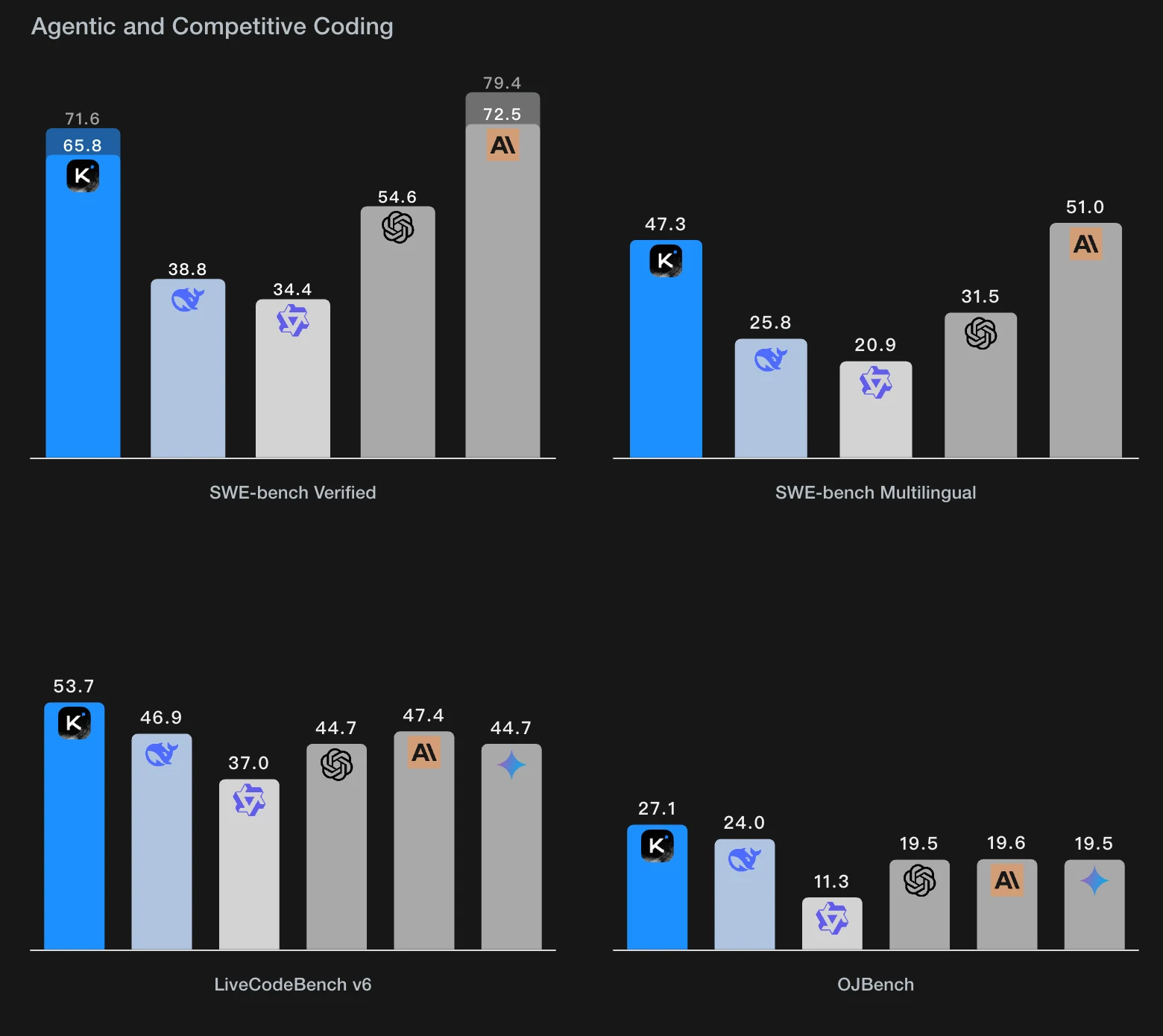
- Kimi K2 achieves state-of-the-art (SOTA) performance in STEM and coding benchmarks, including LiveCodeBench and OJBench.
- It can generate complex code, debug issues, and simulate intricate algorithms with precision.
-
Tool Use Expertise
- Kimi K2 has been trained on multi-turn tool-use scenarios across hundreds of domains.
- Its ability to identify when a tool is needed and execute multi-step workflows makes it a highly practical coding assistant.
-
Reinforcement Learning for Task Execution
- By leveraging rubric-based self-assessments and on-policy learning, Kimi K2 continuously improves its judgment and decision-making.
From Kimi
Kimi K2’s Agent Capabilities Depend on Function Calling
While Kimi K2’s inherent strengths in coding and tool use are impressive, its agentic capabilities heavily rely on function calling. Without this feature, its ability to interact with external tools and systems would be severely limited.
What is Function Calling?
Function calling is a structured mechanism that allows large language models (LLMs) to interact with external systems, tools, or APIs. Instead of merely generating text, an LLM with function-calling support can analyze user prompts, identify when an external action is required, and generate structured JSON calls to execute specific functions.
https://www.youtube.com/watch?v=KUEmEb71vzQ
How Function Calling Works
- Prompt Analysis: The LLM interprets the user’s request and determines if a function call is needed.
- JSON Call Generation: It generates a structured JSON object containing the function name and necessary parameters.
- Execution by External Systems: An external system receives the JSON call, executes the function, and returns the results.
- Response Generation: The LLM uses the returned data to provide a final response to the user.
This cycle can repeat for multi-step or complex tasks, enabling the model to act as a dynamic and interactive agent.
Why Function Calling is Essential
- Transforms Knowledge into Action: Function calling allows Kimi K2 to move from being a “knowledge provider” to a “task executor.”
- Real-World Interactions: It enables Kimi K2 to interact with APIs, databases, and external systems, effectively automating tasks like scheduling, data retrieval, and IoT control.
- Multi-Step Workflows: Kimi K2 can chain multiple function calls to execute complex workflows, such as fetching data, processing it, and storing results.
Function Calling VS SDK
| Feature | Function Calling | SDK |
|---|---|---|
| Definition | A structured mechanism for LLMs to trigger external functions or APIs. | A toolkit that simplifies interaction with APIs and external systems. |
| Purpose | Enables direct execution of tasks by generating function calls (e.g., JSON). | Provides pre-built tools and libraries for easier API integration. |
| Flexibility | Highly dynamic, allowing models to interact with any defined function. | Limited to the features and endpoints supported by the SDK. |
| Implementation | Requires defining functions, schemas, and handling responses manually. | Abstracts API logic, offering a plug-and-play experience. |
| Use Case | Ideal for multi-step task automation and real-time decision-making. | Best for rapid development with predefined workflows. |
| Developer Effort | Requires more setup to define and manage function calls. | Minimal effort; simplifies API usage with pre-built methods. |
What Can Kimi K2 + Function Calling Achieve?
The combination of Kimi K2’s strengths and function-calling capabilities unlocks a wide range of real-world applications:
1. Real-World Task Execution
- Automation: Automate repetitive tasks such as booking appointments, submitting forms, or generating reports.
- IoT Control: Interact with IoT devices to perform actions like adjusting room temperature or toggling lights.
2. Access to Real-Time Data
- Dynamic Updates: Retrieve real-time data (e.g., weather, stock prices) via API calls.
- Enhanced Responses: Integrate real-time information into answers, improving accuracy and relevance.
3. Advanced Multimodal Applications
- Image and Video Processing: Trigger external tools for tasks like image editing or video trimming.
- Cross-Format Integration: Process inputs from text, images, and audio to perform complex tasks.
4. Complex Workflows and Pipelines
- Chain multiple function calls to execute data pipelines, such as:
- Fetching data → Analyzing it → Storing results.
- Enable seamless integration with databases and analytics tools for advanced workflows.
5. Developer-Friendly Solutions
- Custom APIs: Developers can fine-tune Kimi K2 to interact with proprietary APIs and tools.
- Scalable Integrations: Easily add new functions to expand capabilities without major infrastructure changes.
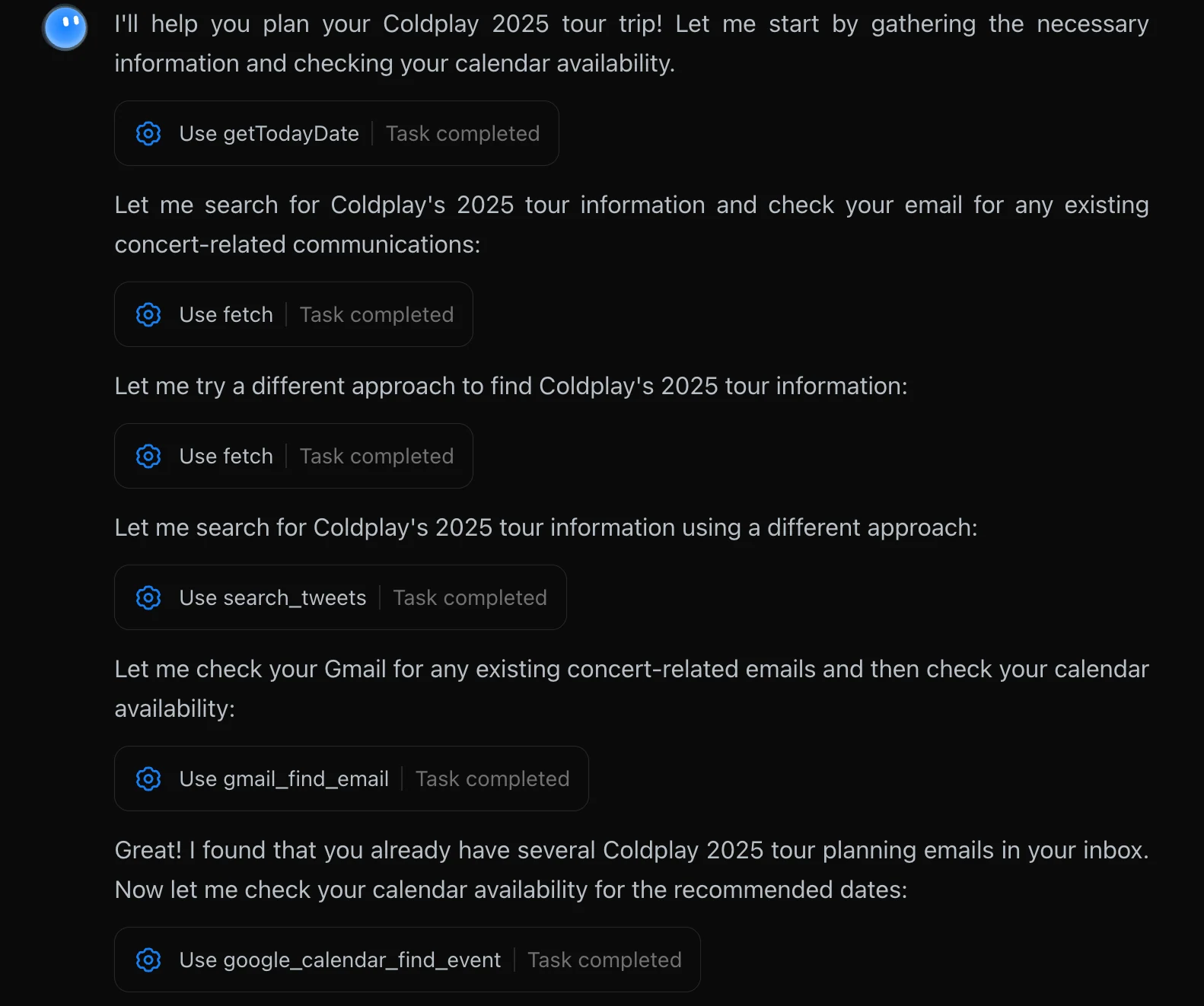
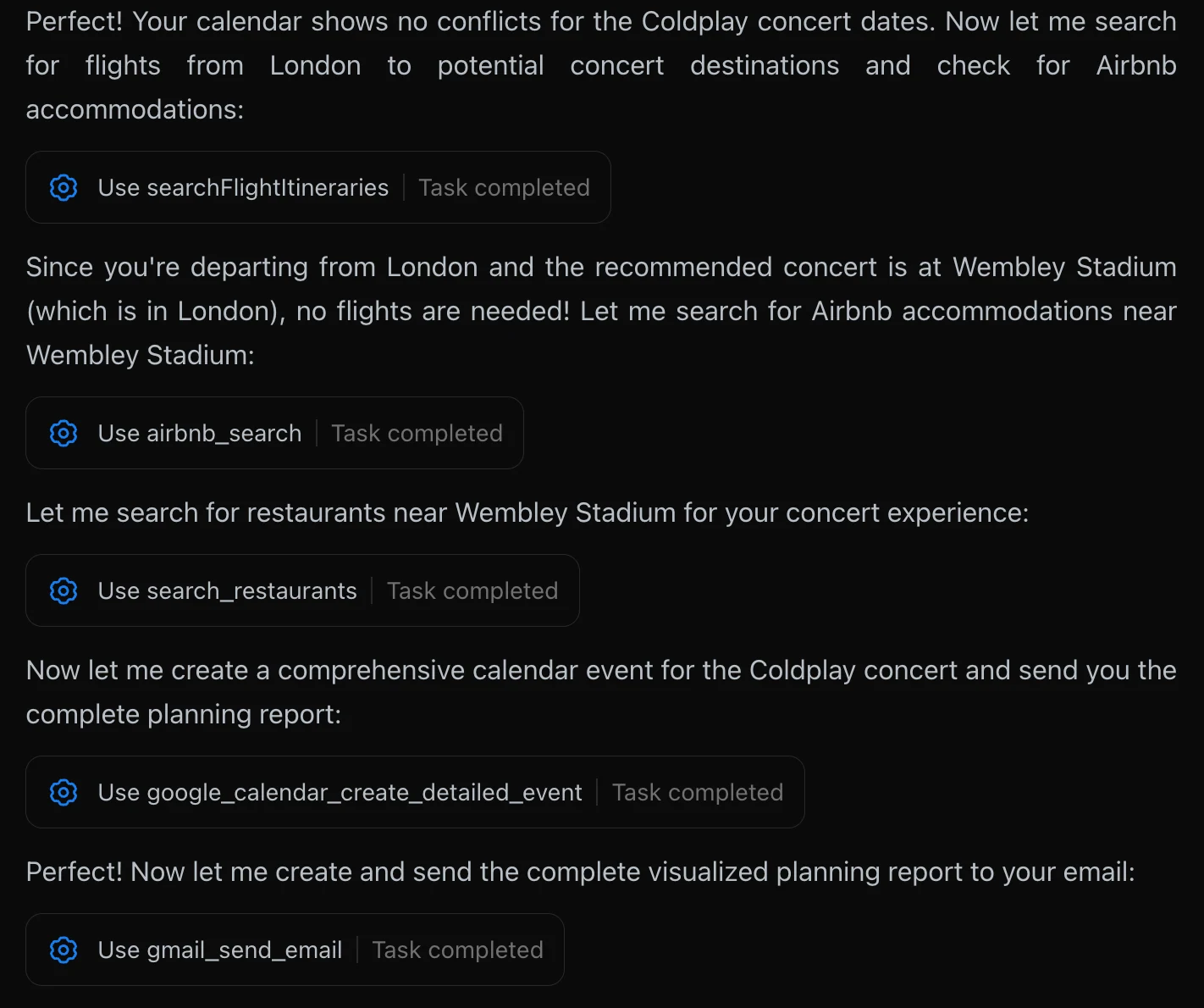
A Demo Showcasing Kimi K2 with Function Calling
1. My total budget is $10,000, which should cover all expenses including transportation, accommodation, and tickets. Please provide a detailed budget breakdown for the entire trip. My primary evaluation criteria are: convenience of transportation, availability of tickets, and the quality of local attractions.
2. Please refer to my total budget mentioned above.
3. In addition to my total budget specified above, I am looking for accommodation that offers an authentic local experience, which is why I have a preference for Airbnb.
4. Check my Google Mail and create entries in my Google Calendar.
Novita Kimi K2 API Supports Function Calling
This guide demonstrates how to use Function Calling to retrieve current weather information for a user’s specified location. We will walk through a complete Python code example.
For the specific API format of Function Calling, please refer to the Docs!
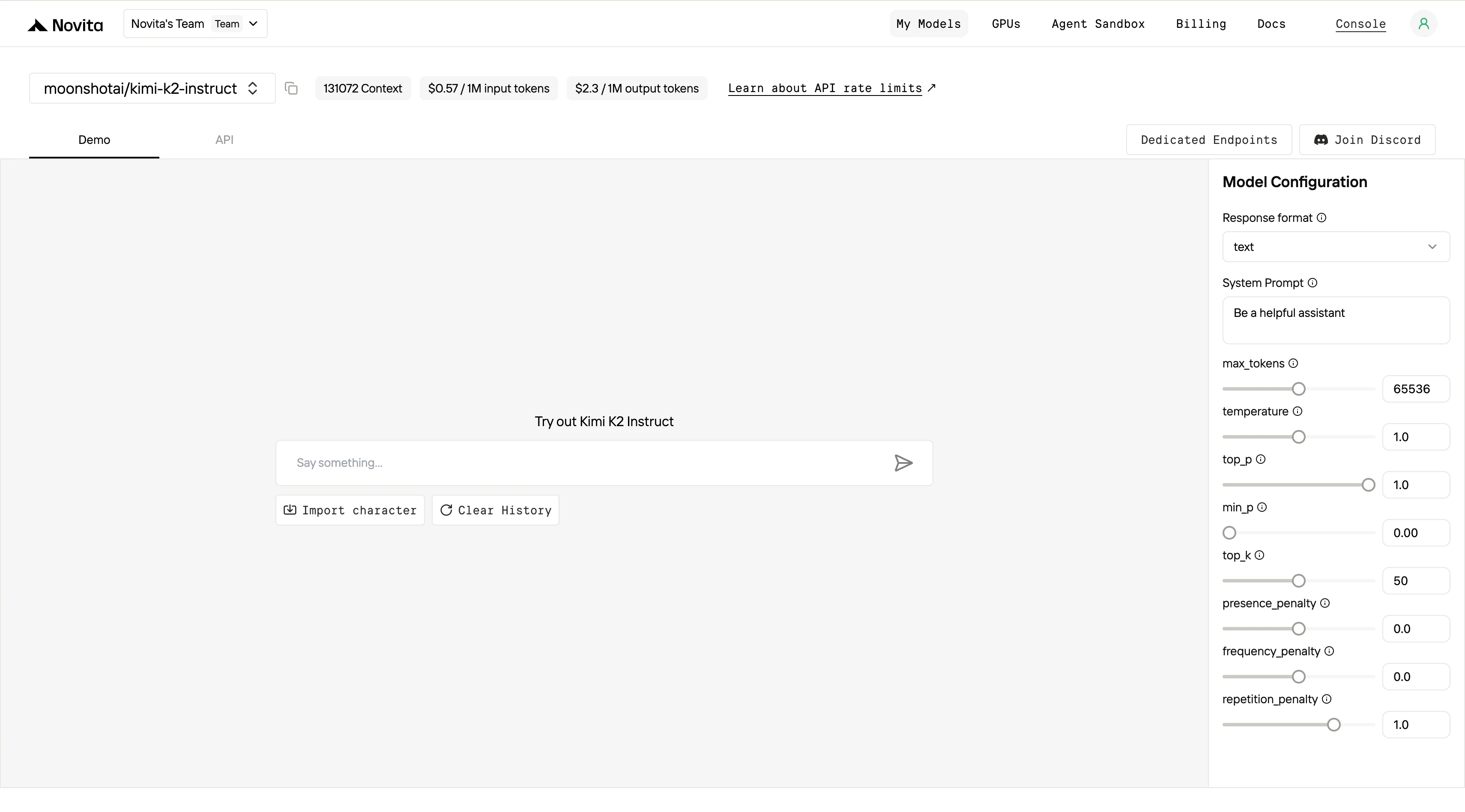
- Initialize the Client
First, you need to initialize the client with your Novita API key.
from openai import OpenAI
import json

client = OpenAI(
    base_url="https://api.novita.ai/v3/openai",
    # Get the Novita AI API Key from: https://novita.ai/settings/key-management.
    api_key="<YOUR Novita AI API Key>",
)

model = "moonshotai/kimi-k2-instruct"- Define the Function to Be Called
Next, define the Python function that the model can call. In this example, it’s a function to get weather information.
# Example function to simulate fetching weather data.
def get_weather(location):
    """Retrieves the current weather for a given location."""
    print("Calling get_weather function with location: ", location)
    # In a real application, you would call an external weather API here.
    # This is a simplified example returning hardcoded data.
return json.dumps({"location": location, "temperature": "60 degrees Fahrenheit"})- Construct the API Request with Tools and User Message
Now, create the API request to the Novita endpoint. This request includes the tools parameter, defining the functions the model can use, and the user’s message.
tools = [
    {
        "type": "function",
        "function": {
            "name": "get_weather",
            "description": "Get weather of an location, the user shoud supply a location first",
            "parameters": {
                "type": "object",
                "properties": {
                    "location": {
                        "type": "string",
                        "description": "The city and state, e.g. San Francisco, CA",
                    }
                },
                "required": ["location"]
            },
        }
    },
]

messages = [
    {
        "role": "user",
        "content": "What is the weather in San Francisco?"
    }
]

# Let's send the request and print the response.
response = client.chat.completions.create(
    model=model,
    messages=messages,
    tools=tools,
)

# Please check if the response contains tool calls if in production.
tool_call = response.choices[0].message.tool_calls[0]
print(tool_call.model_dump())- Output
{'id': '0', 'function': {'arguments': '{"location": "San Francisco, CA"}', 'name': 'get_weather'}, 'type': 'function'}- Respond with the Function Call Result and Get the Final Answer
The next step is to process the function call, execute the get_weather function, and send the result back to the model to generate the final response to the user.
# Ensure tool_call is defined from the previous step
if tool_call:
    # Extend conversation history with the assistant's tool call message
    messages.append(response.choices[0].message)

    function_name = tool_call.function.name
    if function_name == "get_weather":
        function_args = json.loads(tool_call.function.arguments)
        # Execute the function and get the response
        function_response = get_weather(
            location=function_args.get("location"))
        # Append the function response to the messages
        messages.append(
            {
                "tool_call_id": tool_call.id,
                "role": "tool",
                "content": function_response,
            }
        )

    # Get the final response from the model, now with the function result
    answer_response = client.chat.completions.create(
        model=model,
        messages=messages,
        # Note: Do not include tools parameter here.
    )
print(answer_response.choices[0].message)- Output
{'id': '0', 'function': {'arguments': '{"location": "San Francisco, CA"}', 'name': 'get_weather'}, 'type': 'function'}Novita AI Now Offers Compatibility with Anthropic SDK
The combination of Kimi K2 and Claude Code has quickly become a hot topic in the AI community, offering unparalleled agent capabilities for real-world applications. To make this integration even more seamless, Novita AI now provides compatibility with the Anthropic SDK, enabling you to effortlessly leverage the power of Kimi K2 through the familiar Claude Code interface.
You can check this docs to get more details!
1. Install the Anthropic SDK
pip install anthropic2. Initialize the Client
The Anthropic SDKs are designed to pull the API key and base URL from the environmental variables: ANTHROPIC_API_KEY and ANTHROPIC_BASE_URL. Also, you can supply the parameters to the Anthropic client when initializing it.
You can view and manage your API keys on the settings page.
- Using Environment Variables
export ANTHROPIC_BASE_URL="https://api.novita.ai/anthropic"
export ANTHROPIC_API_KEY="<YOUR_NOVITA_API_KEY>"- Set the parameters while initializing the Anthropic client
import anthropic

client = anthropic.Anthropic(
    base_url="https://api.novita.ai/anthropic",
    api_key="<YOUR_NOVITA_API_KEY>"
)
3. Call the API
import anthropic

# Initialize the client, if you already set `ANTHROPIC_BASE_URL` and `ANTHROPIC_API_KEY`
# in the environment variables, you can omit the `api_key` and `base_url` parameters.
client = anthropic.Anthropic(
    base_url="https://api.novita.ai/anthropic",
    api_key="<YOUR_NOVITA_API_KEY>"
)

message = client.messages.create(
    model="moonshotai/kimi-k2-instruct",
    max_tokens=1000,
    temperature=1,
    system="You are a world-class poet. Respond only with short poems.",
    messages=[
        {
            "role": "user",
            "content": [
                {
                    "type": "text",
                    "text": "Why is the ocean salty?"
                }
            ]
        }
    ]
)

print(message.content)
Kimi K2’s support for function calling elevates it from a high-performing LLM to a next-generation AI agent capable of real-world interaction and task execution. When combined with its dominance in STEM and coding, this feature positions Kimi K2 as a cost-effective, specialized solution for developing practical and dynamic AI systems.
By bridging the gap between knowledge and action, Kimi K2 not only enhances user experience but also democratizes access to advanced AI capabilities. Its open-source nature and affordability make it a disruptive force in the AI landscape, paving the way for widespread innovation and adoption.
Frequently Asked Questions
What is function calling in the context of LLMs?
Function calling is a technique that allows large language models to recognize when a specific task requires an external function or tool and generate structured data to execute that function.
What are the main benefits of using function calling?
Key benefits include increased efficiency in processing tasks, enhanced flexibility for developers to update functions easily, scalability for adding new functionalities without extensive changes, and personalized user interactions.
Can Kimi K2 replace proprietary models like GPT-4 or Claude?
Kimi K2 does not aim to replace general-purpose models. Instead, it focuses on being a specialist agent with strengths in STEM, coding, and tool use, complemented by its function-calling capabilities
Novita AI is the All-in-one cloud platform that empowers your AI ambitions. Integrated APIs, serverless, GPU Instance — the cost-effective tools you need. Eliminate infrastructure, start free, and make your AI vision a reality.



