Key Highlights
LlaMA 3.3, developed by Meta, is a powerful language model with impressive capabilities.
It scores 92.1 in IFEval for excellent instruction following, 88.4% in HumanEval for strong code generation, and 91.1 in MGSM for multilingual math problem solving.
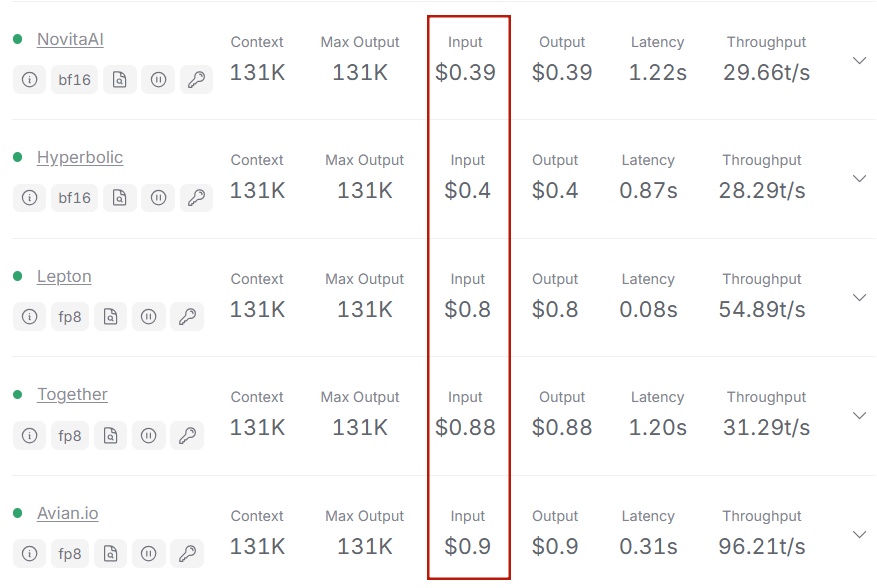
With efficient resource usage (40GB GPU VRAM) and low token cost ($0.39 per million tokens from Novita AI), it’s ideal for startups and small businesses.
Developers can easily access LLaMA 3.3 via Novita AI. Simply sign up for a free trial, get an API key, and integrate the model into applications, unlocking its full potential for language tasks.
LLaMA 3.3 is Meta’s latest breakthrough in large language models, offering significant improvements in performance and efficiency over previous versions. Despite having fewer parameters, the LLaMA 3.3 70B model outperforms many traditional large-scale models, including LLaMA 3.1 405B, in several key benchmarks. This optimization strikes an ideal balance between computational efficiency and processing power, reducing hardware requirements while maintaining high performance. This article provides an in-depth analysis of LLaMA 3.3’s benchmark performance across several critical dimensions.
Overview of Benchmark Metrics for LLMs
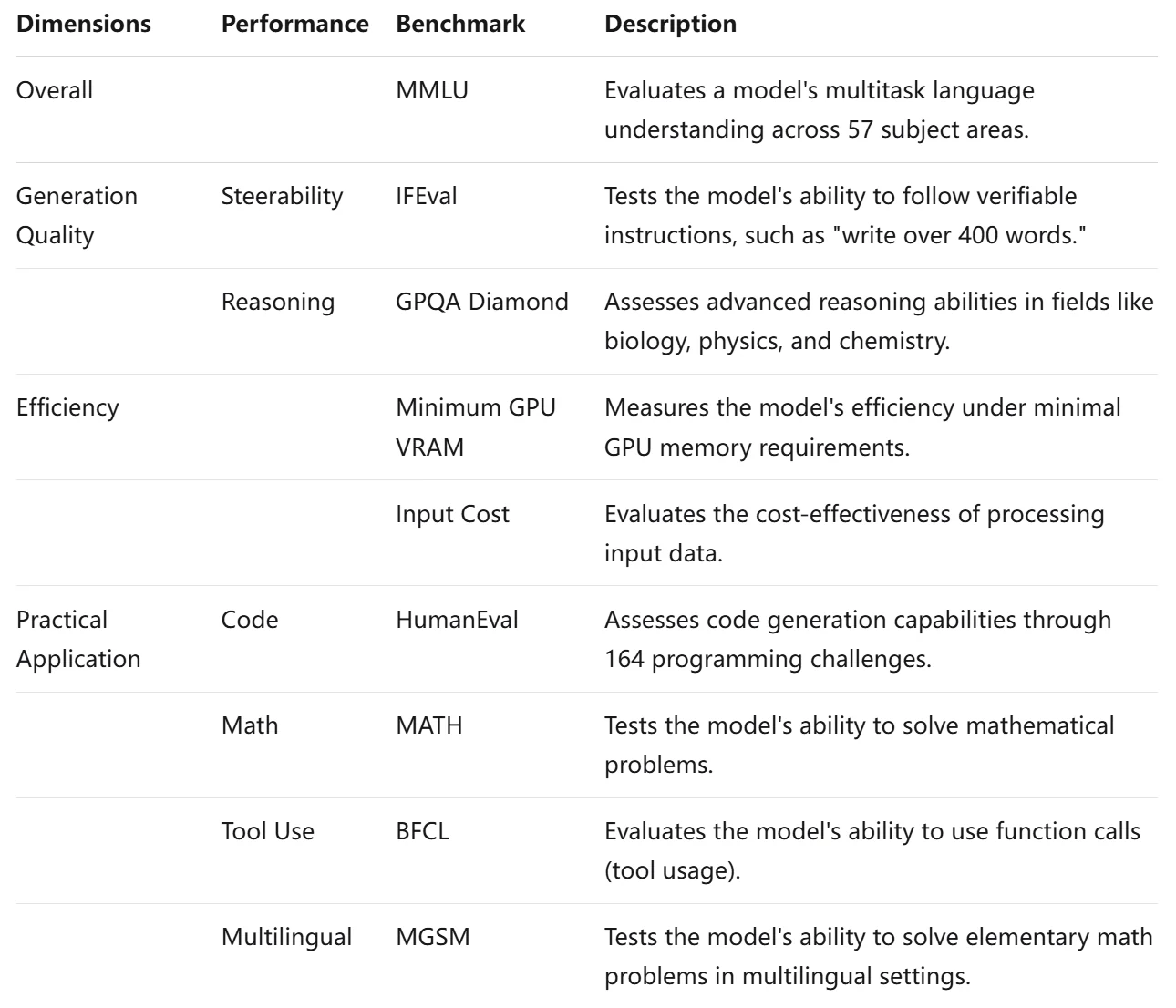
When evaluating large language models (LLMs), four critical benchmarks are used to assess their overall performance: Overall, Generation Quality, Efficiency, and Practical Application.Together, these standards provide a comprehensive view of an LLM’s effectiveness and usability.
Overall Dimension
You can indeed say that MMLU is a relatively comprehensive benchmark for describing model capabilities compared to other testing standards. However, it’s important to note that no single benchmark can capture all aspects of a model’s performance. It’s often used in conjunction with other benchmarks for a more complete evaluation.
What is MMLU?
MMLU (Massive Multitask Language Understanding) is a comprehensive benchmark designed to evaluate the performance of AI language models across a wide range of subjects and tasks. It assesses a model’s multitask capabilities, general knowledge, and problem-solving abilities in various domains.
Detection Content:
- Multi-domain Knowledge
MMLU covers 57 different subject areas, including STEM, humanities, social sciences, and professional fields. - Reasoning Ability
Assesses the model’s reasoning and problem-solving skills through diverse question types. - Language Understanding
Tests the model’s ability to understand and process language in different contexts. - Multitask Processing
Evaluates the model’s ability to switch between multiple tasks and generalize knowledge.
Detection Methods:
MMLU evaluates language models through a structured workflow that begins with presenting multiple-choice questions across 57 diverse subjects. Models are tested in zero-shot and few-shot settings, simulating real-world scenarios. Their performance is measured by accuracy scoring, which assesses the proportion of correct answers. Finally, a comprehensive score is calculated by averaging accuracy across all domains, resulting in a score between 0 and 1 that summarizes the model’s overall capabilities.ccuracy across all 57 domains, resulting in a comprehensive score between 0 and 1.
Generation Quality
Generation quality encompasses the coherence, relevance, and fluency of the text generated by the model. High generation quality is crucial for applications involving content creation, dialogue systems, and more.
Two significant benchmarks in this area are IFEval, GPQA.
What is IFEval?
IFEval, or Instruction-Following Evaluation, is a benchmark designed to assess a language model’s ability to understand and follow instructions accurately. IFEval focuses on evaluating how well a language model can comprehend and execute instructions given in natural language.The benchmark is crucial for ensuring that models can effectively assist users in real-world scenarios where following instructions is essential.
Example Workflow
- Instruction Generation: Create prompts that include one or more verifiable instructions from a set of 25 predefined types, such as “write more than 400 words” or “mention the keyword AI at least three times.”
- Model Response: The language model generates a response based on the given instructions.
- Evaluation Metrics:
- Strict Metric: Check if the model’s output strictly adheres to the instructions using exact string matching.
- Loose Metric: Evaluate the output after applying various transformations to allow for flexibility in format and phrasing, reducing false negatives.
- Scoring: Calculate the accuracy based on the percentage of instructions followed correctly, both at the prompt level and instruction level.
- Output Data: Compile the results to provide insights into the model’s instruction-following capabilities, highlighting areas of strength and weakness.
What is GPQA?
GPQA, or the General Purpose Question Answering benchmark. This benchmark is particularly useful for evaluating a model’s ability to understand and generate accurate responses to various types of queries, making it a crucial metric for applications like virtual assistants, chatbots, and information retrieval systems.
Example Workflow like IFEval, but with some differences
- Focus on Difficulty:
- IFEval: Concentrates on the model’s ability to follow various natural language instructions.
- GPQA: Targets high-difficulty questions that are challenging even for experts, ensuring they cannot be easily answered through online searches.
- Question Development:
- IFEval: Primarily assesses how well models execute given instructions without extensive validation.
- GPQA: Involves experts creating and validating complex questions.
Efficiency
Efficiency in the context of LLMs encompasses both running compatibility and input cost. Minimum GPU VRAM and Input Cost—play crucial roles in determining how efficiently a large language model (LLM) like LLaMA 3.3 operates. Here’s a detailed explanation of each metric and the standards used for their calculation:
What is Minimum GPU VRAM?
Minimum GPU VRAM refers to the minimum amount of video RAM (VRAM) required to run the model effectively. VRAM is essential for storing the model’s parameters as well as intermediate computations during inference and training. A smaller Minimum GPU VRAM signifies increased accessibility. For developers and organizations looking to leverage the power of AI without incurring prohibitive costs.
What is Input Cost?(e.g. Novita AI)
Input Cost refers to the expenses associated with processing inputs, measured in terms of computational resources utilized.Input costs are typically calculated based on real-world usage scenarios and can vary depending on the service provider. For example, the costs can be derived from API usage.
Practical Application
Practical application metrics evaluate how well a model performs in real-world tasks. Key benchmarks in this domain include:
| Benchmark | Meaning |
|---|---|
| HumanEval | A benchmark for evaluating code generation capabilities of language models. |
| MATH | A benchmark focused on assessing mathematical problem-solving abilities of language models. |
| BFCL v2 | A benchmark for evaluating function-calling capabilities of large language models. |
| MGSM | A benchmark aimed at evaluating multilingual problem-solving in elementary math. |
Now that we’ve explored a comprehensive and universal benchmarking framework for LLMs, let’s dive into LLaMA 3.3’s performance across these dimensions!
Overview of Benchmark for Llama3.3,compared with Llama 3.1 70b instruct, GPT-4o
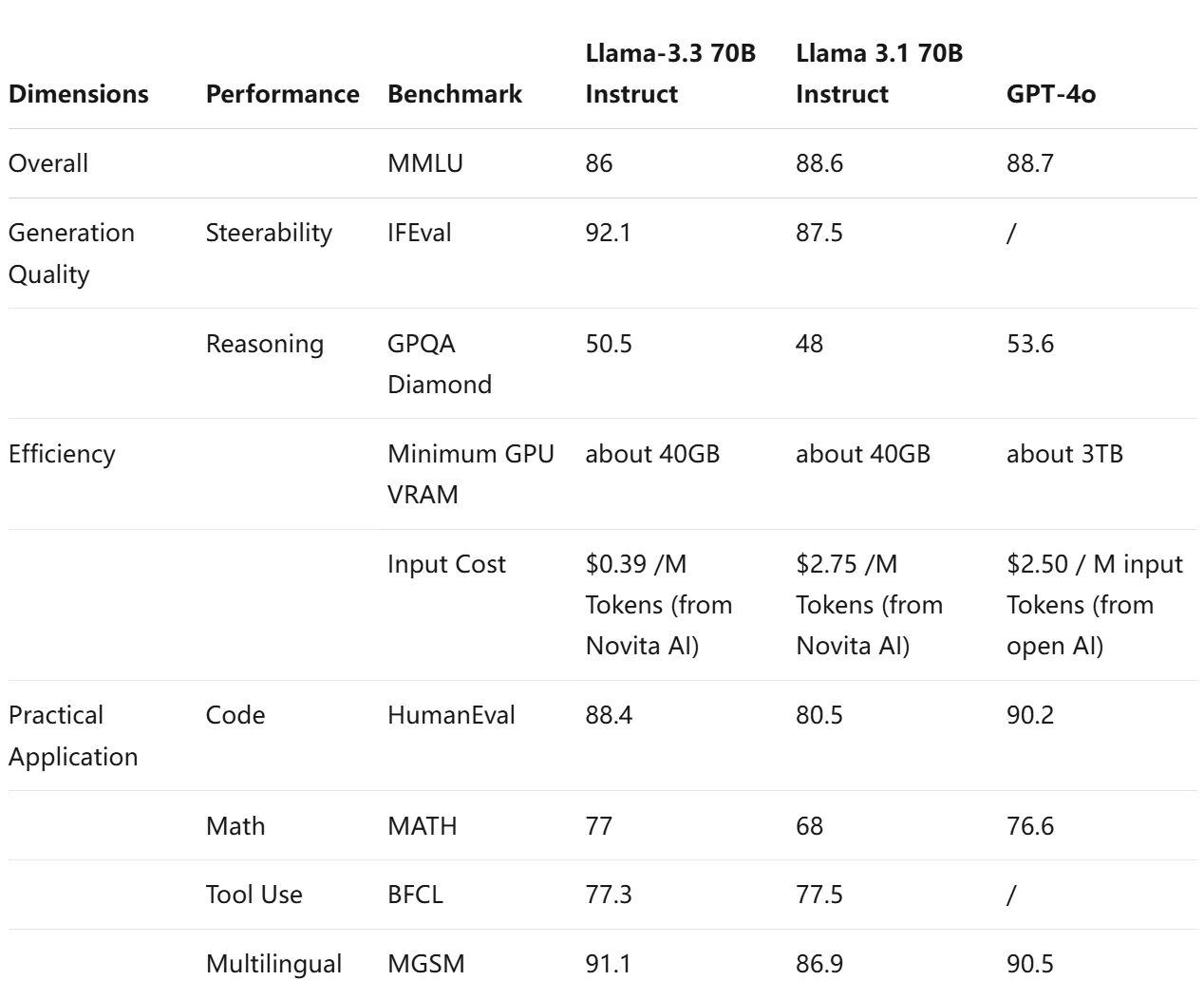
Overall, these benchmarks provide valuable insights into how each model performs across various dimensions of language understanding and generation, helping to identify the most suitable model for specific applications.
Highlights Where LLaMA 3.3 Excels
| Advantage | Description | Application Areas |
|---|---|---|
| Instruction Following | Scores 92.1 in IFEval, showcasing its ability to follow complex instructions effectively. | AI assistants, automated customer support, interactive applications. |
| High Performance in Coding | Achieves an 88.4% pass rate on the HumanEval coding benchmark, indicating strong code generation capabilities. | AI-assisted programming tools, software development environments. |
| Multilingual Support | Supports multiple languages with a score of 91.1 in MGSM, facilitating communication across diverse markets. | Global applications, translation services, multilingual chatbots. |
| Efficient Resource Usage | Requires only about 40GB of GPU VRAM, allowing it to run on mid-tier hardware. | Development for users with limited computational resources or consumer-grade hardware. |
| Cost-Effectiveness | Low token costs (e.g., $0.10 per million input tokens), making it affordable for deployment. | Startups, small businesses, budget-conscious projects. |
Based on the advantages of the Llama 3.3 model, it is particularly well-suited for small businesses and developers. So next, we will take Novita AI as an example to introduce how to try out Llama 3.3 through the simple API method.
How to quickly try out LLaMA 3.3 via Novita AI?
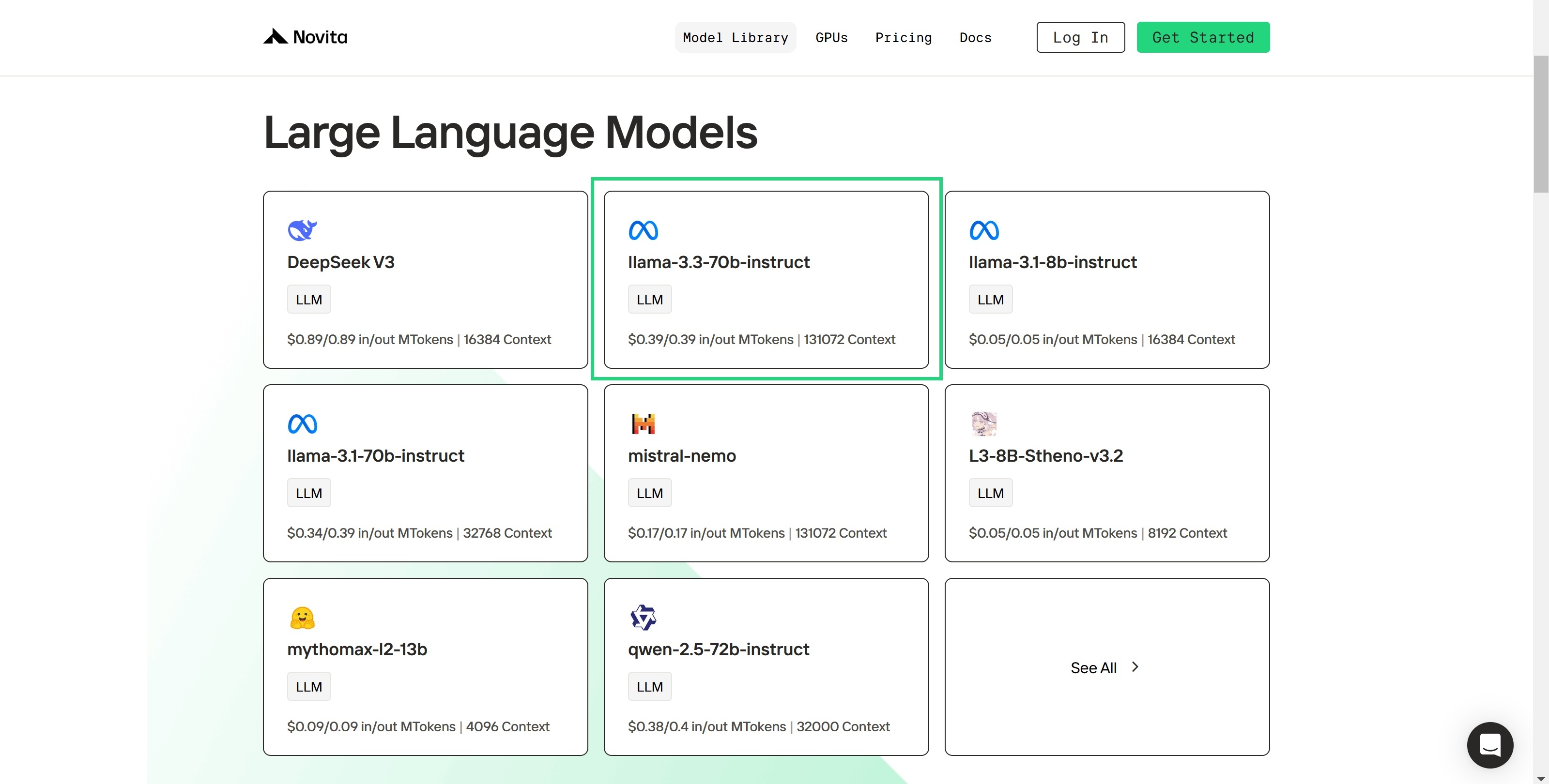
Step 1: Log In and Access the Model Library
Log in to your account and click on the Model Library button.

Step 2: Choose Your Model
Browse through the available options and select the model that suits your needs.
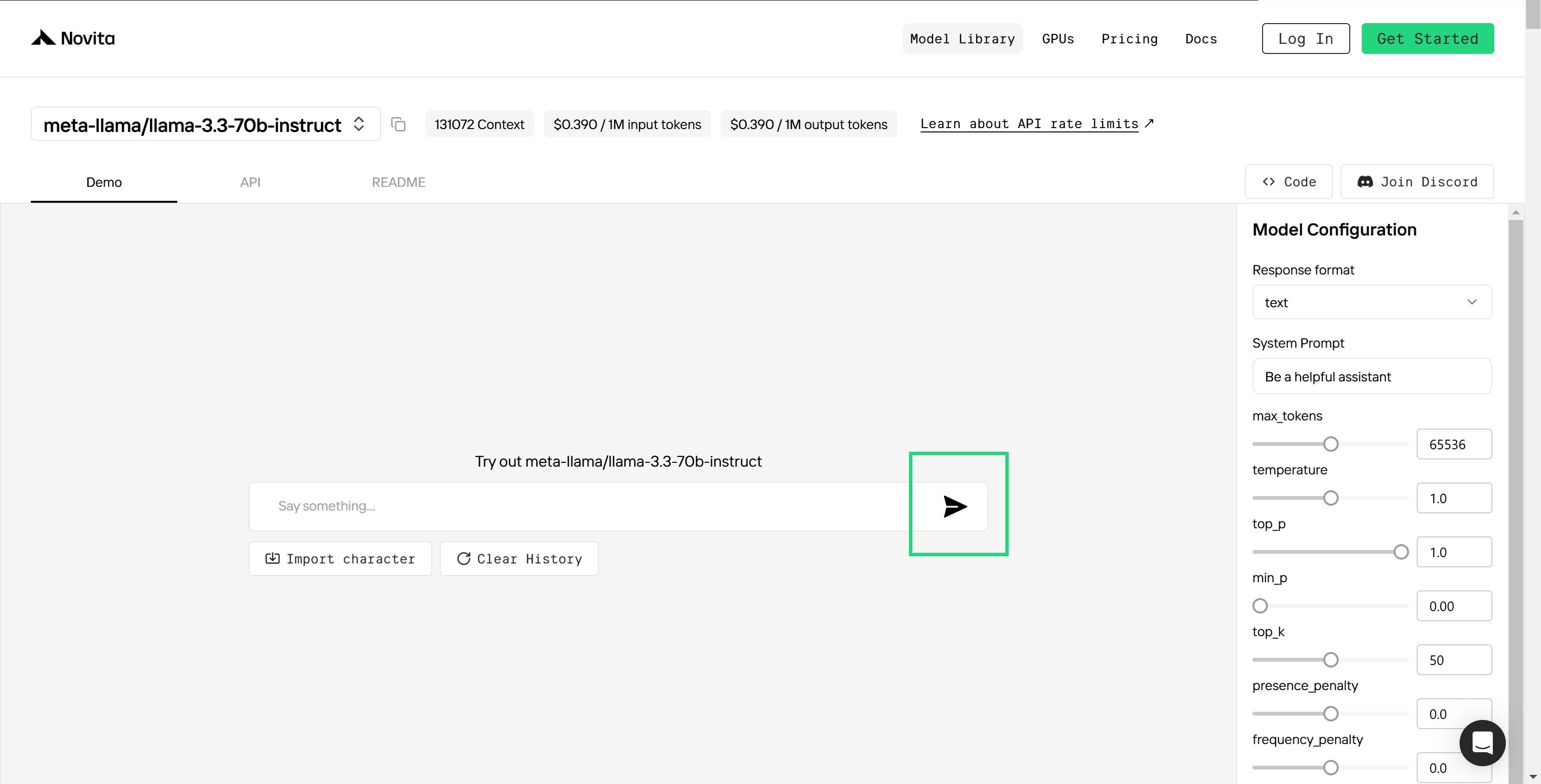
Step 3: Start Your Free Trial
Begin your free trial to explore the capabilities of the selected model.
Step 4: Get Your API Key
To authenticate with the API, we will provide you with a new API key. Entering the “Settings“ page, you can copy the API key as indicated in the image.

Step 5: Install the API
Install API using the package manager specific to your programming language.
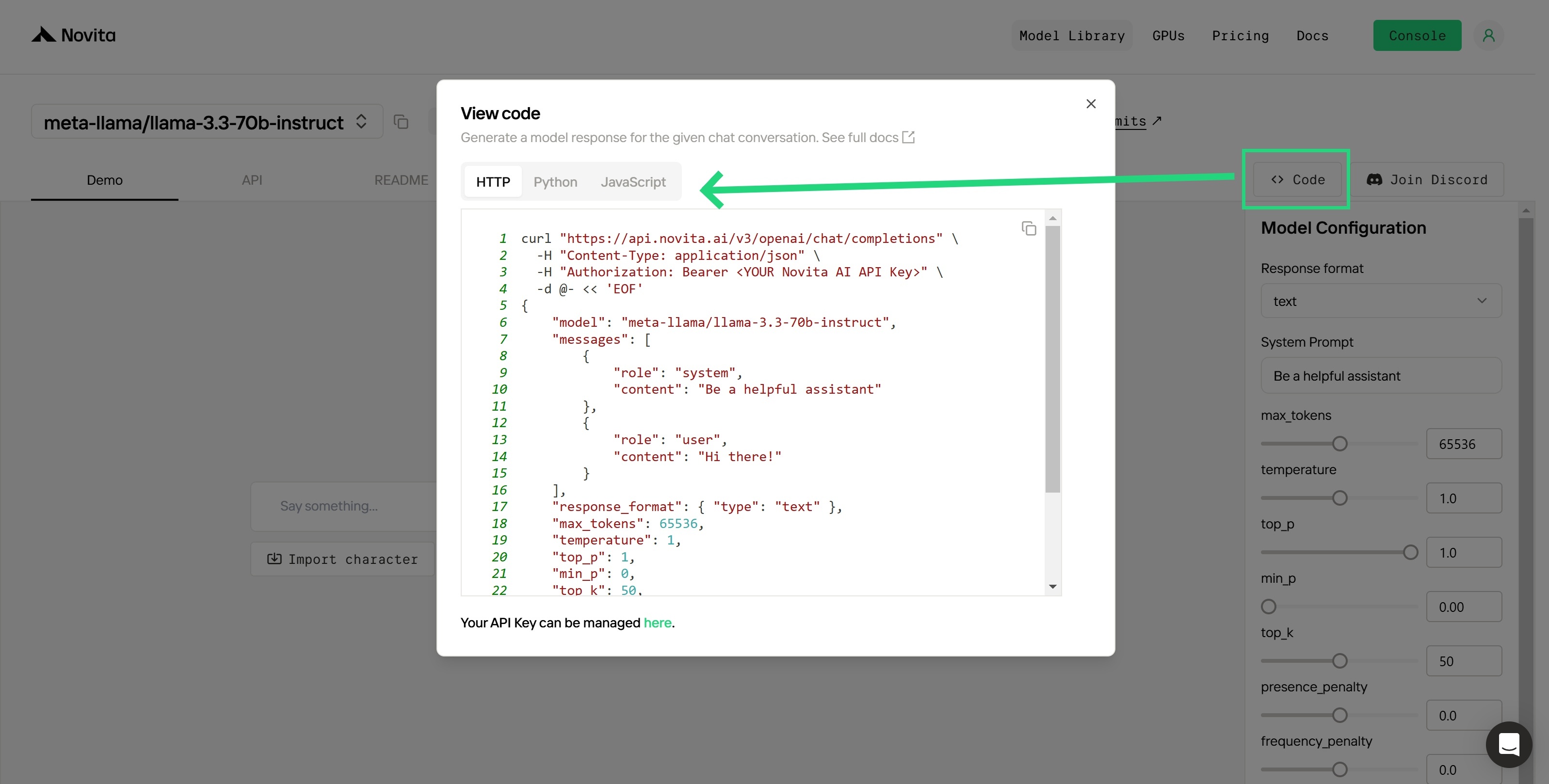
After installation, import the necessary libraries into your development environment. Initialize the API with your API key to start interacting with Novita AI LLM. This is an example of using chat completions API for pthon users.
from openai import OpenAI
client = OpenAI(
base_url="https://api.novita.ai/v3/openai",
# Get the Novita AI API Key by referring to: https://novita.ai/docs/get-started/quickstart.html#_2-manage-api-key.
api_key="<YOUR Novita AI API Key>",
)
model = "meta-llama/llama-3.3-70b-instruct"
stream = True # or False
max_tokens = 512
chat_completion_res = client.chat.completions.create(
model=model,
messages=[
{
"role": "system",
"content": "Act like you are a helpful assistant.",
},
{
"role": "user",
"content": "Hi there!",
}
],
stream=stream,
max_tokens=max_tokens,
)
if stream:
for chunk in chat_completion_res:
print(chunk.choices[0].delta.content or "")
else:
print(chat_completion_res.choices[0].message.content)Upon registration, Novita AI provides a $0.5 credit to get you started!
If the free credits is used up, you can pay to continue using it.
Conclusion
Llama 3.3, developed by Meta, is a powerful language model with 70 billion parameters, excelling in instruction following, coding, and multilingual support. It offers cost-efficiency, reducing operational expenses while delivering high-quality results.Novita AI provides easy access to Llama 3.3 through an API, allowing developers to integrate it into applications for tasks.
Frequently Asked Questions
Novita AI is the All-in-one cloud platform that empowers your AI ambitions. Integrated APIs, serverless, GPU Instance — the cost-effective tools you need. Eliminate infrastructure, start free, and make your AI vision a reality.



