In modern DevOps and cloud computing, Docker has revolutionized how applications are developed, shipped, and deployed. At its core, Docker relies on two fundamental concepts: images and containers. While these terms are often used interchangeably, they serve distinct roles in the containerization workflow. Understanding their differences is critical for optimizing development pipelines, ensuring environment consistency, and leveraging platforms like Novita AI for scalable deployments. This guide dissects their technical nuances, practical applications, and real-world use cases.
What is a Docker Image?
A Docker Image is a lightweight, standalone, and executable software package that contains all the components required to run an application. It includes the code, libraries, dependencies, configurations, and the runtime environment needed for the application to function. Think of it as a blueprint or template.
Key characteristics of Docker images include:
- Read-only: Once created, Docker images cannot be altered.
- Layered structure: Docker images consist of several layers, each representing an action or instruction (e.g., copying a file or installing a package) taken during the image creation process.
- Portable: Since the image includes everything needed to run an application, it can be shared across different environments, ensuring consistency across development, testing, and production.
In simple terms, a Docker image is like a snapshot of an application in its desired state, including all the required dependencies and configurations.
What is a Docker Container?
A Docker Container is a runtime instance of a Docker image. In other words, while the Docker image is static and read-only, the Docker container is the live, running version of that image. Containers can be started, stopped, moved, and deleted with ease.
Key characteristics of Docker containers include:
- Writable file system: While containers are created from images, they have a writable layer where the application can write and modify data.
- Isolated environments: Containers run in isolated environments but share the host operating system’s kernel. This provides process and file system isolation while maintaining efficiency.
- Ephemeral: Containers are typically short-lived. Once the container stops, its state is lost unless persisted externally (e.g., using volumes or external databases).
In short, a Docker container is the executable instance of a Docker image, where the application runs and can perform tasks like data processing, serving web pages, or running services.
Key Differences Between Docker Images and Containers
| Aspect | Docker Image | Docker Container |
|---|---|---|
| State | Read-only template | Runnable instance with writable layer |
| Lifecycle | Persistent (stored in registries) | Ephemeral (created/destroyed on demand) |
| Modifiability | Immutable after creation | Mutable during runtime |
| Storage Overhead | Layered, shared across containers | Adds a thin writable layer (~MBs) |
| Primary Use Case | Blueprint for consistency | Execution environment for applications |
Technical Insights:
- Layer Efficiency: Images reuse shared layers (e.g.,
python:3.7base) across containers, minimizing storage duplication. Containers, however, store unique runtime data in their top layer. - Security: Images are scanned for vulnerabilities during builds, while containers rely on runtime isolation to prevent exploits.
- Orchestration: Platforms like Kubernetes manage containers at scale, whereas images are version-controlled artifacts.
Practical Scenarios and Use Cases
Docker Images in Action:
- CI/CD Pipelines: Teams build images once and deploy them across environments (dev, staging, prod), eliminating “works on my machine” issues.
- Version Control: Tagged images (e.g.,
app:v1.2) enable rollbacks and audits. Novita AI’s registry supports automated image updates for GPU-optimized workloads. - Base Image Customization: Developers extend official images (e.g.,
nginx) to include custom configurations or pre-installed tools.
Docker Containers in Action:
- Microservices: Containers isolate services (e.g., API, database), allowing independent scaling. Novita AI’s Kubernetes integration simplifies multi-container orchestration.
- Debugging: A temporary container can be spawned with diagnostic tools without altering the original image.
- Dynamic Port Mapping: Running containers expose ports on-demand, as demonstrated in Novita AI’s tutorials for API endpoints.
Leveraging Docker for Scalable Cloud GPU Solutions with Novita AI
In today’s AI and machine learning landscape, efficiently managing GPU resources through containerization has become crucial. Novita AI provides a seamless platform that combines Docker technology with powerful GPU capabilities, enabling developers and researchers to deploy their applications efficiently.
By leveraging Docker containers, Novita AI guarantees that each deployment is isolated, reproducible, and portable. The containerization process ensures that your application will run consistently, regardless of the underlying hardware or cloud region. The platform also supports volume creation and various billing methods, providing further customization and control over your cloud infrastructure.
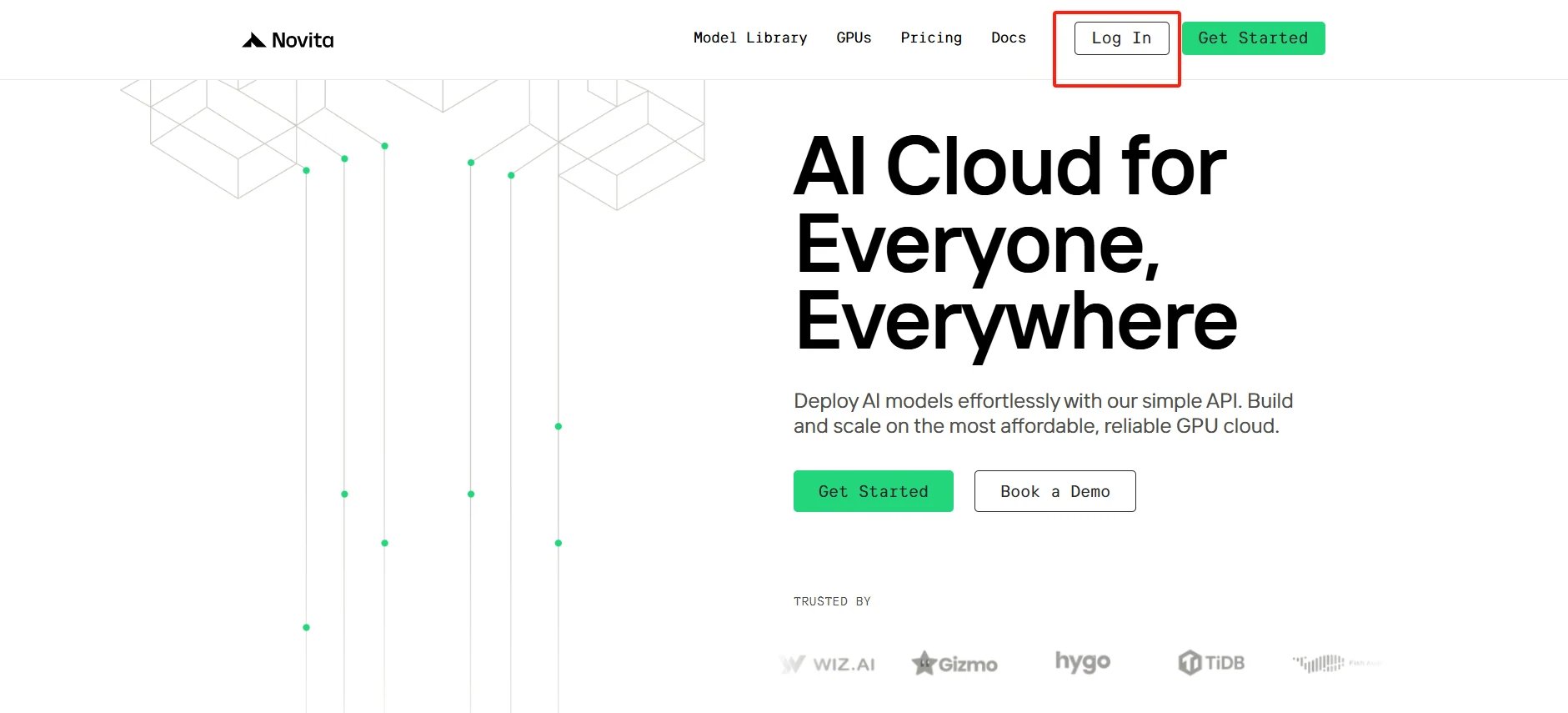
Step 1: Create an Account
Getting started with Novita AI is quick. Simply create your account on their platform and access the GPU marketplace. Choose from a range of high-performance instances with detailed specifications, and launch your selected instance with just a few clicks. Start now and focus on your AI development while Novita AI handles the infrastructure.
[Try using Novita AI now](https://novita.ai/?utm_source=blogs_GPU&utm_medium=article&utm_campaign=In-Depth Guide: Essential Differences Between Docker Images and Containers)
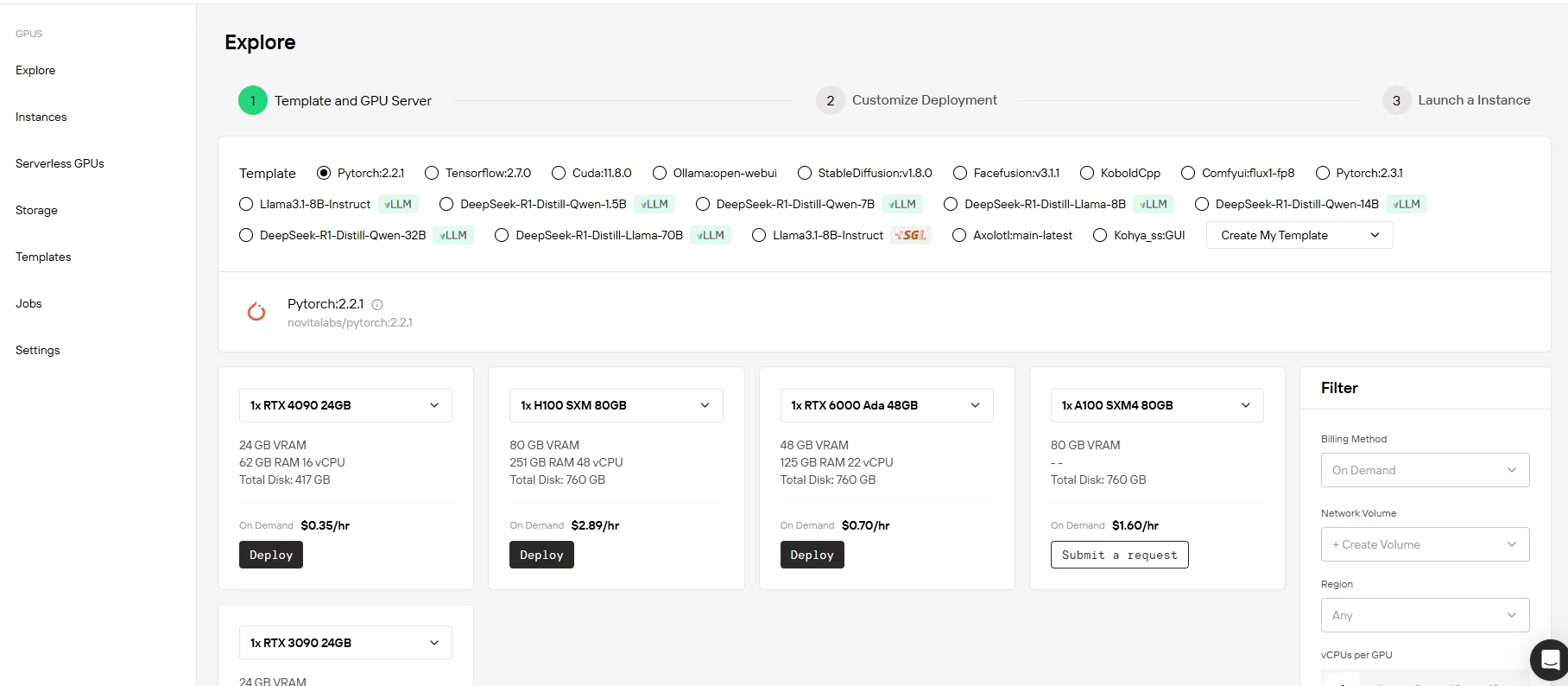
Step 2: Select Your GPU
Novita AI offers the latest NVIDIA GPUs, including RTX 3090, RTX 4090, RTX 6000 Ada, A100 SXM and H100 SXM, providing excellent performance for large AI models. Choose from pre-configured templates or build a custom solution that fits your needs. Try Novita AI’s High-Performance GPUs today for efficient AI training.
[Try Novita AI’s High-Performance GPUs](https://novita.ai/gpus-console/?utm_source=blogs_GPU&utm_medium=article&utm_campaign=In-Depth Guide: Essential Differences Between Docker Images and Containers)
Step 3: Customize Your Setup
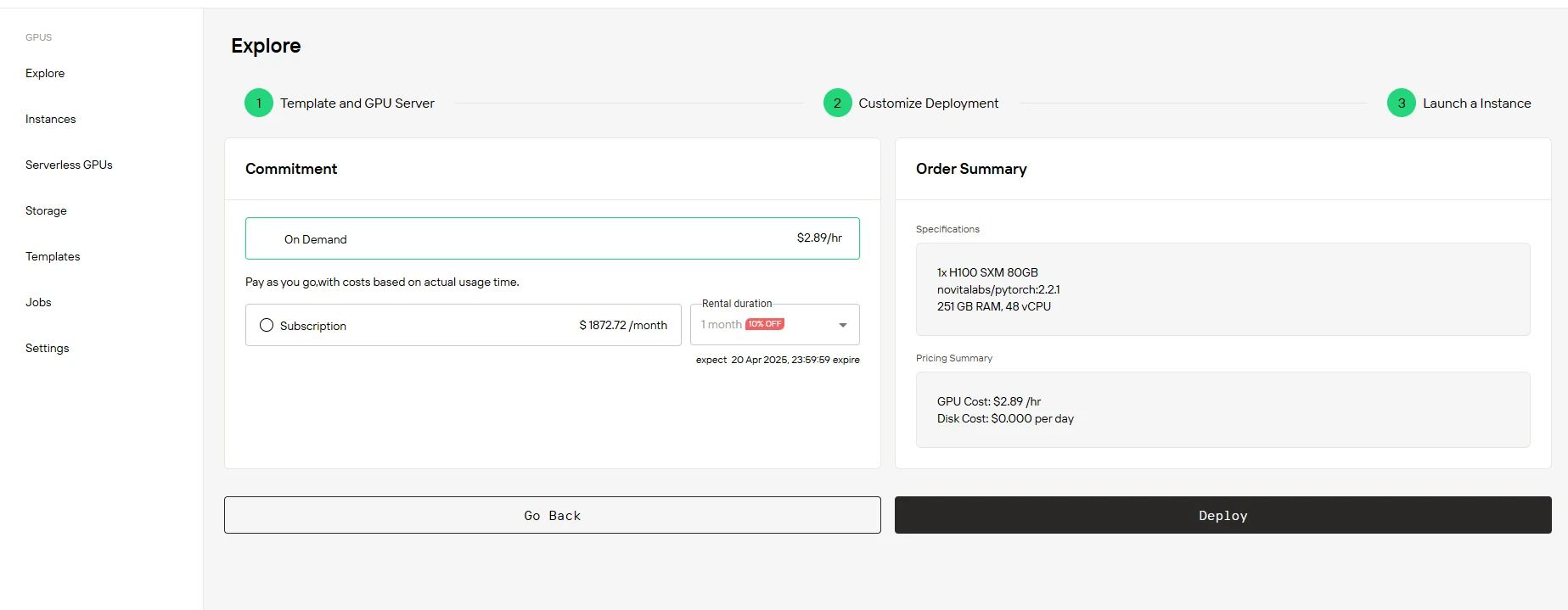
Start with 60GB free storage and scale up as your project grows. Choose between pay-as-you-go or subscription pricing. No hidden fees—just transparent pricing with instant provisioning. Here’s a look at our pricing:
| Option | RTX 3090 24 GB | RXT 4090 24 GB | RXT 6000 Ada 48GB | H100 SXM 80 GB |
| 1-5 months | $136.00/month (10% OFF) | $226.80/month (10% OFF) | $453.60/month(10% OFF) | $1872.72/month (10% OFF) |
| 6-11 months | $129.00/month( (15% OFF) | $206.64/month (18% OFF) | $428.40/month(15% OFF) | $1664.64/month (20% OFF) |
| 12 months | $113.40/month(25% OFF) | $189.00/month (25% OFF) | $403.20/month(20% OFF) | $1498.18/month (28% OFF) |
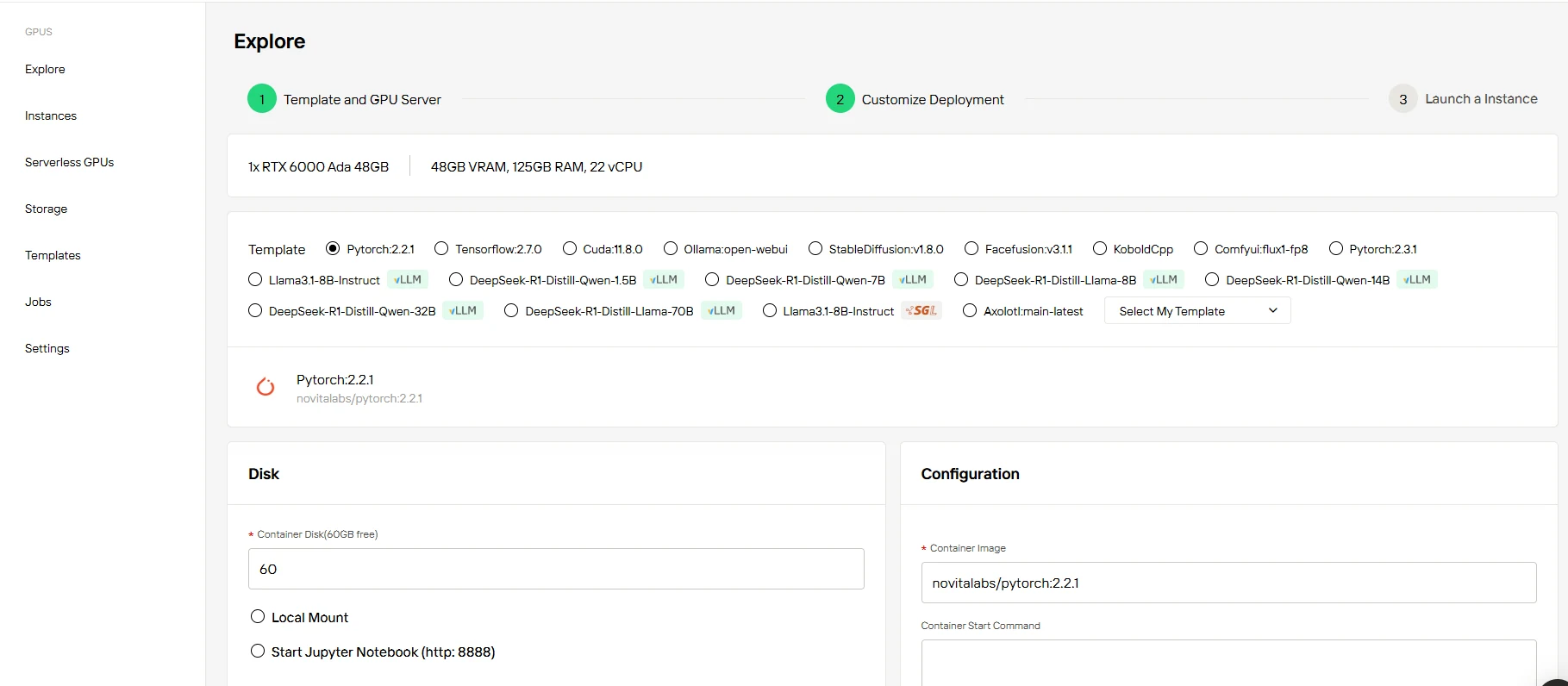
Step4:Launch Your Instance
Once you’ve selected your GPU and configured your setup, launch your instance with a single click. With Novita AI, your GPU environment is ready instantly, allowing you to focus on innovation without delay.
Conclusion
Docker images and containers are foundational to modern application development and deployment. Images provide the consistent, immutable blueprint; containers bring that blueprint to life as isolated, scalable, and flexible environments. Platforms like Novita AI take these principles further, enabling users to deploy, scale, and manage AI workloads efficiently on powerful cloud GPUs. By mastering the differences and interplay between images and containers, teams can unlock new levels of productivity, scalability, and innovation—whether running simple web apps or training state-of-the-art AI models in the cloud.
Frequently Asked Questions
Can I modify a Docker image directly?
No, Docker images are immutable (read-only). To make changes, you need to create a new image using a Dockerfile or commit changes from a container.
Can multiple containers use the same image?
Yes, one Docker image can be used to create multiple containers, each running independently with its own writable layer and isolated resources.
What happens to container data when it stops?
By default, data in a container’s writable layer is lost when the container is removed. Use volumes or bind mounts for persistent data storage.
[Novita AI](https://novita.ai/?utm_source=blogs_GPU&utm_medium=article&utm_campaign=In-Depth Guide: Essential Differences Between Docker Images and Containers) is an AI cloud platform that offers developers an easy way to deploy AI models using our simple API, while also providing the affordable and reliable GPU cloud for building and scaling.
Recommended Reading
Can Docker Containers Share a GPU? Expert Perspective
Docker for Beginners: Say Goodbye to Deployment Nightmares!
Dynamically Adding Port Mappings to Running Docker Containers



