Qwen3 235B A22B Instruct 2507 is a cutting-edge, instruction-tuned language model developed by Alibaba Cloud and made accessible via Novita AI. This article provides a detailed look at the architecture, benchmarking results, and a step-by-step guide on how to access and integrate this state-of-the-art model into your own workflows.
Qwen3 235B A22B Instruct 2507 Model Architecture Details
Qwen3 235B A22B Instruct 2507 is an instruction‑tuned variant of Alibaba Cloud’s Qwen3 model family. The Qwen3 235B A22B Instruct 2507 release is a refined, non‑thinking version of Qwen3 235B A22B Instruct 2507.
| Parameter | Value |
|---|---|
| Total parameters | 235 B |
| Context Window | 262k |
| Active parameters per forward pass | 22 B |
| Layers | 94 |
| Attention heads (Q/KV) | 64 / 4 |
| Number of experts | 128 total; 8 activated |
| Context length | 262 144 tokens |
| Thinking support | No |
Qwen3 235B A22B Instruct 2507 leverages a modern, highly scalable MoE architecture, enabling it to handle massive contexts and diverse tasks efficiently. Its instruction tuning and alignment enhancements make it robust for real-world use across multiple languages and challenging reasoning scenarios.
Benchmarking Results for Qwen3 235B A22B Instruct 2507
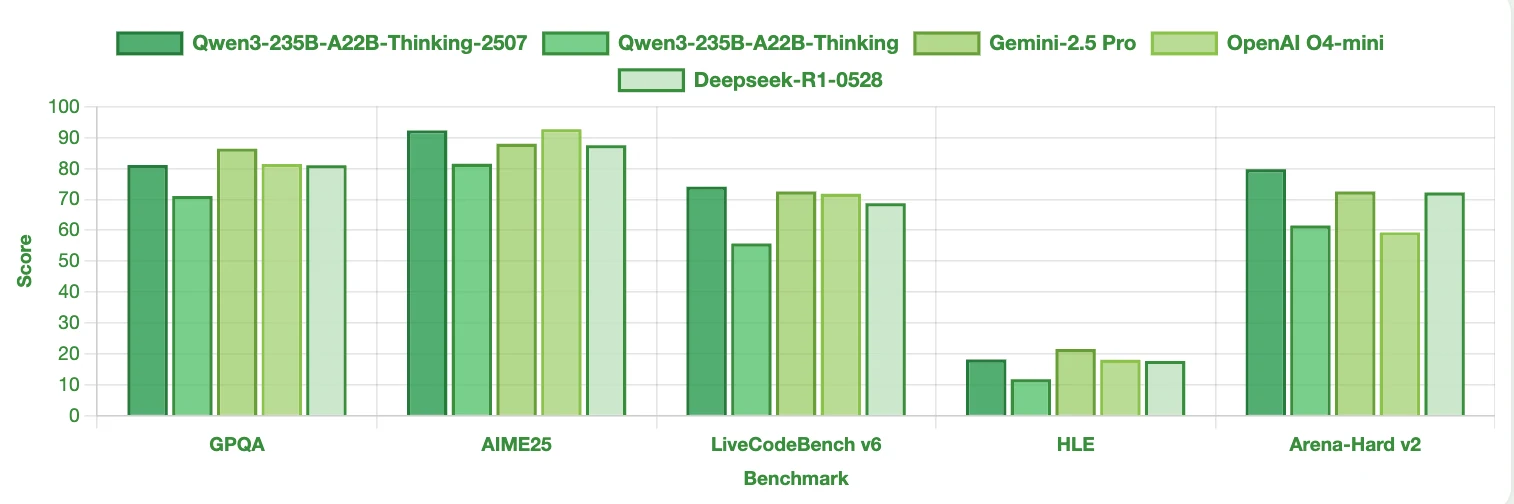
Area Qwen3-235B-A22B-Instruct-2507 Performance Math/Reasoning ⭐⭐⭐⭐⭐ Coding ⭐⭐⭐⭐⭐ General Knowledge ⭐⭐⭐⭐ Real-world Logic ⭐⭐⭐ Alignment ⭐⭐⭐⭐
Qwen3 235B A22B Instruct 2507 vs Other LLM
Benchmark
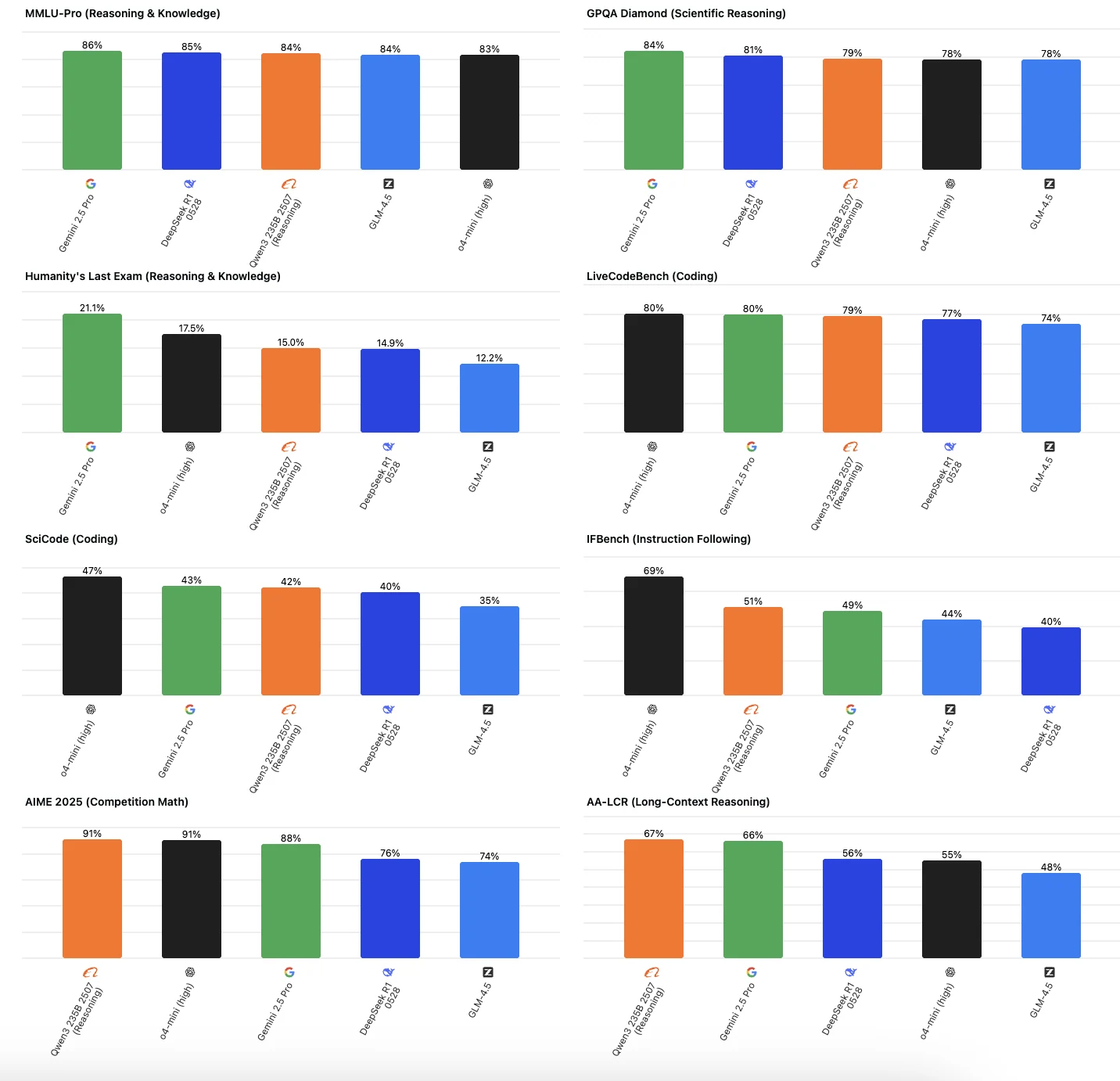
From Artificial Analysis
Qwen3-235B-A22B Instruct 2507 is especially strong in long-context reasoning, mathematical reasoning, and general coding and reasoning tasks. It demonstrates top-tier performance and reliability in most benchmarks. However, it is relatively less strong—though still competitive—in extremely challenging reasoning assessments and highly specialized coding tasks.
Effeciency
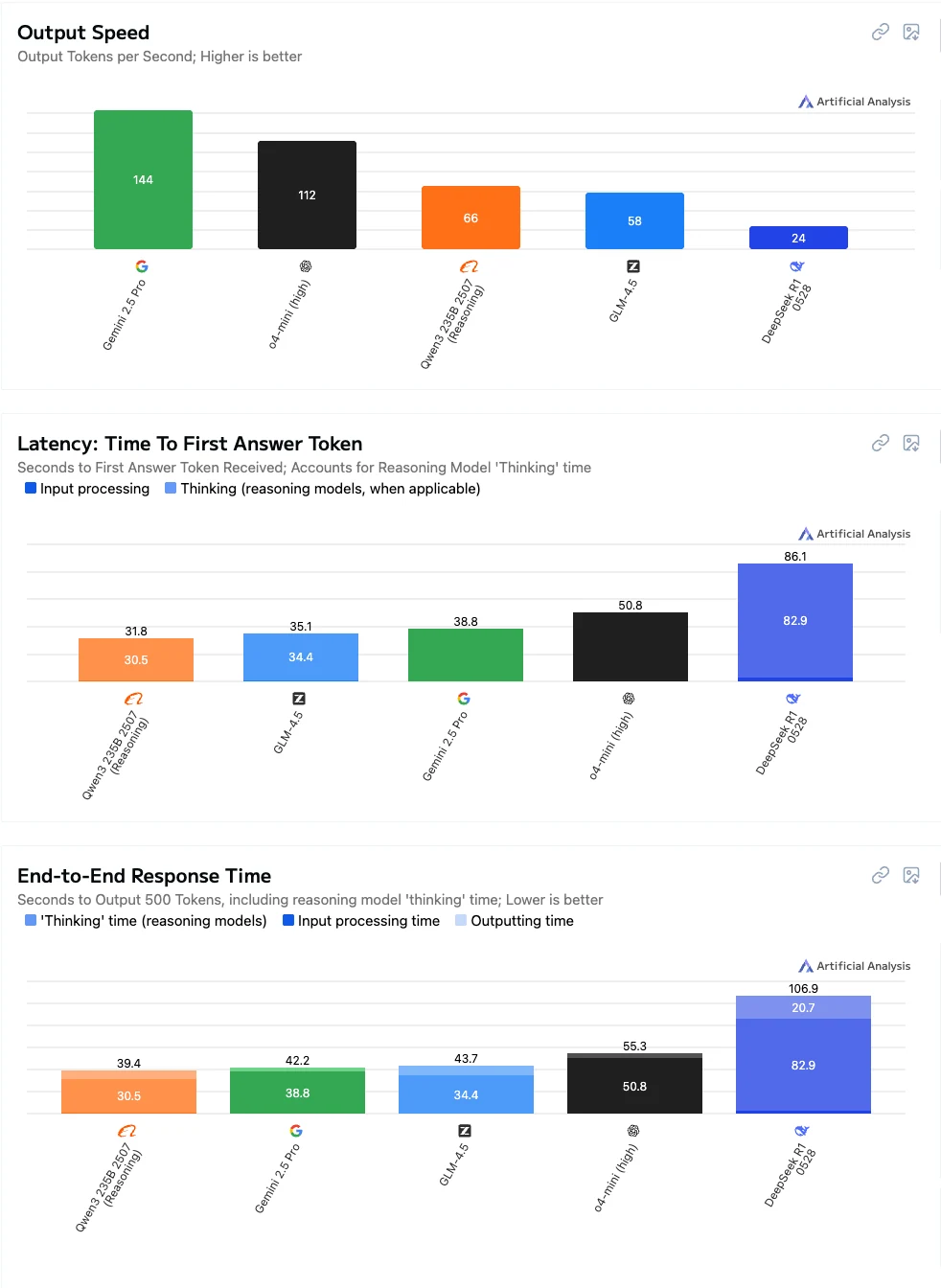
From Artificial Analysis
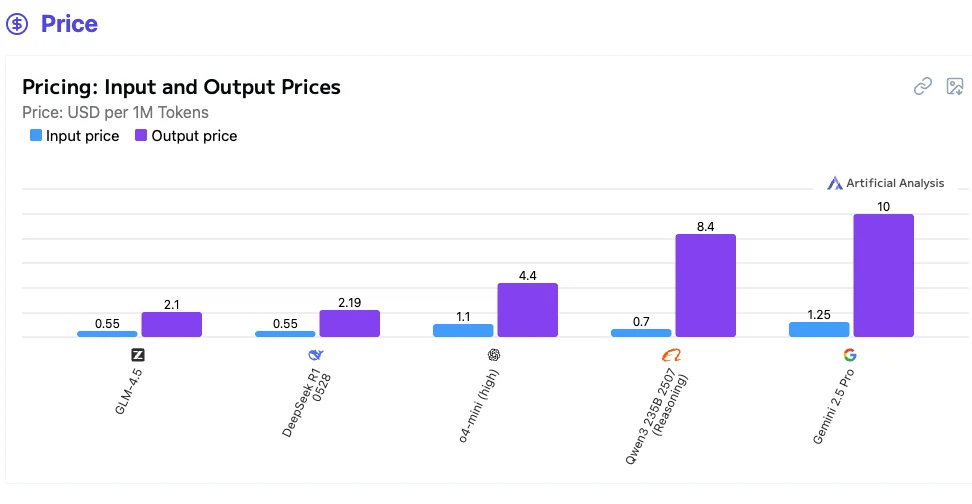
From Artificial Analysis
Qwen3-235B-A22B Instruct 2507 is a great choice if you value low latency and quick complete responses, but may not be ideal if you prioritize cost or maximum output speed.
How to Obtain Access to the Qwen3 235B A22B Instruct 2507?
Step 1: Log In and Access the Model Library
Log in to your account and click on the Model Library button.

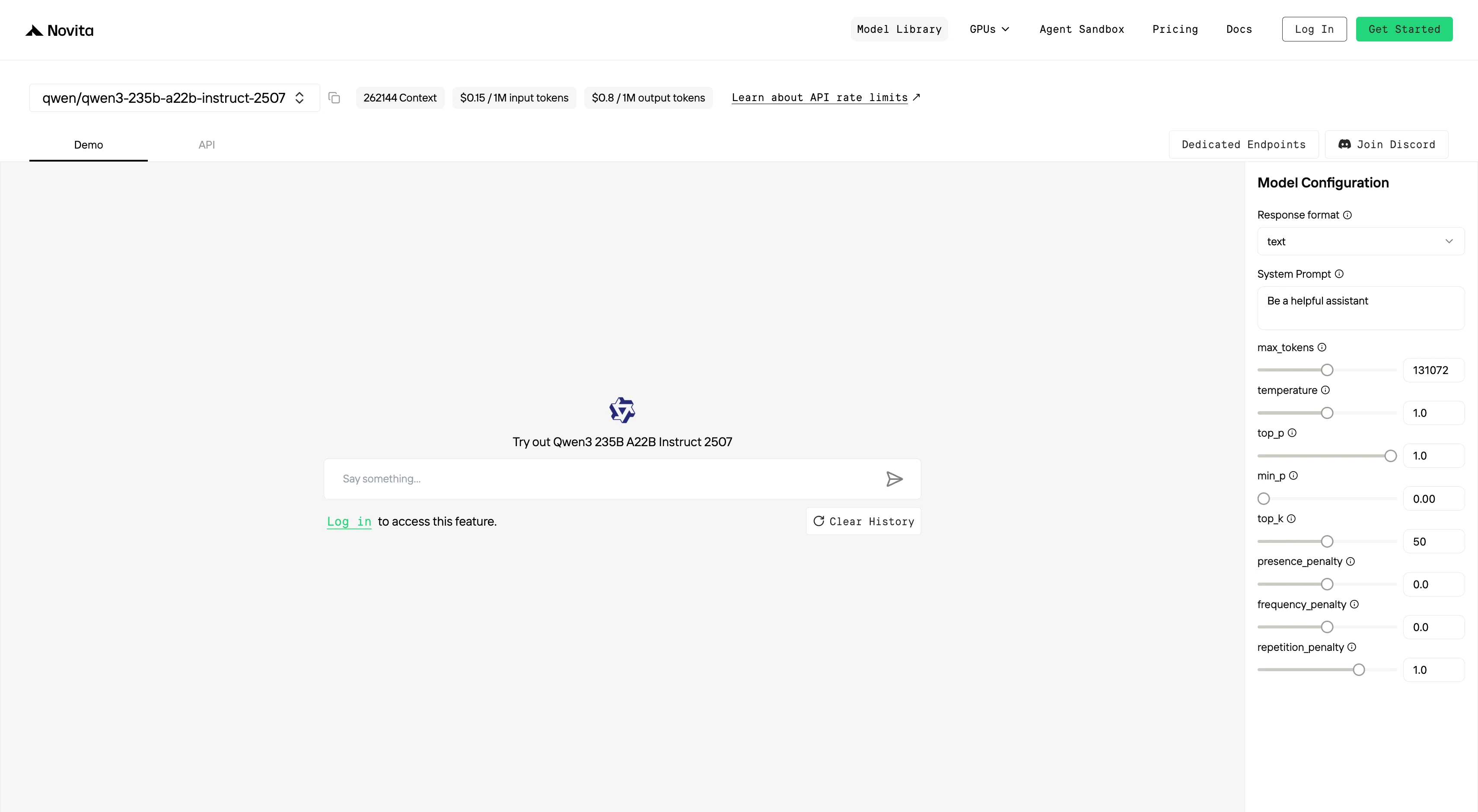
Try Qwen3 235B A22B Instruct 2507 Now!
Step 2: Choose Your Model
Browse through the available options and select the model that suits your needs.
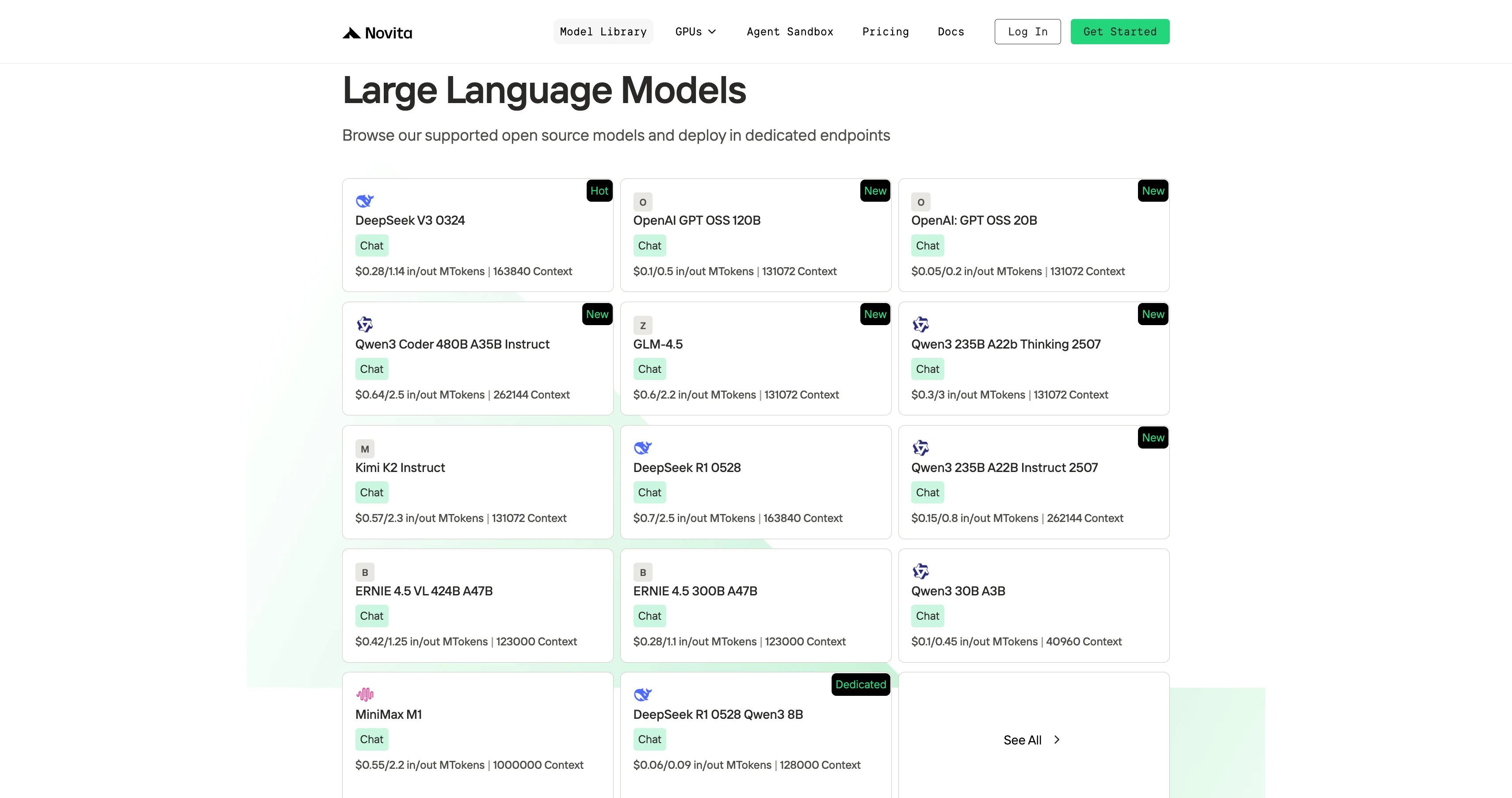
Step 3: Start Your Free Trial
Begin your free trial to explore the capabilities of the selected model.
Step 4: Get Your API Key
To authenticate with the API, we will provide you with a new API key. Entering the “Settings“ page, you can copy the API key as indicated in the image.

Step 5: Install the API
Install API using the package manager specific to your programming language.
After installation, import the necessary libraries into your development environment. Initialize the API with your API key to start interacting with Novita AI LLM. This is an example of using chat completions API for python users.
from openai import OpenAI

client = OpenAI(
    base_url="https://api.novita.ai/v3/openai",
    api_key="",
)

model = "qwen/qwen3-235b-a22b-instruct-2507"
stream = True # or False
max_tokens = 131072
system_content = ""Be a helpful assistant""
temperature = 1
top_p = 1
min_p = 0
top_k = 50
presence_penalty = 0
frequency_penalty = 0
repetition_penalty = 1
response_format = { "type": "text" }

chat_completion_res = client.chat.completions.create(
    model=model,
    messages=[
        {
            "role": "system",
            "content": system_content,
        },
        {
            "role": "user",
            "content": "Hi there!",
        }
    ],
    stream=stream,
    max_tokens=max_tokens,
    temperature=temperature,
    top_p=top_p,
    presence_penalty=presence_penalty,
    frequency_penalty=frequency_penalty,
    response_format=response_format,
    extra_body={
      "top_k": top_k,
      "repetition_penalty": repetition_penalty,
      "min_p": min_p
    }
  )

if stream:
    for chunk in chat_completion_res:
        print(chunk.choices[0].delta.content or "", end="")
else:
    print(chat_completion_res.choices[0].message.content)
Qwen3 235B A22B Instruct 2507 Third Platform Guide
Using CLI like Trae,Claude Code, Qwen Code
If you want to use Novita AI’s top models (like Qwen3-Coder, Kimi K2, DeepSeek R1, GLM 4.5) for AI coding assistance in your local environment or IDE, the process is simple: get your API Key, install the tool, configure environment variables, and start coding.
For detailed setup commands and examples, check the official tutorials:
- Trae : Step-by-Step Guide to Access AI Models in Your IDE
- Claude Code:How to Use Kimi-K2 in Claude Code on Windows, Mac, and Linux
- Qwen Code:How to Use OpenAI Compatible API in Qwen Code (60s Setup!)
Multi-Agent Workflows with OpenAI Agents SDK
Build advanced multi-agent systems by integrating Novita AI with the OpenAI Agents SDK:
- Plug-and-play: Use Novita AI’s LLMs in any OpenAI Agents workflow.
- Supports handoffs, routing, and tool use: Design agents that can delegate, triage, or run functions, all powered by Novita AI’s models.
- Python integration: Simply set the SDK endpoint to
https://api.novita.ai/v3/openaiand use your API key.
Connect API on Third-Party Platforms
- OpenAI-Compatible API: Enjoy hassle-free migration and integration with tools such as Cline and Cursor, designed for the OpenAI API standard.
- Hugging Face: Use Modeis in Spaces, pipelines, or with the Transformers library via Novita AI endpoints.
- Agent & Orchestration Frameworks: Easily connect Novita AI with partner platforms like Continue, AnythingLLM,LangChain, Dify and Langflow through official connectors and step-by-step integration guides.
Qwen3 235B A22B Instruct 2507 stands out as one of the most advanced instruction-tuned LLMs available, excelling at tasks requiring long-context reasoning, coding, and real-world logic. Its highly scalable MoE architecture, massive context window, and robust alignment make it suitable for a wide range of enterprise and research applications. Accessing and integrating Qwen3 235B A22B Instruct 2507 is straightforward—whether you work in Python, need an OpenAI-compatible API, or seek multi-agent workflow integration. With strong benchmarking results and broad compatibility, this model is positioned as a top choice for anyone seeking state-of-the-art AI capabilities.
Frequently Asked Questions
What makes Qwen3 235B A22B Instruct 2507 unique among large language models?
Its instruction tuning, 235B total parameters, massive 262k context window, and scalable MoE architecture allow it to handle long documents, complex reasoning, and multilingual tasks with high accuracy.
Can I use Qwen3 235B A22B Instruct 2507 for coding assistance?
Yes. It excels in coding tasks and can be integrated into local IDEs or CLI tools like Trae and Claude Code for AI coding support.
Is there a free trial of Qwen3 235B A22B Instruct 2507 available?
Yes, you can start with a free trial by signing up on the Novita AI platform and following the setup steps.
Novita AI is an AI cloud platform that offers developers an easy way to deploy AI models using our simple API, while also providing an affordable and reliable GPU cloud for building and scaling.