Developers today face two core problems: benchmarks that fail to reflect real application delivery, and frontier models whose costs make large-scale use impractical. This article addresses both by introducing VIBE, a runtime-level benchmark created by Minimax, and by showing how Minimax M2.1 delivers near-frontier full-stack capability at a dramatically lower price. It explains what VIBE measures, how Minimax M2.1 performs, and how developers can access and deploy it across Web, API, local, and agent-based workflows.
Benchmarking Full-Stack Application Intelligence of Minimax M2.1
Minimax introduces VIBE, a purpose-built benchmark designed to measure a model’s ability to construct complete, runnable applications from zero to one. Unlike traditional coding benchmarks that evaluate isolated snippets, VIBE executes the generated project in real runtime environments and verifies both functional correctness and visual behavior.
| Benchmark | MiniMax-M2.1 | MiniMax-M2 | Claude Sonnet 4.5 | Claude Opus 4.5 | Gemini 3 Pro |
|---|---|---|---|---|---|
| VIBE (Average) | 88.6 | 67.5 | 85.2 | 90.7 | 82.4 |
| VIBE-Web | 91.5 | 80.4 | 87.3 | 89.1 | 89.5 |
| VIBE-Simulation | 87.1 | 77.0 | 79.1 | 84.0 | 89.2 |
| VIBE-Android | 89.7 | 69.2 | 87.5 | 92.2 | 78.7 |
| VIBE-iOS | 88.0 | 39.5 | 81.2 | 90.0 | 75.8 |
| VIBE-Backend | 86.7 | 67.8 | 90.8 | 98.0 | 78.7 |
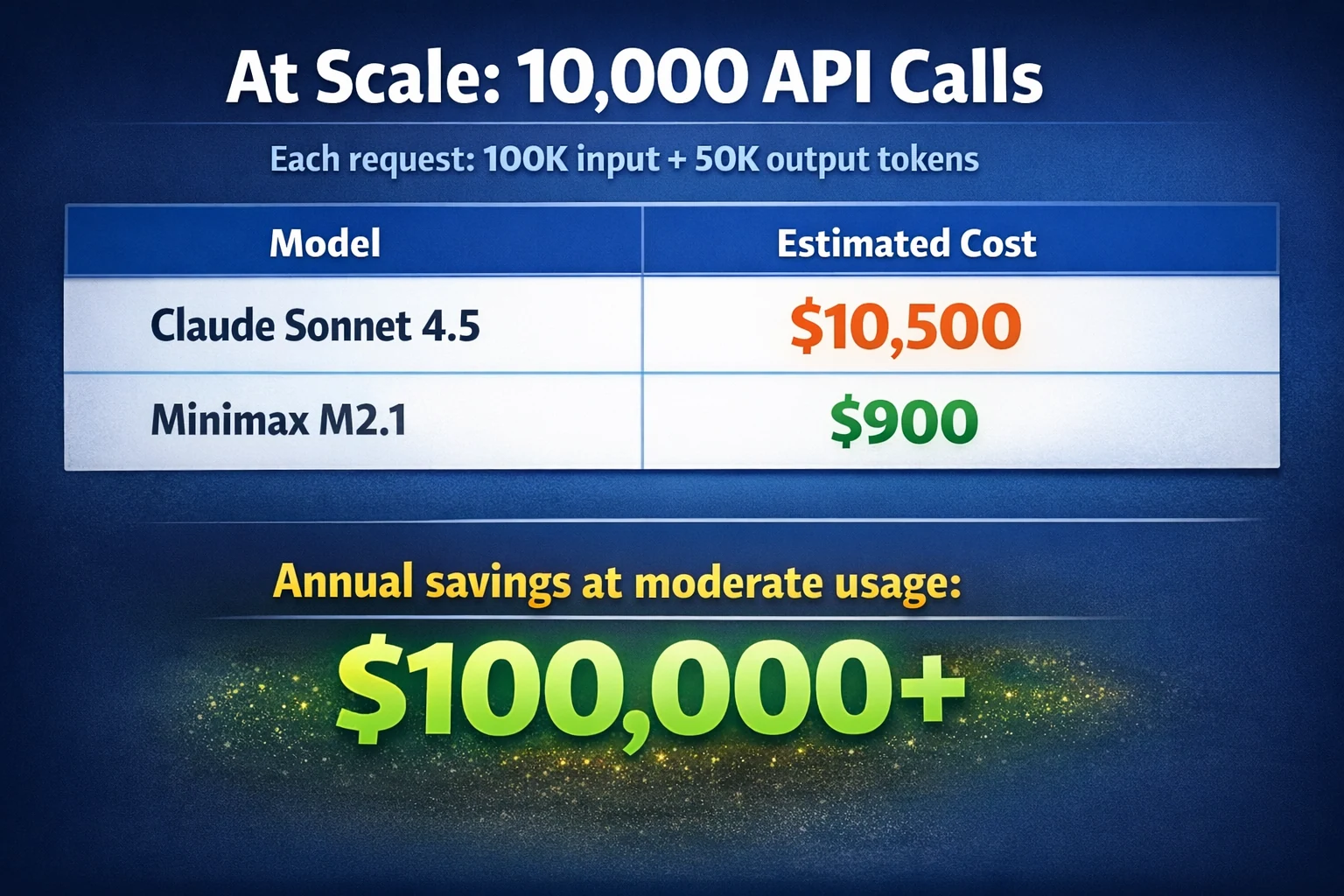
What makes this more compelling is cost. M2.1 delivers near-frontier full-stack capability at a significantly lower price point than comparable models. In practice, this changes how teams can use LLMs.
How to Access Minimax M2.1?
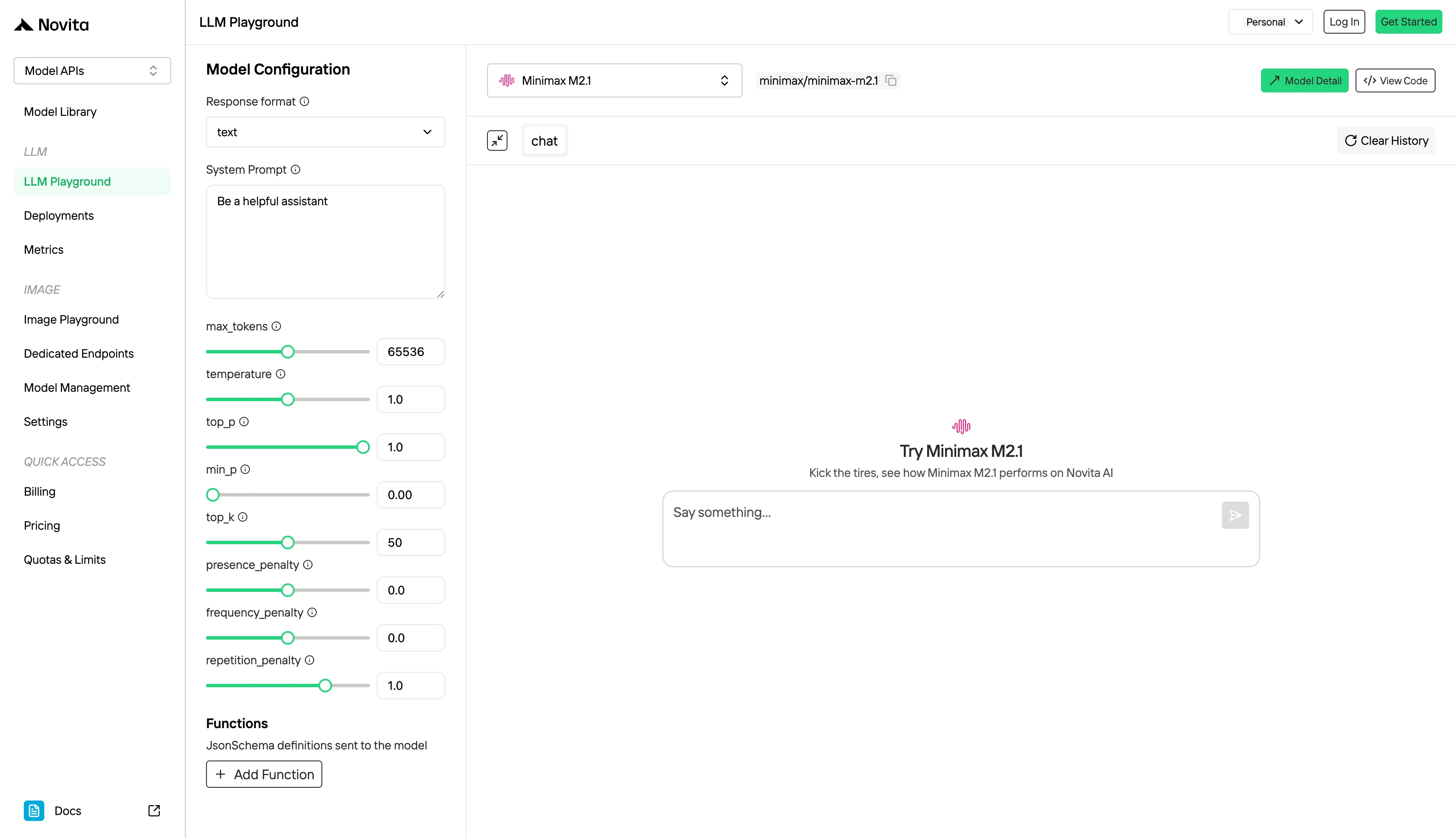
1.Minimax M2.1 Web Interface
2.Minimax M2.1 API Access for Developers
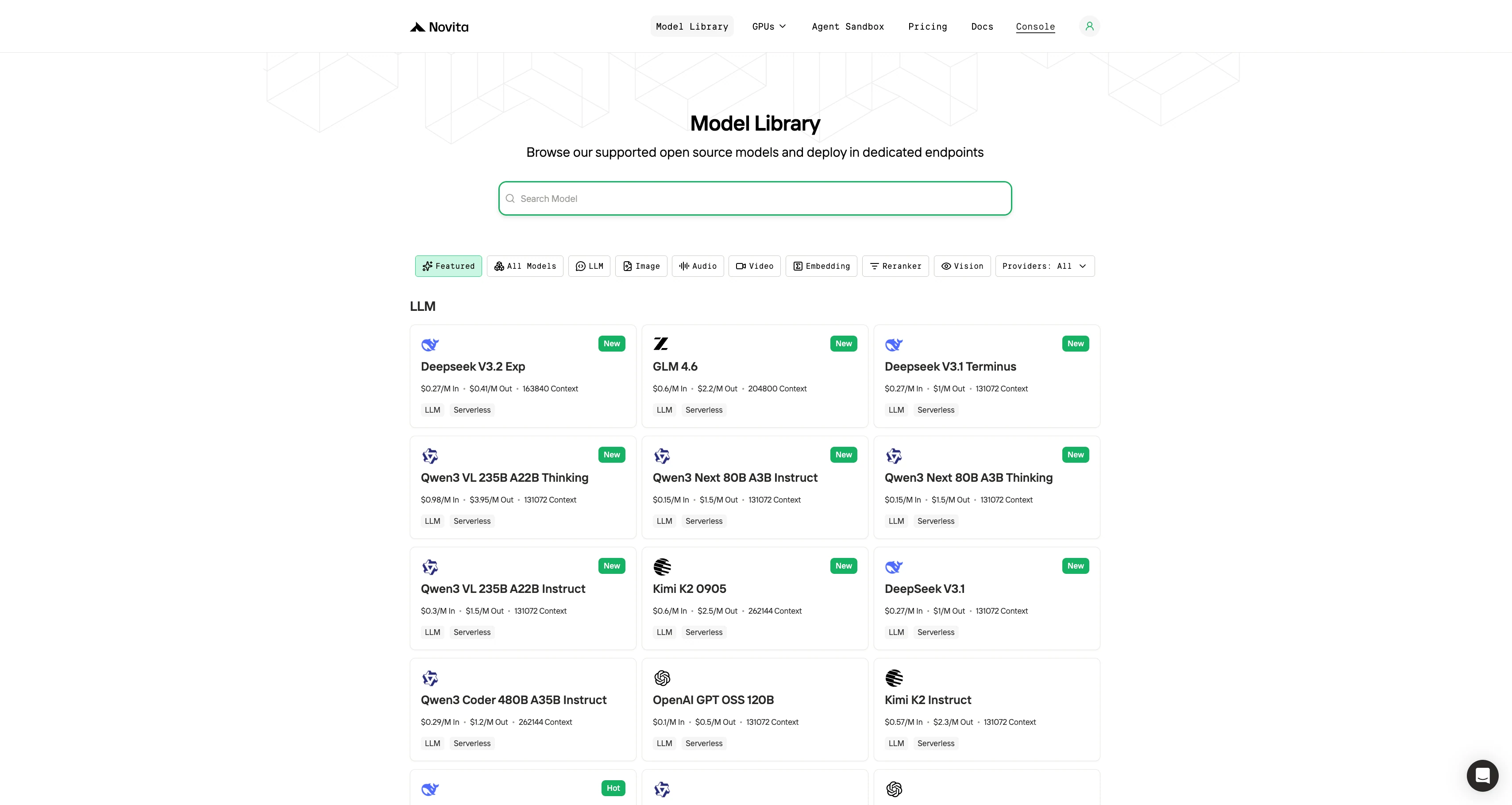
Step 1: Log In and Access the Model Library
Log in to your account and click on the Model Library button.

Step 2: Choose Your Model
Browse through the available options and select the model that suits your needs.
Step 3: Start Your Free Trial
Begin your free trial to explore the capabilities of the selected model.
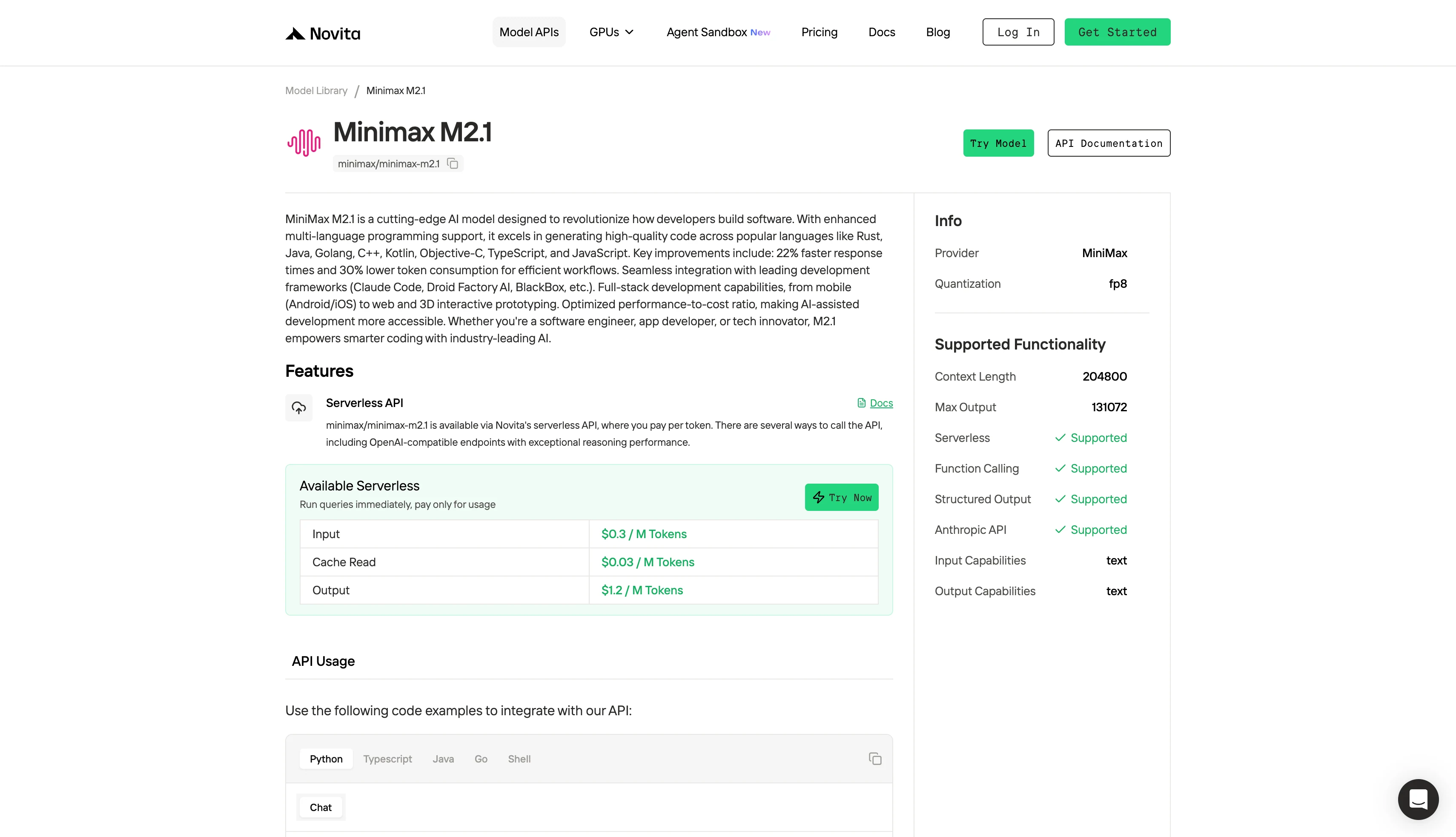
Step 4: Get Your API Key
To authenticate with the API, we will provide you with a new API key. Entering the “Settings“ page, you can copy the API key as indicated in the image.

Step 5: Install the API
Install API using the package manager specific to your programming language.
After installation, import the necessary libraries into your development environment. Initialize the API with your API key to start interacting with Novita AI LLM. This is an example of using chat completions API for python users.
from openai import OpenAI

client = OpenAI(
    api_key="<Your API Key>",
    base_url="https://api.novita.ai/openai"
)

response = client.chat.completions.create(
    model="minimax/minimax-m2.1",
    messages=[
        {"role": "system", "content": "You are a helpful assistant."},
        {"role": "user", "content": "Hello, how are you?"}
    ],
    max_tokens=131072,
    temperature=0.7
)

print(response.choices[0].message.content)
3.Minimax M2.1 Local Deployment and Dedicated Endpoints
Requirements:
| Configuration | Max Context | Use Case |
|---|---|---|
| 4× A100 or A800 (80 GB) | 400K tokens | Standard deployments |
| 4× H200 or H20 (96 GB+) | 400K tokens | Standard deployments |
| 8× H200 (141 GB) | 3M tokens | Extended-context workloads |
Installation Steps:
- Download model weights from HuggingFace or ModelScope
- Choose inference framework: vLLM or SGLang supported
- Follow deployment guide in the official GitHub repository
You’d choose a dedicated endpoint when you need stable high-performance inference, custom model control, and lower cost under continuous or heavy workloads, instead of maintaining local GPUs and infrastructure.
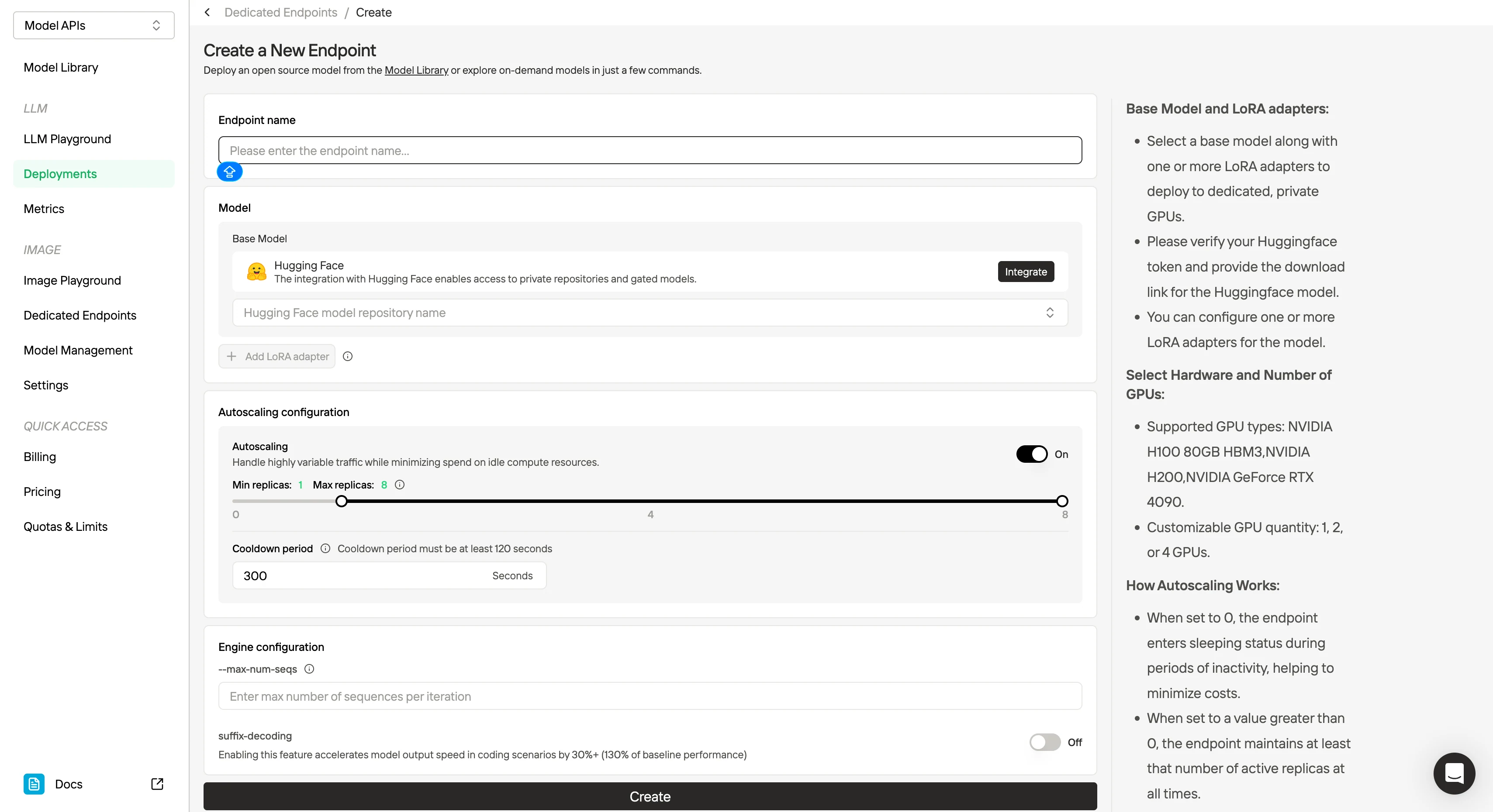
4.Minimax M2.1 Integration with Code Agent Tools
Minimax M2.1 is built to serve as a stable backbone for Code Agent workflows, integrating smoothly with Claude Code, Droid (Factory AI), Cline, Kilo Code, and Roo Code, while supporting structured context systems such as Skill.md, Claude.md, agent.md, cursorrule, and Slash Commands. It remains coherent under long-horizon planning and iterative execution, enabling tasks like multi-file scaffolding, refactor loops, and autonomous debugging.
Through Novita AI, developers can bypass regional restrictions and deploy M2.1 directly in existing pipelines with 99% SLA-backed stability, making it suitable for high-frequency code generation and CI automation. The same stack also offers Kimi-K2 and Qwen3 Coder, delivering near–Claude Sonnet 4 coding performance at less than one-fifth the cost, allowing teams to scale agent-driven development economically.
The First: Get API Key
Minimax M2.1 in Cursor
Step 1: Install Cursor
Download the latest version from cursor.com, subscribe to the Pro plan, and complete the initial setup.
Step 2: Access Advanced Model Settings
In Cursor, open Settings, select Models from the left menu, and locate API Configuration.
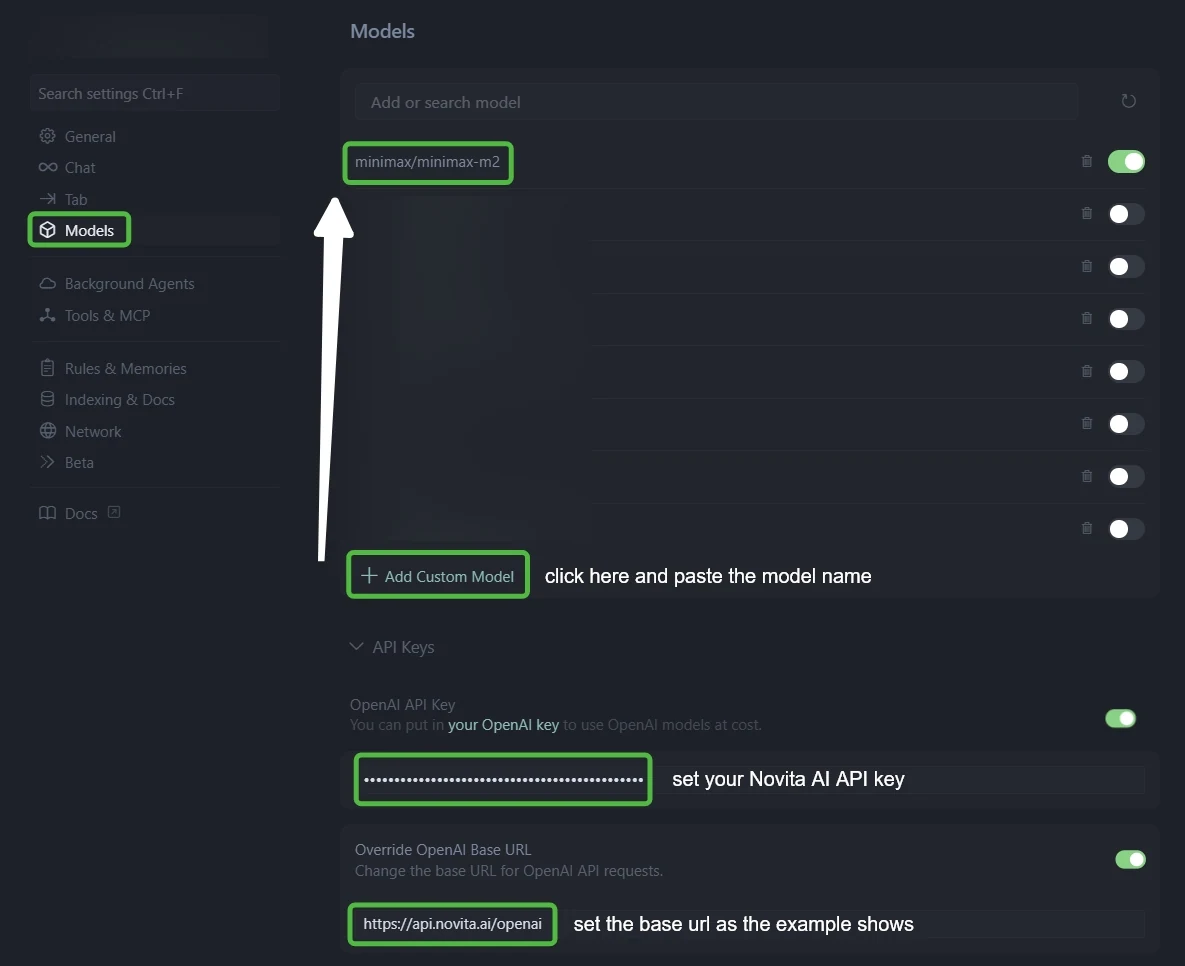
Step 3: Configure Novita AI Integration
- In “OpenAI API Key” field: Paste your Novita AI API key
- In “Override OpenAI Base URL” field: Replace default with:
https://api.novita.ai/openai
Step 4: Add Multiple AI Coding Models
Click ”+ Add Custom Model” and add each model:
- minimax/minimax m2.1
qwen/qwen3-vl-235b-a22b-thinkingzai-org/glm-4.6deepseek/deepseek-v3.1moonshotai/kimi-k2-0905openai/gpt-oss-120bgoogle/gemma-3-12b-it
Step 5: Test Your Integration
Start a new chat in Ask or Agent mode, switch between models, and confirm each responds correctly.
Minimax M2.1 in Claude Code
Step 1: Install Claude Code
First, verify that Node.js 18 or higher is installed on your system:
node -v
# Expected output: v18.x.x or higher (e.g.v20.10.0)
If Node.js is missing or older than v18, download and install a recent version from [https://nodejs.org](https://nodejs.org)
- Installation Command:
Install Claude Code globally using npm:
npm install -g @anthropic-ai/claude-code- Verify Installation:
claude --versionStep 2: Setting Up Environment Variables
On Windows:Set the variables for the current CMD session:
set ANTHROPIC_BASE_URL=https://api.novita.ai/anthropic
set ANTHROPIC_AUTH_TOKEN=<Your_Novita_API_Key>
set ANTHROPIC_MODEL=minimax/minimax-m2.1
set ANTHROPIC_SMALL_FAST_MODEL=minimax/minimax-m2.1
On macOS and Linux:Export the variables in your shell:
export ANTHROPIC_BASE_URL="https://api.novita.ai/anthropic"
export ANTHROPIC_AUTH_TOKEN="<Your_Novita_API_Key>"
export ANTHROPIC_MODEL="minimax/minimax-m2.1"
export ANTHROPIC_SMALL_FAST_MODEL="minimax/minimax-m2.1"Step 3: Starting Claude Code
- Navigate to Your Project Directory
cd <path_to_your_project>- Launch Claude Code
claude .The dot (.) tells Claude Code to operate on the current directory, scanning and working within this project.
After startup, you will see an interactive Claude Code prompt with access to commands such as /init, /model, /review, and more.
Common session‑level commands include:
/init– Initialize Claude Code in the current directory./login– Authenticate with an API provider if needed./logout– Clear stored credentials./memory– View or edit persistent memory./model– View or switch the current model./permissions– Manage file and command permissions./review– Review pending changes before applying them./status– Show current session status./terminal-setup– Configure terminal integration./vim– Toggle Vim keybindings.
Minimax M2.1 in Trae
Step 1: Open Trae and Access Models
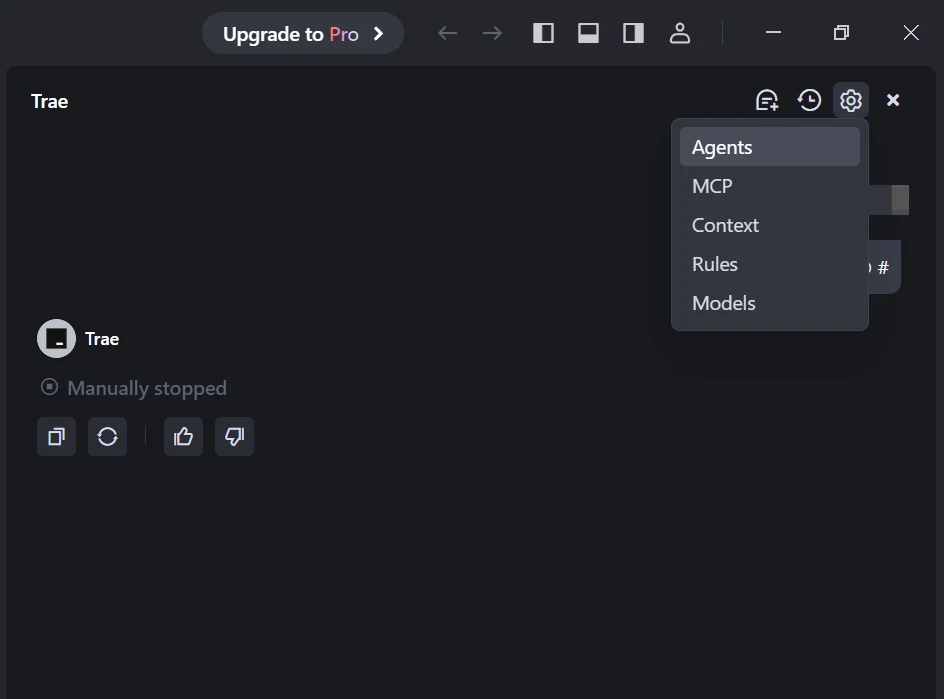
Launch the Trae app. Click the Toggle AI Side Bar in the top-right corner to open the AI Side Bar. Then, go to AI Management and select Models.
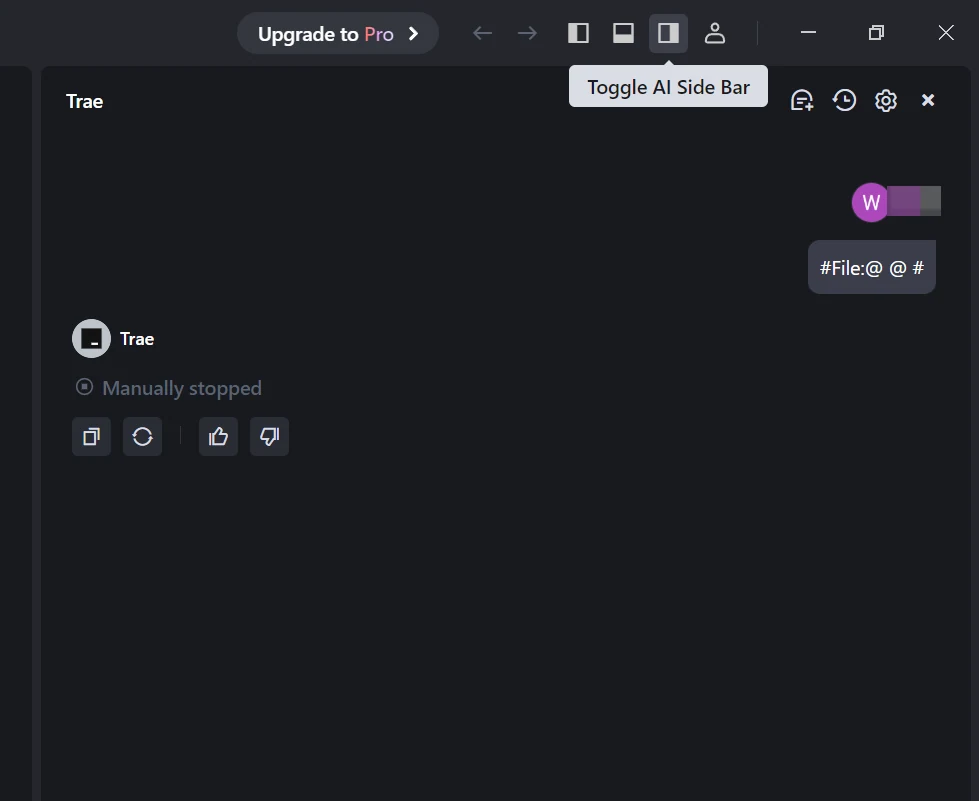
Step 2: Add a Custom Model
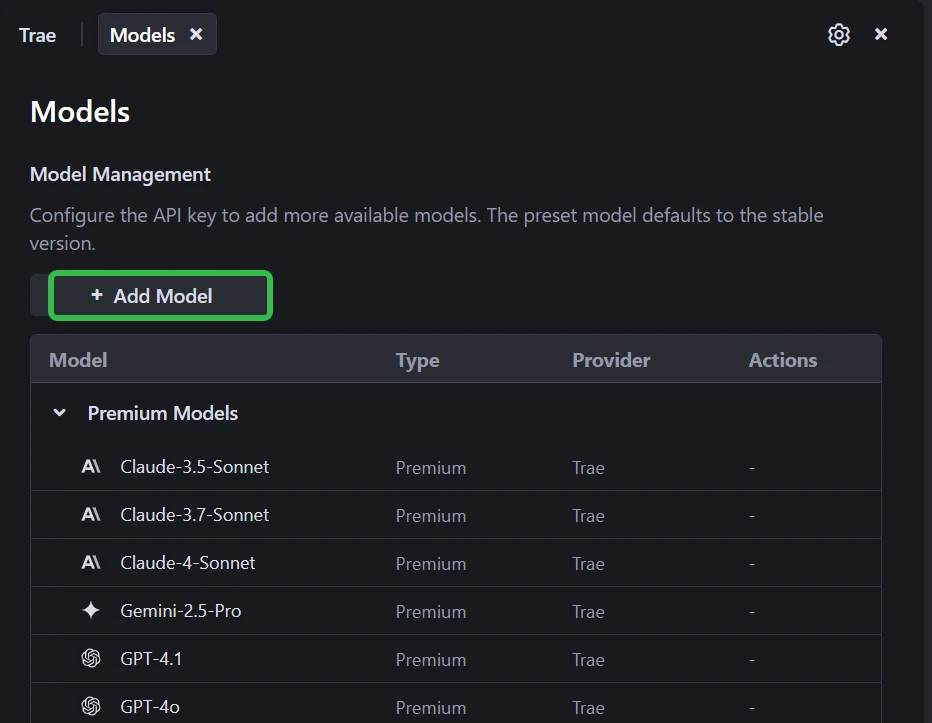
Click the Add Model button to create a custom model entry.
Step 3: Choose Novita as Provider
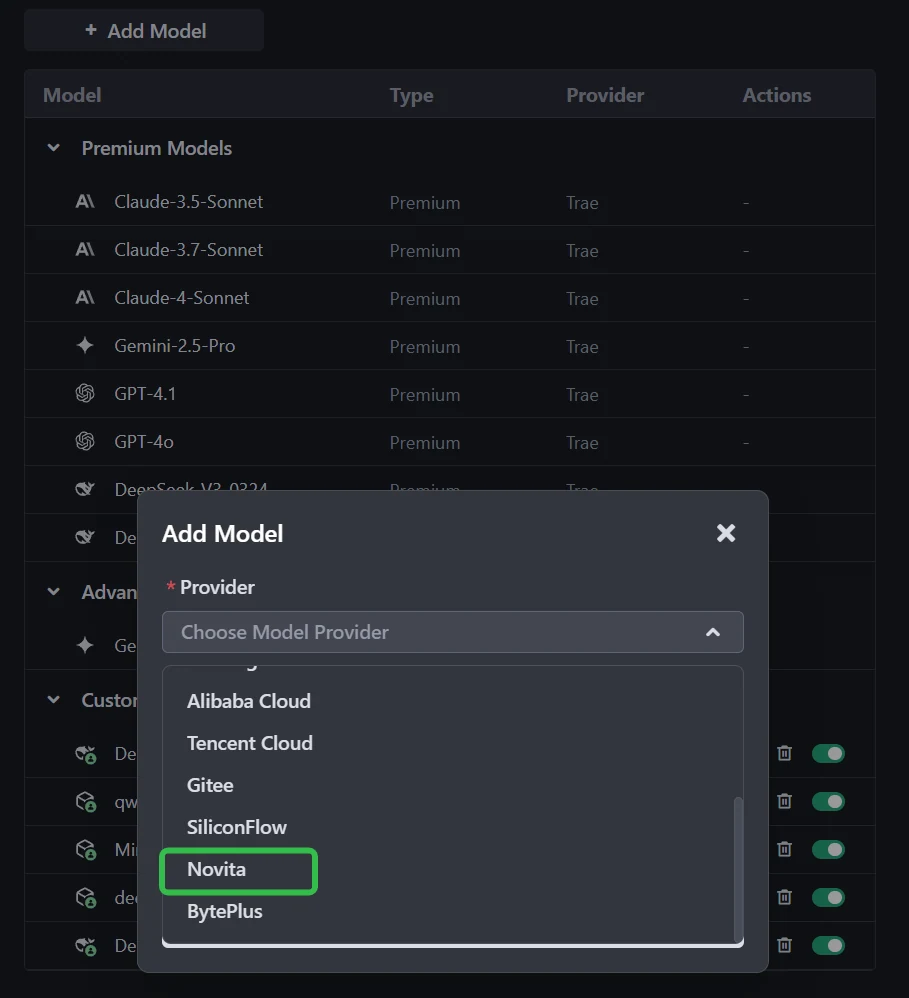
In the add-model dialog, select Provider = Novita from the dropdown menu.
Step 4: Select or Enter the Model
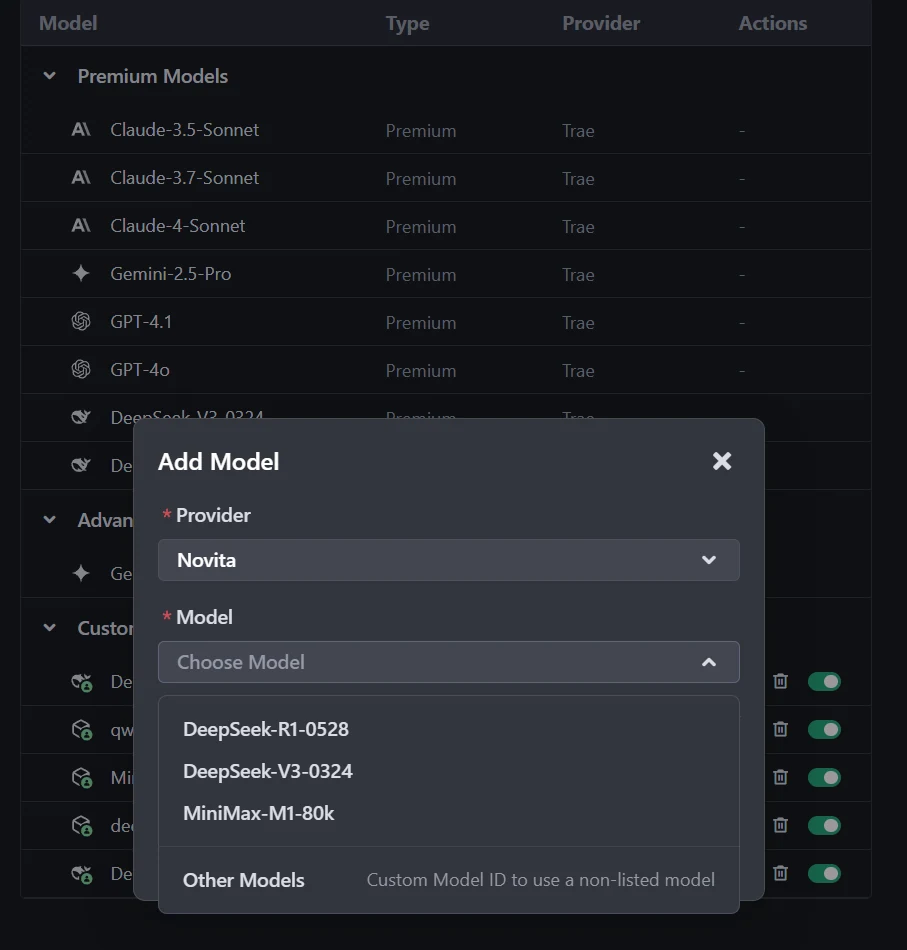
From the Model dropdown, pick your desired model (e.g., DeepSeek-R1-0528, DeepSeek-V3-0324, or MiniMax-M1-80k). If the exact model isn’t listed, simply type the model ID that you noted from the Novita library. Ensure you choose the correct variant of the model you want to use.
Step 5: Enter Your API Key
Copy the Novita AI API key from your Novita console and paste it into the API Key field in Trae.
Step 6: Save the Configuration
Click Add Model to save. Trae will validate the API key and model selection in the background.
Miniax M2.1 in Codex
Step1:Prerequisites
- Create an account: Visit Novita AI’s website and sign up for an account.
- Generate your API Key: After logging in, navigate to the Key Management page to generate your API key.
- Select a Model Name: You’ll need to copy the model name you want to use from Novita AI’s Model Library. Some available models include:
deepseek/deepseek-v3.1qwen/qwen3-coder-480b-a35b-instructmoonshotai/kimi-k2-0905openai/gpt-oss-120bzai-org/glm-4.5google/gemma-3-12b-it
- Save it Securely: you’ll need it for configuration.
Step2:Installation
#Install via npm (Recommended)
npm install -g @openai/codex
#Install via Homebrew (macOS)
brew install codex#Verify Installation
codex --versionStep3:Configuring Novita AI Models
Setup Configuration File
Codex CLI uses a TOML configuration file located at:
- macOS/Linux:
~/.codex/config.toml - Windows:
%USERPROFILE%\.codex\config.toml
Basic Configuration Template
model = "MODEL_NAME"
model_provider = "novitaai"

[model_providers.novitaai]
name = "Novita AI"
base_url = "https://api.novita.ai/openai"
http_headers = {"Authorization" = "Bearer YOUR_NOVITA_API_KEY"}
wire_api = "chat"5.Minimax M2.1 on Third-Party Platforms
- OpenAI-Compatible API: Enjoy hassle-free migration and integration with tools such as Cline, OpenCode and Cursor, designed for the OpenAI API standard.
- Hugging Face: Use Modeis in Spaces, pipelines, or with the Transformers library via Novita AI endpoints.
- Agent & Orchestration Frameworks: Easily connect Novita AI with partner platforms like Continue, AnythingLLM,LangChain, Dify and Langflow through official connectors and step-by-step integration guides.
VIBE reframes evaluation around runnable software, and Minimax M2.1 proves that full-stack application intelligence can be both execution-grade and affordable. With strong cross-platform performance and flexible deployment paths, Minimax M2.1 enables teams to move from AI-assisted coding to economically scalable, agent-driven software production.
Frequently Asked Questions
What does VIBE measure for Minimax M2.1?
VIBE executes apps generated by Minimax M2.1 in real runtimes, validating both functional behavior and visual output across Web, Simulation, Android, iOS, and Backend.
How does Minimax M2.1 compare with Claude Sonnet 4.5 and Claude Opus 4.5?
Minimax M2.1 achieves competitive VIBE scores against Claude Sonnet 4.5 and Claude Opus 4.5 while operating at a significantly lower cost.
How can developers access Minimax M2.1 via API?
Developers can obtain a key and call Minimax M2.1 through Novita AI using an OpenAI-compatible endpoint
Novita AI is an AI cloud platform that offers developers an easy way to deploy AI models using our simple API, while also providing an affordable and reliable GPU cloud for building and scaling.
Recommend Reading



