In this guide, we’ll show you four practical ways to access GLM-4.7—from a web interface for quick testing, to local deployment for strict data residency. We’ll focus especially on API access via Novita AI, where GLM-4.7 is available as zai-org/glm-4.7 through a serverless endpoint—so you can go from idea to working integration in minutes, without managing inference infrastructure.
By the end, you’ll know exactly which access option fits your workload, and you’ll have a step-by-step API setup you can copy into your app to start building with GLM-4.7 right away.
GLM-4.7 vs GLM-4.6: Key Upgrades at a Glance
GLM-4.7 keeps the same headline context limits as GLM-4.6—200K context window and up to 128K output, butGLM-4.7’s biggest gains show up where production apps care most—agentic, tool-using workflows and end-to-end coding execution.You can try GLM- 4.7 quickly via Novita.
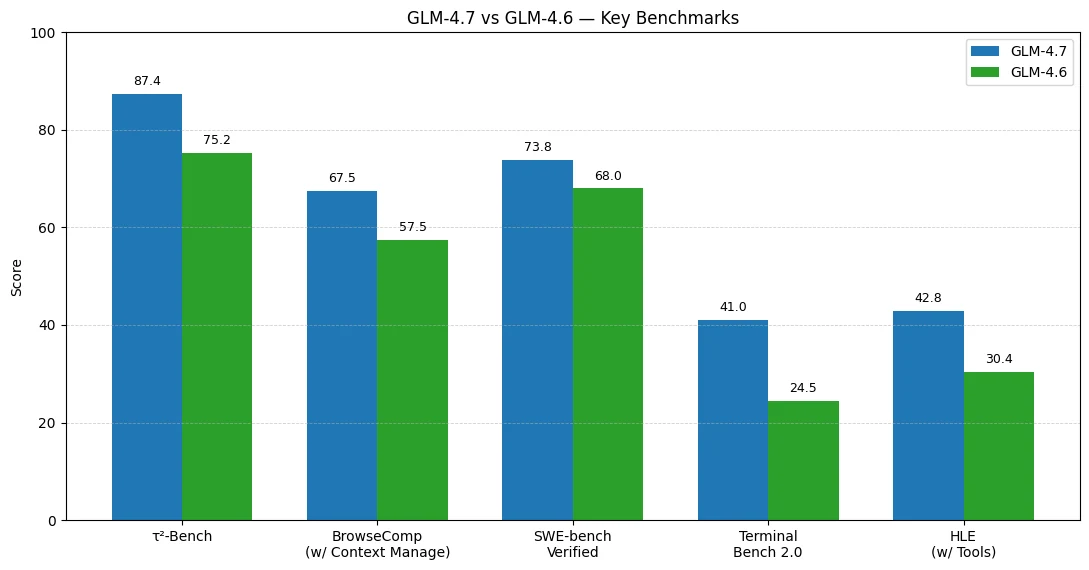
Benchmark results suggest GLM-4.7’s biggest gains over GLM-4.6 show up in agentic, tool-using workflows and end-to-end coding execution.
Tool use & agent workflows improve the most
- τ²-Bench: 75.2 → 87.4 (+12.2)
- BrowseComp (w/ Context Manage): 57.5 → 67.5 (+10.0)
Real-world coding becomes more reliable
- SWE-bench Verified: 68.0 → 73.8 (+5.8)
Terminal-style coding agents see a major jump
- Terminal Bench 2.0: 24.5 → 41.0 (+16.5)
Hard reasoning with tools is significantly stronger
- HLE (w/ Tools): 30.4 → 42.8 (+12.4)
What Can You Do With GLM-4.7?
Here are high-leverage use cases that match GLM-4.7’s strengths:
- Agentic coding assistants
- “Plan → implement → test → fix” loops
- Multi-file refactors, terminal-style tasks, and longer programming sessions
- Tool-using agents (search + browse + structured outputs)
- Research agents that collect sources, compare results, and return structured summaries
- Front-end generation with cleaner aesthetics
- Landing pages, UI components, design-consistent layout generation
- Office automation (PPT outlines, posters, polished writing)
- More reliable formatting and layout consistency, better “ready-to-use” drafts
Getting Started with GLM-4.7: Your Access Options
You generally have four practical options:
Try It First: Novita Web Playground (Easiest for Beginners)
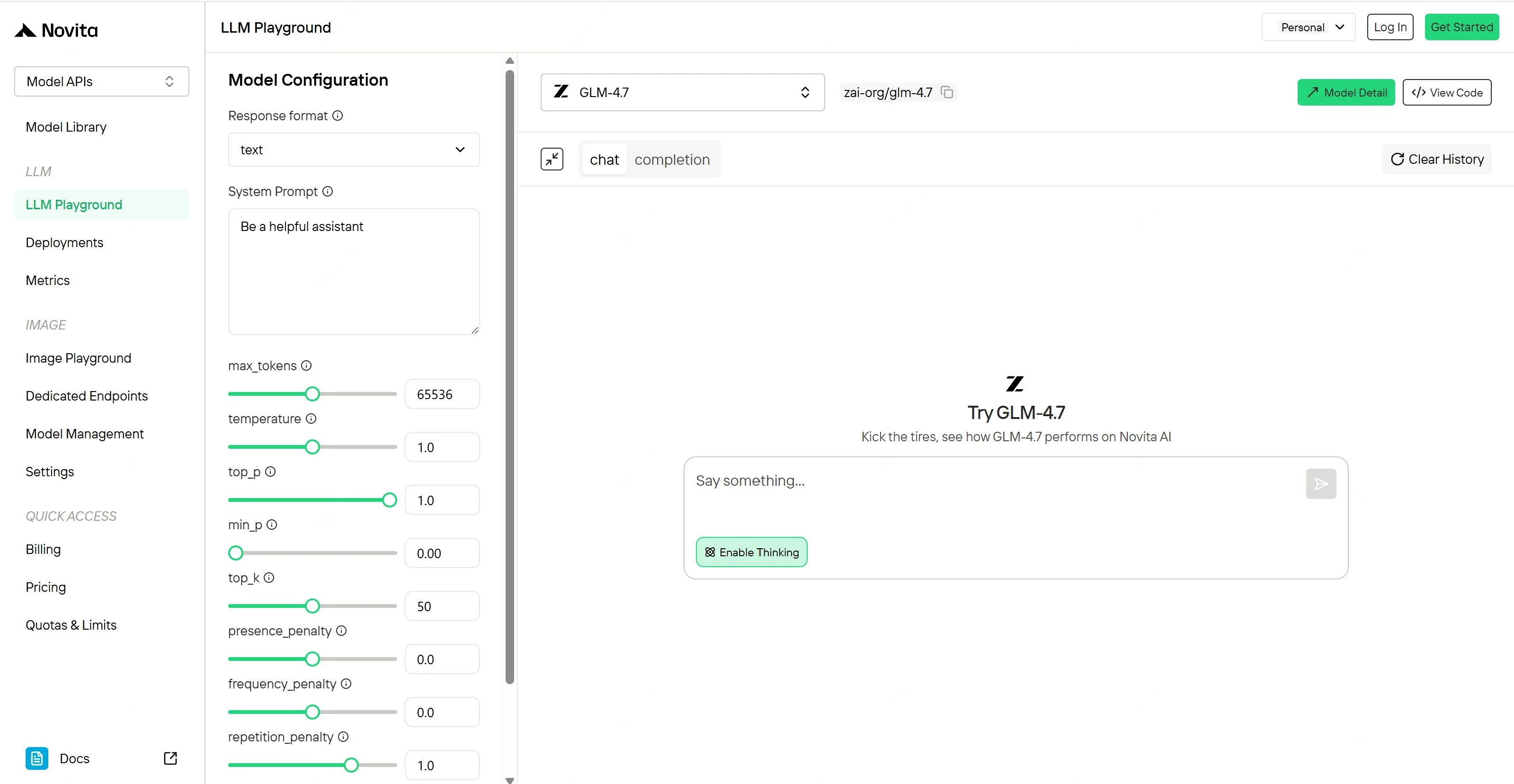
If you want to quickly test prompts and see how GLM-4.7 behaves, Novita provides a one-click web experience.
Build with APIs: Official Endpoint vs Novita AI Serverless (For Developers)
Best for: production apps, startups optimizing cost, teams wanting one unified API across many models.
If you want serverless scaling, OpenAI-compatible calls, and usage-based billing, GLM-4.7 is available on Novita AI as zai-org/glm-4.7.
💡Novita AI highlights:
- Serverless: run immediately, pay only for what you use
- Pricing: $0.6 / M input tokens, $2.2 / M output tokens
- Long context + large output: 204,800 context, 131,072 max output
- Function calling + structured output + reasoning supported
Step-by-step: Use GLM-4.7 via API with Novita AI
Bring GLM-4.7 into your applications using Novita AI’s OpenAI-compatible unified REST API.
Step 1: Log In and Access the Model Library
Visit https://novita.ai/: Log in (or sign up) to your Novita AI account and navigate to the Model Library.
Step 2: Choose GLM-4.7
Browse the available models and select GLM-4.7 based on your workload requirements.
Step 3: Start Your Free Trial
Activate your free trial to explore GLM-4.7’s reasoning, long-context, and cost-performance characteristics.
Step 4: Get Your API Key
Open the Settings page to generate and copy your API key for authentication.
Step 5: Install and Call the API (Python Example)
Below is a simple example using the Chat Completions API with Python:
from openai import OpenAI

client = OpenAI(
    api_key="<Your API Key>",
    base_url="https://api.novita.ai/openai"
)

response = client.chat.completions.create(
    model="zai-org/glm-4.7",
    messages=[
        {"role": "system", "content": "You are a helpful assistant."},
        {"role": "user", "content": "Hello, how are you?"}
    ],
    max_tokens=131072,
    temperature=0.7
)

print(response.choices[0].message.content)
This setup allows you to control reasoning depth, token usage, and generation behavior—particularly useful when leveraging turn-level thinking to manage cost and latency.
Run It on Your Own Stack: Local Serving for Power Users(Advanced Users)
Best for: offline workloads, data residency constraints, custom inference stacks.
GLM-4.7 is open-sourced under the MIT license on Hugging Face, and the official model card includes guidance for serving locally (vLLM, SGLang, transformers) plus notes about framework support.
GPU / VRAM requirements (quick reference)
When serving GLM-4.7 locally, VRAM is the hard constraint. Your required GPU memory depends primarily on the quantization bit-width (lower-bit quantization → lower VRAM), plus a small headroom for runtime overhead.
Below is a practical reference (model size + estimated VRAM requirement + suggested GPU setups):
| Bit-width | Quantization | Model size | Est. VRAM required | Recommended GPU | Total VRAM |
|---|---|---|---|---|---|
| 1-bit | TQ1_0 | 84.5 GB | ~86 GB | NVIDIA L4 ×4 | 96 GB |
| 1-bit | IQ1_S | 97.2 GB | ~99 GB | NVIDIA A100 ×2 | 160 GB |
| 1-bit | IQ1_M | 108 GB | ~110 GB | — | — |
| 3-bit | Q3_K_XL | 159 GB | ~161 GB | NVIDIA L40S ×4 | 192 GB |
| 3-bit | Q3_K_M | 171 GB | ~173 GB | NVIDIA L40S ×4 | 192 GB |
| 4-bit | IQ4_XS | 192 GB | ~194 GB | NVIDIA A100 ×4 | 320 GB |
| 8-bit | Q8_0 | 381 GB | ~383 GB | NVIDIA A100 ×8 | 640 GB |
| 16-bit | BF16 | 717 GB | ~719 GB | NVIDIA H200 ×8 | 1128 GB |
Rule of thumb: plan for slightly more VRAM than the “memory requirement” number (framework/runtime overhead, KV cache growth, batching, etc.). For most “power-user local serving” setups, 3–4 bit quantization is the most practical starting point, while 8/16-bit typically requires multi-GPU servers.
Plug It In: IDE Agents, Tool Calling, and App Frameworks
Best for: “bring your own IDE agent,” multi-agent systems, tool-calling apps.
GLM-4.7 is explicitly described as working well in popular coding-agent environments (e.g., Claude Code style workflows).
On Novita AI, you can integrate GLM-4.7 into existing tooling that already speaks OpenAI-compatible APIs (and Novita’s model page also lists Anthropic API support on the platform).
If you’re using an agentic coding setup, GLM-4.7 can serve as the model behind popular IDE assistants and coding agents:
- Claude Code: Advanced agentic coding workflows with strong multi-step reasoning
- Qwen Code: Specialized AI coding tool optimized for development tasks
- Cline (VS Code) : AI assistant integrated directly into VS Code for iterative coding and tool runs
- Cursor IDE : A modern IDE with a seamless AI-powered coding experience
- Trae: Terminal-based AI development assistant for command-oriented workflows
- Codex CLI: Command-line AI assistance for planning, edits, and quick automation
- Kilo: Lightweight AI coding agent/assistant for fast edits, refactors, and codebase Q&A across projects
- OpenCode: Open-source, local-first coding assistant/agent that supports customizable workflows and tool integrations
How to use GLM-4.7 in these workflows:
- Set the provider/base URL to Novita’s OpenAI-compatible endpoint
- Choose the model:
zai-org/glm-4.7
Fastest Path: Try GLM-4.7 on Novita AI
If your goal is “get GLM-4.7 running today” without managing infrastructure, Novita AI’s serverless access is typically the most direct route—especially when you’re comparing models, optimizing spend, or shipping quickly.
Novita AI is an AI cloud platform that offers developers an easy way to deploy AI models using our simple API, while also providing the affordable and reliable GPU cloud for building and scaling.
Frequently asked questions
Is GLM-4.7 free?
On Novita AI, GLM-4.7 is pay-per-token: $0.6/M tokens (input), $0.11/M tokens (cache read), and $2.2/M tokens (output)
On Z.ai, access is commonly packaged via a paid Coding Plan (starting at $3/month).
Some platforms may offer limited trials/quotas, but GLM-4.7 itself isn’t universally “free.”
Is GLM-4.7 really good?
For coding + agentic workflows, it’s positioned as a top-tier open model by its publisher. Z.ai reports strong results on coding and agent benchmarks (e.g., LiveCodeBench v6, SWE-bench Verified, BrowseComp, τ²-Bench), and frames it as competitive with Claude Sonnet 4.5 on several measurements
Does GLM-4.7 have vision?
GLM-4.7 is text-only. If you need vision, use a GLM-V variant instead (e.g. GLM-4.6V or GLM-4.5V, which support image inputs depending on the provider)



