GLM 4.5 is a cutting-edge large language model designed with built-in agentic capabilities—meaning it can reason, take action, and use tools in real coding workflows. In benchmarks across 52 real-world programming tasks—ranging from frontend development to algorithm design—GLM 4.5 performed competitively with top-tier models like Claude 4 Sonnet, Kimi K2, and Qwen3-Coder.
With seamless integration into tools like Claude Code and Trae, GLM 4.5 becomes a highly capable code agent. This guide will walk you through how to test and run GLM 4.5 in Trae, one of the most flexible and developer-friendly IDEs for AI-assisted coding.
Does GLM 4.5 Really Change the Future of Code AI Agents?
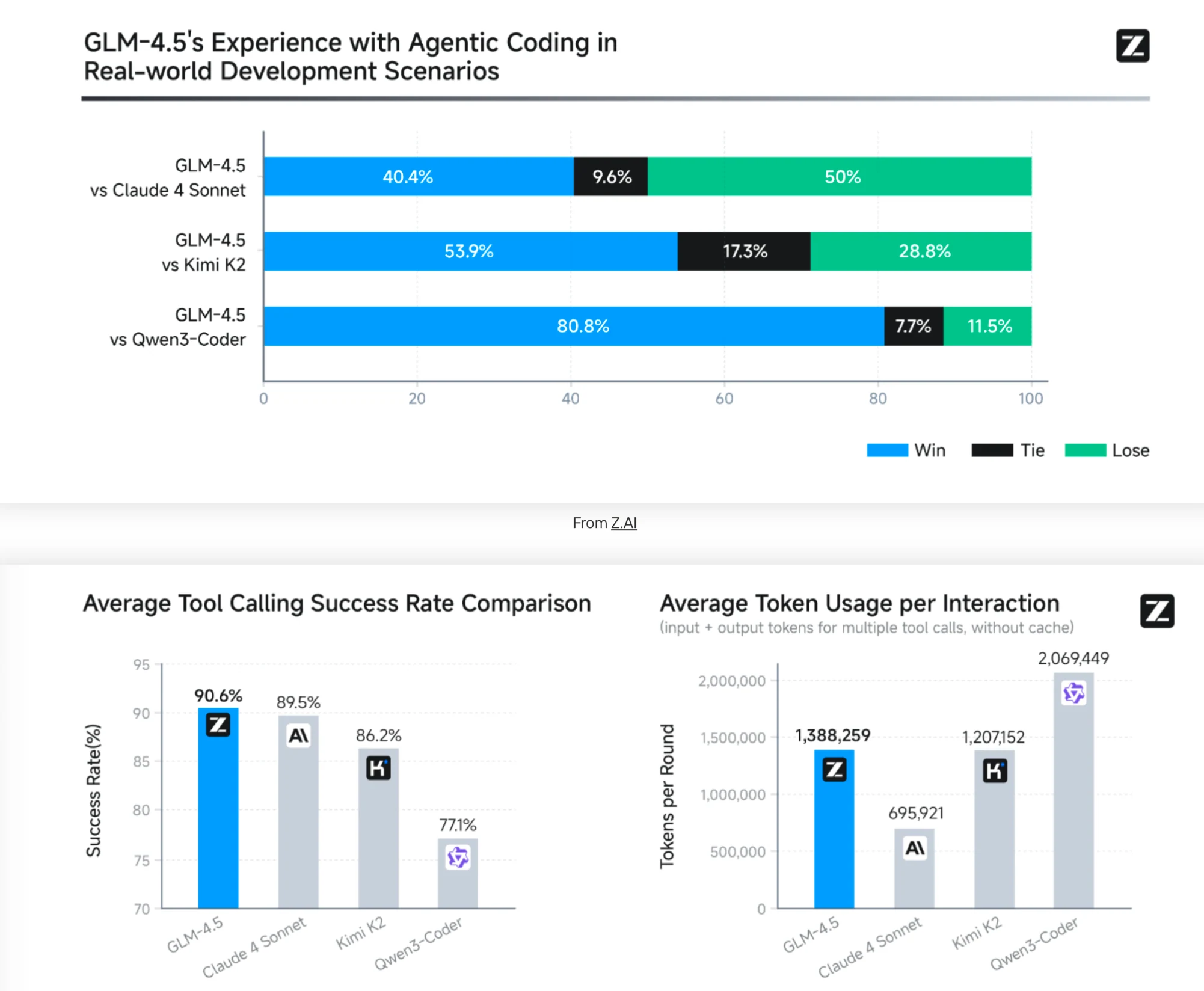
To assess GLM-4.5’s agentic coding capabilities, we utilized Claude Code to evaluate performance against Claude-4-Sonnet, Kimi K2, and Qwen3-Coder across 52 coding tasks spanning frontend development, tool development, data analysis, testing, and algorithm implementation. All evaluations were performed in isolated testing environments through multi-round human interaction with standardized evaluation criteria to ensure consistency and reproducibility-From Z AI
1. Strong Head-to-Head Performance
- Vs Claude 4 Sonnet: GLM-4.5 won 40.4% of the time but lost 50%, indicating competitive performance with a leading model.
- Vs Kimi K2: GLM-4.5 won 53.9%, showing clear superiority.
- Vs Qwen3-Coder: GLM-4.5 dominated with 80.8% wins — a decisive lead.
This suggests GLM-4.5 outperforms or matches top-tier coding agents in real-world development scenarios.
2. Best Tool Use Efficiency
- Highest Tool Calling Success Rate: 90.6%, better than Claude 4 Sonnet (89.5%) and far ahead of Qwen3-Coder (77.1%).
- This is crucial in agentic coding, where seamless tool integration often determines reliability.
3. Balanced Token Usage
- Uses more tokens than Claude but far fewer than Qwen3-Coder.
- GLM-4.5: 1.39M tokens/interaction
- Claude: 696K
- Qwen3-Coder: 2.07M
It strikes a middle ground: powerful enough to be effective, but not overly costly.
Why GLM 4.5 Works Best with Claude Code or Trae?
1. Optimized for Agentic Interactions
GLM 4.5 is designed to operate as an agent—capable of taking actions, using tools, and managing tasks. Claude Code and Trae are built to support such agentic behavior by allowing seamless integration with APIs, external tools, and complex workflows.
2. Rich Toolchains and API Support
These platforms offer pre-configured access to toolchains and APIs. GLM 4.5 can invoke these tools directly to automate tasks like testing, deployment, documentation, and data analysis—maximizing its utility as an intelligent coding assistant.
3. High-Fidelity Coding Interfaces
Claude Code and Trae provide environments with features like:
- Context-aware autocomplete
- Syntax checking and linting
- Multi-language support
This matches well with GLM 4.5’s advanced code generation and refactoring abilities, improving both accuracy and developer productivity.
4. Real-Time Feedback Loops
GLM 4.5 benefits from real-time feedback capabilities provided by these platforms. Whether debugging, optimizing code, or suggesting architecture changes, the model can adapt its outputs instantly based on system responses.
5. Scalable Collaboration
Both Claude Code and Trae offer collaborative features like shared workspaces, live editing, and task assignment. This enhances GLM 4.5’s role as a team-based coding assistant, supporting engineers in both solo and team environments.
6. Purpose-Built Performance Optimization
These environments are tuned to get the most out of large language models like GLM 4.5. That includes managing context length efficiently, caching interactions, and streamlining tool invocation—ensuring fast, stable performance even with large projects.
Which one Should You Choose: Claude Code or Trae?
What is Claude Code?
Designed as a CLI agentic interface, Claude Code enables seamless orchestration of tools and workflows via its Anthropic-compatible framework, which GLM‑4.5 supports out-of-the-box.
What is Trae?
Trae’s active integration of GLM‑4.5 support reflects growing demand for low-cost, high-performance agentic models. Users can plug GLM‑4.5 into their automation stack without retooling existing infrastructure.
1. Terminal‑Driven Automation & Whole‑Repo Workflows
- Preferred: Claude Code
Claude Code excels at CLI‑based, agentic workflows: editing files, running tests, applying refactors, managing Git (commits, PRs), and end‑to‑end debugging—all via natural language commands in the terminal with minimal UI friction.
Ideal tasks: CLI-based prototyping, bug fixing, Git-integrated code modifications, continuous integration flows.
2. GUI/IDE‑based Coding, Live Autocomplete & Builder Mode
- Preferred: Trae
As a full IDE wrapped around VS Code, Trae offers editor-based chat, inline code completion, comment-driven generation, and a Builder mode—where the tool breaks down a command into steps, previews proposed changes, and applies them automatically.
Ideal tasks: Editor‑based coding, test generation in real time, refactoring, feature scaffolding across multiple files, iterative development with previewed changes.
3. Conceptual Planning or Structural Prototyping
- Preferred: Claude Code
Many users leverage Claude Code to rapidly prototype features using high-level prompts, without writing detailed design documents. It’s particularly suited for exploring architecture alternatives or generating simple MVPs from concept.
4. Deep Debugging, Test‑Driven Iteration & Commit Suggestions
- Preferred: Claude Code
Claude Code offers robust test automation, stack trace analysis, and Git commit/PR generation with natural-language context. Many users prefer it for scenario-driven bug triage and test-based code evolution.
5. Custom Agent Workflows, Multi‑LLM Use, and Developer Experimentation
- Preferred: Trae
The open‑source CLI mode of Trae (MIT licensed) supports local LLMs, OpenAI, Claude, etc., scripting with bash, and recorded execution paths. It ranks highly on SWE‑bench with autonomous issue resolution and flexible tool orchestration.
6. Cost‑Sensitive or Open‑Source Project Environments
- Preferred: Trae
Trae is free, fully open-source, and imposes no vendor lock-in. It’s ideal for developers and teams seeking full control over deployment, API usage, and cost structure—especially with locally hosted models .
Prefer Claude Code if you work primarily in a terminal, require integrated test and version control support, or need fast prototyping via language-driven commands on macOS/Linux.
Choose Trae if you prefer a GUI coding experience, plan to work on Windows, need live inline suggestions, want full open-source flexibility, or require multi-model integration and customizable workflows.
How to Use GLM 4.5 with Claude Code and Trae?
Novita AI is a cloud platform that provides API access to a wide range of open-source AI models, including large language models (LLMs) like LLaMA, DeepSeek, Mistral, Qwen, and more. With Novita AI, you can sign up for an account, generate an API key, and choose from dozens of hosted models to integrate into your tools.
Novita AI integrates the Anthropic API to use GLM 4.5 in Claude Code and Trae,surpassing many industry providers. It also provides APIs with 131K context and costs of $0.6/input and $2.2/output, delivering strong support for maximizing GLM 4.5’s code agent potential.
Prerequisites-Get Novita AI API Key
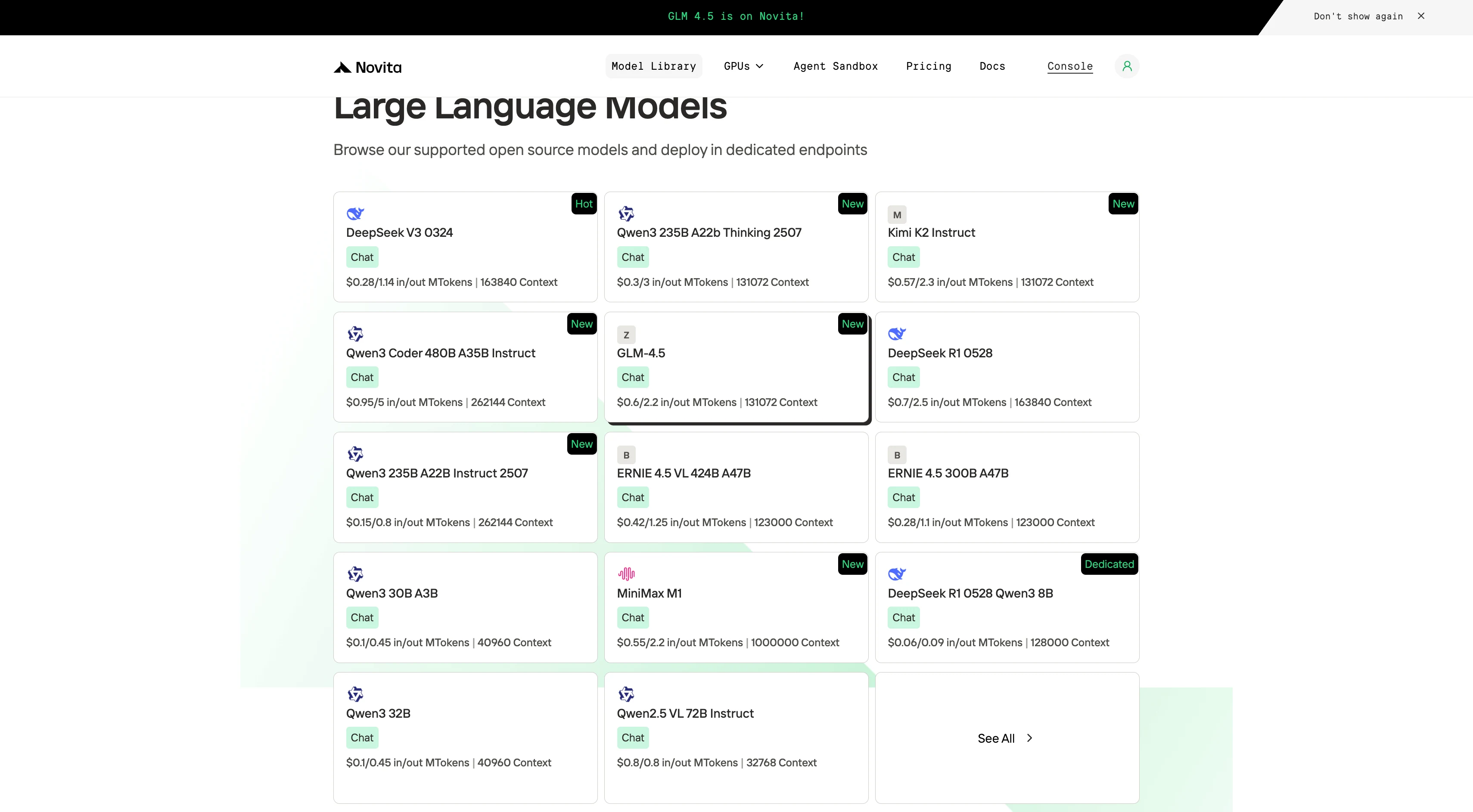
Step 1: Log in to your account and click on the Model Library button.

Step 2: Choose Your Model
Browse through the available options and select the model that suits your needs.
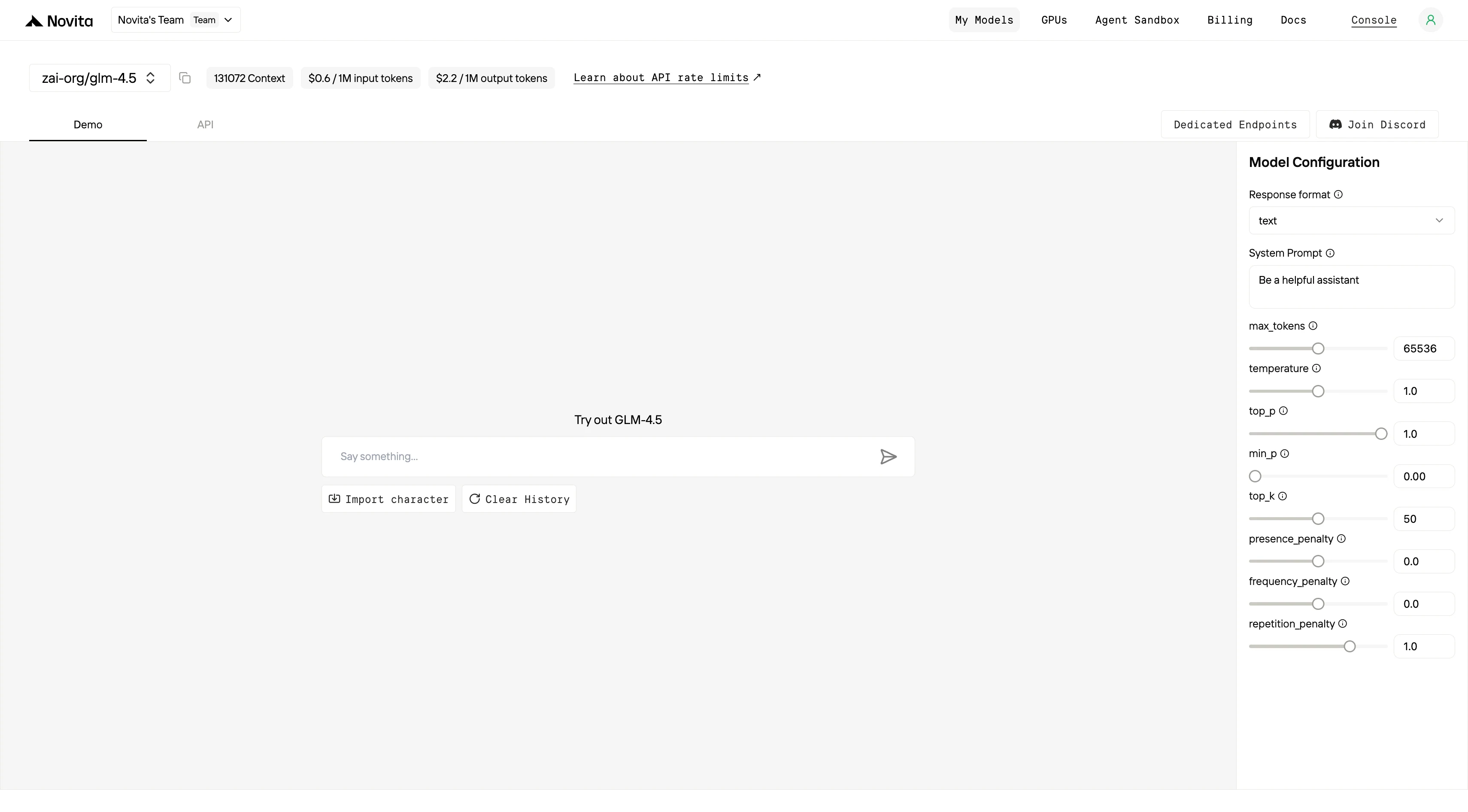
Step 3: Start Your Free Trial
Begin your free trial to explore the capabilities of the selected model.
Step 4: Get Your API Key
To authenticate with the API, we will provide you with a new API key. Entering the “Settings“ page, you can copy the API key as indicated in the image.

Step 5: Install the API
Install API using the package manager specific to your programming language.
After installation, import the necessary libraries into your development environment. Initialize the API with your API key to start interacting with Novita AI LLM. This is an example of using chat completions API for python users.
from openai import OpenAI

client = OpenAI(
    base_url="https://api.novita.ai/v3/openai",
    api_key="session_UsudmdAIggvSInjIdO2HWaTCyXxTFOXDV8TH8UCPbA576Rs4AGqSA5ThNbelSDgdEGAWQcWXnAU2bHi5BueceA==",
)

model = "zai-org/glm-4.5"
stream = True # or False
max_tokens = 65536
system_content = ""Be a helpful assistant""
temperature = 1
top_p = 1
min_p = 0
top_k = 50
presence_penalty = 0
frequency_penalty = 0
repetition_penalty = 1
response_format = { "type": "text" }

chat_completion_res = client.chat.completions.create(
    model=model,
    messages=[
        {
            "role": "system",
            "content": system_content,
        },
        {
            "role": "user",
            "content": "Hi there!",
        }
    ],
    stream=stream,
    max_tokens=max_tokens,
    temperature=temperature,
    top_p=top_p,
    presence_penalty=presence_penalty,
    frequency_penalty=frequency_penalty,
    response_format=response_format,
    extra_body={
      "top_k": top_k,
      "repetition_penalty": repetition_penalty,
      "min_p": min_p
    }
  )

if stream:
    for chunk in chat_completion_res:
        print(chunk.choices[0].delta.content or "", end="")
else:
    print(chat_completion_res.choices[0].message.content)
Claude Code Guide
Step 1: Installing Claude Code
Before installing Claude Code, ensure your system meets the minimum requirements. Node.js 18 or higher must be installed on your local environment. You can verify your Node.js version by running node --version in your terminal.
For Windows
Open Command Prompt and execute the following commands:
npm install -g @anthropic-ai/claude-code
npx win-claude-code@latest
The global installation ensures Claude Code is accessible from any directory on your system. The npx win-claude-code@latest command downloads and runs the latest Windows-specific version.
For Mac and Linux
Open Terminal and run:
npm install -g @anthropic-ai/claude-codeMac users can proceed directly with the global installation without requiring additional platform-specific commands. The installation process automatically configures the necessary dependencies and PATH variables.
Step 2 :Setting Up Environment Variables
Environment variables configure Claude Code to use Kimi-K2 through Novita AI’s API endpoints. These variables tell Claude Code where to send requests and how to authenticate.
For Windows
Open Command Prompt and set the following environment variables:
set ANTHROPIC_BASE_URL=https://api.novita.ai/anthropic
set ANTHROPIC_AUTH_TOKEN=<Novita API Key>
set ANTHROPIC_MODEL="zai-org/glm-4.5"
set ANTHROPIC_SMALL_FAST_MODEL="zai-org/glm-4.5"
Replace <Novita API Key> with your actual API key obtained from the Novita AI platform. These variables remain active for the current session and must be reset if you close the Command Prompt.
For Mac and Linux
Open Terminal and export the following environment variables:
export ANTHROPIC_BASE_URL="https://api.novita.ai/anthropic"
export ANTHROPIC_AUTH_TOKEN="<Novita API Key>"
export ANTHROPIC_MODEL="zai-org/glm-4.5"
export ANTHROPIC_SMALL_FAST_MODEL="zai-org/glm-4.5"
Step 3: Starting Claude Code
With installation and configuration complete, you can now start Claude Code in your project directory. Navigate to your desired project location using the cd command:
cd <your-project-directory>
claude .
The dot (.) parameter instructs Claude Code to operate in the current directory. Upon startup, you’ll see the Claude Code prompt appear in an interactive session.
This indicates the tool is ready to receive your instructions. The interface provides a clean, intuitive environment for natural language programming interactions.
Step 4: Using Claude Code in VSCode or Cursor
Claude Code integrates seamlessly with popular development environments. It enhances your existing workflow rather than replacing it.
You can use Claude Code directly in the terminal within VSCode or Cursor. This maintains access to your familiar development tools while leveraging AI assistance.
Additionally, Claude Code plugins are available for both VSCode and Cursor. These plugins provide deeper integration with these editors, offering inline AI assistance, code suggestions, and project management features directly within your IDE interface.
Trae Guide
Step 1: Open Trae and Access Models
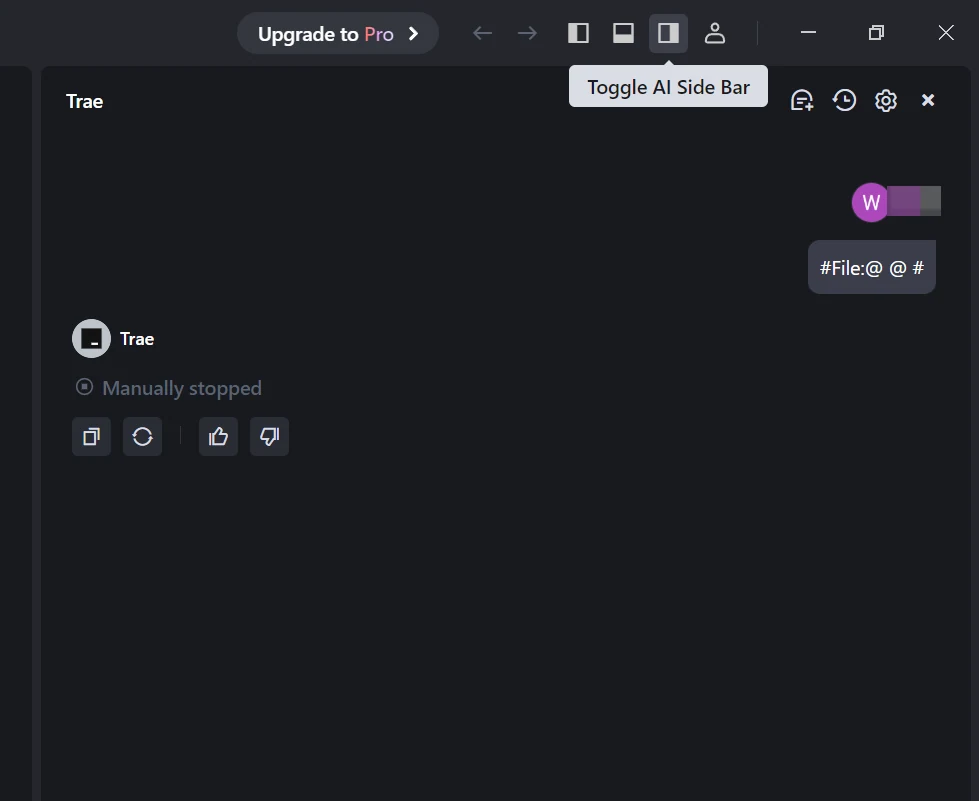
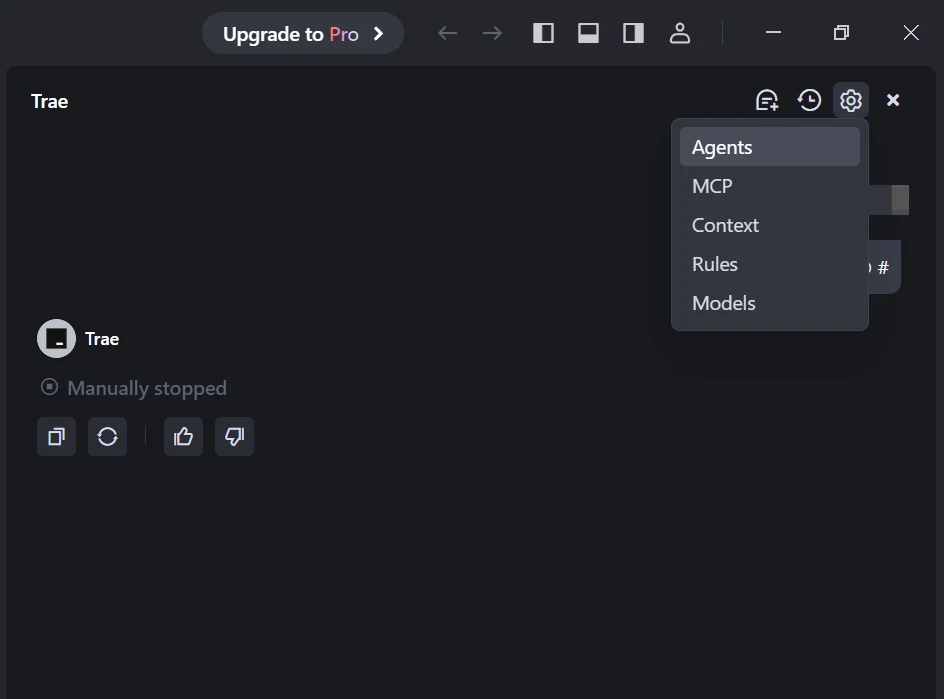
Launch the Trae app. Click the Toggle AI Side Bar in the top-right corner to open the AI Side Bar. Then, go to AI Management and select Models.
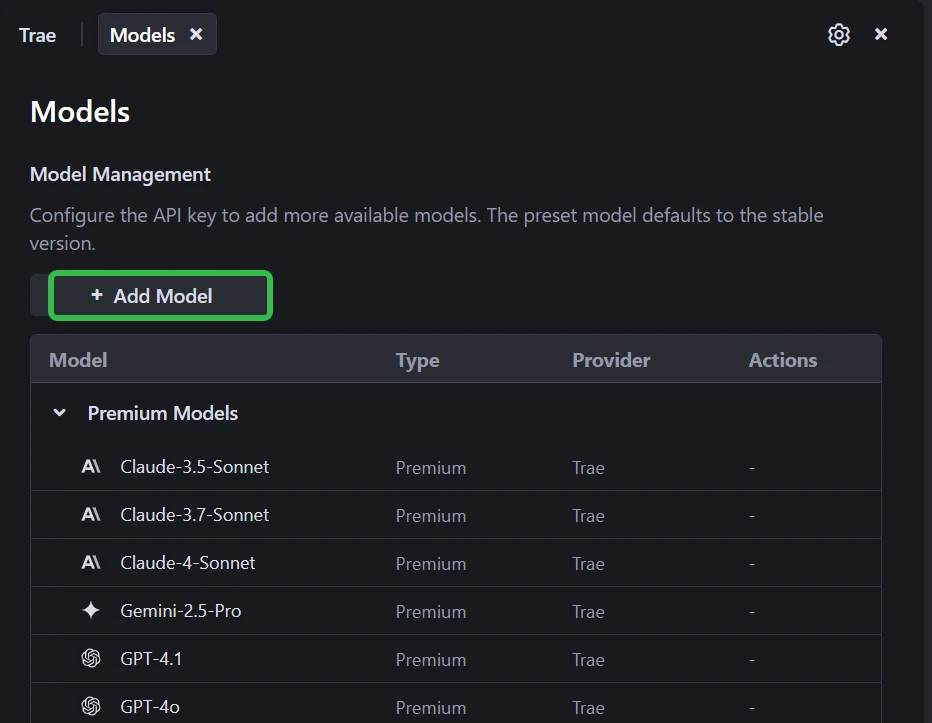
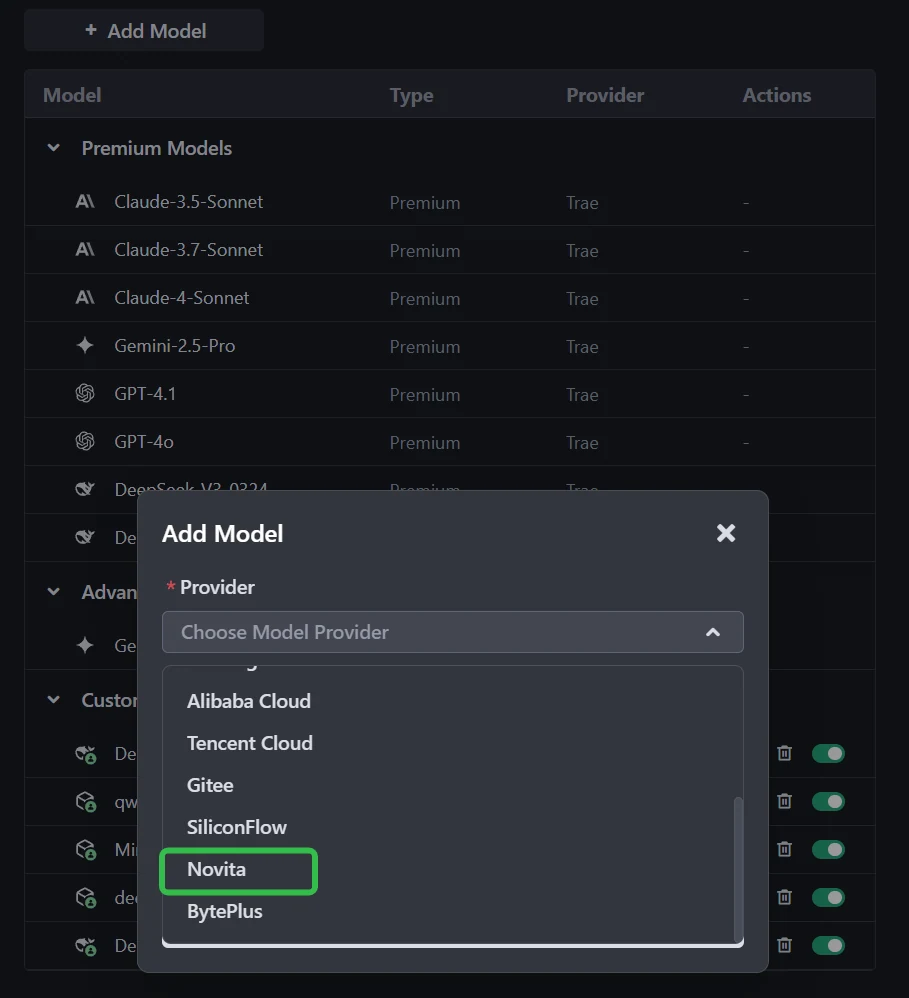
Step 2: Add a Custom Model and Choose Novita as Provider and Select Models
Click the Add Model button to create a custom model entry. In the add-model dialog, select Provider = Novita from the dropdown menu.
From the Model dropdown, pick your desired model (DeepSeek-R1-0528, Kimi K2, GLM 4.5, DeepSeek-V3-0324, or MiniMax-M1-80k). If the exact model isn’t listed, simply type the model ID that you noted from the Novita library. Ensure you choose the correct variant of the model you want to use.
Step 3: Enter Your API Key
Copy the Novita AI API key from your Novita console and paste it into the API Key field in Trae.
Step 4: Save the Configuration
Click Add Model to save. Trae will validate the API key and model selection in the background.
GLM 4.5 stands out with its tool-using intelligence, competitive accuracy, and balanced resource use. Trae offers the perfect environment for developers to explore this power in action—thanks to its:
- Live code editing and Builder mode
- Multi-model support (including Novita-hosted GLM 4.5)
- Zero vendor lock-in and open-source nature
Whether you’re building features, debugging, writing tests, or experimenting with AI automation, Trae + GLM 4.5 gives you the flexibility and performance to do more, faster.
Frequently Asked Questions
What makes GLM 4.5 special for coding?
GLM 4.5 supports tool calls, multi-step reasoning, debugging, and PR generation. It outperformed or matched Claude 4, Kimi K2, and Qwen3-Coder in a benchmark of 52 real coding tasks.
Why use Trae instead of Claude Code?
Use Trae if you prefer a GUI/IDE experience, live code editing, model switching, or open-source tools. Choose Claude Code if you like terminal workflows, command-line automation, or Git-based task handling.
Is GLM 4.5 fast and affordable?
Yes. It runs faster than most large models and is more cost-efficient:
~90.6% tool-calling success rate
Balanced token usage (1.39M/interaction)
Competitive pricing via Novita AI($0.6/input and $2.2/output price)
Novita AI is the All-in-one cloud platform that empowers your AI ambitions. Integrated APIs, serverless, GPU Instance — the cost-effective tools you need. Eliminate infrastructure, start free, and make your AI vision a reality.
Recommend Reading
Fine-Tuning DeepSeek R1-0528: More Cost-Effective Solutions