In the rapidly evolving field of machine learning, one question consistently emerges: how much RAM do you really need? RAM (Random Access Memory) plays a crucial role in determining the success and efficiency of machine learning projects. This comprehensive guide explores RAM requirements across different scales of ML projects and helps you make informed decisions about memory allocation.
Understanding RAM’s Role in Machine Learning
Data storage and retrieval functions
Machine learning models typically work with vast amounts of data, which are loaded into RAM for faster access. When training a model, the data needs to be quickly retrieved and passed through the model for calculations. If the available RAM is insufficient, your computer will rely on slower storage (e.g., SSD or HDD), which can significantly reduce the speed of training.
Impact on processing speed
RAM directly impacts the speed at which a machine learning model is trained. More RAM allows for faster data processing by enabling the model to hold larger portions of data in memory at once. If there isn’t enough RAM, the system may have to swap data between RAM and disk storage, which slows down computations and leads to longer training times.
Relationship between RAM and model performance
The performance of machine learning models is also affected by RAM. Larger models, such as deep neural networks, require more memory to store parameters and intermediate outputs during training. Insufficient RAM can lead to frequent system slowdowns or even crashes, as the model cannot fit all the necessary information in memory. Therefore, ensuring that the right amount of RAM is available for the model is essential for optimal performance.
Key Factors Influencing RAM Requirements for Machine Learning
Model Architecture Complexity
The more complex the model, the more memory it will require. Deep learning models, for example, often have millions or even billions of parameters, which demand significant amounts of RAM to store weights and intermediate calculations. On the other hand, simpler machine learning models like linear regression may not require as much RAM.
- Transformers: Training GPT-3’s 175B parameters demands 320GB RAM to store optimizer states and gradients.
- CNNs: ResNet-50 requires 12GB RAM baseline, doubling to 24GB with data augmentation.
- Hybrid Architectures: CNN-LSTM models for video analysis need dual memory pools for spatial and temporal activations.
Dataset Characteristics
Larger datasets, such as image and video data, demand more RAM. Training a neural network on a dataset of 1 million images may require upwards of 64GB of RAM. The size of the dataset directly influences the amount of RAM needed to efficiently process the data.
| Data Type | RAM Requirement | Use Case Example |
|---|---|---|
| 4K Video | 12GB/s bandwidth | Real-time object detection |
| NLP Text | 64GB+ | 1TB corpus tokenization |
| Tabular | 256GB | Netflix’s Spark pipelines |
Framework Overheads
Machine learning frameworks (such as TensorFlow, PyTorch, or scikit-learn) often add overheads in terms of memory usage. These frameworks need additional memory for operations like model training, gradient calculations, and backpropagation. If you are using advanced techniques like hyperparameter tuning or multi-model architectures, the memory footprint of these frameworks can grow.
- TensorFlow/PyTorch: Introduce 15–20% memory overhead for computation graphs and autograd tracking.
- Distributed Training: Horovod adds 10–15% RAM usage for parameter synchronization buffers.
- Quantization: FP8 reduces Llama2-13B’s memory footprint by 4x without accuracy loss.
Concurrent Processing Requirements
Running multiple machine learning tasks simultaneously increases RAM needs. Sharing resources among various processes can lead to higher RAM consumption. High concurrency or real-time processing necessitates a larger RAM capacity to ensure efficient handling of multiple tasks simultaneously.For example, parallel processing of 50MP medical images requires 64GB RAM to avoid thrashing.
RAM Recommendations by Project Scale
Small-Scale Prototyping (8-16GB)
For beginners and small projects, 8-16GB of RAM can be sufficient to get started with machine learning.
8GB RAM:
- Suitable for basic machine learning tasks and small datasets
- Can handle simple models like linear regression or small neural networks
- Ideal for learning and experimenting with ML concepts
16GB RAM:
- Allows for more complex models and slightly larger datasets
- Suitable for most introductory machine learning courses and tutorials
- Can handle popular datasets like MNIST or CIFAR-10
With 8-16GB of RAM, you can comfortably run Python, Jupyter Notebooks, and popular ML libraries like scikit-learn, TensorFlow, or PyTorch for small-scale projects. However, you may experience limitations when working with larger datasets or more complex models.
Mid-Range Production (16-32GB)
For more serious machine learning work and production environments, 16-32GB of RAM is recommended.
16GB RAM:
- Suitable for most medium-sized machine learning projects
- Can handle larger datasets and more complex models
- Allows for faster data preprocessing and model training
32GB RAM:
- Provides ample memory for most production-level machine learning tasks
- Enables work with larger datasets and more sophisticated models
- Allows for multiple concurrent ML tasks or data processing jobs
With 16-32GB of RAM, you can comfortably work on more challenging machine learning projects, including computer vision tasks with larger images, natural language processing with moderate-sized text corpora, and more complex neural network architectures.
Large-Scale Distributed Training (32GB+)
For advanced users, research teams, and enterprise-level projects, 32GB or more RAM is often necessary.
32GB+ RAM:
- Essential for large-scale machine learning projects and deep learning
- Allows for training on very large datasets and complex model architectures
- Enables distributed training across multiple GPUs or machines
64GB+ RAM:
- Ideal for cutting-edge research and enterprise-level machine learning
- Necessary for training state-of-the-art models like large language models
- Enables efficient processing of massive datasets and high-dimensional data
With 32GB or more RAM, you can tackle the most demanding machine learning tasks, including training large transformer models, processing high-resolution images or videos, and working with big data in fields like genomics or climate modeling.
For distributed training setups, RAM requirements can easily exceed 128GB or even reach terabyte levels, depending on the scale of the project and the complexity of the models being trained.
Cost-Benefit Considerations for RAM in Machine Learning
Budget constraints
RAM costs can vary significantly based on capacity and speed. As of 2025, here’s a general pricing structure:
- 16GB DDR4: $60-$80
- 32GB DDR4-3600: $150-$200
- 64GB DDR5-4800: $280-$350
For ML projects, it’s often recommended to have at least double the amount of CPU memory as there is total GPU memory in the system. This means a system with two RTX 4090 GPUs (48GB total VRAM) should ideally have 128GB of RAM, which could cost around $500-$700.
However, budget constraints may limit your options. In such cases, prioritize RAM allocation based on your most critical workloads. For entry-level projects, 16GB might suffice, while mid-range production environments typically require 32GB or more.
Scaling options
As ML projects grow, so do RAM requirements. Here are some scaling strategies:
- Vertical Scaling: Upgrading from 32GB to 128GB DDR5 can boost batch capacity 4x, but costs about 6x more.
- Horizontal Scaling: Distributing training across multiple nodes with 32GB each can reduce per-node costs by up to 40%.
- Gradual Upgrades: Start with a baseline (e.g., 32GB) and expand as needed. This approach allows for better cost management over time.
- RAM Optimization: Implement techniques like gradient checkpointing or mixed-precision training to reduce memory usage, potentially delaying the need for upgrades.
Cloud alternatives
If you’re constrained by local hardware, scaling your RAM via cloud solutions could be a more cost-effective alternative. With cloud providers, you can rent virtual machines with the desired amount of RAM, allowing you to scale up or down as your project demands change. This flexibility allows you to pay only for what you need, without committing to large hardware purchases. Cloud services like AWS, Google Cloud, and Novita AI provide flexible GPU and RAM resources that can be provisioned on-demand.
Practical Example: RAM Usage in Novita AI
Novita AI offers flexible cloud-based GPU solutions with different levels of RAM, making it an ideal option for machine learning practitioners who require substantial memory for their projects. Whether you’re working on a small-scale prototype or scaling to distributed training, Novita AI provides a variety of configurations to suit your RAM needs. The ability to choose the right configuration ensures that you can maintain high performance while optimizing costs.
Here’s how to get started with Novita AI:
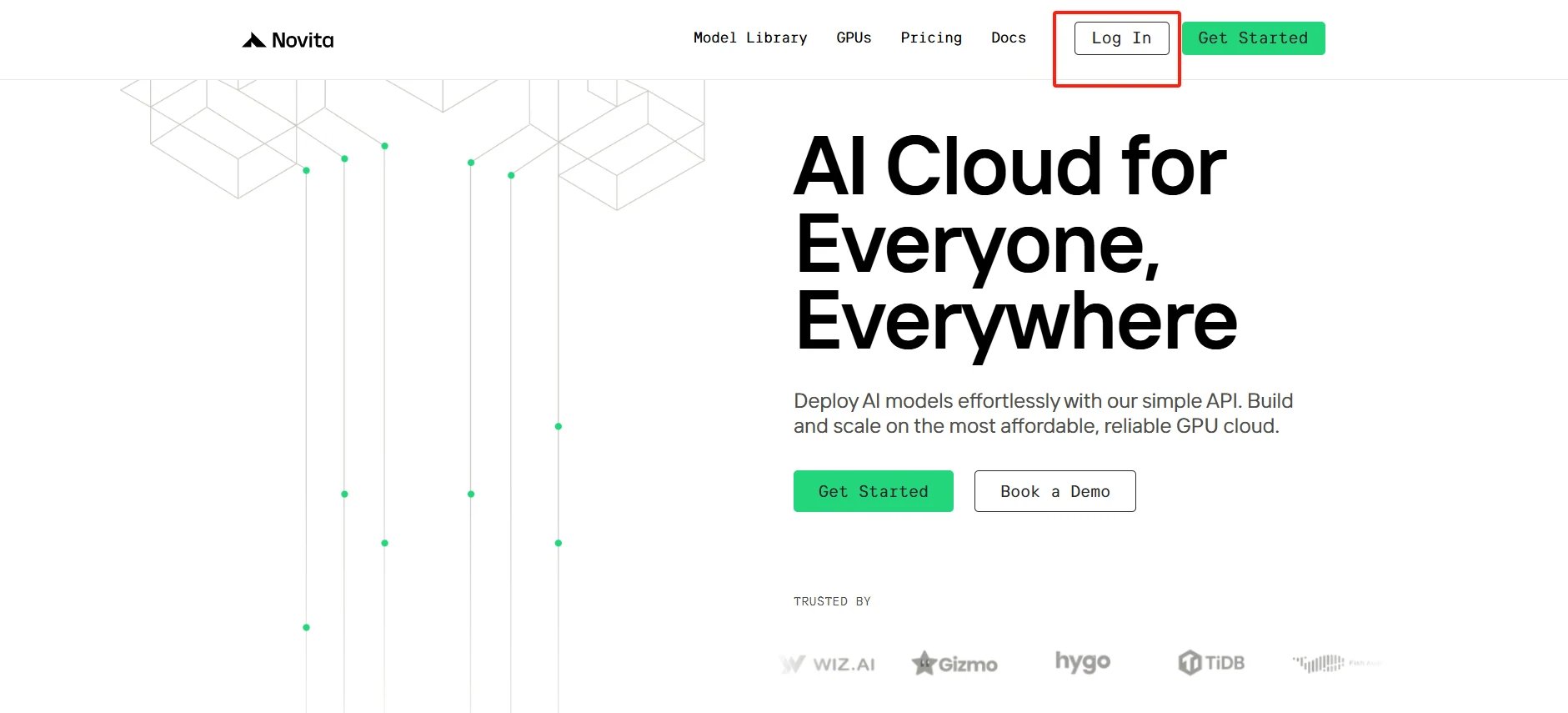
Step1:Register an account
If you’re new to Novita AI, start by creating an account on our website. After registration, navigate to the “[GPUs](https://novita.ai/gpus/?utm_source=blogs_GPU&utm_medium=article&utm_campaign=How Much RAM is Needed for Machine Learning?)” tab to explore the available options.
[Try using Novita AI now](https://novita.ai/?utm_source=blogs_GPU&utm_medium=article&utm_campaign=How Much RAM is Needed for Machine Learning?)
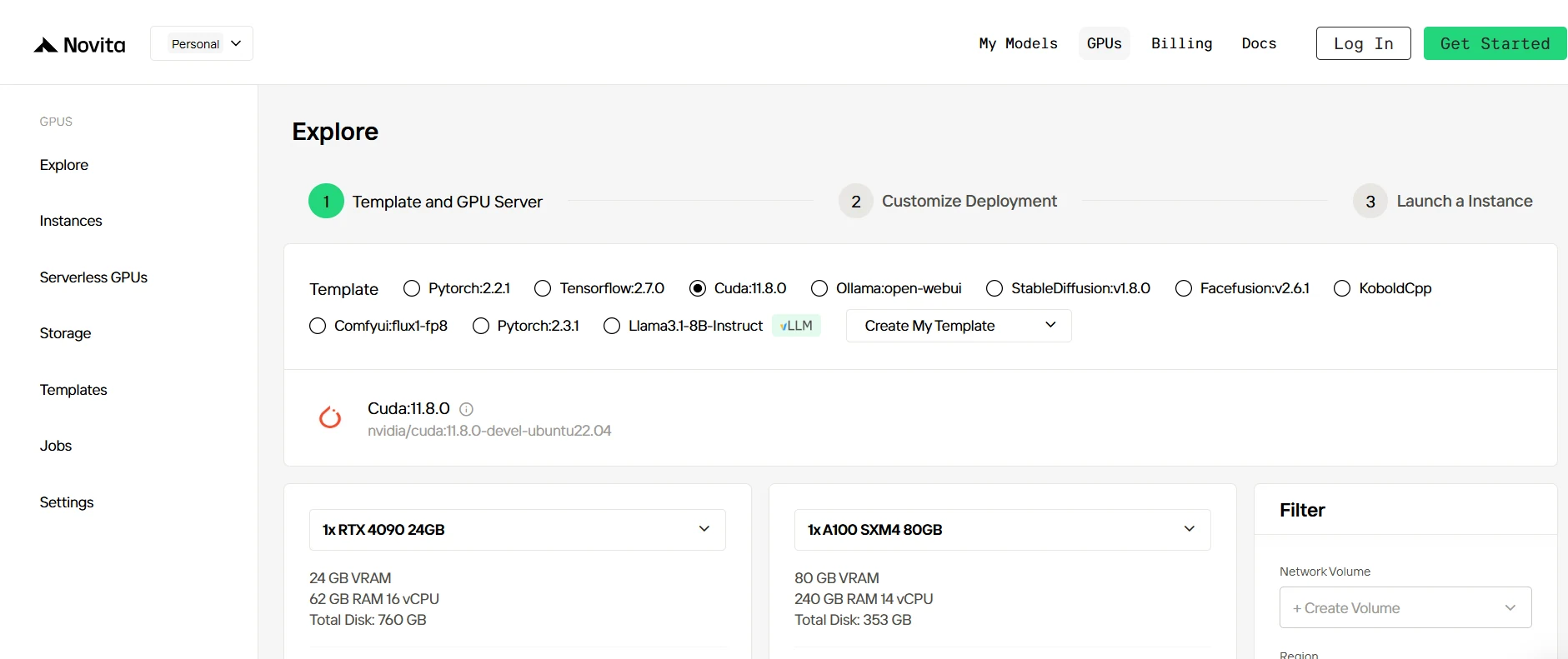
Step2:Exploring Templates and GPU Servers
Select a template for your project from available options like PyTorch, TensorFlow, or CUDA. Then, choose the GPU server configuration that best fits your project’s RAM and workload needs—options range from RTX 4090 to A100 SXM4, each with varying levels of VRAM and memory.
[Try Novita AI’s High-Performance GPUs](https://novita.ai/gpus-console/?utm_source=blogs_GPU&utm_medium=article&utm_campaign=How Much RAM is Needed for Machine Learning?)
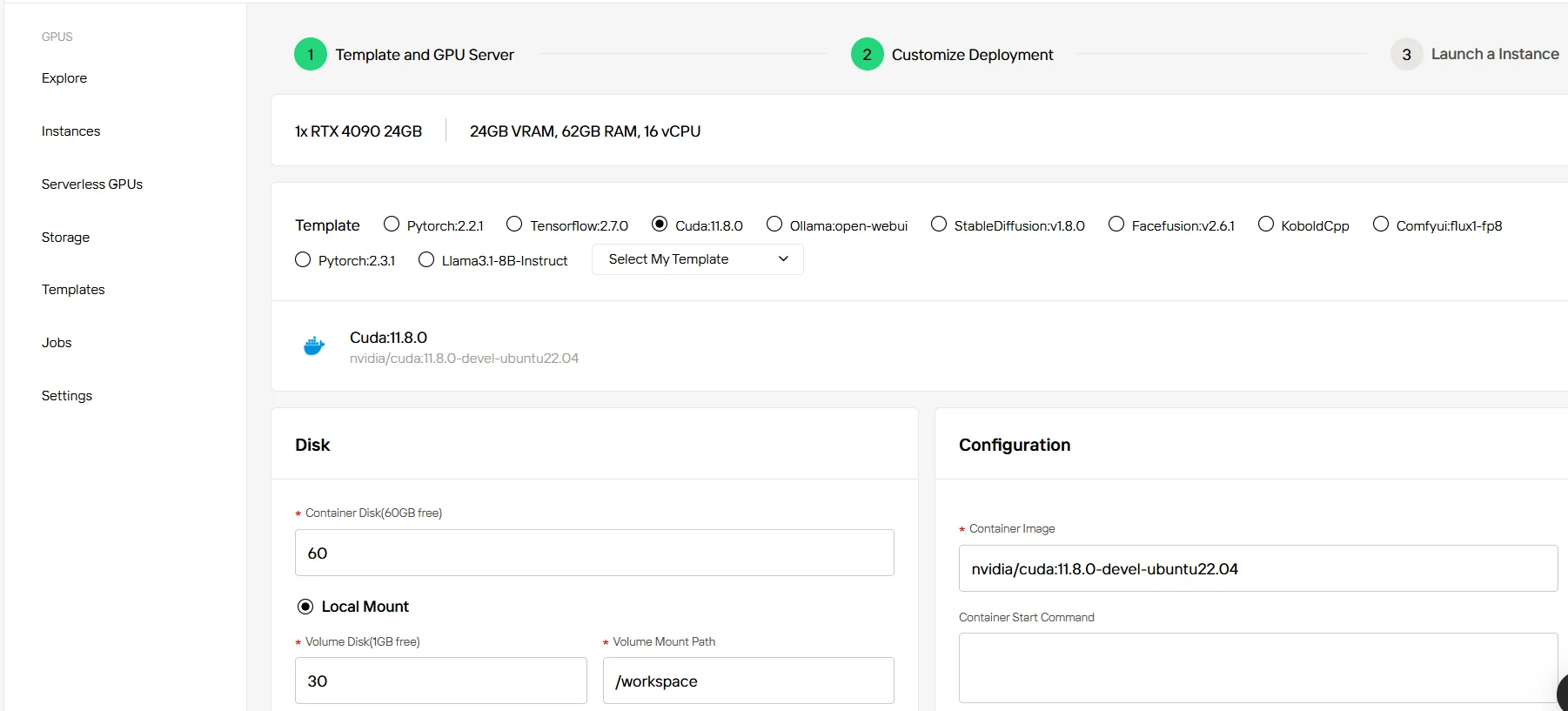
Step3:Tailor Your Deployment
Customize your deployment by selecting the operating system version (e.g., CUDA 11.8) and adjusting other parameters to match the specific RAM needs of your project.
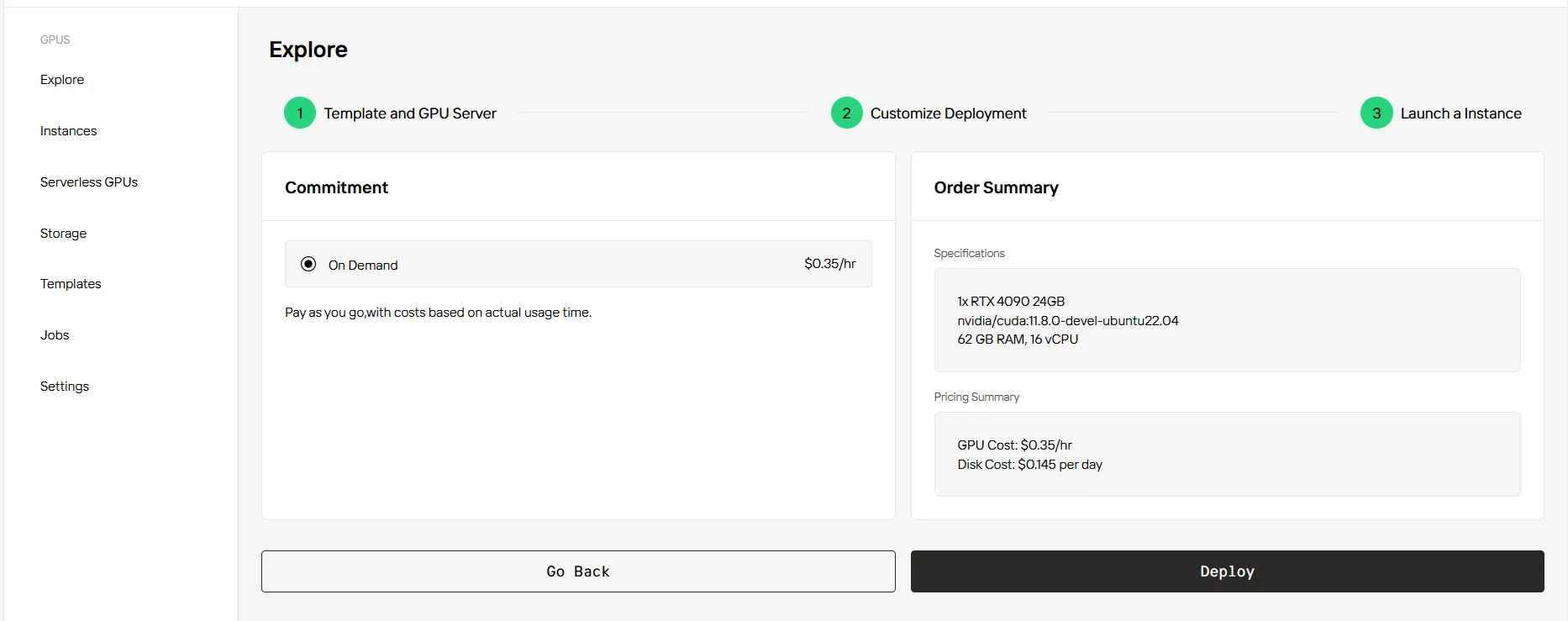
Step4:Launch an instance
Once your settings are configured, click “Launch Instance” to deploy your machine learning environment. Your chosen RAM configuration will be ready to support your tasks, helping to ensure the smooth execution of your models.
Conclusion
Choosing the right amount of RAM for machine learning projects is crucial for handling large datasets and complex computations. Understanding the factors that influence RAM requirements and following strategies to optimize its usage ensures smoother project execution. By considering the scale and complexity of the project, budget constraints, and available resources, users can make informed decisions to optimize their machine learning workflows.
Frequently Asked Questions
Does more RAM always improve machine learning model performance?
Not necessarily. While adequate RAM is essential, adding more RAM doesn’t always translate to better performance. RAM helps ensure smooth operation, but model performance largely depends on other factors like CPU/GPU capabilities, data quality, and algorithm efficiency.
How much RAM is recommended for small-scale machine learning projects?
For small-scale prototyping, such as academic or hobbyist projects, 8-16GB of RAM is typically sufficient. These projects usually involve testing small models or working with smaller datasets, so they don’t require a large amount of memory.
Can I use cloud alternatives instead of upgrading my hardware?
Yes, cloud platforms offer flexible RAM options without upfront hardware investments. Services like Novita AI, AWS SageMaker, and Azure Machine Learning provide scalable resources suitable for various project sizes and memory requirements.
[Novita AI](https://novita.ai/?utm_source=blogs_GPU&utm_medium=article&utm_campaign=How Much RAM is Needed for Machine Learning?) is an AI cloud platform that offers developers an easy way to deploy AI models using our simple API, while also providing a affordable and reliable GPU cloud for building and scaling.
Recommended Reading
How Much RAM Memory Does Llama 3.1 70B Use?
LLaMA 3.2 90B VRAM: How Much Memory Does Fine-tuning Need?
Choosing the Best GPU for Machine Learning in 2025: A Complete Guide



